2018 FORD FUSION ENERGI traction control
[x] Cancel search: traction controlPage 305 of 538
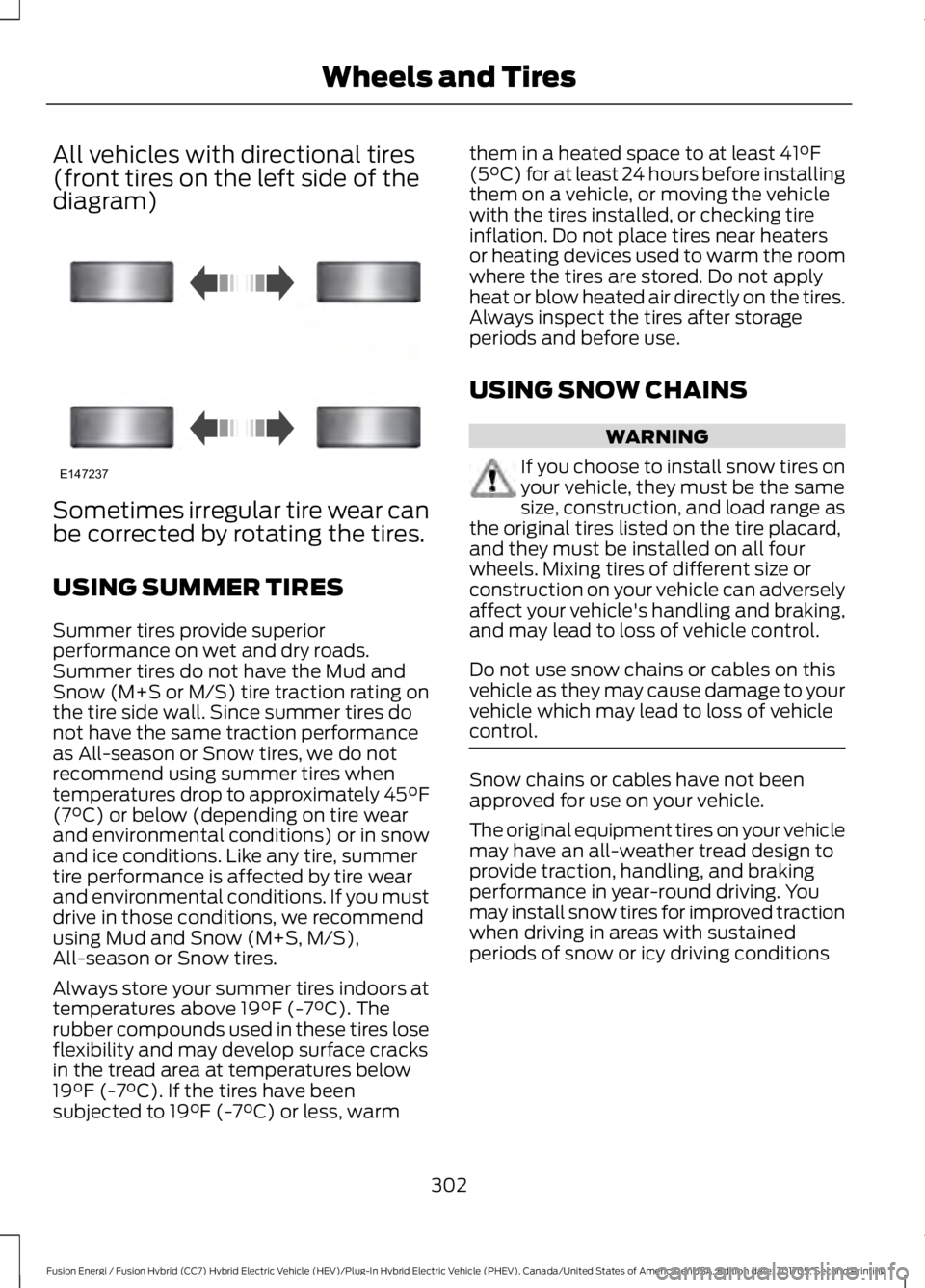
All vehicles with directional tires(front tires on the left side of thediagram)
Sometimes irregular tire wear canbe corrected by rotating the tires.
USING SUMMER TIRES
Summer tires provide superiorperformance on wet and dry roads.Summer tires do not have the Mud andSnow (M+S or M/S) tire traction rating onthe tire side wall. Since summer tires donot have the same traction performanceas All-season or Snow tires, we do notrecommend using summer tires whentemperatures drop to approximately 45°F(7°C) or below (depending on tire wearand environmental conditions) or in snowand ice conditions. Like any tire, summertire performance is affected by tire wearand environmental conditions. If you mustdrive in those conditions, we recommendusing Mud and Snow (M+S, M/S),All-season or Snow tires.
Always store your summer tires indoors attemperatures above 19°F (-7°C). Therubber compounds used in these tires loseflexibility and may develop surface cracksin the tread area at temperatures below19°F (-7°C). If the tires have beensubjected to 19°F (-7°C) or less, warm
them in a heated space to at least 41°F(5°C) for at least 24 hours before installingthem on a vehicle, or moving the vehiclewith the tires installed, or checking tireinflation. Do not place tires near heatersor heating devices used to warm the roomwhere the tires are stored. Do not applyheat or blow heated air directly on the tires.Always inspect the tires after storageperiods and before use.
USING SNOW CHAINS
WARNING
If you choose to install snow tires onyour vehicle, they must be the samesize, construction, and load range asthe original tires listed on the tire placard,and they must be installed on all fourwheels. Mixing tires of different size orconstruction on your vehicle can adverselyaffect your vehicle's handling and braking,and may lead to loss of vehicle control.
Do not use snow chains or cables on thisvehicle as they may cause damage to yourvehicle which may lead to loss of vehiclecontrol.
Snow chains or cables have not beenapproved for use on your vehicle.
The original equipment tires on your vehiclemay have an all-weather tread design toprovide traction, handling, and brakingperformance in year-round driving. Youmay install snow tires for improved tractionwhen driving in areas with sustainedperiods of snow or icy driving conditions
302
Fusion Energi / Fusion Hybrid (CC7) Hybrid Electric Vehicle (HEV)/Plug-In Hybrid Electric Vehicle (PHEV), Canada/United States of America, enUSA, Edition date: 201705, Second Printing
Wheels and TiresE147237
Page 502 of 538

SYNC® Automotive Important SafetyInformation Read and followinstructions:
•Before using your SYNC® system, readand follow all instructions and safetyinformation provided in this end usermanual ("Owner Guide".) Notfollowing precautions found in theOwner Guide can lead to an accidentor other serious injuries.
General Operation
•Voice Command Control: Certainfunctions within the SYNC® systemmay be accomplished using voicecommands. Using voice commandswhile driving helps you to operate thesystem without removing your handsfrom the wheel or eyes from the road.
•Prolonged Views of Screen: Do notaccess any function requiring aprolonged view of the screen while youare driving. Pull over in a safe and legalmanner before attempting to access afunction of the system requiringprolonged attention.
•Volume Setting: Do not raise thevolume excessively. Keep the volumeat a level where you can still hearoutside traffic and emergency signalswhile driving. Driving while unable tohear these sounds could cause anaccident.
•Navigation Features: Any navigationfeatures included in the system areintended to provide turn by turninstructions to get you to a desireddestination. Please make certain allpersons using this system carefullyread and follow instructions and safetyinformation fully.
•Distraction Hazard: Any navigationfeatures may require manual(non-verbal) setup. Attempting toperform such set-up or insert datawhile driving can distract your attentionand could cause an accident or otherserious injury. Stop the vehicle in a safeand legal manner before attemptingthese operations.
•Let Your Judgment Prevail: Anynavigation features are provided onlyas an aid. Make your driving decisionsbased on your observations of localconditions and existing trafficregulations. Any such feature is not asubstitute for your personal judgment.Any route suggestions made by thissystem should never replace any localtraffic regulations or your personaljudgment or knowledge of safe drivingpractices.
•Route Safety: Do not follow the routesuggestions if doing so would result inan unsafe or illegal maneuver, if youwould be placed in an unsafe situation,or if you would be directed into an areathat you consider unsafe. The driver isultimately responsible for the safeoperation of the vehicle and therefore,must evaluate whether it is safe tofollow the suggested directions.
•Potential Map Inaccuracy: Mapsused by this system may be inaccuratebecause of changes in roads, trafficcontrols or driving conditions. Alwaysuse good judgment and common sensewhen following the suggested routes.
•Emergency Services: Do not rely onany navigation features included in thesystem to route you to emergencyservices. Ask local authorities or anemergency services operator for theselocations. Not all emergency servicessuch as police, fire stations, hospitalsand clinics are likely to be contained inthe map database for such navigationfeatures.
499
Fusion Energi / Fusion Hybrid (CC7) Hybrid Electric Vehicle (HEV)/Plug-In Hybrid Electric Vehicle (PHEV), Canada/United States of America, enUSA, Edition date: 201705, Second Printing
Appendices
Page 533 of 538

Power Steering.....................................................116Pre-Collision Assist.............................................116Remote Start.........................................................116Seats........................................................................116Starting System ...................................................117Tire Pressure Monitoring System...................117Traction Control....................................................117Transmission.........................................................118Installing Child Restraints............................19Child Seats...............................................................19Using Lap and Shoulder Belts.........................20Using Lower Anchors and Tethers forCHildren (LATCH)...........................................24Using Tether Straps.............................................26Instrument Cluster........................................89Instrument Lighting Dimmer......................77Vehicles With Front Fog Lamps......................78Vehicles Without Front Fog Lamps...............78Instrument Panel Overview........................16Interior Lamps.................................................80Front Interior Lamps...........................................80Rear Interior Lamps..............................................81Interior Luggage CompartmentRelease...........................................................66Interior Mirror...................................................86Automatic Dimming Mirror..............................86Manual Dimming Mirror.....................................86Introduction.........................................................7
J
Jump Starting the Vehicle........................233Connecting the Jumper Cables....................233Jump Starting......................................................234Preparing Your Vehicle.....................................233Removing the Jumper Cables.......................234
K
Keyless Entry...................................................64SECURICODE™ Keyless EntryKeypad................................................................64Keyless Starting............................................145Ignition Modes.....................................................145Keys and Remote Controls........................50
L
Lane Keeping System................................209Switching the System On and Off...............210Lighting Control..............................................76Headlamp Flasher................................................77Headlamp High Beam........................................76Lighting...............................................................76General Information............................................76Load Carrying.................................................222Load Limit.......................................................222Special Loading Instructions for Owners ofPick-up Trucks and Utility-typeVehicles............................................................226Vehicle Loading - with and without aTrailer.................................................................222Locking and Unlocking..................................61Activating Intelligent Access............................62Autolock...................................................................63Autounlock.............................................................64Battery Saver.........................................................64Illuminated Entry..................................................64Illuminated Exit.....................................................64Power Door Locks.................................................61Remote Control.....................................................61Smart Unlocks for Intelligent AccessKeys......................................................................63
M
Maintenance.................................................258General Information.........................................258Manual Seats.................................................130Memory Function..........................................132Easy Entry and Exit Feature............................133Linking a PreSet Position to your RemoteControl or Intelligent Access KeyFob.......................................................................133Saving a PreSet Position..................................133Message CenterSee: Information Displays.................................97MirrorsSee: Heated Windows and Mirrors..............126See: Windows and Mirrors................................83Mobile Communications Equipment.......13Moonroof...........................................................87Bounce-Back.........................................................88Opening and Closing the Moonroof..............87
530
Fusion Energi / Fusion Hybrid (CC7) Hybrid Electric Vehicle (HEV)/Plug-In Hybrid Electric Vehicle (PHEV), Canada/United States of America, enUSA, Edition date: 201705, Second Printing
Index
Page 536 of 538

Special Operating Conditions ScheduledMaintenance..............................................480Exceptions............................................................482Speed ControlSee: Cruise Control...........................................200Stability Control............................................185Principle of Operation.......................................185Starting a Gasoline Engine.......................146Automatic Engine Shutdown.........................147Failure to Start.....................................................146Guarding Against Exhaust Fumes...............148Important Ventilating Information..............148Starting Your Vehicle.........................................146Stopping the Engine When Your Vehicle isMoving................................................................147Stopping the Engine When Your Vehicle isStationary.........................................................147Starting and Stopping the Engine..........145General Information..........................................145Steering............................................................218Electric Power Steering....................................218Steering Wheel................................................70Storage Compartments.............................144SunroofSee: Moonroof.......................................................87Sun Visors.........................................................87Illuminated Vanity Mirror...................................87Supplementary Restraints System..........41Principle of Operation.........................................41Symbols Glossary.............................................7SYNC™ 3........................................................370General Information.........................................370SYNC™ 3 Troubleshooting.....................456SYNC™ Applications andServices........................................................348911 Assist...............................................................348SYNC Mobile Apps............................................350SYNC™............................................................332General Information..........................................332SYNC™ Troubleshooting.........................362
T
Technical SpecificationsSee: Capacities and Specifications...........308The Better Business Bureau (BBB) AutoLine Program (U.S. Only)........................241
Tire Care..........................................................287Glossary of Tire Terminology........................289Information About Uniform Tire QualityGrading..............................................................287Information Contained on the TireSidewall...........................................................290Temperature A B C............................................288Traction AA A B C..............................................288Treadwear............................................................288Tire Inflation When PuncturedSee: Tire Sealant and Inflator Kit..................281Tire Pressure Monitoring System..........303Changing Tires With a Tire PressureMonitoring System.......................................304Understanding Your Tire PressureMonitoring System ......................................304Tire Repair KitSee: Tire Sealant and Inflator Kit..................281Tire Sealant and Inflator Kit.....................281First Stage: Reinflating the Tire with SealingCompound and Air.......................................283General Information.........................................282Second Stage: Checking TirePressure............................................................285Tips for Use of the Kit......................................282What to do after the Tire has beenSealed...............................................................285What to do when a Tire Is Punctured........283TiresSee: Wheels and Tires......................................281Towing a Trailer.............................................227Towing Points................................................237Installing the Recovery Hook.........................237Recovery Hook Location..................................237Towing the Vehicle on FourWheels...........................................................227Emergency Towing.............................................227Recreational Towing..........................................227Towing..............................................................227Traction Control............................................184Principle of Operation.......................................184Transmission Code Designation..............311Transmission...................................................175Transporting the Vehicle...........................237Type Approvals..............................................521RF Certification Logos for Tire PressureMonitoring Sensor(s)...................................521
533
Fusion Energi / Fusion Hybrid (CC7) Hybrid Electric Vehicle (HEV)/Plug-In Hybrid Electric Vehicle (PHEV), Canada/United States of America, enUSA, Edition date: 201705, Second Printing
Index
Page 537 of 538

U
Under Hood Overview...............................259Unique Driving Characteristics................150Universal Garage Door Opener................137HomeLink Wireless Control System............137USB Port...........................................................331Using Adaptive Cruise Control................201Automatic Cancellation..................................204Blocked Sensor..................................................205Canceling the Set Speed................................204Changing the Set Speed................................204Detection Issues................................................204Following a Vehicle...........................................202Following a Vehicle to a CompleteStop...................................................................203Hilly Condition Usage......................................204Overriding the Set Speed...............................204Resuming the Set Speed................................204Setting the Adaptive Cruise Speed............202Setting the Adaptive Cruise Speed WhenYour Vehicle is Stationary..........................202Setting the Gap Distance...............................203Switching Adaptive Cruise ControlOff......................................................................204Switching Adaptive Cruise ControlOn.......................................................................202Switching to ECO Cruise.................................206Switching to Normal Cruise Control..........206System Not Available......................................205Using Cruise Control..................................200Switching Cruise Control Off........................200Switching Cruise Control On.........................200Switching to ECO Cruise..................................201Using MyKey With Remote StartSystems..........................................................59Using Snow Chains.....................................302Using Stability Control...............................186Using Summer Tires...................................302Using SYNC™ With Your MediaPlayer.............................................................353Accessing Your USB Song Library................357Bluetooth Devices and SystemSettings............................................................359Connecting Your Digital Media Player to theUSB Port...........................................................353Media Menu Features......................................356Media Voice Commands................................354
USB 2......................................................................359Voice Commands for Audio Sources.........360Using SYNC™ With Your Phone............336Accessing Features through the PhoneMenu...................................................................341Accessing Your Phone Settings...................344Bluetooth Devices.............................................345Making Calls........................................................340Pairing a Phone for the First Time...............337Pairing Subsequent Phones..........................338Phone Options during an Active Call.........340Phone Voice Commands................................338Receiving Calls...................................................340System Settings.................................................346Text Messaging...................................................342Using Traction Control...............................184Switching the System Off...............................184System Indicator Lights andMessages..........................................................184Using a Switch.....................................................184Using the Information DisplayControls.............................................................184Using Voice Recognition...........................334Audio Voice Commands.................................385Climate Voice Commands.............................386Initiating a Voice Session................................334Mobile App Voice Commands......................389Navigation Voice Commands.......................387Phone Voice Commands...............................386SiriusXM Traffic and Travel Link VoiceCommands.....................................................389System Interaction and Feedback..............335Voice Settings Commands............................390Utilizing the Mediation/ArbitrationProgram (Canada Only).........................242
V
Vehicle Care...................................................274General Information..........................................274Vehicle Certification Label.........................311Vehicle Identification Number.................310Vehicle Storage.............................................27912V Battery...........................................................280Body........................................................................279Brakes....................................................................280Cooling System..................................................280Engine.....................................................................279
534
Fusion Energi / Fusion Hybrid (CC7) Hybrid Electric Vehicle (HEV)/Plug-In Hybrid Electric Vehicle (PHEV), Canada/United States of America, enUSA, Edition date: 201705, Second Printing
Index