2018 FORD FUSION ENERGI lock
[x] Cancel search: lockPage 283 of 538
Cooling System
•Protect against freezing temperatures.
•When removing your vehicle fromstorage, check coolant fluid level.Confirm that there are no coolingsystem leaks and that fluid is at therecommended level.
12V Battery
•Check and recharge as necessary. Keepconnections clean.
•If storing your vehicle for more than 30days without recharging the battery,we recommend that you disconnectthe battery cables to maintain batterycharge for quick starting.
Note:It is necessary to reset memoryfeatures if you disconnect the batterycables.
We recommend the following options foryour plug-in vehicle:
•Leave your vehicle plugged in. The 12Vbattery maintains power if left pluggedin. However, this periodically useselectricity from the household outlet.
•Connect a battery charger to your 12Vbattery and leave it on a continuous,slow charge.
•Disconnect the 12V battery. If your 12Vbattery is located in the luggagecompartment, do not fully shut theluggage compartment afterdisconnecting the 12V battery. Onlyleave the luggage compartment openif your vehicle is stored in a lockedlocation.
Brakes
•Make sure the brakes and parking brakerelease fully.
Tires
•Maintain recommended air pressure.
Miscellaneous
•Make sure you cover all linkages,cables, levers and pins under yourvehicle with grease to prevent rust.
•Move vehicles at least 25 ft (7.5 m)every 15 days to lubricate working partsand prevent corrosion.
Removing Vehicle From Storage
When your vehicle is ready to come out ofstorage, do the following:
•Wash your vehicle to remove any dirtor grease film build-up on windowsurfaces.
•Check windshield wipers for anydeterioration.
•Check under the hood for any foreignmaterial that may have collectedduring storage such as mice or squirrelnests.
•Check the exhaust for any foreignmaterial that may have collectedduring storage.
•Check tire pressures and set tireinflation per the Tire Label.
•Check brake pedal operation. Driveyour vehicle 15 ft (4.5 m) back andforth to remove rust build-up.
•Check fluid levels (including coolantand gas) to make sure there are noleaks, and fluids are at recommendedlevels.
•If you remove the 12-volt battery, cleanthe cable ends and inspect.
Contact an authorized dealer if you haveany concerns or issues.
BODY STYLING KITS
The distance between the underside ofyour vehicle and the ground is less thanthat of other models. Drive with extremecare to avoid damage to your vehicle.
280
Fusion Energi / Fusion Hybrid (CC7) Hybrid Electric Vehicle (HEV)/Plug-In Hybrid Electric Vehicle (PHEV), Canada/United States of America, enUSA, Edition date: 201705, Second Printing
Vehicle Care
Page 286 of 538

* When inflation only is requiredfor a tire or other objects, theselector must be in the Airposition.
What to do when a Tire IsPunctured
A tire puncture within the tire's tread areacan be repaired in two stages with the kit.
•In the first stage, the tire will bereinflated with a sealing compoundand air. After the tire has been inflated,you will need to drive the vehicle ashort distance 4 mi (6 km) to distributethe sealant in the tire.
•In the second stage, you will need tocheck the tire pressure and adjust, ifnecessary, to the vehicle's specifiedtire inflation pressure.
First Stage: Reinflating the Tirewith Sealing Compound and Air
WARNINGS
Do not stand directly over the kitwhile inflating the tire. If you noticeany unusual bulges or deformationsin the tire's sidewall during inflation, stopand call roadside assistance.
If the tire does not inflate to therecommended tire pressure within15 minutes, stop and call roadsideassistance.
Do not run the engine whenoperating the air compressor unlessthe vehicle is outdoors or in awell-ventilated area.
Preparation: Park the vehicle in a safe, leveland secure area, away from moving traffic.
Turn the hazard lights on. Apply the parkingbrake and turn the engine off. Inspect theflat tire for visible damage.
Sealant compound contains latex. Useappropriate precautions to avoid anyallergic reactions.
Do not remove any foreign object that haspierced the tire. If a puncture is located inthe tire sidewall, stop and call roadsideassistance.
1. Remove the valve cap from the tirevalve.
2. Unwrap the dual purpose hose (blacktube) from the back of the compressorhousing.
3. Fasten the hose to the tire valve byturning the connector clockwise.Tighten the connection securely.
4. Plug the power cable into the 12-voltpower point in the vehicle.
283
Fusion Energi / Fusion Hybrid (CC7) Hybrid Electric Vehicle (HEV)/Plug-In Hybrid Electric Vehicle (PHEV), Canada/United States of America, enUSA, Edition date: 201705, Second Printing
Wheels and TiresE175978 E175979
Page 287 of 538

5. Remove the warning sticker found onthe casing/housing and place it on thetop of the instrument panel or thecenter of the dash.
6. Start the vehicle leave the enginerunning so the compressor does notdrain the vehicle’s battery.
7. Turn dial (A) clockwise to the sealantposition. Turn the kit on by pressing theon/off button (B).
8.Inflate the tire to the pressure listed onthe tire label located on the driver'sdoor or the door jamb area. The initialair pressure gauge reading may indicatea value higher than the label pressurewhile the sealing compound is beingpumped into the tire. This is normal andshould be no reason for concern. The
pressure gauge reading will indicatethe tire inflation pressure after about30 seconds of operation. The final tirepressure should be checked with thecompressor turned OFF in order to getan accurate pressure reading.
9. When the recommended tire pressureis reached, turn off the kit, unplug thepower cable, and disconnect the hosefrom the tire valve. Re-install the valvecap on the tire valve and return the kitto the stowage area.
10.Immediately and cautiously, drive thevehicle 4 mi (6 km) to distribute thesealant evenly inside the tire. Do notexceed 50 mph (80 km/h).
11.After 4 mi (6 km), stop and check thetire pressure. See Second stage:Checking tire pressure.
284
Fusion Energi / Fusion Hybrid (CC7) Hybrid Electric Vehicle (HEV)/Plug-In Hybrid Electric Vehicle (PHEV), Canada/United States of America, enUSA, Edition date: 201705, Second Printing
Wheels and TiresE175981 E175982
Page 288 of 538
Note:If you experience any unusualvibration, ride disturbance or noise whiledriving, reduce your speed until you cansafely pull off to the side of the road to callfor roadside assistance. Note: Do notproceed to the second stage of thisoperation.
Second Stage: Checking TirePressure
WARNINGS
If the tire does not inflate to therecommended tire pressure within15 minutes, stop and call roadsideassistance.
The power plug may get hot after useand should be handled carefullywhen unplugging.
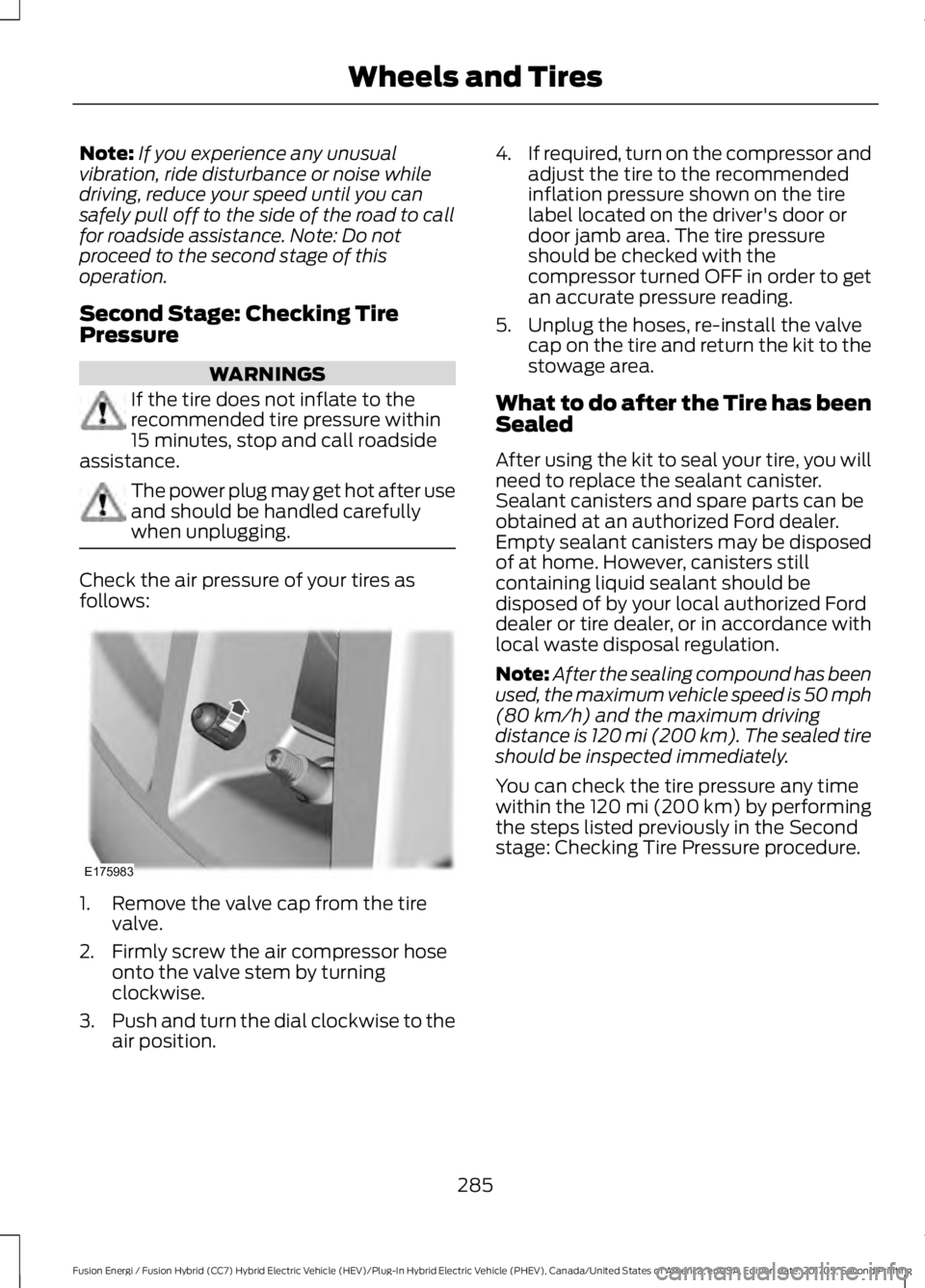
Check the air pressure of your tires asfollows:
1. Remove the valve cap from the tirevalve.
2. Firmly screw the air compressor hoseonto the valve stem by turningclockwise.
3.Push and turn the dial clockwise to theair position.
4.If required, turn on the compressor andadjust the tire to the recommendedinflation pressure shown on the tirelabel located on the driver's door ordoor jamb area. The tire pressureshould be checked with thecompressor turned OFF in order to getan accurate pressure reading.
5. Unplug the hoses, re-install the valvecap on the tire and return the kit to thestowage area.
What to do after the Tire has beenSealed
After using the kit to seal your tire, you willneed to replace the sealant canister.Sealant canisters and spare parts can beobtained at an authorized Ford dealer.Empty sealant canisters may be disposedof at home. However, canisters stillcontaining liquid sealant should bedisposed of by your local authorized Forddealer or tire dealer, or in accordance withlocal waste disposal regulation.
Note:After the sealing compound has beenused, the maximum vehicle speed is 50 mph(80 km/h) and the maximum drivingdistance is 120 mi (200 km). The sealed tireshould be inspected immediately.
You can check the tire pressure any timewithin the 120 mi (200 km) by performingthe steps listed previously in the Secondstage: Checking Tire Pressure procedure.
285
Fusion Energi / Fusion Hybrid (CC7) Hybrid Electric Vehicle (HEV)/Plug-In Hybrid Electric Vehicle (PHEV), Canada/United States of America, enUSA, Edition date: 201705, Second Printing
Wheels and TiresE175983
Page 317 of 538

SpecificationName
Motorcraft® R-1234yf Refrigerant POE OilYN-34
-A/C refrigerant compressor oil (Mexico):Motorcraft® Electric A/C Compressor OilYN-32
ESB-M1C93-BMulti-purpose grease:Motorcraft Multi-Purpose Grease SprayXL-5
-Lock cylinders (U.S.):Penetrating and Lock LubricantXL-1
-Lock cylinders (Canada):Penetrating FluidCXC-51-A
-Lock cylinders (Mexico):Penetrating and Lock LubricantMXL-1
If you use oil and fluids that do not meetthe defined specification and viscositygrade, this may lead to:
•Component damage which is notcovered by the vehicle warranty.
•Longer engine cranking periods.
•Increased emission levels.
•Reduced engine performance.
•Reduced fuel economy.
•Degraded brake performance.
We recommend Motorcraft motor oil foryour vehicle. If Motorcraft oil is notavailable, use motor oils of therecommended viscosity grade that meetAPI SN requirements and display the APICertification Mark for gasoline engines. Donot use oil labeled with API SN servicecategory unless the label also displays theAPI certification mark.
An oil that displays this symbol conformsto current engine, emission system andfuel economy performance standards ofILSAC.
Do not use supplemental engine oiladditives because they are unnecessaryand could lead to engine damage that maynot be covered by your vehicle warranty.
314
Fusion Energi / Fusion Hybrid (CC7) Hybrid Electric Vehicle (HEV)/Plug-In Hybrid Electric Vehicle (PHEV), Canada/United States of America, enUSA, Edition date: 201705, Second Printing
Capacities and SpecificationsE142732
Page 324 of 538

CD: Press to listen to a CD. Pressthe function buttons below theradio screen to select on-screenoptions of Repeat or Shuffle.
A
SOUND: Press to accesssettings for Treble, Midrange,Bass, Fade and Balance. Use theup and down arrow buttons toselect the various settings. Whenyou make your selection, press
B
the left and right arrow buttonsto change the settings. Press OKto set or press MENU to exit.Sound settings can be set foreach audio sourceindependently.
Display screen: Shows audioand SYNC information.C
Number block: In radio mode,store and recall your favoriteradio stations. To store a radiostation, tune to the station, thenpress and hold a preset buttonuntil sound returns. In CD mode,select a track. In phone mode,enter a phone number.
D
Function buttons: Selectdifferent functions of the audiosystem depending on whichmode you are in (such as Radiomode or CD mode).
E
TUNE: In radio mode, turn tosearch through the radiofrequency band. In SIRIUS mode,turn to find the previous or nextavailable satellite radio station.
F
Eject: Press to eject a CD.G
Seek, Fast Forward andReverse: In radio mode, selecta frequency band and presseither button. The system stopsat the first station it finds in thatdirection. In SIRIUS mode, press
H
to select the next or previous
satellite radio station. If youselect a specific category (suchas jazz, rock or news), press tofind the next or previous stationin the selected category. In CDmode, press to select the next orprevious track. Press and hold tomove quickly forward orbackward through the currenttrack.
End phone call: Press and holdto end a phone call.I
OK and cursor arrows: Use theup and down arrow buttons toselect the various settings. Whenyou make your selection, pressthe left and right arrow buttonsto change the settings. Press OKto set or press MENU to exit.
J
CD slot: Insert a CD.K
Answer or Make phone call:Press to either answer anincoming phone call or to makea phone call.
L
Play/Pause: Press to eitherplay or pause a track whenlistening to a CD.
M
Vol and Power: Turn to adjustthe volume. Press to switch thesystem on and off.
N
PHONE: Press to access thephone features of the SYNCsystem. See your SYNCinformation.
O
MENU: Press to access differentaudio system features. SeeMenu Structure.
P
321
Fusion Energi / Fusion Hybrid (CC7) Hybrid Electric Vehicle (HEV)/Plug-In Hybrid Electric Vehicle (PHEV), Canada/United States of America, enUSA, Edition date: 201705, Second Printing
Audio System
Page 325 of 538

MEDIA: Press to open the mediasource menu. You can press thismultiple times to change to CDor to a SYNC-Media device orscroll through the media sourcesusing the arrow buttons. PressOK to select a source.
Q
Clock: Press to access the clocksetting. Use the center arrowcontrols to change the hours andminutes. You can also set theclock by pressing the MENUbutton and scrolling to ClockSettings.
R
RADIO: Press to listen to theradio or change radio stations.Press the function buttonsbelow the radio screen to selectdifferent radio functions.
S
SIRIUS or MUTE: Press to listento SIRIUS satellite radio, or ifequipped, press to mute theplaying audio.
T
Menu Structure
Note:Depending on your system, someoptions may appear slightly different.
Press MENU.
Press the up and down arrow buttons toscroll through the options.
Press the right arrow to enter a menu.Press the left arrow to exit a menu.
Press OK to confirm a selection.
Radio
Use the left and right arrows to go up or down thefrequency band.Manual Tune
Select for a brief sampling of all available channels.Scan
Select to store the six strongest local stations on the AM-AST and FM-AST frequency bands.AST
Select to have the system search by certain musiccategories (such as Rock, Pop or Country).Set Category for Seek/Scan
Select to view additional broadcast data, if available. Thisfeature defaults to off. RBDS must be on for you to set acategory.
RDS Text Display
322
Fusion Energi / Fusion Hybrid (CC7) Hybrid Electric Vehicle (HEV)/Plug-In Hybrid Electric Vehicle (PHEV), Canada/United States of America, enUSA, Edition date: 201705, Second Printing
Audio System
Page 326 of 538
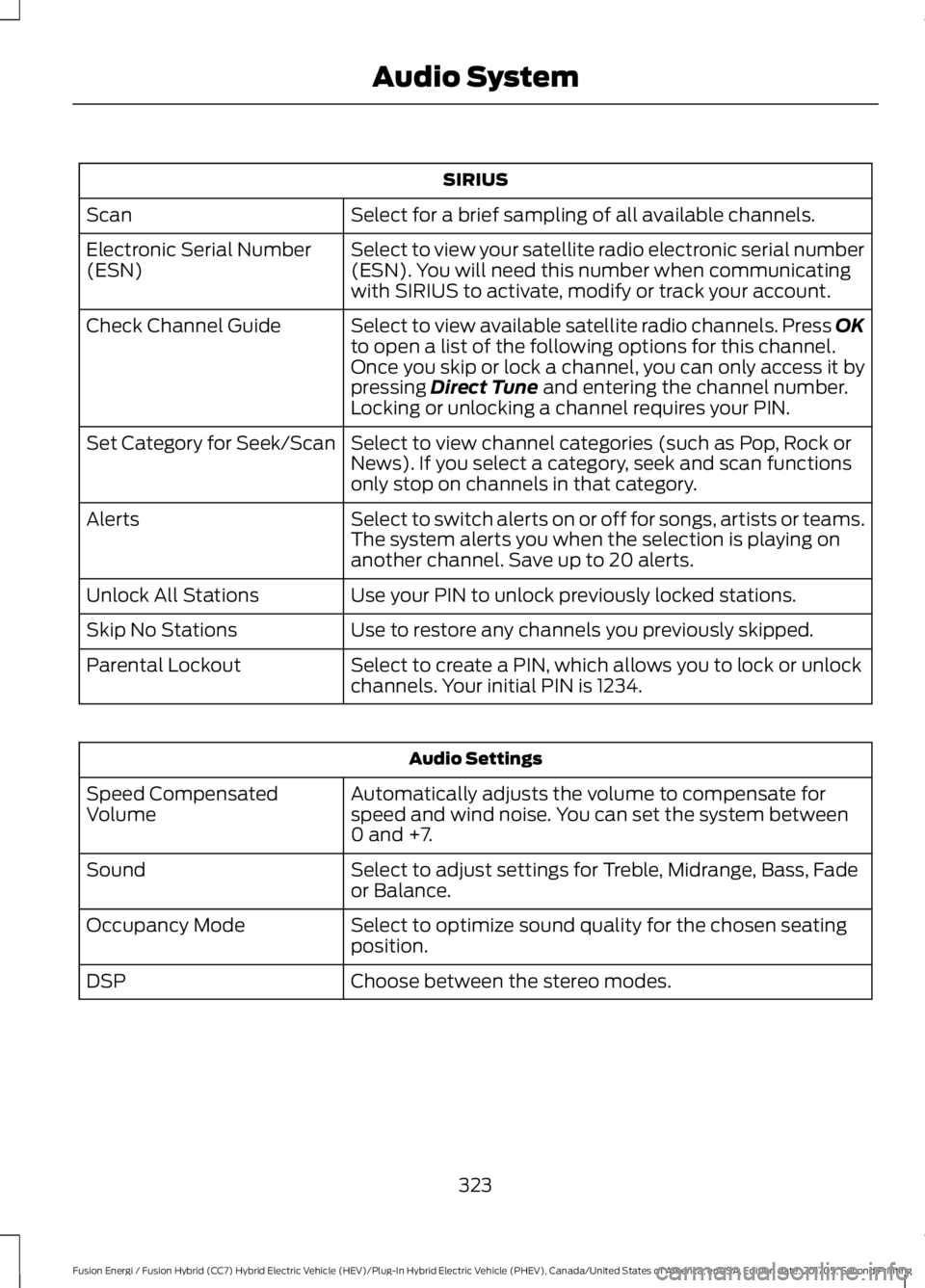
SIRIUS
Select for a brief sampling of all available channels.Scan
Select to view your satellite radio electronic serial number(ESN). You will need this number when communicatingwith SIRIUS to activate, modify or track your account.
Electronic Serial Number(ESN)
Select to view available satellite radio channels. Press OKto open a list of the following options for this channel.Once you skip or lock a channel, you can only access it bypressing Direct Tune and entering the channel number.Locking or unlocking a channel requires your PIN.
Check Channel Guide
Select to view channel categories (such as Pop, Rock orNews). If you select a category, seek and scan functionsonly stop on channels in that category.
Set Category for Seek/Scan
Select to switch alerts on or off for songs, artists or teams.The system alerts you when the selection is playing onanother channel. Save up to 20 alerts.
Alerts
Use your PIN to unlock previously locked stations.Unlock All Stations
Use to restore any channels you previously skipped.Skip No Stations
Select to create a PIN, which allows you to lock or unlockchannels. Your initial PIN is 1234.Parental Lockout
Audio Settings
Automatically adjusts the volume to compensate forspeed and wind noise. You can set the system between0 and +7.
Speed CompensatedVolume
Select to adjust settings for Treble, Midrange, Bass, Fadeor Balance.Sound
Select to optimize sound quality for the chosen seatingposition.Occupancy Mode
Choose between the stereo modes.DSP
323
Fusion Energi / Fusion Hybrid (CC7) Hybrid Electric Vehicle (HEV)/Plug-In Hybrid Electric Vehicle (PHEV), Canada/United States of America, enUSA, Edition date: 201705, Second Printing
Audio System