2018 FORD FOCUS key
[x] Cancel search: keyPage 360 of 473
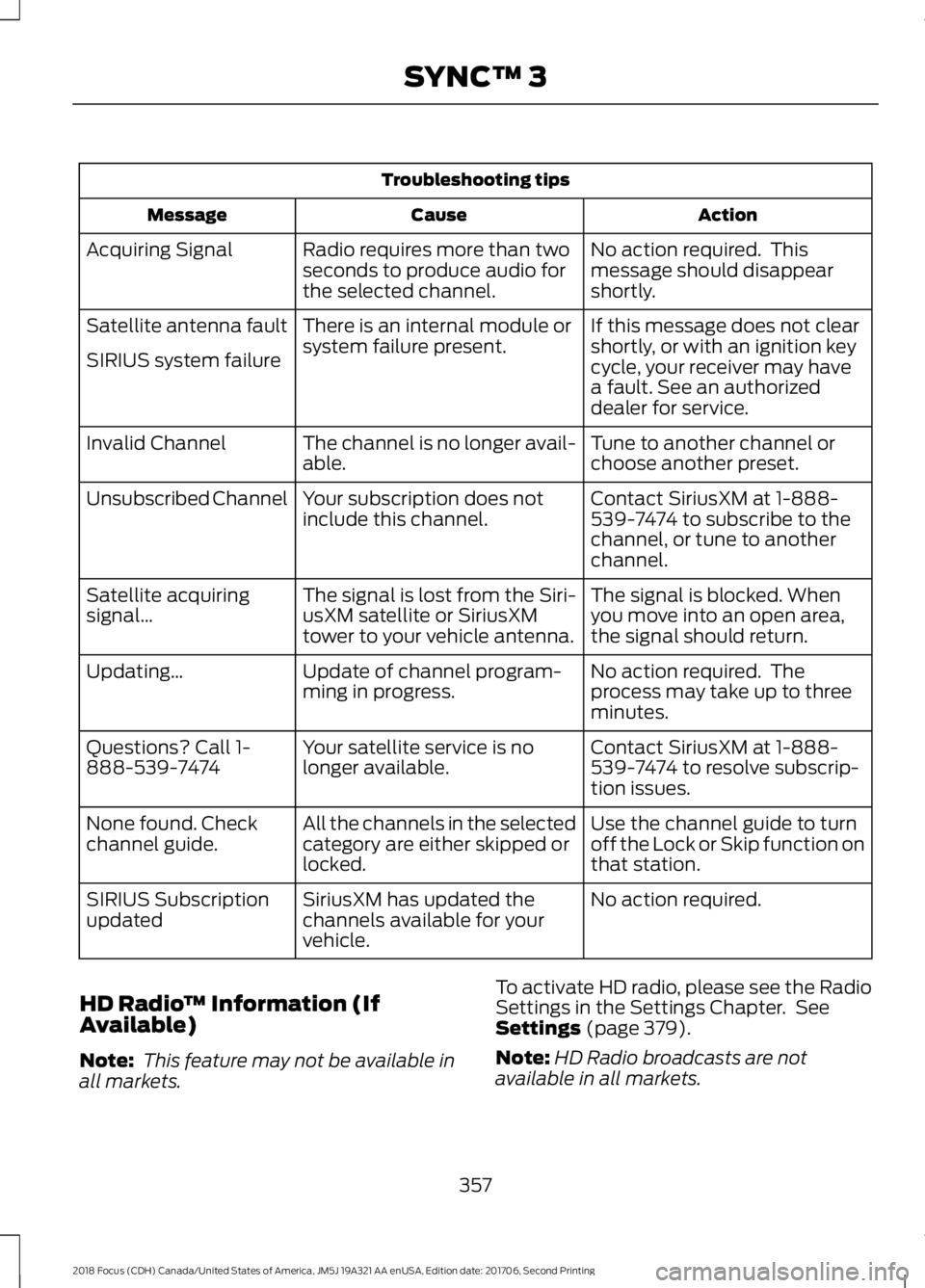
Troubleshooting tips
ActionCauseMessage
No action required. Thismessage should disappearshortly.
Radio requires more than twoseconds to produce audio forthe selected channel.
Acquiring Signal
If this message does not clearshortly, or with an ignition keycycle, your receiver may havea fault. See an authorizeddealer for service.
There is an internal module orsystem failure present.Satellite antenna fault
SIRIUS system failure
Tune to another channel orchoose another preset.The channel is no longer avail-able.Invalid Channel
Contact SiriusXM at 1-888-539-7474 to subscribe to thechannel, or tune to anotherchannel.
Your subscription does notinclude this channel.Unsubscribed Channel
The signal is blocked. Whenyou move into an open area,the signal should return.
The signal is lost from the Siri-usXM satellite or SiriusXMtower to your vehicle antenna.
Satellite acquiringsignal…
No action required. Theprocess may take up to threeminutes.
Update of channel program-ming in progress.Updating…
Contact SiriusXM at 1-888-539-7474 to resolve subscrip-tion issues.
Your satellite service is nolonger available.Questions? Call 1-888-539-7474
Use the channel guide to turnoff the Lock or Skip function onthat station.
All the channels in the selectedcategory are either skipped orlocked.
None found. Checkchannel guide.
No action required.SiriusXM has updated thechannels available for yourvehicle.
SIRIUS Subscriptionupdated
HD Radio™ Information (IfAvailable)
Note: This feature may not be available inall markets.
To activate HD radio, please see the RadioSettings in the Settings Chapter. SeeSettings (page 379).
Note:HD Radio broadcasts are notavailable in all markets.
3572018 Focus (CDH) Canada/United States of America, JM5J 19A321 AA enUSA, Edition date: 201706, Second PrintingSYNC™ 3
Page 368 of 473
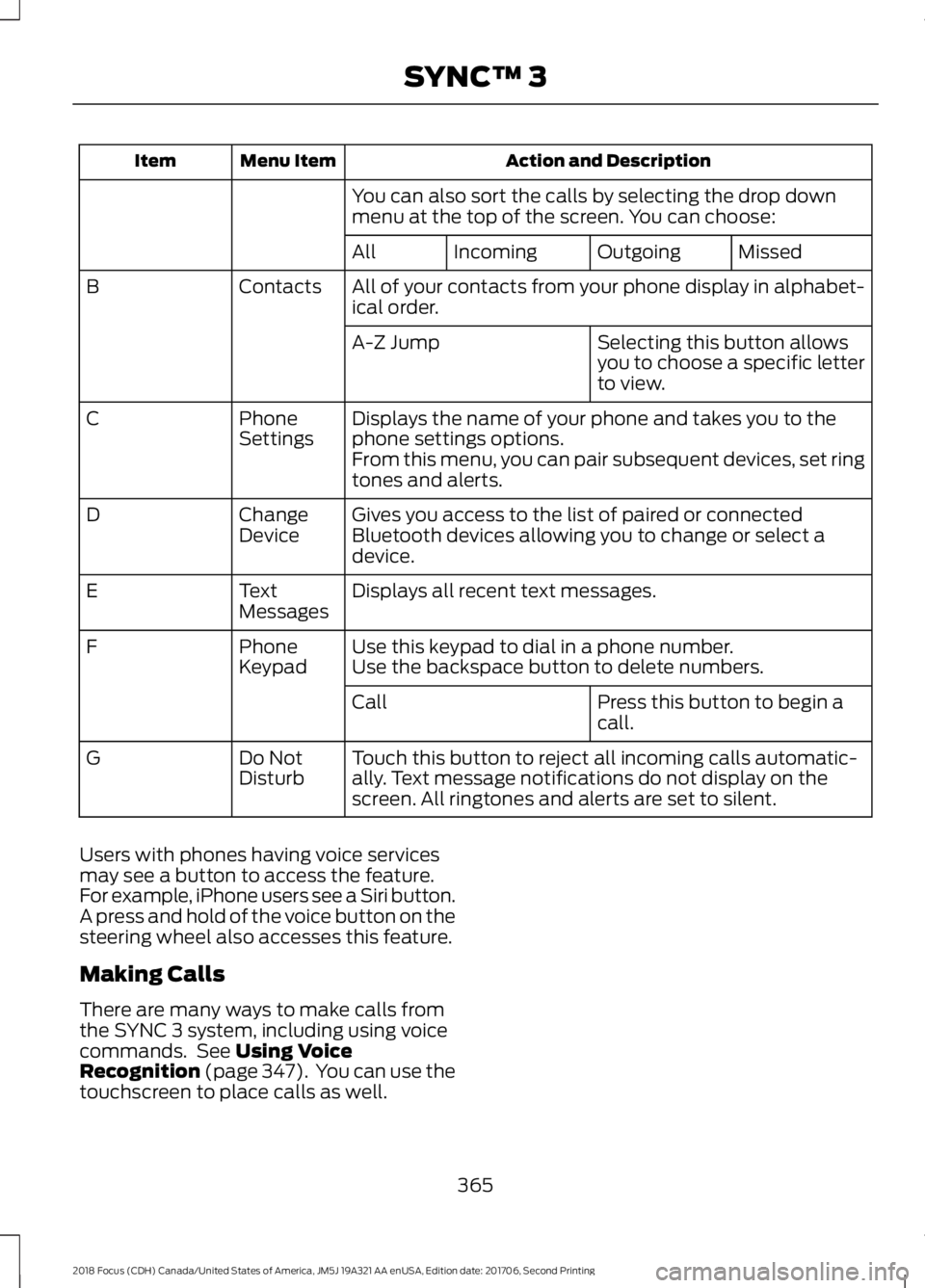
Action and DescriptionMenu ItemItem
You can also sort the calls by selecting the drop downmenu at the top of the screen. You can choose:
MissedOutgoingIncomingAll
All of your contacts from your phone display in alphabet-ical order.ContactsB
Selecting this button allowsyou to choose a specific letterto view.
A-Z Jump
Displays the name of your phone and takes you to thephone settings options.PhoneSettingsC
From this menu, you can pair subsequent devices, set ringtones and alerts.
Gives you access to the list of paired or connectedBluetooth devices allowing you to change or select adevice.
ChangeDeviceD
Displays all recent text messages.TextMessagesE
Use this keypad to dial in a phone number.PhoneKeypadFUse the backspace button to delete numbers.
Press this button to begin acall.Call
Touch this button to reject all incoming calls automatic-ally. Text message notifications do not display on thescreen. All ringtones and alerts are set to silent.
Do NotDisturbG
Users with phones having voice servicesmay see a button to access the feature.For example, iPhone users see a Siri button.A press and hold of the voice button on thesteering wheel also accesses this feature.
Making Calls
There are many ways to make calls fromthe SYNC 3 system, including using voicecommands. See Using VoiceRecognition (page 347). You can use thetouchscreen to place calls as well.
3652018 Focus (CDH) Canada/United States of America, JM5J 19A321 AA enUSA, Edition date: 201706, Second PrintingSYNC™ 3
Page 369 of 473
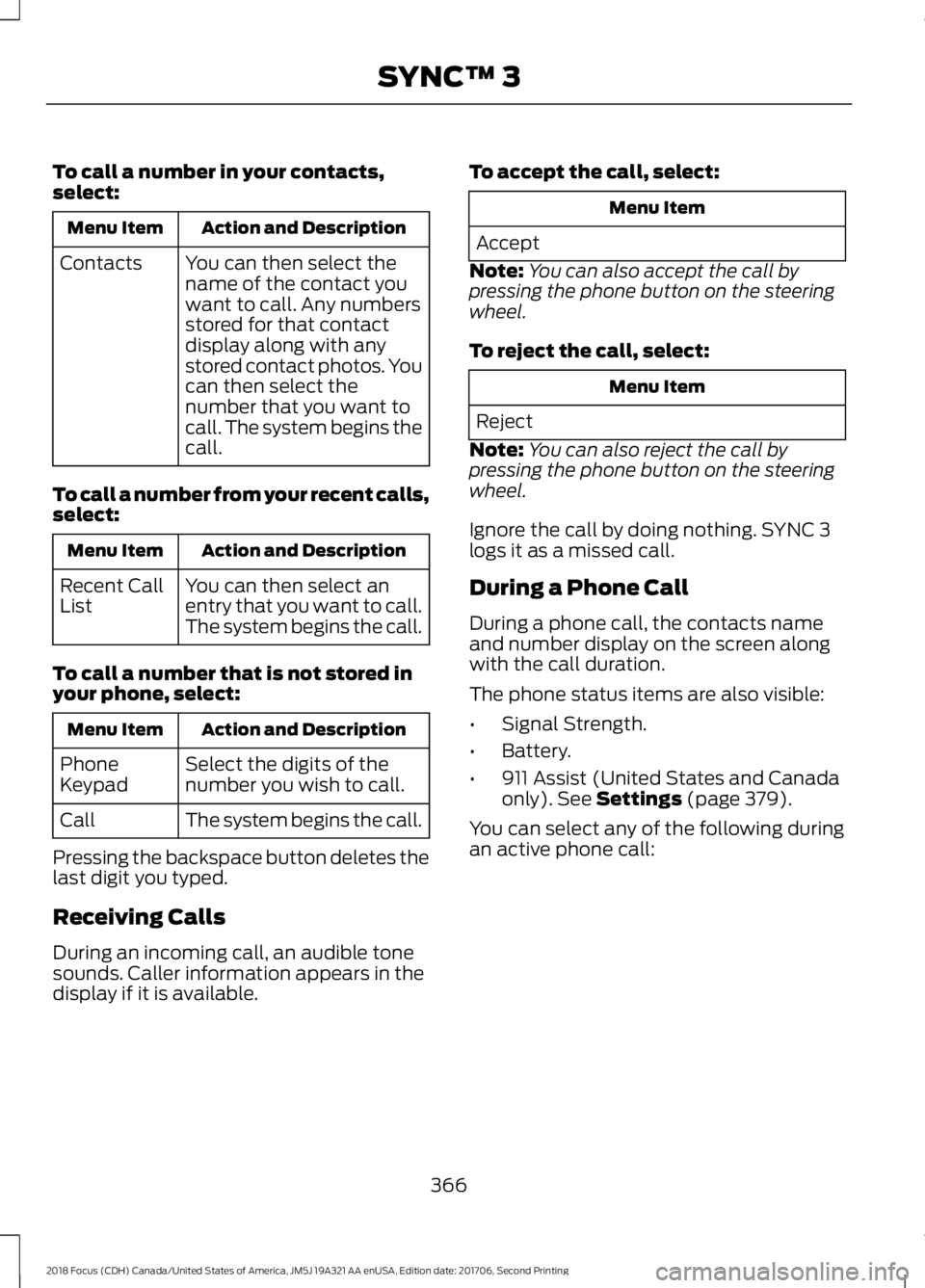
To call a number in your contacts,select:
Action and DescriptionMenu Item
You can then select thename of the contact youwant to call. Any numbersstored for that contactdisplay along with anystored contact photos. Youcan then select thenumber that you want tocall. The system begins thecall.
Contacts
To call a number from your recent calls,select:
Action and DescriptionMenu Item
You can then select anentry that you want to call.The system begins the call.
Recent CallList
To call a number that is not stored inyour phone, select:
Action and DescriptionMenu Item
Select the digits of thenumber you wish to call.PhoneKeypad
The system begins the call.Call
Pressing the backspace button deletes thelast digit you typed.
Receiving Calls
During an incoming call, an audible tonesounds. Caller information appears in thedisplay if it is available.
To accept the call, select:
Menu Item
Accept
Note:You can also accept the call bypressing the phone button on the steeringwheel.
To reject the call, select:
Menu Item
Reject
Note:You can also reject the call bypressing the phone button on the steeringwheel.
Ignore the call by doing nothing. SYNC 3logs it as a missed call.
During a Phone Call
During a phone call, the contacts nameand number display on the screen alongwith the call duration.
The phone status items are also visible:
•Signal Strength.
•Battery.
•911 Assist (United States and Canadaonly). See Settings (page 379).
You can select any of the following duringan active phone call:
3662018 Focus (CDH) Canada/United States of America, JM5J 19A321 AA enUSA, Edition date: 201706, Second PrintingSYNC™ 3
Page 370 of 473
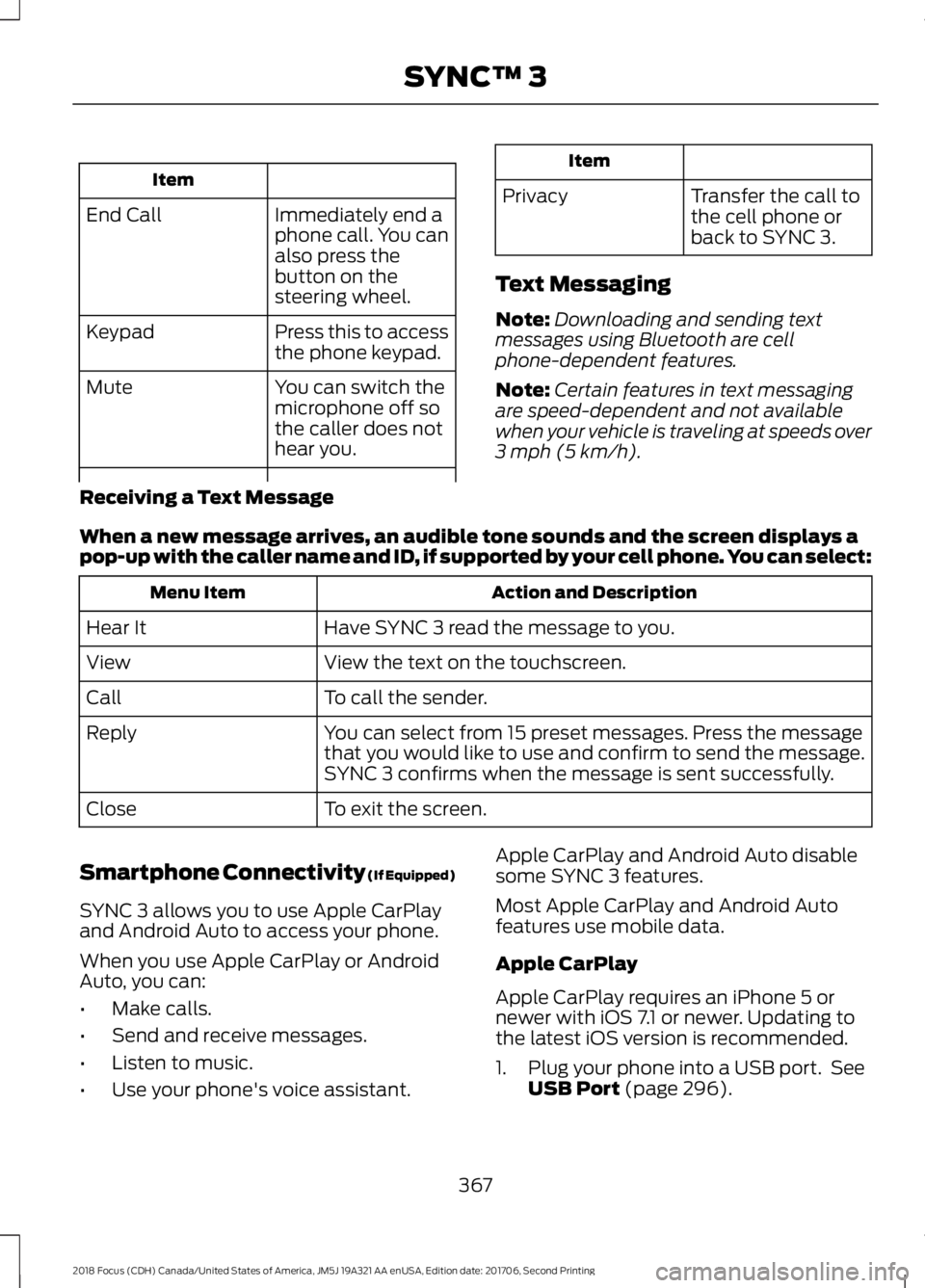
Item
Immediately end aphone call. You canalso press thebutton on thesteering wheel.
End Call
Press this to accessthe phone keypad.Keypad
You can switch themicrophone off sothe caller does nothear you.
Mute
Item
PrivacyTransfer the call tothe cell phone orback to SYNC 3.
Text Messaging
Note:Downloading and sending textmessages using Bluetooth are cellphone-dependent features.
Note:Certain features in text messagingare speed-dependent and not availablewhen your vehicle is traveling at speeds over3 mph (5 km/h).
Receiving a Text Message
When a new message arrives, an audible tone sounds and the screen displays apop-up with the caller name and ID, if supported by your cell phone. You can select:
Action and DescriptionMenu Item
Have SYNC 3 read the message to you.Hear It
View the text on the touchscreen.View
To call the sender.Call
You can select from 15 preset messages. Press the messagethat you would like to use and confirm to send the message.SYNC 3 confirms when the message is sent successfully.
Reply
To exit the screen.Close
Smartphone Connectivity (If Equipped)
SYNC 3 allows you to use Apple CarPlayand Android Auto to access your phone.
When you use Apple CarPlay or AndroidAuto, you can:
•Make calls.
•Send and receive messages.
•Listen to music.
•Use your phone's voice assistant.
Apple CarPlay and Android Auto disablesome SYNC 3 features.
Most Apple CarPlay and Android Autofeatures use mobile data.
Apple CarPlay
Apple CarPlay requires an iPhone 5 ornewer with iOS 7.1 or newer. Updating tothe latest iOS version is recommended.
1.Plug your phone into a USB port. SeeUSB Port (page 296).
3672018 Focus (CDH) Canada/United States of America, JM5J 19A321 AA enUSA, Edition date: 201706, Second PrintingSYNC™ 3
Page 394 of 473
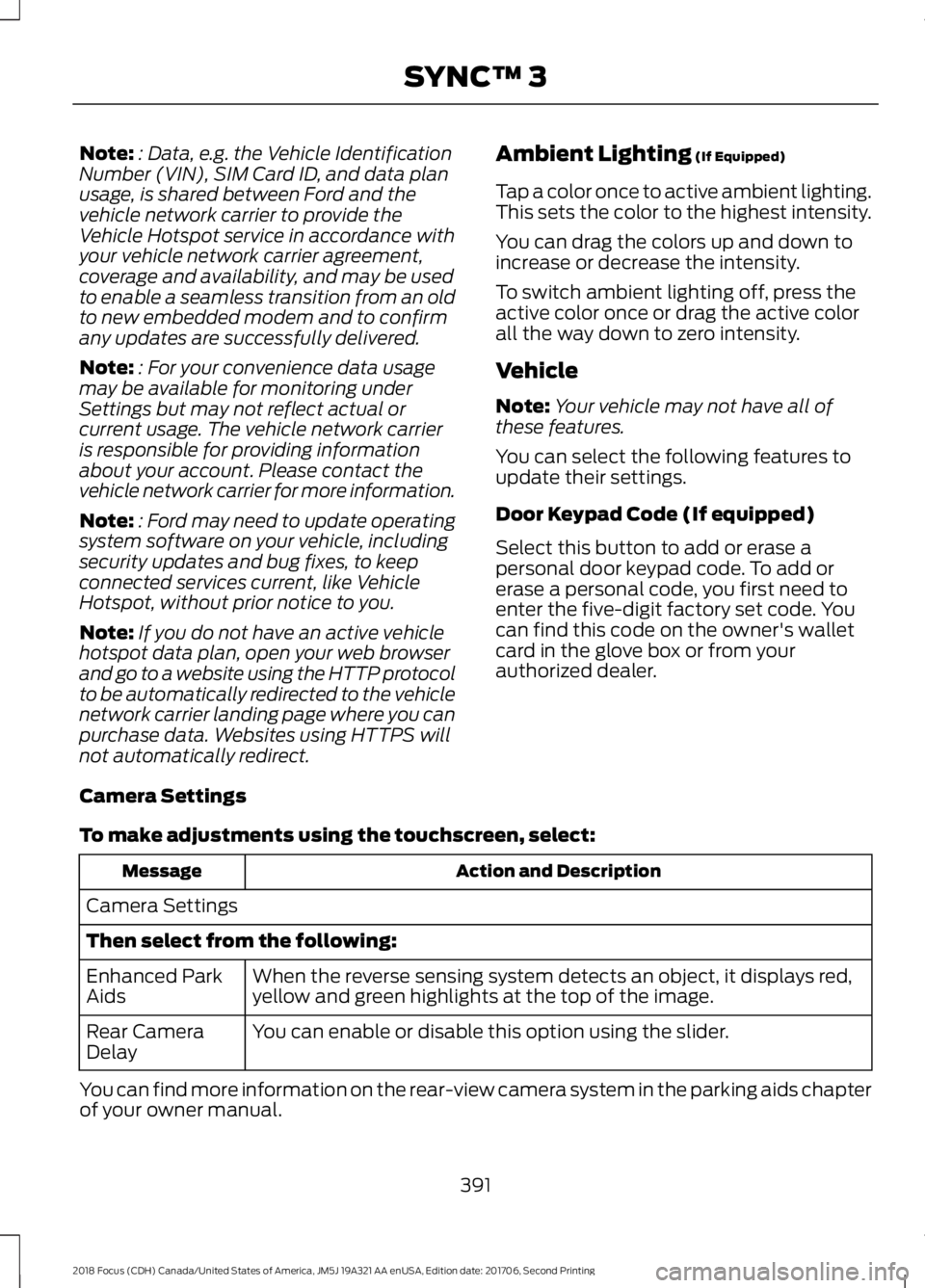
Note:: Data, e.g. the Vehicle IdentificationNumber (VIN), SIM Card ID, and data planusage, is shared between Ford and thevehicle network carrier to provide theVehicle Hotspot service in accordance withyour vehicle network carrier agreement,coverage and availability, and may be usedto enable a seamless transition from an oldto new embedded modem and to confirmany updates are successfully delivered.
Note:: For your convenience data usagemay be available for monitoring underSettings but may not reflect actual orcurrent usage. The vehicle network carrieris responsible for providing informationabout your account. Please contact thevehicle network carrier for more information.
Note:: Ford may need to update operatingsystem software on your vehicle, includingsecurity updates and bug fixes, to keepconnected services current, like VehicleHotspot, without prior notice to you.
Note:If you do not have an active vehiclehotspot data plan, open your web browserand go to a website using the HTTP protocolto be automatically redirected to the vehiclenetwork carrier landing page where you canpurchase data. Websites using HTTPS willnot automatically redirect.
Ambient Lighting (If Equipped)
Tap a color once to active ambient lighting.This sets the color to the highest intensity.
You can drag the colors up and down toincrease or decrease the intensity.
To switch ambient lighting off, press theactive color once or drag the active colorall the way down to zero intensity.
Vehicle
Note:Your vehicle may not have all ofthese features.
You can select the following features toupdate their settings.
Door Keypad Code (If equipped)
Select this button to add or erase apersonal door keypad code. To add orerase a personal code, you first need toenter the five-digit factory set code. Youcan find this code on the owner's walletcard in the glove box or from yourauthorized dealer.
Camera Settings
To make adjustments using the touchscreen, select:
Action and DescriptionMessage
Camera Settings
Then select from the following:
When the reverse sensing system detects an object, it displays red,yellow and green highlights at the top of the image.Enhanced ParkAids
You can enable or disable this option using the slider.Rear CameraDelay
You can find more information on the rear-view camera system in the parking aids chapterof your owner manual.
3912018 Focus (CDH) Canada/United States of America, JM5J 19A321 AA enUSA, Edition date: 201706, Second PrintingSYNC™ 3
Page 405 of 473

Voice command issues
Possible solutionPossible causeIssue
Review the media voice commands at thebeginning of the media section.You may be using thewrong voice commands.
SYNC 3 doesnot understandthe name of asong or artist.
Say the song or artist name exactly as it isdisplayed on your device. For example, say"Play Artist Prince" or "Play song PurpleRain".
You may not be sayingthe name exactly as itappears on your device.
Make sure you are saying the complete titlesuch as "California remix featuring JenniferNettles".
If there are any abbreviations in the name,like ESPN or CNN, you have to spell those:"E-S-P-N" or "C-N-N".
Make sure that song titles, artists, album,and playlists names do not have any specialcharacters like *, - or +.
The song or artist namemay have some specialcharacters that are notbeing recognized bySYNC 3.
Make sure that you are saying the nameexactly as it appears on your phone. Forexample, if your contact is "Joe Wilson",say "Call Joe Wilson". If your contact nameis "Mom", say "Call Mom".
You may not be sayingthe name exactly as itappears on your phone-book.
SYNC 3 doesnot understandor is calling thewrong contactwhen I want tomake a call.Make sure that your contact names do nothave any special characters like *, - or +.
The contact name maycontain special charac-ters.
SYNC 3 applies the phonetic pronunciationrules of the selected language to thecontact names stored on your cell phone.
You may not be sayingthe name exactly as itappears on your phone-book.
The SYNC 3voice controlsystem is havingtrouble recog-nizing foreignnames storedon my cellphone.
Helpful Hint: You can select your contactmanually. Press PHONE. Select the optionfor phonebook and then contact name.Press the soft-key option to hear it. SYNC3 will read the contact name to you, givingyou some idea of the pronunciation it isexpecting.
4022018 Focus (CDH) Canada/United States of America, JM5J 19A321 AA enUSA, Edition date: 201706, Second PrintingSYNC™ 3
Page 408 of 473
For a complete listing of the accessoriesthat are available for your vehicle, pleasecontact your authorized dealer or visit theonline store web site:
Web Address (United States)
www.Accessories.Ford.com
Web Address (Canada)
www.Accessories.Ford.ca
Ford Accessories are available for yourvehicle through an authorized Ford dealer.Ford Motor Company will repair or replaceany properly authorized dealer-installedFord Original Accessory found to bedefective in factory-supplied materials orworkmanship during the warranty period,as well as any component damaged by thedefective accessories.
Ford Motor Company will warrant yourFord Original Accessory through thewarranty that provides the greatestbenefit:
•24 months, unlimited mileage.
•The remainder of your new vehiclelimited warranty.
Contact an authorized dealer for detailsand a copy of the warranty.
Exterior style
•Graphics.
•Hood deflector.*
•Keyless entry.
•Side window deflectors.*
•Splash guards.
•Spoilers.
•Wheels.
•Bumper protector.
Interior style
•All-weather floor mats.
•Cargo area protectors.
•Cargo organizers.
•Door sill plates.
•Interior light kit.
•Interior trim.
•Premium carpeted floor mats.
•Shift knobs.
•Sport pedals.
Lifestyle
•Ash cup and smokers packages.
•Portable media player.*
•Roof racks and carriers.*
•Tablet holder.*
Peace of mind
•Bumper-mounted parking sensor.*
•First aid kit.*
•Full vehicle covers.*
•Locking fuel plug.
•Remote start.
•Vehicle security systems.
•Wheel locks.
•Roadside assistance kits.*
4052018 Focus (CDH) Canada/United States of America, JM5J 19A321 AA enUSA, Edition date: 201706, Second PrintingAccessories
Page 462 of 473

A
A/CSee: Climate Control.........................................104About This Manual...........................................7ABSSee: Brakes............................................................147ABS driving hintsSee: Hints on Driving With Anti-LockBrakes................................................................148Accessories...................................................405Exterior style.......................................................405Interior style.........................................................405Lifestyle.................................................................405Peace of mind....................................................405AccessoriesSee: Replacement PartsRecommendation............................................12Active Park Assist.........................................155Deactivating the Active Park AssistFeature...............................................................157Parallel Parking Assist......................................155Troubleshooting the System..........................158Adjusting the Headlamps.........................225Horizontal Aim Adjustment...........................226Vertical Aim Adjustment.................................225Adjusting the Steering Wheel.....................71Airbag Disposal..............................................46Air ConditioningSee: Climate Control.........................................104Air FilterSee: Changing the Engine Air Filter.............234AlarmSee: Anti-Theft Alarm........................................70Ambient Lighting.............................................81Anti-Theft Alarm............................................70Arming the Alarm.................................................70Disarming the Alarm...........................................70Appendices....................................................427Apps..................................................................376...................................................................................376SiriusXM Traffic and Travel Link...................378Audible Warnings and Indicators............90Fasten Safety Belt................................................91Headlamps On Warning Chime.....................90Key in Ignition Warning Chime........................90Keyless Warning Alert........................................90Low Fuel Minder....................................................91
Parking Brake On Warning Chime...................91Audio Control....................................................71Seek, Next or Previous........................................72Audio System.................................................281General Information..........................................281Audio Unit - Vehicles With: SatelliteRadio.............................................................289Audio Unit - Vehicles With: Sony AudioSystem..........................................................285Menu Structure..................................................286Audio Unit - Vehicles With: SYNC.........282Autolamps.........................................................77Windshield Wiper ActivatedHeadlamps.........................................................77Automatic Climate Control......................105Dual Zone Temperature Control...................107Single Zone Temperature Control...............106Temperature Control........................................106Automatic High Beam Control..................79Automatic High Beam Indicator....................80Overriding the System.......................................80Switching the System On and Off.................79Automatic Transmission............................142Automatic Transmission AdaptiveLearning............................................................146Brake-Shift Interlock.........................................145If Your Vehicle Gets Stuck In Mud orSnow..................................................................146SelectShift Automatic™Transmission...................................................143Understanding the Positions of YourAutomatic Transmission.............................143Automatic Transmission FluidCheck..............................................................221Auto-Start-Stop............................................127Limitations of Use..............................................128Switching the System On and Off...............128Using Auto-Start-Stop with a ManualTransmission....................................................127Using Auto-Start-Stop with an AutomaticTransmission....................................................127Auxiliary Power Points..................................11712 Volt DC Power Point.......................................117Location...................................................................117
4592018 Focus (CDH) Canada/United States of America, JM5J 19A321 AA enUSA, Edition date: 201706, Second PrintingIndex