2018 FORD FOCUS remote control
[x] Cancel search: remote controlPage 68 of 473
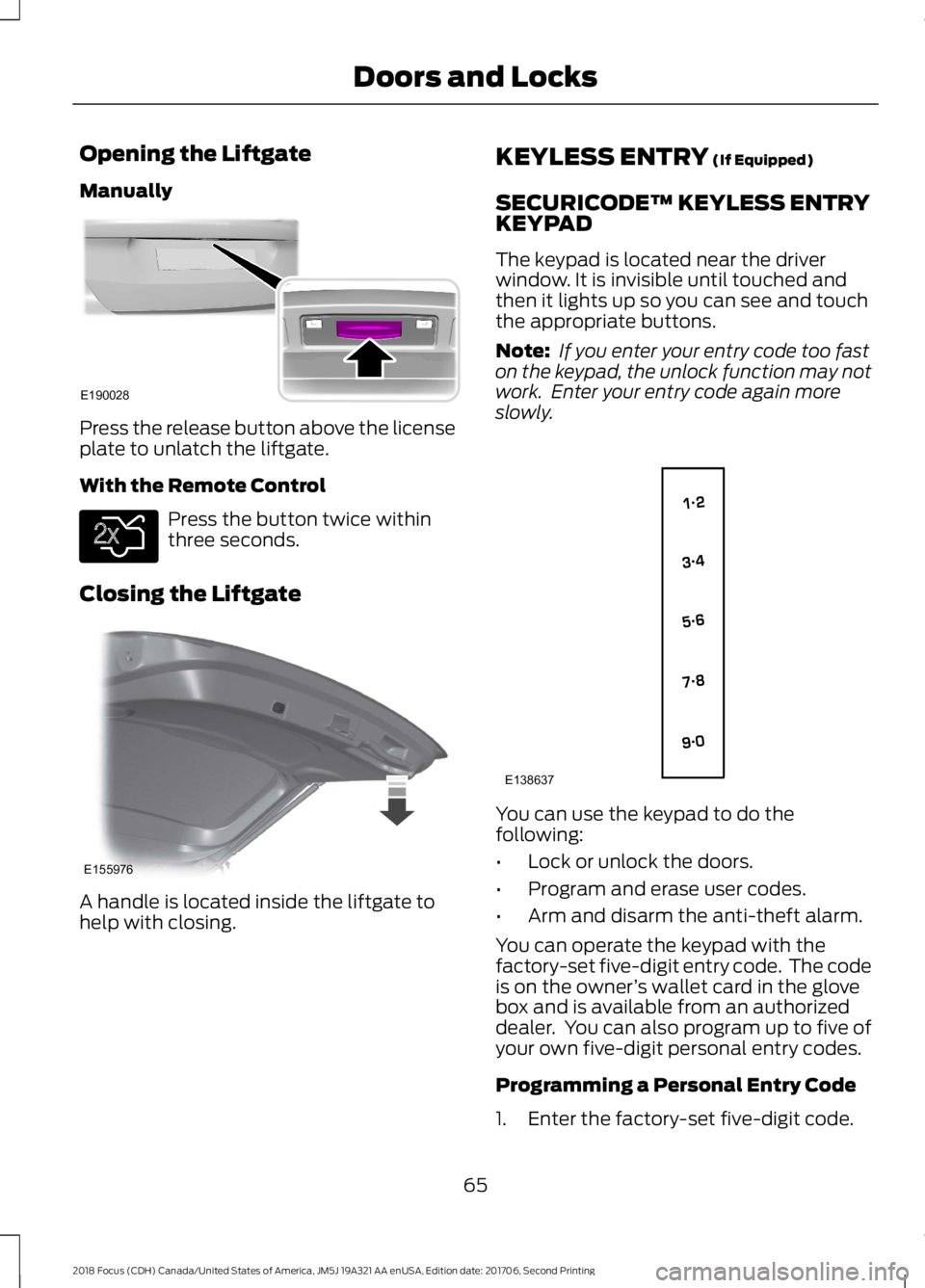
Opening the Liftgate
Manually
Press the release button above the licenseplate to unlatch the liftgate.
With the Remote Control
Press the button twice withinthree seconds.
Closing the Liftgate
A handle is located inside the liftgate tohelp with closing.
KEYLESS ENTRY (If Equipped)
SECURICODE™ KEYLESS ENTRYKEYPAD
The keypad is located near the driverwindow. It is invisible until touched andthen it lights up so you can see and touchthe appropriate buttons.
Note: If you enter your entry code too faston the keypad, the unlock function may notwork. Enter your entry code again moreslowly.
You can use the keypad to do thefollowing:
•Lock or unlock the doors.
•Program and erase user codes.
•Arm and disarm the anti-theft alarm.
You can operate the keypad with thefactory-set five-digit entry code. The codeis on the owner’s wallet card in the glovebox and is available from an authorizeddealer. You can also program up to five ofyour own five-digit personal entry codes.
Programming a Personal Entry Code
1.Enter the factory-set five-digit code.
652018 Focus (CDH) Canada/United States of America, JM5J 19A321 AA enUSA, Edition date: 201706, Second PrintingDoors and LocksE190028 E138630 E155976 E138637
Page 69 of 473
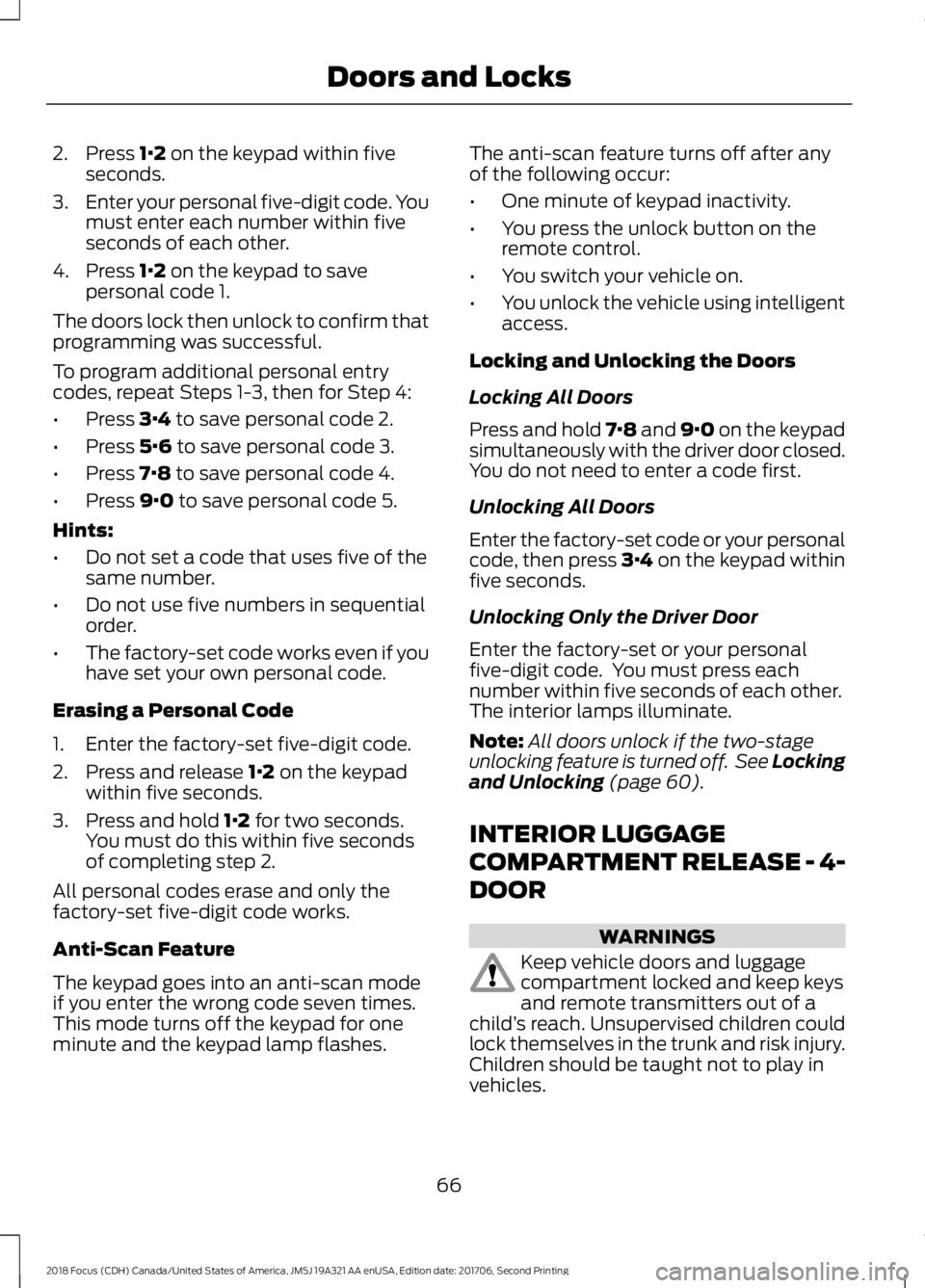
2.Press 1·2 on the keypad within fiveseconds.
3.Enter your personal five-digit code. Youmust enter each number within fiveseconds of each other.
4.Press 1·2 on the keypad to savepersonal code 1.
The doors lock then unlock to confirm thatprogramming was successful.
To program additional personal entrycodes, repeat Steps 1-3, then for Step 4:
•Press 3·4 to save personal code 2.
•Press 5·6 to save personal code 3.
•Press 7·8 to save personal code 4.
•Press 9·0 to save personal code 5.
Hints:
•Do not set a code that uses five of thesame number.
•Do not use five numbers in sequentialorder.
•The factory-set code works even if youhave set your own personal code.
Erasing a Personal Code
1.Enter the factory-set five-digit code.
2.Press and release 1·2 on the keypadwithin five seconds.
3.Press and hold 1·2 for two seconds.You must do this within five secondsof completing step 2.
All personal codes erase and only thefactory-set five-digit code works.
Anti-Scan Feature
The keypad goes into an anti-scan modeif you enter the wrong code seven times.This mode turns off the keypad for oneminute and the keypad lamp flashes.
The anti-scan feature turns off after anyof the following occur:
•One minute of keypad inactivity.
•You press the unlock button on theremote control.
•You switch your vehicle on.
•You unlock the vehicle using intelligentaccess.
Locking and Unlocking the Doors
Locking All Doors
Press and hold 7·8 and 9·0 on the keypadsimultaneously with the driver door closed.You do not need to enter a code first.
Unlocking All Doors
Enter the factory-set code or your personalcode, then press 3·4 on the keypad withinfive seconds.
Unlocking Only the Driver Door
Enter the factory-set or your personalfive-digit code. You must press eachnumber within five seconds of each other.The interior lamps illuminate.
Note:All doors unlock if the two-stageunlocking feature is turned off. See Lockingand Unlocking (page 60).
INTERIOR LUGGAGE
COMPARTMENT RELEASE - 4-
DOOR
WARNINGS
Keep vehicle doors and luggagecompartment locked and keep keysand remote transmitters out of achild’s reach. Unsupervised children couldlock themselves in the trunk and risk injury.Children should be taught not to play invehicles.
662018 Focus (CDH) Canada/United States of America, JM5J 19A321 AA enUSA, Edition date: 201706, Second PrintingDoors and Locks
Page 71 of 473
PASSIVE ANTI-THEFT
SYSTEM
Note: The system is not compatible withnon-Ford aftermarket remote start systems.Use of these systems may result in enginestarting problems and a loss of securityprotection.
Note: Metallic objects, electronic devicesor a second coded key on the same keychain may result in vehicle startingproblems, especially if they are too close tothe key when starting your vehicle. Preventthese objects from touching the coded keywhen starting your vehicle. If your vehiclefails to start, switch the ignition off, moveall objects on the key chain away from thekey and start your vehicle.
Note: Do not leave a duplicate coded keyin your vehicle. Always take your keys andlock all doors when leaving your vehicle.
SecuriLock
The system helps prevent the engine fromstarting unless you use a coded keyprogrammed to your vehicle. A messagemay appear in the information display.
If your vehicle fails to start, the system mayhave a fault. Contact an authorized dealer.A message may appear in the informationdisplay.
Automatic Arming
The system arms when you switch theignition off.
Automatic Disarming
The system disarms when you switch theignition on with a coded key.
Replacement Keys
Note:Your vehicle comes with two keys.
The intelligent access key functions as aprogrammed key that operates the driverdoor lock and turns on the intelligentaccess with push button start system, aswell as a remote control.
If your intelligent access keys are lost orstolen and you do not have an extra codedkey, you need to have your vehicle towedto an authorized dealer. You need to erasethe key codes from your vehicle andprogram new coded keys.
Store a spare intelligent access key awayfrom your vehicle in a safe place. Contactan authorized dealer to purchaseadditional spare or replacement keys.
Programming a Spare IntegratedKeyhead Transmitter
You can program your own integratedkeyhead transmitter or standardSecuriLock coded keys to your vehicle. Thisprocedure will program both the vehicleimmobilizer keycode and the remote entryportion of the remote control to yourvehicle.
Only use integrated keyhead transmittersor standard SecuriLock keys.
You must have two previouslyprogrammed coded keys and the newunprogrammed key readily accessible.Contact an authorized dealer to have thespare key programmed if two previouslyprogrammed keys are not available.
Make sure that the ignition is switched offbefore beginning this procedure. Carry outall steps within 30 seconds of starting thesequence. Stop and wait for at least oneminute before starting again if you carryout any steps out of sequence.
Note:You can program a maximum of eightcoded keys to your vehicle. All eight can beintegrated keyhead transmitters.
Read and understand the entire procedurebefore you begin.
682018 Focus (CDH) Canada/United States of America, JM5J 19A321 AA enUSA, Edition date: 201706, Second PrintingSecurity
Page 73 of 473
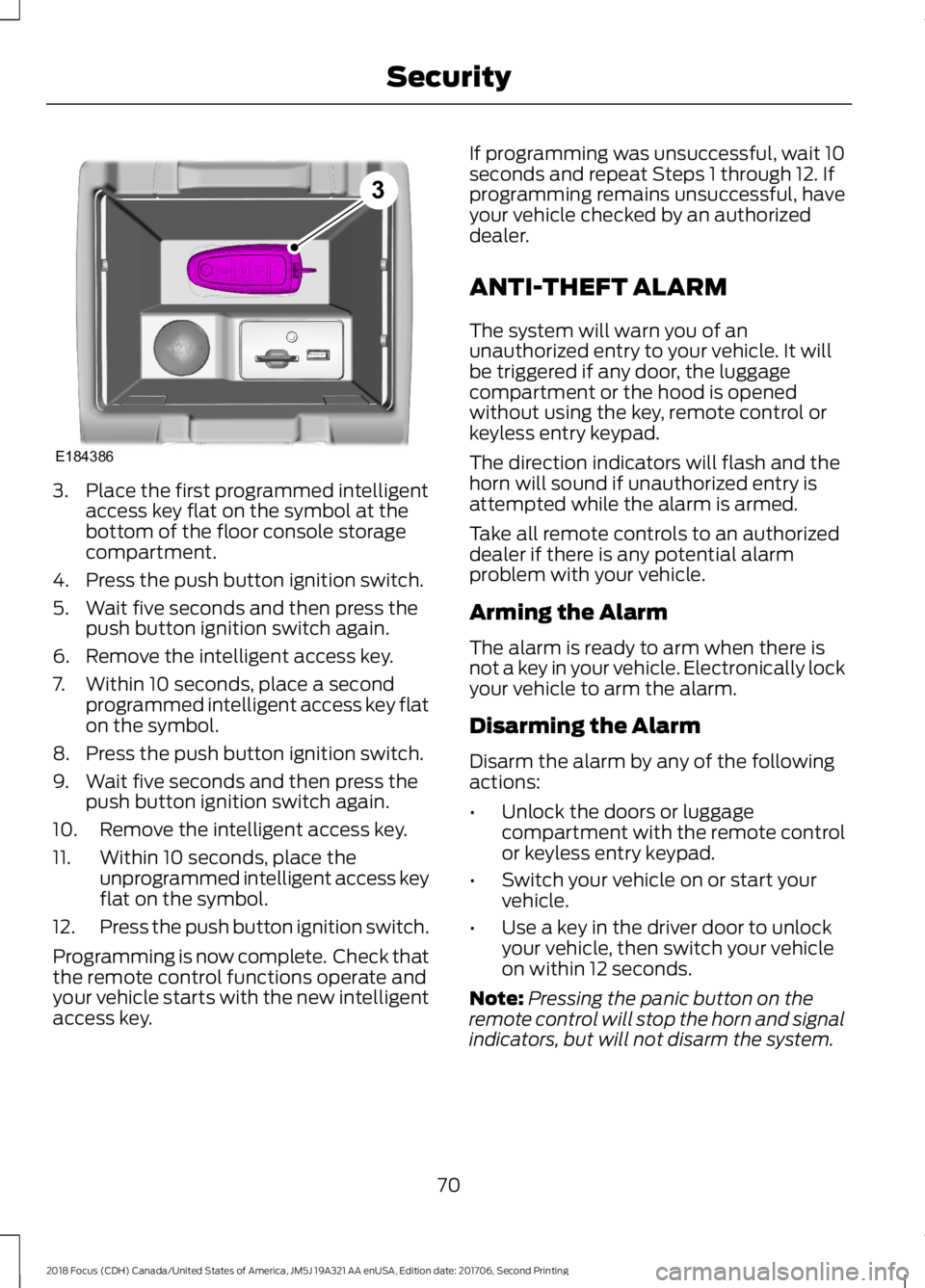
3.Place the first programmed intelligentaccess key flat on the symbol at thebottom of the floor console storagecompartment.
4.Press the push button ignition switch.
5.Wait five seconds and then press thepush button ignition switch again.
6.Remove the intelligent access key.
7.Within 10 seconds, place a secondprogrammed intelligent access key flaton the symbol.
8.Press the push button ignition switch.
9.Wait five seconds and then press thepush button ignition switch again.
10.Remove the intelligent access key.
11.Within 10 seconds, place theunprogrammed intelligent access keyflat on the symbol.
12.Press the push button ignition switch.
Programming is now complete. Check thatthe remote control functions operate andyour vehicle starts with the new intelligentaccess key.
If programming was unsuccessful, wait 10seconds and repeat Steps 1 through 12. Ifprogramming remains unsuccessful, haveyour vehicle checked by an authorizeddealer.
ANTI-THEFT ALARM
The system will warn you of anunauthorized entry to your vehicle. It willbe triggered if any door, the luggagecompartment or the hood is openedwithout using the key, remote control orkeyless entry keypad.
The direction indicators will flash and thehorn will sound if unauthorized entry isattempted while the alarm is armed.
Take all remote controls to an authorizeddealer if there is any potential alarmproblem with your vehicle.
Arming the Alarm
The alarm is ready to arm when there isnot a key in your vehicle. Electronically lockyour vehicle to arm the alarm.
Disarming the Alarm
Disarm the alarm by any of the followingactions:
•Unlock the doors or luggagecompartment with the remote controlor keyless entry keypad.
•Switch your vehicle on or start yourvehicle.
•Use a key in the driver door to unlockyour vehicle, then switch your vehicleon within 12 seconds.
Note:Pressing the panic button on theremote control will stop the horn and signalindicators, but will not disarm the system.
702018 Focus (CDH) Canada/United States of America, JM5J 19A321 AA enUSA, Edition date: 201706, Second PrintingSecurityE1843863
Page 83 of 473
Switch the lighting control to theautolamps position. See Autolamps(page 77).
Overriding the System
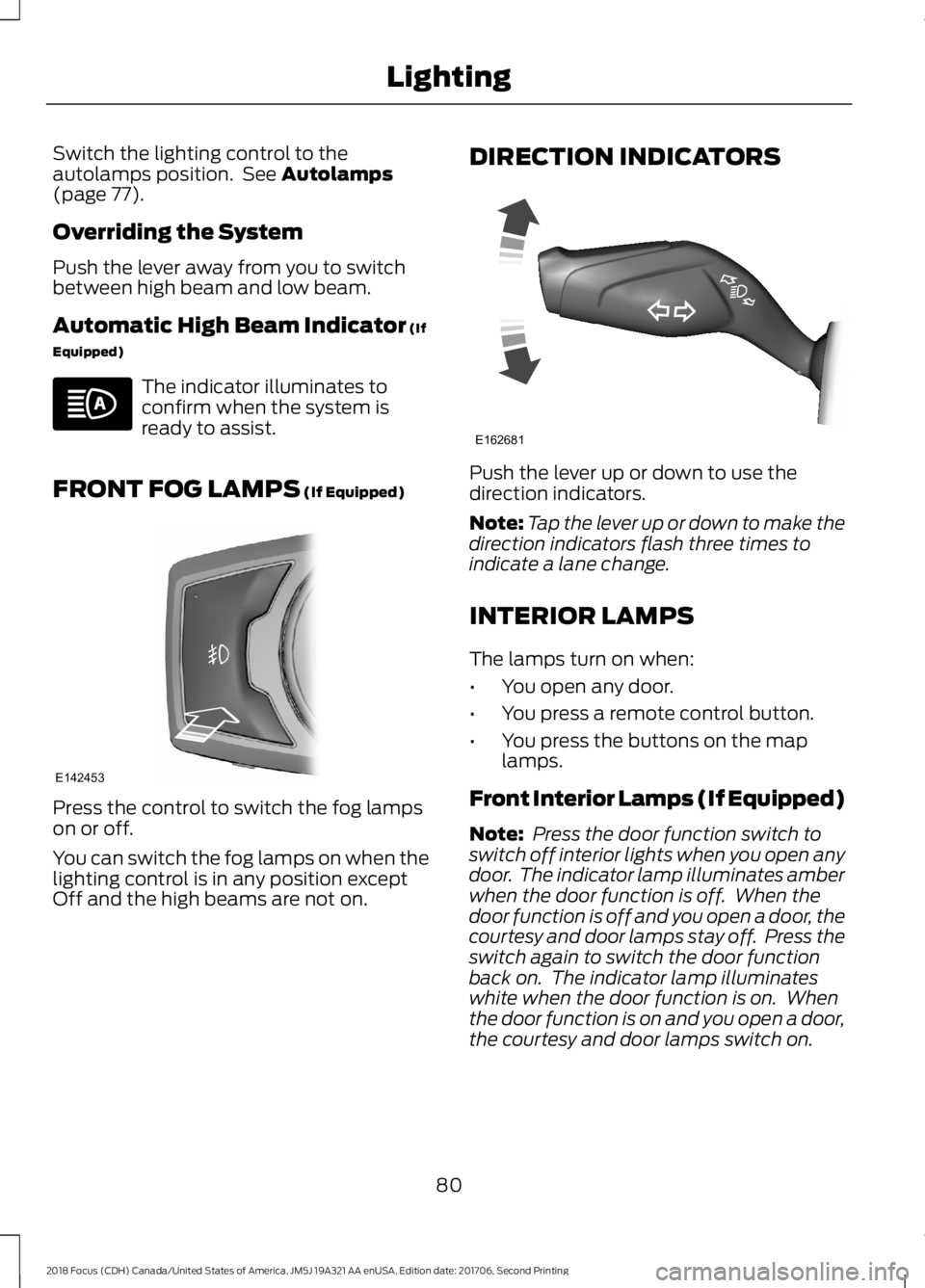
Push the lever away from you to switchbetween high beam and low beam.
Automatic High Beam Indicator (If
Equipped)
The indicator illuminates toconfirm when the system isready to assist.
FRONT FOG LAMPS (If Equipped)
Press the control to switch the fog lampson or off.
You can switch the fog lamps on when thelighting control is in any position exceptOff and the high beams are not on.
DIRECTION INDICATORS
Push the lever up or down to use thedirection indicators.
Note:Tap the lever up or down to make thedirection indicators flash three times toindicate a lane change.
INTERIOR LAMPS
The lamps turn on when:
•You open any door.
•You press a remote control button.
•You press the buttons on the maplamps.
Front Interior Lamps (If Equipped)
Note: Press the door function switch toswitch off interior lights when you open anydoor. The indicator lamp illuminates amberwhen the door function is off. When thedoor function is off and you open a door, thecourtesy and door lamps stay off. Press theswitch again to switch the door functionback on. The indicator lamp illuminateswhite when the door function is on. Whenthe door function is on and you open a door,the courtesy and door lamps switch on.
802018 Focus (CDH) Canada/United States of America, JM5J 19A321 AA enUSA, Edition date: 201706, Second PrintingLighting E142453 E162681
Page 97 of 473
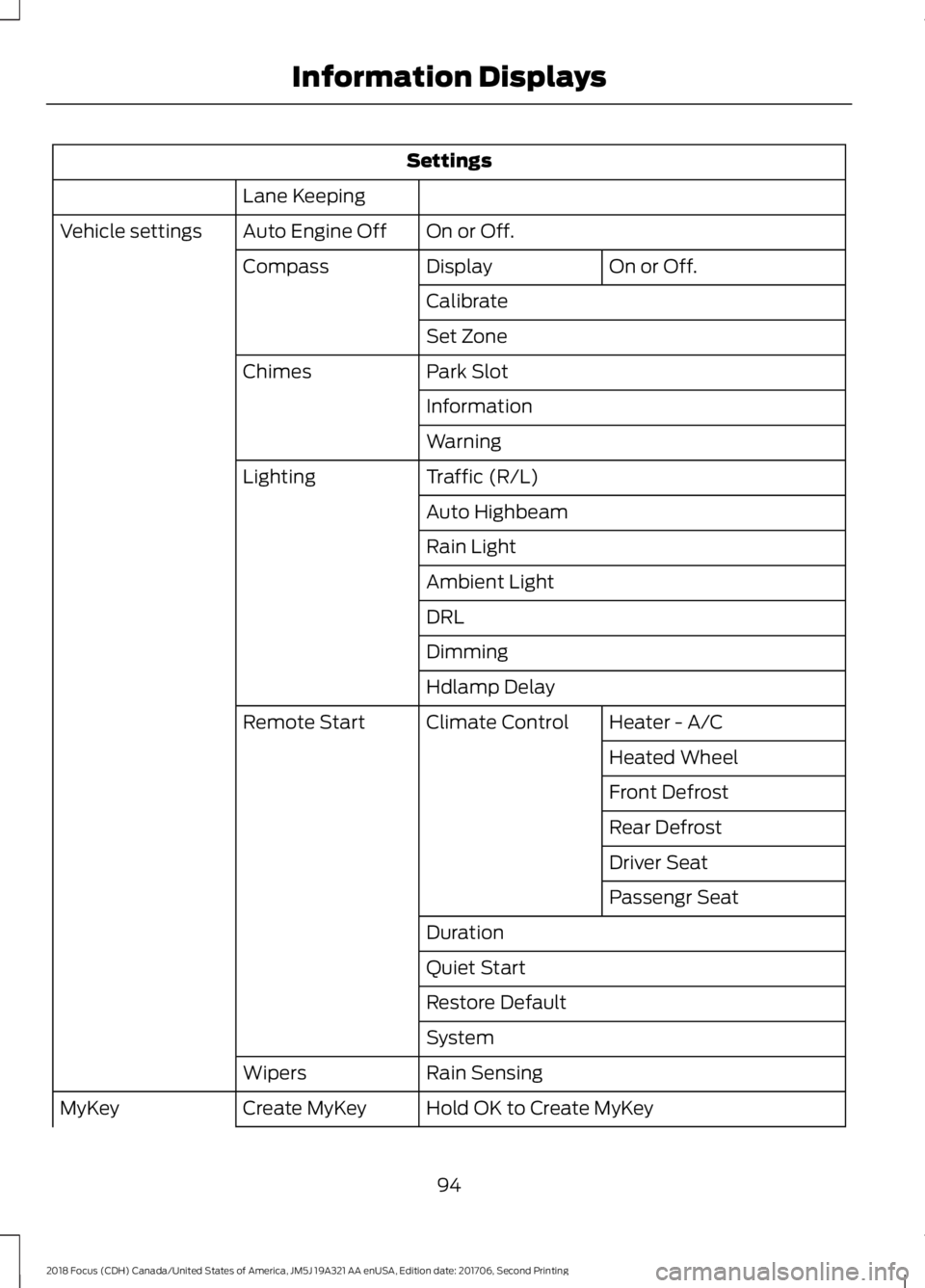
Settings
Lane Keeping
On or Off.Auto Engine OffVehicle settings
On or Off.DisplayCompass
Calibrate
Set Zone
Park SlotChimes
Information
Warning
Traffic (R/L)Lighting
Auto Highbeam
Rain Light
Ambient Light
DRL
Dimming
Hdlamp Delay
Heater - A/CClimate ControlRemote Start
Heated Wheel
Front Defrost
Rear Defrost
Driver Seat
Passengr Seat
Duration
Quiet Start
Restore Default
System
Rain SensingWipers
Hold OK to Create MyKeyCreate MyKeyMyKey
942018 Focus (CDH) Canada/United States of America, JM5J 19A321 AA enUSA, Edition date: 201706, Second PrintingInformation Displays
Page 102 of 473
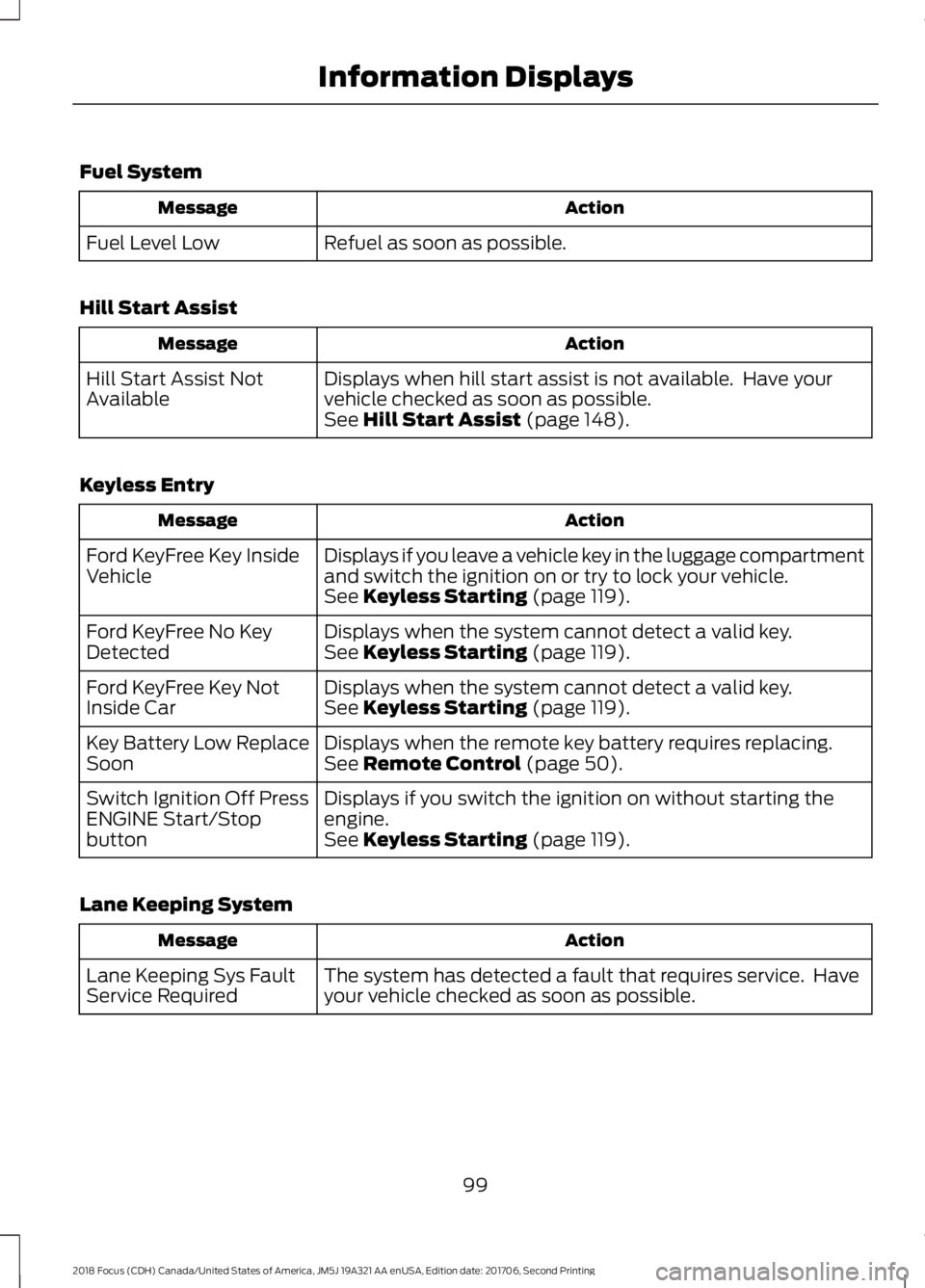
Fuel System
ActionMessage
Refuel as soon as possible.Fuel Level Low
Hill Start Assist
ActionMessage
Displays when hill start assist is not available. Have yourvehicle checked as soon as possible.Hill Start Assist NotAvailableSee Hill Start Assist (page 148).
Keyless Entry
ActionMessage
Displays if you leave a vehicle key in the luggage compartmentand switch the ignition on or try to lock your vehicle.Ford KeyFree Key InsideVehicleSee Keyless Starting (page 119).
Displays when the system cannot detect a valid key.Ford KeyFree No KeyDetectedSee Keyless Starting (page 119).
Displays when the system cannot detect a valid key.Ford KeyFree Key NotInside CarSee Keyless Starting (page 119).
Displays when the remote key battery requires replacing.Key Battery Low ReplaceSoonSee Remote Control (page 50).
Displays if you switch the ignition on without starting theengine.Switch Ignition Off PressENGINE Start/StopbuttonSee Keyless Starting (page 119).
Lane Keeping System
ActionMessage
The system has detected a fault that requires service. Haveyour vehicle checked as soon as possible.Lane Keeping Sys FaultService Required
992018 Focus (CDH) Canada/United States of America, JM5J 19A321 AA enUSA, Edition date: 201706, Second PrintingInformation Displays
Page 113 of 473
Replace the filter at regular intervals.
For additional cabin air filter information,or to replace the filter, see an authorizeddealer.
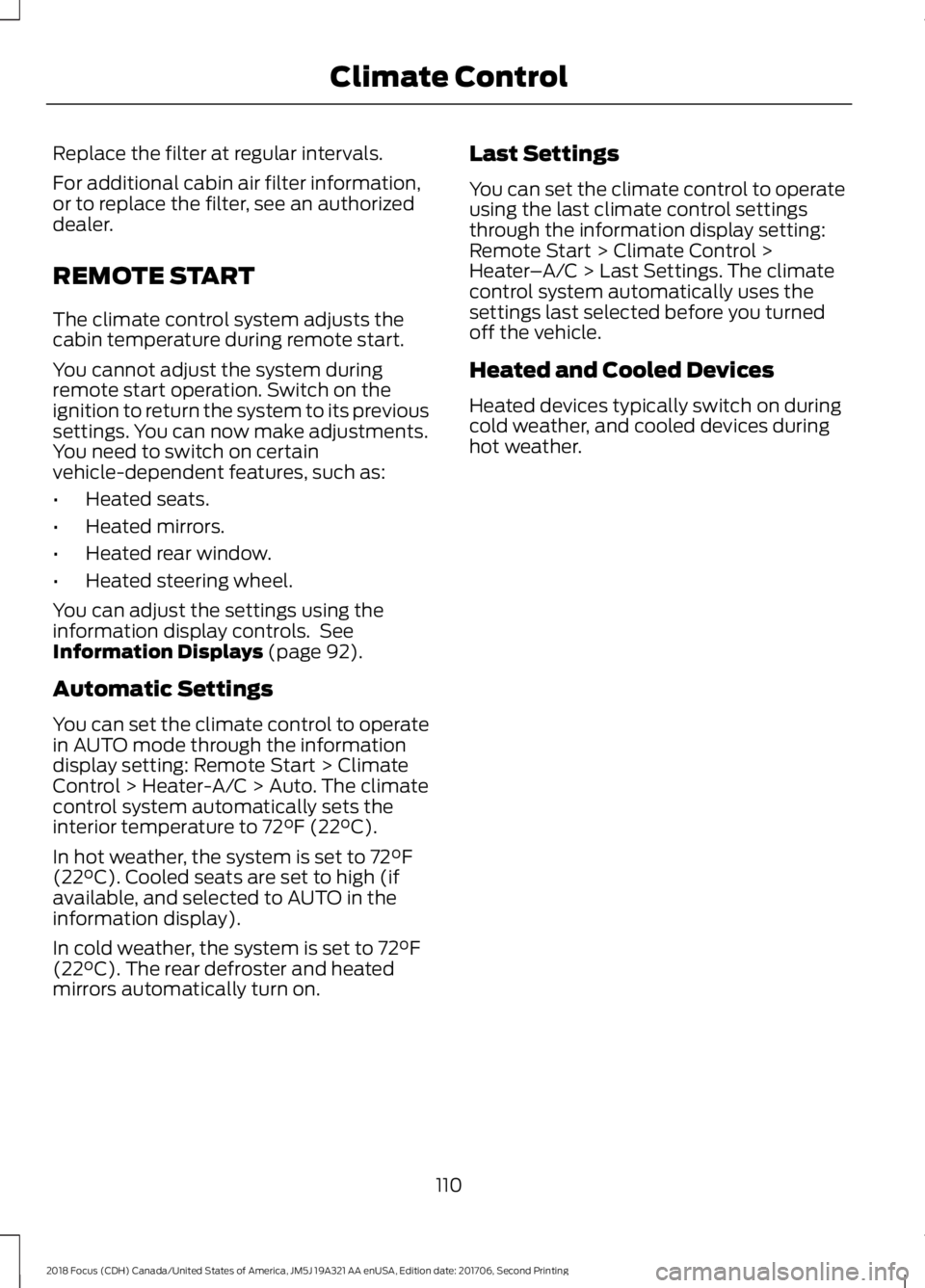
REMOTE START
The climate control system adjusts thecabin temperature during remote start.
You cannot adjust the system duringremote start operation. Switch on theignition to return the system to its previoussettings. You can now make adjustments.You need to switch on certainvehicle-dependent features, such as:
•Heated seats.
•Heated mirrors.
•Heated rear window.
•Heated steering wheel.
You can adjust the settings using theinformation display controls. SeeInformation Displays (page 92).
Automatic Settings
You can set the climate control to operatein AUTO mode through the informationdisplay setting: Remote Start > ClimateControl > Heater-A/C > Auto. The climatecontrol system automatically sets theinterior temperature to 72°F (22°C).
In hot weather, the system is set to 72°F(22°C). Cooled seats are set to high (ifavailable, and selected to AUTO in theinformation display).
In cold weather, the system is set to 72°F(22°C). The rear defroster and heatedmirrors automatically turn on.
Last Settings
You can set the climate control to operateusing the last climate control settingsthrough the information display setting:Remote Start > Climate Control >Heater–A/C > Last Settings. The climatecontrol system automatically uses thesettings last selected before you turnedoff the vehicle.
Heated and Cooled Devices
Heated devices typically switch on duringcold weather, and cooled devices duringhot weather.
1102018 Focus (CDH) Canada/United States of America, JM5J 19A321 AA enUSA, Edition date: 201706, Second PrintingClimate Control