2018 FORD FOCUS lights
[x] Cancel search: lightsPage 373 of 473
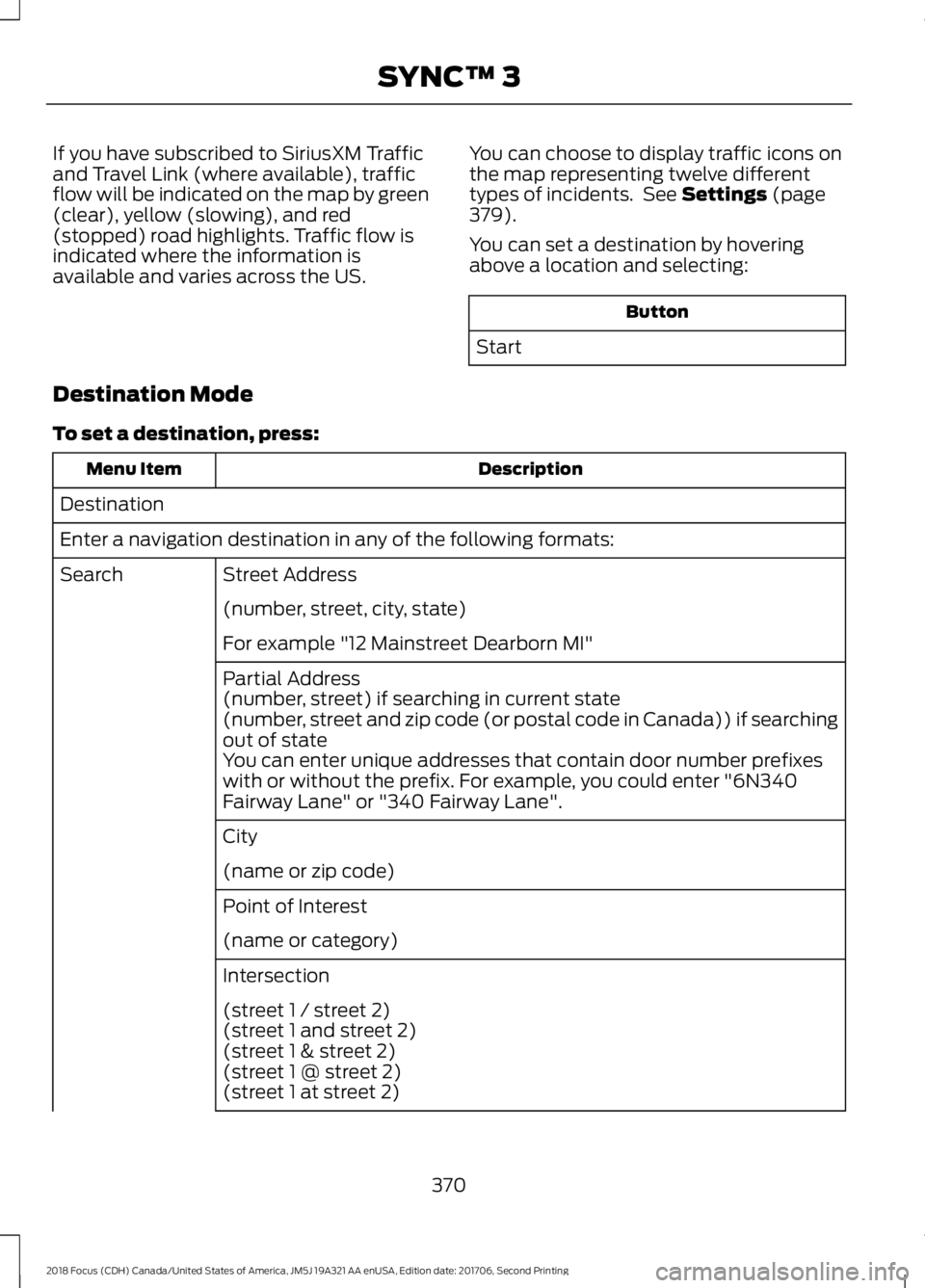
If you have subscribed to SiriusXM Trafficand Travel Link (where available), trafficflow will be indicated on the map by green(clear), yellow (slowing), and red(stopped) road highlights. Traffic flow isindicated where the information isavailable and varies across the US.
You can choose to display traffic icons onthe map representing twelve differenttypes of incidents. See Settings (page379).
You can set a destination by hoveringabove a location and selecting:
Button
Start
Destination Mode
To set a destination, press:
DescriptionMenu Item
Destination
Enter a navigation destination in any of the following formats:
Street AddressSearch
(number, street, city, state)
For example "12 Mainstreet Dearborn MI"
Partial Address(number, street) if searching in current state(number, street and zip code (or postal code in Canada)) if searchingout of stateYou can enter unique addresses that contain door number prefixeswith or without the prefix. For example, you could enter "6N340Fairway Lane" or "340 Fairway Lane".
City
(name or zip code)
Point of Interest
(name or category)
Intersection
(street 1 / street 2)(street 1 and street 2)(street 1 & street 2)(street 1 @ street 2)(street 1 at street 2)
3702018 Focus (CDH) Canada/United States of America, JM5J 19A321 AA enUSA, Edition date: 201706, Second PrintingSYNC™ 3
Page 394 of 473
Note:: Data, e.g. the Vehicle IdentificationNumber (VIN), SIM Card ID, and data planusage, is shared between Ford and thevehicle network carrier to provide theVehicle Hotspot service in accordance withyour vehicle network carrier agreement,coverage and availability, and may be usedto enable a seamless transition from an oldto new embedded modem and to confirmany updates are successfully delivered.
Note:: For your convenience data usagemay be available for monitoring underSettings but may not reflect actual orcurrent usage. The vehicle network carrieris responsible for providing informationabout your account. Please contact thevehicle network carrier for more information.
Note:: Ford may need to update operatingsystem software on your vehicle, includingsecurity updates and bug fixes, to keepconnected services current, like VehicleHotspot, without prior notice to you.
Note:If you do not have an active vehiclehotspot data plan, open your web browserand go to a website using the HTTP protocolto be automatically redirected to the vehiclenetwork carrier landing page where you canpurchase data. Websites using HTTPS willnot automatically redirect.
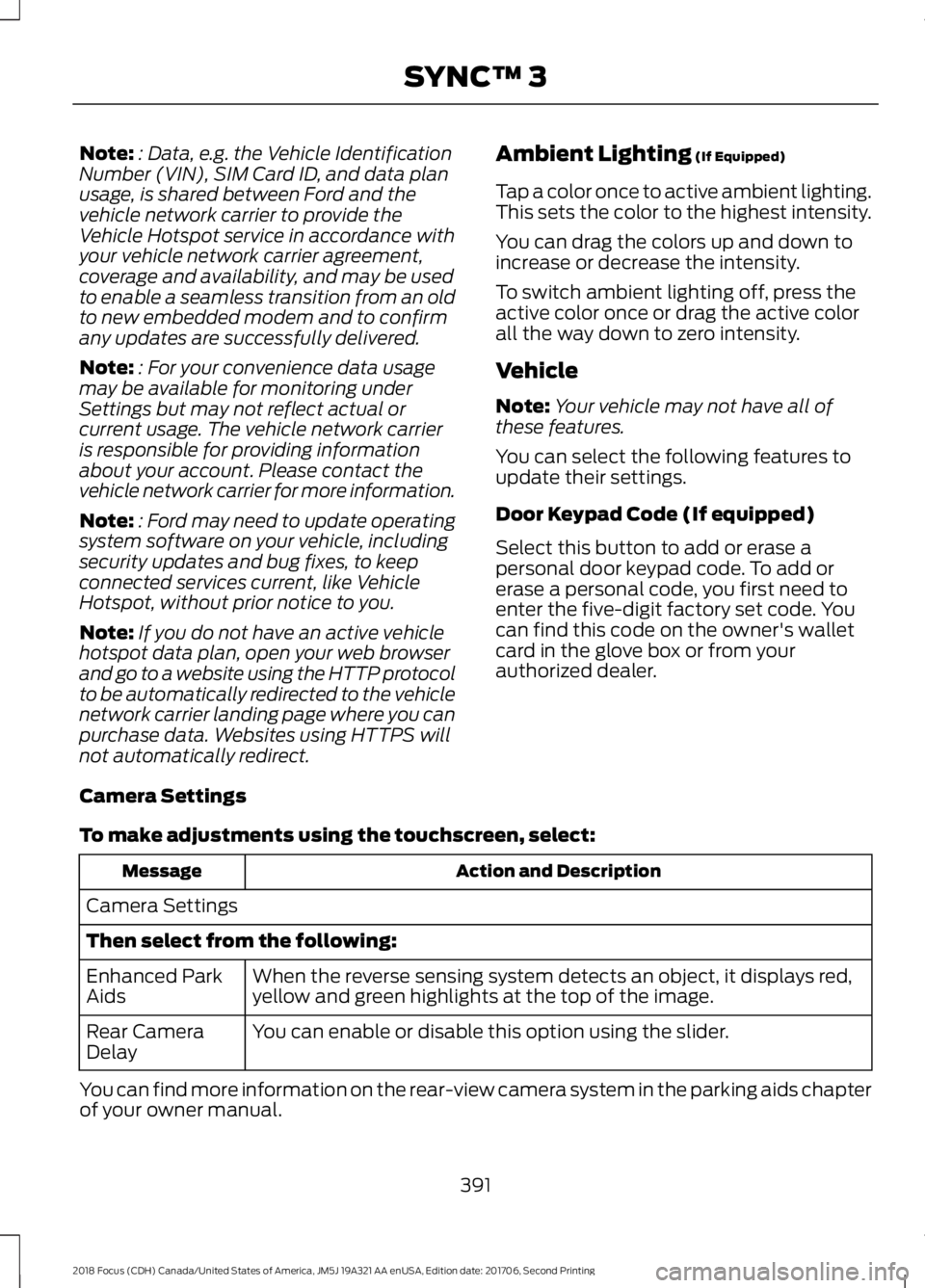
Ambient Lighting (If Equipped)
Tap a color once to active ambient lighting.This sets the color to the highest intensity.
You can drag the colors up and down toincrease or decrease the intensity.
To switch ambient lighting off, press theactive color once or drag the active colorall the way down to zero intensity.
Vehicle
Note:Your vehicle may not have all ofthese features.
You can select the following features toupdate their settings.
Door Keypad Code (If equipped)
Select this button to add or erase apersonal door keypad code. To add orerase a personal code, you first need toenter the five-digit factory set code. Youcan find this code on the owner's walletcard in the glove box or from yourauthorized dealer.
Camera Settings
To make adjustments using the touchscreen, select:
Action and DescriptionMessage
Camera Settings
Then select from the following:
When the reverse sensing system detects an object, it displays red,yellow and green highlights at the top of the image.Enhanced ParkAids
You can enable or disable this option using the slider.Rear CameraDelay
You can find more information on the rear-view camera system in the parking aids chapterof your owner manual.
3912018 Focus (CDH) Canada/United States of America, JM5J 19A321 AA enUSA, Edition date: 201706, Second PrintingSYNC™ 3
Page 413 of 473
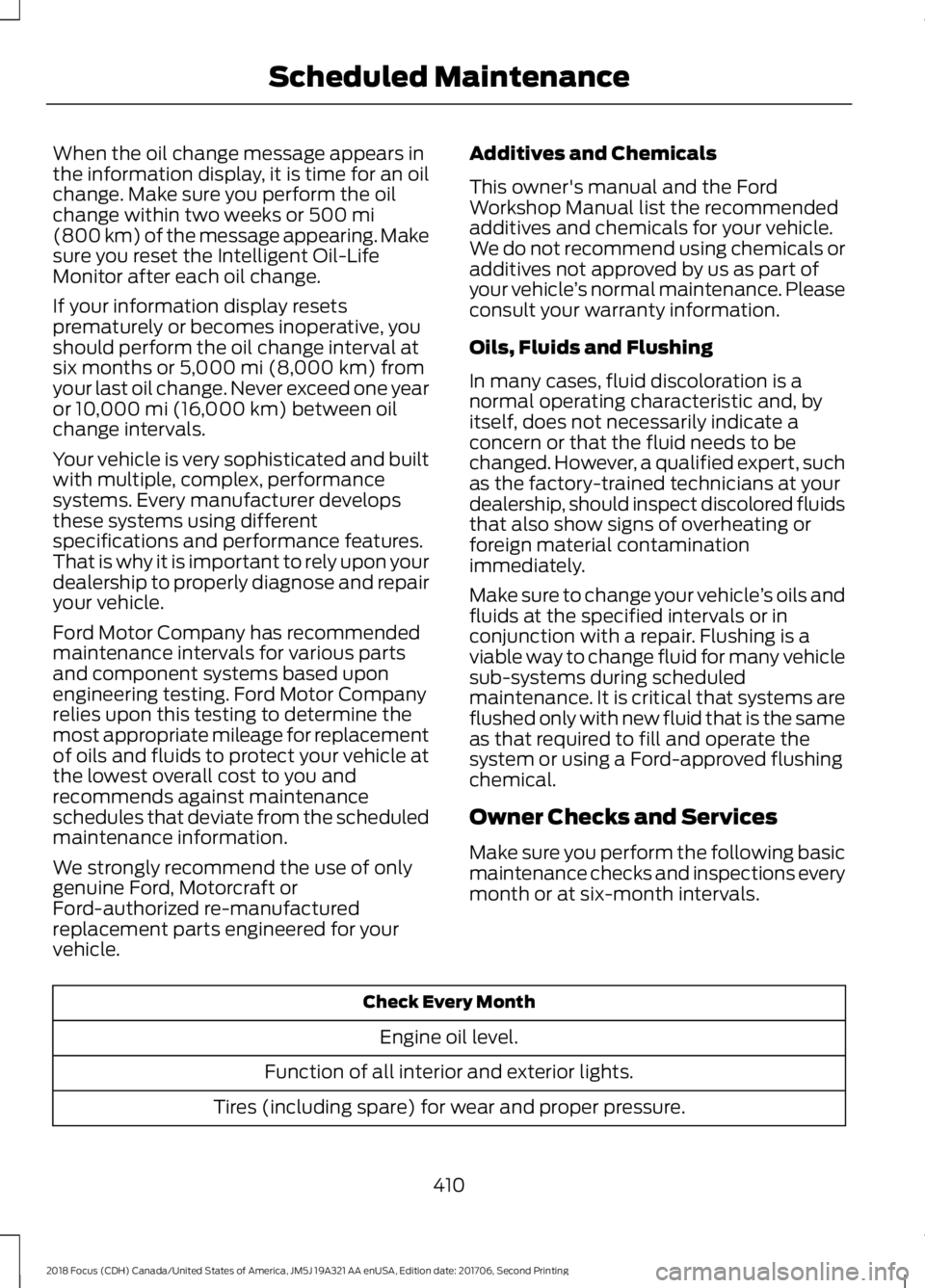
When the oil change message appears inthe information display, it is time for an oilchange. Make sure you perform the oilchange within two weeks or 500 mi(800 km) of the message appearing. Makesure you reset the Intelligent Oil-LifeMonitor after each oil change.
If your information display resetsprematurely or becomes inoperative, youshould perform the oil change interval atsix months or 5,000 mi (8,000 km) fromyour last oil change. Never exceed one yearor 10,000 mi (16,000 km) between oilchange intervals.
Your vehicle is very sophisticated and builtwith multiple, complex, performancesystems. Every manufacturer developsthese systems using differentspecifications and performance features.That is why it is important to rely upon yourdealership to properly diagnose and repairyour vehicle.
Ford Motor Company has recommendedmaintenance intervals for various partsand component systems based uponengineering testing. Ford Motor Companyrelies upon this testing to determine themost appropriate mileage for replacementof oils and fluids to protect your vehicle atthe lowest overall cost to you andrecommends against maintenanceschedules that deviate from the scheduledmaintenance information.
We strongly recommend the use of onlygenuine Ford, Motorcraft orFord-authorized re-manufacturedreplacement parts engineered for yourvehicle.
Additives and Chemicals
This owner's manual and the FordWorkshop Manual list the recommendedadditives and chemicals for your vehicle.We do not recommend using chemicals oradditives not approved by us as part ofyour vehicle’s normal maintenance. Pleaseconsult your warranty information.
Oils, Fluids and Flushing
In many cases, fluid discoloration is anormal operating characteristic and, byitself, does not necessarily indicate aconcern or that the fluid needs to bechanged. However, a qualified expert, suchas the factory-trained technicians at yourdealership, should inspect discolored fluidsthat also show signs of overheating orforeign material contaminationimmediately.
Make sure to change your vehicle’s oils andfluids at the specified intervals or inconjunction with a repair. Flushing is aviable way to change fluid for many vehiclesub-systems during scheduledmaintenance. It is critical that systems areflushed only with new fluid that is the sameas that required to fill and operate thesystem or using a Ford-approved flushingchemical.
Owner Checks and Services
Make sure you perform the following basicmaintenance checks and inspections everymonth or at six-month intervals.
Check Every Month
Engine oil level.
Function of all interior and exterior lights.
Tires (including spare) for wear and proper pressure.
4102018 Focus (CDH) Canada/United States of America, JM5J 19A321 AA enUSA, Edition date: 201706, Second PrintingScheduled Maintenance
Page 464 of 473

Clearing All MyKeys........................................57Climate Control............................................104Clutch Fluid Check - ManualTransmission................................................221Cold Weather Precautions........................186Coolant CheckSee: Engine Coolant Check.............................217Crash Sensors and Airbag Indicator........45Creating a MyKey...........................................56Programming/Changing ConfigurableSettings...............................................................56Cross Traffic Alert...........................................171Blocked Sensors..................................................172Switching the System Off and On................173System Errors........................................................173System Lights, Messages and AudibleAlerts...................................................................172System Limitations.............................................173Using the Cross Traffic Alert System............171Cruise Control..................................................72Principle of Operation.......................................162Cruise controlSee: Using Cruise Control................................162Customer Assistance..................................193
D
Data Recording..................................................9Event Data Recording..........................................10Service Data Recording........................................9Daytime Running Lamps.............................78Type 1 - Conventional(Non-Configurable)........................................78Type 2 - Configurable..........................................78Digital Radio...................................................291HD Radio Reception and StationTroubleshooting............................................292Direction Indicators.......................................80Doors and Locks............................................60Drive Belt Routing - 1.0LEcoBoost™.................................................235Drive Belt Routing - 2.0L...........................235Driver Alert......................................................164Principle of Operation.......................................164Using Driver Alert................................................164Driver and Passenger Airbags...................39Children and Airbags..........................................40
Proper Driver and Front Passenger SeatingAdjustment........................................................39Driver Knee Airbag.........................................44Driving Aids.....................................................164Driving at High Speed................................266Driving Hints...................................................186Driving Through Water...............................186DRLSee: Daytime Running Lamps.........................78
E
Eco Mode.........................................................173Resetting Eco Mode...........................................174Type 1.......................................................................174Economical Driving......................................186Electromagnetic Compatibility...............427Emission Law.................................................136Noise Emissions Warranty, ProhibitedTampering Acts and Maintenance..........137Tampering With a Noise ControlSystem...............................................................136End User License Agreement.................429VEHICLE SOFTWARE END USER LICENSEAGREEMENT (EULA) .................................429Engine Block Heater....................................125Using the Engine Block Heater......................126Engine Coolant Check.................................217Adding Coolant....................................................217Coolant Change..................................................219Engine Coolant TemperatureManagement..................................................220Fail-Safe Cooling................................................219Recycled Coolant................................................218Severe Climates..................................................219Engine Cooling Fan......................................216Engine Emission Control............................136Engine ImmobilizerSee: Passive Anti-Theft System....................68Engine Oil Check...........................................215Adding Engine Oil...............................................215Engine Oil Dipstick - 1.0LEcoBoost™..................................................215Engine Oil Dipstick - 2.0L...........................215Engine Specifications - 1.0LEcoBoost™.................................................268Engine Specifications - 2.0L...................269
4612018 Focus (CDH) Canada/United States of America, JM5J 19A321 AA enUSA, Edition date: 201706, Second PrintingIndex
Page 471 of 473
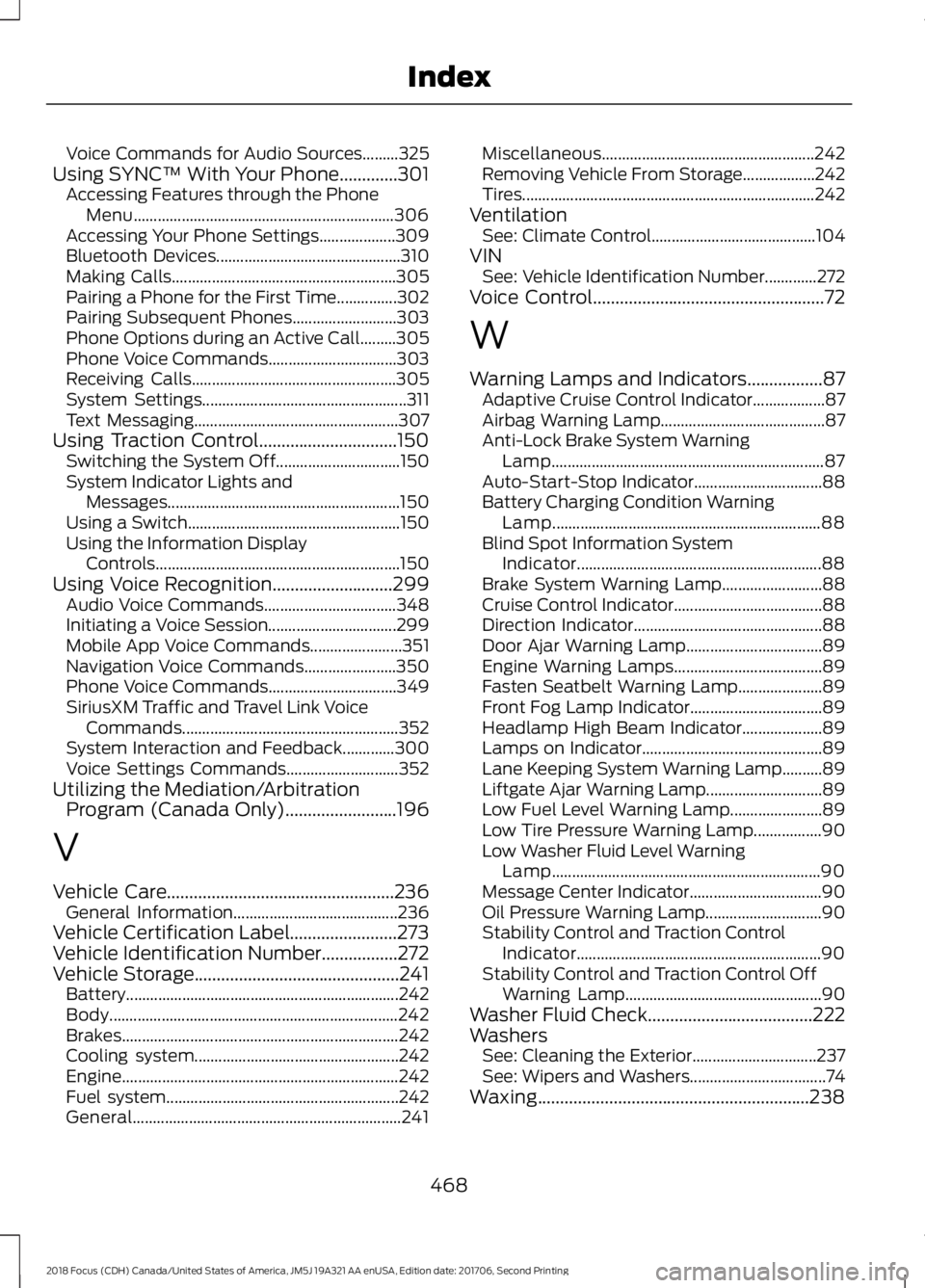
Voice Commands for Audio Sources.........325Using SYNC™ With Your Phone.............301Accessing Features through the PhoneMenu.................................................................306Accessing Your Phone Settings...................309Bluetooth Devices..............................................310Making Calls........................................................305Pairing a Phone for the First Time...............302Pairing Subsequent Phones..........................303Phone Options during an Active Call.........305Phone Voice Commands................................303Receiving Calls...................................................305System Settings...................................................311Text Messaging...................................................307Using Traction Control...............................150Switching the System Off...............................150System Indicator Lights andMessages..........................................................150Using a Switch.....................................................150Using the Information DisplayControls.............................................................150Using Voice Recognition...........................299Audio Voice Commands.................................348Initiating a Voice Session................................299Mobile App Voice Commands.......................351Navigation Voice Commands.......................350Phone Voice Commands................................349SiriusXM Traffic and Travel Link VoiceCommands......................................................352System Interaction and Feedback.............300Voice Settings Commands............................352Utilizing the Mediation/ArbitrationProgram (Canada Only).........................196
V
Vehicle Care...................................................236General Information.........................................236Vehicle Certification Label........................273Vehicle Identification Number.................272Vehicle Storage..............................................241Battery....................................................................242Body........................................................................242Brakes.....................................................................242Cooling system...................................................242Engine.....................................................................242Fuel system..........................................................242General...................................................................241
Miscellaneous.....................................................242Removing Vehicle From Storage..................242Tires.........................................................................242VentilationSee: Climate Control.........................................104VINSee: Vehicle Identification Number.............272Voice Control....................................................72
W
Warning Lamps and Indicators.................87Adaptive Cruise Control Indicator..................87Airbag Warning Lamp.........................................87Anti-Lock Brake System WarningLamp....................................................................87Auto-Start-Stop Indicator................................88Battery Charging Condition WarningLamp...................................................................88Blind Spot Information SystemIndicator.............................................................88Brake System Warning Lamp.........................88Cruise Control Indicator.....................................88Direction Indicator...............................................88Door Ajar Warning Lamp..................................89Engine Warning Lamps.....................................89Fasten Seatbelt Warning Lamp.....................89Front Fog Lamp Indicator.................................89Headlamp High Beam Indicator....................89Lamps on Indicator.............................................89Lane Keeping System Warning Lamp..........89Liftgate Ajar Warning Lamp.............................89Low Fuel Level Warning Lamp.......................89Low Tire Pressure Warning Lamp.................90Low Washer Fluid Level WarningLamp...................................................................90Message Center Indicator.................................90Oil Pressure Warning Lamp.............................90Stability Control and Traction ControlIndicator.............................................................90Stability Control and Traction Control OffWarning Lamp.................................................90Washer Fluid Check.....................................222WashersSee: Cleaning the Exterior...............................237See: Wipers and Washers..................................74Waxing.............................................................238
4682018 Focus (CDH) Canada/United States of America, JM5J 19A321 AA enUSA, Edition date: 201706, Second PrintingIndex