2018 FORD FOCUS climate control
[x] Cancel search: climate controlPage 262 of 473
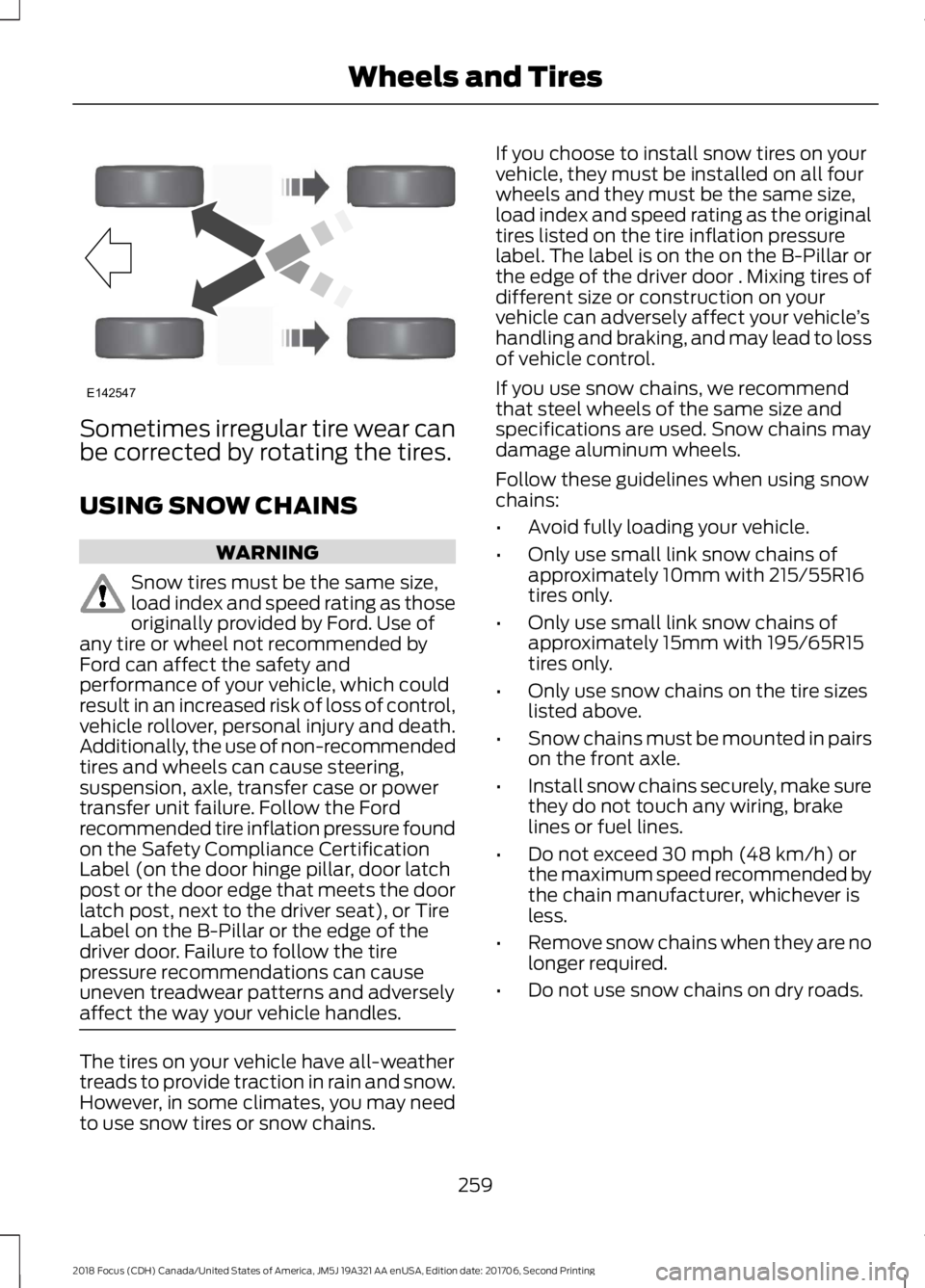
Sometimes irregular tire wear canbe corrected by rotating the tires.
USING SNOW CHAINS
WARNING
Snow tires must be the same size,load index and speed rating as thoseoriginally provided by Ford. Use ofany tire or wheel not recommended byFord can affect the safety andperformance of your vehicle, which couldresult in an increased risk of loss of control,vehicle rollover, personal injury and death.Additionally, the use of non-recommendedtires and wheels can cause steering,suspension, axle, transfer case or powertransfer unit failure. Follow the Fordrecommended tire inflation pressure foundon the Safety Compliance CertificationLabel (on the door hinge pillar, door latchpost or the door edge that meets the doorlatch post, next to the driver seat), or TireLabel on the B-Pillar or the edge of thedriver door. Failure to follow the tirepressure recommendations can causeuneven treadwear patterns and adverselyaffect the way your vehicle handles.
The tires on your vehicle have all-weathertreads to provide traction in rain and snow.However, in some climates, you may needto use snow tires or snow chains.
If you choose to install snow tires on yourvehicle, they must be installed on all fourwheels and they must be the same size,load index and speed rating as the originaltires listed on the tire inflation pressurelabel. The label is on the on the B-Pillar orthe edge of the driver door . Mixing tires ofdifferent size or construction on yourvehicle can adversely affect your vehicle’shandling and braking, and may lead to lossof vehicle control.
If you use snow chains, we recommendthat steel wheels of the same size andspecifications are used. Snow chains maydamage aluminum wheels.
Follow these guidelines when using snowchains:
•Avoid fully loading your vehicle.
•Only use small link snow chains ofapproximately 10mm with 215/55R16tires only.
•Only use small link snow chains ofapproximately 15mm with 195/65R15tires only.
•Only use snow chains on the tire sizeslisted above.
•Snow chains must be mounted in pairson the front axle.
•Install snow chains securely, make surethey do not touch any wiring, brakelines or fuel lines.
•Do not exceed 30 mph (48 km/h) orthe maximum speed recommended bythe chain manufacturer, whichever isless.
•Remove snow chains when they are nolonger required.
•Do not use snow chains on dry roads.
2592018 Focus (CDH) Canada/United States of America, JM5J 19A321 AA enUSA, Edition date: 201706, Second PrintingWheels and TiresE142547
Page 304 of 473
To adjust this setting press the voice button, when prompted say:
Action and DescriptionVoice Command
voice settings
Then any of the following:
When enabled, this feature will prompt youto confirm any voice initiated call commandprior to the call being placed.
phone confirmation on
The system will make a best guess; youmay still occasionally be asked to confirmsettings.
phone confirmation off
Changing the Voice Settings
In addition to using voice commands tochange the voice settings, you can also usethe menu in the audio display.
To change the voice settings press theMenu button then select:
Menu Item
SYNC-Settings
Voice settings
Note:Depending on the current climatecontrol settings, the fan speed mayautomatically go down while issuing voicecommands or while making and receivingphone calls via SYNC to reduce the amountof background noise in the vehicle. The fanspeed will automatically return to normaloperation once the voice session ends. Fanspeed can also be adjusted normally duringa voice session, simply press fan buttons (orturn fan knob) to increase or decrease fanspeed to desired setting.
To disable this automatic fan speedreduction feature during voice sessions,press and hold the climate control AC andRecirculated air buttons simultaneously,release and then increase fan speed within2 seconds. To re-enable this feature, repeatthe above sequence.
USING SYNC™ WITH YOUR
PHONE
Hands-free calling is one of the mainfeatures of SYNC. While the systemsupports a variety of features, many aredependent on your cellular phone'sfunctionality. At a minimum, most cellularphones with Bluetooth wireless technologysupport the following functions:
•Answering an incoming call.
•Ending a call.
•Using privacy mode.
•Dialing a number.
•Redialing.
•Call waiting notification.
•Caller ID.
3012018 Focus (CDH) Canada/United States of America, JM5J 19A321 AA enUSA, Edition date: 201706, Second PrintingSYNC™
Page 338 of 473

GENERAL INFORMATION
WARNING
Driving while distracted can result inloss of vehicle control, crash andinjury. We strongly recommend thatyou use extreme caution when using anydevice that may take your focus off theroad. Your primary responsibility is the safeoperation of your vehicle. We recommendagainst the use of any hand-held devicewhile driving and encourage the use ofvoice-operated systems when possible.Make sure you are aware of all applicablelocal laws that may affect the use ofelectronic devices while driving.
Getting to Know Your System
The SYNC 3 system allows you to interactwith a variety of features using thetouchscreen and voice commands. Byintegrating with your Bluetooth-enabledphone, the touchscreen provides easyinteraction with audio, multimedia, climatecontrol, navigation, and your phone's SYNCAppLink.
Using the Touchscreen
To operate the touchscreen, you cansimply touch the item or option that youwant to select. The button highlights whenyou select it.
The SYNC 3 layout allows you to quicklyselect the feature you wish to use.
3352018 Focus (CDH) Canada/United States of America, JM5J 19A321 AA enUSA, Edition date: 201706, Second PrintingSYNC™ 3E207614
Page 339 of 473

Action and DescriptionMenu ItemItem
This bar displays icons and messages pertaining to currentsystem activities including climate settings, voicecommands and phone functions such as text messages.
Status BarA
This button is available on the main screens. Pressing ittakes you to the home screen view.HomeB
This shows the current time. You can set the clock manuallyor have it controlled by the vehicle's GPS location. SeeSettings (page 379).
ClockC
This displays the current outside temperature.OutsideTemperatureD
You can touch any of the buttons on this bar to select afeature.Feature BarE
The touchscreen allows you quick accessto all of your comfort, navigation,communication and entertainmentoptions. Using the status and feature baryou can quickly select the feature you wantto use.
Note:Your system is equipped with afeature that allows you to access andcontrol audio features for 10 minutes afteryou switch the ignition off (and no doorsopen).
The Status Bar
Additional icons also display in the statusbar depending on market, vehicle optionsand current operation. If a feature is notactive, the icon does not display. Certainicons may move to the left or rightdepending on what options are active.
3362018 Focus (CDH) Canada/United States of America, JM5J 19A321 AA enUSA, Edition date: 201706, Second PrintingSYNC™ 3
Page 343 of 473
•SOUND: Press to access the Soundmenu where you can adjust sound andother audio settings.
•1-6: Press and hold to store or press toselect an AM, FM or SIRIUS memorypreset. See Audio System (page 281).
•DISP: Switch the display on or off. Youcan also touch the screen to switch thedisplay back on.
•Temperature, fan and climatecontrol buttons: Control thetemperature, fan speed or settings ofthe climate control system. SeeClimate Control (page 104).
911 Assist
WARNINGS
Unless the 911 Assist setting is set onbefore a crash, the system will notdial for help which could delayresponse time, potentially increasing therisk of serious injury or death after a crash.
Do not wait for 911 Assist to make anemergency call if you can do ityourself. Dial emergency servicesimmediately to avoid delayed responsetime which could increase the risk ofserious injury or death after a crash. If youdo not hear 911 Assist within five secondsof the crash, the system or phone may bedamaged or non-functional.
Always place your phone in a securelocation in your vehicle so it does notbecome a projectile or get damagedin a crash. Failure to do so may causeserious injury to someone or damage thephone which could prevent 911 Assist fromworking properly.
Note:The SYNC 911 Assist feature must beset on before the incident.
Note:The SYNC 911 Assist feature onlyoperates in the U.S., Canada or in a territoryin which 911 is the emergency number.
Note:Before setting this feature on, makesure that you read the 911 Assist PrivacyNotice later in this section for importantinformation.
Note:If any user sets 911 Assist to on or off,that setting applies for all paired phones. If911 Assist is switched off and the phone isconnected to SYNC, an icon displays on thestatus bar.
Note:Every phone operates differently.While SYNC 911 Assist works with mostcellular phones, some may have troubleusing this feature.
If a crash deploys an airbag (excludingknee airbags and rear inflatable safetybelts [if equipped]) or activates the fuelpump shut-off, your SYNC-equippedvehicle may be able to contact emergencyservices by dialing 911 through a paired andconnected Bluetooth-enabled phone. Youcan learn more about the 911 Assistfeature, by visiting:
Website
www.owner.ford.comwww.syncmyride.cawww.syncmaroute.ca
For important information about airbagdeployment and the fuel pump shut-offplease see the Supplementary Restrainsand Roadside Emergencies sections ofyour owner manual.
To switch 911 Assist on and off please viewthe settings information. See Settings(page 379).
To make sure that 911 Assist workscorrectly:
•SYNC must be powered and workingproperly at the time of the incident andthroughout feature activation and use.
•The 911 Assist feature must be set onbefore the incident.
3402018 Focus (CDH) Canada/United States of America, JM5J 19A321 AA enUSA, Edition date: 201706, Second PrintingSYNC™ 3
Page 356 of 473
Note:Depending on the current climatecontrol settings, the fan speed mayautomatically go down while issuing voicecommands or while making and receivingphone calls via SYNC to reduce the amountof background noise in the vehicle. The fanspeed will automatically return to normaloperation once the voice session ends. Fanspeed can also be adjusted normally duringa voice session, simply press fan buttons (orturn fan knob) to increase or decrease fanspeed to desired setting.
To disable this automatic fan speedreduction feature during voice sessions,press and hold the climate control AC andRecirculated air buttons simultaneously,release and then increase fan speed within2 seconds. To re-enable this feature, repeatthe above sequence.
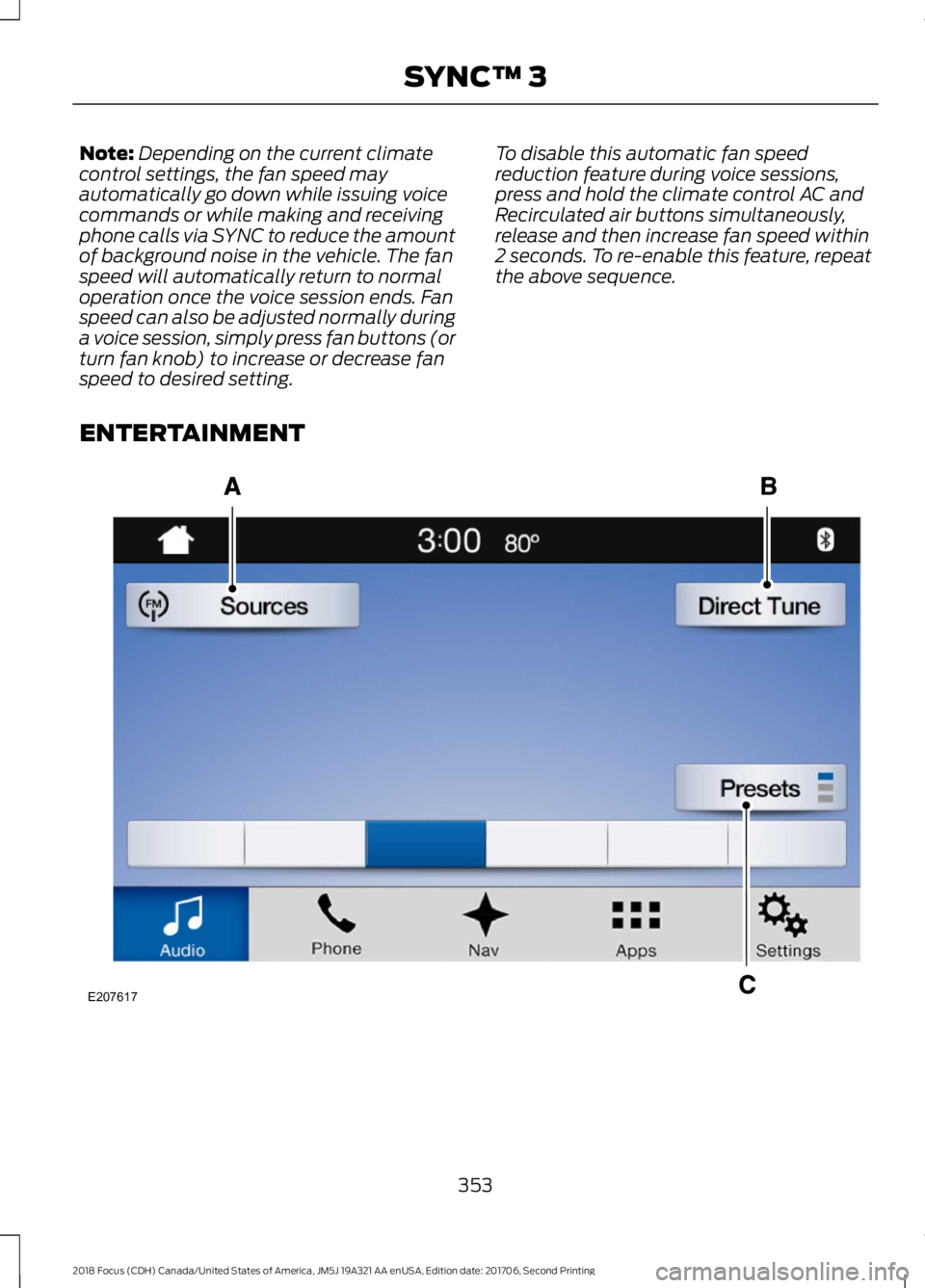
ENTERTAINMENT
3532018 Focus (CDH) Canada/United States of America, JM5J 19A321 AA enUSA, Edition date: 201706, Second PrintingSYNC™ 3E207617
Page 462 of 473

A
A/CSee: Climate Control.........................................104About This Manual...........................................7ABSSee: Brakes............................................................147ABS driving hintsSee: Hints on Driving With Anti-LockBrakes................................................................148Accessories...................................................405Exterior style.......................................................405Interior style.........................................................405Lifestyle.................................................................405Peace of mind....................................................405AccessoriesSee: Replacement PartsRecommendation............................................12Active Park Assist.........................................155Deactivating the Active Park AssistFeature...............................................................157Parallel Parking Assist......................................155Troubleshooting the System..........................158Adjusting the Headlamps.........................225Horizontal Aim Adjustment...........................226Vertical Aim Adjustment.................................225Adjusting the Steering Wheel.....................71Airbag Disposal..............................................46Air ConditioningSee: Climate Control.........................................104Air FilterSee: Changing the Engine Air Filter.............234AlarmSee: Anti-Theft Alarm........................................70Ambient Lighting.............................................81Anti-Theft Alarm............................................70Arming the Alarm.................................................70Disarming the Alarm...........................................70Appendices....................................................427Apps..................................................................376...................................................................................376SiriusXM Traffic and Travel Link...................378Audible Warnings and Indicators............90Fasten Safety Belt................................................91Headlamps On Warning Chime.....................90Key in Ignition Warning Chime........................90Keyless Warning Alert........................................90Low Fuel Minder....................................................91
Parking Brake On Warning Chime...................91Audio Control....................................................71Seek, Next or Previous........................................72Audio System.................................................281General Information..........................................281Audio Unit - Vehicles With: SatelliteRadio.............................................................289Audio Unit - Vehicles With: Sony AudioSystem..........................................................285Menu Structure..................................................286Audio Unit - Vehicles With: SYNC.........282Autolamps.........................................................77Windshield Wiper ActivatedHeadlamps.........................................................77Automatic Climate Control......................105Dual Zone Temperature Control...................107Single Zone Temperature Control...............106Temperature Control........................................106Automatic High Beam Control..................79Automatic High Beam Indicator....................80Overriding the System.......................................80Switching the System On and Off.................79Automatic Transmission............................142Automatic Transmission AdaptiveLearning............................................................146Brake-Shift Interlock.........................................145If Your Vehicle Gets Stuck In Mud orSnow..................................................................146SelectShift Automatic™Transmission...................................................143Understanding the Positions of YourAutomatic Transmission.............................143Automatic Transmission FluidCheck..............................................................221Auto-Start-Stop............................................127Limitations of Use..............................................128Switching the System On and Off...............128Using Auto-Start-Stop with a ManualTransmission....................................................127Using Auto-Start-Stop with an AutomaticTransmission....................................................127Auxiliary Power Points..................................11712 Volt DC Power Point.......................................117Location...................................................................117
4592018 Focus (CDH) Canada/United States of America, JM5J 19A321 AA enUSA, Edition date: 201706, Second PrintingIndex
Page 464 of 473

Clearing All MyKeys........................................57Climate Control............................................104Clutch Fluid Check - ManualTransmission................................................221Cold Weather Precautions........................186Coolant CheckSee: Engine Coolant Check.............................217Crash Sensors and Airbag Indicator........45Creating a MyKey...........................................56Programming/Changing ConfigurableSettings...............................................................56Cross Traffic Alert...........................................171Blocked Sensors..................................................172Switching the System Off and On................173System Errors........................................................173System Lights, Messages and AudibleAlerts...................................................................172System Limitations.............................................173Using the Cross Traffic Alert System............171Cruise Control..................................................72Principle of Operation.......................................162Cruise controlSee: Using Cruise Control................................162Customer Assistance..................................193
D
Data Recording..................................................9Event Data Recording..........................................10Service Data Recording........................................9Daytime Running Lamps.............................78Type 1 - Conventional(Non-Configurable)........................................78Type 2 - Configurable..........................................78Digital Radio...................................................291HD Radio Reception and StationTroubleshooting............................................292Direction Indicators.......................................80Doors and Locks............................................60Drive Belt Routing - 1.0LEcoBoost™.................................................235Drive Belt Routing - 2.0L...........................235Driver Alert......................................................164Principle of Operation.......................................164Using Driver Alert................................................164Driver and Passenger Airbags...................39Children and Airbags..........................................40
Proper Driver and Front Passenger SeatingAdjustment........................................................39Driver Knee Airbag.........................................44Driving Aids.....................................................164Driving at High Speed................................266Driving Hints...................................................186Driving Through Water...............................186DRLSee: Daytime Running Lamps.........................78
E
Eco Mode.........................................................173Resetting Eco Mode...........................................174Type 1.......................................................................174Economical Driving......................................186Electromagnetic Compatibility...............427Emission Law.................................................136Noise Emissions Warranty, ProhibitedTampering Acts and Maintenance..........137Tampering With a Noise ControlSystem...............................................................136End User License Agreement.................429VEHICLE SOFTWARE END USER LICENSEAGREEMENT (EULA) .................................429Engine Block Heater....................................125Using the Engine Block Heater......................126Engine Coolant Check.................................217Adding Coolant....................................................217Coolant Change..................................................219Engine Coolant TemperatureManagement..................................................220Fail-Safe Cooling................................................219Recycled Coolant................................................218Severe Climates..................................................219Engine Cooling Fan......................................216Engine Emission Control............................136Engine ImmobilizerSee: Passive Anti-Theft System....................68Engine Oil Check...........................................215Adding Engine Oil...............................................215Engine Oil Dipstick - 1.0LEcoBoost™..................................................215Engine Oil Dipstick - 2.0L...........................215Engine Specifications - 1.0LEcoBoost™.................................................268Engine Specifications - 2.0L...................269
4612018 Focus (CDH) Canada/United States of America, JM5J 19A321 AA enUSA, Edition date: 201706, Second PrintingIndex