Page 74 of 473
ADJUSTING THE STEERING
WHEEL
WARNING
Do not adjust the steering wheelwhen your vehicle is moving.
Note:Make sure that you are sitting in thecorrect position. See Sitting in the CorrectPosition (page 111).
1.Unlock the steering column.
2.Adjust the steering wheel to the desiredposition.
3.Lock the steering column.
AUDIO CONTROL
Select the required source on the audiounit.
You can operate the following functionswith the control:
Volume up.A
Seek up or next.B
712018 Focus (CDH) Canada/United States of America, JM5J 19A321 AA enUSA, Edition date: 201706, Second PrintingSteering Wheel122E95178 3E95179 E187452
Page 75 of 473
Volume down.C
Seek down or previous.D
Seek, Next or Previous
Press the seek button to:
•Tune the radio to the next or previousstored preset.
•Play the next or the previous track.
Press and hold the seek button to:
•Tune the radio to the next station upor down the frequency band.
•Seek through a track.
VOICE CONTROL
Press the button to select or deselect voicecontrol. See Using Voice Recognition(page 347).
CRUISE CONTROL
See Principle of Operation (page 162).
INFORMATION DISPLAY
CONTROL
See General Information (page 92).
722018 Focus (CDH) Canada/United States of America, JM5J 19A321 AA enUSA, Edition date: 201706, Second PrintingSteering WheelE186744 E144500 E188902
Page 76 of 473
HEATED STEERING WHEEL (If
Equipped)
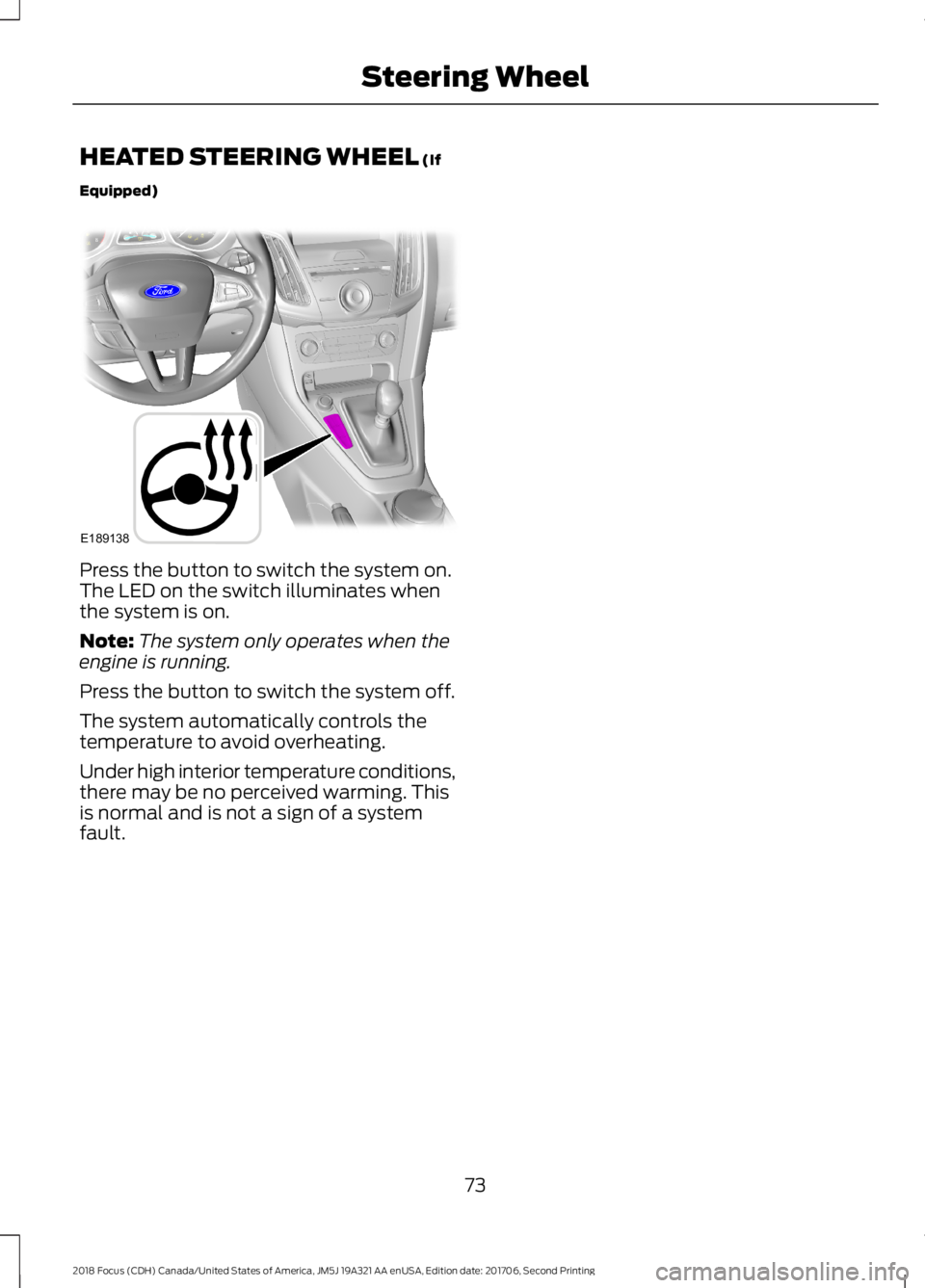
Press the button to switch the system on.The LED on the switch illuminates whenthe system is on.
Note:The system only operates when theengine is running.
Press the button to switch the system off.
The system automatically controls thetemperature to avoid overheating.
Under high interior temperature conditions,there may be no perceived warming. Thisis normal and is not a sign of a systemfault.
732018 Focus (CDH) Canada/United States of America, JM5J 19A321 AA enUSA, Edition date: 201706, Second PrintingSteering WheelE189138
Page 95 of 473
GENERAL INFORMATION
WARNING
Driving while distracted can result inloss of vehicle control, crash andinjury. We strongly recommend thatyou use extreme caution when using anydevice that may take your focus off theroad. Your primary responsibility is the safeoperation of your vehicle. We recommendagainst the use of any hand-held devicewhile driving and encourage the use ofvoice-operated systems when possible.Make sure you are aware of all applicablelocal laws that may affect the use ofelectronic devices while driving.
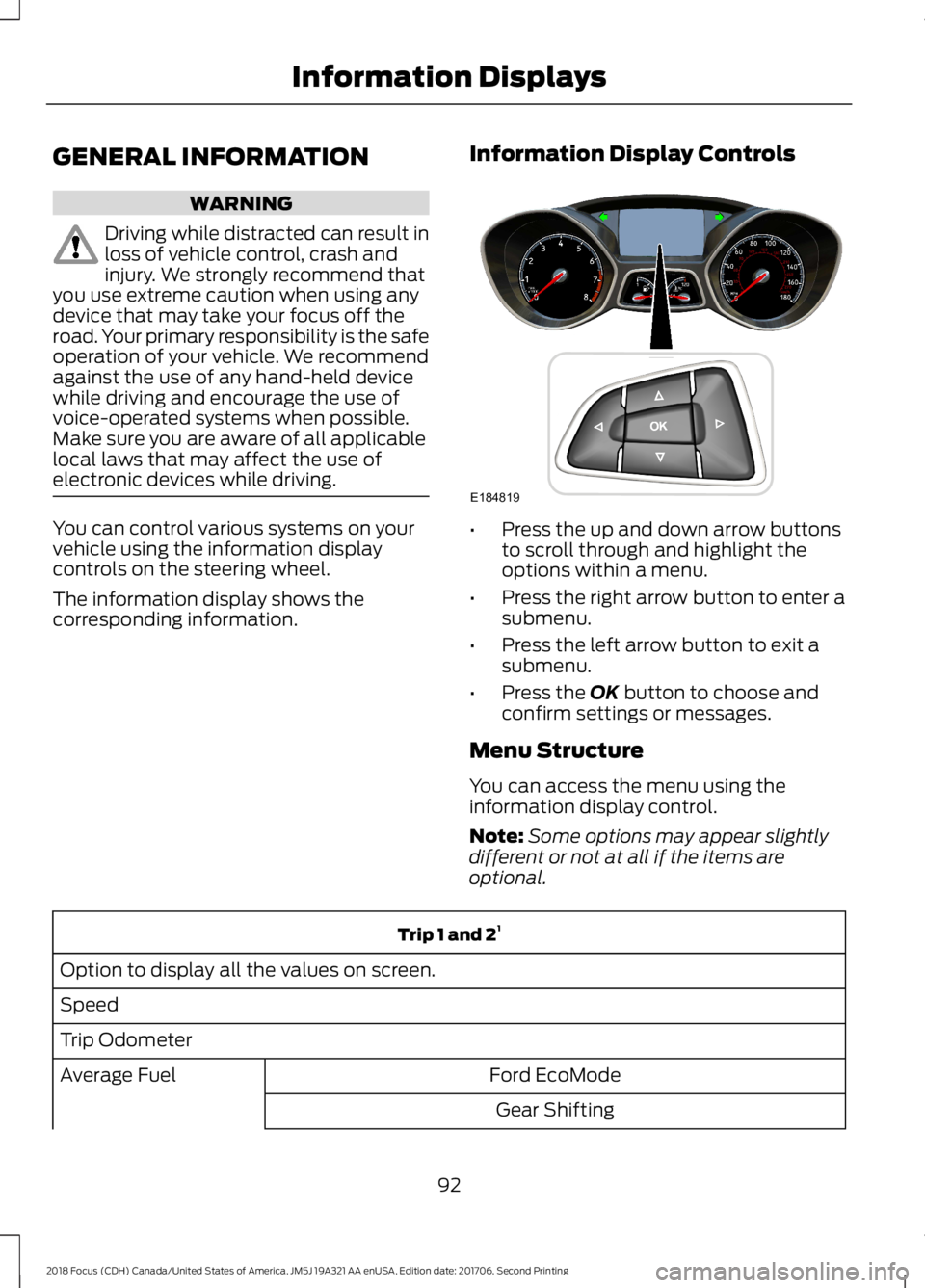
You can control various systems on yourvehicle using the information displaycontrols on the steering wheel.
The information display shows thecorresponding information.
Information Display Controls
•Press the up and down arrow buttonsto scroll through and highlight theoptions within a menu.
•Press the right arrow button to enter asubmenu.
•Press the left arrow button to exit asubmenu.
•Press the OK button to choose andconfirm settings or messages.
Menu Structure
You can access the menu using theinformation display control.
Note:Some options may appear slightlydifferent or not at all if the items areoptional.
Trip 1 and 21
Option to display all the values on screen.
Speed
Trip Odometer
Ford EcoModeAverage Fuel
Gear Shifting
922018 Focus (CDH) Canada/United States of America, JM5J 19A321 AA enUSA, Edition date: 201706, Second PrintingInformation DisplaysE184819
Page 97 of 473
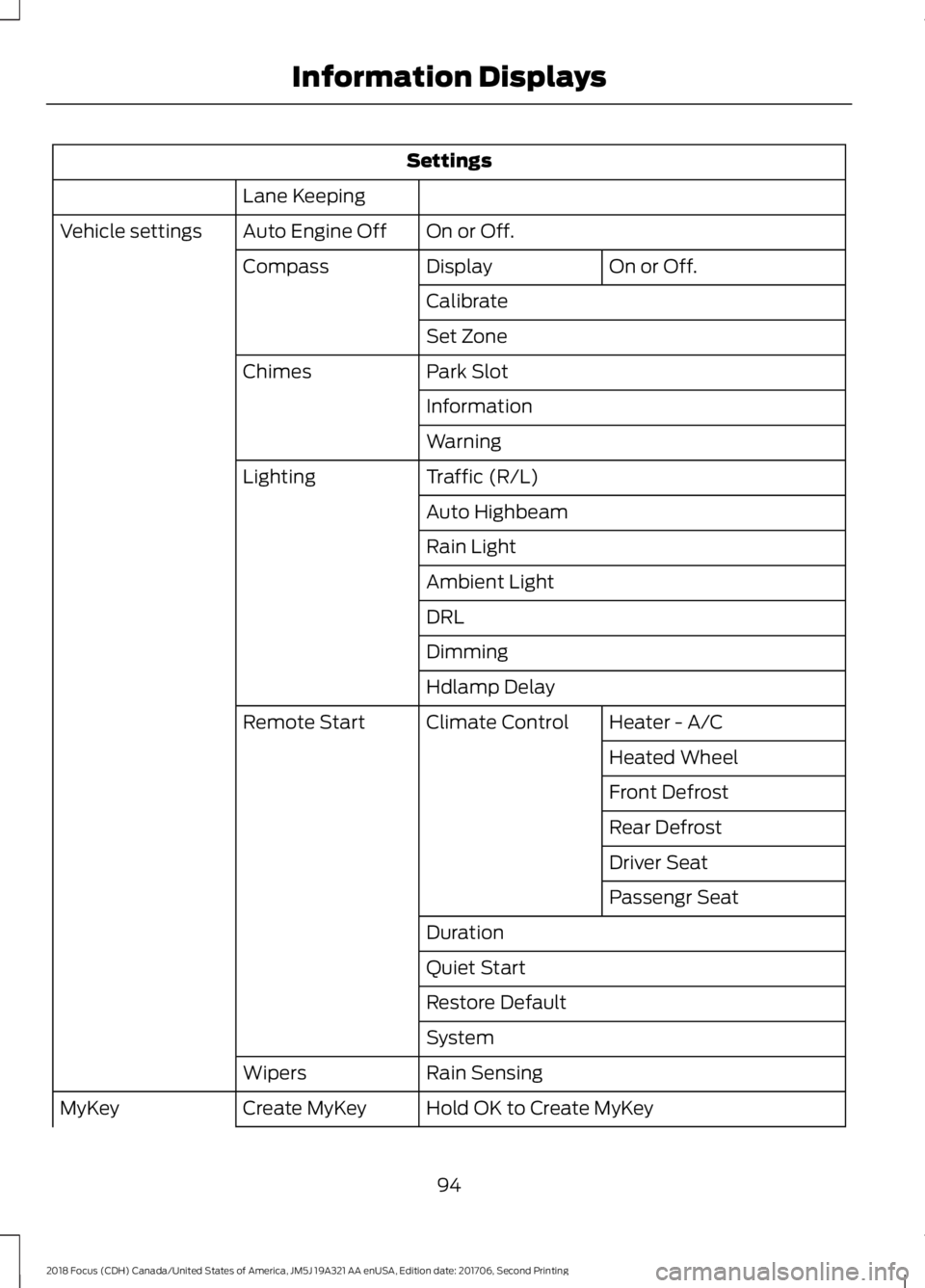
Settings
Lane Keeping
On or Off.Auto Engine OffVehicle settings
On or Off.DisplayCompass
Calibrate
Set Zone
Park SlotChimes
Information
Warning
Traffic (R/L)Lighting
Auto Highbeam
Rain Light
Ambient Light
DRL
Dimming
Hdlamp Delay
Heater - A/CClimate ControlRemote Start
Heated Wheel
Front Defrost
Rear Defrost
Driver Seat
Passengr Seat
Duration
Quiet Start
Restore Default
System
Rain SensingWipers
Hold OK to Create MyKeyCreate MyKeyMyKey
942018 Focus (CDH) Canada/United States of America, JM5J 19A321 AA enUSA, Edition date: 201706, Second PrintingInformation Displays
Page 105 of 473
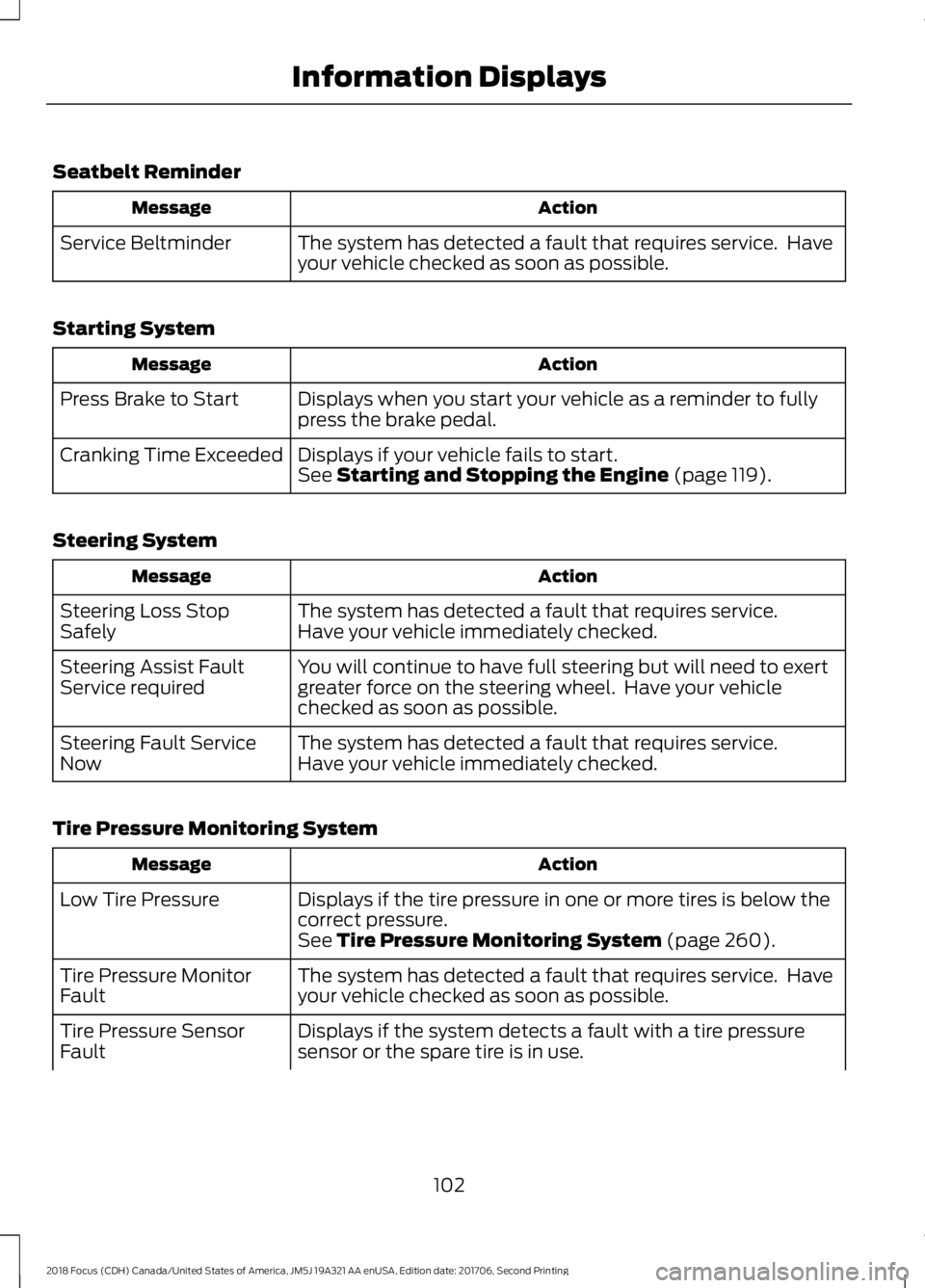
Seatbelt Reminder
ActionMessage
The system has detected a fault that requires service. Haveyour vehicle checked as soon as possible.Service Beltminder
Starting System
ActionMessage
Displays when you start your vehicle as a reminder to fullypress the brake pedal.Press Brake to Start
Displays if your vehicle fails to start.Cranking Time ExceededSee Starting and Stopping the Engine (page 119).
Steering System
ActionMessage
The system has detected a fault that requires service.Steering Loss StopSafelyHave your vehicle immediately checked.
You will continue to have full steering but will need to exertgreater force on the steering wheel. Have your vehiclechecked as soon as possible.
Steering Assist FaultService required
The system has detected a fault that requires service.Steering Fault ServiceNowHave your vehicle immediately checked.
Tire Pressure Monitoring System
ActionMessage
Displays if the tire pressure in one or more tires is below thecorrect pressure.Low Tire Pressure
See Tire Pressure Monitoring System (page 260).
The system has detected a fault that requires service. Haveyour vehicle checked as soon as possible.Tire Pressure MonitorFault
Displays if the system detects a fault with a tire pressuresensor or the spare tire is in use.Tire Pressure SensorFault
1022018 Focus (CDH) Canada/United States of America, JM5J 19A321 AA enUSA, Edition date: 201706, Second PrintingInformation Displays
Page 113 of 473
Replace the filter at regular intervals.
For additional cabin air filter information,or to replace the filter, see an authorizeddealer.
REMOTE START
The climate control system adjusts thecabin temperature during remote start.
You cannot adjust the system duringremote start operation. Switch on theignition to return the system to its previoussettings. You can now make adjustments.You need to switch on certainvehicle-dependent features, such as:
•Heated seats.
•Heated mirrors.
•Heated rear window.
•Heated steering wheel.
You can adjust the settings using theinformation display controls. SeeInformation Displays (page 92).
Automatic Settings
You can set the climate control to operatein AUTO mode through the informationdisplay setting: Remote Start > ClimateControl > Heater-A/C > Auto. The climatecontrol system automatically sets theinterior temperature to 72°F (22°C).
In hot weather, the system is set to 72°F(22°C). Cooled seats are set to high (ifavailable, and selected to AUTO in theinformation display).
In cold weather, the system is set to 72°F(22°C). The rear defroster and heatedmirrors automatically turn on.
Last Settings
You can set the climate control to operateusing the last climate control settingsthrough the information display setting:Remote Start > Climate Control >Heater–A/C > Last Settings. The climatecontrol system automatically uses thesettings last selected before you turnedoff the vehicle.
Heated and Cooled Devices
Heated devices typically switch on duringcold weather, and cooled devices duringhot weather.
1102018 Focus (CDH) Canada/United States of America, JM5J 19A321 AA enUSA, Edition date: 201706, Second PrintingClimate Control
Page 114 of 473
SITTING IN THE CORRECT
POSITION
WARNINGS
Do not recline the seatback too faras this can cause the occupant toslide under the seatbelt, resulting inserious injury in the event of a collision.
Always sit upright against yourseatback with your feet on the floor.
Do not place objects higher than thetop of the seat backrest. Failure tofollow this instruction could result inpersonal injury or death in the event of asudden stop or crash.
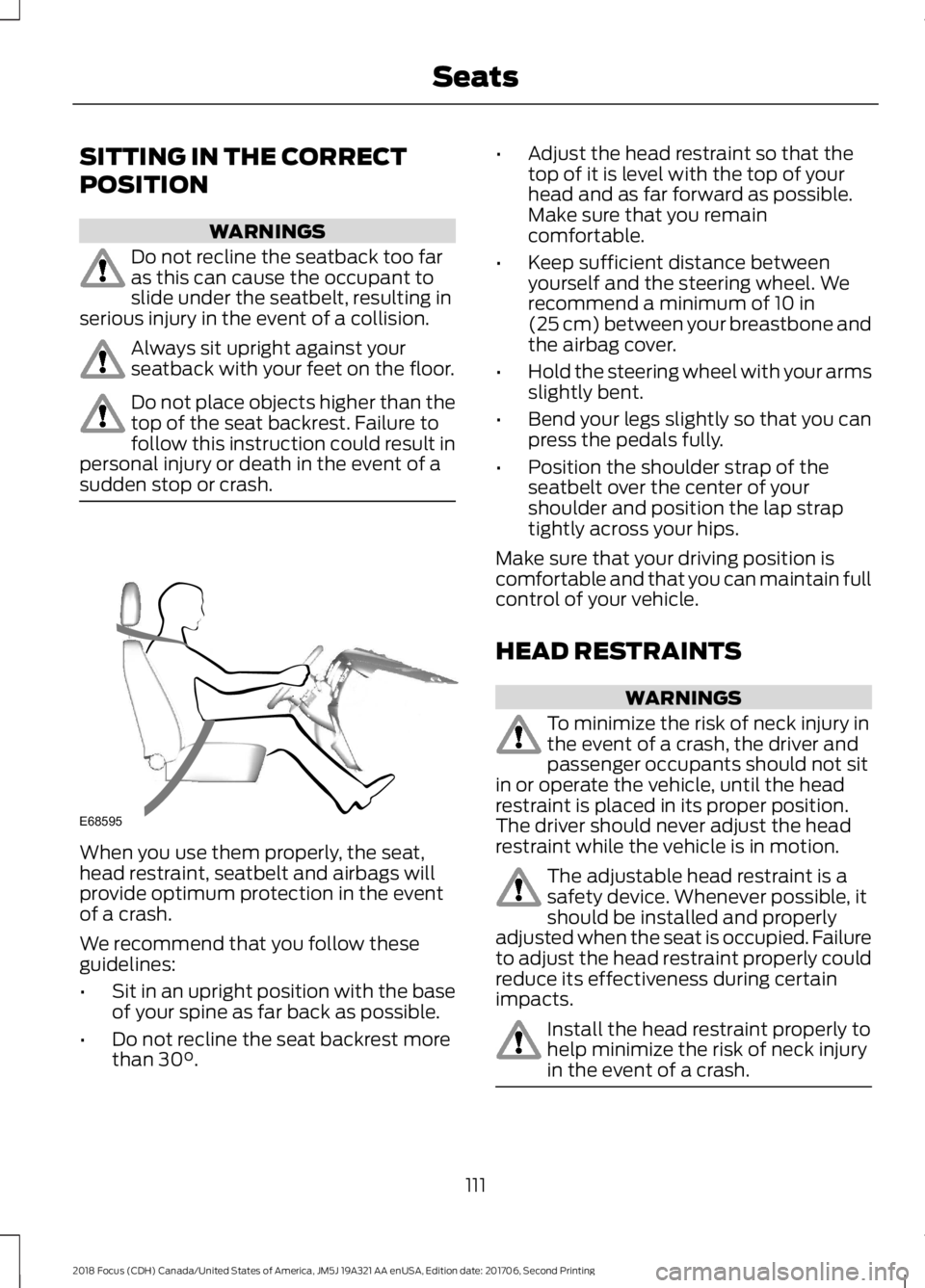
When you use them properly, the seat,head restraint, seatbelt and airbags willprovide optimum protection in the eventof a crash.
We recommend that you follow theseguidelines:
•Sit in an upright position with the baseof your spine as far back as possible.
•Do not recline the seat backrest morethan 30°.
•Adjust the head restraint so that thetop of it is level with the top of yourhead and as far forward as possible.Make sure that you remaincomfortable.
•Keep sufficient distance betweenyourself and the steering wheel. Werecommend a minimum of 10 in(25 cm) between your breastbone andthe airbag cover.
•Hold the steering wheel with your armsslightly bent.
•Bend your legs slightly so that you canpress the pedals fully.
•Position the shoulder strap of theseatbelt over the center of yourshoulder and position the lap straptightly across your hips.
Make sure that your driving position iscomfortable and that you can maintain fullcontrol of your vehicle.
HEAD RESTRAINTS
WARNINGS
To minimize the risk of neck injury inthe event of a crash, the driver andpassenger occupants should not sitin or operate the vehicle, until the headrestraint is placed in its proper position.The driver should never adjust the headrestraint while the vehicle is in motion.
The adjustable head restraint is asafety device. Whenever possible, itshould be installed and properlyadjusted when the seat is occupied. Failureto adjust the head restraint properly couldreduce its effectiveness during certainimpacts.
Install the head restraint properly tohelp minimize the risk of neck injuryin the event of a crash.
1112018 Focus (CDH) Canada/United States of America, JM5J 19A321 AA enUSA, Edition date: 201706, Second PrintingSeatsE68595