2018 FORD FOCUS instrument panel
[x] Cancel search: instrument panelPage 109 of 473
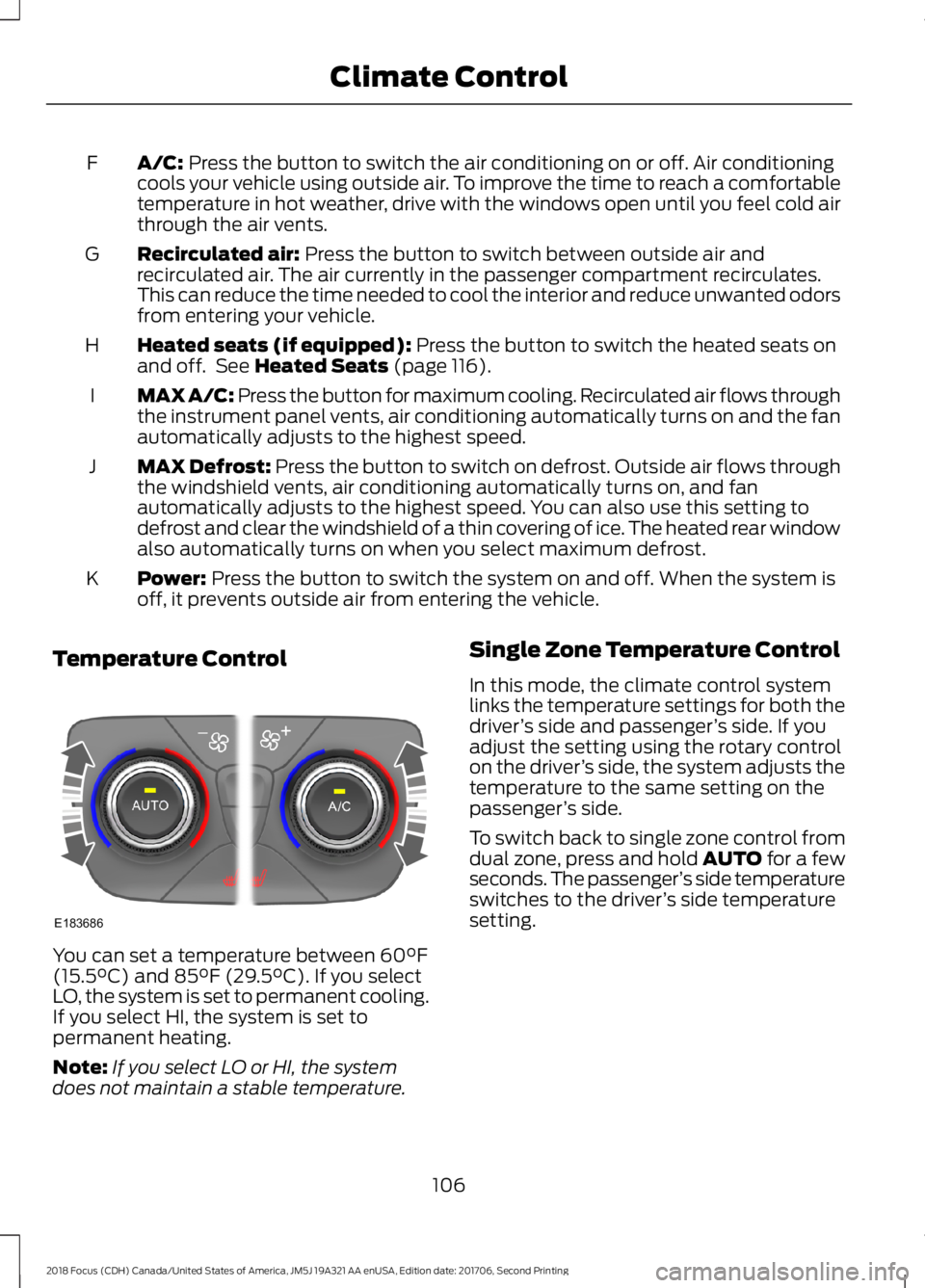
A/C: Press the button to switch the air conditioning on or off. Air conditioningcools your vehicle using outside air. To improve the time to reach a comfortabletemperature in hot weather, drive with the windows open until you feel cold airthrough the air vents.
F
Recirculated air: Press the button to switch between outside air andrecirculated air. The air currently in the passenger compartment recirculates.This can reduce the time needed to cool the interior and reduce unwanted odorsfrom entering your vehicle.
G
Heated seats (if equipped): Press the button to switch the heated seats onand off. See Heated Seats (page 116).H
MAX A/C: Press the button for maximum cooling. Recirculated air flows throughthe instrument panel vents, air conditioning automatically turns on and the fanautomatically adjusts to the highest speed.
I
MAX Defrost: Press the button to switch on defrost. Outside air flows throughthe windshield vents, air conditioning automatically turns on, and fanautomatically adjusts to the highest speed. You can also use this setting todefrost and clear the windshield of a thin covering of ice. The heated rear windowalso automatically turns on when you select maximum defrost.
J
Power: Press the button to switch the system on and off. When the system isoff, it prevents outside air from entering the vehicle.K
Temperature Control
You can set a temperature between 60°F(15.5°C) and 85°F (29.5°C). If you selectLO, the system is set to permanent cooling.If you select HI, the system is set topermanent heating.
Note:If you select LO or HI, the systemdoes not maintain a stable temperature.
Single Zone Temperature Control
In this mode, the climate control systemlinks the temperature settings for both thedriver’s side and passenger’s side. If youadjust the setting using the rotary controlon the driver’s side, the system adjusts thetemperature to the same setting on thepassenger’s side.
To switch back to single zone control fromdual zone, press and hold AUTO for a fewseconds. The passenger’s side temperatureswitches to the driver’s side temperaturesetting.
1062018 Focus (CDH) Canada/United States of America, JM5J 19A321 AA enUSA, Edition date: 201706, Second PrintingClimate ControlE183686
Page 110 of 473
Dual Zone Temperature Control
Select a temperature for the passenger’sside using the rotary control on thepassenger’s side. Single zone temperaturecontrol automatically switches off. Thetemperature on the driver’s side remainsunchanged. You can now adjust the driver’sside and passenger’s side temperaturesindependently. The display shows thetemperature settings for each side.
HINTS ON CONTROLLING THE
INTERIOR CLIMATE
General Hints
Note:Prolonged use of recirculated air maycause the windows to fog up.
Note:To reduce humidity build-up insideyour vehicle, do not drive with the systemswitched off or with recirculated air alwaysswitched on.
Note:Do not place objects under the frontseats as this may interfere with the airflowto the rear seats.
Note:Remove any snow, ice or leaves fromthe air intake area at the base of thewindshield.
Note:To improve the time to reach comfortin hot weather, drive with the windows fullyopen until you feel cold air through the airvents.
Manual Climate Control
Note:To reduce fogging of the windshieldduring humid weather, adjust the airdistribution control to the windshield airvents position.
Automatic Climate Control
Note:Adjusting the settings when yourvehicle interior is extremely hot or cold isnot necessary. The system automaticallyadjusts to heat or cool the cabin to yourselected temperature as quickly as possible.For the system to function efficiently, theinstrument panel and side air vents shouldbe fully open.
Note:If you select AUTO during coldoutside temperatures, the system directsairflow to the windshield and side windowvents. In addition, the fan may run at aslower speed until the engine warms up.
Note:If you select AUTO during hot outsidetemperatures, or when the inside of thevehicle is hot, the system automatically usesrecirculated air to maximize interior cooling.When the interior reaches the selectedtemperature, the system automaticallyswitches to using outside air.
Heating the Interior Quickly
Vehicle with automatic climate controlVehicle with manual climate control
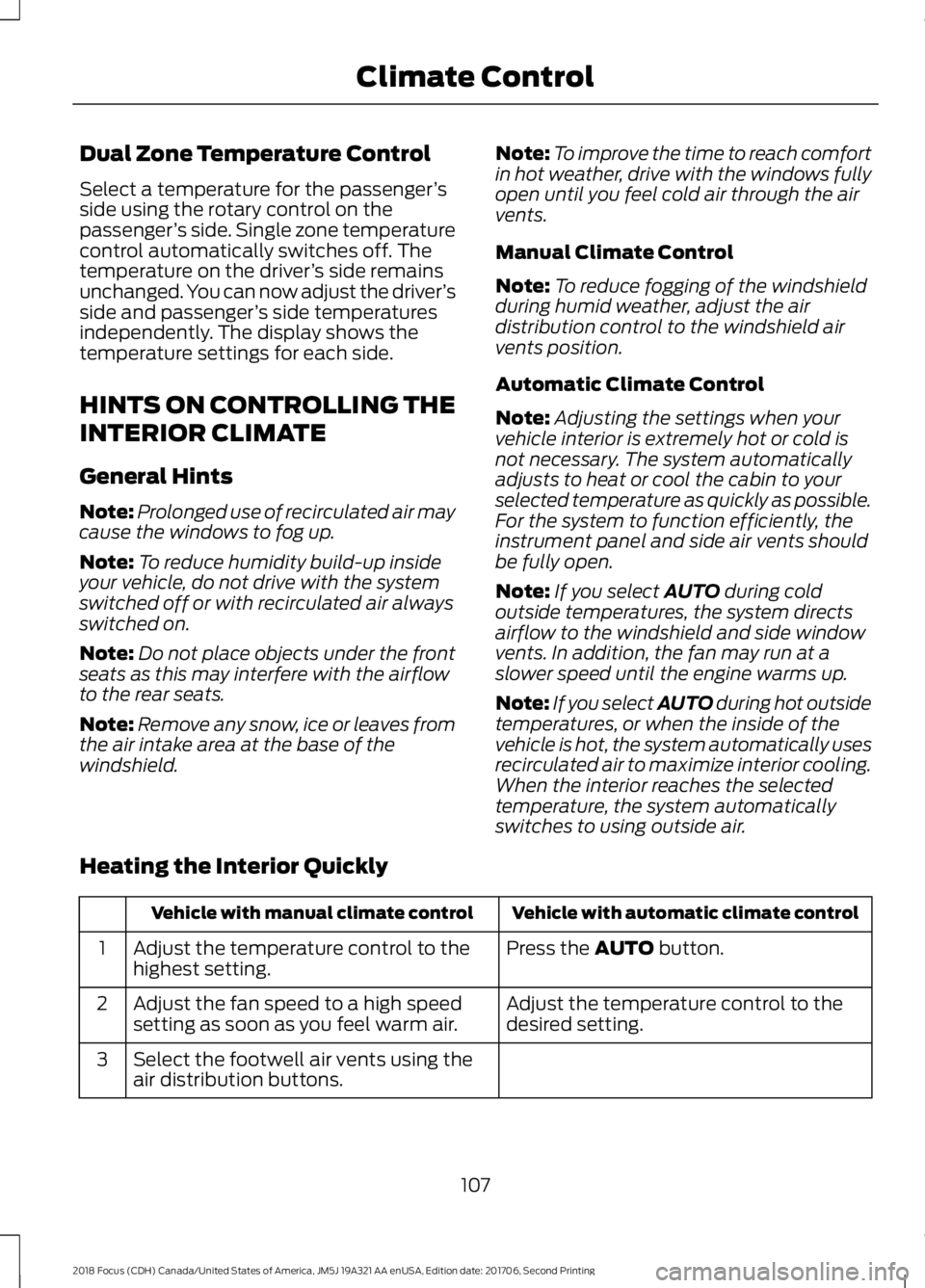
Press the AUTO button.Adjust the temperature control to thehighest setting.1
Adjust the temperature control to thedesired setting.Adjust the fan speed to a high speedsetting as soon as you feel warm air.2
Select the footwell air vents using theair distribution buttons.3
1072018 Focus (CDH) Canada/United States of America, JM5J 19A321 AA enUSA, Edition date: 201706, Second PrintingClimate Control
Page 111 of 473
Recommended Settings for Heating
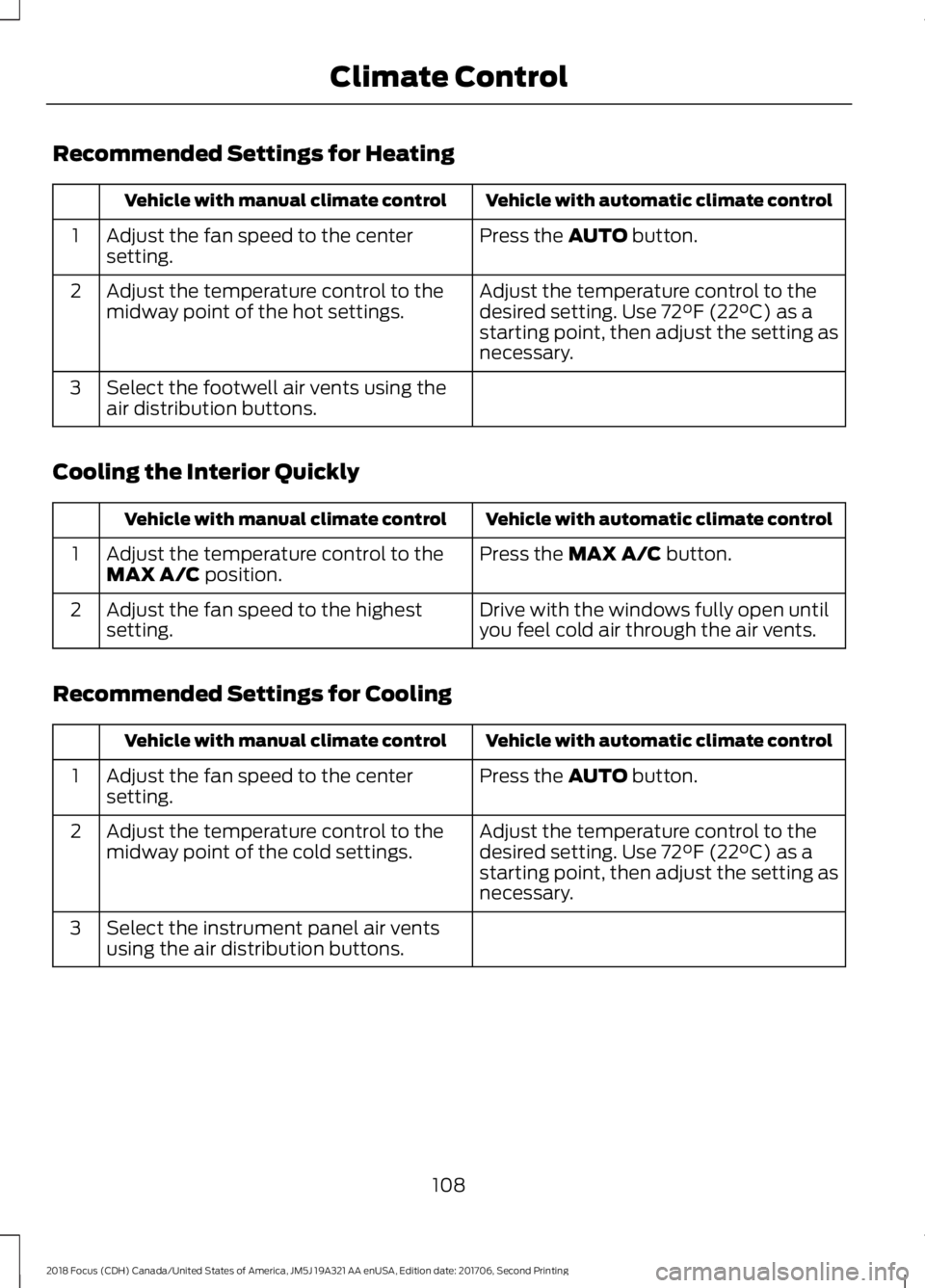
Vehicle with automatic climate controlVehicle with manual climate control
Press the AUTO button.Adjust the fan speed to the centersetting.1
Adjust the temperature control to thedesired setting. Use 72°F (22°C) as astarting point, then adjust the setting asnecessary.
Adjust the temperature control to themidway point of the hot settings.2
Select the footwell air vents using theair distribution buttons.3
Cooling the Interior Quickly
Vehicle with automatic climate controlVehicle with manual climate control
Press the MAX A/C button.Adjust the temperature control to theMAX A/C position.1
Drive with the windows fully open untilyou feel cold air through the air vents.Adjust the fan speed to the highestsetting.2
Recommended Settings for Cooling
Vehicle with automatic climate controlVehicle with manual climate control
Press the AUTO button.Adjust the fan speed to the centersetting.1
Adjust the temperature control to thedesired setting. Use 72°F (22°C) as astarting point, then adjust the setting asnecessary.
Adjust the temperature control to themidway point of the cold settings.2
Select the instrument panel air ventsusing the air distribution buttons.3
1082018 Focus (CDH) Canada/United States of America, JM5J 19A321 AA enUSA, Edition date: 201706, Second PrintingClimate Control
Page 123 of 473
Switching the Ignition On toAccessory Mode
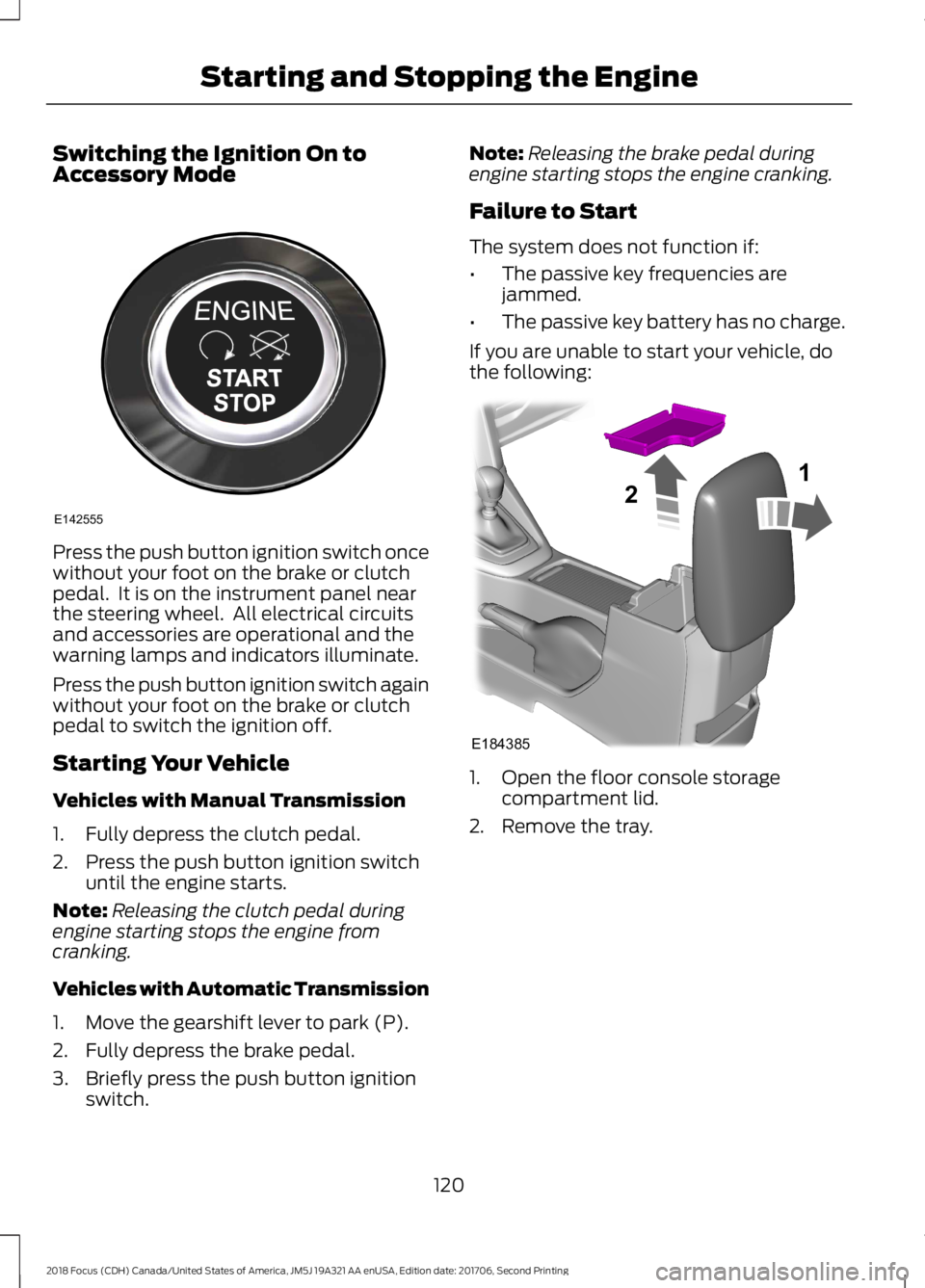
Press the push button ignition switch oncewithout your foot on the brake or clutchpedal. It is on the instrument panel nearthe steering wheel. All electrical circuitsand accessories are operational and thewarning lamps and indicators illuminate.
Press the push button ignition switch againwithout your foot on the brake or clutchpedal to switch the ignition off.
Starting Your Vehicle
Vehicles with Manual Transmission
1.Fully depress the clutch pedal.
2.Press the push button ignition switchuntil the engine starts.
Note:Releasing the clutch pedal duringengine starting stops the engine fromcranking.
Vehicles with Automatic Transmission
1.Move the gearshift lever to park (P).
2.Fully depress the brake pedal.
3.Briefly press the push button ignitionswitch.
Note:Releasing the brake pedal duringengine starting stops the engine cranking.
Failure to Start
The system does not function if:
•The passive key frequencies arejammed.
•The passive key battery has no charge.
If you are unable to start your vehicle, dothe following:
1.Open the floor console storagecompartment lid.
2.Remove the tray.
1202018 Focus (CDH) Canada/United States of America, JM5J 19A321 AA enUSA, Edition date: 201706, Second PrintingStarting and Stopping the EngineE142555 E18438521
Page 153 of 473
PRINCIPLE OF OPERATION
The traction control system helps avoiddrive wheel spin and loss of traction.
If your vehicle begins to slide, the systemapplies the brakes to individual wheelsand, when needed, reduces engine powerat the same time. If the wheels spin whenaccelerating on slippery or loose surfaces,the system reduces engine power in orderto increase traction.
USING TRACTION CONTROL
WARNING
The stability and traction controllight illuminates steadily if thesystem detects a failure. Make sureyou did not manually disable the tractioncontrol system using the informationdisplay controls or the switch. If thestability control and traction control lightis still illuminating steadily, have thesystem serviced by an authorized dealerimmediately. Operating your vehicle withthe traction control disabled could lead toan increased risk of loss of vehicle control,vehicle rollover, personal injury and death.
The system automatically turns on eachtime you switch the ignition on.
If your vehicle is stuck in mud or snow,switching traction control off may bebeneficial as this allows the wheels to spin.
Note:When you switch traction control off,stability control remains fully active.
Switching the System Off
When you switch the system off or on, amessage appears in the informationdisplay showing system status.
You can switch the system off by eitherusing the information display controls orthe switch.
Using the Information DisplayControls
You can switch this feature off or on in theinformation display. See GeneralInformation (page 92).
Using a Switch (If Equipped)
Use the traction control switch on theinstrument panel to switch the system offor on.
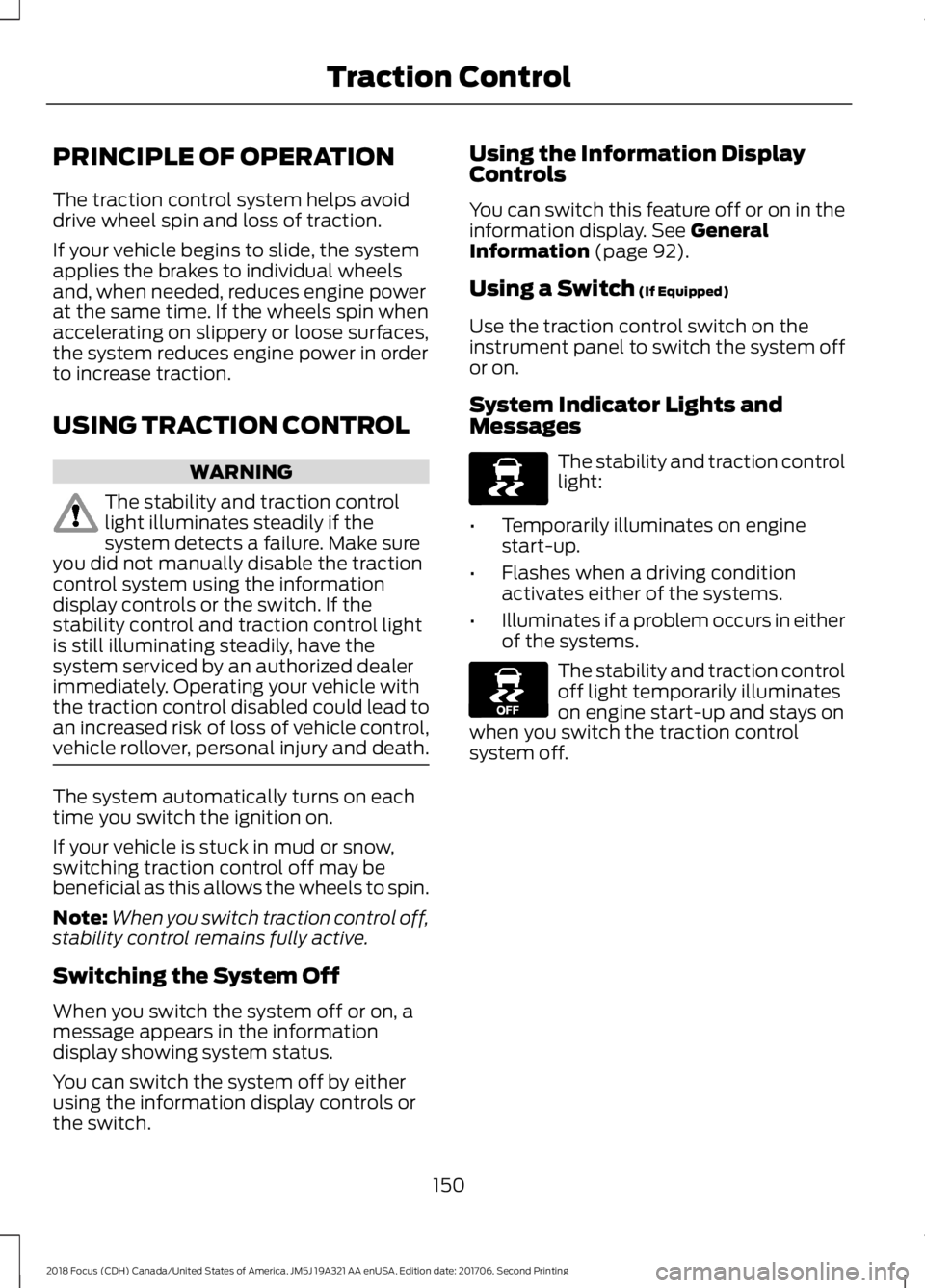
System Indicator Lights andMessages
The stability and traction controllight:
•Temporarily illuminates on enginestart-up.
•Flashes when a driving conditionactivates either of the systems.
•Illuminates if a problem occurs in eitherof the systems.
The stability and traction controloff light temporarily illuminateson engine start-up and stays onwhen you switch the traction controlsystem off.
1502018 Focus (CDH) Canada/United States of America, JM5J 19A321 AA enUSA, Edition date: 201706, Second PrintingTraction ControlE138639 E130458
Page 192 of 473
Vehicles Sold in Canada: GettingRoadside Assistance
To fully assist you should you have avehicle concern, Ford Motor Company ofCanada, Limited offers a complimentaryroadside assistance program. Thisprogram is eligible within Canada or thecontinental United States.
This program is separate from the NewVehicle Limited Warranty, but the coverageis concurrent with the powertrain coverageperiod of your vehicle.
Canadian customers who require roadsideassistance, call 1-800-665-2006.
Vehicles Sold in Canada: UsingRoadside Assistance
Complete the roadside assistanceidentification card and place it in yourwallet for quick reference.
In Canada, this card is found in theWarranty Guide in the glove compartmentof your vehicle.
Vehicles Sold in Canada: RoadsideAssistance Program Coverage
The service is available 24 hours a day,seven days a week.
Canadian roadside coverage and benefitsmay differ from the U.S. coverage.
If you require more information, pleaserefer to the coverage section of yourwarranty guide, call us in Canada at1-800-665-2006, or visit our website atwww.ford.ca.
HAZARD FLASHERS
Note:If used when the vehicle is notrunning, the battery will lose charge. Theremay be insufficient power to restart yourvehicle.
The hazard warning button islocated on the instrument panel.Use it when your vehicle iscreating a safety hazard for othermotorists.
•Press the button to turn on the hazardwarning function, and the front andrear direction indicators will flash.
•Press the button again to turn themoff.
FUEL SHUTOFF
WARNING
If your vehicle has been involved in acrash, have the fuel system checked.Failure to follow this instructioncould result in fire, personal injury or death.
In the event of a moderate to severecollision, this vehicle includes a fuel pumpshutoff feature that stops the flow of fuelto the engine. Not every impact will causea shutoff.
Should your vehicle shut off after acollision, you may restart your vehicle. Forvehicles equipped with a key system:
1.Switch off the ignition.
2.Switch to start position.
3.Switch off the ignition.
4.Switch on the ignition to re-enable thefuel pump.
For vehicles equipped with a push buttonstart system:
1.Press the START/STOP button toswitch off the ignition.
2.Press the brake pedal and press theSTART/STOP button to switch on theignition.
1892018 Focus (CDH) Canada/United States of America, JM5J 19A321 AA enUSA, Edition date: 201706, Second PrintingRoadside Emergencies
Page 214 of 473
GENERAL INFORMATION
Have your vehicle serviced regularly to helpmaintain its roadworthiness and resalevalue. There is a large network ofauthorized dealers that are there to helpyou with their professional servicingexpertise. We believe that their speciallytrained technicians are best qualified toservice your vehicle properly and expertly.They are supported by a wide range ofhighly specialized tools developedspecifically for servicing your vehicle.
If your vehicle requires professional service,an authorized dealer can provide thenecessary parts and service. Check yourwarranty information to find out whichparts and services are covered.
Use only recommended fuels, lubricants,fluids and service parts conforming tospecifications. Motorcraft® parts aredesigned and built to provide the bestperformance in your vehicle.
Precautions
•Do not work on a hot engine.
•Make sure that nothing gets caught inmoving parts.
•Do not work on a vehicle with theengine running in an enclosed space,unless you are sure you have enoughventilation.
•Keep all open flames and other burningmaterial (such as cigarettes) awayfrom the battery and all fuel relatedparts.
Working with the Engine Off
1.Set the parking brake and shift to park(P).
2.Switch off the engine.
3.Block the wheels.
Working with the Engine On
WARNING
To reduce the risk of vehicle damageand/or personal burn injuries, do notstart your engine with the air cleanerremoved and do not remove it while theengine is running.
1.Set the parking brake and shift to park(P).
2.Block the wheels.
OPENING AND CLOSING THE
HOOD
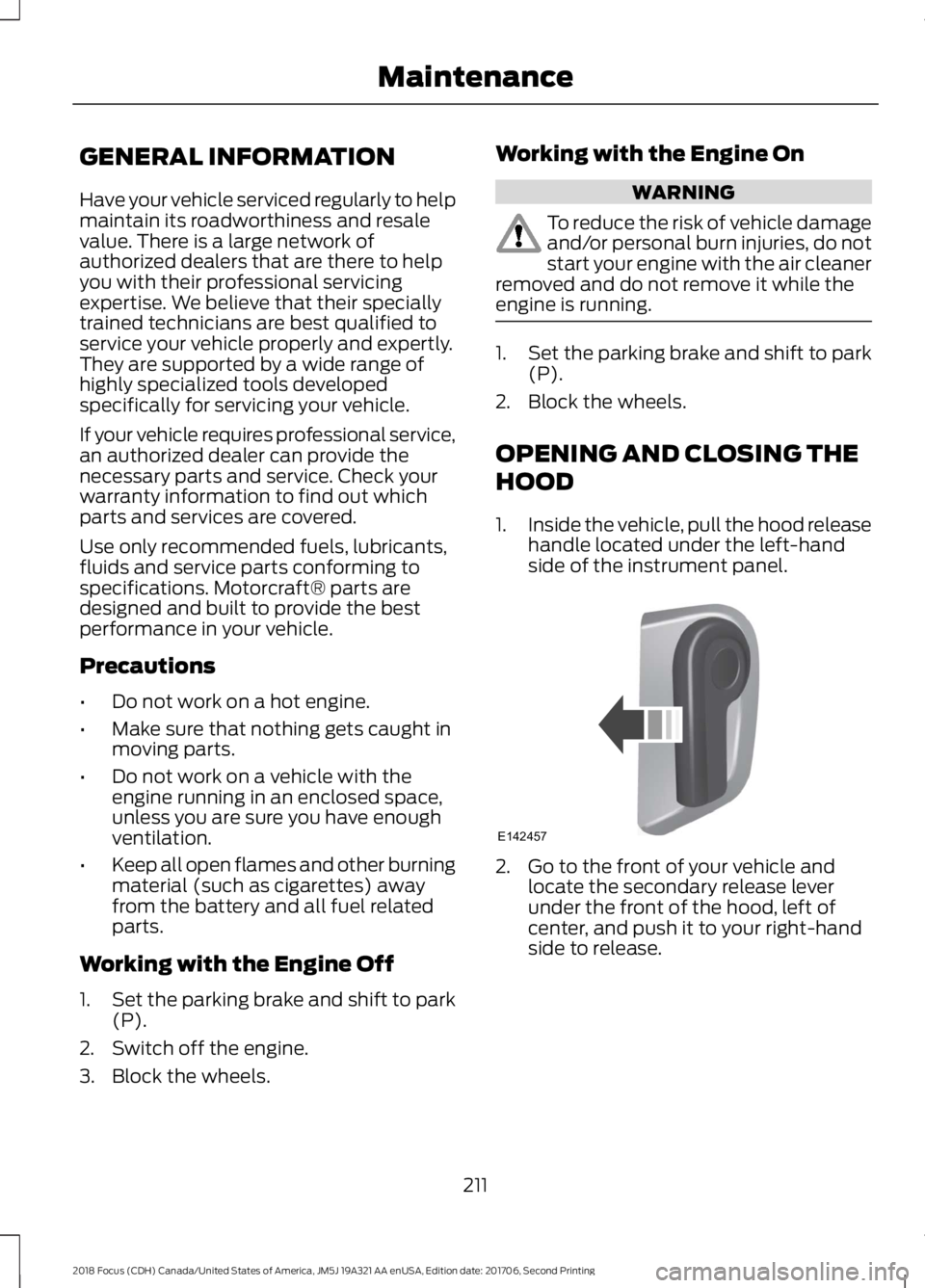
1.Inside the vehicle, pull the hood releasehandle located under the left-handside of the instrument panel.
2.Go to the front of your vehicle andlocate the secondary release leverunder the front of the hood, left ofcenter, and push it to your right-handside to release.
2112018 Focus (CDH) Canada/United States of America, JM5J 19A321 AA enUSA, Edition date: 201706, Second PrintingMaintenanceE142457
Page 236 of 473
Trade numberFunction
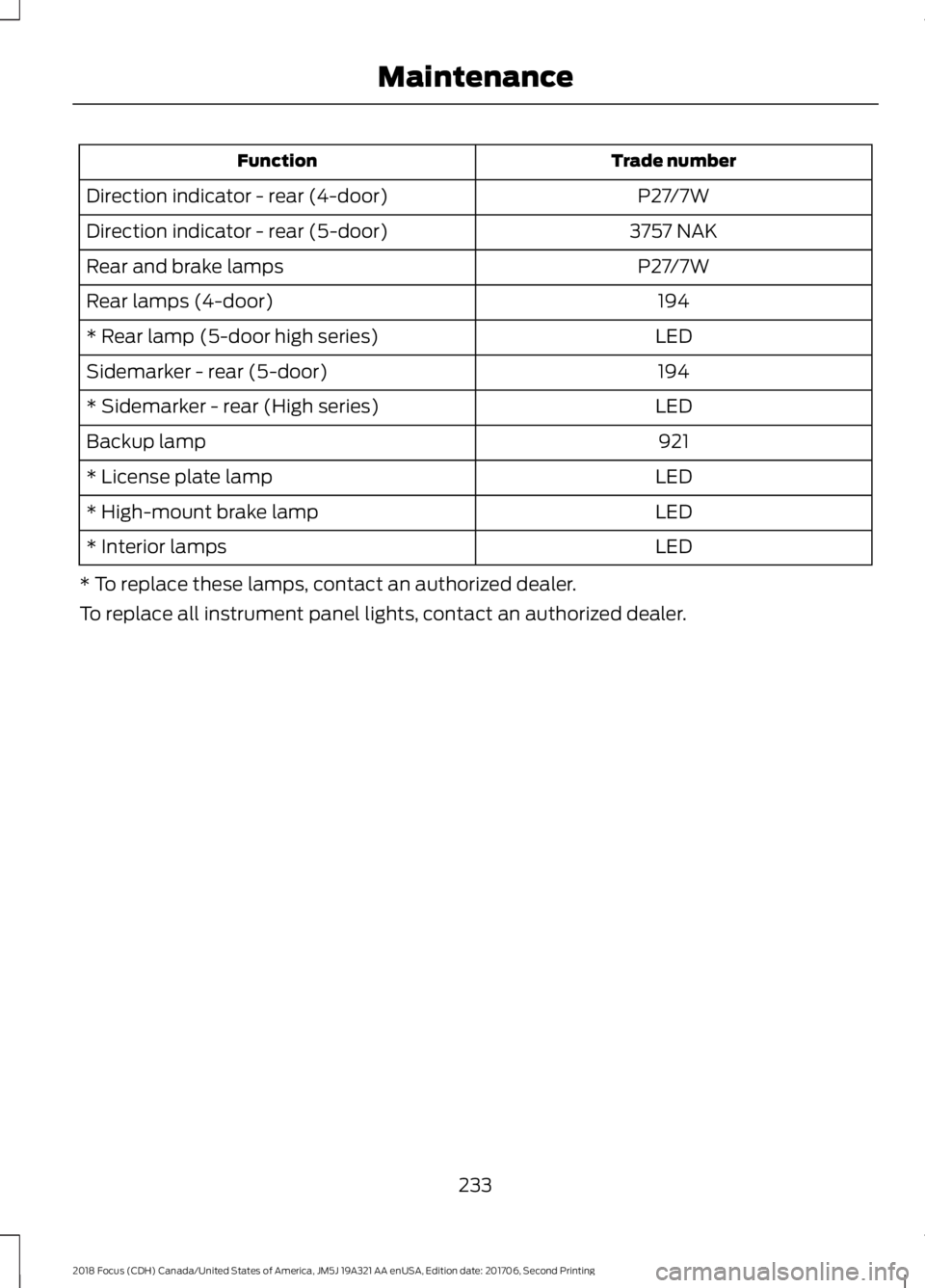
P27/7WDirection indicator - rear (4-door)
3757 NAKDirection indicator - rear (5-door)
P27/7WRear and brake lamps
194Rear lamps (4-door)
LED* Rear lamp (5-door high series)
194Sidemarker - rear (5-door)
LED* Sidemarker - rear (High series)
921Backup lamp
LED* License plate lamp
LED* High-mount brake lamp
LED* Interior lamps
* To replace these lamps, contact an authorized dealer.
To replace all instrument panel lights, contact an authorized dealer.
2332018 Focus (CDH) Canada/United States of America, JM5J 19A321 AA enUSA, Edition date: 201706, Second PrintingMaintenance