2018 FORD FOCUS ELECTRIC seats
[x] Cancel search: seatsPage 85 of 375
Your current energy use is the white line
that moves up and down in the Budget
Gauge. A higher line means you are using
more energy (lower is better). Your energy
use includes input from the accelerator
pedal as well as the accessories, such as
Climate Control.
The Budget is shown by the blue cup shape
around the Budget Gauge. As long as your
current energy use is within the cup, you
are staying within your budget. Your
Budget represents the maximum energy
usage you can maintain in order to achieve
your vehicle range estimate, or reach your
intended charge point. Driving for extended
periods outside of the Budget Cup reduces
your budget and could put you at risk of
not reaching your intended charge point.
Range view
Shows your range relative to your charge
point as well as performance to your
budget.
A blue charge point icon means you have
a Surplus. If an E appears to the left of an
amber charge point icon, then you are
projected to run out of charge prior to
reaching your charge point.
Current performance to your budget is
represented by the glow of the car icon:
more Blue = better performance to budget,
more Amber = worse.
The optional Surplus Graphic displays
available range beyond your charge point.
If you didn
’t enter your charge point
through the Navigation system, your
budget will be set to the range estimate at
the start of your trip. The gauge will show
your estimated distance to E (empty)
along with your current performance to
budget. The optional Surplus Graphic is
not available in this case. MyView
You can choose what to display in this
view. Selecting Change MyView in the
options menu allows you to scroll through
two columns of content choices.
• Press the up or down arrow to view
content.
• Press
OK to save your selected
content.
Unique content available in MyView:
• Accessory Power - Indicates electrical
power demands from your vehicle ’s
accessory systems. Accessories use
power but do not contribute to
propelling your vehicle. The gauge
separately displays power demand in
kilowatts (kW) for climate and other
accessories. Climate includes the
power being used by high voltage
climate control components such as
the electric A/C compressor and the
electric heater. Other includes all
power being used by the low voltage
accessories (cabin fans, headlights,
heated seats, etc.).
• Budget + Avg - The white pointers on
the outside of the budget gauge
indicate your average watt hours per
mi (km) since you last charged your
vehicle. Immediately after charging the
white pointers will start out at the top
of the gauge, as you begin driving they
will reflect your average energy use.
Note: The trip data cannot be reset in
MyView.
Trip 1 and 2 Use the arrow buttons to choose
between the following.
82
2018 Focus (CDH) Battery Electric Vehicle (BEV), Canada/United States of America, JM5J 19A321 RA enUSA, Edition date: 201706, First Printing Information DisplaysE138660
Page 97 of 375
AUTOMATIC CLIMATE CONTROL
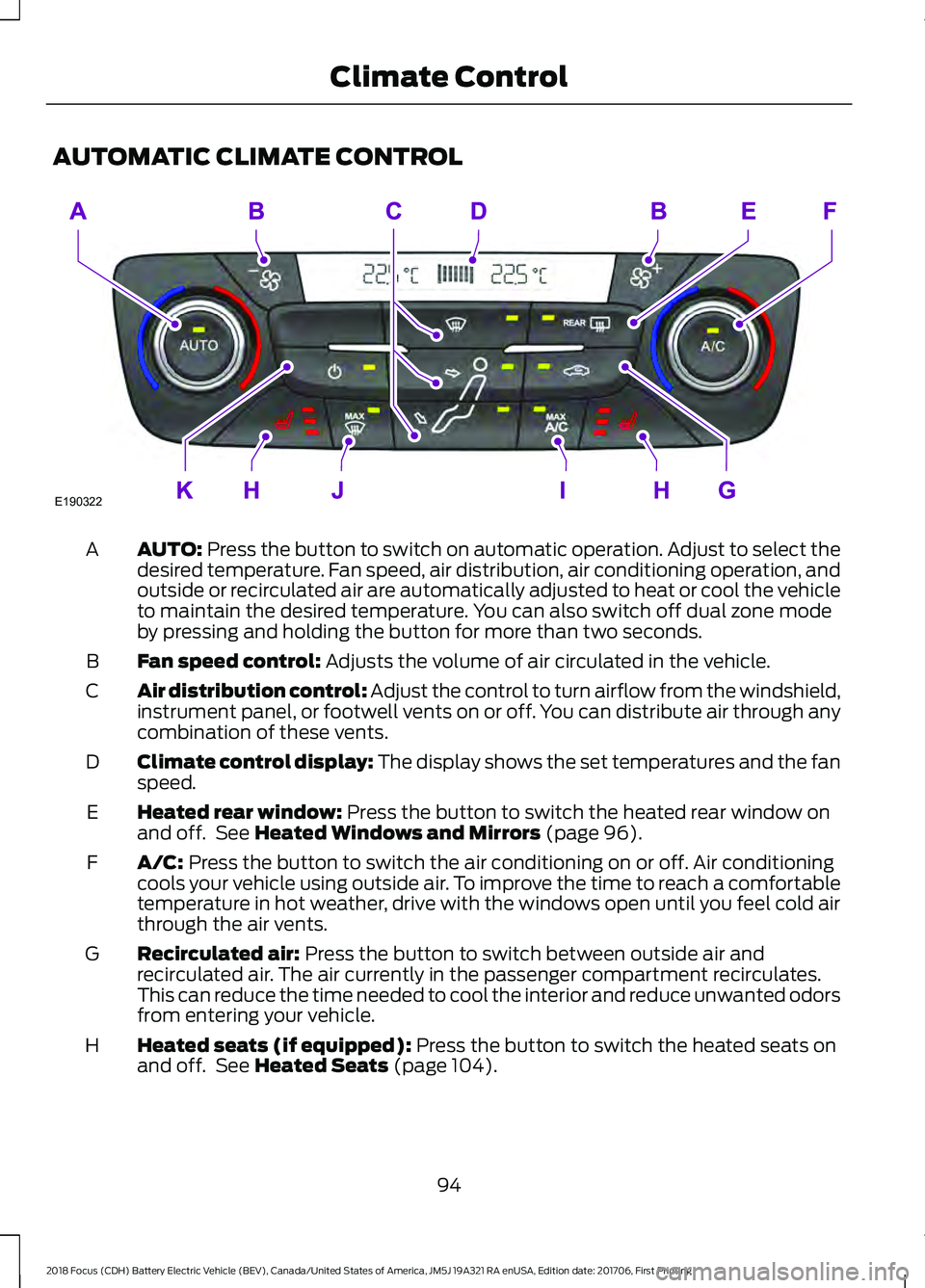
AUTO: Press the button to switch on automatic operation. Adjust to select the
desired temperature. Fan speed, air distribution, air conditioning operation, and
outside or recirculated air are automatically adjusted to heat or cool the vehicle
to maintain the desired temperature. You can also switch off dual zone mode
by pressing and holding the button for more than two seconds.
A
Fan speed control:
Adjusts the volume of air circulated in the vehicle.
B
Air distribution control: Adjust the control to turn airflow from the windshield,
instrument panel, or footwell vents on or off. You can distribute air through any
combination of these vents.
C
Climate control display: The display shows the set temperatures and the fan
speed.
D
Heated rear window:
Press the button to switch the heated rear window on
and off. See Heated Windows and Mirrors (page 96).
E
A/C:
Press the button to switch the air conditioning on or off. Air conditioning
cools your vehicle using outside air. To improve the time to reach a comfortable
temperature in hot weather, drive with the windows open until you feel cold air
through the air vents.
F
Recirculated air:
Press the button to switch between outside air and
recirculated air. The air currently in the passenger compartment recirculates.
This can reduce the time needed to cool the interior and reduce unwanted odors
from entering your vehicle.
G
Heated seats (if equipped):
Press the button to switch the heated seats on
and off. See Heated Seats (page 104).
H
94
2018 Focus (CDH) Battery Electric Vehicle (BEV), Canada/United States of America, JM5J 19A321 RA enUSA, Edition date: 201706, First Printing Climate ControlE190322
Page 98 of 375
MAX A/C: Press the button for maximum cooling. Recirculated air flows through
the instrument panel vents, air conditioning automatically turns on and the fan
automatically adjusts to the highest speed.
I
MAX Defrost: Press the button to switch on defrost. Outside air flows through
the windshield vents, air conditioning automatically turns on, and fan
automatically adjusts to the highest speed. You can also use this setting to
defrost and clear the windshield of a thin covering of ice. The heated rear window
also automatically turns on when you select maximum defrost.
J
Power: Press the button to switch the system on and off. When the system is
off, it prevents outside air from entering the vehicle.
K
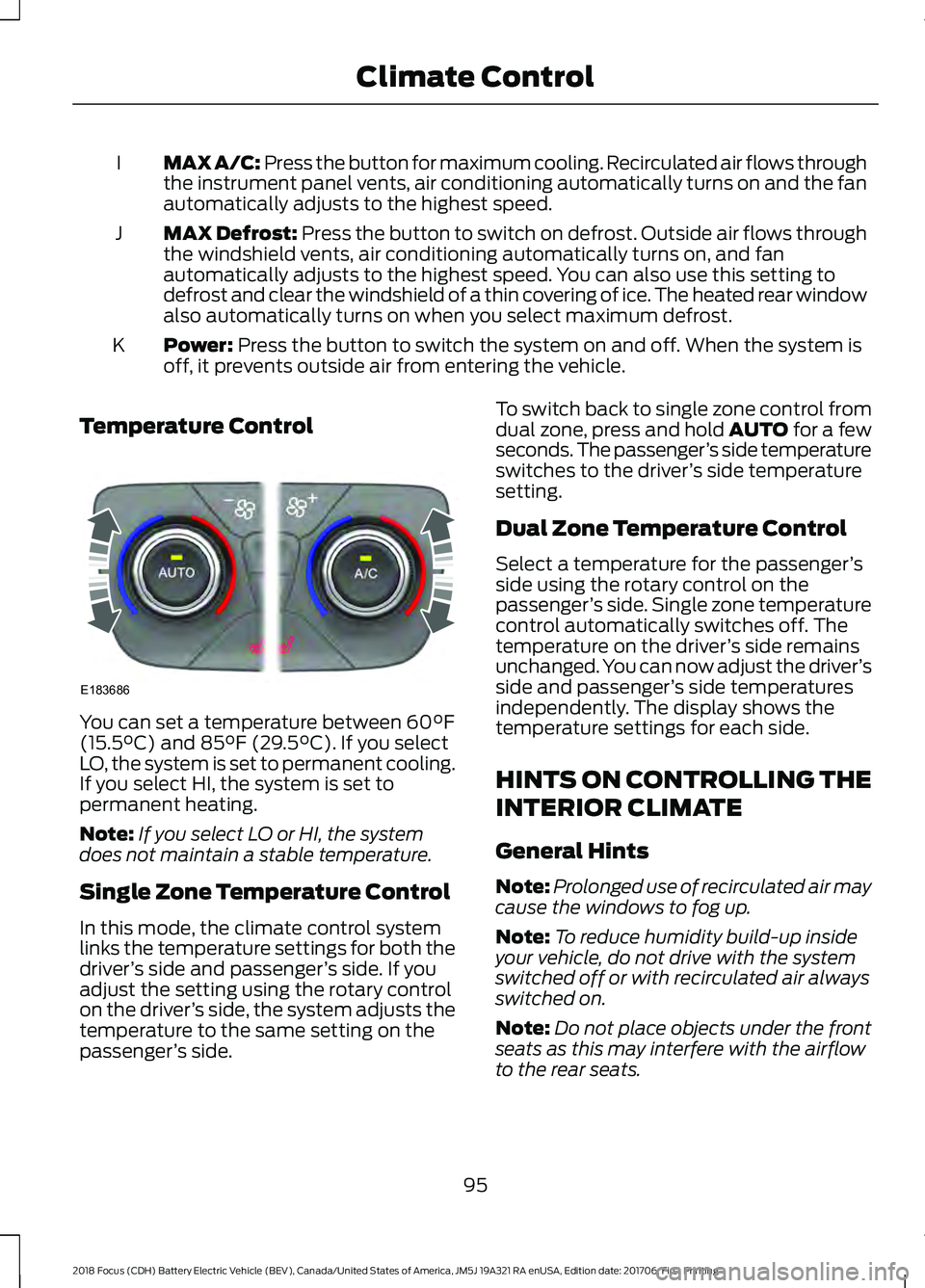
Temperature Control You can set a temperature between
60°F
(15.5°C) and 85°F (29.5°C). If you select
LO, the system is set to permanent cooling.
If you select HI, the system is set to
permanent heating.
Note: If you select LO or HI, the system
does not maintain a stable temperature.
Single Zone Temperature Control
In this mode, the climate control system
links the temperature settings for both the
driver ’s side and passenger ’s side. If you
adjust the setting using the rotary control
on the driver ’s side, the system adjusts the
temperature to the same setting on the
passenger ’s side. To switch back to single zone control from
dual zone, press and hold AUTO for a few
seconds. The passenger
’s side temperature
switches to the driver ’s side temperature
setting.
Dual Zone Temperature Control
Select a temperature for the passenger ’s
side using the rotary control on the
passenger ’s side. Single zone temperature
control automatically switches off. The
temperature on the driver ’s side remains
unchanged. You can now adjust the driver ’s
side and passenger ’s side temperatures
independently. The display shows the
temperature settings for each side.
HINTS ON CONTROLLING THE
INTERIOR CLIMATE
General Hints
Note: Prolonged use of recirculated air may
cause the windows to fog up.
Note: To reduce humidity build-up inside
your vehicle, do not drive with the system
switched off or with recirculated air always
switched on.
Note: Do not place objects under the front
seats as this may interfere with the airflow
to the rear seats.
95
2018 Focus (CDH) Battery Electric Vehicle (BEV), Canada/United States of America, JM5J 19A321 RA enUSA, Edition date: 201706, First Printing Climate ControlE183686
Page 99 of 375
Note:
Remove any snow, ice, or leaves from
the air intake area at the base of the
windshield.
Note: To improve air conditioning when
starting your vehicle, drive with the windows
slightly open for two to three minutes.
Recommended Settings for
Cooling
1. Press the AUTO button.
2. Adjust the temperature control to the desired setting.
Side Window Defogging in Cold
Weather
1. Select air distribution through the floor
vent.
2. Select air distribution through the panel
vent.
3. Select
A/C.
4. Adjust the temperature control to the desired setting.
5. Adjust the outer panel vents toward the side windows.
Note: To increase airflow to the outer panel
vents, close the vents in the middle of the
instrument panel.
Improving Vehicle Drive Range
Your vehicle is equipped with a high
voltage electric compressor and a high
voltage electric heater. You can increase
your driving range by minimizing the
amount of energy expended to cool or heat
the interior during the drive.
Pre-condition the interior temperature
during vehicle charging reduces the battery
energy use on the interior comfort and
improves range.
Note: Your vehicle may not always reach
the set cabin temperature due to charging
and ambient temperature conditions. Hot and cold temperatures make your
vehicle use more energy to achieve and
maintain a comfortable interior
temperature. Park the vehicle in the shade
or in a parking structure when hot, and in
a garage when cold.
Consider partially opening a window (or
windows) to let fresh air circulate, if
weather conditions permit. You can
achieve maximum energy savings by
switching the climate system off. Do this
only if conditions exist for safe vehicle
operation.
Reduce fan speed.
Set the
AUTO temperature a couple
degrees cooler than you normally do on
cold days and a couple degrees higher on
hot days. Use the heated seats on cold
days to increase interior comfort.
Switch the air conditioning off in mild
temperatures or low humidity conditions.
Defrost mode automatically turns the air
conditioning on to dehumidify the air, and
cannot be switched off. If defogging or
defrosting is not necessary, select a
non-defrost mode and disengage air
conditioning to extend vehicle range.
Air conditioning and heating functions are
automatically switched off (unless in
defrost mode) when driving distance to
empty is zero miles (zero km). The interior
fan will continue to operate.
HEATED WINDOWS AND
MIRRORS
Heated Rear Window
Note: Make sure the vehicle is running
before operating the heated windows.
96
2018 Focus (CDH) Battery Electric Vehicle (BEV), Canada/United States of America, JM5J 19A321 RA enUSA, Edition date: 201706, First Printing Climate Control
Page 102 of 375
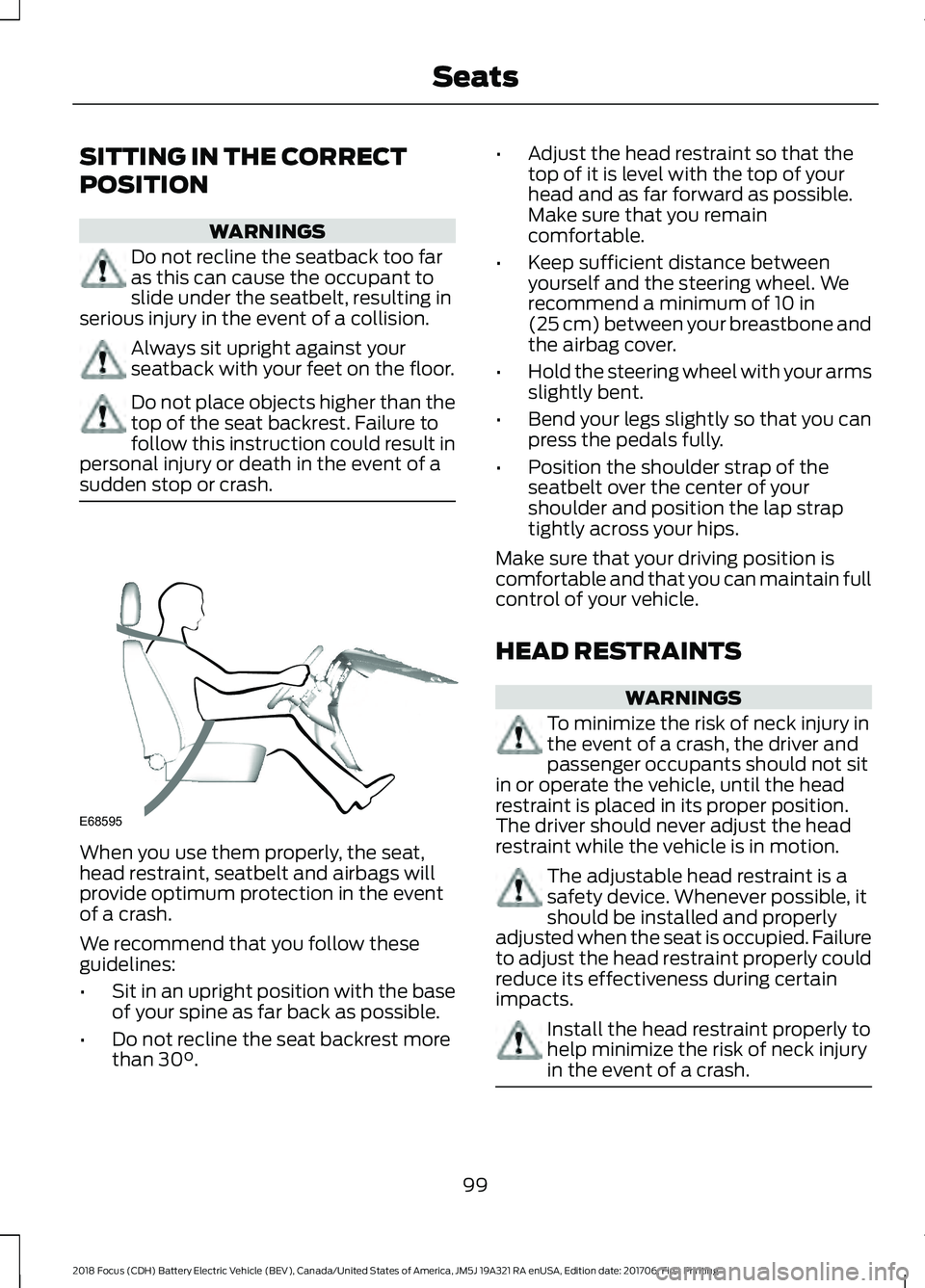
SITTING IN THE CORRECT
POSITION
WARNINGS
Do not recline the seatback too far
as this can cause the occupant to
slide under the seatbelt, resulting in
serious injury in the event of a collision. Always sit upright against your
seatback with your feet on the floor.
Do not place objects higher than the
top of the seat backrest. Failure to
follow this instruction could result in
personal injury or death in the event of a
sudden stop or crash. When you use them properly, the seat,
head restraint, seatbelt and airbags will
provide optimum protection in the event
of a crash.
We recommend that you follow these
guidelines:
•
Sit in an upright position with the base
of your spine as far back as possible.
• Do not recline the seat backrest more
than 30°. •
Adjust the head restraint so that the
top of it is level with the top of your
head and as far forward as possible.
Make sure that you remain
comfortable.
• Keep sufficient distance between
yourself and the steering wheel. We
recommend a minimum of
10 in
(25 cm) between your breastbone and
the airbag cover.
• Hold the steering wheel with your arms
slightly bent.
• Bend your legs slightly so that you can
press the pedals fully.
• Position the shoulder strap of the
seatbelt over the center of your
shoulder and position the lap strap
tightly across your hips.
Make sure that your driving position is
comfortable and that you can maintain full
control of your vehicle.
HEAD RESTRAINTS WARNINGS
To minimize the risk of neck injury in
the event of a crash, the driver and
passenger occupants should not sit
in or operate the vehicle, until the head
restraint is placed in its proper position.
The driver should never adjust the head
restraint while the vehicle is in motion. The adjustable head restraint is a
safety device. Whenever possible, it
should be installed and properly
adjusted when the seat is occupied. Failure
to adjust the head restraint properly could
reduce its effectiveness during certain
impacts. Install the head restraint properly to
help minimize the risk of neck injury
in the event of a crash.
99
2018 Focus (CDH) Battery Electric Vehicle (BEV), Canada/United States of America, JM5J 19A321 RA enUSA, Edition date: 201706, First Printing SeatsE68595
Page 103 of 375
Note:
Adjust the seatback to an upright
driving position before adjusting the head
restraint. Adjust the head restraint so that
the top of it is level with the top of your head
and as far forward as possible. Make sure
that you remain comfortable. If you are
extremely tall, adjust the head restraint to
its highest position.
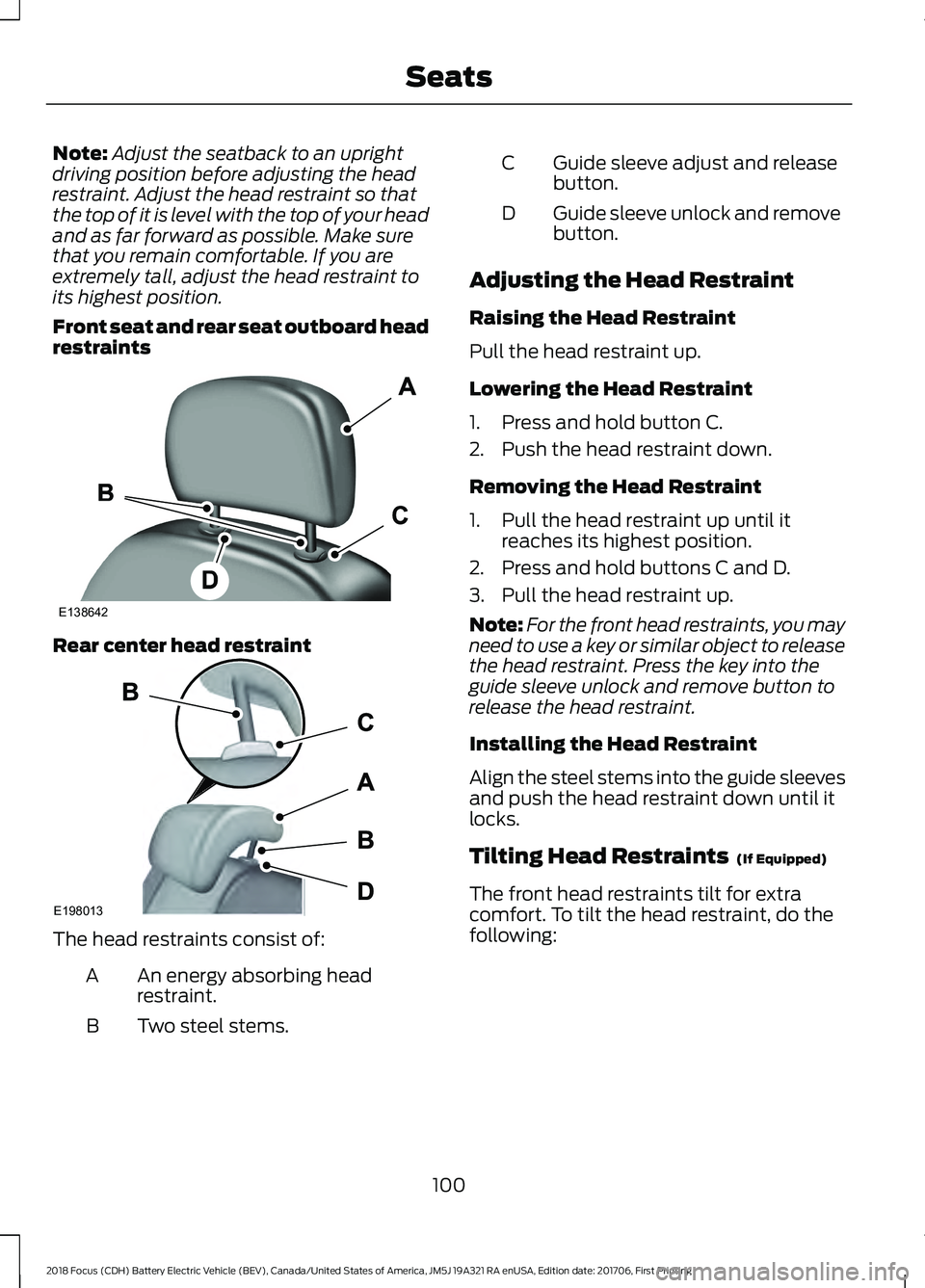
Front seat and rear seat outboard head
restraints Rear center head restraint
The head restraints consist of:
An energy absorbing head
restraint.
A
Two steel stems.
B Guide sleeve adjust and release
button.
C
Guide sleeve unlock and remove
button.
D
Adjusting the Head Restraint
Raising the Head Restraint
Pull the head restraint up.
Lowering the Head Restraint
1. Press and hold button C.
2. Push the head restraint down.
Removing the Head Restraint
1. Pull the head restraint up until it reaches its highest position.
2. Press and hold buttons C and D.
3. Pull the head restraint up.
Note: For the front head restraints, you may
need to use a key or similar object to release
the head restraint. Press the key into the
guide sleeve unlock and remove button to
release the head restraint.
Installing the Head Restraint
Align the steel stems into the guide sleeves
and push the head restraint down until it
locks.
Tilting Head Restraints (If Equipped)
The front head restraints tilt for extra
comfort. To tilt the head restraint, do the
following:
100
2018 Focus (CDH) Battery Electric Vehicle (BEV), Canada/United States of America, JM5J 19A321 RA enUSA, Edition date: 201706, First Printing SeatsE138642 E198013
Page 104 of 375
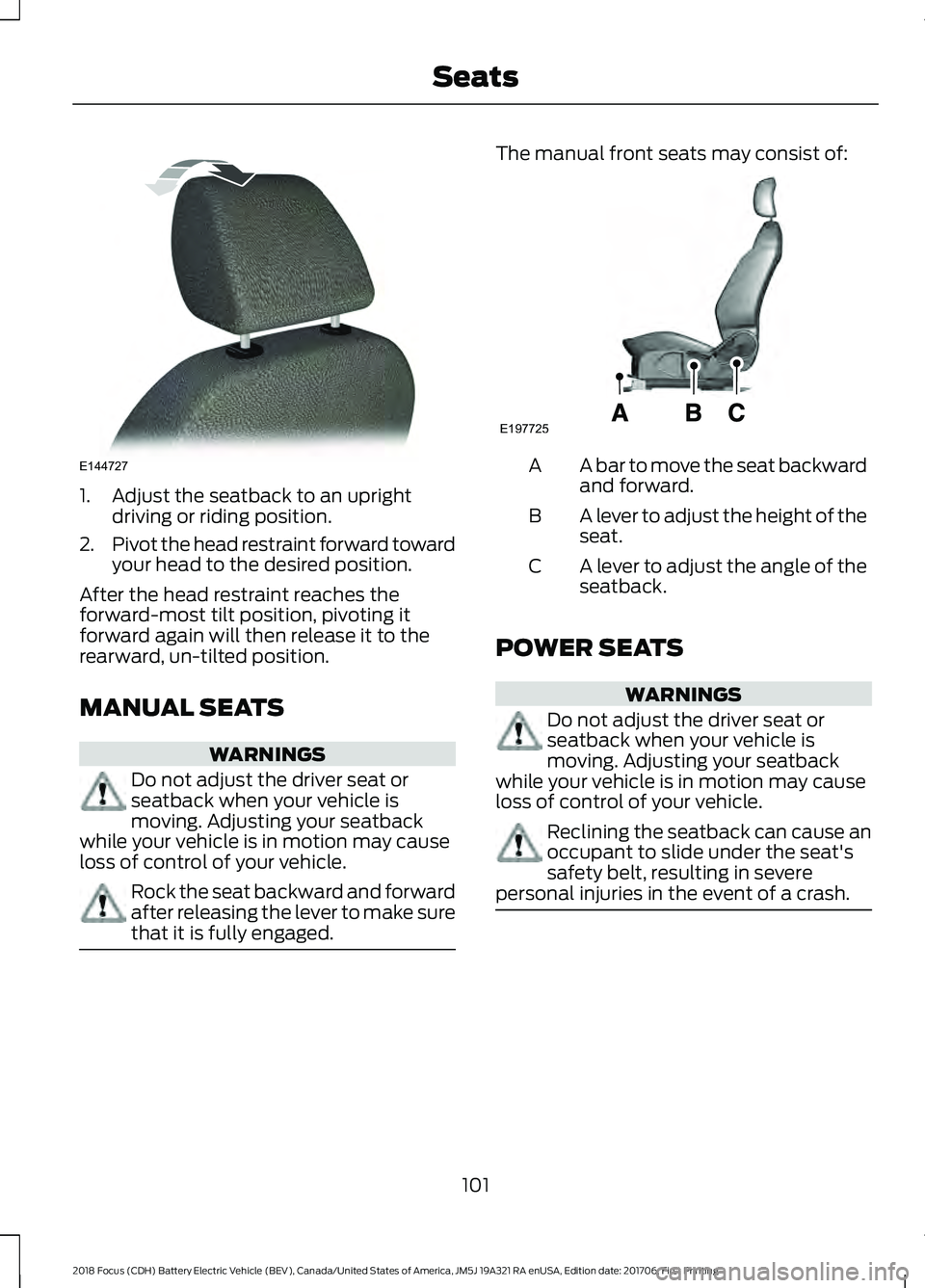
1. Adjust the seatback to an upright
driving or riding position.
2. Pivot the head restraint forward toward
your head to the desired position.
After the head restraint reaches the
forward-most tilt position, pivoting it
forward again will then release it to the
rearward, un-tilted position.
MANUAL SEATS WARNINGS
Do not adjust the driver seat or
seatback when your vehicle is
moving. Adjusting your seatback
while your vehicle is in motion may cause
loss of control of your vehicle. Rock the seat backward and forward
after releasing the lever to make sure
that it is fully engaged. The manual front seats may consist of:
A bar to move the seat backward
and forward.
A
A lever to adjust the height of the
seat.
B
A lever to adjust the angle of the
seatback.
C
POWER SEATS WARNINGS
Do not adjust the driver seat or
seatback when your vehicle is
moving. Adjusting your seatback
while your vehicle is in motion may cause
loss of control of your vehicle. Reclining the seatback can cause an
occupant to slide under the seat's
safety belt, resulting in severe
personal injuries in the event of a crash. 101
2018 Focus (CDH) Battery Electric Vehicle (BEV), Canada/United States of America, JM5J 19A321 RA enUSA, Edition date: 201706, First Printing SeatsE144727 E197725
Page 105 of 375
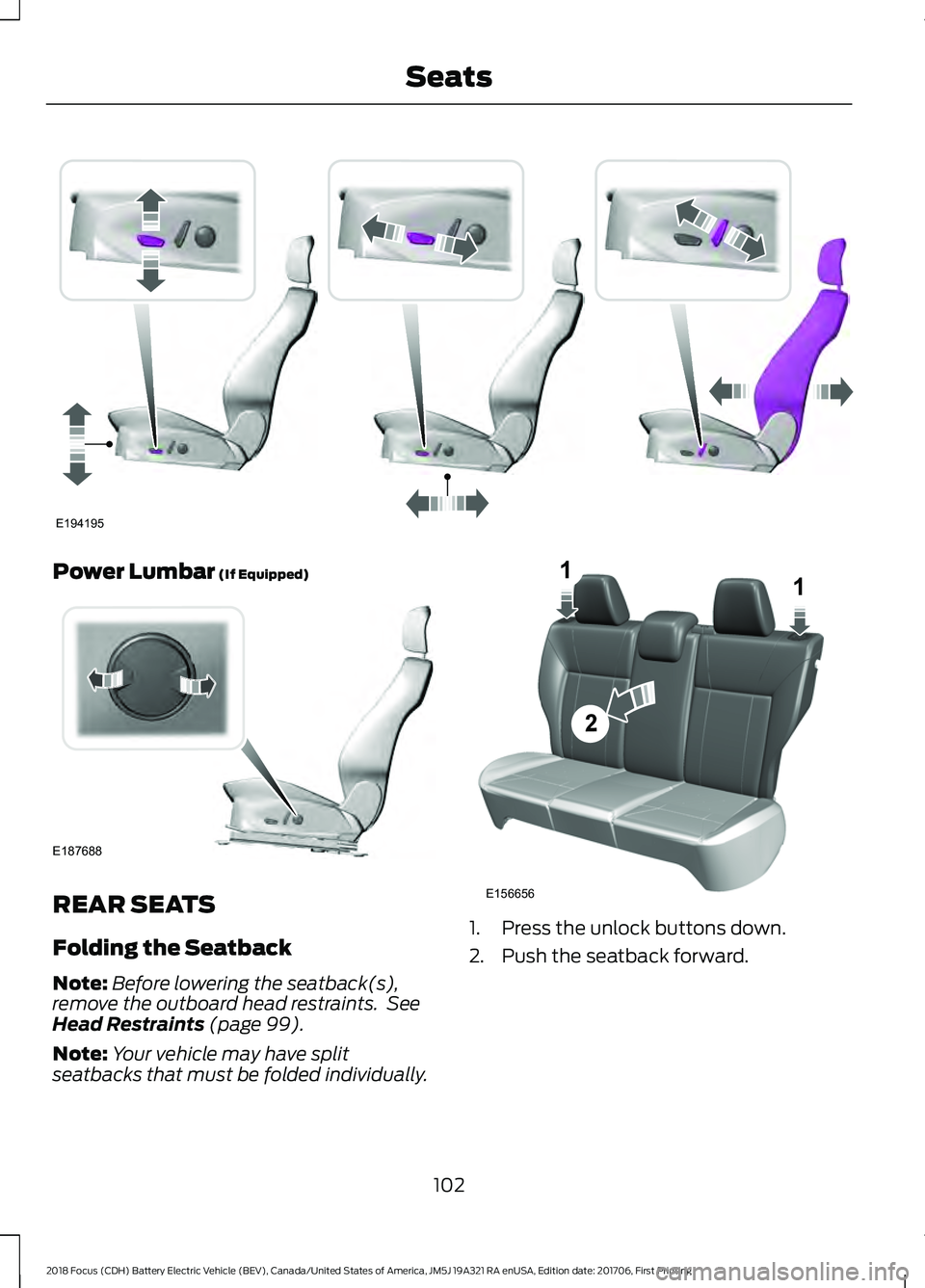
Power Lumbar (If Equipped)
REAR SEATS
Folding the Seatback
Note:
Before lowering the seatback(s),
remove the outboard head restraints. See
Head Restraints
(page 99).
Note: Your vehicle may have split
seatbacks that must be folded individually. 1. Press the unlock buttons down.
2. Push the seatback forward.
102
2018 Focus (CDH) Battery Electric Vehicle (BEV), Canada/United States of America, JM5J 19A321 RA enUSA, Edition date: 201706, First Printing SeatsE194195 E187688 E156656
2
11