2018 FORD FOCUS ELECTRIC door lock
[x] Cancel search: door lockPage 116 of 375
Your vehicle is equipped with a standard
DC charge feature. You can charge your
vehicle using SAEJ1772 compatible
charging stations. Charging to 80% takes
approximately 33 minutes, or to 75 miles
range in 30 minutes.
Note:
If charging for your plug-in vehicle
fails, please call the Customer Relationship
Center, or click on Call for support or Live
chat at www.owner.ford.com
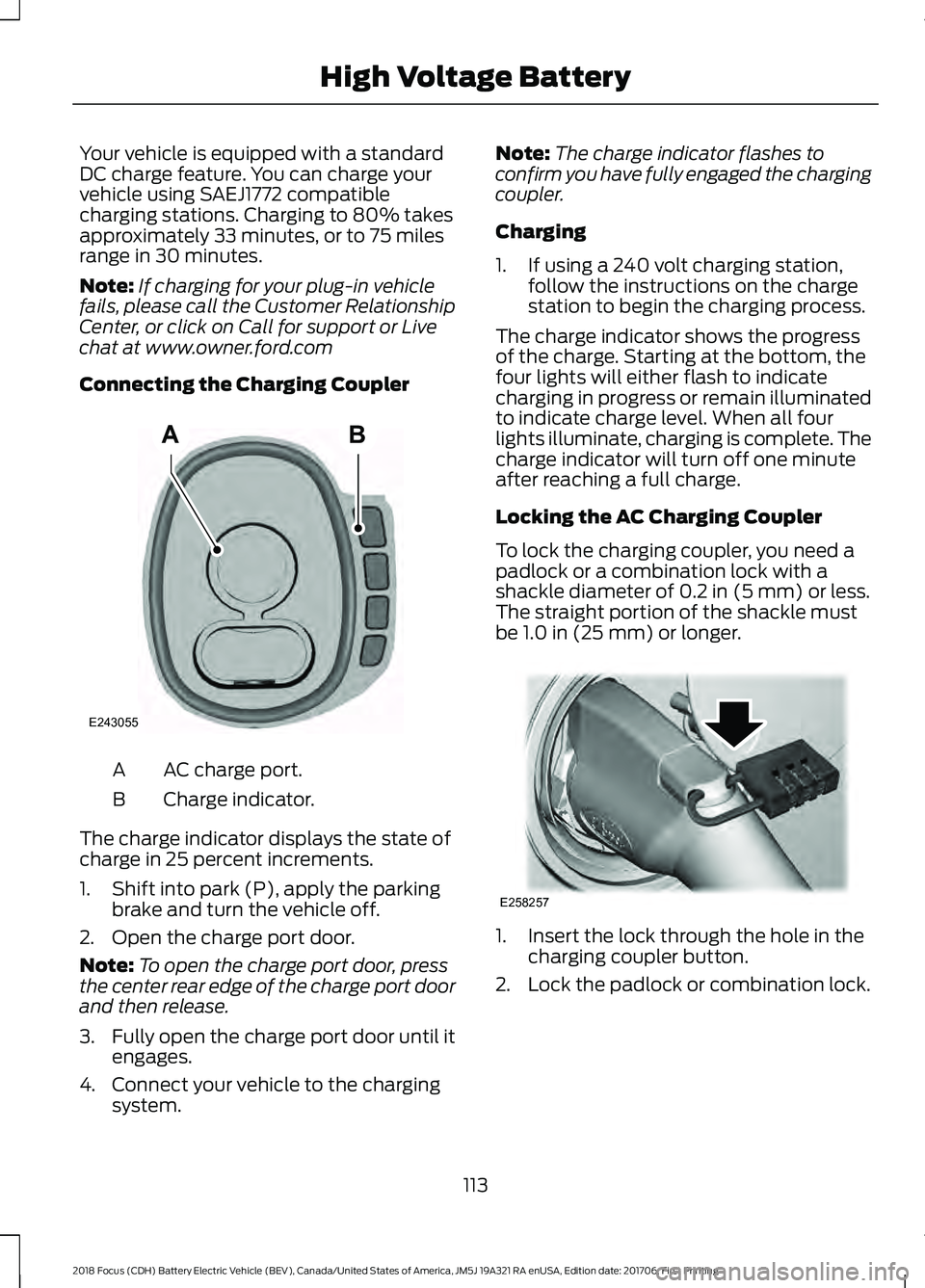
Connecting the Charging Coupler AC charge port.
A
Charge indicator.
B
The charge indicator displays the state of
charge in 25 percent increments.
1. Shift into park (P), apply the parking brake and turn the vehicle off.
2. Open the charge port door.
Note: To open the charge port door, press
the center rear edge of the charge port door
and then release.
3. Fully open the charge port door until it
engages.
4. Connect your vehicle to the charging system. Note:
The charge indicator flashes to
confirm you have fully engaged the charging
coupler.
Charging
1. If using a 240 volt charging station, follow the instructions on the charge
station to begin the charging process.
The charge indicator shows the progress
of the charge. Starting at the bottom, the
four lights will either flash to indicate
charging in progress or remain illuminated
to indicate charge level. When all four
lights illuminate, charging is complete. The
charge indicator will turn off one minute
after reaching a full charge.
Locking the AC Charging Coupler
To lock the charging coupler, you need a
padlock or a combination lock with a
shackle diameter of 0.2 in (5 mm) or less.
The straight portion of the shackle must
be
1.0 in (25 mm) or longer. 1. Insert the lock through the hole in the
charging coupler button.
2. Lock the padlock or combination lock.
113
2018 Focus (CDH) Battery Electric Vehicle (BEV), Canada/United States of America, JM5J 19A321 RA enUSA, Edition date: 201706, First Printing High Voltage BatteryAB
E243055 E258257
Page 118 of 375
DC Charging
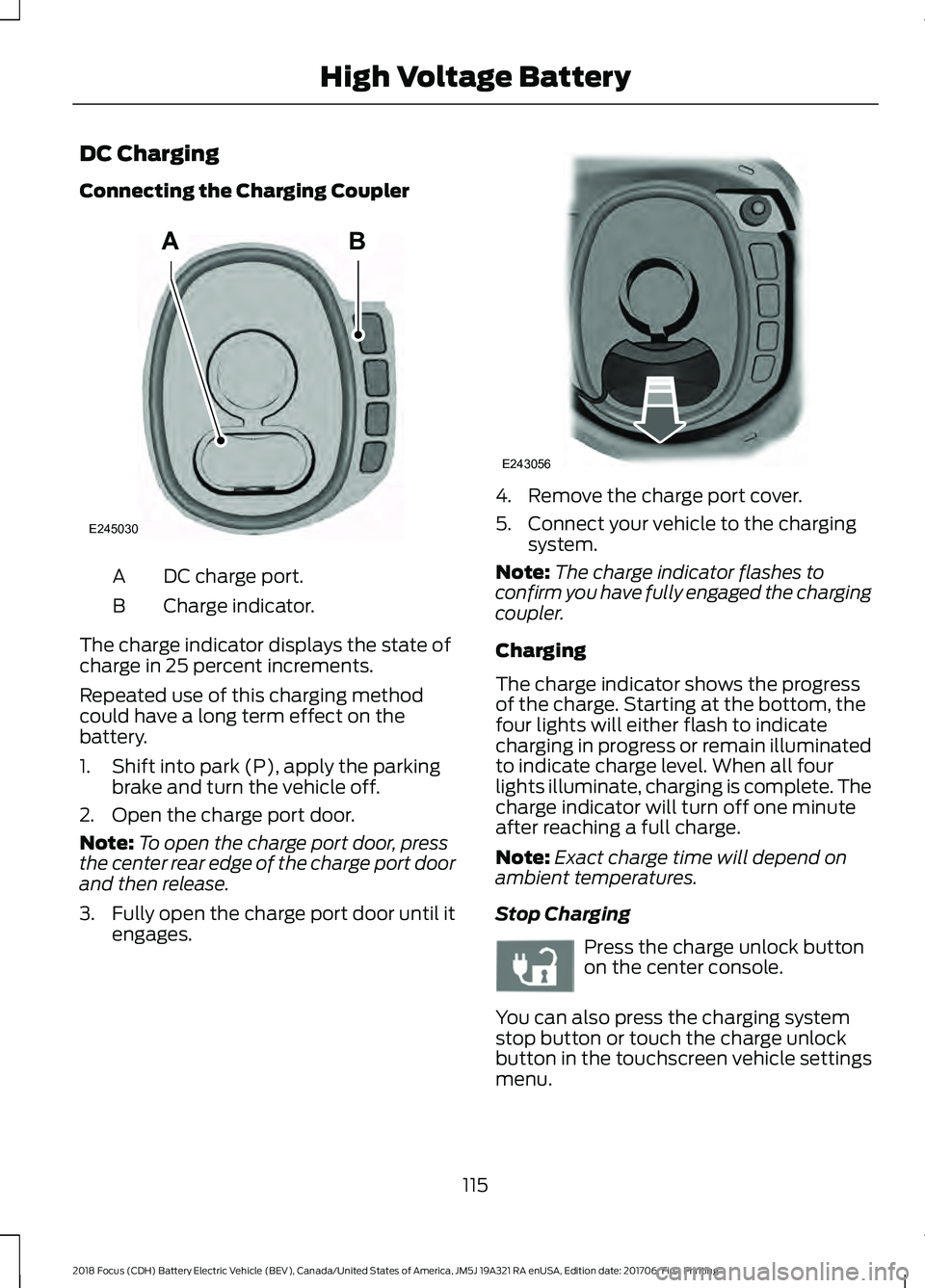
Connecting the Charging Coupler
DC charge port.
A
Charge indicator.
B
The charge indicator displays the state of
charge in 25 percent increments.
Repeated use of this charging method
could have a long term effect on the
battery.
1. Shift into park (P), apply the parking brake and turn the vehicle off.
2. Open the charge port door.
Note: To open the charge port door, press
the center rear edge of the charge port door
and then release.
3. Fully open the charge port door until it
engages. 4. Remove the charge port cover.
5. Connect your vehicle to the charging
system.
Note: The charge indicator flashes to
confirm you have fully engaged the charging
coupler.
Charging
The charge indicator shows the progress
of the charge. Starting at the bottom, the
four lights will either flash to indicate
charging in progress or remain illuminated
to indicate charge level. When all four
lights illuminate, charging is complete. The
charge indicator will turn off one minute
after reaching a full charge.
Note: Exact charge time will depend on
ambient temperatures.
Stop Charging Press the charge unlock button
on the center console.
You can also press the charging system
stop button or touch the charge unlock
button in the touchscreen vehicle settings
menu.
115
2018 Focus (CDH) Battery Electric Vehicle (BEV), Canada/United States of America, JM5J 19A321 RA enUSA, Edition date: 201706, First Printing High Voltage BatteryAB
E245030 E243056 E242991
Page 119 of 375
Disconnecting the Charging Coupler
1. Press and hold the button on the
charging coupler and disconnect from
the charging port.
Note: Do not try to disconnect the charging
coupler with force. This could damage the
charging port and charging coupler.
Note: You cannot disconnect the charging
coupler until charging has been stopped or
completed.
2. Replace the charge port cover.
3. Close the charge port door.
Note: To close the charge port door, press
the center rear edge of the charge port door
and then release.
Overriding the Lock
If DC charging has stopped and you are still
unable to disconnect the charging coupler,
you must complete the following button
sequence within 10 seconds.
1. Press the charge unlock button on the center console.
2. Touch the charge unlock button in the touchscreen vehicle settings menu.
3. Press the charge unlock button on the center console.
Note: A message requesting confirmation
that your vehicle is unplugged appears on
the instrument cluster. See Information
Messages (page 87).
4. Switch the power off, leave your vehicle and close the door.
5. After one minute, press and hold the button on the charging coupler and
disconnect from the charging port.
If the previous steps fail to unlock the
charging coupler, you may need to switch
the power off, then on, and off again and
wait another minute to allow the system
to reset. If your first attempt was unsuccessful,
repeat steps 1 through 5.
If you are still unable to disconnect the
charging coupler, press the emergency
stop button on the charging system.
Note:
For additional instructions, please
refer to information available from the
charging networks or the charging system
site.
Call the Ford Roadside Assistance at
1-800-241-3673 for US sold vehicles
traveling within the US or Canada and
1-800-665-2006 for Canadian sold
vehicles traveling with the US or Canada
for additional information.
HIGH VOLTAGE BATTERY CUT-
OFF SWITCH
The high voltage shut off operation shuts
off power from the high-voltage battery
after a collision, or if your vehicle receives
a substantial physical jolt.
To reactivate your vehicle after either
event, perform the following steps:
1. Press the
START/STOP button to
power off your vehicle.
2. Wait for your vehicle to fully shut down
and the instrument cluster to turn off.
Note: Your vehicle may take between 30
to 90 seconds to shut down.
3. Press the brake pedal and press the START/STOP
button.
4. If your vehicle is not powered after this
sequence, repeat steps 1 through 3 up
to two more times.
Note: During this process, your vehicle
detects if the electrical system is safe and
reactivates. Once your vehicle determines
the electrical system safe, you can start your
vehicle as you would normally by pressing
the brake in combination with the
START/STOP
button.
116
2018 Focus (CDH) Battery Electric Vehicle (BEV), Canada/United States of America, JM5J 19A321 RA enUSA, Edition date: 201706, First Printing High Voltage Battery
Page 167 of 375
Protected Component
Fuse Rating
Fuse Number
Ground fuse (central lock supply).
20A
F83
Ground fuse (central unlock supply).
Ground fuse (driver door unlock relay supply).
20A
F84 Ground fuse (central/double lock relay supply).
Ground fuse ( release relay supply).
Heated seats (ignition sense).
7.5A
F85
Restraint system.
10A
F86 Passenger airbag deactivation switch.
Occupant weight sensor.
Not used (spare).
15A
F87
Not used.
-
F88
Not used.
-
F89
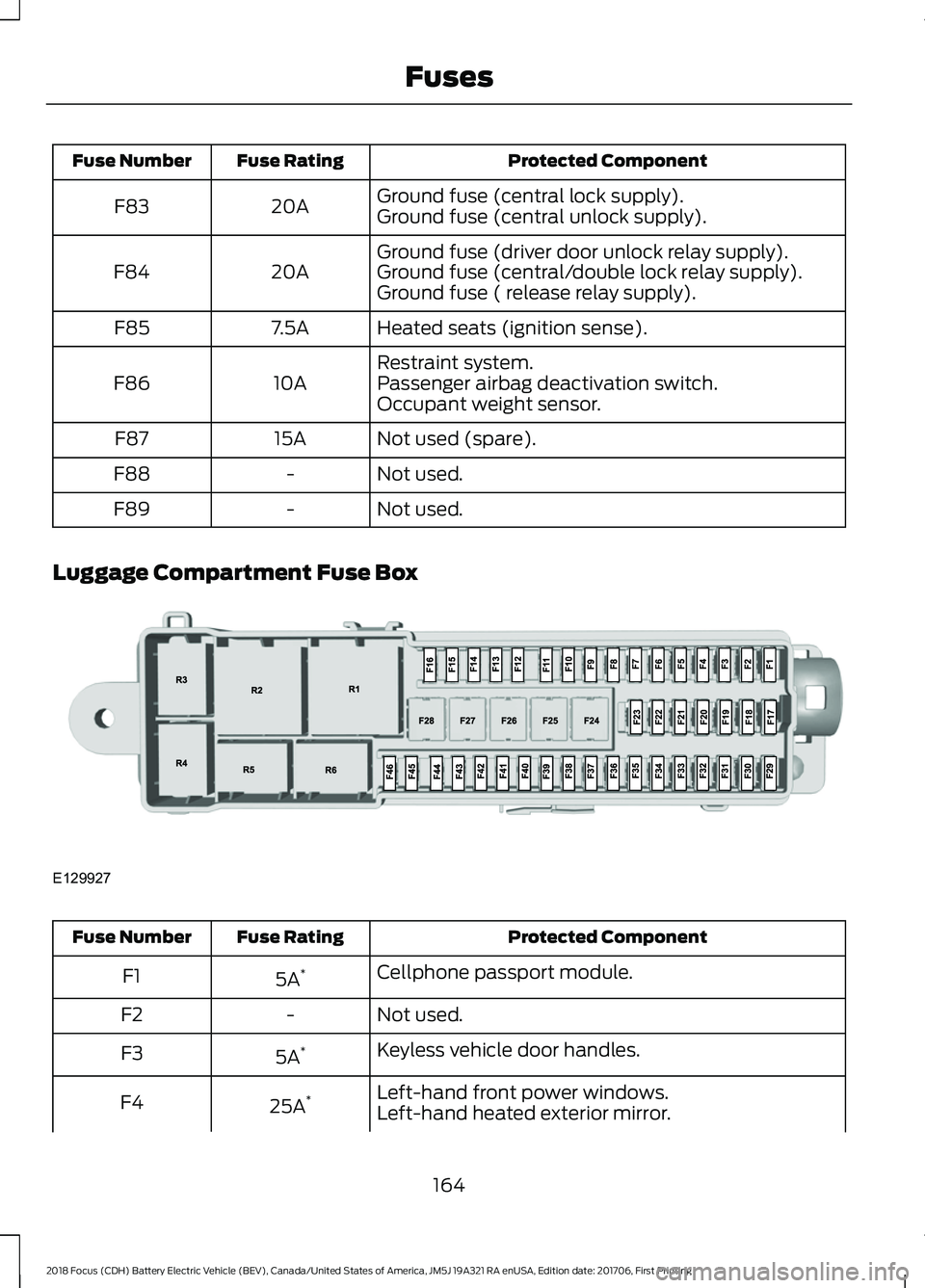
Luggage Compartment Fuse Box Protected Component
Fuse Rating
Fuse Number
Cellphone passport module.
5A *
F1
Not used.
-
F2
Keyless vehicle door handles.
5A *
F3
Left-hand front power windows.
25A *
F4
Left-hand heated exterior mirror.
164
2018 Focus (CDH) Battery Electric Vehicle (BEV), Canada/United States of America, JM5J 19A321 RA enUSA, Edition date: 201706, First Printing FusesE129927
Page 168 of 375
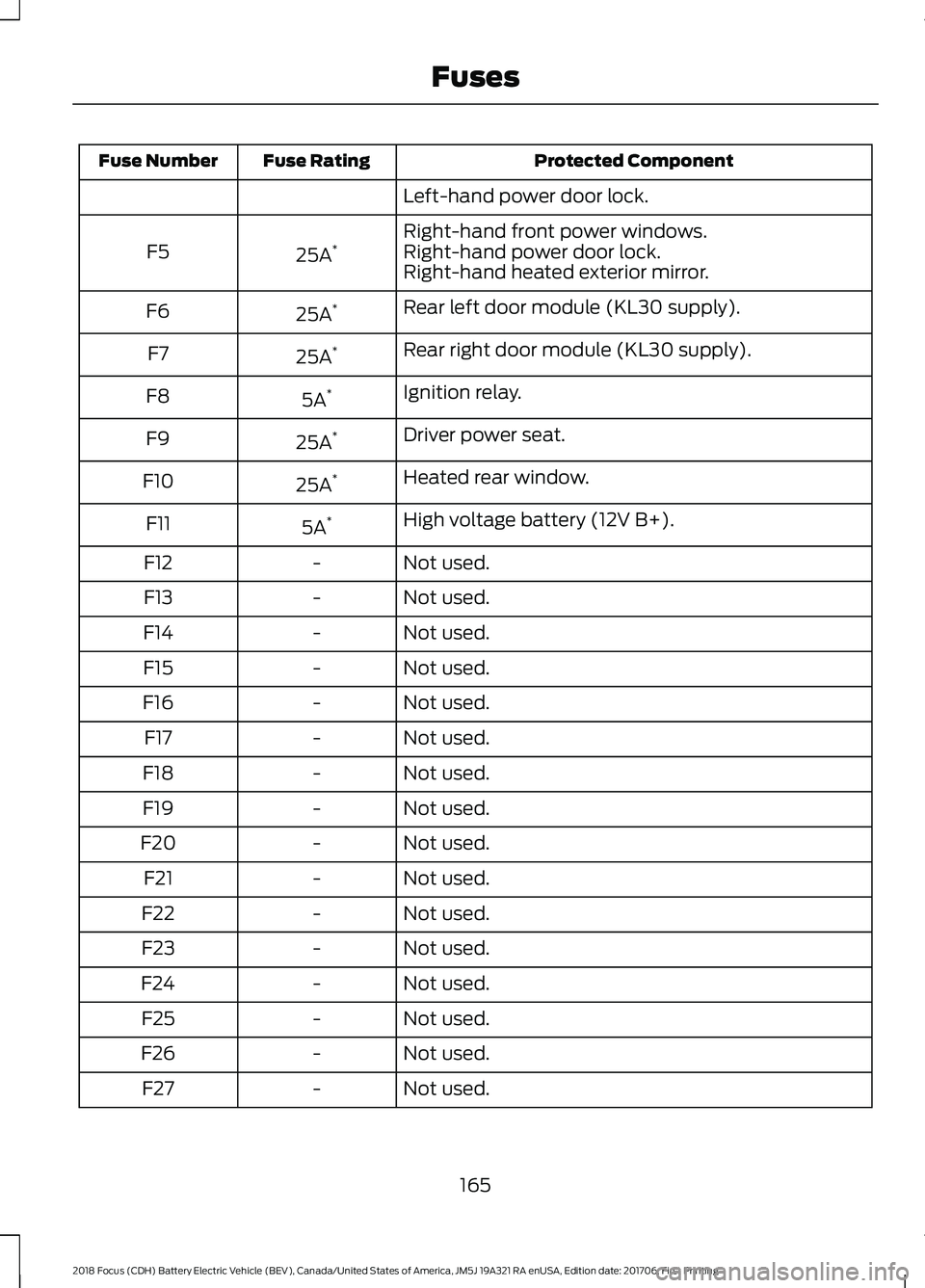
Protected Component
Fuse Rating
Fuse Number
Left-hand power door lock.
Right-hand front power windows.
25A *
F5 Right-hand power door lock.
Right-hand heated exterior mirror.
Rear left door module (KL30 supply).
25A *
F6
Rear right door module (KL30 supply).
25A *
F7
Ignition relay.
5A *
F8
Driver power seat.
25A *
F9
Heated rear window.
25A *
F10
High voltage battery (12V B+).
5A *
F11
Not used.
-
F12
Not used.
-
F13
Not used.
-
F14
Not used.
-
F15
Not used.
-
F16
Not used.
-
F17
Not used.
-
F18
Not used.
-
F19
Not used.
-
F20
Not used.
-
F21
Not used.
-
F22
Not used.
-
F23
Not used.
-
F24
Not used.
-
F25
Not used.
-
F26
Not used.
-
F27
165
2018 Focus (CDH) Battery Electric Vehicle (BEV), Canada/United States of America, JM5J 19A321 RA enUSA, Edition date: 201706, First Printing Fuses
Page 188 of 375
Note:
Holding the pressure washer nozzle
at an angle to the vehicle's surface may
damage graphics and cause the edges to
peel away from the vehicle's surface.
Underbody
Regularly clean the underside of your
vehicle using water. Keep body and door
drain holes free of debris or foreign
material.
Under Hood
For removing black rubber marks from
under the hood we recommend Motorcraft
Wheel and Tire Cleaner or Motorcraft Bug
and Tar Remover.
WAXING
Regular waxing is necessary to protect your
car's paint from the elements. We
recommend that you wash and wax the
painted surface once or twice a year.
When washing and waxing, park your
vehicle in a shaded area out of direct
sunlight. Always wash your vehicle before
applying wax.
• Use a quality wax that does not contain
abrasives.
• Follow the manufacturer ’s instructions
to apply and remove the wax.
• Apply a small amount of wax in a
back-and-forth motion, not in circles. •
Do not allow wax to come in contact
with any non-body (low-gloss black)
colored trim. The wax will discolor or
stain the parts over time.
•Roof racks.
• Bumpers.
• Grained door handles.
• Side moldings.
• Mirror housings.
• Windshield cowl area.
• Do not apply wax to glass areas.
• After waxing, your car's paint should
feel smooth, and be free of streaks and
smudges.
CLEANING THE ENGINE
Engines are more efficient when they are
clean because grease and dirt buildup keep
the engine warmer than normal.
When washing:
• Take care when using a power washer
to clean the engine. The high-pressure
fluid could penetrate the sealed parts
and cause damage.
• Do not spray a hot engine with cold
water to avoid cracking the engine
block or other engine components.
• Spray Motorcraft Engine Shampoo and
Degreaser on all parts that require
cleaning and pressure rinse clean. In
Canada, use Motorcraft Engine
Shampoo.
• Never wash or rinse the engine while it
is hot or running; water in the running
engine may cause internal damage.
185
2018 Focus (CDH) Battery Electric Vehicle (BEV), Canada/United States of America, JM5J 19A321 RA enUSA, Edition date: 201706, First Printing Vehicle Care
Page 196 of 375
* When inflation only is required
for a tire or other objects, the
selector must be in the Air
position.
What to Do When a Tire Is
Punctured
Repair a tire puncture within the tire's tread
area in two stages with the kit.
• In the first stage, inflate the tire with a
sealing compound and air. After you
inflate the tire, you will need to drive
the vehicle a short distance (about 4
miles [6 kilometers]) to distribute the
sealant in the tire.
• In the second stage, check the tire
pressure and adjust, if necessary, to the
vehicle's specified tire inflation
pressure.
First Stage: Inflating the Tire with
Sealing Compound and Air WARNINGS
Do not stand directly over the kit
while inflating the tire. If you notice
any unusual bulges or deformations
in the tire's sidewall during inflation, stop
and call roadside assistance. If the tire does not inflate to the
recommended tire pressure within
15 minutes, stop and call roadside
assistance. Do not run the engine during kit
operation unless the vehicle is
outdoors or in a well-ventilated area.
Preparation: Park the vehicle in a safe, level
and secure area, away from moving traffic.
Switch the hazard lights on. Apply the
parking brake and switch the engine off.
Inspect the flat tire for visible damage. Sealant compound contains latex. Use
appropriate precautions to avoid any
allergic reactions.
Do not remove any foreign object that has
pierced the tire. If a puncture is located in
the tire sidewall, stop and call roadside
assistance.
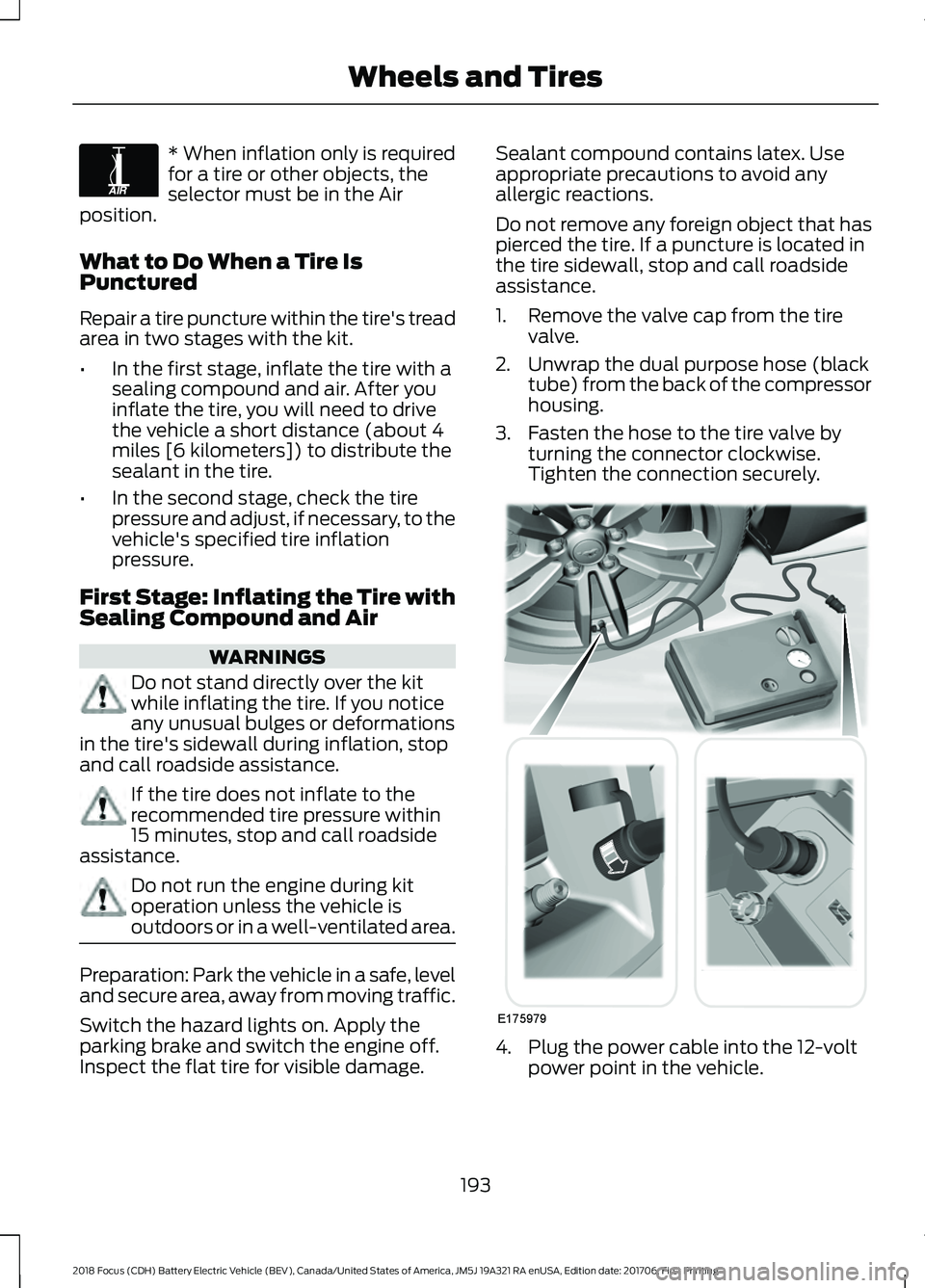
1. Remove the valve cap from the tire
valve.
2. Unwrap the dual purpose hose (black tube) from the back of the compressor
housing.
3. Fasten the hose to the tire valve by turning the connector clockwise.
Tighten the connection securely. 4. Plug the power cable into the 12-volt
power point in the vehicle.
193
2018 Focus (CDH) Battery Electric Vehicle (BEV), Canada/United States of America, JM5J 19A321 RA enUSA, Edition date: 201706, First Printing Wheels and TiresE175978 E175979
Page 197 of 375
5. Remove the warning sticker found on
the canister and place it on the top of
the instrument panel or the center of
the dash.
6. Start the vehicle and leave the engine running so the compressor does not
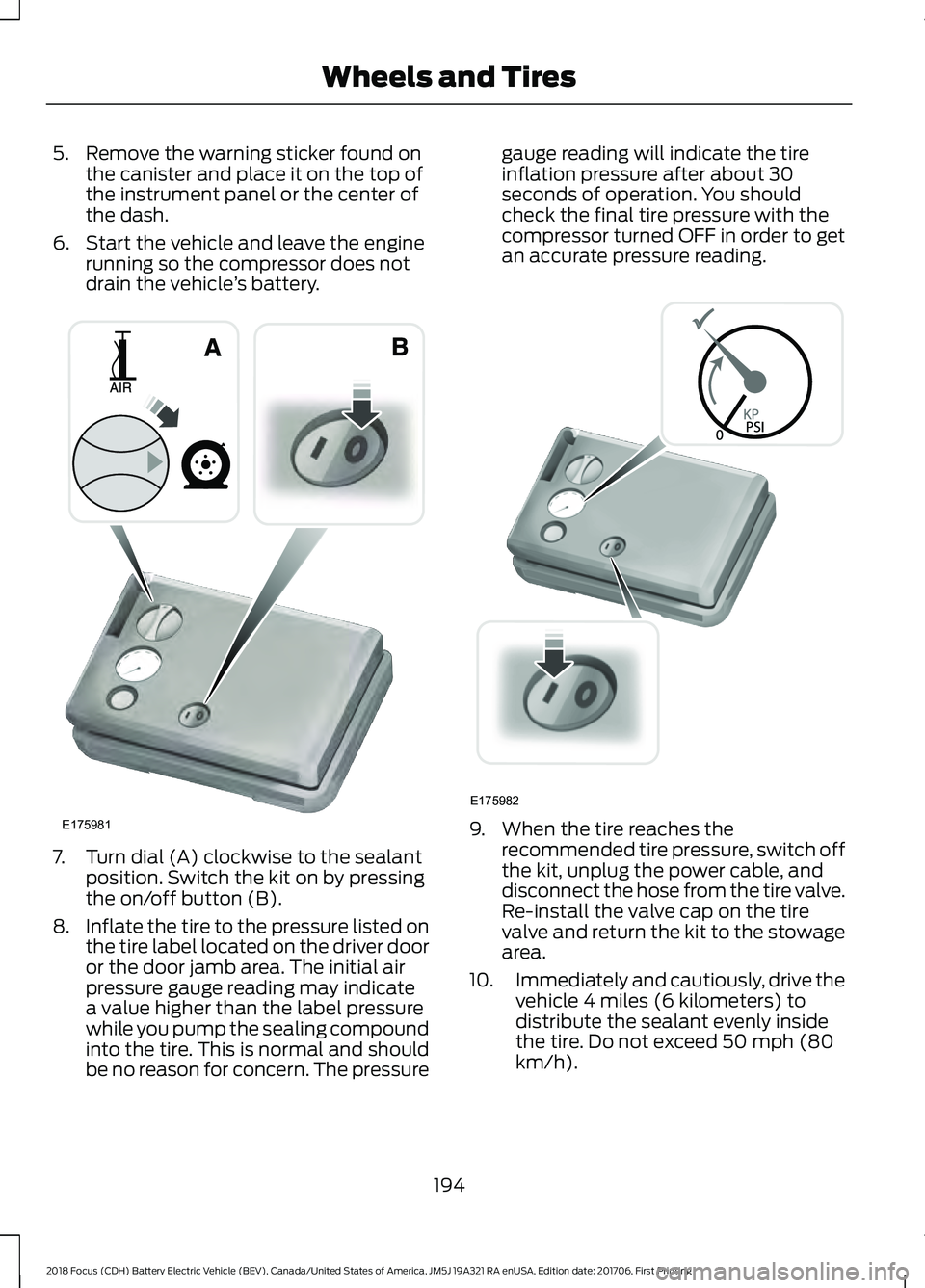
drain the vehicle ’s battery. 7. Turn dial (A) clockwise to the sealant
position. Switch the kit on by pressing
the on/off button (B).
8. Inflate the tire to the pressure listed on
the tire label located on the driver door
or the door jamb area. The initial air
pressure gauge reading may indicate
a value higher than the label pressure
while you pump the sealing compound
into the tire. This is normal and should
be no reason for concern. The pressure gauge reading will indicate the tire
inflation pressure after about 30
seconds of operation. You should
check the final tire pressure with the
compressor turned OFF in order to get
an accurate pressure reading.
9. When the tire reaches the
recommended tire pressure, switch off
the kit, unplug the power cable, and
disconnect the hose from the tire valve.
Re-install the valve cap on the tire
valve and return the kit to the stowage
area.
10. Immediately and cautiously, drive the
vehicle 4 miles (6 kilometers) to
distribute the sealant evenly inside
the tire. Do not exceed 50 mph (80
km/h).
194
2018 Focus (CDH) Battery Electric Vehicle (BEV), Canada/United States of America, JM5J 19A321 RA enUSA, Edition date: 201706, First Printing Wheels and TiresE175981 E175982