2018 FORD FOCUS ELECTRIC display
[x] Cancel search: displayPage 306 of 375
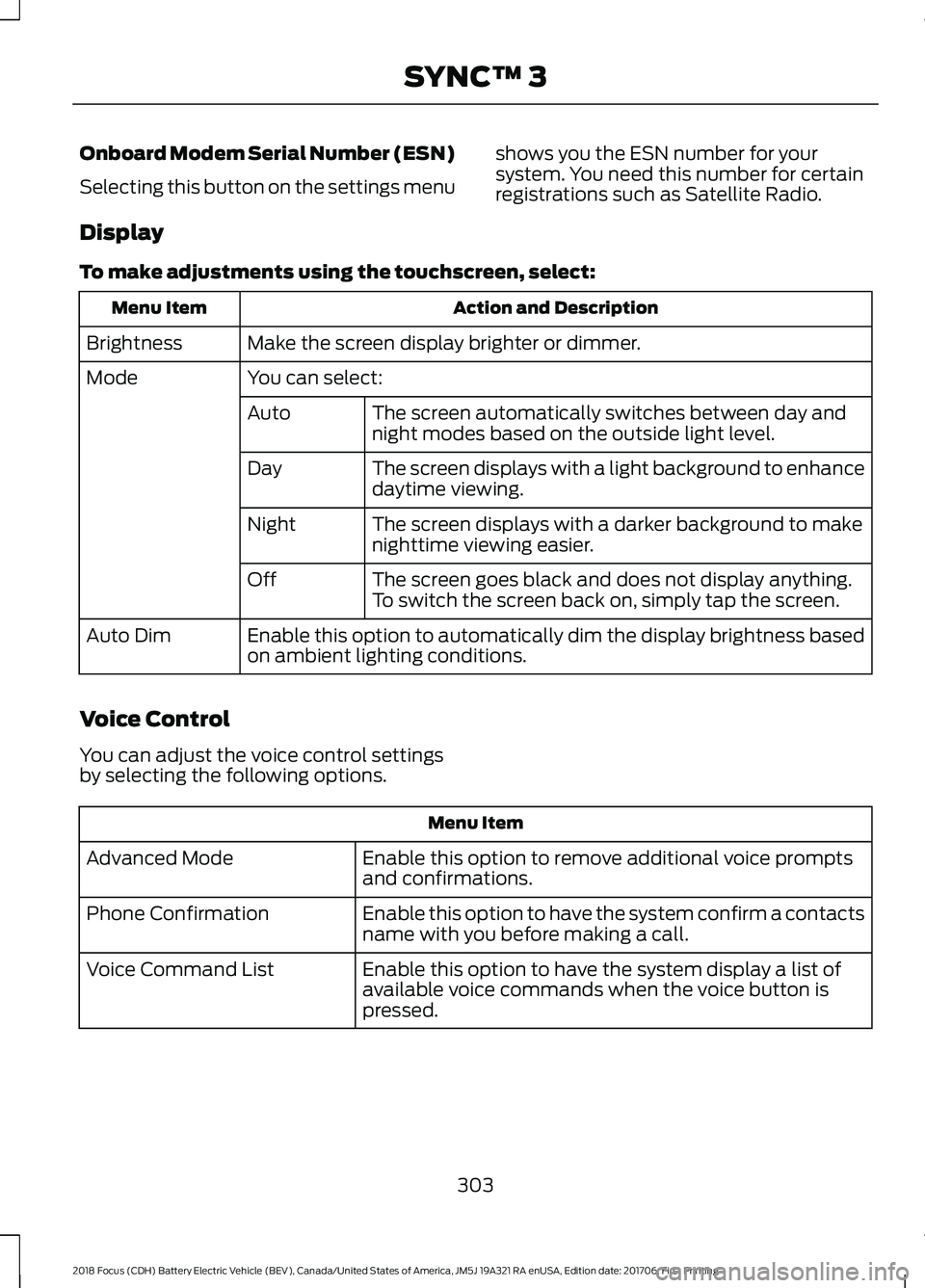
Onboard Modem Serial Number (ESN)
Selecting this button on the settings menu
shows you the ESN number for your
system. You need this number for certain
registrations such as Satellite Radio.
Display
To make adjustments using the touchscreen, select: Action and Description
Menu Item
Make the screen display brighter or dimmer.
Brightness
You can select:
Mode
The screen automatically switches between day and
night modes based on the outside light level.
Auto
The screen displays with a light background to enhance
daytime viewing.
Day
The screen displays with a darker background to make
nighttime viewing easier.
Night
The screen goes black and does not display anything.
To switch the screen back on, simply tap the screen.
Off
Enable this option to automatically dim the display brightness based
on ambient lighting conditions.
Auto Dim
Voice Control
You can adjust the voice control settings
by selecting the following options. Menu Item
Enable this option to remove additional voice prompts
and confirmations.
Advanced Mode
Enable this option to have the system confirm a contacts
name with you before making a call.
Phone Confirmation
Enable this option to have the system display a list of
available voice commands when the voice button is
pressed.
Voice Command List
303
2018 Focus (CDH) Battery Electric Vehicle (BEV), Canada/United States of America, JM5J 19A321 RA enUSA, Edition date: 201706, First Printing SYNC™ 3
Page 315 of 375
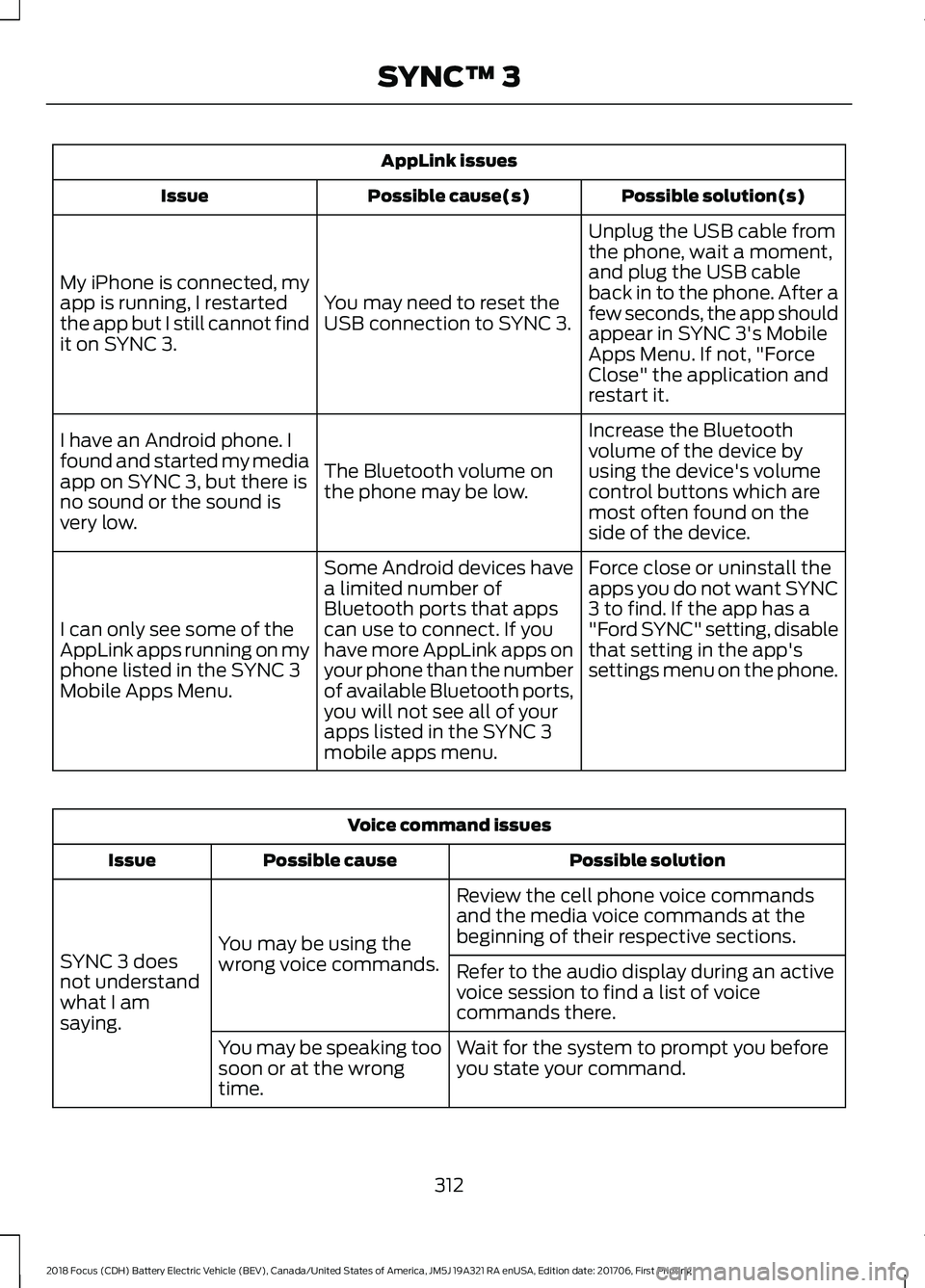
AppLink issues
Possible solution(s)
Possible cause(s)
Issue
Unplug the USB cable from
the phone, wait a moment,
and plug the USB cable
back in to the phone. After a
few seconds, the app should
appear in SYNC 3's Mobile
Apps Menu. If not, "Force
Close" the application and
restart it.
You may need to reset the
USB connection to SYNC 3.
My iPhone is connected, my
app is running, I restarted
the app but I still cannot find
it on SYNC 3.
Increase the Bluetooth
volume of the device by
using the device's volume
control buttons which are
most often found on the
side of the device.
The Bluetooth volume on
the phone may be low.
I have an Android phone. I
found and started my media
app on SYNC 3, but there is
no sound or the sound is
very low.
Force close or uninstall the
apps you do not want SYNC
3 to find. If the app has a
"Ford SYNC" setting, disable
that setting in the app's
settings menu on the phone.
Some Android devices have
a limited number of
Bluetooth ports that apps
can use to connect. If you
have more AppLink apps on
your phone than the number
of available Bluetooth ports,
you will not see all of your
apps listed in the SYNC 3
mobile apps menu.
I can only see some of the
AppLink apps running on my
phone listed in the SYNC 3
Mobile Apps Menu. Voice command issues
Possible solution
Possible cause
Issue
Review the cell phone voice commands
and the media voice commands at the
beginning of their respective sections.
You may be using the
wrong voice commands.
SYNC 3 does
not understand
what I am
saying. Refer to the audio display during an active
voice session to find a list of voice
commands there.
Wait for the system to prompt you before
you state your command.
You may be speaking too
soon or at the wrong
time.
312
2018 Focus (CDH) Battery Electric Vehicle (BEV), Canada/United States of America, JM5J 19A321 RA enUSA, Edition date: 201706, First Printing SYNC™ 3
Page 316 of 375
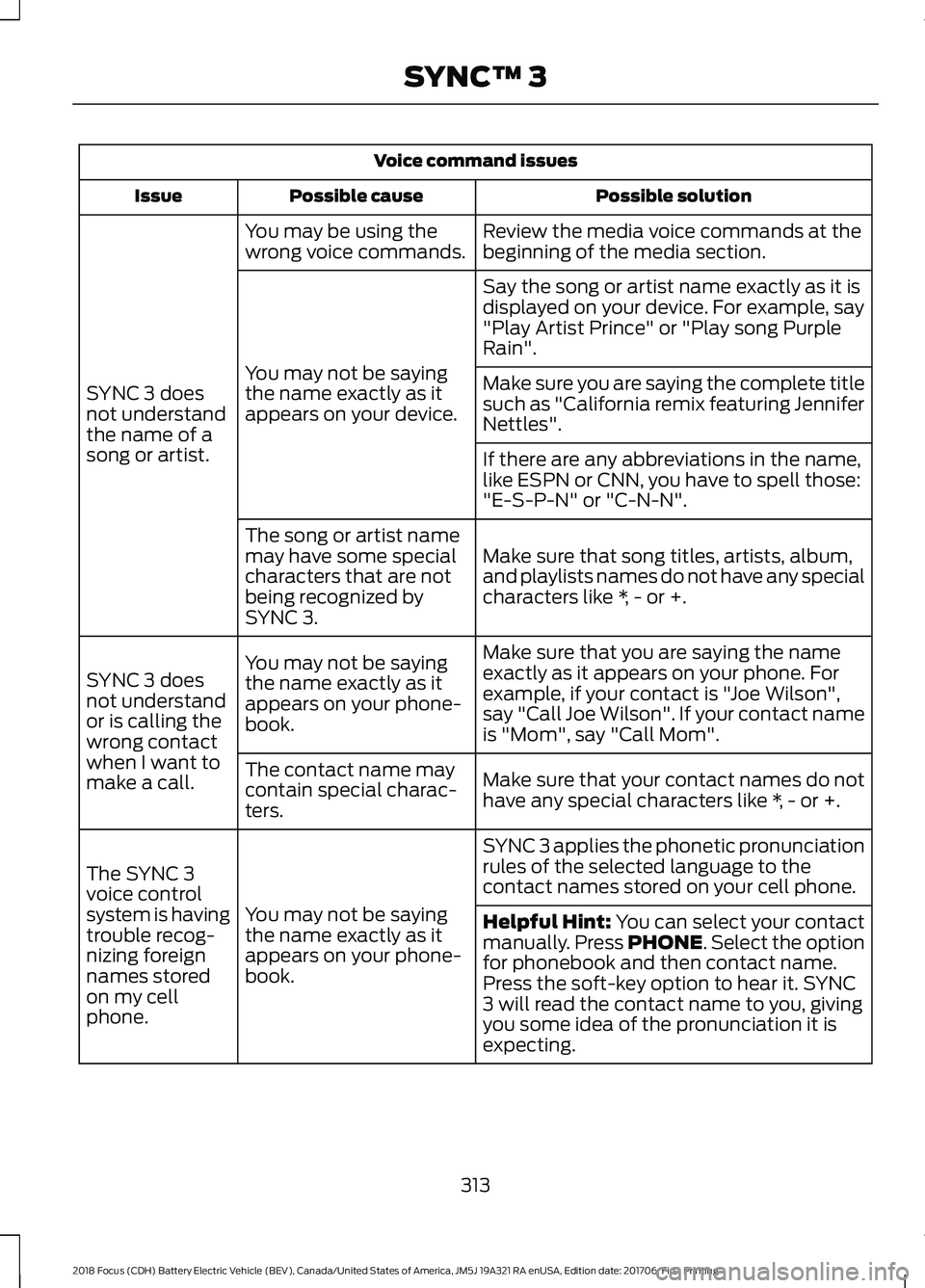
Voice command issues
Possible solution
Possible cause
Issue
Review the media voice commands at the
beginning of the media section.
You may be using the
wrong voice commands.
SYNC 3 does
not understand
the name of a
song or artist. Say the song or artist name exactly as it is
displayed on your device. For example, say
"Play Artist Prince" or "Play song Purple
Rain".
You may not be saying
the name exactly as it
appears on your device. Make sure you are saying the complete title
such as "California remix featuring Jennifer
Nettles".
If there are any abbreviations in the name,
like ESPN or CNN, you have to spell those:
"E-S-P-N" or "C-N-N".
Make sure that song titles, artists, album,
and playlists names do not have any special
characters like *, - or +.
The song or artist name
may have some special
characters that are not
being recognized by
SYNC 3.
Make sure that you are saying the name
exactly as it appears on your phone. For
example, if your contact is "Joe Wilson",
say "Call Joe Wilson". If your contact name
is "Mom", say "Call Mom".
You may not be saying
the name exactly as it
appears on your phone-
book.
SYNC 3 does
not understand
or is calling the
wrong contact
when I want to
make a call.
Make sure that your contact names do not
have any special characters like *, - or +.
The contact name may
contain special charac-
ters.
SYNC 3 applies the phonetic pronunciation
rules of the selected language to the
contact names stored on your cell phone.
You may not be saying
the name exactly as it
appears on your phone-
book.
The SYNC 3
voice control
system is having
trouble recog-
nizing foreign
names stored
on my cell
phone.
Helpful Hint: You can select your contact
manually. Press PHONE. Select the option
for phonebook and then contact name.
Press the soft-key option to hear it. SYNC
3 will read the contact name to you, giving
you some idea of the pronunciation it is
expecting.
313
2018 Focus (CDH) Battery Electric Vehicle (BEV), Canada/United States of America, JM5J 19A321 RA enUSA, Edition date: 201706, First Printing SYNC™ 3
Page 318 of 375
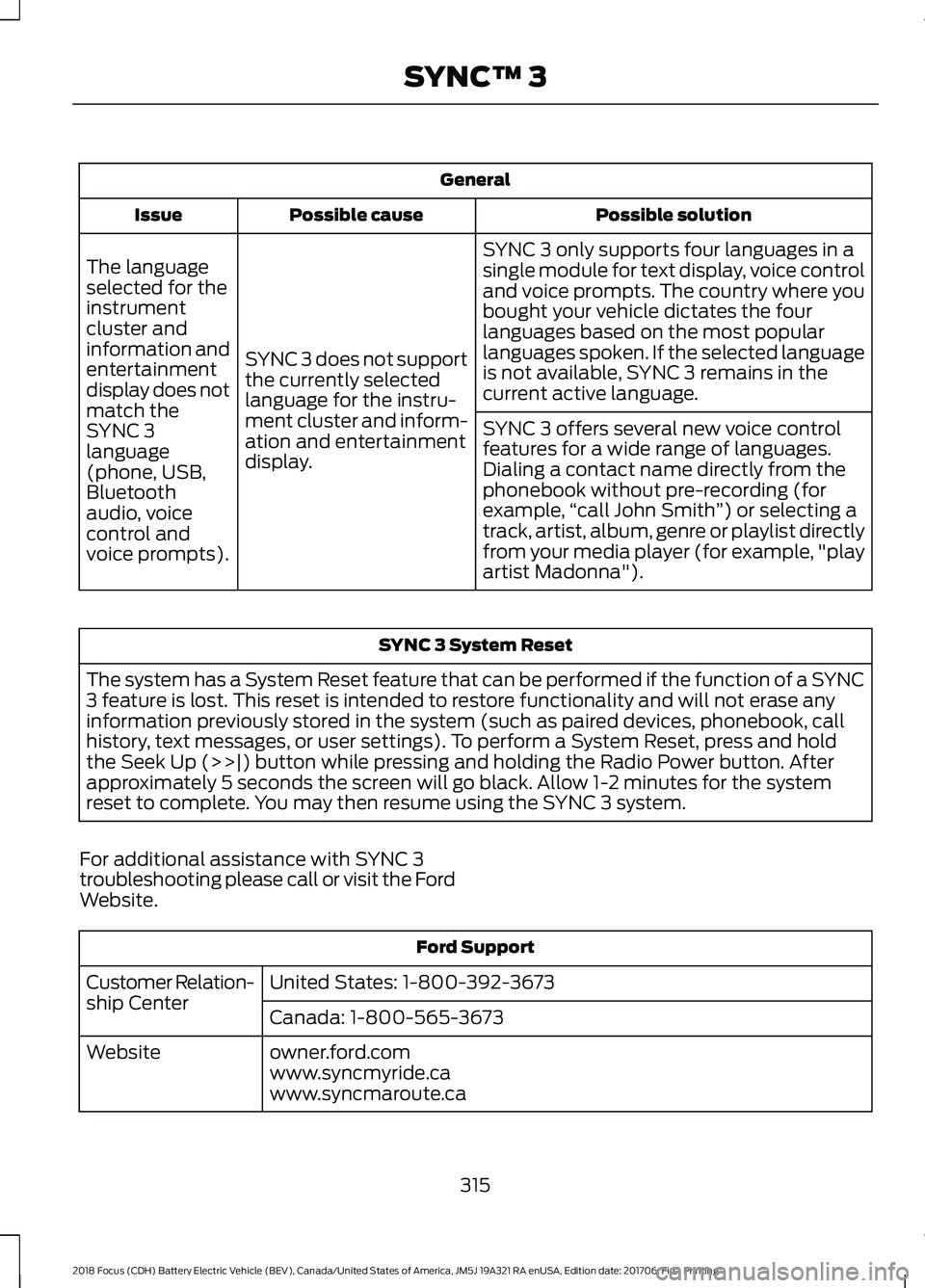
General
Possible solution
Possible cause
Issue
SYNC 3 only supports four languages in a
single module for text display, voice control
and voice prompts. The country where you
bought your vehicle dictates the four
languages based on the most popular
languages spoken. If the selected language
is not available, SYNC 3 remains in the
current active language.
SYNC 3 does not support
the currently selected
language for the instru-
ment cluster and inform-
ation and entertainment
display.
The language
selected for the
instrument
cluster and
information and
entertainment
display does not
match the
SYNC 3
SYNC 3 offers several new voice control
features for a wide range of languages.
Dialing a contact name directly from the
phonebook without pre-recording (for
example,
“call John Smith ”) or selecting a
track, artist, album, genre or playlist directly
from your media player (for example, "play
artist Madonna").
language
(phone, USB,
Bluetooth
audio, voice
control and
voice prompts). SYNC 3 System Reset
The system has a System Reset feature that can be performed if the function of a SYNC
3 feature is lost. This reset is intended to restore functionality and will not erase any
information previously stored in the system (such as paired devices, phonebook, call
history, text messages, or user settings). To perform a System Reset, press and hold
the Seek Up (>>|) button while pressing and holding the Radio Power button. After
approximately 5 seconds the screen will go black. Allow 1-2 minutes for the system
reset to complete. You may then resume using the SYNC 3 system.
For additional assistance with SYNC 3
troubleshooting please call or visit the Ford
Website. Ford Support
United States: 1-800-392-3673
Customer Relation-
ship Center
Canada: 1-800-565-3673
owner.ford.com
Website
www.syncmyride.ca
www.syncmaroute.ca
315
2018 Focus (CDH) Battery Electric Vehicle (BEV), Canada/United States of America, JM5J 19A321 RA enUSA, Edition date: 201706, First Printing SYNC™ 3
Page 356 of 375
V. Europe Territory
A. Use of Certain Traffic Codes in Europe 1. General Restrictions Applicable to
Traffic Codes. Client acknowledges
and agrees that in certain countries of
the Europe Territory, Client will need
to obtain rights directly from third
party RDS-TMC code providers to
receive and use the Traffic Codes in
the Data and to deliver to End-Users
Transactions in any way derived from
or based on such Traffic Codes. For
such countries, HERE shall deliver the
Data incorporating Traffic Codes to
Client only after receiving certification
from Client of its having obtained such
rights.
2. Display of Third Party Rights
Legends for Belgium. Client shall, for
each Transaction that uses Traffic
Codes for Belgium, provide the
following notice to the End-User:
“Traffic Codes for Belgium are
provided by the Ministerie van de
Vlaamse Gemeenschap and the
Ministèrie de l ’Equipement et des
Transports. ”
B. Paper Maps. With respect to any
license granted to Client relating to
making, selling or distributing paper
maps (i.e., a map fixed on a paper or
paper-like medium): (a) such license
with respect to Data for the Territory of
Great Britain is conditioned on Client’ s
entering into and complying with a
separate written agreement with the
Ordnance Survey (“OS ”) to create and
sell paper maps, Client’ s paying to the
OS any and all applicable paper map
royalties, and Client’ s complying with
the OS copyright notice requirements;
(b) such license for selling or otherwise
distributing for charge with respect to
Data for the Territory of Czech Republic is conditioned on Client’
s obtaining prior
written consent from Kartografie a.s.;
(c) such license for selling or distributing
with respect to Data for the Territory of
Switzerland is conditioned on Client’ s
obtaining a permit from Bundesamt für
Landestopografie of Switzerland; (d)
Client is restricted from using Data for
the Territory of France to create paper
maps with a scale between 1:5,000 and
1:250,000; and (e) Client is restricted
from using any Data to create, sell or
distribute paper maps that are the same
or substantially similar, in terms of data
content and specific use of color,
symbols and scale, to paper maps
published by the European national
mapping agencies, including without
limitation, Landervermessungämter of
Germany, Topografische Dienst of the
Netherlands, Nationaal Geografisch
Instituut of Belgium, Bundesamt für
Landestopografie of Switzerland,
Bundesamt für Eich-und Vermessung-
swesen of Austria, and the National
Land Survey of Sweden.
C. OS Enforcement. Without limiting
Section IV(B) above, with respect to
Data for the Territory of Great Britain,
Client acknowledges and agrees that
the Ordnance Survey (“OS ”) may bring
a direct action against Client to enforce
compliance with the OS copyright notice
(see Section IV(D) below) and paper
map requirements (see Section IV(B)
above) contained in this Agreement.
D. Third Party Notices. Any and all copies
of the Data and/or packaging relating
thereto shall include the respective Third
Party Notices set forth below and used
as described below corresponding to
the Territory (or portion thereof)
included in such copy:
Notice
Country(ies)
353
2018 Focus (CDH) Battery Electric Vehicle (BEV), Canada/United States of America, JM5J 19A321 RA enUSA, Edition date: 201706, First Printing Appendices
Page 370 of 375
Entertainment...............................................245
AM/FM Radio...................................................... 246
Apps........................................................................\
254
Bluetooth Stereo or USB................................ 253
CD........................................................................\
.... 252
HD Radio ™ Information (If
Available)........................................................ 249
SiriusXM® Satellite Radio (If Activated)........................................................ 247
Sources.................................................................. 246
Supported Media Players, Formats and Metadata Information................................ 254
USB Ports............................................................. 254
Environment......................................................12
Event Data Recording See: Data Recording............................................... 7
Exterior Mirrors.................................................72
Fold-Away Exterior Mirrors................................ 73
Heated Exterior Mirrors....................................... 73
Integrated Blind Spot Mirrors........................... 73
Power Exterior Mirrors......................................... 72
F
Fastening the Seatbelts..............................28 Seatbelt Locking Modes.................................... 29
Using Seatbelts During Pregnancy................28
Flat Tire Inflation See: Tire Sealant and Inflator Kit...................191
Floor Mats........................................................142
Ford Credit
...........................................................9
US Only....................................................................... 9
Ford Protect....................................................318 Ford Protect Extended Service Plan
(CANADA ONLY)........................................... 319
Ford Protect Extended Service Plans (U.S. Only)................................................................... 318
Front Passenger Sensing System.............37
Front Wiper Blades See: Changing the Front Wiper Blades.......176
Fuse Box Locations......................................156 Engine Compartment Fuse Box.................... 156
Luggage Compartment Fuse Box................156
Passenger Compartment Fuse Box............156
Fuses.................................................................156
Fuse Specification Chart...........................156 Electric Motor Compartment Fuse
Box....................................................................... 157Luggage Compartment Fuse Box................164
Passenger Compartment Fuse Box.............162
Pre-fuse Box.........................................................
156
G
Gauges................................................................75 Common Displays................................................ 75
Gearbox See: Transmission............................................... 118
General Information on Radio Frequencies...................................................44
General Maintenance Information.......320 Multi-point Inspection...................................... 322
Owner Checks and Services........................... 321
Protecting Your Investment........................... 320
Why Maintain Your Vehicle?......................... 320
Why Maintain Your Vehicle at Your Dealership?..................................................... 320
Getting Assistance Outside the U.S. and Canada..........................................................152
Getting the Services You Need...............149 Away From Home ............................................... 149
H
Handbrake See: Parking Brake............................................... 121
Hazard Flashers
............................................145
Headlamp Adjusting See: Adjusting the Headlamps....................... 177
Headlamp Exit Delay....................................68
Headlamp Removal See: Removing a Headlamp........................... 178
Head Restraints..............................................99 Adjusting the Head Restraint........................ 100
Tilting Head Restraints ................................... 100
Heated Seats
.................................................104
Heated Windows and Mirrors...................96 Heated Exterior Mirrors....................................... 97
Heated Rear Window......................................... 96
Heating See: Climate Control.......................................... 94
High Voltage Battery Cut-Off Switch.............................................................116
High Voltage Battery....................................110 General Information........................................... 110
367
2018 Focus (CDH) Battery Electric Vehicle (BEV), Canada/United States of America, JM5J 19A321 RA enUSA, Edition date: 201706, First Printing Index
Page 371 of 375
Hill Start Assist..............................................122
Switching the System On and Off................122
Using Hill Start Assist........................................ 122
Hints on Controlling the Interior Climate............................................................95
General Hints......................................................... 95
Improving Vehicle Drive Range....................... 96
Recommended Settings for Cooling............96
Side Window Defogging in Cold Weather.............................................................. 96
Hints on Driving With Anti-Lock Brakes..............................................................121
Home Screen................................................238
Hood Lock See: Opening and Closing the Hood...........170
I
In California (U.S. Only).............................150
Information Display Control.......................63 Multimedia Controls........................................... 63
Information Displays....................................80 General Information........................................... 80
Information Messages
..................................87
AdvanceTrac®....................................................... 87
Alarm System........................................................ 88
Battery and Charging System (High Voltage).............................................................. 88
Door Ajar................................................................. 89
Hill Start Assist..................................................... 90
Keys and Intelligent Access............................. 90
Lighting.................................................................... 90
Maintenance........................................................... 91
MyKey........................................................................\
91
Parking Aid.............................................................. 92
Parking Brake......................................................... 92
Power Steering...................................................... 92
Remote Start......................................................... 93
Tire Pressure Monitoring System................... 93
Traction Control.................................................... 93
Transmission.......................................................... 93
Installing Child Restraints
............................16
Child Restraints...................................................... 16
Using Lap and Shoulder Belts.......................... 17
Using Lower Anchors and Tethers for Children (LATCH)............................................. 19
Using Tether Straps.............................................. 21
Instrument Cluster.........................................75 Instrument Lighting Dimmer.....................68
Instrument Panel Overview.........................13
Interior Lamps
.................................................69
Front Interior Lamps (If Equipped)...............69
Interior Mirror
....................................................73
Introduction........................................................5
J
Jump Starting the Vehicle.........................145 To Connect the Booster Cables.................... 146
To Start Your Vehicle......................................... 146
K
Keys and Remote Controls.........................44
L
Lighting Control..............................................66 Headlamp Flasher................................................ 67
High Beams............................................................ 66
Parking Lamps...................................................... 66
Lighting..............................................................66 General Information........................................... 66
Load Carrying
.................................................134
Load Limit........................................................134
Special Loading Instructions for Owners of
Pick-up Trucks and Utility-type
Vehicles............................................................. 139
Vehicle Loading - with and without a Trailer.................................................................. 134
Locking and Unlocking
.................................53
Activating Intelligent Access............................ 54
Autolock................................................................... 55
Autounlock............................................................. 55
Battery Saver......................................................... 56
Disabled Intelligent Access Keys.................... 55
Illuminated Entry.................................................. 56
Illuminated Exit..................................................... 56
Opening the Liftgate........................................... 56
Power Door Locks................................................ 53
Remote Control..................................................... 53
Smart Unlocks for Intelligent Access Keys...................................................................... 55
Lug Nuts See: Changing a Road Wheel........................ 216
Lug Nuts
............................................................217
368
2018 Focus (CDH) Battery Electric Vehicle (BEV), Canada/United States of America, JM5J 19A321 RA enUSA, Edition date: 201706, First Printing Index
Page 372 of 375
M
Maintenance..................................................169
General Information.......................................... 169
Manual Liftgate..............................................56
Closing the Liftgate.............................................. 57
Opening the Liftgate............................................ 57
Manual Seats
..................................................101
Media Hub......................................................226
Message Center See: Information Displays................................ 80
Mirrors See: Heated Windows and Mirrors................96
See: Windows and Mirrors................................. 71
Mobile Communications Equipment........11
Motorcraft Parts
............................................218
MyKey Troubleshooting...............................52
MyKey ™............................................................48
Principle of Operation........................................ 48
N
Navigation......................................................260 cityseeker............................................................. 268
Destination Mode.............................................. 263
Map Mode............................................................. 261
Navigation Map Updates................................ 269
Navigation Menu................................................ 266
SiriusXM Traffic and Travel Link................... 269
Waypoints............................................................. 267
Normal Scheduled Maintenance...........323
O
Opening and Closing the Hood...............170 Closing the Hood................................................ 170
Opening the Hood.............................................. 170
Ordering Additional Owner's Literature.......................................................153
Obtaining a French Owner ’s Manual..........154
Overhead Console
.......................................106
P
Parking Aids....................................................126 Principle of Operation....................................... 126
Parking Brake
...................................................121 Passive Anti-Theft System
........................58
SecuriLock.............................................................. 58
PATS See: Passive Anti-Theft System..................... 58
Perchlorate..........................................................9
Personal Safety System ™
..........................34
How Does the Personal Safety System
Work?.................................................................. 34
Phone...............................................................255 During a Phone Call.......................................... 258
Making Calls......................................................... 257
Pairing Your Cell Phone for the First Time................................................................... 255
Phone Menu........................................................ 256
Receiving Calls.................................................... 258
Smartphone Connectivity.............................. 259
Text Messaging................................................... 259
Post-Crash Alert System
...........................148
Power Door Locks See: Locking and Unlocking............................. 53
Power Seats
....................................................101
Power Lumbar..................................................... 102
Power Windows
...............................................71
Accessory Delay.................................................... 72
Bounce-Back........................................................... 71
One-Touch Down.................................................. 71
One-Touch Up........................................................ 71
Window Lock........................................................... 71
Protecting the Environment
........................12
R
Rear Parking Aid............................................126 Obstacle Distance Indicator............................ 127
Rear Seats.......................................................102 Folding the Seatback........................................ 102
Rear Under Floor Storage
..........................134
Cargo Management System.......................... 134
Rear View Camera........................................127 Enhanced Park Aids.......................................... 130
Using the Rear View Camera System.........128
Rear View Camera See: Rear View Camera.................................... 127
Rear Window Wiper and Washers...........65 Rear Window Washer......................................... 65
Rear Window Wiper............................................ 65
Rear Wiper Blades See: Changing the Rear Wiper Blades.........177
369
2018 Focus (CDH) Battery Electric Vehicle (BEV), Canada/United States of America, JM5J 19A321 RA enUSA, Edition date: 201706, First Printing Index