2018 FORD FOCUS ELECTRIC display
[x] Cancel search: displayPage 283 of 375
Action and Description
Menu Item
Item
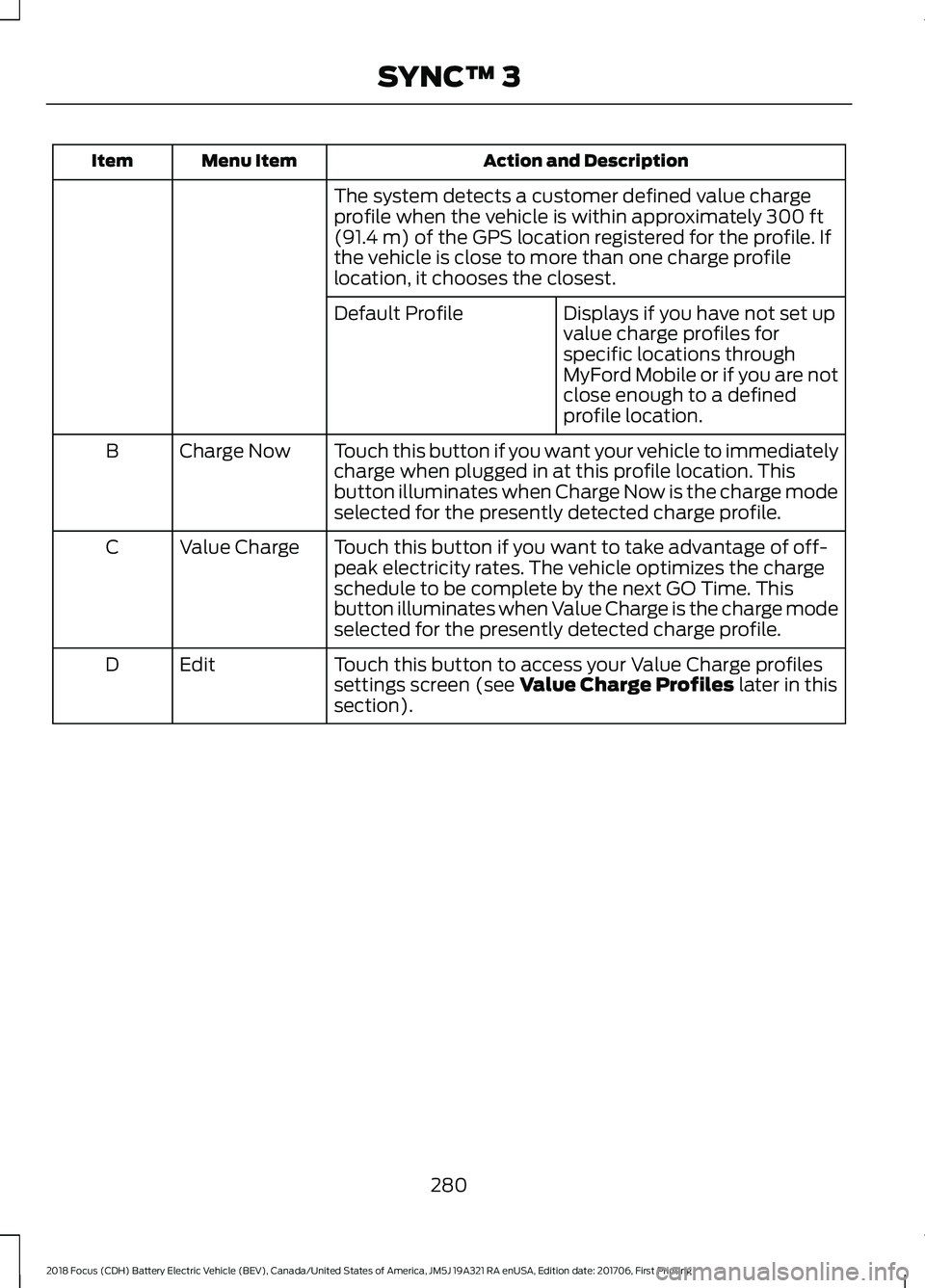
The system detects a customer defined value charge
profile when the vehicle is within approximately 300 ft
(91.4 m) of the GPS location registered for the profile. If
the vehicle is close to more than one charge profile
location, it chooses the closest.
Displays if you have not set up
value charge profiles for
specific locations through
MyFord Mobile or if you are not
close enough to a defined
profile location.
Default Profile
Touch this button if you want your vehicle to immediately
charge when plugged in at this profile location. This
button illuminates when Charge Now is the charge mode
selected for the presently detected charge profile.
Charge Now
B
Touch this button if you want to take advantage of off-
peak electricity rates. The vehicle optimizes the charge
schedule to be complete by the next GO Time. This
button illuminates when Value Charge is the charge mode
selected for the presently detected charge profile.
Value Charge
C
Touch this button to access your Value Charge profiles
settings screen (see
Value Charge Profiles later in this
section).
Edit
D
280
2018 Focus (CDH) Battery Electric Vehicle (BEV), Canada/United States of America, JM5J 19A321 RA enUSA, Edition date: 201706, First Printing SYNC™ 3
Page 284 of 375
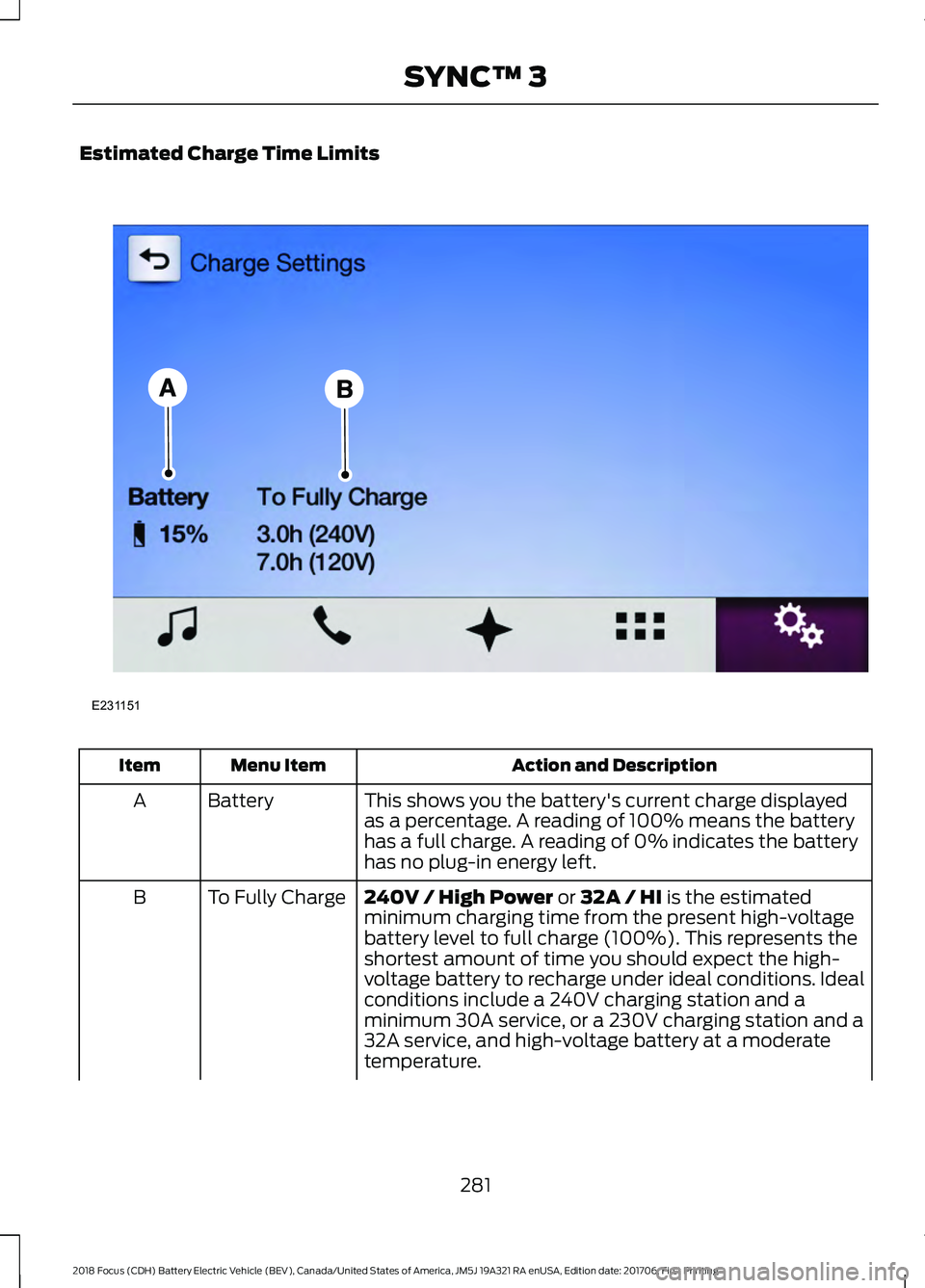
Estimated Charge Time Limits
Action and Description
Menu Item
Item
This shows you the battery's current charge displayed
as a percentage. A reading of 100% means the battery
has a full charge. A reading of 0% indicates the battery
has no plug-in energy left.
Battery
A
240V / High Power or 32A / HI is the estimated
minimum charging time from the present high-voltage
battery level to full charge (100%). This represents the
shortest amount of time you should expect the high-
voltage battery to recharge under ideal conditions. Ideal
conditions include a 240V charging station and a
minimum 30A service, or a 230V charging station and a
32A service, and high-voltage battery at a moderate
temperature.
To Fully Charge
B
281
2018 Focus (CDH) Battery Electric Vehicle (BEV), Canada/United States of America, JM5J 19A321 RA enUSA, Edition date: 201706, First Printing SYNC™ 3E231151
Page 285 of 375
Action and Description
Menu Item
Item
Note: Some charging stations use lower voltage (208V),
which result in longer charge times.
120V / Low Power or 10A / LO is the estimated
maximum charging time from the present high-voltage
battery level to full charge (100%). This represents the
longest amount of time you should expect the high-
voltage battery to recharge under normal conditions.
Normal conditions include a 120V convenience cord and
12A service, or a 230V convenience cord and 10A service.
Note: These charging times are only estimates. It is normal for your actual charge duration
to be longer.
Note: Charging may take longer when the AC line voltage is low and may indicate your
electrical source is not meeting certain requirements. See
Charging the High Voltage
Battery (page 110).
GO Time Schedule
You can access the GO Time Schedule by
selecting the edit option under MY GO
Time on the Charge Setting screen. Action and Description
Menu Item
This turns on the GO Time schedule.
On
This turns off the GO Time schedule. This also turns off the cabin
conditioning function. Use this mode to prevent using energy for
cabin preconditioning when you leave your vehicle plugged in and
do not plan to use it for a while, such as when on vacation.
Off
Note:
If you choose to perform Value Charging with the schedule
off, the vehicle schedules charging to finish at the lowest cost
within 24 hours of plugging the vehicle in.
This displays the GO Time day-of-week and time. The blue high-
lighted GO Time is the present GO Time, which the vehicle is using
for charge scheduling and cabin conditioning. You can schedule
two GO Time events per day for each day of the week.
GO Time 1
282
2018 Focus (CDH) Battery Electric Vehicle (BEV), Canada/United States of America, JM5J 19A321 RA enUSA, Edition date: 201706, First Printing SYNC™ 3
Page 286 of 375
Action and Description
Menu Item
Allows you to edit the GO Time and
cabin conditioning temperature.
My GO Times
Indicates that you can add a GO
Time to this slot.
--:--
GO Time 2
Note: If you set GO Time 2 to occur before GO Time 1, or if you
set GO Time 1 to occur after an existing GO Time 2, the GO Times
will automatically sort themselves and be displayed in the correct
order.
GO Time and Cabin Conditioning
This screen allows you to enter or change
the GO Time and cabin conditioning
temperature. Press any GO Time on the Schedule screen
to enter the editing screen for that GO
Time. Action and Description
Menu Item
These change the hours and minutes of your GO Time. The
minutes change in increments of five. You can also switch the
settings for AM and PM by touching those buttons.
Time (+ and -)
These switch the setting for your selected cabin conditioning
temperature for this GO Time event. You can select from four
settings:
Cabin Conditioning
(+ and -)
Off
85°F (29.5°C)
72°F (22°C)
65°F (18.5°C)
Note:
Cabin conditioning can perform differently depending on
if you plug into a low current convenience cord or a high current
charging station. The power available for conditioning is limited
to the charging station power available.
Note:
Your vehicle may not always reach the set cabin temper-
ature due to charging and ambient temperature conditions. This
is normal operation.
Touching this button erases the GO Time and cabin conditioning
temperature.
Clear
Touching this button stores the GO Time and temperature
settings.
Save
Note: If you select a GO Time, but choose
Off for the temperature setting, the vehicle
schedules charging to be complete by your GO Time and does not condition the cabin.
Note: Make sure you save your settings before returning to the previous screen. If you do
not touch
Save, the system will not automatically store the settings.
283
2018 Focus (CDH) Battery Electric Vehicle (BEV), Canada/United States of America, JM5J 19A321 RA enUSA, Edition date: 201706, First Printing SYNC™ 3
Page 287 of 375
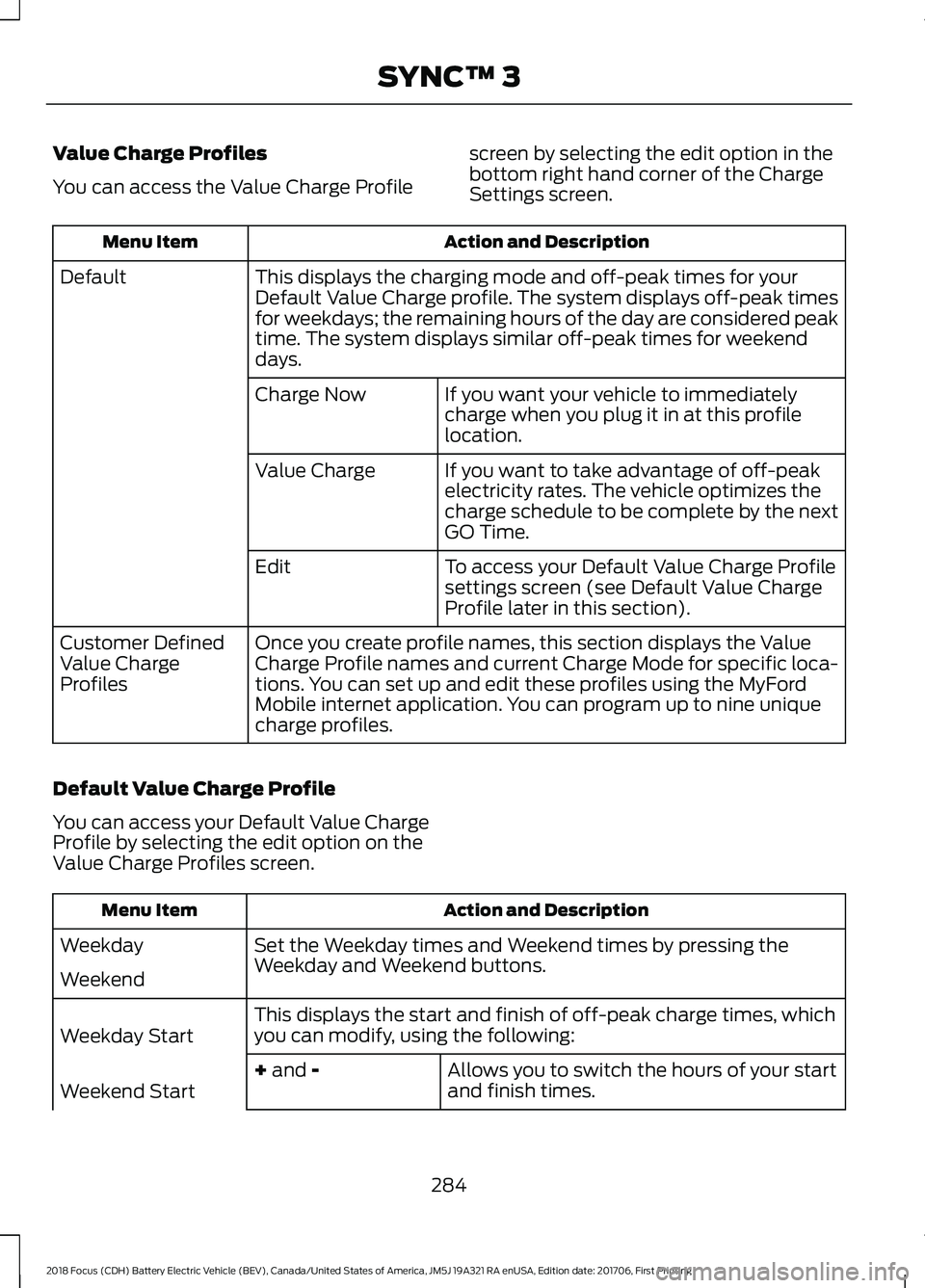
Value Charge Profiles
You can access the Value Charge Profile
screen by selecting the edit option in the
bottom right hand corner of the Charge
Settings screen. Action and Description
Menu Item
This displays the charging mode and off-peak times for your
Default Value Charge profile. The system displays off-peak times
for weekdays; the remaining hours of the day are considered peak
time. The system displays similar off-peak times for weekend
days.
Default
If you want your vehicle to immediately
charge when you plug it in at this profile
location.
Charge Now
If you want to take advantage of off-peak
electricity rates. The vehicle optimizes the
charge schedule to be complete by the next
GO Time.
Value Charge
To access your Default Value Charge Profile
settings screen (see Default Value Charge
Profile later in this section).
Edit
Once you create profile names, this section displays the Value
Charge Profile names and current Charge Mode for specific loca-
tions. You can set up and edit these profiles using the MyFord
Mobile internet application. You can program up to nine unique
charge profiles.
Customer Defined
Value Charge
Profiles
Default Value Charge Profile
You can access your Default Value Charge
Profile by selecting the edit option on the
Value Charge Profiles screen. Action and Description
Menu Item
Set the Weekday times and Weekend times by pressing the
Weekday and Weekend buttons.
Weekday
Weekend
This displays the start and finish of off-peak charge times, which
you can modify, using the following:
Weekday Start
Allows you to switch the hours of your start
and finish times.
+ and -
Weekend Start
284
2018 Focus (CDH) Battery Electric Vehicle (BEV), Canada/United States of America, JM5J 19A321 RA enUSA, Edition date: 201706, First Printing SYNC™ 3
Page 290 of 375
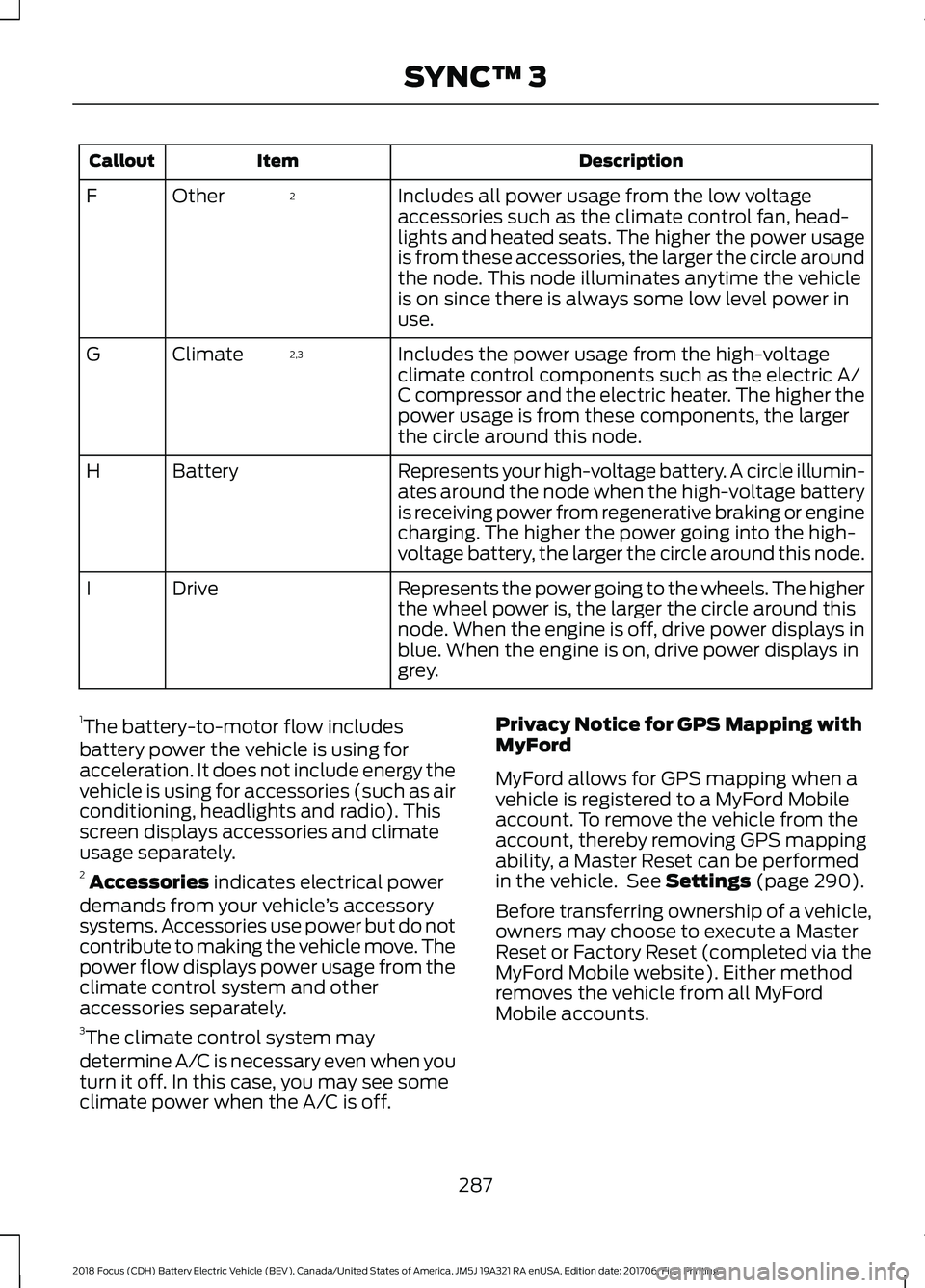
Description
Item
Callout
Includes all power usage from the low voltage
accessories such as the climate control fan, head-
lights and heated seats. The higher the power usage
is from these accessories, the larger the circle around
the node. This node illuminates anytime the vehicle
is on since there is always some low level power in
use.
2
Other
F
Includes the power usage from the high-voltage
climate control components such as the electric A/
C compressor and the electric heater. The higher the
power usage is from these components, the larger
the circle around this node.
2,3
Climate
G
Represents your high-voltage battery. A circle illumin-
ates around the node when the high-voltage battery
is receiving power from regenerative braking or engine
charging. The higher the power going into the high-
voltage battery, the larger the circle around this node.
Battery
H
Represents the power going to the wheels. The higher
the wheel power is, the larger the circle around this
node. When the engine is off, drive power displays in
blue. When the engine is on, drive power displays in
grey.
Drive
I
1 The battery-to-motor flow includes
battery power the vehicle is using for
acceleration. It does not include energy the
vehicle is using for accessories (such as air
conditioning, headlights and radio). This
screen displays accessories and climate
usage separately.
2 Accessories indicates electrical power
demands from your vehicle ’s accessory
systems. Accessories use power but do not
contribute to making the vehicle move. The
power flow displays power usage from the
climate control system and other
accessories separately.
3 The climate control system may
determine A/C is necessary even when you
turn it off. In this case, you may see some
climate power when the A/C is off. Privacy Notice for GPS Mapping with
MyFord
MyFord allows for GPS mapping when a
vehicle is registered to a MyFord Mobile
account. To remove the vehicle from the
account, thereby removing GPS mapping
ability, a Master Reset can be performed
in the vehicle. See Settings (page 290).
Before transferring ownership of a vehicle,
owners may choose to execute a Master
Reset or Factory Reset (completed via the
MyFord Mobile website). Either method
removes the vehicle from all MyFord
Mobile accounts.
287
2018 Focus (CDH) Battery Electric Vehicle (BEV), Canada/United States of America, JM5J 19A321 RA enUSA, Edition date: 201706, First Printing SYNC™ 3
Page 294 of 375
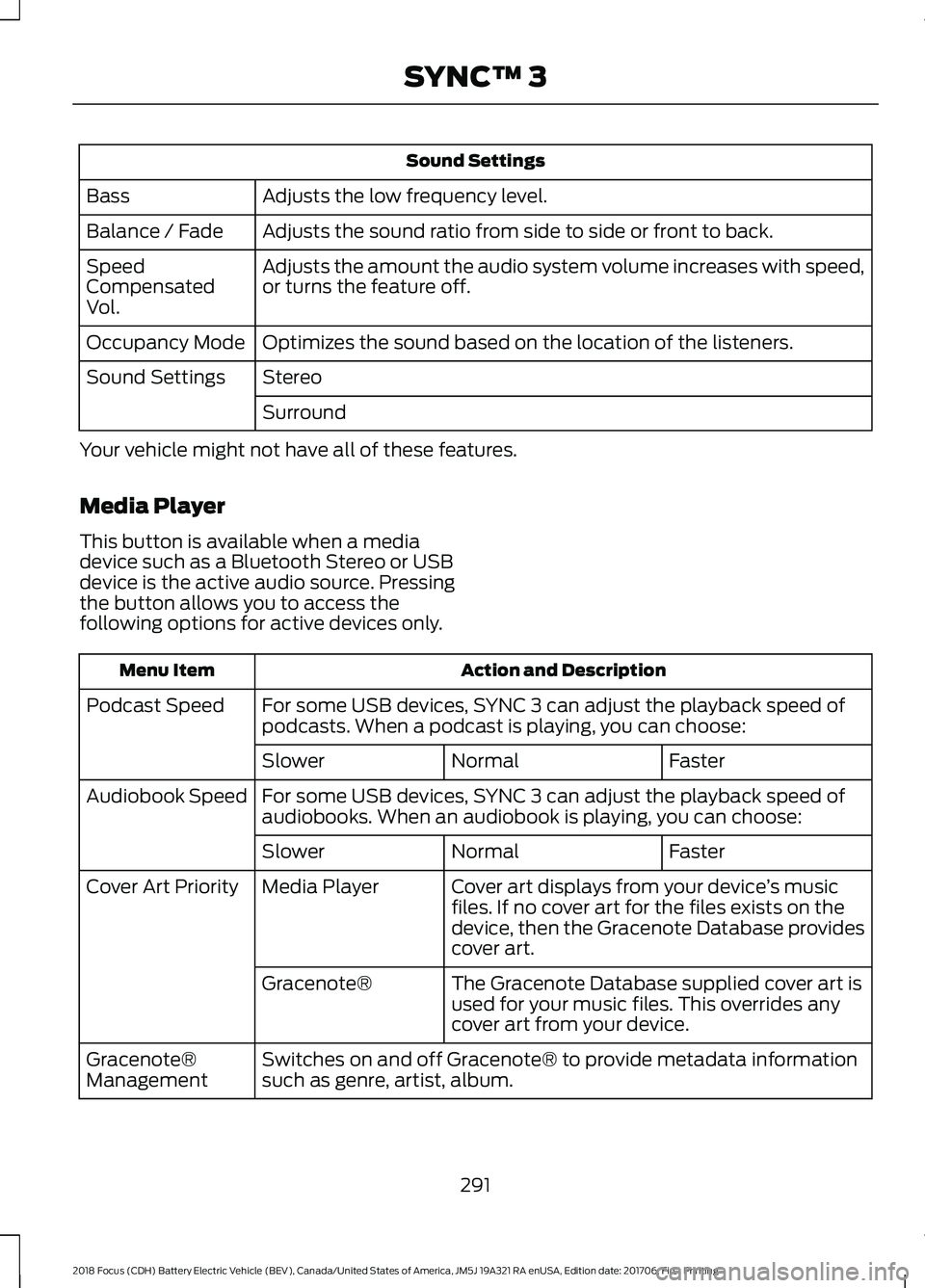
Sound Settings
Adjusts the low frequency level.
Bass
Adjusts the sound ratio from side to side or front to back.
Balance / Fade
Adjusts the amount the audio system volume increases with speed,
or turns the feature off.
Speed
Compensated
Vol.
Optimizes the sound based on the location of the listeners.
Occupancy Mode
Stereo
Sound Settings
Surround
Your vehicle might not have all of these features.
Media Player
This button is available when a media
device such as a Bluetooth Stereo or USB
device is the active audio source. Pressing
the button allows you to access the
following options for active devices only. Action and Description
Menu Item
For some USB devices, SYNC 3 can adjust the playback speed of
podcasts. When a podcast is playing, you can choose:
Podcast Speed
Faster
Normal
Slower
For some USB devices, SYNC 3 can adjust the playback speed of
audiobooks. When an audiobook is playing, you can choose:
Audiobook Speed
Faster
Normal
Slower
Cover art displays from your device ’s music
files. If no cover art for the files exists on the
device, then the Gracenote Database provides
cover art.
Media Player
Cover Art Priority
The Gracenote Database supplied cover art is
used for your music files. This overrides any
cover art from your device.
Gracenote®
Switches on and off Gracenote® to provide metadata information
such as genre, artist, album.
Gracenote®
Management
291
2018 Focus (CDH) Battery Electric Vehicle (BEV), Canada/United States of America, JM5J 19A321 RA enUSA, Edition date: 201706, First Printing SYNC™ 3
Page 295 of 375
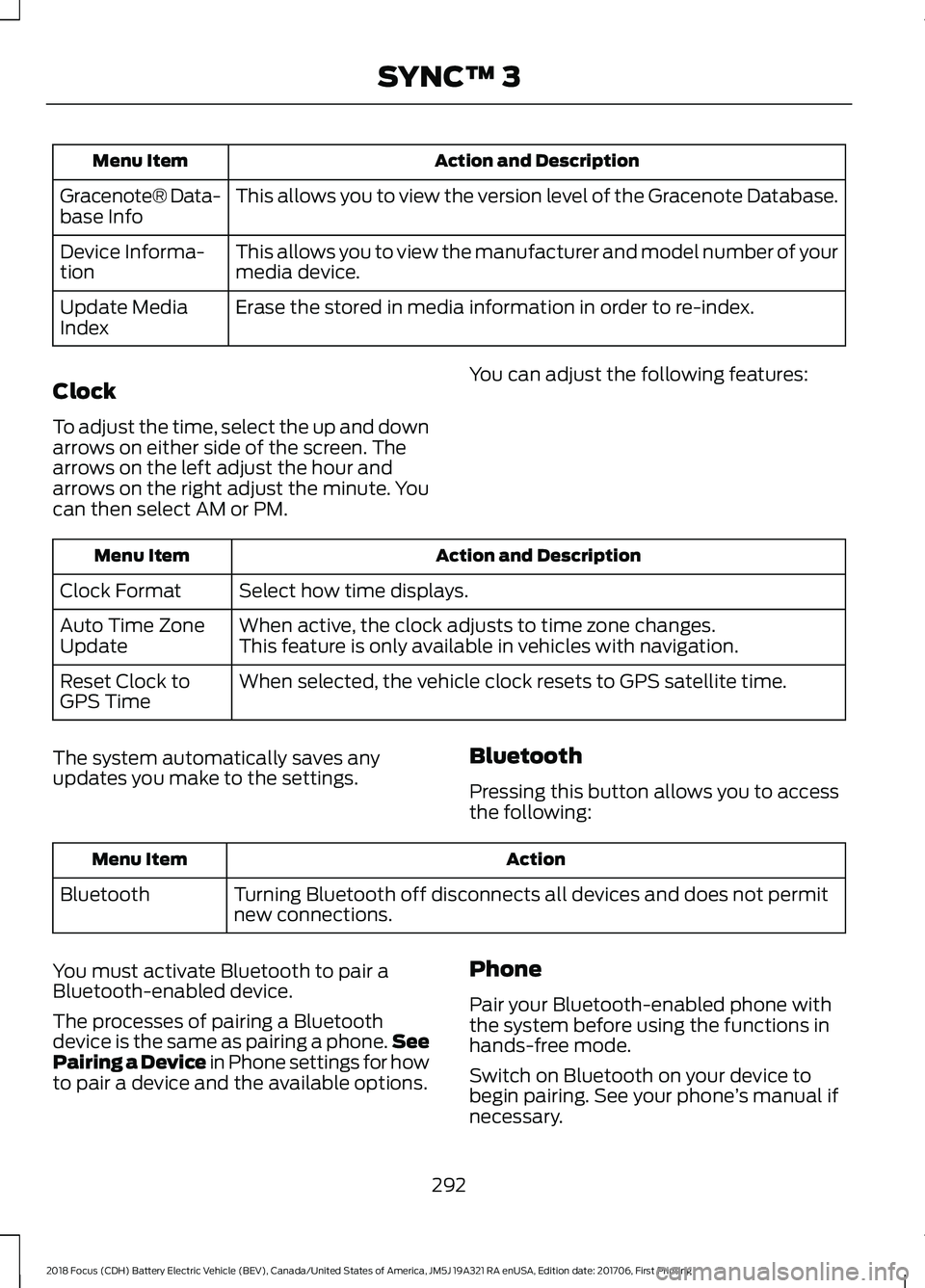
Action and Description
Menu Item
This allows you to view the version level of the Gracenote Database.
Gracenote® Data-
base Info
This allows you to view the manufacturer and model number of your
media device.
Device Informa-
tion
Erase the stored in media information in order to re-index.
Update Media
Index
Clock
To adjust the time, select the up and down
arrows on either side of the screen. The
arrows on the left adjust the hour and
arrows on the right adjust the minute. You
can then select AM or PM. You can adjust the following features:Action and Description
Menu Item
Select how time displays.
Clock Format
When active, the clock adjusts to time zone changes.
Auto Time Zone
Update This feature is only available in vehicles with navigation.
When selected, the vehicle clock resets to GPS satellite time.
Reset Clock to
GPS Time
The system automatically saves any
updates you make to the settings. Bluetooth
Pressing this button allows you to access
the following: Action
Menu Item
Turning Bluetooth off disconnects all devices and does not permit
new connections.
Bluetooth
You must activate Bluetooth to pair a
Bluetooth-enabled device.
The processes of pairing a Bluetooth
device is the same as pairing a phone. See
Pairing a Device in Phone settings for how
to pair a device and the available options. Phone
Pair your Bluetooth-enabled phone with
the system before using the functions in
hands-free mode.
Switch on Bluetooth on your device to
begin pairing. See your phone
’s manual if
necessary.
292
2018 Focus (CDH) Battery Electric Vehicle (BEV), Canada/United States of America, JM5J 19A321 RA enUSA, Edition date: 201706, First Printing SYNC™ 3