2018 FORD FLEX lock
[x] Cancel search: lockPage 115 of 508

Power Steering
Action
Message
The power steering system has detected a condition thatrequires service. See an authorized dealer.
Steering Fault Service
Now
The power steering system is not working. Stop your vehiclea safe place. Contact an authorized dealer.
Service Power Steering
Now
The power steering system has detected a condition withinthe power steering system or passive entry or passive start system requires service. Contact an authorized dealer.
Steering Assist Fault
Service Required
Seats Action
Message
Objects are by the passenger seat. After the objects are movedaway from the seat, if the warning stays on or continues to
come on contact an authorized dealer as soon as possible.
Occupant Sensor
BLOCKED Remove
Objects Near Passenger Seat
Tire Pressure Monitoring System Action
Message
One or more tires on your vehicle have low tire pressure. SeeTire Pressure Monitoring System (page 293).
Tire Pressure Low
The tire pressure monitoring system is malfunctioning. If thewarning stays on or continues to come on, contact an
authorized dealer.
See Tire Pressure Monitoring System (page 293).
Tire Pressure Monitor
Fault
A tire pressure sensor is malfunctioning, or your spare tire isin use. For more information on how the system operatesunder these conditions, See
Tire Pressure Monitoring
System (page 293). If the warning stays on or continues to
come on, contact an authorized dealer as soon as possible.
Tire Pressure Sensor
Fault
112
Flex (TP3) , enUSA, Edition date: 201801, Second Printing Information Displays
Page 118 of 508

MAX A/C: Press for maximum
cooling. Recirculated air flows
through the instrument panel
vents, air conditioning turns on
and the fan adjusts to the
highest speed.
E
Temperature control:
Adjusts
the temperature of the air
circulated in your vehicle.
F
Rear fan speed control:
Adjusts the volume of air
circulated to the rear of the
passenger compartment.
G
Rear passenger temperature
control:
Adjusts the
temperature to the rear of the
passenger compartment.
H
Rear climate control lock:
When illuminated, you can only
operate the rear passenger
settings through the front
controls.
I
Rear passenger power:
Press
to switch the rear system on and
off.
J Fan speed control: Adjusts the
volume of air circulated in the
vehicle.
K
Heated rear window:
Press to
switch the heated rear window
on and off. See
Heated
Windows and Mirrors (page
121).
L
Defrost:
Press to distribute air
through the windshield air vents
and de-mister. Air distribution to
the instrument panel and
footwell vents turns off. You can
also use this setting to defog and
clear the windshield of a thin
covering of ice.
M
AUTOMATIC CLIMATE
CONTROL - VEHICLES WITH:
PREMIUM AM/FM/CD
Note: You can switch temperature units
between Fahrenheit and Celsius. See your
SYNC information. 115
Flex (TP3) , enUSA, Edition date: 201801, Second Printing Climate ControlE210701
Page 124 of 508

Rear fan speed control:
Adjusts the volume of air
circulated to the rear passenger
compartment.
A
Rear air distribution control:
Press to switch the direction of
airflow.
B
Rear passenger temperature
control: Adjusts the
temperature setting for the rear
passenger compartment.
C
Rear heated seats:
Press to
switch the rear heated seats on
and off. See
Heated Seats
(page 136).
D
Fan speed control lock: When
illuminated, you can only
operate the rear passenger
settings through the front
controls.
E HEATED WINDOWS AND
MIRRORS
Note:
Make sure the engine is running
before operating the heated windows.
Heated Rear Window Press the button to clear the
heated rear window of thin ice
and fog. The heated rear
window turns off after a short period of
time. Press the button again to switch it
off.
Note: Do not use razor blades or other
sharp objects to clean or remove decals
from the inside of the heated rear window.
The vehicle warranty does not cover
damage caused to the heated rear window
grid lines.
Heated Exterior Mirrors
When you switch the heated rear window
on, the heated exterior mirrors turn on.
121
Flex (TP3) , enUSA, Edition date: 201801, Second Printing Climate ControlE210706 E184884
Page 127 of 508

Note:
Adjust the seat backrest to an upright
driving position before adjusting the head
restraint. Adjust the head restraint so that
the top of it is level with the top of your head
and as far forward as possible. Make sure
that you remain comfortable. If you are
extremely tall, adjust the head restraint to
its highest position.
Front Seat Head Restraints Second Row Center Seat Head
Restraint (If Equipped)
The head restraints consist of:
An energy absorbing head
restraint.
A
Two steel stems.
B Guide sleeve adjust and release
button.
C
Guide sleeve unlock and remove
button.
D
Adjusting the Head Restraint
Raising the Head Restraint
Pull the head restraint up.
Lowering the Head Restraint
1. Press and hold button C.
2. Push the head restraint down.
Removing the Head Restraint
1. Pull the head restraint up until it reaches its highest position.
2. Press and hold buttons C and D.
3. Pull the head restraint up.
Installing the Head Restraint
1. Align the steel stems into the guide sleeves.
2. Press and hold buttons C and D.
3. Push the head restraint down until it locks.
Second Row Outermost Seat Head
Restraints 124
Flex (TP3) , enUSA, Edition date: 201801, Second Printing SeatsE138642 E138645 E162872
A
C
B
Page 128 of 508

The head restraints consist of:
An energy absorbing head
restraint.
A
Two steel stems.
B
Guide sleeve unlock and remove
buttons.
C
The outermost head restraints are
non-adjustable, but they can be removed.
Removing the Head Restraint
1. Pull the head restraint up until it reaches its highest position.
2. Press and hold the C buttons.
3. Pull the head restraint up.
Installing the Head Restraint
1. Align the steel stems into the guide sleeves.
2. Press and hold the C buttons.
3. Push the head restraint down until it locks.
Third Row Head Restraints (If
Equipped) The head restraints consist of:
An energy absorbing head
restraint.
A
Two steel stems.
B
Fold strap.
C
Folding the Head Restraint
Pull the fold strap (C). Pull the head
restraint back up to reset.
Note: Press the stow or fold button on the
power folding seats to fold the head
restraint.
Tilting Head Restraints (If Equipped) The front head restraints tilt for extra
comfort.
1. Adjust the seat backrest to an upright
driving or riding position.
2. Pivot the head restraint forward toward
your head to the desired position.
After the head restraint reaches the
forward-most tilt position, pivot it forward
again to release it to the rearward, un-tilted
position.
125
Flex (TP3) , enUSA, Edition date: 201801, Second Printing SeatsE190836 E144727
Page 131 of 508

Power Lumbar (If Equipped)
MEMORY FUNCTION
(If Equipped)
WARNINGS
Before activating the memory seat,
make sure that the area immediately
surrounding the seat is clear of
obstructions and that all occupants are
clear of moving parts. Do not use the memory function
when your vehicle is moving.
This feature automatically recalls the
position of the following:
•
Driver seat.
• Power mirrors.
• Optional power steering column.
• Optional power adjustable foot pedals.
The memory control is on the driver door. Saving a PreSet Position
1. Switch the ignition on.
2. Adjust the memory features to your
desired position.
3. Press and hold the desired preset button until you hear a single tone.
You can save up to two preset memory
positions. You can save a memory preset
at any time.
Recalling a PreSet Position
Press and release the preset button
associated with your desired driving
position. The memory features move to
the position stored for that preset.
You can recall a programmed memory
position:
• Only in park (P) or neutral (N) if the
ignition is on.
• In any gearshift position if the ignition
is not on.
You can also recall a programmed memory
position by:
• Pressing your remote control
transmitter unlock button (if the
remote control is programmed to a
memory position).
• Unlocking your vehicle with an
intelligent access key (if it is
programmed to a memory position).
Note: Using a linked keyfob to recall your
memory position when the ignition is off
moves the seat to the Easy Entry position.
128
Flex (TP3) , enUSA, Edition date: 201801, Second Printing SeatsE138648 21
E205043
Page 132 of 508
Note:
Adjusting any active memory feature
or pressing a memory switch during a
memory recall cancels the operation.
Linking a PreSet Position to your
Remote Control or Intelligent
Access Key Fob
Your vehicle can save the preset memory
positions for up to two remote controls.
1. With the ignition on, move the memory
features to the desired positions.
2. Press and hold the desired preset button for about five seconds. A tone
sounds after about two seconds.
Continue holding until you hear a
second tone.
3. Within three seconds, press the lock button on the remote control you are
linking.
To unlink a remote control, follow the
same procedure – except in step 3, press
the unlock button on the remote control.
Note: If more than one linked remote
control or intelligent access key is in range,
the memory function moves to the settings
of the first key to initiate a memory recall.
Easy Entry and Exit Feature
This feature adjusts the position of the seat
and steering column to allow easier exit
and entry to the vehicle.
The driver seat automatically moves 2 in
(5 cm) rearward when the transmission is
in park (P) and you remove the key from
the ignition or you switch the ignition off.
The driver seat and steering wheel return
to their previous positions when you put
the key in the ignition or switch the ignition
on.
You can enable or disable this feature
through the information display. See
Information Displays
(page 97). REAR SEATS
Adjusting the Rear Seats
Second Row Seats WARNINGS
Always drive and ride with your
seatback upright and the lap belt
snug and low across the hips.
Reclining the seatback can cause an
occupant to slide under the seat's
seatbelt, resulting in severe personal
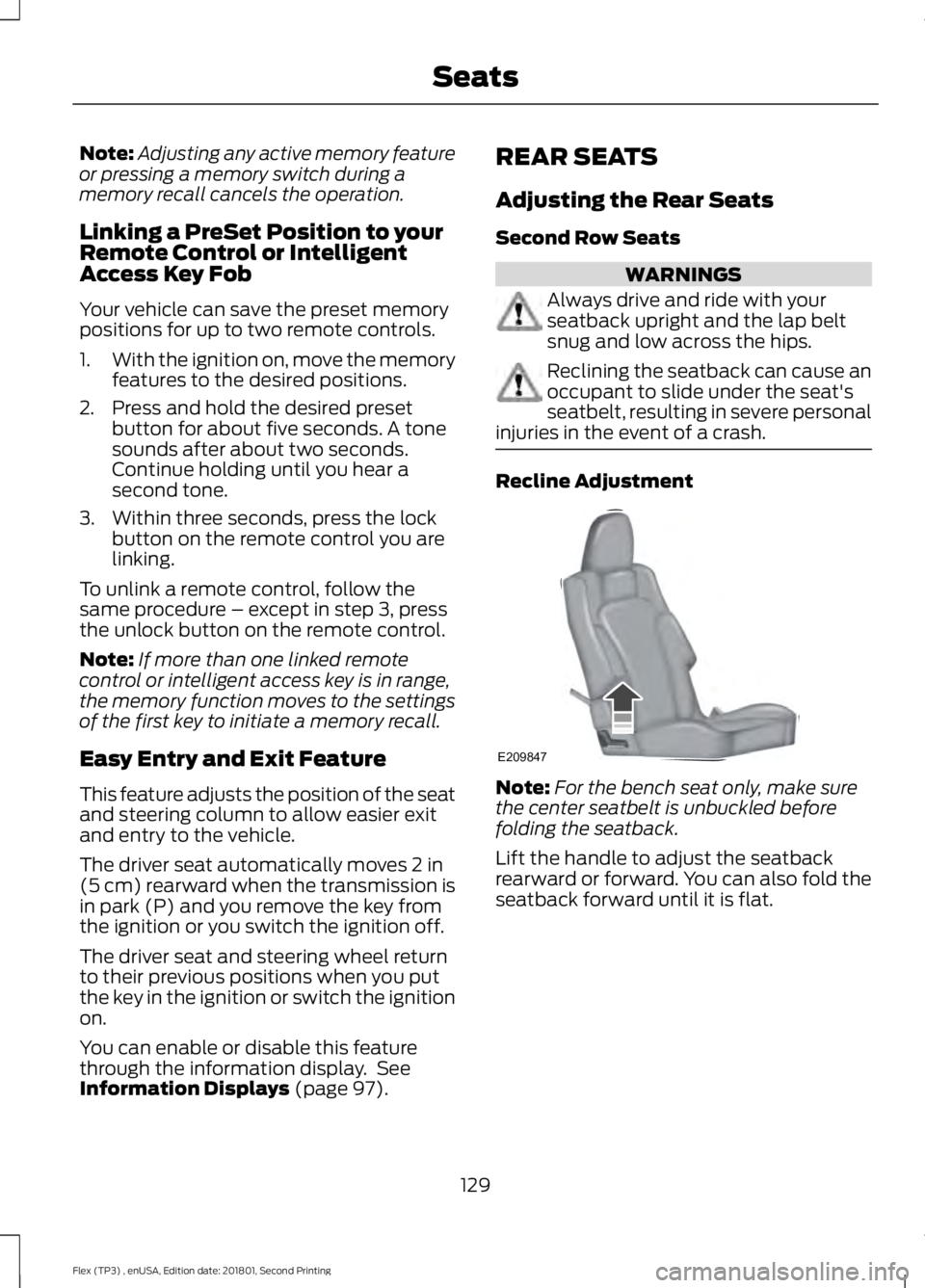
injuries in the event of a crash. Recline Adjustment
Note:
For the bench seat only, make sure
the center seatbelt is unbuckled before
folding the seatback.
Lift the handle to adjust the seatback
rearward or forward. You can also fold the
seatback forward until it is flat.
129
Flex (TP3) , enUSA, Edition date: 201801, Second Printing SeatsE209847
Page 133 of 508

Moving the Seats Backward and
Forward (If equipped)
Power Fold and Tumble Seat
WARNING
Do not fold a seat if it is occupied.
Failure to follow this instruction
could result in personal injury.
This feature is available for the right-hand
seat on seven-passenger vehicles and on
both sides for six-passenger vehicles.
The control is at the back of the rear door
opening. Press it to fold the seatback down
and tumble the seat forward for access to
the third row. Note:
When you switch the ignition off, the
power fold feature works until the battery
saver turns it off after 10 minutes. You can
reactivate the power seats by pressing the
unlock button on the remote entry key fob
or by using the unlock procedure on the
keyless entry keypad. See Doors and Locks
(page 63). Keep the key in the accessory or
run position to prevent the feature from
timing out.
Third Row Seats (Accessing the Seat) WARNINGS
Check under the seat cushion to
make sure no cargo or objects are
under the seat cushion before
returning the seat cushion to its original
position, and that the seat cushion locks
into place. Failure to do so may prevent
the seat from operating properly in the
event of a crash, which could increase the
risk of serious injury. Do not adjust a seat or release a seat
floor latch when the vehicle is
moving. Failure to follow this
instruction could result in personal injury
or death in a sudden stop or crash. Do not drive your vehicle with a seat
that is unlatched or in the folded
position. Failure to follow this
instruction could result in personal injury
or death in the event of a sudden stop or
crash. Note:
Remove items from the second-row
seat. Make sure that no bulky objects such
as purses or briefcases are on the floor in
front of the second-row seats before
tumbling them.
Note: For second-row bench seats, make
sure the center seatbelt is unbuckled before
folding the seatback.
Note: You may have to move the front-row
seat forward to allow the second-row seat
to be fully tumbled.
130
Flex (TP3) , enUSA, Edition date: 201801, Second Printing SeatsE190838 E190848