2018 FORD FLEX reset
[x] Cancel search: resetPage 105 of 508

Display Mode
XXX mi (km) to empty, Fuel gauge and Total odometer
Option 1
Round tachometer, Fuel gauge and Total odometer
Option 2
Round tachometer, Engine coolant temp gauge, Fuel gauge and Total
odometer
Option 3
Digital speedometer, Fuel gauge and Total odometer
Option 4
Regardless of display mode chosen, when you use the SelectShift Automatic ™ trans-
mission (SST), the cluster will change to the round tachometer if not already selected.
XXX mi (km) to empty
Shows approximate fuel level before the
fuel tank reaches empty. The value is
dynamic and can change (raise or lower)
depending on driving style.
Fuel gauge
Switch the ignition on. The fuel gauge will
indicate approximately how much fuel is
in the fuel tank. The arrow next to the fuel
pump symbol shows the fuel filler door
side of your vehicle. When the fuel level
becomes low, the level indicator will
change to amber. When the fuel level
becomes critically low, the level indicator
will change to red.
Note: The fuel gauge level may vary slightly
when your vehicle is moving or when driving
on a slope.
Note: When a MyKey® is in use, low fuel
warnings will display earlier. Round tachometer
Indicates the engine speed in revolutions
per minute. Driving with your tachometer
pointer continuously at the top of the scale
may damage the engine. During SelectShift
Automatic
™ transmission (SST) use, the
currently selected gear will appear in the
display.
Engine coolant temperature gauge
Indicates engine coolant temperature. At
normal operating temperature, the level
indicator will be in the normal range. If the
engine coolant temperature exceeds the
normal range, stop your vehicle as soon as
safely possible, switch off the engine and
let the engine cool.
Trip 1 & 2
Choose between the following trip
displays. Trip 1 & 2
Trip distance
Average fuel economy
Elapsed trip time
Hold OK to Reset
102
Flex (TP3) , enUSA, Edition date: 201801, Second Printing Information Displays
Page 106 of 508

Note:
Press and hold OK to reset the
currently displayed trip information.
Trip distance
Shows the accumulated trip distance.
Average fuel economy
Shows the average fuel economy for a
given trip. Elapsed trip time
When you switch off your vehicle the timer
stops and restarts when you restart your
vehicle.
Fuel Economy
Use the left or right arrow buttons to
choose the desired fuel economy display.Fuel Economy
Inst Fuel Economy
30 Min Fuel History
Note: Press and hold
OK to reset the
currently displayed fuel usage information.
Inst Fuel Economy
This display shows a visual graph of your
instantaneous fuel economy.
30 Min Fuel History
This display shows a bar chart of your fuel
history. Driver Assist
Use the up or down arrow buttons to
choose between the following display
options.
Note:
Some items are optional and may
not appear. Driver Assist
Traction Control
Blindspot High, Normal or Low
Sensitivity
Collision Warn
Cross Traffic
—
Adaptive or Normal
Cruise Control
Driver Alert
Front Park Aid
Rear Park Aid
103
Flex (TP3) , enUSA, Edition date: 201801, Second Printing Information Displays
Page 107 of 508

Settings
In this mode, you can configure different
driver setting choices.
Note:
Some items are optional and may
not appear. Settings
Sport, Normal or Comfort
Handling in D
Drive
Control
Vehicle
Sport or Normal
Handling in S
Auto Engine Off Normal or Towing
DTE Calcula-
tion
Easy Entry / Exit
Select time interval
Autolamp Delay
Lighting
Autolock
Locks
Autounlock All doors or Driver door
Remote Unlocking
Remaining Life XXX% - Hold OK to Reset
Oil Life
Reset
Switch Enabled or Switch Disabled
Power Lift-
gate
Auto or Last Settings
Climate Control
Remote
Start
Auto Heated or Off
Seats and Wheel or
Seats
5, 10 or 15 minutes
Duration
System
Remote Open
Windows
Remote Close
Courtesy Wipe
Wipers
Rain Sensing
MyKeys and Admin Keys
Mykey
Status
MyKey
Hold
OK to Create MyKey
Create
MyKey
104
Flex (TP3) , enUSA, Edition date: 201801, Second Printing Information Displays
Page 128 of 508

The head restraints consist of:
An energy absorbing head
restraint.
A
Two steel stems.
B
Guide sleeve unlock and remove
buttons.
C
The outermost head restraints are
non-adjustable, but they can be removed.
Removing the Head Restraint
1. Pull the head restraint up until it reaches its highest position.
2. Press and hold the C buttons.
3. Pull the head restraint up.
Installing the Head Restraint
1. Align the steel stems into the guide sleeves.
2. Press and hold the C buttons.
3. Push the head restraint down until it locks.
Third Row Head Restraints (If
Equipped) The head restraints consist of:
An energy absorbing head
restraint.
A
Two steel stems.
B
Fold strap.
C
Folding the Head Restraint
Pull the fold strap (C). Pull the head
restraint back up to reset.
Note: Press the stow or fold button on the
power folding seats to fold the head
restraint.
Tilting Head Restraints (If Equipped) The front head restraints tilt for extra
comfort.
1. Adjust the seat backrest to an upright
driving or riding position.
2. Pivot the head restraint forward toward
your head to the desired position.
After the head restraint reaches the
forward-most tilt position, pivot it forward
again to release it to the rearward, un-tilted
position.
125
Flex (TP3) , enUSA, Edition date: 201801, Second Printing SeatsE190836 E144727
Page 131 of 508

Power Lumbar (If Equipped)
MEMORY FUNCTION
(If Equipped)
WARNINGS
Before activating the memory seat,
make sure that the area immediately
surrounding the seat is clear of
obstructions and that all occupants are
clear of moving parts. Do not use the memory function
when your vehicle is moving.
This feature automatically recalls the
position of the following:
•
Driver seat.
• Power mirrors.
• Optional power steering column.
• Optional power adjustable foot pedals.
The memory control is on the driver door. Saving a PreSet Position
1. Switch the ignition on.
2. Adjust the memory features to your
desired position.
3. Press and hold the desired preset button until you hear a single tone.
You can save up to two preset memory
positions. You can save a memory preset
at any time.
Recalling a PreSet Position
Press and release the preset button
associated with your desired driving
position. The memory features move to
the position stored for that preset.
You can recall a programmed memory
position:
• Only in park (P) or neutral (N) if the
ignition is on.
• In any gearshift position if the ignition
is not on.
You can also recall a programmed memory
position by:
• Pressing your remote control
transmitter unlock button (if the
remote control is programmed to a
memory position).
• Unlocking your vehicle with an
intelligent access key (if it is
programmed to a memory position).
Note: Using a linked keyfob to recall your
memory position when the ignition is off
moves the seat to the Easy Entry position.
128
Flex (TP3) , enUSA, Edition date: 201801, Second Printing SeatsE138648 21
E205043
Page 132 of 508
Note:
Adjusting any active memory feature
or pressing a memory switch during a
memory recall cancels the operation.
Linking a PreSet Position to your
Remote Control or Intelligent
Access Key Fob
Your vehicle can save the preset memory
positions for up to two remote controls.
1. With the ignition on, move the memory
features to the desired positions.
2. Press and hold the desired preset button for about five seconds. A tone
sounds after about two seconds.
Continue holding until you hear a
second tone.
3. Within three seconds, press the lock button on the remote control you are
linking.
To unlink a remote control, follow the
same procedure – except in step 3, press
the unlock button on the remote control.
Note: If more than one linked remote
control or intelligent access key is in range,
the memory function moves to the settings
of the first key to initiate a memory recall.
Easy Entry and Exit Feature
This feature adjusts the position of the seat
and steering column to allow easier exit
and entry to the vehicle.
The driver seat automatically moves 2 in
(5 cm) rearward when the transmission is
in park (P) and you remove the key from
the ignition or you switch the ignition off.
The driver seat and steering wheel return
to their previous positions when you put
the key in the ignition or switch the ignition
on.
You can enable or disable this feature
through the information display. See
Information Displays
(page 97). REAR SEATS
Adjusting the Rear Seats
Second Row Seats WARNINGS
Always drive and ride with your
seatback upright and the lap belt
snug and low across the hips.
Reclining the seatback can cause an
occupant to slide under the seat's
seatbelt, resulting in severe personal
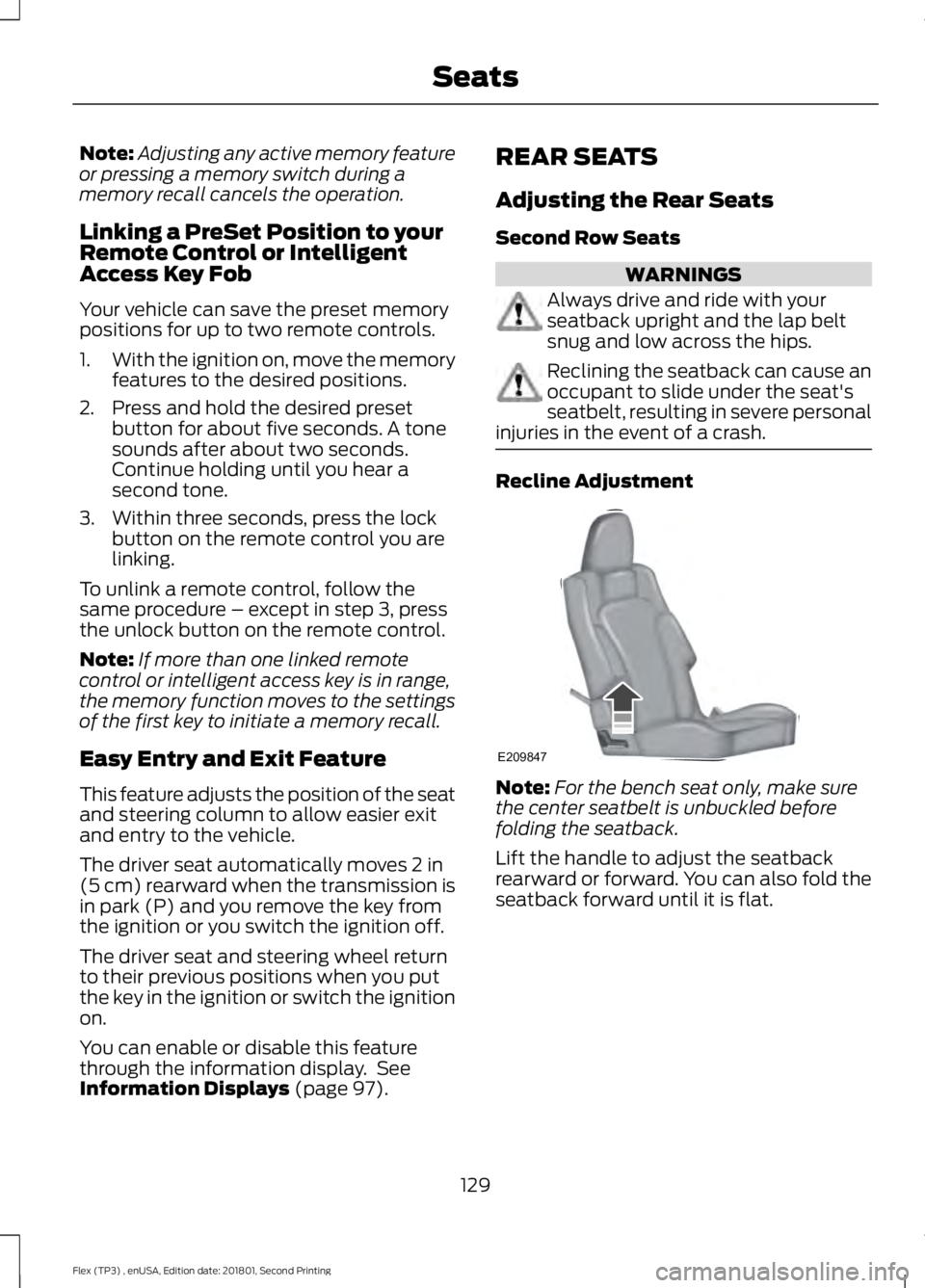
injuries in the event of a crash. Recline Adjustment
Note:
For the bench seat only, make sure
the center seatbelt is unbuckled before
folding the seatback.
Lift the handle to adjust the seatback
rearward or forward. You can also fold the
seatback forward until it is flat.
129
Flex (TP3) , enUSA, Edition date: 201801, Second Printing SeatsE209847
Page 138 of 508

Press to return the seat to the
normal seating position.
A
Press to stow the seat into the
tub floor.
B
Press the top of the button to
fold down the seatback. Press
the bottom portion of the button
to put the seat into the tailgate
position.
C
Press to select either right-hand
seat, the left-hand seat or both.
D
Note: The third row seat includes obstacle
detection that allows the seat to stop and
reverse direction if it hits an obstacle so that
the obstacle can be removed.
Note: Pressing a different button while the
power seat feature is already being
performed may cause the first selected seat
movement to be cancelled. Allow the first
seat movement to be completed before
pressing a button for another function. Note:
Make sure that there are no objects
such as books, purses or briefcases on the
load floor before unstowing the seat. Failure
to remove all objects from the top of the
load floor prior to unstowing it may cause
damage to the seat.
Note: In order to allow the seat to complete
the stowed position, do not place objects
under the seat before stowing. Remove all
objects from the seat and stowage tub.
Note: In the unlikely event that the third
row power seat stops prematurely or travels
to an unexpected position, press the FOLD
button (C) to reset the seat and return it to
a normal position. WARNING
Do not sit in seats that are rearward
facing when your vehicle is moving.
This is not a correct seating position
and the seatbelts do not properly function
this way. Failure to follow this instruction
could result in personal injury or death in
a sudden stop or crash. 135
Flex (TP3) , enUSA, Edition date: 201801, Second Printing SeatsE209855
Page 147 of 508

When the indicator light on the power point
is:
•
On: The power point is working, the
ignition is on and a device is plugged
in.
• Off: The power point is off, the ignition
is off or no device is plugged in.
• Flashing: The power point is in fault
mode.
The power outlet temporarily turns off
power when in fault mode if the device
exceeds the 150 watt limit. Unplug your
device and switch the ignition off. Switch
the ignition back on, but do not plug your
device back in. Let the system cool off and
switch the ignition off to reset the fault
mode. Switch the ignition back on and
make sure the indicator light remains on.
Do not use the power point for certain
electric devices, including:
• Cathode-ray, tube-type televisions.
• Motor loads, such as vacuum cleaners,
electric saws and other electric power
tools or compressor-driven
refrigerators.
• Measuring devices, which process
precise data, such as medical
equipment or measuring equipment.
• Other appliances requiring an
extremely stable power supply such as
microcomputer-controlled electric
blankets or touch-sensor lamps.
144
Flex (TP3) , enUSA, Edition date: 201801, Second Printing Auxiliary Power Points