2018 FORD FLEX reset
[x] Cancel search: resetPage 436 of 508

USB and Bluetooth Stereo issues
Possible solution
Possible cause
Issue
Make sure you connect the device to SYNC
3 and that you have started the media
player on your device.
This is a device-
dependent feature.
Bluetooth audio
does not
stream. The device is not
connected.
Try switching your device off, resetting it or
removing the battery, then reconnect it to
SYNC 3.
The device is in a bad
state.
Make sure that all song details are popu-
lated.
Your music files may not
contain the correct artist,
song title, album or genre
information.
SYNC 3 does
not recognize
music that is on
my device. Try replacing the corrupt file with a new
version.
The file may be
corrupted.
Some devices require you to change the
USB settings from mass storage to media
transfer protocol class.
The song may have
copyright protection that
does not allow it to play.
Convert the file to a supported format. See
Entertainment (page 386).
The file format is not
supported by SYNC 3.
Update media index. See
Settings (page
415).
The device needs to be
re-indexed.
Make sure your device is unlocked before
connecting it to SYNC 3.
The device has a lock
screen enabled.
Disconnect the device from SYNC 3. Try
switching your device off, resetting it or
removing the battery, then connect it back
to SYNC 3.
This is a device limitation.
When I connect
my device, I
sometimes do
not hear any
sound.
433
Flex (TP3) , enUSA, Edition date: 201801, Second Printing SYNC™ 3
Page 440 of 508

AppLink issues
Possible solution(s)
Possible cause(s)
Issue
Switch Bluetooth off and then on to reset
it on your phone. If you are in your vehicle,
SYNC 3 should be able to automatically re-
connect to your phone if you press the
"Phone" button.
There is a Bluetooth issue
on some older versions
of the Android operating
system that may cause
apps that were found on
your previous vehicle
drive to not be found
again if you did not
switch Bluetooth off.
My Android
phone is
connected, my
app(s) are
running, I
restarted them,
but I still cannot
find any apps.
Unplug the USB cable from the phone, wait
a moment, and plug the USB cable back in
to the phone. After a few seconds, the app
should appear in SYNC 3's Mobile Apps
Menu. If not, "Force Close" the application
and restart it.
You may need to reset
the USB connection to
SYNC 3.
My iPhone is
connected, my
app is running, I
restarted the
app but I still
cannot find it on
SYNC 3.
Increase the Bluetooth volume of the
device by using the device's volume control
buttons which are most often found on the
side of the device.
The Bluetooth volume on
the phone may be low.
I have an
Android phone.
I found and
started my
media app on
SYNC 3, but
there is no
sound or the
sound is very
low.
Force close or uninstall the apps you do not
want SYNC 3 to find. If the app has a "Ford
SYNC" setting, disable that setting in the
app's settings menu on the phone.
Some Android devices
have a limited number of
Bluetooth ports that
apps can use to connect.
If you have more AppLink
apps on your phone than
the number of available
Bluetooth ports, you will
not see all of your apps
listed in the SYNC 3
mobile apps menu.
I can only see
some of the
AppLink apps
running on my
phone listed in
the SYNC 3
Mobile Apps
Menu.
437
Flex (TP3) , enUSA, Edition date: 201801, Second Printing SYNC™ 3
Page 444 of 508

Personal Profiles
Possible cause and solution
Issue
The keyfob being used is not linked to a
profile.
The wrong keyfob is being used.
A button other than unlock or remote start
is being pressed on a linked keyfob.
The Personal Profile was deleted.
Personal Profiles is turned off.
My preset positions recall but my profile
does not.
The vehicle is in motion.
My profile recalls but my preset positions
do not. The preset positions are the same as the
Guest or previously active profile.
Unlink and relink your keyfob in the
Personal Profiles menu. You may need to
see your authorized dealer.
I lost a keyfob.
Keyfobs had been erased and reprogramed.
This could happen if you let dealership add
a new keyfob to replace lost one.
I lost all profiles.
Master Reset had been performed without
your acknowledgement.
441
Flex (TP3) , enUSA, Edition date: 201801, Second Printing SYNC™ 3
Page 445 of 508
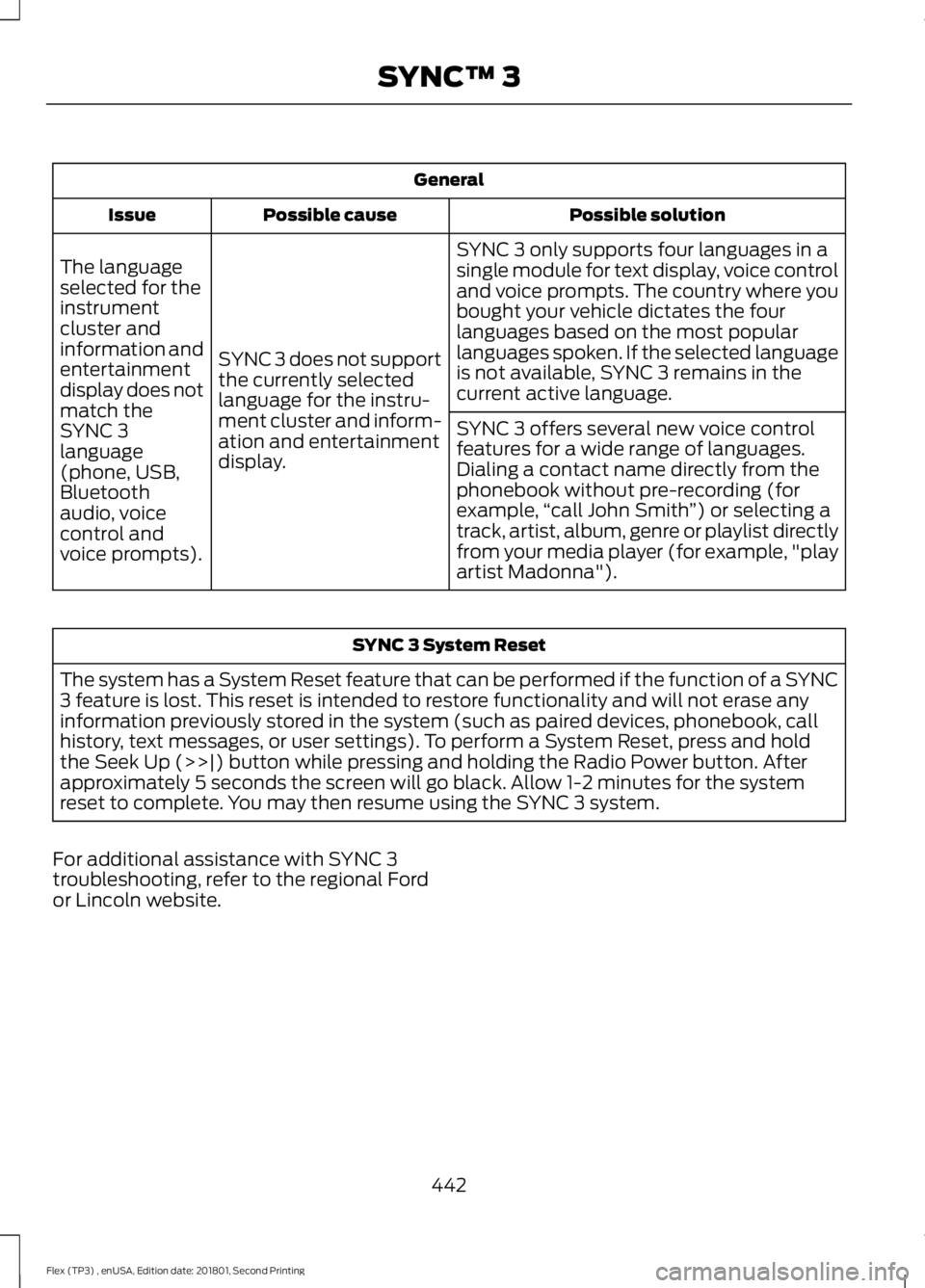
General
Possible solution
Possible cause
Issue
SYNC 3 only supports four languages in a
single module for text display, voice control
and voice prompts. The country where you
bought your vehicle dictates the four
languages based on the most popular
languages spoken. If the selected language
is not available, SYNC 3 remains in the
current active language.
SYNC 3 does not support
the currently selected
language for the instru-
ment cluster and inform-
ation and entertainment
display.
The language
selected for the
instrument
cluster and
information and
entertainment
display does not
match the
SYNC 3
SYNC 3 offers several new voice control
features for a wide range of languages.
Dialing a contact name directly from the
phonebook without pre-recording (for
example,
“call John Smith ”) or selecting a
track, artist, album, genre or playlist directly
from your media player (for example, "play
artist Madonna").
language
(phone, USB,
Bluetooth
audio, voice
control and
voice prompts). SYNC 3 System Reset
The system has a System Reset feature that can be performed if the function of a SYNC
3 feature is lost. This reset is intended to restore functionality and will not erase any
information previously stored in the system (such as paired devices, phonebook, call
history, text messages, or user settings). To perform a System Reset, press and hold
the Seek Up (>>|) button while pressing and holding the Radio Power button. After
approximately 5 seconds the screen will go black. Allow 1-2 minutes for the system
reset to complete. You may then resume using the SYNC 3 system.
For additional assistance with SYNC 3
troubleshooting, refer to the regional Ford
or Lincoln website.
442
Flex (TP3) , enUSA, Edition date: 201801, Second Printing SYNC™ 3
Page 451 of 508

When the oil change message appears in
the information display, it is time for an oil
change. Make sure you perform the oil
change within two weeks or 500 mi
(800 km) of the message appearing. Make
sure you reset the Intelligent Oil-Life
Monitor after each oil change. See
Oil
Change Indicator Reset (page 250).
If your information display resets
prematurely or becomes inoperative, you
should perform the oil change interval at
six months or
5,000 mi (8,000 km) from
your last oil change. Never exceed one year
or
10,000 mi (16,000 km) between oil
change intervals.
Your vehicle is very sophisticated and built
with multiple, complex, performance
systems. Every manufacturer develops
these systems using different
specifications and performance features.
That is why it is important to rely upon your
dealership to properly diagnose and repair
your vehicle.
Ford Motor Company has recommended
maintenance intervals for various parts
and component systems based upon
engineering testing. Ford Motor Company
relies upon this testing to determine the
most appropriate mileage for replacement
of oils and fluids to protect your vehicle at
the lowest overall cost to you and
recommends against maintenance
schedules that deviate from the scheduled
maintenance information.
We strongly recommend the use of only
genuine Ford, Motorcraft or
Ford-authorized re-manufactured
replacement parts engineered for your
vehicle. Additives and Chemicals
This owner's manual and the Ford
Workshop Manual list the recommended
additives and chemicals for your vehicle.
We do not recommend using chemicals or
additives not approved by us as part of
your vehicle
’s normal maintenance. Please
consult your warranty information.
Oils, Fluids and Flushing
In many cases, fluid discoloration is a
normal operating characteristic and, by
itself, does not necessarily indicate a
concern or that the fluid needs to be
changed. However, a qualified expert, such
as the factory-trained technicians at your
dealership, should inspect discolored fluids
that also show signs of overheating or
foreign material contamination
immediately.
Make sure to change your vehicle ’s oils and
fluids at the specified intervals or in
conjunction with a repair. Flushing is a
viable way to change fluid for many vehicle
sub-systems during scheduled
maintenance. It is critical that systems are
flushed only with new fluid that is the same
as that required to fill and operate the
system or using a Ford-approved flushing
chemical.
Owner Checks and Services
Make sure you perform the following basic
maintenance checks and inspections every
month or at six-month intervals.
448
Flex (TP3) , enUSA, Edition date: 201801, Second Printing Scheduled Maintenance
Page 455 of 508

At Every Oil Change Interval as Indicated by the Information Display
1
Inspect the tires, tire wear and measure the tread depth.
Inspect the wheels and related components for abnormal noise, wear, looseness or
drag.
1 Do not exceed one year or 10,000 mi (16,000 km) between service intervals.
2 Reset the Intelligent Oil-Life Monitor after engine oil and filter changes. See Oil Change
Indicator Reset
(page 250). Other Maintenance Items
1
Replace cabin air filter.
Every
20,000 mi
(32,000 km)
Replace engine air filter.
Every
30,000 mi
(48,000 km)
Change engine coolant.2
At
100,000 mi
(160,000 km)
Replace spark plugs.
Every
100,000 mi
(160,000 km) Inspect accessory drive belt(s). 3
Change automatic transmission fluid.
Every
150,000 mi
(240,000 km) Replace accessory drive belt(s). 4
1 Perform these maintenance items within 3,000 mi (4,800 km) of the last engine oil and
filter change. Do not exceed the designated distance for the interval.
2 Initial replacement at six years or
100,000 mi (160,000 km), then every three years or
50,000 mi (80,000 km).
3 After initial inspection, inspect every other oil change until replaced.
4 If not replaced within the last
100,000 mi (160,000 km).
452
Flex (TP3) , enUSA, Edition date: 201801, Second Printing Scheduled Maintenance
Page 457 of 508
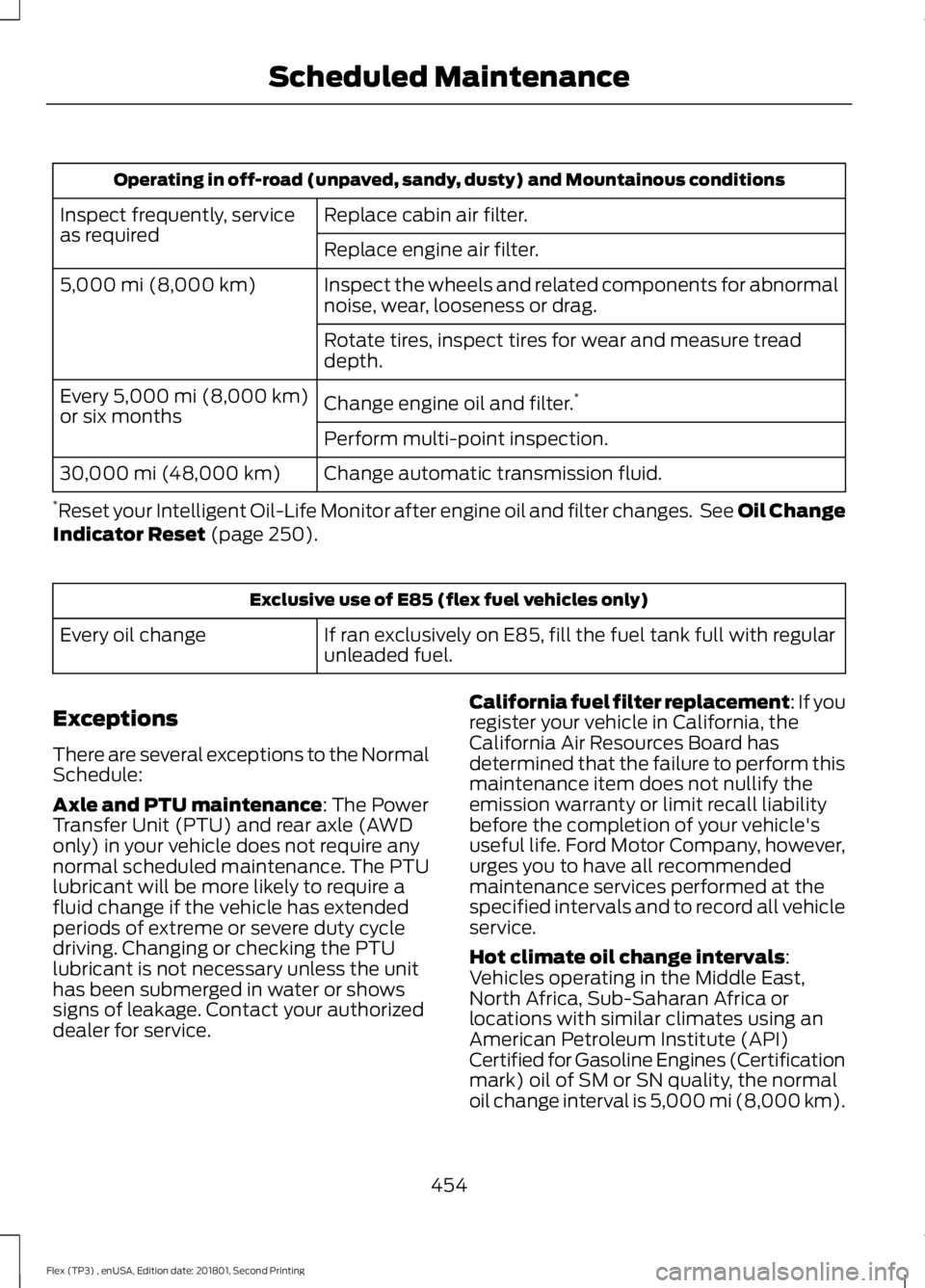
Operating in off-road (unpaved, sandy, dusty) and Mountainous conditions
Replace cabin air filter.
Inspect frequently, service
as required
Replace engine air filter.
Inspect the wheels and related components for abnormal
noise, wear, looseness or drag.
5,000 mi (8,000 km)
Rotate tires, inspect tires for wear and measure tread
depth.
Change engine oil and filter.*
Every 5,000 mi (8,000 km)
or six months
Perform multi-point inspection.
Change automatic transmission fluid.
30,000 mi (48,000 km)
* Reset your Intelligent Oil-Life Monitor after engine oil and filter changes. See Oil Change
Indicator Reset
(page 250). Exclusive use of E85 (flex fuel vehicles only)
If ran exclusively on E85, fill the fuel tank full with regular
unleaded fuel.
Every oil change
Exceptions
There are several exceptions to the Normal
Schedule:
Axle and PTU maintenance
: The Power
Transfer Unit (PTU) and rear axle (AWD
only) in your vehicle does not require any
normal scheduled maintenance. The PTU
lubricant will be more likely to require a
fluid change if the vehicle has extended
periods of extreme or severe duty cycle
driving. Changing or checking the PTU
lubricant is not necessary unless the unit
has been submerged in water or shows
signs of leakage. Contact your authorized
dealer for service. California fuel filter replacement: If you
register your vehicle in California, the
California Air Resources Board has
determined that the failure to perform this
maintenance item does not nullify the
emission warranty or limit recall liability
before the completion of your vehicle's
useful life. Ford Motor Company, however,
urges you to have all recommended
maintenance services performed at the
specified intervals and to record all vehicle
service.
Hot climate oil change intervals
:
Vehicles operating in the Middle East,
North Africa, Sub-Saharan Africa or
locations with similar climates using an
American Petroleum Institute (API)
Certified for Gasoline Engines (Certification
mark) oil of SM or SN quality, the normal
oil change interval is 5,000 mi (8,000 km)
.
454
Flex (TP3) , enUSA, Edition date: 201801, Second Printing Scheduled Maintenance
Page 503 of 508

L
Liftgate...............................................................69
Lighting Control..............................................82
Flashing the Headlamp High Beam..............83
Headlamp High Beam........................................ 82
Lighting..............................................................82
General Information............................................ 82
Load Carriers See: Roof Racks and Load Carriers............204
Load Carrying
................................................204
Load Limit......................................................204 Special Loading Instructions for Owners of
Pick-up Trucks and Utility-type
Vehicles............................................................ 209
Vehicle Loading - with and without a Trailer................................................................ 204
Locking and Unlocking.................................63 Activating Intelligent Access........................... 64
Autolock.................................................................. 65
Autounlock ............................................................ 65
Battery Saver......................................................... 66
Enabling or Disabling Autounlock.................65
Illuminated Entry.................................................. 66
Illuminated Exit..................................................... 66
Locking and Unlocking the Doors with the Key Blade............................................................ 63
Opening a Rear Door From the Inside..........64
Power Door Locks................................................ 63
Remote Control.................................................... 63
Smart Unlocks for Integrated Keyhead Transmitter........................................................ 64
Smart Unlocks for Intelligent Access Keys...................................................................... 65
Lug Nuts See: Changing a Road Wheel....................... 296
M
Maintenance..................................................245 General Information......................................... 245
Manual Climate Control
..............................114
Manual Liftgate..............................................69
Closing the Liftgate............................................. 69
Opening the Liftgate........................................... 69
Manual Seats
.................................................126
Lumbar Adjustment.......................................... 126Moving the Seat Backward and
Forward............................................................. 126
Recline Adjustment........................................... 126
Memory Function
.........................................128
Easy Entry and Exit Feature............................ 129
Linking a PreSet Position to your Remote Control or Intelligent Access Key Fob
........................................................................\
...... 129
Saving a PreSet Position................................. 128
Message Center See: Information Displays................................. 97
Mirrors See: Heated Windows and Mirrors................121
See: Windows and Mirrors................................ 87
Mobile Communications Equipment.......13
Moonroof..........................................................90 Bounce-Back.......................................................... 91
Opening and Closing the Moonroof...............91
Venting the Moonroof......................................... 91
Motorcraft Parts - 3.5L Duratec.............303
Motorcraft Parts - 3.5L Ecoboost™.................................................305
MyKey Troubleshooting
................................61
MyKey ™.............................................................57
Principle of Operation......................................... 57
N
Navigation.....................................................404 cityseeker................................................................ 411
Destination Mode............................................. 406
Map Mode............................................................ 404
Navigation Map Updates................................. 412
Navigation Menu............................................... 409
SiriusXM Traffic and Travel Link.................... 412
SYNC AppLink...................................................... 411
Waypoints............................................................. 410
Normal Scheduled Maintenance..........450 Intelligent Oil-Life Monitor™........................ 450
Normal Maintenance Intervals...................... 451
O
Oil Change Indicator Reset......................250
Oil Check See: Engine Oil Check...................................... 249
Opening and Closing the Hood..............245 Closing the Hood............................................... 246
500
Flex (TP3) , enUSA, Edition date: 201801, Second Printing Index