2018 FORD F-150 steering
[x] Cancel search: steeringPage 319 of 641

•
Always keep available ground
clearance in mind and pick a route that
minimizes the risk of catching the
underside of the vehicle on an obstacle.
• When negotiating low speed obstacles,
applying light brake pressure in
conjunction with the throttle will help
prevent the vehicle from jerking and
will allow you to negotiate the obstacle
in a more controlled manner. Using 4L
will also help with this.
• Use and equip supplemental safety
equipment as discussed later in this
chapter.
• Please consult your local off-road
group for other helpful tips.
• Off-roading requires a high degree of
concentration. Even if your local law
does not prohibit alcohol use while
driving off-road, Ford strongly
recommends against drinking if you
plan to off-road.
Crossing Obstacles
• Review the path ahead before
attempting to cross any obstacle. It is
best if the obstacle is reviewed from
outside the vehicle so that there is a
good understanding of terrain condition
both in front of and behind the
obstacle.
• Approach obstacles slowly and slowly
inch the vehicle over.
• If a large obstacle such as a rock
cannot be avoided, choose a path that
places the rock directly under the tire
rather than the undercarriage of the
vehicle. This will help prevent damage
to the vehicle.
• Ditches and washouts should be
crossed at a 45 degree angle, allowing
each wheel to independently cross the
obstacle. Hill Climbing WARNING: Extreme care should
be used when steering the vehicle in
reverse down a slope so as not to cause
the vehicle to swerve out of control.
• Always attempt to climb a steep hill
along the fall line of the slope and not
diagonally.
• If the vehicle is unable to make it up
the hill, DO NOT attempt to turn back
down the slope. Place the vehicle in
low range and slowly back down in
reverse.
• When descending a steep slope, select
low gear and engage hill descent
control. Use the throttle and brake
pedals to control your descent speed
as described earlier in this section using
hill descent control. Note that hill
descent control is functional in reverse
and should be used in this situation.
DRIVING THROUGH WATER WARNING:
Do not drive through
flowing or deep water as you may lose
control of your vehicle.
Note: Driving through standing water can
cause vehicle damage.
Note: Engine damage can occur if water
enters the air filter.
Before driving through standing water,
check the depth. Never drive through water
that is higher than the bottom of the wheel
hubs.
316
F-150 (TFC) Canada/United States of America, enUSA, Edition date: 201709, Fifth-Printing Driving Hints
Page 320 of 641
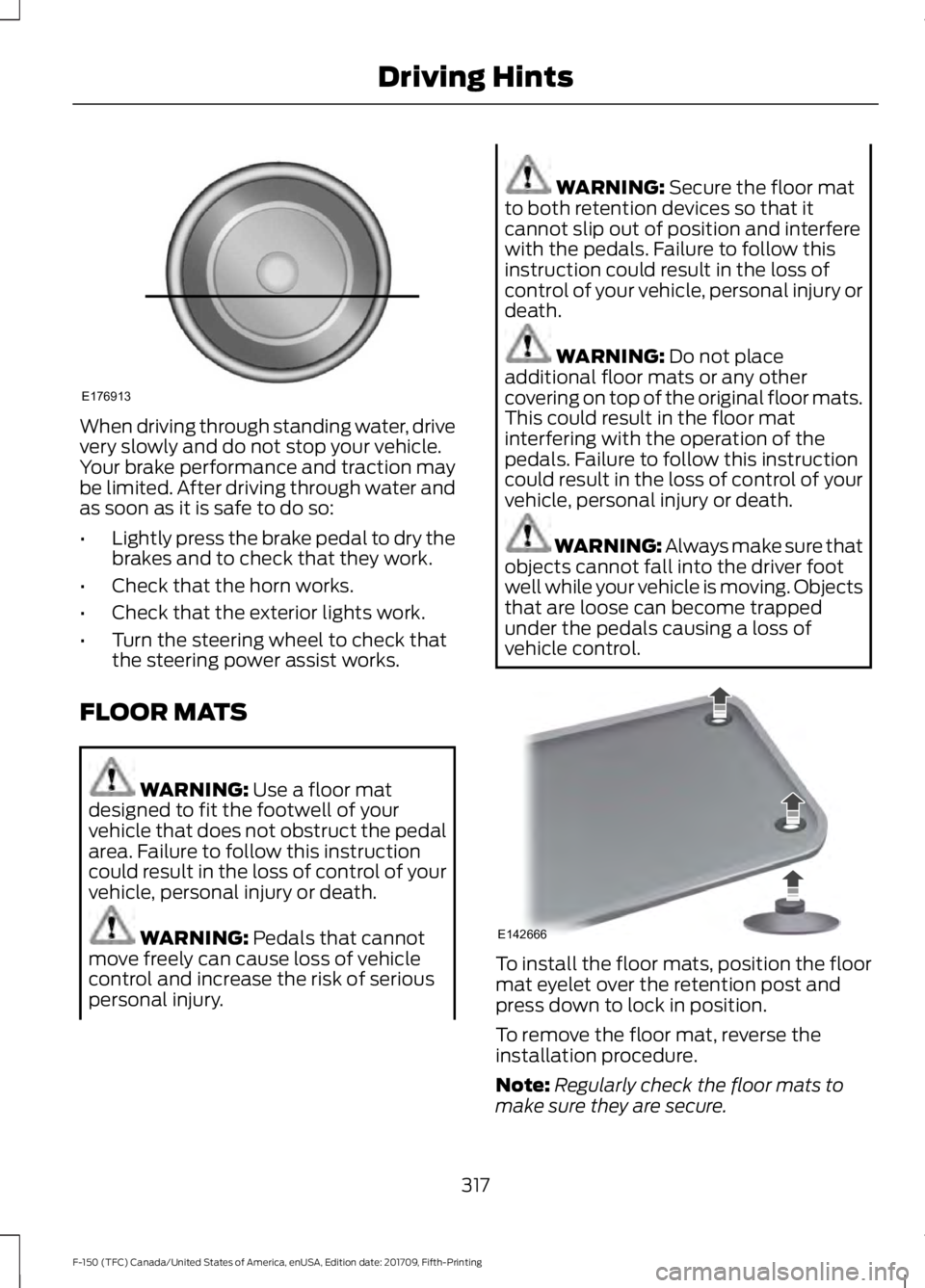
When driving through standing water, drive
very slowly and do not stop your vehicle.
Your brake performance and traction may
be limited. After driving through water and
as soon as it is safe to do so:
•
Lightly press the brake pedal to dry the
brakes and to check that they work.
• Check that the horn works.
• Check that the exterior lights work.
• Turn the steering wheel to check that
the steering power assist works.
FLOOR MATS WARNING: Use a floor mat
designed to fit the footwell of your
vehicle that does not obstruct the pedal
area. Failure to follow this instruction
could result in the loss of control of your
vehicle, personal injury or death. WARNING:
Pedals that cannot
move freely can cause loss of vehicle
control and increase the risk of serious
personal injury. WARNING:
Secure the floor mat
to both retention devices so that it
cannot slip out of position and interfere
with the pedals. Failure to follow this
instruction could result in the loss of
control of your vehicle, personal injury or
death. WARNING:
Do not place
additional floor mats or any other
covering on top of the original floor mats.
This could result in the floor mat
interfering with the operation of the
pedals. Failure to follow this instruction
could result in the loss of control of your
vehicle, personal injury or death. WARNING: Always make sure that
objects cannot fall into the driver foot
well while your vehicle is moving. Objects
that are loose can become trapped
under the pedals causing a loss of
vehicle control. To install the floor mats, position the floor
mat eyelet over the retention post and
press down to lock in position.
To remove the floor mat, reverse the
installation procedure.
Note:
Regularly check the floor mats to
make sure they are secure.
317
F-150 (TFC) Canada/United States of America, enUSA, Edition date: 201709, Fifth-Printing Driving HintsE176913 E142666
Page 321 of 641
SNOWPLOWING
We recommend the four-wheel drive F-150
in XL, XLT or Lariat trim levels with the 5.0L
engine and snowplow option for residential
snowplowing only. We do not recommend
the F-150 with the automatic four-wheel
drive system for snowplowing.
Do not use F-150 vehicles equipped with
the 2.7L, 3.0L, 3.3L or 3.5L engines for
snowplowing.
Installing the Snowplow
Weight limits and guidelines for selecting
and installing the snowplow are in the Ford
Truck Body Builders Layout Book,
snowplow section, found at
www.fleet.ford.com/truckbbas.
A typical installation affects the following:
•
Certification to government safety laws
such as occupant protection and airbag
deployment, braking, and lighting. Look
for an Alterer ’s Label on your vehicle
from the snowplow installer certifying
that the installation meets all
applicable Federal Motor Vehicle
Safety Standards (FMVSS).
• The Front Gross Axle Weight Rating
(GAWR) is on the upper left side of the
vehicle ’s Safety Compliance
Certification Label. This is the total
weight that front axle supports, which
includes the vehicle weight plus any
auxiliary equipment such as snowplow
frame-mounted hardware that can be
added to the vehicle and satisfy Ford
compliance certification to FMVSS. Do
not exceed FGAWR or Gross Vehicle
Weight Rating (GVWR).
• Rear ballast weight behind the rear
axle may be required to prevent
exceeding the FGAWR, and provide
front-to-rear weight balance for proper
braking and steering. •
Front wheel toe may require
re-adjustment to prevent premature
uneven tire wear. Specifications are in
the Ford Workshop Manual.
• Headlight aim may require adjustment.
• The tire air pressures recommended
for general driving are on the vehicle ’s
Safety Certification Label. The
maximum cold inflation pressure for
the tire and associated load rating are
on the tire sidewall. Tire air pressure
may require re-adjustment within these
pressure limits to accommodate the
additional weight of the snowplow
installation.
• Federal and some local regulations
require additional exterior lamps for
snowplow-equipped vehicles. Contact
an authorized dealer for additional
information.
Snowplow Mode (If Equipped)
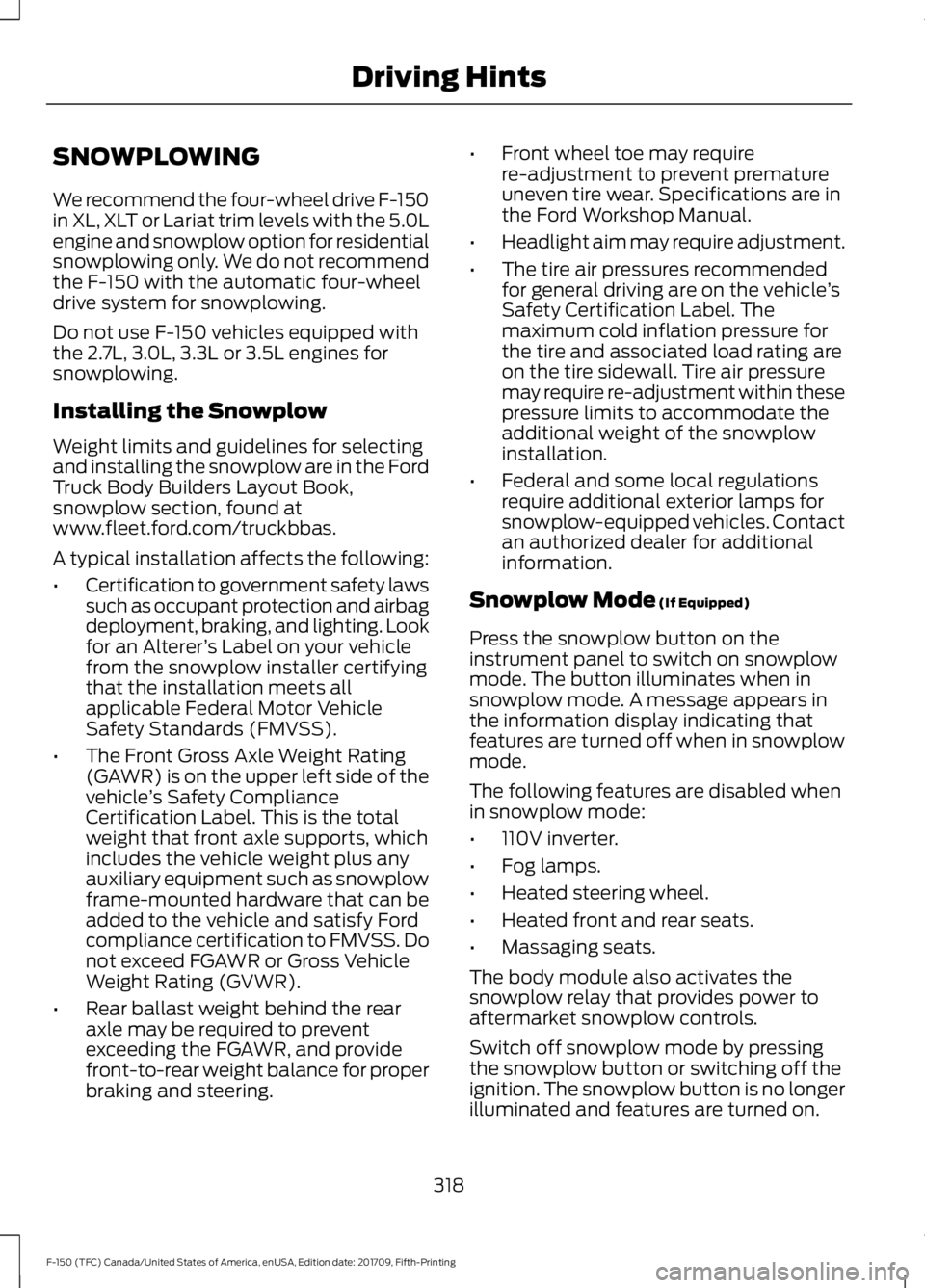
Press the snowplow button on the
instrument panel to switch on snowplow
mode. The button illuminates when in
snowplow mode. A message appears in
the information display indicating that
features are turned off when in snowplow
mode.
The following features are disabled when
in snowplow mode:
• 110V inverter.
• Fog lamps.
• Heated steering wheel.
• Heated front and rear seats.
• Massaging seats.
The body module also activates the
snowplow relay that provides power to
aftermarket snowplow controls.
Switch off snowplow mode by pressing
the snowplow button or switching off the
ignition. The snowplow button is no longer
illuminated and features are turned on.
318
F-150 (TFC) Canada/United States of America, enUSA, Edition date: 201709, Fifth-Printing Driving Hints
Page 339 of 641

Protected Components
Fuse Rating
Fuse Number
Horn.
25A 1
1
Electric fan 1.
50A 2
2
Windshield wiper motor.
30A 2
3
Body control module.
60A 2
4
Starter relay.
30A 2
5
Power point 1.
20A 2
6
Power point 2.
20A 2
8
Rain sensor.
5A 1
10
Upfitter 1 relay (Raptor).
15A 2
12
4x4 run/start.
10A 1
13
Adaptive cruise control run/start module.
Not used (spare).
15A 1
14
Front view camera.
7.5A 1
15
Voltage quality module.
Not used (spare)(Raptor).
15A 1
Powertrain control module.
10A 1
16
Transmission control module run/start.
Anti-lock brakes run/start.
10A 1
17
Electric power steering run/start.
10A 1
18
Upfitter 5 relay (Raptor).
5A 1
19
Blower motor.
40A 2
20
Passenger seat motors.
30A 2
21
Radio amplifier.
20A 1
22
336
F-150 (TFC) Canada/United States of America, enUSA, Edition date: 201709, Fifth-Printing Fuses
Page 341 of 641
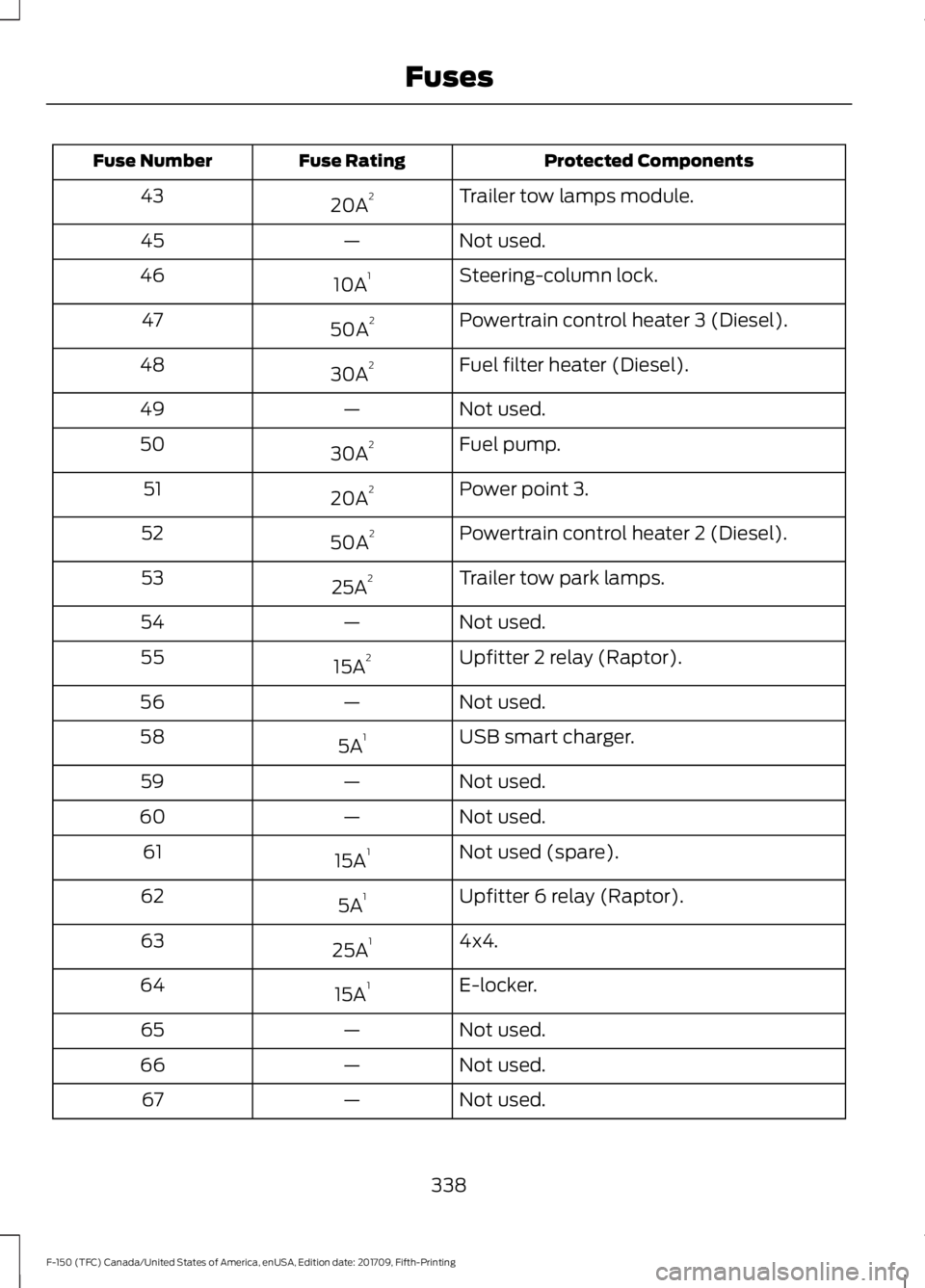
Protected Components
Fuse Rating
Fuse Number
Trailer tow lamps module.
20A 2
43
Not used.
—
45
Steering-column lock.
10A 1
46
Powertrain control heater 3 (Diesel).
50A 2
47
Fuel filter heater (Diesel).
30A 2
48
Not used.
—
49
Fuel pump.
30A 2
50
Power point 3.
20A 2
51
Powertrain control heater 2 (Diesel).
50A 2
52
Trailer tow park lamps.
25A 2
53
Not used.
—
54
Upfitter 2 relay (Raptor).
15A 2
55
Not used.
—
56
USB smart charger.
5A 1
58
Not used.
—
59
Not used.
—
60
Not used (spare).
15A 1
61
Upfitter 6 relay (Raptor).
5A 1
62
4x4.
25A 1
63
E-locker.
15A 1
64
Not used.
—
65
Not used.
—
66
Not used.
—
67
338
F-150 (TFC) Canada/United States of America, enUSA, Edition date: 201709, Fifth-Printing Fuses
Page 345 of 641

Protected Components
Fuse Rating
Fuse Number
Extended power module (Base only).
10A
9
Embedded modem module.
5A
10
Combined sensor module.
5A
11
Climate head module.
7.5A
12
Smart datalink connector.
Cluster.
7.5A
13
Steering column control module.
Brake on/off switch.
10A
14
Smart datalink connector.
10A
15
Tailgate release.
15A
16
Heads up display.
5A
17
Terrain switch.
Ignition switch and passive-entry passive-
start start stop switch.
5A
18
Key inhibit solenoid.
Extended power module (except Raptor).
7.5A
19
Restraint control module (Raptor only).
7.5A
Not used.
—
20
Heads up display.
5A
21
In car temperature with humidity sensor.
Passenger occupant detection. (Raptor
only)
5A
22
Power driven rear glass switch.
10A
23
Inverter.
Driver side window.
Moonroof.
Vista roof.
Central lock/unlock.
20A
24
Driver door control module.
30A
25
Passenger door control module.
30A
26
Vista roof.
30A
27
Moonroof.
342
F-150 (TFC) Canada/United States of America, enUSA, Edition date: 201709, Fifth-Printing Fuses
Page 346 of 641
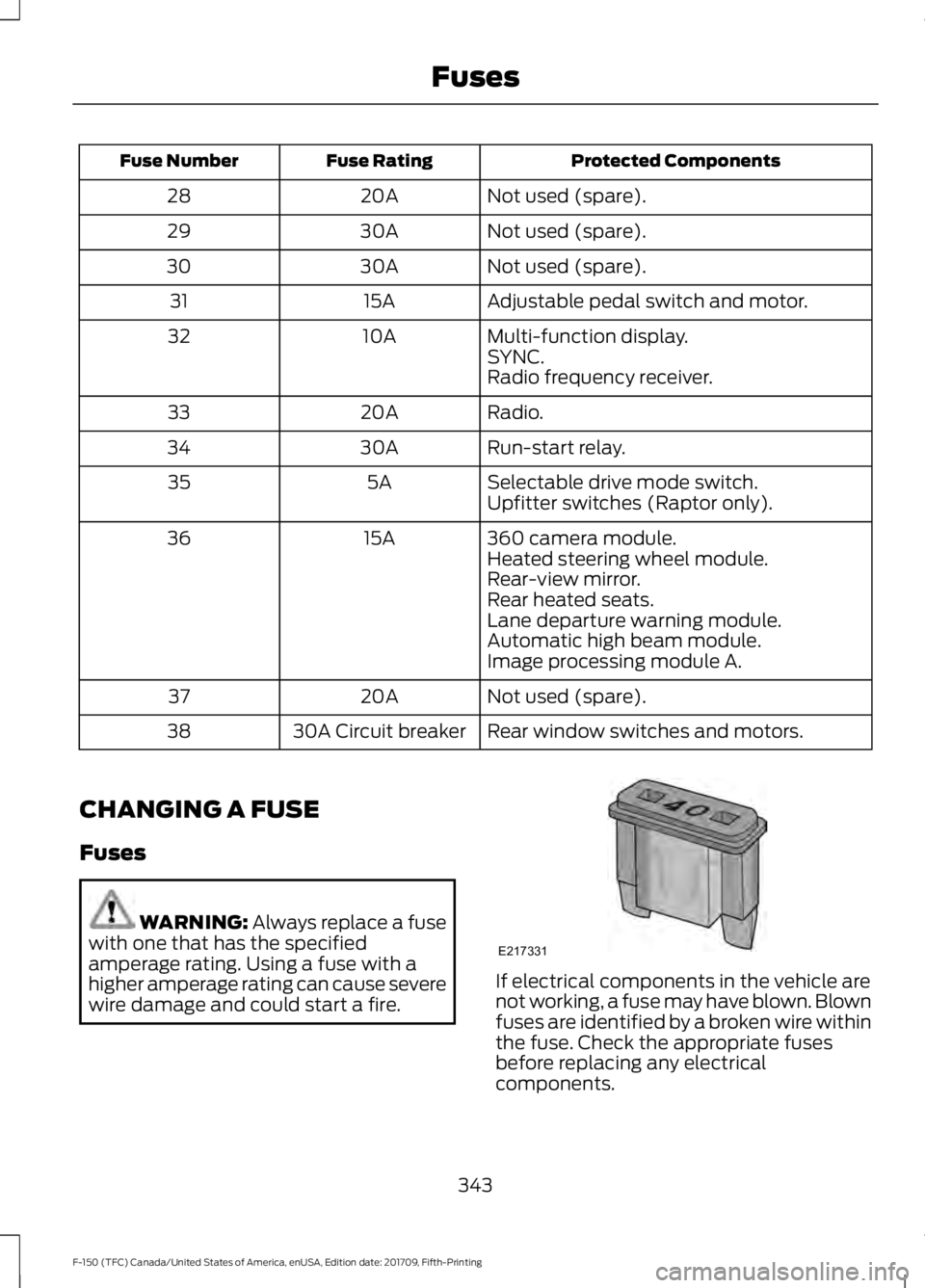
Protected Components
Fuse Rating
Fuse Number
Not used (spare).
20A
28
Not used (spare).
30A
29
Not used (spare).
30A
30
Adjustable pedal switch and motor.
15A
31
Multi-function display.
10A
32
SYNC.
Radio frequency receiver.
Radio.
20A
33
Run-start relay.
30A
34
Selectable drive mode switch.
5A
35
Upfitter switches (Raptor only).
360 camera module.
15A
36
Heated steering wheel module.
Rear-view mirror.
Rear heated seats.
Lane departure warning module.
Automatic high beam module.
Image processing module A.
Not used (spare).
20A
37
Rear window switches and motors.
30A Circuit breaker
38
CHANGING A FUSE
Fuses WARNING: Always replace a fuse
with one that has the specified
amperage rating. Using a fuse with a
higher amperage rating can cause severe
wire damage and could start a fire. If electrical components in the vehicle are
not working, a fuse may have blown. Blown
fuses are identified by a broken wire within
the fuse. Check the appropriate fuses
before replacing any electrical
components.
343
F-150 (TFC) Canada/United States of America, enUSA, Edition date: 201709, Fifth-Printing FusesE217331
Page 356 of 641

The American Petroleum Institute (API)
service symbol is used to identify the
proper engine oil for your engine. The API
service symbol will be displayed on the oil
container you purchase. The API symbol
displays the oil performance category in
the top half of the symbol and the viscosity
grade in the center of the symbol.
To top up the engine oil level do the
following:
1. Clean the area surrounding the engine
oil filler cap before you remove it.
2. Remove the engine oil filler cap. See
Under Hood Overview (page 347).
3. Add engine oil that meets Ford specifications.
See Capacities and
Specifications (page 415).
4. Recheck the oil level.
5. If the oil level is correct, replace the dipstick and make sure it is fully seated.
6. Replace the engine oil filler cap. Turn it clockwise until you feel a strong
resistance.
Note: Do not add oil further than the
maximum mark. Oil levels above the
maximum mark may cause engine damage.
Note: Make sure you install the oil filler cap
correctly.
Note: Soak up any spillage with an
absorbent cloth immediately. OIL CHANGE INDICATOR
RESET
Use the information display controls on
the steering wheel to reset the oil change
indicator.
From the main menu scroll to:
Action and description
Message
Press the right arrow button,
then from this menu scroll
to the following message.
Settings
Press the right arrow button,
then from this menu scroll
to the following message.
Conveni-
ence
Press the right arrow button,
then from this menu scroll
to the following message.
Oil Life
Reset
Press and hold the
OK
button until the instrument
cluster displays the
following message.
Hold OK to
Reset
Reset Successful
When the oil change indic-
ator resets the instrument
cluster displays 100%.
Remaining Life
{00}%
If the instrument cluster
displays one of the following
messages, repeat the
process.
Not Reset
Reset Cancelled
353
F-150 (TFC) Canada/United States of America, enUSA, Edition date: 201709, Fifth-Printing MaintenanceE258300