2018 FORD F-150 light
[x] Cancel search: lightPage 67 of 641

•
Various vehicle speed reminders so you
know when your vehicle approaches
the limits. Warnings appear in the
information display and an audible
warning sounds when you exceed the
limit.
• Audio system maximum volume of
45%. A message will be shown in the
display when you attempt to exceed
the limited volume. Also, the
speed-sensitive or compensated
automatic volume control will be
disabled.
• Always on setting. When this is
selected, you will not be able to turn
off Advance Trac or traction control,
911 Assist or Emergency Assistance, or
Do Not Disturb (if your vehicle is
equipped with these features).
CREATING A MYKEY
Use the information display to create a
MyKey.
To create a MyKey:
1. Place your key into the ignition or, if your vehicle is equipped with keyless
start, place your transmitter into the
backup position. Details on the backup
position's location are in another
chapter. See Passive Anti-Theft
System (page 78).
2. Switch the ignition on.
3. Access the main menu using your left-hand-side steering wheel controls.
4. Depending on your display options, select either
Settings or Advanced
Settings, then MyKey and finally
Create MyKey.
5. When the menu reads
Hold OK to
Create MyKey, press and hold the OK
button to program a MyKey.
6. The display then prompts you to program the Configurable settings. You can program the configurable features
now or at any time. You can advance
through the settings without programming
them by pressing the
OK button. MyKey
then keeps all of the default settings.
When you finish programming your MyKey,
the Type 3 information display adds a
confirmation screen, New MyKey Has
Been Created
. The programmed
restrictions apply when you key off, open
and close the driver door and restart your
vehicle with the programmed key or
transmitter.
Programming/Changing
Configurable Settings
Use the information display to program or
change your configurable MyKey settings.
1. Place your admin key into the ignition or, if your vehicle is equipped with
keyless start, place your admin
transmitter into the backup position.
Details on the backup position's
location are in another chapter. See
Passive Anti-Theft System
(page
78).
2. Depending on your display options, select either
Settings or Advanced
Settings, then MyKey and finally to
various configurable features.
3. Scroll down through the choices, and then highlight the feature you want to
configure.
Note: You can clear or change your MyKey
settings at any time during the same key
cycle as you created the MyKey. Once you
have switched the engine off, however, you
will need an admin key to change or clear
your MyKey settings.
The programmed restrictions apply when
you key off, open and close the driver door
and restart your vehicle with the
programmed key or transmitter.
64
F-150 (TFC) Canada/United States of America, enUSA, Edition date: 201709, Fifth-Printing MyKey
™
(If Equipped)
Page 73 of 641

When you lock your vehicle using the
power door lock control (with the door
open, vehicle in park and ignition off), your
vehicle searches for an intelligent access
key in the passenger compartment after
you close the door. If your vehicle finds a
key, all of the doors immediately unlock.
In order to override the smart unlock
feature and intentionally lock the
intelligent access key inside your vehicle,
you can lock your vehicle after all doors
are closed by using the keyless entry
keypad, pressing the lock button on
another intelligent access key or touching
the locking area on the handle with another
intelligent access key in your hand.
When you open one of the front doors and
lock your vehicle using the power door lock
control, all doors lock then unlock if the
ignition is on.
Autolock (If Equipped)
Autolock locks all the doors when:
• All doors are closed.
• The ignition is on.
• You shift into any gear putting your
vehicle in motion.
• Your vehicle reaches a speed greater
than
12 mph (20 km/h).
Autolock repeats when:
• You open then close any door while the
ignition is on and your vehicle speed is
9 mph (15 km/h)
or lower.
• Your vehicle reaches a speed greater
than
12 mph (20 km/h). Autounlock
Autounlock unlocks all the doors when:
•
The ignition is on, all the doors are
closed, and your vehicle has been
moving at a speed greater than 12 mph
(20 km/h)
.
• Your vehicle comes to a stop and you
switch the ignition off or to the
accessory position.
• You open the driver door within 10
minutes of switching the ignition off or
to accessory.
Note: The doors do not autounlock if you
electronically lock your vehicle after you
switch the ignition off and before you open
the driver door.
Enabling or Disabling Autounlock
You can enable or disable the autounlock
feature in the information display or an
authorized dealer can do it for you. See
General Information
(page 113).
Illuminated Entry
The interior lamps and select exterior
lamps illuminate when you unlock the
doors with the remote entry system.
The illuminated entry system turns off the
lights if:
• The ignition is on.
• You press the remote control lock
button.
• After 25 seconds of illumination.
The dome lamp does not turn on if the
control is set to the off position.
The lights do not turn off if:
• You switch them on with the dimmer
control.
• Any door is open.
70
F-150 (TFC) Canada/United States of America, enUSA, Edition date: 201709, Fifth-Printing Doors and Locks
Page 78 of 641
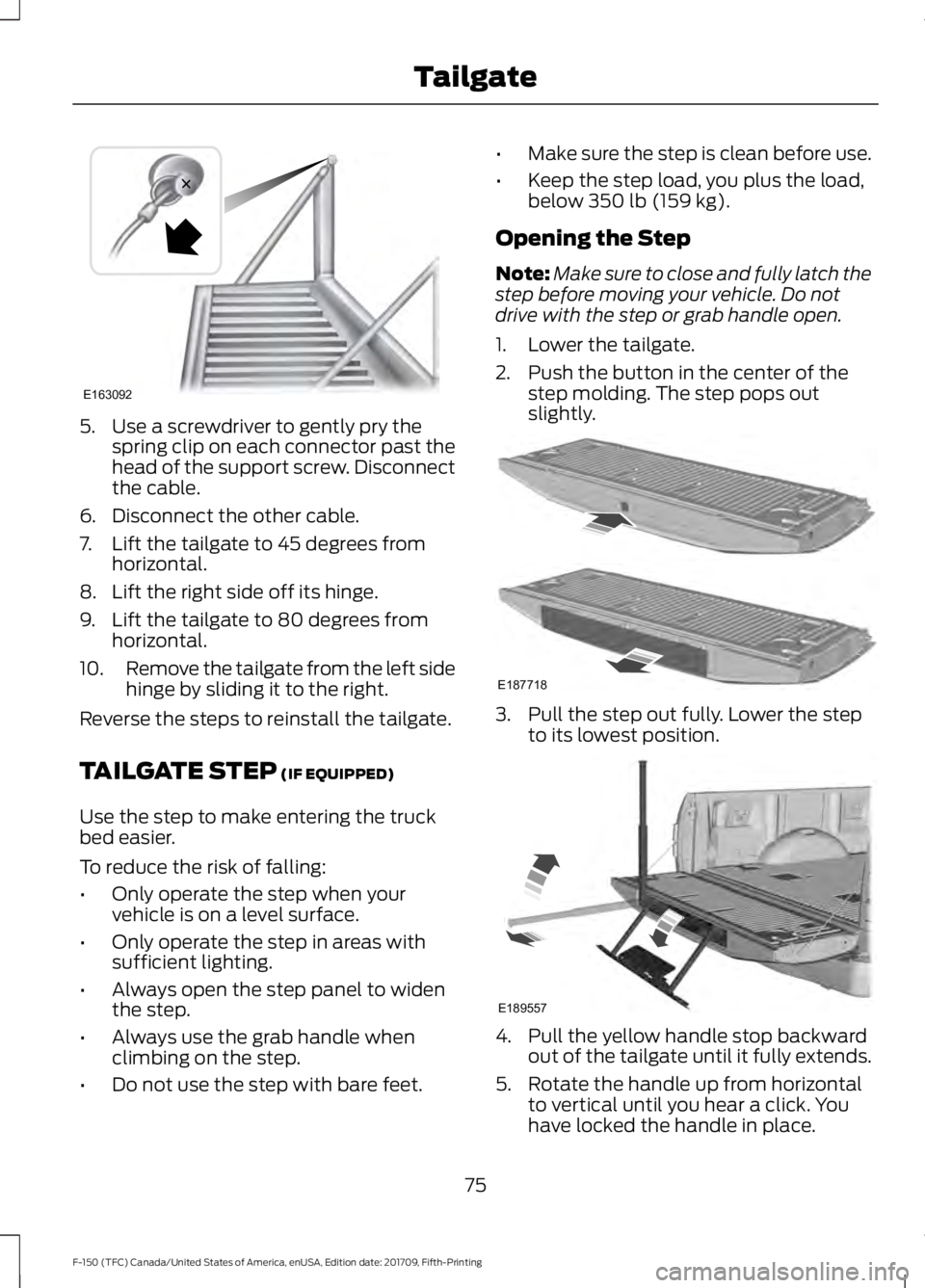
5. Use a screwdriver to gently pry the
spring clip on each connector past the
head of the support screw. Disconnect
the cable.
6. Disconnect the other cable.
7. Lift the tailgate to 45 degrees from horizontal.
8. Lift the right side off its hinge.
9. Lift the tailgate to 80 degrees from horizontal.
10. Remove the tailgate from the left side
hinge by sliding it to the right.
Reverse the steps to reinstall the tailgate.
TAILGATE STEP (IF EQUIPPED)
Use the step to make entering the truck
bed easier.
To reduce the risk of falling:
• Only operate the step when your
vehicle is on a level surface.
• Only operate the step in areas with
sufficient lighting.
• Always open the step panel to widen
the step.
• Always use the grab handle when
climbing on the step.
• Do not use the step with bare feet. •
Make sure the step is clean before use.
• Keep the step load, you plus the load,
below
350 lb (159 kg).
Opening the Step
Note: Make sure to close and fully latch the
step before moving your vehicle. Do not
drive with the step or grab handle open.
1. Lower the tailgate.
2. Push the button in the center of the step molding. The step pops out
slightly. 3. Pull the step out fully. Lower the step
to its lowest position. 4. Pull the yellow handle stop backward
out of the tailgate until it fully extends.
5. Rotate the handle up from horizontal to vertical until you hear a click. You
have locked the handle in place.
75
F-150 (TFC) Canada/United States of America, enUSA, Edition date: 201709, Fifth-Printing TailgateE163092 E187718 E189557
Page 94 of 641
GENERAL INFORMATION
Condensation in the Exterior Front
Lamps and Rear Lamps
Exterior front lamps and rear lamps have
vents to accommodate normal changes
in air pressure.
Condensation can be a natural by-product
of this design. When moist air enters the
lamp assembly through the vents, there is
a possibility that condensation can occur
when the temperature is cold. When
normal condensation occurs, a fine mist
can form on the interior of the lens. The
fine mist eventually clears and exits
through the vents during normal operation.
Clearing time may take as long as 48 hours
under dry weather conditions.
Examples of acceptable condensation are:
•
The presence of a fine mist (no streaks,
drip marks or large droplets).
• A fine mist covers less than 50% of the
lens.
Examples of unacceptable condensation
are:
• A water puddle inside the lamp.
• Streaks, drip marks or large droplets
present on the interior of the lens.
If you see any unacceptable condensation,
have your vehicle checked by an authorized
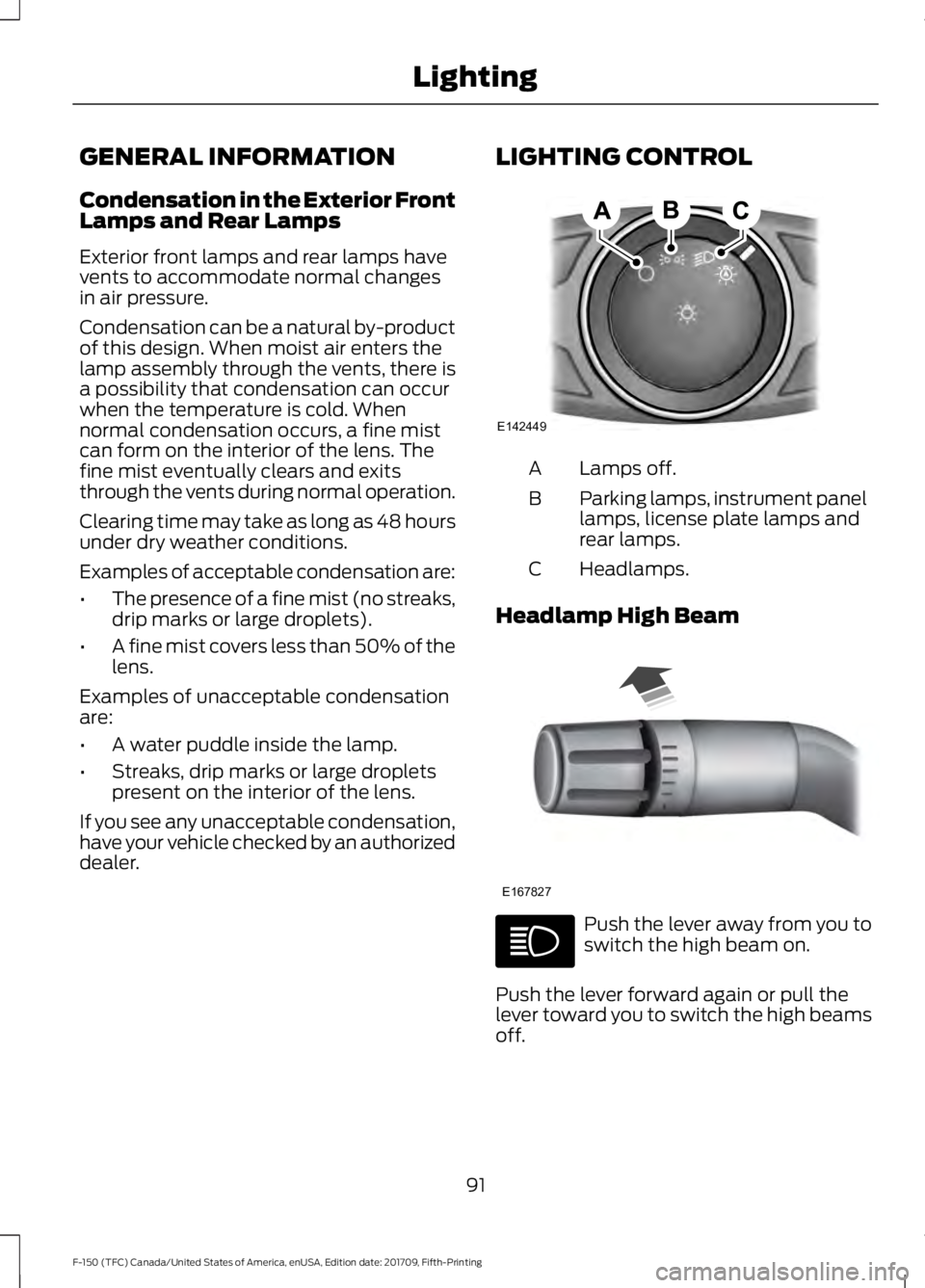
dealer. LIGHTING CONTROL Lamps off.
A
Parking lamps, instrument panel
lamps, license plate lamps and
rear lamps.
B
Headlamps.
C
Headlamp High Beam Push the lever away from you to
switch the high beam on.
Push the lever forward again or pull the
lever toward you to switch the high beams
off.
91
F-150 (TFC) Canada/United States of America, enUSA, Edition date: 201709, Fifth-Printing LightingE142449 E167827
Page 95 of 641
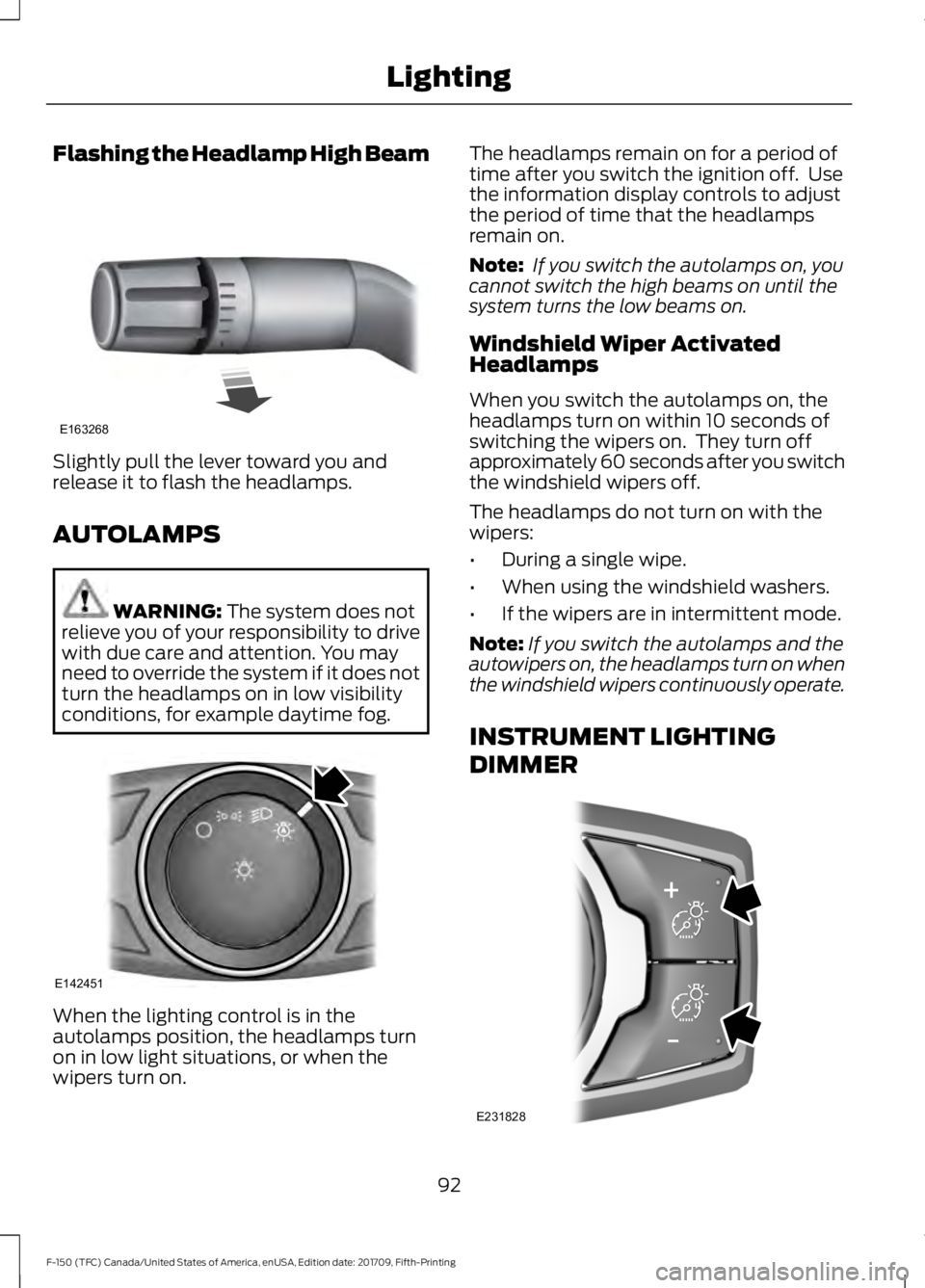
Flashing the Headlamp High Beam
Slightly pull the lever toward you and
release it to flash the headlamps.
AUTOLAMPS
WARNING: The system does not
relieve you of your responsibility to drive
with due care and attention. You may
need to override the system if it does not
turn the headlamps on in low visibility
conditions, for example daytime fog. When the lighting control is in the
autolamps position, the headlamps turn
on in low light situations, or when the
wipers turn on. The headlamps remain on for a period of
time after you switch the ignition off. Use
the information display controls to adjust
the period of time that the headlamps
remain on.
Note:
If you switch the autolamps on, you
cannot switch the high beams on until the
system turns the low beams on.
Windshield Wiper Activated
Headlamps
When you switch the autolamps on, the
headlamps turn on within 10 seconds of
switching the wipers on. They turn off
approximately 60 seconds after you switch
the windshield wipers off.
The headlamps do not turn on with the
wipers:
• During a single wipe.
• When using the windshield washers.
• If the wipers are in intermittent mode.
Note: If you switch the autolamps and the
autowipers on, the headlamps turn on when
the windshield wipers continuously operate.
INSTRUMENT LIGHTING
DIMMER 92
F-150 (TFC) Canada/United States of America, enUSA, Edition date: 201709, Fifth-Printing LightingE163268 E142451 E231828
Page 96 of 641

Press repeatedly or press and hold until
you reach the desired level.
DAYTIME RUNNING LAMPS
WARNING: The daytime running
lamps system does not activate the rear
lamps and may not provide adequate
lighting during low visibility driving
conditions. Make sure you switch the
headlamps on, as appropriate, during all
low visibility conditions. Failure to do so
may result in a crash.
Type One - Conventional (Non-
Configurable)
The daytime running lamps turn on when:
1. Switching the ignition on.
2. The transmission is not in park (P) for vehicles with automatic transmissions,
or releasing the parking brake for
vehicles with manual transmissions.
3. The lighting control is in the off, parking
lamp or autolamps positions.
4. The headlamps are off.
Type Two - Configurable
Switch the daytime running lamps on or
off using the information display. See
Information Displays
(page 113).
The daytime running lamps turn on when:
1. The lamps are on in the information display.
2. Switching the ignition on.
3. The transmission is not in park (P) for vehicles with automatic transmissions,
or releasing the parking brake for
vehicles with manual transmissions.
4. The lighting control is in the autolamps
position.
5. The headlamps are off. The other lighting control switch positions
do not turn on the daytime running lamps.
If the daytime running lamps are off in the
information display, the lamps stay off in
all switch positions.
AUTOMATIC HIGH BEAM
CONTROL
(IF EQUIPPED)
WARNING:
The system does not
relieve you of your responsibility to drive
with due care and attention. You may
need to override the system if it does not
turn the high beams on or off.
The system turns on high beams if it is dark
enough and no other traffic is present. If it
detects an approaching vehicle ’s
headlamps or tail lamps, or street lighting
ahead, the system turns off high beams
before they can distract other road users.
Low beams remain on.
Note: The system may not operate properly
if the sensor is blocked. Keep the windshield
free from obstruction or damage.
Note: The system may not operate properly
in cold or inclement conditions. You can
switch on the high beams by overriding the
system.
Note: If the system detects a blockage, for
example bird droppings, bug splatter, snow
or ice, the system goes into low beam mode
until you clear the blockage. A message may
appear in the information display if the
camera is blocked.
Note: Using much larger tires or equipping
vehicle accessories such as snowplows can
modify your vehicle's ride height and
degrade automatic high beam control
performance.
93
F-150 (TFC) Canada/United States of America, enUSA, Edition date: 201709, Fifth-Printing Lighting
Page 97 of 641

A camera sensor, centrally mounted
behind the windshield of your vehicle,
continuously monitors conditions to turn
the high beams on and off.
Once the system is active, the high beams
turn on if:
•
The ambient light level is low enough.
• There is no traffic in front of your
vehicle.
• The vehicle speed is greater than
approximately 32 mph (51 km/h).
The high beams turn off if:
• The ambient light level is high enough
that high beams are not required.
• The system detects an approaching
vehicle's headlamps or tail lamps.
• The vehicle speed falls below
approximately
27 mph (44 km/h).
• The system detects severe rain, snow
or fog.
• The camera is blocked.
Switching the System On and Off
Switch the system on using the information
display. See Information Displays (page
113
). Switch the lighting control to the
autolamps position. See
Autolamps
(page 92). Overriding the System
When you switch on the high beams,
pushing or pulling the stalk provides a
temporary override to low beam.
Automatic High Beam Indicator
(If
Equipped) The indicator lamp illuminates
to confirm when the system is
ready to assist.
FRONT FOG LAMPS
(IF EQUIPPED) Press the button to switch the fog lamps
on or off.
You can switch the fog lamps on when the
lighting control is in any position except
off.
94
F-150 (TFC) Canada/United States of America, enUSA, Edition date: 201709, Fifth-Printing LightingE142451 E210814
Page 98 of 641
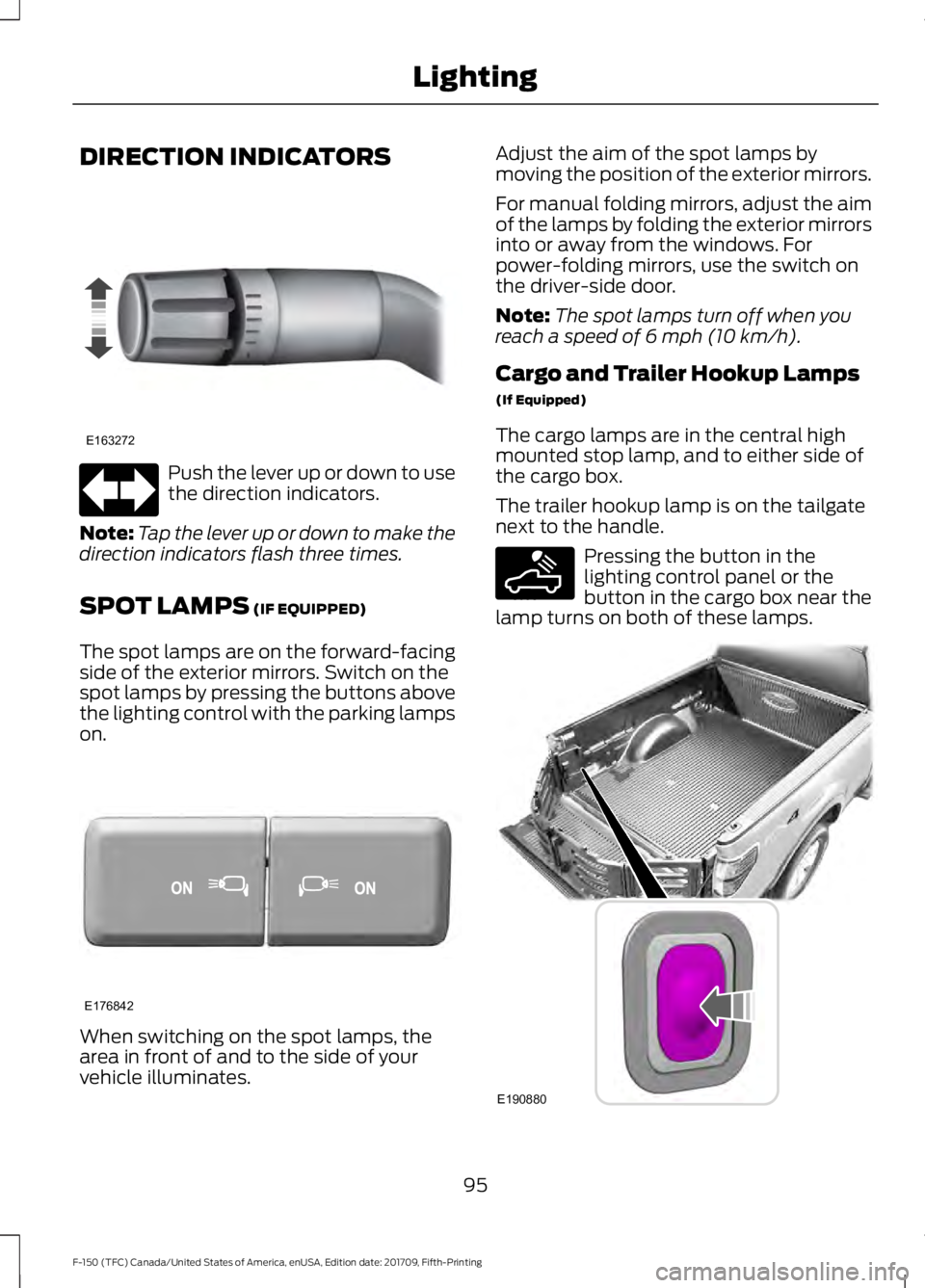
DIRECTION INDICATORS
Push the lever up or down to use
the direction indicators.
Note: Tap the lever up or down to make the
direction indicators flash three times.
SPOT LAMPS (IF EQUIPPED)
The spot lamps are on the forward-facing
side of the exterior mirrors. Switch on the
spot lamps by pressing the buttons above
the lighting control with the parking lamps
on. When switching on the spot lamps, the
area in front of and to the side of your
vehicle illuminates. Adjust the aim of the spot lamps by
moving the position of the exterior mirrors.
For manual folding mirrors, adjust the aim
of the lamps by folding the exterior mirrors
into or away from the windows. For
power-folding mirrors, use the switch on
the driver-side door.
Note:
The spot lamps turn off when you
reach a speed of
6 mph (10 km/h).
Cargo and Trailer Hookup Lamps
(If Equipped)
The cargo lamps are in the central high
mounted stop lamp, and to either side of
the cargo box.
The trailer hookup lamp is on the tailgate
next to the handle. Pressing the button in the
lighting control panel or the
button in the cargo box near the
lamp turns on both of these lamps. 95
F-150 (TFC) Canada/United States of America, enUSA, Edition date: 201709, Fifth-Printing LightingE163272 E176842 E189587 E190880