2018 FORD EXPLORER climate control
[x] Cancel search: climate controlPage 5 of 571

Steering Wheel
Adjusting the Steering Wheel - Vehicles
With: Manual Adjustable Steering
Column ..........................................................76
Adjusting the Steering Wheel - Vehicles With: Power Adjustable Steering
Column ..........................................................
76
Audio Control ..................................................
78
Voice Control ...................................................
78
Cruise Control .................................................
79
Information Display Control ......................
79
Heated Steering Wheel ...............................
79
Pedals
Adjusting the Pedals ...................................
80
Wipers and Washers
Windshield Wipers ........................................
81
Autowipers .......................................................
81
Windshield Washers ....................................
82
Rear Window Wiper and Washers ..........
82
Lighting
General Information .....................................
83
Lighting Control .............................................
83
Autolamps .......................................................
84
Instrument Lighting Dimmer ....................
84
Headlamp Exit Delay ...................................
85
Daytime Running Lamps ...........................
85
Automatic High Beam Control ................
86
Front Fog Lamps ...........................................
87
Direction Indicators .......................................
87
Interior Lamps ................................................
87
Ambient Lighting ..........................................
89
Windows and Mirrors
Power Windows ..............................................
91
Global Opening ..............................................
92
Exterior Mirrors ...............................................
92
Interior Mirror ..................................................
95Sun Visors
........................................................
95
Moonroof .........................................................
95
Instrument Cluster
Gauges ...............................................................
97
Warning Lamps and Indicators .............
100
Audible Warnings and Indicators ..........
103
Information Displays
General Information ...................................
105
Information Messages ................................
119
Climate Control
Manual Climate Control ............................
133
Automatic Climate Control - Vehicles With: Premium AM/FM/CD .................
134
Automatic Climate Control - Vehicles With: Sony AM/FM/CD .........................
136
Hints on Controlling the Interior Climate ........................................................................\
.
138
Rear Passenger Climate Controls .........
140
Heated Windows and Mirrors ..................
141
Cabin Air Filter ...............................................
142
Remote Start .................................................
142
Seats
Sitting in the Correct Position .................
144
Head Restraints ...........................................
144
Manual Seats ................................................
147
Power Seats ..................................................
148
Memory Function ........................................
150
Rear Seats .......................................................
151
Heated Seats ................................................
158
Climate Controlled Seats .........................
159
Universal Garage Door Opener
Universal Garage Door Opener ...............
161
2
Explorer (TUB) Canada/United States of America, enUSA, Edition date: 201711, Fourth-Printing Table of Contents
Page 19 of 571

INSTRUMENT PANEL OVERVIEW
Air vents.
A
Direction indicators. See
Direction Indicators (page 87).
High beam. See Lighting
Control (page 83).
B
Information display controls. See
Information Display Control
(page
79).
C
Instrument cluster.
See Warning
Lamps and Indicators (page
100).
D
Wiper lever. See
Wipers and
Washers (page 81).
E
180 degree camera. See
180
Degree Camera (page 218).
F Parking aid switch. See Parking
Aids
(page 205).
G
Information and entertainment
display.
H
Hazard warning flasher switch.
See Hazard Flashers
(page 261).
I
Audio unit.
See Audio System
(page 364).
J
Climate controls. See
Climate
Control (page 133).
K
Heated rear window switch. See
Heated Windows and Mirrors
(page
141).
L
16
Explorer (TUB) Canada/United States of America, enUSA, Edition date: 201711, Fourth-Printing At a GlanceE192491
Page 60 of 571

Car Finder
Press the button twice within
three seconds. The horn sounds
and the direction indicators
flash. We recommend you use this method
to locate your vehicle, rather than using
the panic alarm.
Sounding the Panic Alarm
Note: The panic alarm only operates when
the ignition is off. Press the button to sound the
panic alarm. Press the button
again or switch the ignition on to
turn it off.
Remote Start (If Equipped) WARNING:
To avoid exhaust fumes,
do not use remote start if your vehicle is
parked indoors or in areas that are not well
ventilated.
Note: Do not use remote start if your fuel
level is low. The remote start button is on the
remote control.
This feature allows you to start your
vehicle from the outside. Your remote
control has an extended operating range.
If your vehicle has automatic climate
control, you can configure it to operate
when you remote start your vehicle.
See
Climate Control (page 133). A manual
climate control system runs at the setting
it was set to when you switched your
vehicle off. Many states and provinces have
restrictions for the use of remote start.
Check your local and state or provincial
laws for specific requirements regarding
remote start systems.
The system does not work if:
•
The ignition is on.
• The anti-theft alarm triggers.
• You disable the feature.
• The hood is open.
• The transmission is not in park (P).
• The battery voltage is below the
minimum operating voltage.
• The service engine soon light is on.
Remote Control Feedback (If
Equipped)
An LED on the remote control provides
status feedback of remote start or stop
commands. Status
LED
Remote startsuccessful
Solid green
Remote stopsuccessful
Solid red
Request failed or
status not received
Blinking red
Status incomplete
Blinking green
Remote Starting Your Vehicle
Note: You must press each button within
three seconds of each other. If you do not
follow this sequence, your vehicle does not
start remotely, the direction indicators do
not flash twice and the horn does not sound.
57
Explorer (TUB) Canada/United States of America, enUSA, Edition date: 201711, Fourth-Printing Keys and Remote ControlsE138623 E138624 E138625
Page 111 of 571
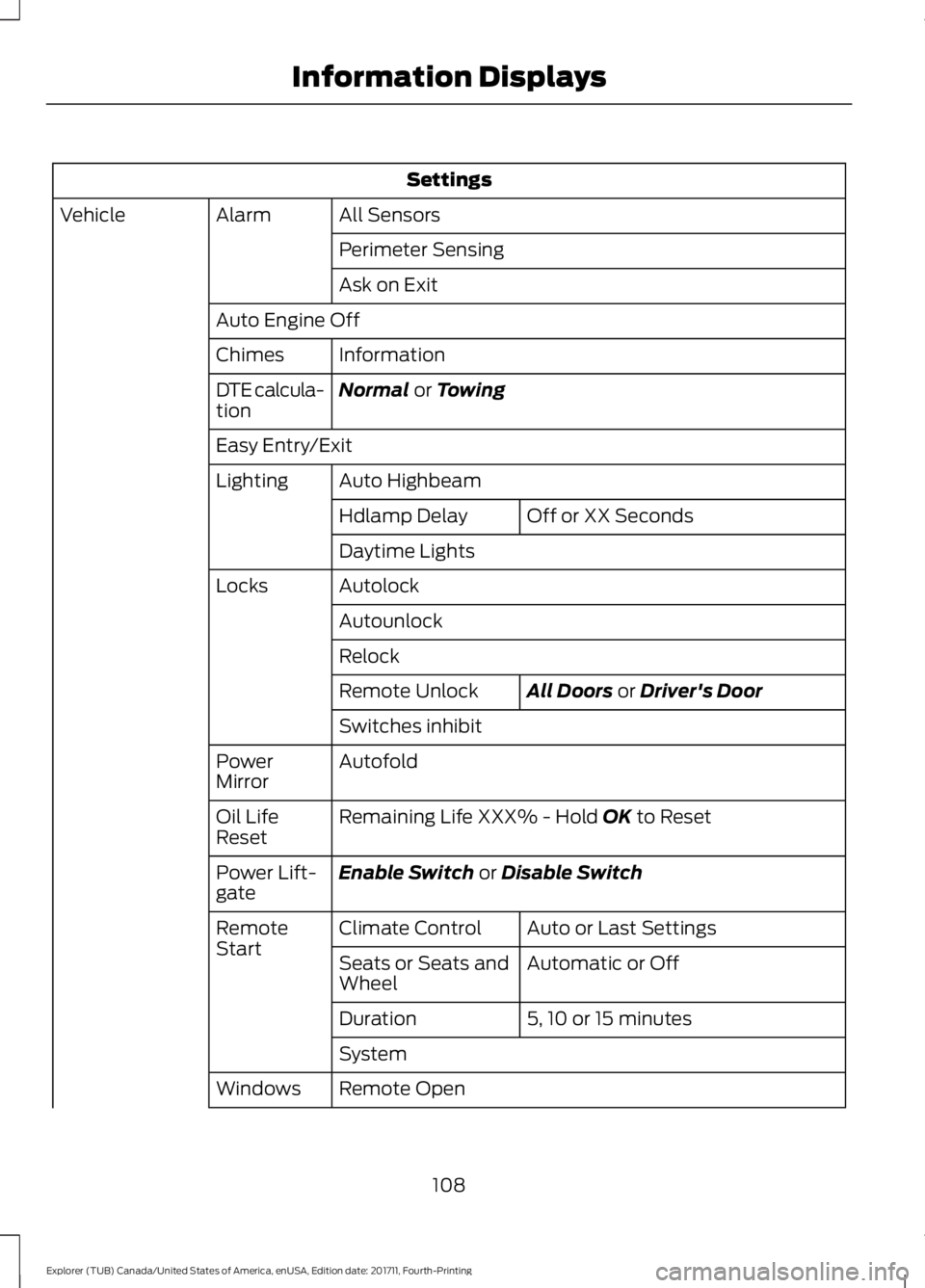
Settings
All Sensors
Alarm
Vehicle
Perimeter Sensing
Ask on Exit
Auto Engine Off Information
Chimes
Normal or Towing
DTE calcula-
tion
Easy Entry/Exit
Auto Highbeam
Lighting
Off or XX Seconds
Hdlamp Delay
Daytime Lights
Autolock
Locks
Autounlock
Relock All Doors
or Driver's Door
Remote Unlock
Switches inhibit
Autofold
Power
Mirror
Remaining Life XXX% - Hold
OK to Reset
Oil Life
Reset
Enable Switch
or Disable Switch
Power Lift-
gate
Auto or Last Settings
Climate Control
Remote
Start
Automatic or Off
Seats or Seats and
Wheel
5, 10 or 15 minutes
Duration
System
Remote Open
Windows
108
Explorer (TUB) Canada/United States of America, enUSA, Edition date: 201711, Fourth-Printing Information Displays
Page 117 of 571

Settings
XXX% - Hold OK to Reset
Oil Life
Reset
Enable Switch
or Disable Switch
Power Lift-
gate
Auto or Last Settings
Climate Control
Remote
Start
Auto or Off
Seats or Seats and
Wheel
5, 10 or 15 minutes
Duration
System
Remote Open
Windows
Courtesy Wipe
Wipers
Rain Sensing
MyKeys Qty
MyKey
MyKey
MyKey Odometer
Admin Key Qty
Hold
OK to Create MyKey
Create
MyKey
Always On or User Selectable
911 Assist
Do Not
Disturb
Traction
Control
Choose desired speed or off
Max Speed
Speed
Minder
Volume Limiter
Hold
OK to Clear All MyKeys
Clear
MyKeys
Miles & Gallons
,L/100km or Km/L
Distance
Display Setup
°Fahrenheit
or °Celsius
Temper-
ature
114
Explorer (TUB) Canada/United States of America, enUSA, Edition date: 201711, Fourth-Printing Information Displays
Page 121 of 571

Settings
Switch Inhibit
Autofold
Mirror
XXX% - Hold OK to Reset
Oil Life
Enable Switch or Disable Switch
Power Lift-
gate
Auto or Last Settings
Climate Control
Remote
Start
Auto or Off
Front Seats &
Wheel
5, 10 or 15 minutes
Duration
System
Remote Open
Windows
Courtesy Wipe
Wipers
Rain Sensing
MyKeys Qty
Mykey
Status
MyKey
MyKey Odometer
Admin Key Qty
Hold
OK to Create MyKey
Create
MyKey
Always On or User Selectable
911 Assist
On or Off
Do Not
Disturb
Always On or User Selectable
Traction
Control
Choose desired speed or off
Max Speed
Speed
Minder
Volume Limiter
Hold
OK to Clear All MyKeys
Clear
MyKeys
Miles & Gallons
,L/100 km or km/L
Distance
Unit
Display
118
Explorer (TUB) Canada/United States of America, enUSA, Edition date: 201711, Fourth-Printing Information Displays
Page 136 of 571
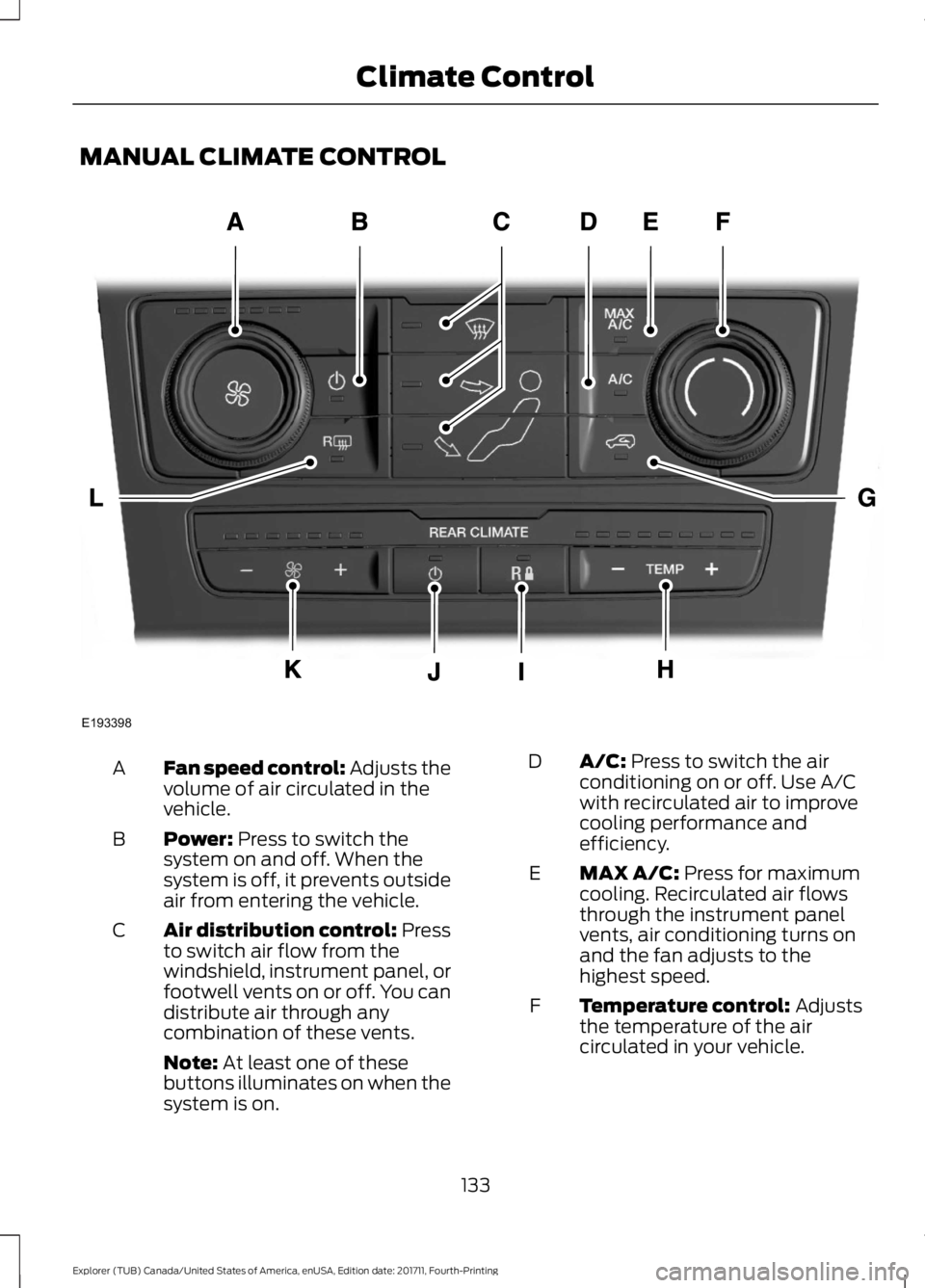
MANUAL CLIMATE CONTROL
Fan speed control: Adjusts the
volume of air circulated in the
vehicle.
A
Power: Press to switch the
system on and off. When the
system is off, it prevents outside
air from entering the vehicle.
B
Air distribution control: Press
to switch air flow from the
windshield, instrument panel, or
footwell vents on or off. You can
distribute air through any
combination of these vents.
C
Note:
At least one of these
buttons illuminates on when the
system is on. A/C:
Press to switch the air
conditioning on or off. Use A/C
with recirculated air to improve
cooling performance and
efficiency.
D
MAX A/C:
Press for maximum
cooling. Recirculated air flows
through the instrument panel
vents, air conditioning turns on
and the fan adjusts to the
highest speed.
E
Temperature control:
Adjusts
the temperature of the air
circulated in your vehicle.
F
133
Explorer (TUB) Canada/United States of America, enUSA, Edition date: 201711, Fourth-Printing Climate ControlE193398
Page 137 of 571

Recirculated air: Press to
switch between outside air and
recirculated air. The air currently
in the passenger compartment
recirculates. This may reduce the
time needed to cool the interior
(when used with A/C) and
reduce unwanted odors from
entering your vehicle.
G
Note:
Recirculated air may turn
off (or prevent you from
switching on) in all air flow
modes except MAX A/C to
reduce the risk of fogging.
Recirculation may also turn on
and off in Panel or Panel/Floor
air flow modes during hot
weather in order to improve
cooling efficiency.
Rear passenger temperature
control:
Adjusts the
temperature setting for the rear
passenger compartment.
H Rear fan speed control lock:
When illuminated, you can only
operate the rear passenger
settings through the front
controls.
I
Rear passenger power:
Press
to switch the rear system on and
off.
J
Rear fan speed control:
Adjusts the volume of air
circulated to the rear passenger
compartment.
K
Heated rear window:
Press to
switch the heated rear window
on and off. See
Heated
Windows and Mirrors (page
141).
L
AUTOMATIC CLIMATE
CONTROL - VEHICLES WITH:
PREMIUM AM/FM/CD
Note: You can switch temperature units
between Fahrenheit and Celsius. See your
SYNC information. 134
Explorer (TUB) Canada/United States of America, enUSA, Edition date: 201711, Fourth-Printing Climate ControlE193399