2018 FORD EXPLORER cooling
[x] Cancel search: coolingPage 318 of 571

•
Cover interior trim to prevent fading.
• Keep all rubber parts free from oil and
solvents.
Engine
• Change the engine oil and filter prior to
storage because used engine oil
contains contaminates which may
cause engine damage.
• Start the engine every 15 days for a
minimum of 15 minutes. Run at fast idle
with the climate controls set to defrost
until the engine reaches normal
operating temperature.
• With your foot on the brake, shift
through all the gears while the engine
is running.
• We recommend that you change the
engine oil before you use your vehicle
again.
Fuel system
• Fill the fuel tank with high-quality fuel
until the first automatic shutoff of the
fuel pump nozzle.
Cooling system
• Protect against freezing temperatures.
• When removing your vehicle from
storage, check coolant fluid level.
Confirm that there are no cooling
system leaks and that fluid is at the
recommended level.
Battery
• Check and recharge as necessary. Keep
connections clean.
• If storing your vehicle for more than 30
days without recharging the battery,
we recommend that you disconnect
the battery cables to maintain battery
charge for quick starting. Note:
It is necessary to reset memory
features if battery cables are disconnected.
Brakes
• Make sure the brakes and parking brake
release fully.
Tires
• Maintain recommended air pressure.
Miscellaneous
• Make sure all linkages, cables, levers
and pins under your vehicle are covered
with grease to prevent rust.
• Move vehicles at least 25 ft (7.5 m)
every 15 days to lubricate working parts
and prevent corrosion.
Removing Vehicle From Storage
When your vehicle is ready to come out of
storage, do the following:
• Wash your vehicle to remove any dirt
or grease film build-up on window
surfaces.
• Check windshield wipers for any
deterioration.
• Check under the hood for any foreign
material that may have collected
during storage such as mice or squirrel
nests.
• Check the exhaust for any foreign
material that may have collected
during storage.
• Check tire pressures and set tire
inflation per the Tire Label.
• Check brake pedal operation. Drive
your vehicle
15 ft (4.5 m) back and
forth to remove rust build-up.
315
Explorer (TUB) Canada/United States of America, enUSA, Edition date: 201711, Fourth-Printing Vehicle Care
Page 453 of 571

Note: the passenger side
temperature and the DUAL
indication automatically turn on
when you or your passenger
adjust the passenger
temperature.
Passenger temperature:
Touch up or down to adjust the
temperature.
G
Fan speed:
Touch up or down
to increase or decrease the
volume of air that circulates in
your vehicle.
H
Note:
You cannot adjust the fan
speed when the system is set to
AUTO or MAX A/C.
Rear:
A pop up appears on the
screen to display the rear control
options.
I
Touch Rear Lock to switch the
rear climate control functions off
and on.
Touch
Rear Control to allow
the rear seat passengers to
adjust the rear climate settings.
Touch it again to prevent the rear
seat passengers from adjusting
the settings. Rear Control
automatically turns off when you
use the touchscreen to adjust
the rear climate settings.
If your vehicle has automatic
climate controls, select
Auto to
connect the rear climate settings
to the Auto settings of the driver.
Touch the up and down arrows
to adjust the temperature.
Manual airflow distribution
controls:
Select these controls
individually, together, or with
Defrost to direct the air flow to
the area you desire.
J Panel:
Distributes air through
the instrument panel vents.
Floor: Distributes air through the
demister vents, floor vents and
rear seat floor vents.
A/C:
A pop-up appears on the
screen to display the air
conditioning options.
K
MAX A/C:
Touch the button to
activate and maximize cooling.
The driver and passenger
temperatures are set to LO,
recirculated air flows through the
instrument panel vents, air
conditioning automatically turns
on and the fan automatically
adjusts to the highest speed.
A/C:
Touch to switch the air
conditioning on or off. Use A/C
with recirculated air to improve
cooling performance and
efficiency.
Note:
In certain conditions (for
example, Max Defrost), the air
conditioning compressor may
continue to operate even when
you switch the air conditioning
A/C button off.
450
Explorer (TUB) Canada/United States of America, enUSA, Edition date: 201711, Fourth-Printing SYNC™ 3
Page 454 of 571

Recirculated air: Touch to
switch the recirculated air on or
off. When recirculated air is on,
it may reduce the amount of
time needed to cool down the
interior (when used with A/C)
and help reduce odors from
reaching the interior.
Note:
Recirculated air may turn
off automatically (or the system
may prevent it from turning on)
in all airflow modes except MAX
A/C to reduce risk of fogging. It
may also turn on and off
automatically in Panel or
Panel/Floor airflow modes
during hot weather in order to
improve cooling efficiency.
PHONE WARNING:
Driving while distracted
can result in loss of vehicle control, crash
and injury. We strongly recommend that
you use extreme caution when using any
device that may take your focus off the
road. Your primary responsibility is the safe
operation of your vehicle. We recommend
against the use of any hand-held device
while driving and encourage the use of
voice-operated systems when possible.
Make sure you are aware of all applicable
local laws that may affect the use of
electronic devices while driving.
Hands-free calling is one of the main
features of the system. Once you pair your
cell phone, you can access many options
using the touchscreen or voice commands.
While the system supports a variety of
features, many are dependent on your cell
phone ’s functionality. Pairing Your Cell Phone for the
First Time
Pair your Bluetooth enabled phone with
the system before using the functions in
hands-free mode.
Switch on Bluetooth on your device to
begin pairing. See your phone
’s manual if
necessary.
To add a phone, select: Menu Item
Add Phone
1. Follow the on-screen instructions.
2. A prompt alerts you to search for the system on your phone.
3. Select your vehicle's make and model as it displays on your phone.
4. Confirm that the six-digit number appearing on your phone matches the
six-digit number on the touchscreen.
5. The touchscreen indicates when the pairing is successful.
6. Your phone may prompt you to give the system permission to access
information. To check your phone ’s
compatibility, see your phone ’s manual
or visit the website.
Alternatively, to add a phone, select: Menu Item
Add Phone
Then select:
Discover Other Bluetooth Devices
1. Follow the on-screen instructions.
2. Select your phone's name when it appears on the touchscreen.
451
Explorer (TUB) Canada/United States of America, enUSA, Edition date: 201711, Fourth-Printing SYNC™ 3
Page 504 of 571

Check Every Month
Engine oil level.
Function of all interior and exterior lights.
Tires (including spare) for wear and proper pressure. Windshield washer fluid level.
Fuel and water separator. Drain if necessary (or if indicated by the information display). Holes and slots in the tail pipe to make sure they are functional and clear of debris. Check Every Six Months
Battery connections. Clean if necessary.
Body and door drain holes for obstructions. Clean if necessary. Cooling system fluid level and coolant strength.
Door weatherstrips for wear. Lubricate if necessary.
Hinges, latches and outside locks for proper operation. Lubricate if necessary. Parking brake for proper operation.
Safety belts and seat latches for wear and function.
Safety warning lamps (brake, ABS, airbag and safety belt) for operation.
Washer spray and wiper operation. Clean or replace blades as necessary.
Multi-Point Inspection
In order to keep your vehicle running right,
it is important to have the systems on your
vehicle checked regularly. This can help
identify potential issues and prevent major
problems. We recommend having the
following multi-point inspection performed
at every scheduled maintenance interval
to help make sure your vehicle keeps
running great.
501
Explorer (TUB) Canada/United States of America, enUSA, Edition date: 201711, Fourth-Printing Scheduled Maintenance
Page 506 of 571
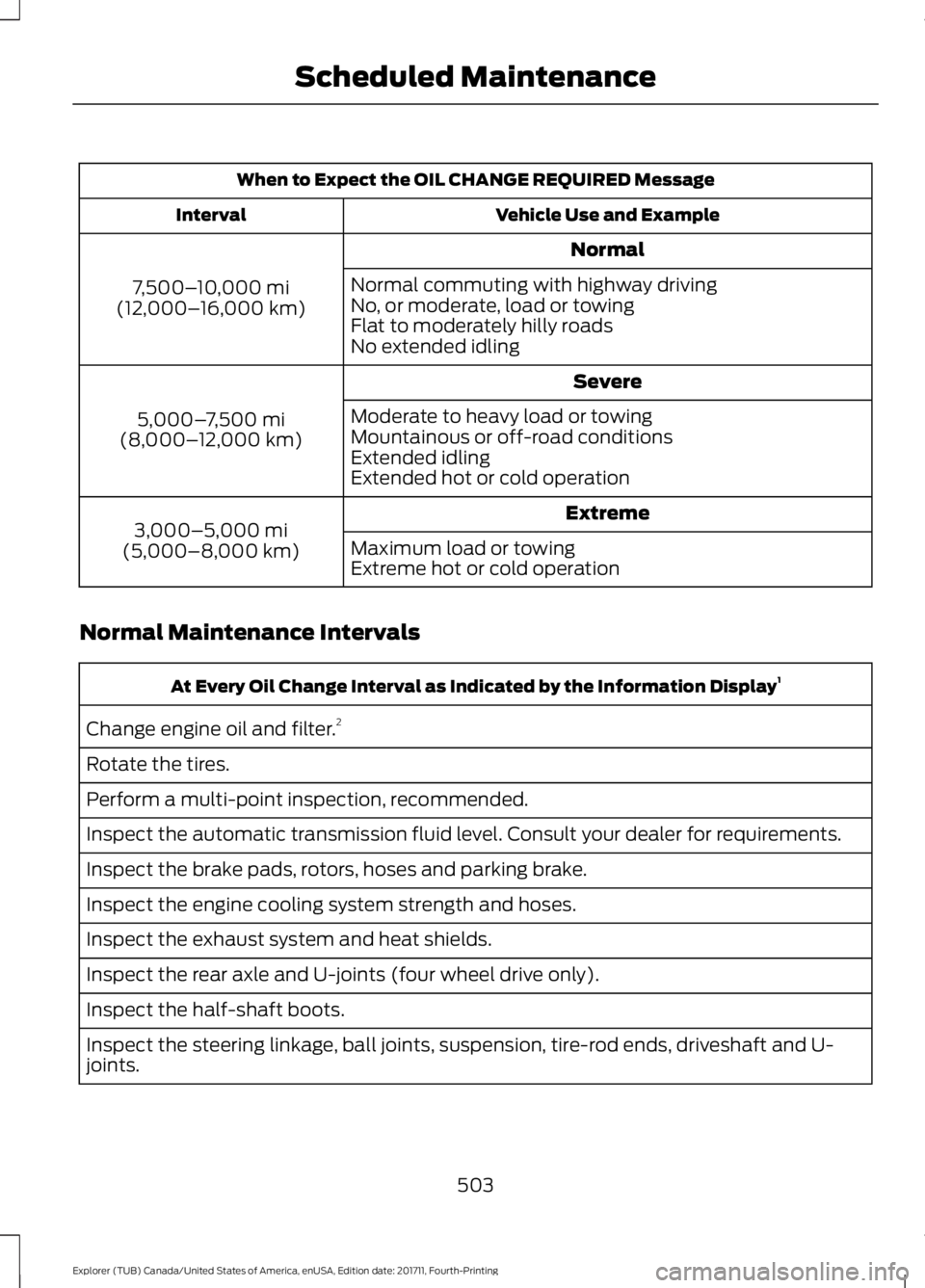
When to Expect the OIL CHANGE REQUIRED Message
Vehicle Use and Example
Interval
Normal
7,500– 10,000 mi
(12,000– 16,000 km) Normal commuting with highway driving
No, or moderate, load or towing
Flat to moderately hilly roads
No extended idling
Severe
5,000– 7,500 mi
(8,000– 12,000 km) Moderate to heavy load or towing
Mountainous or off-road conditions
Extended idling
Extended hot or cold operation
Extreme
3,000–5,000 mi
(5,000–8,000 km) Maximum load or towing
Extreme hot or cold operation
Normal Maintenance Intervals At Every Oil Change Interval as Indicated by the Information Display
1
Change engine oil and filter. 2
Rotate the tires.
Perform a multi-point inspection, recommended.
Inspect the automatic transmission fluid level. Consult your dealer for requirements.
Inspect the brake pads, rotors, hoses and parking brake.
Inspect the engine cooling system strength and hoses.
Inspect the exhaust system and heat shields.
Inspect the rear axle and U-joints (four wheel drive only).
Inspect the half-shaft boots.
Inspect the steering linkage, ball joints, suspension, tire-rod ends, driveshaft and U-
joints.
503
Explorer (TUB) Canada/United States of America, enUSA, Edition date: 201711, Fourth-Printing Scheduled Maintenance
Page 563 of 571

Engine Coolant Check................................291
Adding Coolant.................................................... 291
Coolant Change................................................. 293
Engine Coolant Temperature Management.................................................. 294
Fail-Safe Cooling............................................... 293
Recycled Coolant............................................... 293
Severe Climates................................................. 293
Engine Emission Control............................183
Engine Immobilizer See: Passive Anti-Theft System..................... 74
Engine Oil Check..........................................289
Adding Engine Oil.............................................. 289
Engine Oil Dipstick - 2.3L EcoBoost™.................................................288
Engine Oil Dipstick - 3.5L Duratec/3.5L Ecoboost™.................................................289
Engine Specifications - 2.3L EcoBoost™.................................................343
Drivebelt Routing............................................... 343
Engine Specifications - 3.5L Duratec.........................................................343
Drivebelt Routing............................................... 344
Engine Specifications - 3.5L Ecoboost™.................................................344
Drivebelt Routing............................................... 345
Entertainment...............................................437 AM/FM Radio...................................................... 439
Apps........................................................................\
447
Bluetooth Stereo or USB................................ 446
CD (If equipped)................................................ 445
HD Radio ™ Information (If
Available)........................................................ 442
SiriusXM® Satellite Radio (If Activated)....................................................... 440
Sources................................................................. 438
Supported Media Players, Formats and Metadata Information................................. 447
USB Ports.............................................................. 447
Environment
......................................................15
Essential Towing Checks..........................252
Before Towing a Trailer.................................... 253
Hitches................................................................... 252
Launching or Retrieving a Boat or Personal Watercraft (PWC)........................................ 254
Safety Chains...................................................... 252
Trailer Brakes....................................................... 253
Trailer Lamps....................................................... 253When Towing a Trailer.....................................
253
Event Data Recording See: Data Recording.............................................. 9
Export Unique Options.................................14
Exterior Mirrors
................................................92
Auto-dimming Feature...................................... 94
Auto-Folding Mirrors........................................... 93
Blind Spot Information System...................... 94
Direction Indicator Mirrors ............................... 94
Fold-Away Exterior Mirrors............................... 93
Heated Exterior Mirrors ..................................... 94
Integrated Blind Spot Mirror............................ 94
Memory Mirrors .................................................... 94
Power Exterior Mirrors........................................ 92
F
Fastening the Seatbelts..............................36 Rear Inflatable Seatbelt.................................... 38
Seatbelt Locking Modes.................................... 37
Using Seatbelts During Pregnancy................36
Flat Tire See: Changing a Road Wheel........................ 337
Floor Mats......................................................258
Fog Lamps - Front See: Front Fog Lamps......................................... 87
Foot Pedals See: Adjusting the Pedals................................ 80
Ford Credit
..........................................................11
US Only...................................................................... 11
Ford Protect
...................................................497
Ford Protect Extended Service Plan
(CANADA ONLY).......................................... 498
Ford Protect Extended Service Plans (U.S. Only).................................................................. 497
Four-Wheel Drive..........................................191 Principle of Operation........................................ 191
Front Fog Lamps
............................................87
Front Parking Aid.........................................206
Obstacle Distance Indicator.......................... 207
Front Passenger Sensing System............46
Fuel and Refueling
........................................175
Fuel Consumption........................................181
Advertised Capacity........................................... 181
Fuel Economy....................................................... 181
Fuel Filler Funnel Location.........................177
560
Explorer (TUB) Canada/United States of America, enUSA, Edition date: 201711, Fourth-Printing Index
Page 564 of 571

Fuel Quality - E85.........................................176
Choosing the Right Fuel - Flex Fuel
Vehicles.............................................................. 176
Switching Between E85 and Gasoline........177
Fuel Quality - Gasoline...............................175 Choosing the Right Fuel................................... 175
Fuel Shutoff....................................................261
Fuses.................................................................273
Fuse Specification Chart...........................273 Passenger Compartment Fuse Panel........278
Power Distribution Box.................................... 273
G
Garage Door Opener See: Universal Garage Door Opener.............161
Gauges................................................................97 Engine Coolant Temperature Gauge..........100
Fuel Gauge........................................................... 100
Information Display............................................. 99
Type 1........................................................................\
. 97
Type 2....................................................................... 98
Type 3....................................................................... 99
Gearbox See: Transmission............................................... 187
General Information on Radio Frequencies...................................................52
Intelligent Access................................................. 52
General Maintenance Information.......499 Multi-Point Inspection...................................... 501
Owner Checks and Services......................... 500
Protecting Your Investment.......................... 499
Why Maintain Your Vehicle?......................... 499
Why Maintain Your Vehicle at Your Dealership?.................................................... 499
Getting Assistance Outside the U.S. and Canada.........................................................269
Getting the Services You Need..............266 Away From Home............................................. 266
Global Opening
...............................................92
Moonroof................................................................. 92
Remote Control Front Windows..................... 92
H
Handbrake See: Parking Brake.............................................. 197
Hazard Flashers
............................................261 HDC
See: Using Hill Descent Control................... 203
Headlamp Adjusting See: Adjusting the Headlamps..................... 301
Headlamp Exit Delay
....................................85
Headlamp Removal See: Removing a Headlamp.......................... 303
Headrest See: Head Restraints......................................... 144
Head Restraints
............................................144
Adjusting the Head Restraint......................... 145
Tilting Head Restraints .................................... 146
Heated Seats.................................................158 Front Seats........................................................... 158
Second Row Heated Seats............................. 159
Heated Steering Wheel................................79
Heated Windows and Mirrors...................141 Heated Exterior Mirrors..................................... 142
Heated Rear Window........................................ 142
Heating See: Climate Control......................................... 133
Hill Start Assist..............................................197 Switching the System On and Off...............198
Using Hill Start Assist....................................... 198
Hints on Controlling the Interior Climate..........................................................138
Defogging the Side Windows in Cold Weather............................................................ 140
General Hints....................................................... 138
Quickly Cooling the Interior............................ 139
Quickly Heating the Interior............................ 139
Recommended Settings for Cooling..........140
Recommended Settings for Heating..........139
Hints on Driving With Anti-Lock Brakes
.............................................................197
Home Screen................................................429
Hood Lock See: Opening and Closing the Hood..........284
I
Ignition Switch
...............................................169
In California (U.S. Only).............................267
Information Display Control.......................79
Information Displays
...................................105
General Information.......................................... 105
Information Messages
.................................119
4WD........................................................................\
.. 119
561
Explorer (TUB) Canada/United States of America, enUSA, Edition date: 201711, Fourth-Printing Index
Page 570 of 571

Switching Adaptive Cruise Control
Off....................................................................... 224
Switching Adaptive Cruise Control On........................................................................\
. 221
Switching to Normal Cruise Control...........226
System Not Available....................................... 225
Using Cruise Control...................................220 Switching Cruise Control Off......................... 220
Switching Cruise Control On......................... 220
Using Four-Wheel Drive..............................191 Driving In Special Conditions With
Four-Wheel Drive (4WD)........................... 192
How Your Vehicle Differs From Other Vehicles............................................................. 192
Using Hill Descent Control.......................203 Principle of operation....................................... 203
Using hill descent control............................... 203
Using MyKey With Remote Start Systems..........................................................62
Using Snow Chains.....................................332
Using Stability Control...............................201
Using Summer Tires...................................332
Using SYNC™ With Your Media Player............................................................399
Accessing Your USB Song Library...............403
Bluetooth Devices and System Settings............................................................ 405
Connecting Your Digital Media Player to the USB Port.......................................................... 399
Media Menu Features...................................... 402
Media Voice Commands................................ 400
USB 2..................................................................... 405
Voice Commands for Audio Sources........406
Using SYNC™ With Your Phone............382 Accessing Features through the Phone
Menu.................................................................. 387
Accessing Your Phone Settings................... 390
Bluetooth Devices.............................................. 391
Making Calls........................................................ 386
Pairing a Phone for the First Time...............383
Pairing Subsequent Phones.......................... 384
Phone Options during an Active Call.........386
Phone Voice Commands................................ 384
Receiving Calls................................................... 386
System Settings................................................. 392
Text Messaging.................................................. 388
Using Terrain Control.................................202 Using Traction Control...............................199
Switching the System Off............................... 199
System Indicator Lights and Messages.......................................................... 199
Using a Switch..................................................... 199
Using the Information Display Controls............................................................. 199
Using Voice Recognition...........................380 Audio Voice Commands.................................. 431
Climate Voice Commands............................. 432
Initiating a Voice Session............................... 380
Mobile App Voice Commands...................... 435
Navigation Voice Commands....................... 434
Phone Voice Commands................................ 433
SiriusXM Traffic and Travel Link Voice Commands..................................................... 436
System Interaction and Feedback...............381
Voice Settings Commands............................ 436
Utilizing the Mediation/Arbitration Program (Canada Only)........................269
V
Vehicle Care
..................................................309
General Information......................................... 309
Vehicle Certification Label.......................349
Vehicle Identification Number
...............348
Vehicle Storage.............................................314
Battery.................................................................... 315
Body........................................................................\
. 314
Brakes...................................................................... 315
Cooling system.................................................... 315
Engine..................................................................... 315
Fuel system........................................................... 315
General................................................................... 314
Miscellaneous...................................................... 315
Removing Vehicle From Storage................... 315
Tires........................................................................\
. 315
Ventilation See: Climate Control......................................... 133
VIN See: Vehicle Identification Number............348
Voice Control
....................................................78
W
Warning Lamps and Indicators..............100 Adaptive Cruise Control.................................. 100
567
Explorer (TUB) Canada/United States of America, enUSA, Edition date: 201711, Fourth-Printing Index