2018 FORD EXPLORER fog light
[x] Cancel search: fog lightPage 5 of 571

Steering Wheel
Adjusting the Steering Wheel - Vehicles
With: Manual Adjustable Steering
Column ..........................................................76
Adjusting the Steering Wheel - Vehicles With: Power Adjustable Steering
Column ..........................................................
76
Audio Control ..................................................
78
Voice Control ...................................................
78
Cruise Control .................................................
79
Information Display Control ......................
79
Heated Steering Wheel ...............................
79
Pedals
Adjusting the Pedals ...................................
80
Wipers and Washers
Windshield Wipers ........................................
81
Autowipers .......................................................
81
Windshield Washers ....................................
82
Rear Window Wiper and Washers ..........
82
Lighting
General Information .....................................
83
Lighting Control .............................................
83
Autolamps .......................................................
84
Instrument Lighting Dimmer ....................
84
Headlamp Exit Delay ...................................
85
Daytime Running Lamps ...........................
85
Automatic High Beam Control ................
86
Front Fog Lamps ...........................................
87
Direction Indicators .......................................
87
Interior Lamps ................................................
87
Ambient Lighting ..........................................
89
Windows and Mirrors
Power Windows ..............................................
91
Global Opening ..............................................
92
Exterior Mirrors ...............................................
92
Interior Mirror ..................................................
95Sun Visors
........................................................
95
Moonroof .........................................................
95
Instrument Cluster
Gauges ...............................................................
97
Warning Lamps and Indicators .............
100
Audible Warnings and Indicators ..........
103
Information Displays
General Information ...................................
105
Information Messages ................................
119
Climate Control
Manual Climate Control ............................
133
Automatic Climate Control - Vehicles With: Premium AM/FM/CD .................
134
Automatic Climate Control - Vehicles With: Sony AM/FM/CD .........................
136
Hints on Controlling the Interior Climate ........................................................................\
.
138
Rear Passenger Climate Controls .........
140
Heated Windows and Mirrors ..................
141
Cabin Air Filter ...............................................
142
Remote Start .................................................
142
Seats
Sitting in the Correct Position .................
144
Head Restraints ...........................................
144
Manual Seats ................................................
147
Power Seats ..................................................
148
Memory Function ........................................
150
Rear Seats .......................................................
151
Heated Seats ................................................
158
Climate Controlled Seats .........................
159
Universal Garage Door Opener
Universal Garage Door Opener ...............
161
2
Explorer (TUB) Canada/United States of America, enUSA, Edition date: 201711, Fourth-Printing Table of Contents
Page 11 of 571

Brake system
Cabin air filter
Check fuel cap
Child safety door lock or unlock
Child seat lower anchor
Child seat tether anchor
Cruise control
Do not open when hot
Engine air filter
Engine coolant
Engine coolant temperature
Engine oil
Explosive gas
Fan warning
Fasten seatbelt Flammable
Front airbag
Front fog lamps
Fuel pump reset
Fuse compartment
Hazard flashers
Heated rear window
Windshield defrosting system
Interior luggage compartment
release
Jack
Keep out of reach of children
Lighting control
Low tire pressure warning
Maintain correct fluid level
Note operating instructions
8
Explorer (TUB) Canada/United States of America, enUSA, Edition date: 201711, Fourth-Printing IntroductionE270480 E71340 E71880 E231160 E67017 E161353
Page 87 of 571

Flashing the Headlamp High Beam
Slightly pull the lever toward you and
release it to flash the headlamps.
AUTOLAMPS
WARNING: The system does not
relieve you of your responsibility to drive
with due care and attention. You may need
to override the system if it does not turn
the headlamps on in low visibility
conditions, for example daytime fog. When the lighting control is in the
autolamps position, the headlamps turn
on in low light situations, or when the
wipers turn on. The headlamps remain on for a period of
time after you switch the ignition off. Use
the information display controls to adjust
the period of time that the headlamps
remain on.
Note:
If you switch the autolamps on, you
cannot switch the high beams on until the
system turns the low beams on.
Windshield Wiper Activated
Headlamps
When you switch the autolamps on, the
headlamps turn on within 10 seconds of
switching the wipers on. They turn off
approximately 60 seconds after you switch
the windshield wipers off.
The headlamps do not turn on with the
wipers:
• During a single wipe.
• When using the windshield washers.
• If the wipers are in intermittent mode.
Note: If you switch the autolamps and the
autowipers on, the headlamps turn on when
the windshield wipers continuously operate.
INSTRUMENT LIGHTING
DIMMER 84
Explorer (TUB) Canada/United States of America, enUSA, Edition date: 201711, Fourth-Printing LightingE163268 E142451 E231828
Page 89 of 571

The other lighting control switch positions
do not turn on the daytime running lamps.
If the daytime running lamps are off in the
information display, the lamps stay off in
all switch positions.
AUTOMATIC HIGH BEAM
CONTROL (If Equipped)
WARNING:
The system does not
relieve you of your responsibility to drive
with due care and attention. You may need
to override the system if it does not turn
the high beams on or off.
The system turns on high beams if it is dark
enough and no other traffic is present. If it
detects an approaching vehicle ’s
headlamps or tail lamps, or street lighting
ahead, the system turns off high beams
before they can distract other road users.
Low beams remain on.
Note: The system may not operate properly
if the sensor is blocked. Keep the windshield
free from obstruction or damage.
Note: The system may not operate properly
in cold or inclement conditions. You can
switch on the high beams by overriding the
system.
Note: If the system detects a blockage, for
example bird droppings, bug splatter, snow
or ice, the system goes into low beam mode
until you clear the blockage. A message may
appear in the information display if the
camera is blocked.
Note: Using much larger tires or equipping
vehicle accessories such as snowplows can
modify your vehicle's ride height and
degrade automatic high beam control
performance. A camera sensor, centrally mounted
behind the windshield of your vehicle,
continuously monitors conditions to turn
the high beams on and off.
Once the system is active, the high beams
turn on if:
•
The ambient light level is low enough.
• There is no traffic in front of your
vehicle.
• The vehicle speed is greater than
approximately 32 mph (51 km/h).
The high beams turn off if:
• The ambient light level is high enough
that high beams are not required.
• The system detects an approaching
vehicle's headlamps or tail lamps.
• The vehicle speed falls below
approximately
27 mph (44 km/h).
• The system detects severe rain, snow
or fog.
• The camera is blocked.
Switching the System On and Off
Switch the system on using the information
display. See Information Displays (page
105
). Switch the lighting control to the
autolamps position. See
Autolamps
(page 84).
86
Explorer (TUB) Canada/United States of America, enUSA, Edition date: 201711, Fourth-Printing LightingE142451
Page 90 of 571

Overriding the System
When you switch on the high beams,
pushing or pulling the stalk provides a
temporary override to low beam.
Automatic High Beam Indicator (If
Equipped) The indicator lamp illuminates
to confirm when the system is
ready to assist.
FRONT FOG LAMPS
(If Equipped) Press to switch the fog lamps on or off.
You can switch the fog lamps on when the
lighting control is in any position except
automatic high beam or off. DIRECTION INDICATORS Push the lever up or down to use
the direction indicators.
Note: Tap the lever up or down to make the
direction indicators flash three times.
INTERIOR LAMPS
The lamps turn on when:
• Any door is opened.
• You adjust the instrument panel
dimmer until the courtesy lamps turn
on.
• You press a remote control button and
the ignition is off.
87
Explorer (TUB) Canada/United States of America, enUSA, Edition date: 201711, Fourth-Printing Lighting E232249 E163272
Page 91 of 571

Dome Lamp
Without Fog Lamps
With Fog Lamps
Press the button to switch the lamps on
or off. Map Lamps (If Equipped)
Front Row Map Lamps Second Row Dome and Map Lamps
Second Row Dome and Courtesy
Lamps
88
Explorer (TUB) Canada/United States of America, enUSA, Edition date: 201711, Fourth-Printing LightingE208462 E208463 E163273 E199026 E208464
Page 105 of 571

Fasten Safety Belt
It illuminates and a chime
sounds to remind you to fasten
your safety belt. See Seatbelt
Reminder (page 40).
Front Airbag If it fails to illuminate when you
start your vehicle, continues to
flash or remains on, it indicates
a malfunction. Have the system checked
by an authorized dealer.
Front Fog Lamps
(If Equipped) Lights when you switch the front
fog lamps on.
Heads Up Display
(If Equipped) A red beam of lights illuminates
on the windshield in certain
instances when using adaptive
cruise control and/or the collision warning
system. It also illuminates momentarily
when you start your vehicle to make sure
the display works.
High Beam It illuminates when you switch
the high beam headlamps on. It
flashes when you use the
headlamp flasher.
Hood Ajar Displays when the ignition is on
and the hood is not completely
closed.
Lane Keeping Aid
(If Equipped) Lights when the lane keeping
system is activated. Liftgate Ajar Lights when the liftgate is not
completely closed.
Low Fuel Level It illuminates when the fuel level
is low or the fuel tank is nearly
empty. Refuel as soon as
possible.
Low Tire Pressure Warning It illuminates when your tire
pressure is low. If the lamp
remains on with the engine
running or when driving, check your tire
pressure as soon as possible.
It also illuminates momentarily when you
switch the ignition on to confirm the lamp
is functional. If it does not illuminate when
you switch the ignition on, or begins to
flash at any time, have the system checked
by an authorized dealer.
Low Washer Fluid It illuminates when the
windshield washer fluid is low.
Parking Lamps It illuminates when you switch
the parking lamps on.
Powertrain Fault Illuminates when the system
detects a powertrain or an 4WD
fault. Contact an authorized
dealer as soon as possible.
102
Explorer (TUB) Canada/United States of America, enUSA, Edition date: 201711, Fourth-Printing Instrument ClusterE71880 E67017 E156133 E159324 E144813 E162453 E132353
Page 234 of 571
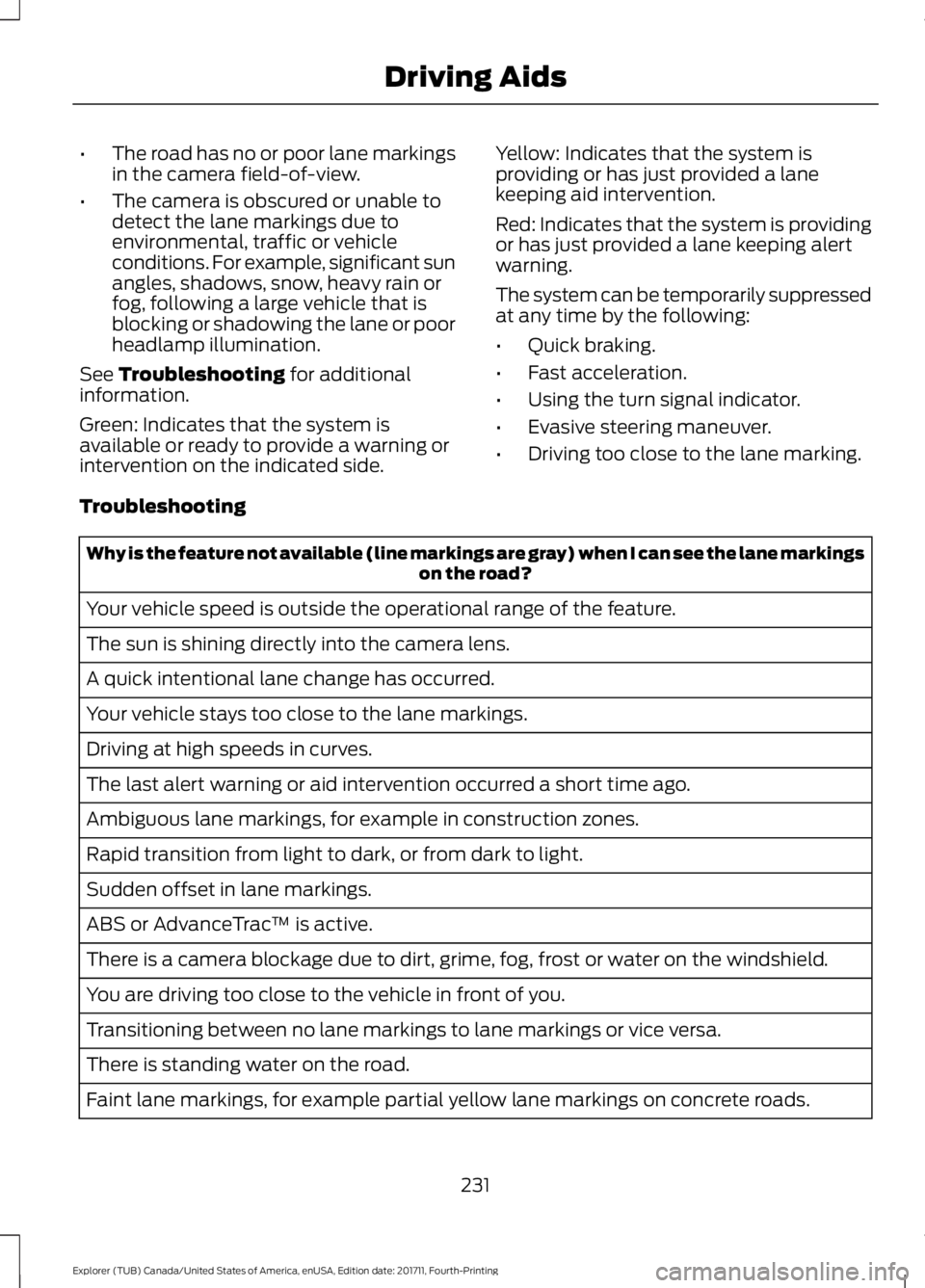
•
The road has no or poor lane markings
in the camera field-of-view.
• The camera is obscured or unable to
detect the lane markings due to
environmental, traffic or vehicle
conditions. For example, significant sun
angles, shadows, snow, heavy rain or
fog, following a large vehicle that is
blocking or shadowing the lane or poor
headlamp illumination.
See Troubleshooting for additional
information.
Green: Indicates that the system is
available or ready to provide a warning or
intervention on the indicated side. Yellow: Indicates that the system is
providing or has just provided a lane
keeping aid intervention.
Red: Indicates that the system is providing
or has just provided a lane keeping alert
warning.
The system can be temporarily suppressed
at any time by the following:
•
Quick braking.
• Fast acceleration.
• Using the turn signal indicator.
• Evasive steering maneuver.
• Driving too close to the lane marking.
Troubleshooting Why is the feature not available (line markings are gray) when I can see the lane markings
on the road?
Your vehicle speed is outside the operational range of the feature.
The sun is shining directly into the camera lens.
A quick intentional lane change has occurred.
Your vehicle stays too close to the lane markings.
Driving at high speeds in curves.
The last alert warning or aid intervention occurred a short time ago.
Ambiguous lane markings, for example in construction zones.
Rapid transition from light to dark, or from dark to light.
Sudden offset in lane markings.
ABS or AdvanceTrac ™ is active.
There is a camera blockage due to dirt, grime, fog, frost or water on the windshield.
You are driving too close to the vehicle in front of you.
Transitioning between no lane markings to lane markings or vice versa.
There is standing water on the road.
Faint lane markings, for example partial yellow lane markings on concrete roads.
231
Explorer (TUB) Canada/United States of America, enUSA, Edition date: 201711, Fourth-Printing Driving Aids