2018 FORD EXPEDITION lights
[x] Cancel search: lightsPage 503 of 571
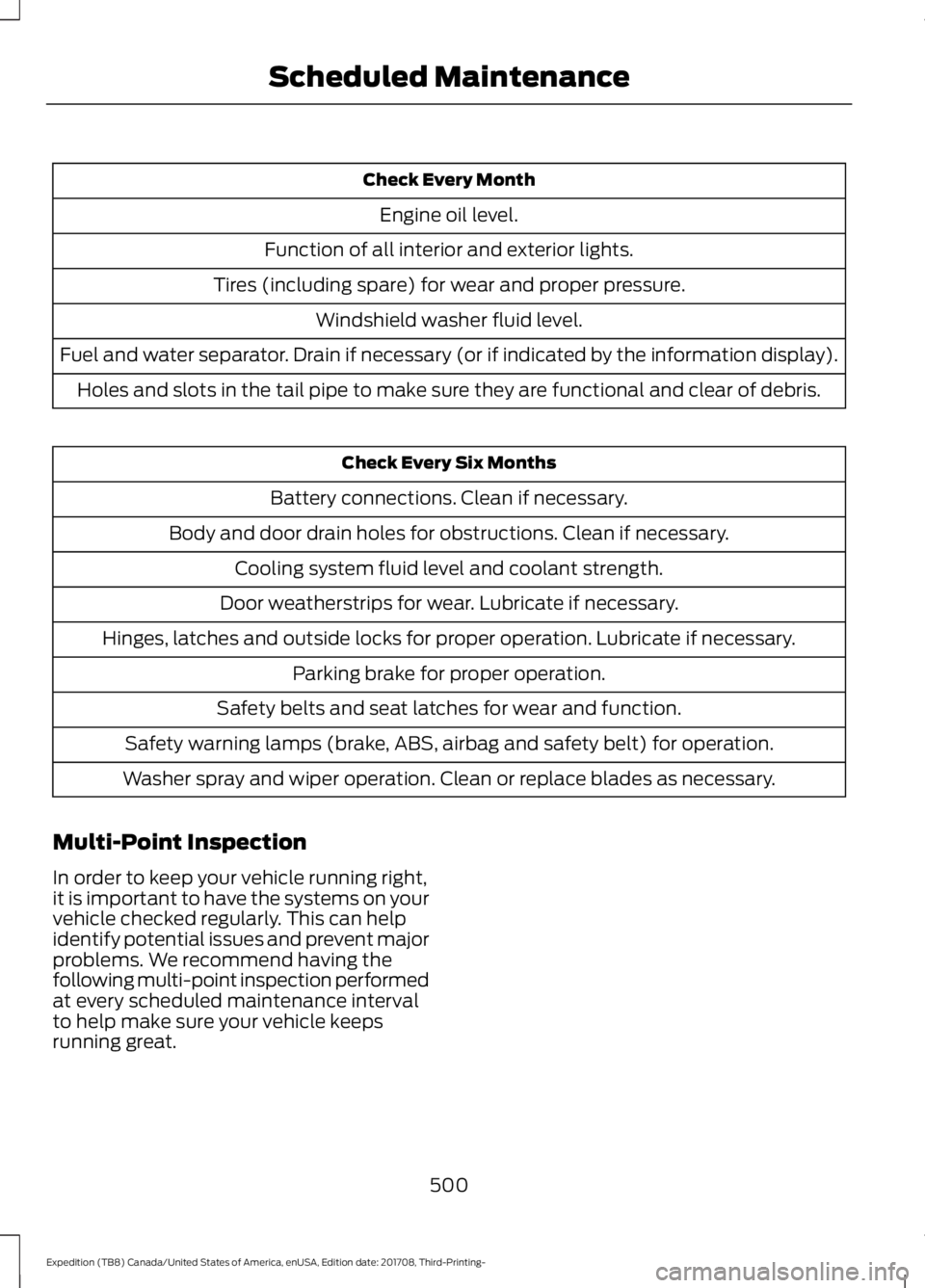
Check Every Month
Engine oil level.
Function of all interior and exterior lights.
Tires (including spare) for wear and proper pressure. Windshield washer fluid level.
Fuel and water separator. Drain if necessary (or if indicated by the information display). Holes and slots in the tail pipe to make sure they are functional and clear of debris. Check Every Six Months
Battery connections. Clean if necessary.
Body and door drain holes for obstructions. Clean if necessary. Cooling system fluid level and coolant strength.
Door weatherstrips for wear. Lubricate if necessary.
Hinges, latches and outside locks for proper operation. Lubricate if necessary. Parking brake for proper operation.
Safety belts and seat latches for wear and function.
Safety warning lamps (brake, ABS, airbag and safety belt) for operation.
Washer spray and wiper operation. Clean or replace blades as necessary.
Multi-Point Inspection
In order to keep your vehicle running right,
it is important to have the systems on your
vehicle checked regularly. This can help
identify potential issues and prevent major
problems. We recommend having the
following multi-point inspection performed
at every scheduled maintenance interval
to help make sure your vehicle keeps
running great.
500
Expedition (TB8) Canada/United States of America, enUSA, Edition date: 201708, Third-Printing- Scheduled Maintenance
Page 562 of 571

Cleaning the Exterior..................................344
Cleaning the Headlamps................................ 345
Exterior Chrome Parts...................................... 345
Exterior Plastic Parts........................................ 345
Stripes or Graphics............................................ 345
Underbody........................................................... 345
Under Hood......................................................... 345
Cleaning the Instrument Panel and Instrument Cluster Lens.........................347
Cleaning the Interior....................................347 Mirrors..................................................................... 347
Cleaning the Wheels..................................349
Cleaning the Windows and Wiper Blades...........................................................346
Clearing All MyKeys.......................................62
Climate............................................................447
Climate Control
.............................................139
Climate Controlled Seats..........................164 Ventilated Seats................................................. 164
Coolant Check See: Engine Coolant Check............................ 329
Crash Sensors and Airbag Indicator.........51
Creating a MyKey
............................................62
Programming and Changing Configurable
Settings............................................................... 62
Cross Traffic Alert
........................................254
Blocked Sensors................................................. 255
Switching the System Off and On..............256
System Errors...................................................... 256
System Lights, Messages and Audible Alerts................................................................. 255
System Limitations........................................... 256
Using the Cross Traffic Alert System.........254
Cruise Control
.................................................84
Principle of Operation....................................... 237
Cruise control See: Using Cruise Control................................ 237
Customer Assistance.................................307
D
Data Recording
..................................................9
Event Data Recording.......................................... 10
Service Data Recording........................................ 9
Daytime Running Lamps..............................91 Type One - Conventional
(Non-Configurable)........................................ 91
Type Two - Configurable.................................... 91Digital Radio..................................................393
HD Radio Reception and Station
Troubleshooting............................................ 394
Direction Indicators
.......................................93
Doors and Locks.............................................65
Drive Control...................................................261 Selectable Drive Modes................................... 261
Driver Alert
......................................................245
Using Driver Alert............................................... 245
Driver and Passenger Airbags...................45 Children and Airbags.......................................... 46
Proper Driver and Front Passenger Seating Adjustment........................................................ 45
Driving Aids
....................................................245
Driving Hints...................................................297
Driving Through Water..............................298
DRL See: Daytime Running Lamps.......................... 91
E
Economical Driving
.....................................297
Electric Parking Brake..................................212 Applying the Electric Parking Brake.............212
Automatically Releasing the Electric
Parking Brake................................................... 213
Manually Releasing the Electric Parking Brake................................................................... 212
Releasing the Electric Parking Brake if the Vehicle Battery is Running Out of
Charge................................................................ 213
Electromagnetic Compatibility
................517
Emission Law..................................................191
Noise Emissions Warranty, Prohibited
Tampering Acts and Maintenance..........192
Tampering With a Noise Control System................................................................ 191
End User License Agreement
..................519
VEHICLE SOFTWARE END USER LICENSE
AGREEMENT (EULA) .................................. 519
Engine Block Heater.....................................179 Using the Engine Block Heater..................... 180
Engine Coolant Check...............................329 Adding Coolant................................................... 329
Coolant Change................................................... 331
Engine Coolant Temperature Management.................................................. 332
Fail-Safe Cooling................................................ 331
559
Expedition (TB8) Canada/United States of America, enUSA, Edition date: 201708, Third-Printing- Index
Page 570 of 571

Unique Driving Characteristics.................181
Universal Garage Door Opener...............166 HomeLink Wireless Control System...........166
USB Port
.........................................................398
Using Adaptive Cruise Control...............238
Automatic Cancellation................................... 241
Blocked Sensor................................................... 243
Canceling the Set Speed................................. 241
Changing the Set Speed.................................. 241
Detection Issues................................................. 242
Following a Vehicle........................................... 239
Following a Vehicle to a Complete Stop................................................................... 240
Hilly Condition and Trailer Tow Usage................................................................. 242
Overriding the Set Speed................................ 241
Park Brake Application..................................... 241
Resuming the Set Speed................................. 241
Setting the Adaptive Cruise Speed.............239
Setting the Adaptive Cruise Speed When Your Vehicle is Stationary.......................... 239
Setting the Gap Distance............................... 240
Switching Adaptive Cruise Control Off....................................................................... 242
Switching Adaptive Cruise Control On....................................................................... 239
Switching to Normal Cruise Control...........244
System Not Available....................................... 243
Using Cruise Control...................................237 Switching Cruise Control Off.........................237
Switching Cruise Control On.......................... 237
Using Four-Wheel Drive
............................202
4WD Switch Selections.................................. 202
4X4 Indicator Lights......................................... 202
Driving Off-Road With Truck and Utility Vehicles............................................................ 205
How Your Vehicle Differs From Other Vehicles............................................................ 204
Operating 4WD Vehicles With Spare or Mismatched Tires......................................... 204
Using Hill Descent Control........................219 Hill Descent Modes............................................ 219
Using MyKey With Remote Start Systems..........................................................63
Using Power Running Boards
...................80
Automatic Power Deploy.................................. 80
Automatic Power Stow..................................... 80
Bounce-back.......................................................... 81Enabling and Disabling.....................................
80
Manual Power Deploy........................................ 80
Using Snow Chains
....................................368
Using Stability Control................................217 Stability Control and Traction Control with
Roll Stability Control ™ (RSC™)..............217
Using SYNC™ With Your Media Player............................................................407
Audio Voice Commands................................. 407
Media Sources.................................................... 407
Using SYNC™ With Your Phone............402 Accessing Features through the Phone
Menu................................................................. 403
Pairing a Phone.................................................. 402
Phone Controls.................................................. 403
Phone Voice Commands............................... 403
Using Traction Control
................................215
Switching the System Off ............................... 215
System Indicator Lights and Messages.......................................................... 215
Using Voice Recognition
..........................400
Audio Voice Commands.................................. 431
Climate Voice Commands............................. 432
Initiating a Voice Session............................... 400
Mobile App Voice Commands...................... 435
Navigation Voice Commands.......................433
Phone Voice Commands................................ 432
SiriusXM Traffic and Travel Link Voice Commands..................................................... 435
System Interaction and Feedback..............401
Voice Settings Commands............................ 436
Utilizing the Mediation/Arbitration Program (Canada Only).........................310
V
Vehicle Care
...................................................344
General Information......................................... 344
Vehicle Certification Label.......................383
Vehicle Identification Number................382
Vehicle Storage
............................................349
Battery................................................................... 350
Body....................................................................... 349
Brakes.................................................................... 350
Cooling system................................................... 350
Engine.................................................................... 350
Fuel system......................................................... 350
General.................................................................. 349
567
Expedition (TB8) Canada/United States of America, enUSA, Edition date: 201708, Third-Printing- Index