2018 FORD EXPEDITION coolant temperature
[x] Cancel search: coolant temperaturePage 330 of 571
Windshield washer fluid
reservoir. See Washer Fluid
Check (page 334).
A.
Power distribution box.
See
Changing a Fuse (page 323).
B.
Battery.
See Changing the 12V
Battery (page 335).
C.
Engine oil filler cap.
See Engine
Oil Check (page 327).
D.
Engine oil dipstick.
See Engine
Oil Dipstick (page 327).
E.
Brake fluid reservoir. See
Brake
Fluid Check (page 334).
F.
Air filter.
See Changing the
Engine Air Filter (page 343).
G.
Engine coolant reservoir. See
Engine Coolant Check
(page
329).
H.
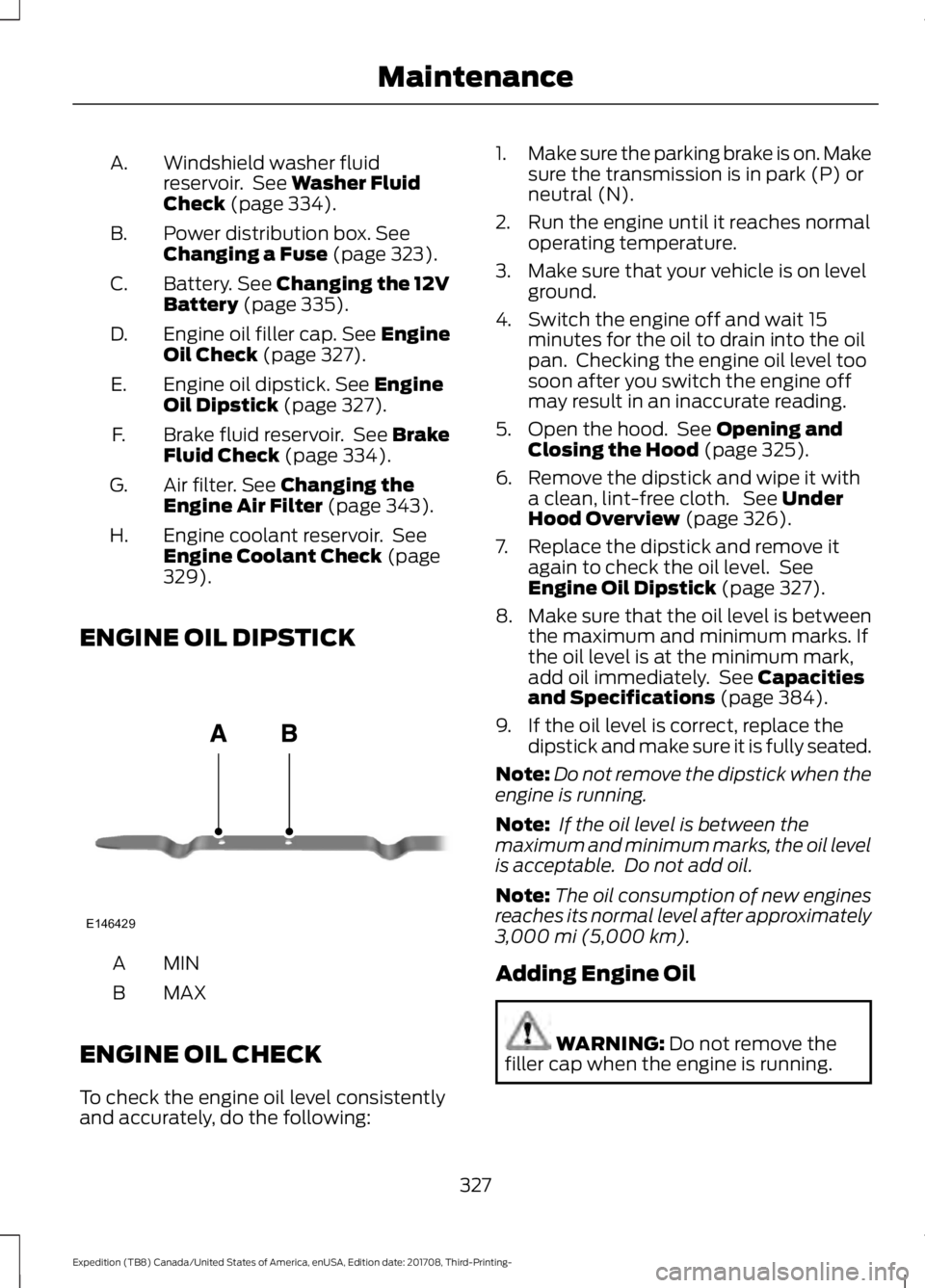
ENGINE OIL DIPSTICK MINA
MAX
B
ENGINE OIL CHECK
To check the engine oil level consistently
and accurately, do the following: 1.
Make sure the parking brake is on. Make
sure the transmission is in park (P) or
neutral (N).
2. Run the engine until it reaches normal operating temperature.
3. Make sure that your vehicle is on level ground.
4. Switch the engine off and wait 15 minutes for the oil to drain into the oil
pan. Checking the engine oil level too
soon after you switch the engine off
may result in an inaccurate reading.
5. Open the hood. See
Opening and
Closing the Hood (page 325).
6. Remove the dipstick and wipe it with a clean, lint-free cloth. See
Under
Hood Overview (page 326).
7. Replace the dipstick and remove it again to check the oil level. See
Engine Oil Dipstick
(page 327).
8. Make sure that the oil level is between
the maximum and minimum marks. If
the oil level is at the minimum mark,
add oil immediately. See
Capacities
and Specifications (page 384).
9. If the oil level is correct, replace the dipstick and make sure it is fully seated.
Note: Do not remove the dipstick when the
engine is running.
Note: If the oil level is between the
maximum and minimum marks, the oil level
is acceptable. Do not add oil.
Note: The oil consumption of new engines
reaches its normal level after approximately
3,000 mi (5,000 km)
.
Adding Engine Oil WARNING:
Do not remove the
filler cap when the engine is running.
327
Expedition (TB8) Canada/United States of America, enUSA, Edition date: 201708, Third-Printing- MaintenanceE146429
Page 334 of 571
Severe Climates
If you drive in extremely cold climates:
•
It may be necessary to increase the
coolant concentration above 50%.
• A coolant concentration of 60%
provides improved freeze point
protection. Coolant concentrations
above 60% decrease the overheat
protection characteristics of the
coolant and may cause engine
damage.
If you drive in extremely hot climates:
• You can decrease the coolant
concentration to 40%.
• Coolant concentrations below 40%
decrease the freeze and corrosion
protection characteristics of the
coolant and may cause engine
damage.
Vehicles driven year-round in non-extreme
climates should use prediluted coolant for
optimum cooling system and engine
protection.
Coolant Change
At specific mileage intervals, as listed in
the scheduled maintenance information,
the coolant should be changed. Add
prediluted coolant approved to the correct
specification.
Fail-Safe Cooling
Fail-safe cooling allows you to temporarily
drive your vehicle before any incremental
component damage occurs. The fail-safe
distance depends on ambient
temperature, vehicle load and terrain.
How Fail-Safe Cooling Works If the engine begins to overheat,
the coolant temperature gauge
moves toward the red zone: A warning lamp illuminates and
a message may appear in the
information display.
If the engine reaches a preset
over-temperature condition, the engine
automatically switches to alternating
cylinder operation. Each disabled cylinder
acts as an air pump and cools the engine.
When this occurs, your vehicle still
operates, however:
• Engine power is limited.
• The air conditioning system turns off.
Continued operation increases the engine
temperature, causing the engine to
completely shut down. Your steering and
braking effort increases in this situation.
When the engine temperature cools, you
can re-start the engine. Have your vehicle
checked as soon as possible to minimize
engine damage.
When Fail-Safe Mode Is Activated WARNING: Fail-safe mode is for
use during emergencies only. Operate
your vehicle in fail-safe mode only as
long as necessary to bring your vehicle
to rest in a safe location and seek
immediate repairs. When in fail-safe
mode, your vehicle will have limited
power, will not be able to maintain
high-speed operation, and may
completely shut down without warning,
potentially losing engine power, power
steering assist, and power brake assist,
which may increase the possibility of a
crash resulting in serious injury.
331
Expedition (TB8) Canada/United States of America, enUSA, Edition date: 201708, Third-Printing- Maintenance
Page 335 of 571
WARNING: Do not remove the
coolant reservoir cap when the cooling
system is hot. Wait 10 minutes for the
cooling system to cool down. Cover the
coolant reservoir cap with a thick cloth
to prevent the possibility of scalding and
slowly remove the cap. Failure to follow
this instruction could result in personal
injury.
Your vehicle has limited engine power
when in the fail-safe mode, drive your
vehicle with caution. Your vehicle does not
maintain high-speed operation and the
engine may operate poorly.
Remember that the engine is capable of
automatically shutting down to prevent
engine damage. In this situation:
1. Pull off the road as soon as safely possible and switch the engine off.
2. If you are a member of a roadside assistance program, we recommend
that you contact your roadside
assistance service provider.
3. If this is not possible, wait a short period for the engine to cool.
4. Check the coolant level. If the coolant level is at or below the minimum mark,
add prediluted coolant immediately.
5. When the engine temperature cools, you can re-start the engine. Have your
vehicle checked as soon as possible to
minimize engine damage.
Note: Driving your vehicle without repair
increases the chance of engine damage. Engine Coolant Temperature
Management (If Equipped) WARNING:
To reduce the risk of
crash and injury, be prepared that the
vehicle speed may reduce and the
vehicle may not be able to accelerate
with full power until the coolant
temperature reduces.
If you tow a trailer with your vehicle, the
engine may temporarily reach a higher
temperature during severe operating
conditions, for example ascending a long
or steep grade in high ambient
temperatures.
At this time, you may notice the coolant
temperature gauge moves toward the red
zone and a message may appear in the
information display.
You may notice a reduction in vehicle
speed caused by reduced engine power in
order to manage the engine coolant
temperature. Your vehicle may enter this
mode if certain high-temperature and
high-load conditions take place. The
amount of speed reduction depends on
vehicle loading, grade and ambient
temperature. If this occurs, there is no
need to stop your vehicle. You can
continue to drive.
The air conditioning may automatically
turn on and off during severe operating
conditions to protect the engine from
overheating. When the coolant
temperature decreases to the normal
operating temperature, the air conditioning
turns on.
If the coolant temperature gauge moves
fully into the red zone, or if the coolant
temperature warning or service engine
soon messages appear in your information
display, do the following:
332
Expedition (TB8) Canada/United States of America, enUSA, Edition date: 201708, Third-Printing- Maintenance
Page 336 of 571
1. Stop your vehicle as soon as it is safe
to do so. Fully apply the parking brake,
shift into park (P) or neutral (N).
2. Leave the engine running until the coolant temperature gauge needle
returns to the normal position. After
several minutes, if the temperature
does not drop, follow the remaining
steps.
3. Switch the engine off and wait for it to
cool. Check the coolant level.
4. If the coolant level is at or below the minimum mark, add prediluted coolant
immediately.
5. If the coolant level is normal, restart the engine and continue.
AUTOMATIC TRANSMISSION
FLUID CHECK
If required, have an authorized dealer check
and change the transmission fluid at the
correct service interval. See Scheduled
Maintenance (page 498).
The automatic transmission does not have
a transmission fluid dipstick.
Refer to your scheduled maintenance
information for scheduled intervals for fluid
checks and changes. Your transmission
does not consume fluid. However, if the
transmission slips, shifts slowly or if you
notice a sign of leaking fluid, contact an
authorized dealer.
Do not use supplemental transmission
fluid additives, treatments or cleaning
agents. The use of these materials may
affect transmission operation and result
in damage to internal transmission
components. TRANSFER CASE FLUID
CHECK
(IF EQUIPPED)
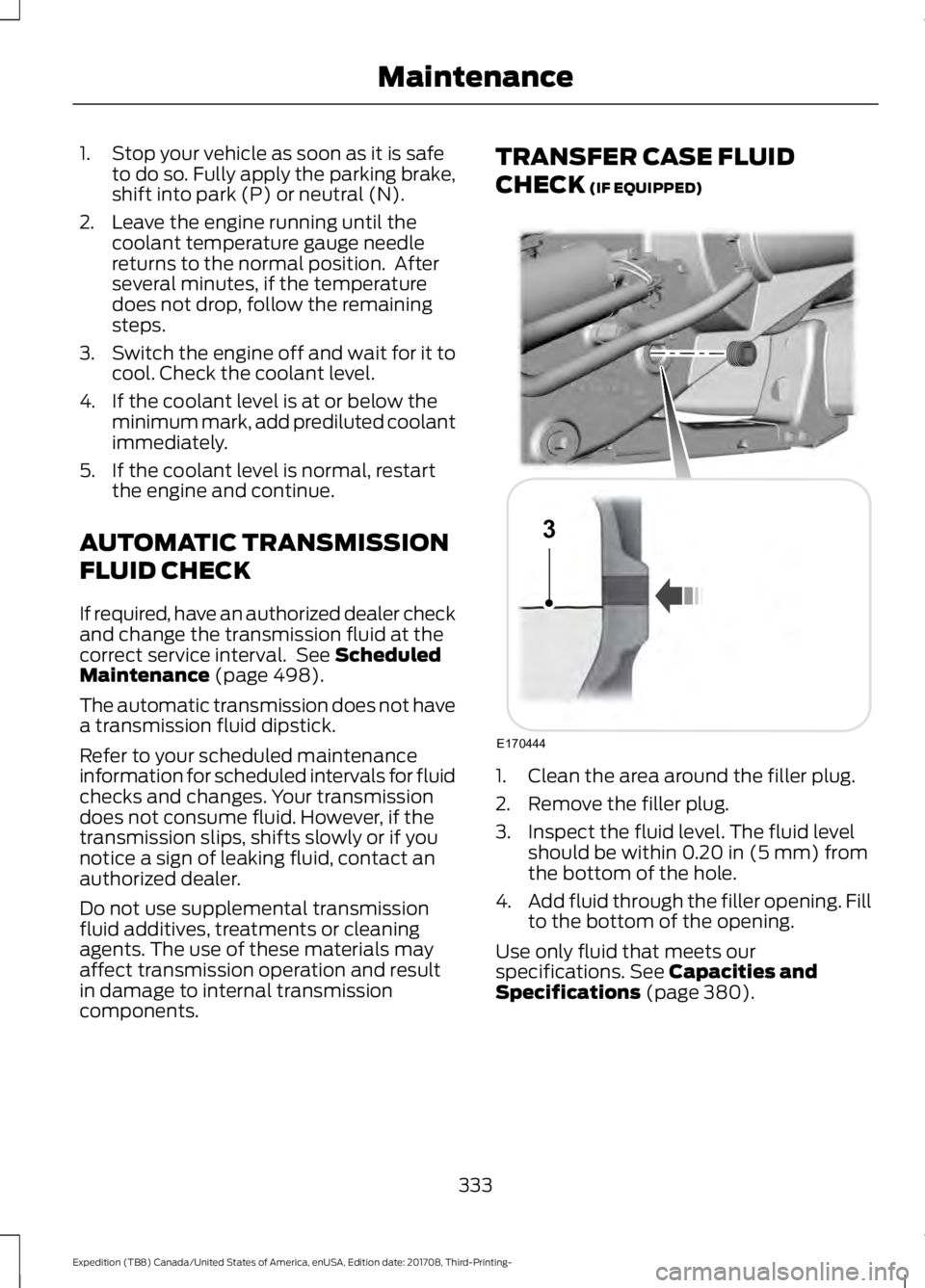
1. Clean the area around the filler plug.
2. Remove the filler plug.
3. Inspect the fluid level. The fluid level
should be within
0.20 in (5 mm) from
the bottom of the hole.
4. Add fluid through the filler opening. Fill
to the bottom of the opening.
Use only fluid that meets our
specifications.
See Capacities and
Specifications (page 380).
333
Expedition (TB8) Canada/United States of America, enUSA, Edition date: 201708, Third-Printing- MaintenanceE170444
3
Page 353 of 571
•
Cover interior trim to prevent fading.
• Keep all rubber parts free from oil and
solvents.
Engine
• Change the engine oil and filter prior to
storage because used engine oil
contains contaminates which may
cause engine damage.
• Start the engine every 15 days for a
minimum of 15 minutes. Run at fast idle
with the climate controls set to defrost
until the engine reaches normal
operating temperature.
• With your foot on the brake, shift
through all the gears while the engine
is running.
• We recommend that you change the
engine oil before you use your vehicle
again.
Fuel system
• Fill the fuel tank with high-quality fuel
until the first automatic shutoff of the
fuel pump nozzle.
Cooling system
• Protect against freezing temperatures.
• When removing your vehicle from
storage, check coolant fluid level.
Confirm that there are no cooling
system leaks and that fluid is at the
recommended level.
Battery
• Check and recharge as necessary. Keep
connections clean.
• If storing your vehicle for more than 30
days without recharging the battery,
we recommend that you disconnect
the battery cables to maintain battery
charge for quick starting. Note:
It is necessary to reset memory
features if battery cables are disconnected.
Brakes
• Make sure the brakes and parking brake
release fully.
Tires
• Maintain recommended air pressure.
Miscellaneous
• Make sure all linkages, cables, levers
and pins under your vehicle are covered
with grease to prevent rust.
• Move vehicles at least 25 ft (7.5 m)
every 15 days to lubricate working parts
and prevent corrosion.
Removing Vehicle From Storage
When your vehicle is ready to come out of
storage, do the following:
• Wash your vehicle to remove any dirt
or grease film build-up on window
surfaces.
• Check windshield wipers for any
deterioration.
• Check under the hood for any foreign
material that may have collected
during storage such as mice or squirrel
nests.
• Check the exhaust for any foreign
material that may have collected
during storage.
• Check tire pressures and set tire
inflation per the Tire Label.
• Check brake pedal operation. Drive
your vehicle
15 ft (4.5 m) back and
forth to remove rust build-up.
350
Expedition (TB8) Canada/United States of America, enUSA, Edition date: 201708, Third-Printing- Vehicle Care
Page 562 of 571

Cleaning the Exterior..................................344
Cleaning the Headlamps................................ 345
Exterior Chrome Parts...................................... 345
Exterior Plastic Parts........................................ 345
Stripes or Graphics............................................ 345
Underbody........................................................... 345
Under Hood......................................................... 345
Cleaning the Instrument Panel and Instrument Cluster Lens.........................347
Cleaning the Interior....................................347 Mirrors..................................................................... 347
Cleaning the Wheels..................................349
Cleaning the Windows and Wiper Blades...........................................................346
Clearing All MyKeys.......................................62
Climate............................................................447
Climate Control
.............................................139
Climate Controlled Seats..........................164 Ventilated Seats................................................. 164
Coolant Check See: Engine Coolant Check............................ 329
Crash Sensors and Airbag Indicator.........51
Creating a MyKey
............................................62
Programming and Changing Configurable
Settings............................................................... 62
Cross Traffic Alert
........................................254
Blocked Sensors................................................. 255
Switching the System Off and On..............256
System Errors...................................................... 256
System Lights, Messages and Audible Alerts................................................................. 255
System Limitations........................................... 256
Using the Cross Traffic Alert System.........254
Cruise Control
.................................................84
Principle of Operation....................................... 237
Cruise control See: Using Cruise Control................................ 237
Customer Assistance.................................307
D
Data Recording
..................................................9
Event Data Recording.......................................... 10
Service Data Recording........................................ 9
Daytime Running Lamps..............................91 Type One - Conventional
(Non-Configurable)........................................ 91
Type Two - Configurable.................................... 91Digital Radio..................................................393
HD Radio Reception and Station
Troubleshooting............................................ 394
Direction Indicators
.......................................93
Doors and Locks.............................................65
Drive Control...................................................261 Selectable Drive Modes................................... 261
Driver Alert
......................................................245
Using Driver Alert............................................... 245
Driver and Passenger Airbags...................45 Children and Airbags.......................................... 46
Proper Driver and Front Passenger Seating Adjustment........................................................ 45
Driving Aids
....................................................245
Driving Hints...................................................297
Driving Through Water..............................298
DRL See: Daytime Running Lamps.......................... 91
E
Economical Driving
.....................................297
Electric Parking Brake..................................212 Applying the Electric Parking Brake.............212
Automatically Releasing the Electric
Parking Brake................................................... 213
Manually Releasing the Electric Parking Brake................................................................... 212
Releasing the Electric Parking Brake if the Vehicle Battery is Running Out of
Charge................................................................ 213
Electromagnetic Compatibility
................517
Emission Law..................................................191
Noise Emissions Warranty, Prohibited
Tampering Acts and Maintenance..........192
Tampering With a Noise Control System................................................................ 191
End User License Agreement
..................519
VEHICLE SOFTWARE END USER LICENSE
AGREEMENT (EULA) .................................. 519
Engine Block Heater.....................................179 Using the Engine Block Heater..................... 180
Engine Coolant Check...............................329 Adding Coolant................................................... 329
Coolant Change................................................... 331
Engine Coolant Temperature Management.................................................. 332
Fail-Safe Cooling................................................ 331
559
Expedition (TB8) Canada/United States of America, enUSA, Edition date: 201708, Third-Printing- Index
Page 564 of 571
Passenger Compartment Fuse Box...........320
G
Garage Door Opener See: Universal Garage Door Opener...........166
Gauges.............................................................104
Engine Coolant Temperature Gauge..........106
Engine Oil Pressure Gauge............................. 105
Fuel Gauge............................................................ 106
Transmission Fluid Temperature Gauge................................................................ 106
Turbo Boost Gauge........................................... 106
Type 1 and 2.......................................................... 104
Type 3..................................................................... 105
Gearbox See: Transmission.............................................. 195
General Information on Radio Frequencies...................................................53
Intelligent Access................................................. 53
General Maintenance Information.......498 Multi-Point Inspection.................................... 500
Owner Checks and Services......................... 499
Protecting Your Investment.......................... 498
Why Maintain Your Vehicle?......................... 498
Why Maintain Your Vehicle at Your Dealership?.................................................... 498
Getting Assistance Outside the U.S. and Canada..........................................................310
Getting the Services You Need
...............307
Away From Home.............................................. 307
Global Opening and Closing......................97 Global Closing........................................................ 97
Global Opening..................................................... 97
H
Hazard Flashers............................................301
Headlamp Adjusting See: Adjusting the Headlamps..................... 338
Headlamp Exit Delay.....................................91
Headlamp Removal See: Removing a Headlamp.......................... 339
Headrest See: Head Restraints......................................... 149
Head Restraints
............................................149
Adjusting the Head Restraint......................... 150
Front Seat Manual Head Restraints............150 Heated Seats
..................................................162
Front Seats............................................................ 162
Rear Seats............................................................. 163
Heated Steering Wheel...............................85
Heated Windows and Mirrors...................147 Heated Exterior Mirrors.................................... 148
Heated Rear Window........................................ 147
Windshield Wiper De-icer............................... 148
Heating See: Climate Control......................................... 139
Hill Descent Control
....................................219
Principle of Operation....................................... 219
Hill Start Assist..............................................213 Switching the System On and Off................214
Using Hill Start Assist........................................ 214
Hints on Controlling the Interior Climate..........................................................143
Defogging the Side Windows in Cold Weather............................................................. 145
General Hints........................................................ 143
Quickly Cooling the Interior............................ 144
Quickly Heating the Interior............................ 144
Recommended Settings for Cooling...........145
Recommended Settings for Heating..........144
Hints on Driving With Anti-Lock Brakes..............................................................211
Home Screen
................................................429
Hood Lock See: Opening and Closing the Hood..........325
I
Ignition Switch
................................................175
In California (U.S. Only)............................308
Information Display Control......................85
Information Displays.....................................111 General Information............................................ 111
Information Messages................................123 Active Park............................................................. 123
Adaptive Cruise Control................................... 123
AdvanceTrac and Traction Control..............124
Airbag...................................................................... 124
Alarm and Security............................................. 125
Automatic Engine Shutdown......................... 125
Battery and Charging System........................ 125
Blind Spot Information and Cross Traffic Alert System.................................................... 126
Collision Warning System................................ 127
561
Expedition (TB8) Canada/United States of America, enUSA, Edition date: 201708, Third-Printing- Index
Page 571 of 571

Miscellaneous.....................................................
350
Removing Vehicle From Storage.................350
Tires........................................................................\
350
Ventilation See: Climate Control......................................... 139
VIN See: Vehicle Identification Number............382
Voice Control...................................................84
W
Warning Lamps and Indicators...............106 Adaptive Cruise Control Indicator................107
Airbag Warning Lamp....................................... 107
Anti-Lock Brake System Warning Lamp................................................................... 107
Automatic Headlamp High Beam Indicator............................................................ 107
Auto-Start-Stop Indicator............................... 107
Battery.................................................................... 107
Blind Spot Information System Indicator............................................................ 107
Brake System Warning Lamp......................... 107
Check Fuel Cap................................................... 108
Cruise Control Indicator................................... 108
Direction Indicator............................................. 108
Door Ajar Warning Lamp................................. 108
Electric Park Brake............................................. 108
Electronic Limited Slip Differential.............108
Engine Coolant Temperature Warning Lamp.................................................................. 108
Fasten Seatbelt Warning Lamp....................108
Four-Wheel Drive Indicators.......................... 108
Front Fog Lamp Indicator............................... 108
Headlamp High Beam Indicator...................108
Hill Descent.......................................................... 109
Hood Ajar.............................................................. 109
Liftgate Ajar Warning Lamp........................... 109
Low Fuel Level Warning Lamp...................... 109
Low Tire Pressure Warning Lamp................109
Oil Pressure Warning Lamp........................... 109
Powertrain Malfunction/Reduced Power/Electronic Throttle Control.........109
Service Engine Soon......................................... 109
Stability Control and Traction Control Indicator............................................................. 110
Stability Control and Traction Control Off Warning Lamp................................................. 110Tow Haul Indicator..............................................
110
Washer Fluid Check
....................................334
Washers See: Cleaning the Exterior.............................. 344
Waxing
.............................................................346
Wheel Nuts See: Changing a Road Wheel........................ 373
Wheels and Tires.........................................352 General Information......................................... 352
Technical Specifications................................. 378
Windows and Mirrors
...................................96
Windshield Washers.....................................88
Front Camera Washer........................................ 88
Windshield Wipers
.........................................87
Speed Dependent Wipers................................. 87
Wiper Blades See: Checking the Wiper Blades.................. 337
Wipers and Washers.....................................87
Wireless Accessory Charging
.....................171
568
Expedition (TB8) Canada/United States of America, enUSA, Edition date: 201708, Third-Printing- Index