2018 FORD ESCAPE SYNC
[x] Cancel search: SYNCPage 451 of 517
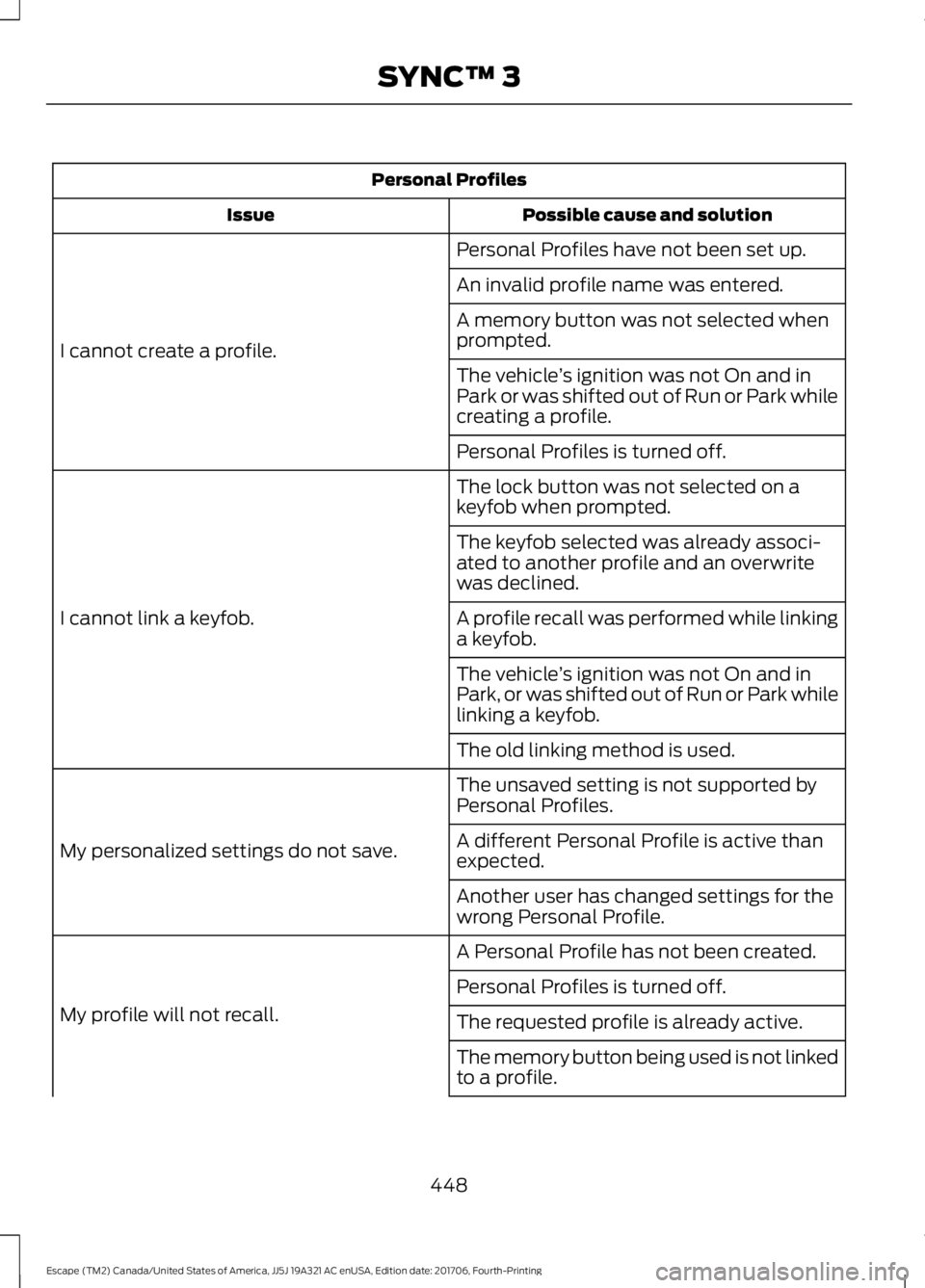
Personal Profiles
Possible cause and solution
Issue
Personal Profiles have not been set up.
I cannot create a profile. An invalid profile name was entered.
A memory button was not selected when
prompted.
The vehicle
’s ignition was not On and in
Park or was shifted out of Run or Park while
creating a profile.
Personal Profiles is turned off.
The lock button was not selected on a
keyfob when prompted.
I cannot link a keyfob. The keyfob selected was already associ-
ated to another profile and an overwrite
was declined.
A profile recall was performed while linking
a keyfob.
The vehicle
’s ignition was not On and in
Park, or was shifted out of Run or Park while
linking a keyfob.
The old linking method is used.
The unsaved setting is not supported by
Personal Profiles.
My personalized settings do not save. A different Personal Profile is active than
expected.
Another user has changed settings for the
wrong Personal Profile.
A Personal Profile has not been created.
My profile will not recall. Personal Profiles is turned off.
The requested profile is already active.
The memory button being used is not linked
to a profile.
448
Escape (TM2) Canada/United States of America, JJ5J 19A321 AC enUSA, Edition date: 201706, Fourth-Printing SYNC™ 3
Page 452 of 517

Personal Profiles
Possible cause and solution
Issue
The keyfob being used is not linked to a
profile.
The wrong keyfob is being used.
A button other than unlock or remote start
is being pressed on a linked keyfob.
The Personal Profile was deleted.
Personal Profiles is turned off.
My preset positions recall but my profile
does not.
The vehicle is in motion.
My profile recalls but my preset positions
do not. The preset positions are the same as the
Guest or previously active profile.
Unlink and relink your keyfob in the
Personal Profiles menu. You may need to
see your authorized dealer.
I lost a keyfob.
Keyfobs had been erased and reprogramed.
This could happen if you let dealership add
a new keyfob to replace lost one.
I lost all profiles.
Master Reset had been performed without
your acknowledgement.
449
Escape (TM2) Canada/United States of America, JJ5J 19A321 AC enUSA, Edition date: 201706, Fourth-Printing SYNC™ 3
Page 453 of 517

General
Possible solution
Possible cause
Issue
SYNC 3 only supports four languages in a
single module for text display, voice control
and voice prompts. The country where you
bought your vehicle dictates the four
languages based on the most popular
languages spoken. If the selected language
is not available, SYNC 3 remains in the
current active language.
SYNC 3 does not support
the currently selected
language for the instru-
ment cluster and inform-
ation and entertainment
display.
The language
selected for the
instrument
cluster and
information and
entertainment
display does not
match the
SYNC 3
SYNC 3 offers several new voice control
features for a wide range of languages.
Dialing a contact name directly from the
phonebook without pre-recording (for
example,
“call John Smith ”) or selecting a
track, artist, album, genre or playlist directly
from your media player (for example, "play
artist Madonna").
language
(phone, USB,
Bluetooth
audio, voice
control and
voice prompts). SYNC 3 System Reset
The system has a System Reset feature that can be performed if the function of a SYNC
3 feature is lost. This reset is intended to restore functionality and will not erase any
information previously stored in the system (such as paired devices, phonebook, call
history, text messages, or user settings). To perform a System Reset, press and hold
the Seek Up (>>|) button while pressing and holding the Radio Power button. After
approximately 5 seconds the screen will go black. Allow 1-2 minutes for the system
reset to complete. You may then resume using the SYNC 3 system.
For additional assistance with SYNC 3
troubleshooting, refer to the regional Ford
or Lincoln website.
450
Escape (TM2) Canada/United States of America, JJ5J 19A321 AC enUSA, Edition date: 201706, Fourth-Printing SYNC™ 3
Page 479 of 517

Antenna Positions
Maximum output power Watt (Peak
RMS)
Frequency Band
MHz
1
50
1-30
2, 3
50
50-54
2, 3
50
68-88
2, 3
50
142-176
2, 3
50
380-512
2, 3
10
806-870
Note: After the installation of radio
frequency transmitters, check for
disturbances from and to all electrical
equipment in your vehicle, both in the
standby and transmit modes.
Check all electrical equipment:
• With the ignition ON.
• With the engine running.
• During a road test at various speeds.
Check that electromagnetic fields
generated inside your vehicle cabin by the
transmitter installed do not exceed
applicable human exposure requirements. END USER LICENSE
AGREEMENT
VEHICLE SOFTWARE END USER
LICENSE AGREEMENT (EULA)
•
You (“You” or “Your ” as applicable)
have acquired a vehicle having several
devices, including SYNC ® and various
control modules, ("DEVICES") that
include software licensed or owned by
Ford Motor Company and its affiliates
("FORD MOTOR COMPANY"). Those
software products of FORD MOTOR
COMPANY origin, as well as associated
media, printed materials, and "online"
or electronic documentation
("SOFTWARE") are protected by
international intellectual property laws
and treaties. The SOFTWARE is
licensed, not sold. All rights reserved.
• The SOFTWARE may interface with
and/or communicate with, or may be
later upgraded to interface with and/or
communicate with additional software
and/or systems provided by FORD
MOTOR COMPANY.
476
Escape (TM2) Canada/United States of America, JJ5J 19A321 AC enUSA, Edition date: 201706, Fourth-Printing Appendices
Page 483 of 517

SYNC® Automotive Important Safety
Information Read and follow
instructions:
•
Before using your SYNC® system, read
and follow all instructions and safety
information provided in this end user
manual ("Owner Guide".) Not
following precautions found in the
Owner Guide can lead to an accident
or other serious injuries.
General Operation
• Voice Command Control: Certain
functions within the SYNC® system
may be accomplished using voice
commands. Using voice commands
while driving helps you to operate the
system without removing your hands
from the wheel or eyes from the road.
• Prolonged Views of Screen:
Do not
access any function requiring a
prolonged view of the screen while you
are driving. Pull over in a safe and legal
manner before attempting to access a
function of the system requiring
prolonged attention.
• Volume Setting:
Do not raise the
volume excessively. Keep the volume
at a level where you can still hear
outside traffic and emergency signals
while driving. Driving while unable to
hear these sounds could cause an
accident.
• Navigation Features:
Any navigation
features included in the system are
intended to provide turn by turn
instructions to get you to a desired
destination. Please make certain all
persons using this system carefully
read and follow instructions and safety
information fully. •
Distraction Hazard:
Any navigation
features may require manual
(non-verbal) setup. Attempting to
perform such set-up or insert data
while driving can distract your attention
and could cause an accident or other
serious injury. Stop the vehicle in a safe
and legal manner before attempting
these operations.
• Let Your Judgment Prevail:
Any
navigation features are provided only
as an aid. Make your driving decisions
based on your observations of local
conditions and existing traffic
regulations. Any such feature is not a
substitute for your personal judgment.
Any route suggestions made by this
system should never replace any local
traffic regulations or your personal
judgment or knowledge of safe driving
practices.
• Route Safety: Do not follow the route
suggestions if doing so would result in
an unsafe or illegal maneuver, if you
would be placed in an unsafe situation,
or if you would be directed into an area
that you consider unsafe. The driver is
ultimately responsible for the safe
operation of the vehicle and therefore,
must evaluate whether it is safe to
follow the suggested directions.
• Potential Map Inaccuracy:
Maps
used by this system may be inaccurate
because of changes in roads, traffic
controls or driving conditions. Always
use good judgment and common sense
when following the suggested routes.
• Emergency Services:
Do not rely on
any navigation features included in the
system to route you to emergency
services. Ask local authorities or an
emergency services operator for these
locations. Not all emergency services
such as police, fire stations, hospitals
and clinics are likely to be contained in
the map database for such navigation
features.
480
Escape (TM2) Canada/United States of America, JJ5J 19A321 AC enUSA, Edition date: 201706, Fourth-Printing Appendices
Page 503 of 517

IMPLIED WARRANTIES OF
MERCHANTABILITY, FITNESS FOR A
PARTICULAR PURPOSE, TITLE, AND
NON-INFRINGEMENT. NEITHER
GRACENOTE WARRANTS THE RESULTS
THAT WILL BE OBTAINED BY YOUR USE
OF THE GRACENOTE SOFTWARE OR ANY
GRACENOTE SERVER. IN NO CASE WILL
GRACENOTE BE LIABLE FOR ANY
CONSEQUENTIAL OR INCIDENTAL
DAMAGES OR FOR ANY LOST PROFITS
OR LOST REVENUES FOR ANY REASON
WHATSOEVER. © Gracenote 2007.
Radio Frequency Statement
FCC ID: ACJ-SYNCG3-L
IC: 216B-SYNCG3-L
This device complies with Part 15 of the
FCC Rules and with RSS-210 of Industry
Canada. Operation is subject to the
following two conditions:
(1) This device may not cause harmful
interference, and
(2)
this device must accept any
interference received, including
interference that may cause undesired
operation. WARNING:
Changes or
modifications not expressively approved
by the party responsible for compliance
could void the user's authority to operate
the equipment. The term "IC:" before the
radio certification number only signifies
that Industry Canada technical
specifications were met.
The antenna used for this transmitter must
not be co-located or operating in
conjunction with any other antenna or
transmitter. Taiwan Territory
Note: In accordance with the management
approach of low-power radio wave
radiation motors:
Article 12: For approved and certified
low-power radiation motor models,
companies, firms or users must not alter
the frequency, increase the power or
change the characteristics and functions
of the original design without authorization.
Article 14: The usage of low-power
radio-frequency motors must not affect
aviation safety and interfere with legal
telecommunications. Should interference
be detected, immediately stop using the
device and only resume usage after
ensuring that there is no longer any
interference. For the legal
telecommunication and wireless
telecommunication of the telco, the
low-power radio frequency motor must be
able to tolerate legal limits of interference
from telecommunication, industrial,
scientific and radio wave equipment.
SUNA TRAFFIC CHANNEL – TERMS
AND CONDITIONS
By activating, using and/or accessing the
SUNA Traffic Channel, SUNA Predictive or
other content or material provided by
Intelematics (together,
SUNA Products
and/or Services
), you must accept
certain terms and conditions. The following
is a brief summary of the terms and
conditions that apply to you. To view the
full terms and conditions relevant to your
use of the SUNA Products and/or Services,
please consult: Website
www.sunatraffic.com.au/termsandcon- ditions/
1. Acceptance
500
Escape (TM2) Canada/United States of America, JJ5J 19A321 AC enUSA, Edition date: 201706, Fourth-Printing Appendices
Page 506 of 517

4
4WD
See: Four-Wheel Drive...................................... 155
A
A/C See: Climate Control......................................... 108
About This Manual...........................................7
ABS See: Brakes........................................................... 160
ABS driving hints See: Hints on Driving With Anti-Lock
Brakes................................................................ 160
Accessories.....................................................451 Exterior Style........................................................ 451
Interior Style......................................................... 451
Lifestyle.................................................................. 451
Peace of Mind...................................................... 451
Accessories See: Replacement Parts
Recommendation............................................ 12
ACC See: Using Adaptive Cruise Control.............183
Active Park Assist
..........................................172
Using Active Park Assist................................... 173
Adjusting the Headlamps........................258 Horizontal Aim Adjustment.......................... 260
Vertical Aim Adjustment................................ 258
Adjusting the Steering Wheel.....................71
Airbag Disposal...............................................47
Air Conditioning See: Climate Control......................................... 108
Air Filter See: Changing the Engine Air Filter............266
Alarm See: Anti-Theft Alarm........................................ 70
Ambient Lighting.............................................81 Adjusting the Brightness................................... 82
Changing the Color.............................................. 82
Switching Ambient Lighting Off..................... 82
Switching Ambient Lighting On...................... 82
Anti-Theft Alarm............................................70 Arming the Alarm................................................. 70
Disarming the Alarm........................................... 70
Appendices....................................................474 Apps
.................................................................420
........................................................................\
.......... 420
SiriusXM Traffic and Travel Link................... 422
At a Glance........................................................16
Audible Warnings and Indicators.............92 Automatic Transmission Warning
Chime................................................................... 92
Engine On Warning Chime................................ 92
Headlamps On Warning Chime...................... 92
Key in Ignition Warning Chime........................ 92
Keyless Warning Alert ........................................ 92
Parking Brake On Warning Chime.................. 92
Audio Control....................................................71 Type One................................................................... 71
Type Two.................................................................. 72
Audio System
.................................................321
General Information........................................... 321
Audio Unit - Vehicles With: AM/FM/CD/ SYNC/Touchscreen Display
.................324
Audio Unit - Vehicles With: AM/FM/CD/ SYNC..............................................................322
Audio Unit - Vehicles With: AM/FM/ CD....................................................................327
Menu Structure................................................... 329
Audio Unit - Vehicles With: Sony Audio System..........................................................326
Autolamps........................................................78 Windshield Wiper Activated
Headlamps........................................................ 78
Automatic Climate Control......................109 Dual Zone Temperature Control..................... 111
Single Zone Temperature Control.................. 111
Smart Zone............................................................. 111
Switching Back to Single Zone Temperature Control...................................... 111
Automatic High Beam Control..................79 Automatic High Beam Indicator.................... 80
Switching the System On and Off................80
Automatic Transmission.............................151 Brake-Shift Interlock Override....................... 153
If Your Vehicle Gets Stuck In Mud or Snow.................................................................. 154
SelectShift Automatic ™
Transmission................................................... 152
Understanding the Positions of Your Automatic Transmission.............................. 151
Automatic Transmission Fluid Check
............................................................254
503
Escape (TM2) Canada/United States of America, JJ5J 19A321 AC enUSA, Edition date: 201706, Fourth-Printing Index
Page 512 of 517

Memory Function...........................................121
Saving a PreSet Position................................... 121
Message Center See: Information Displays................................. 93
Mirrors See: Heated Windows and Mirrors...............114
See: Windows and Mirrors................................ 83
Mobile Communications Equipment.......13
Moonroof..........................................................86 Bounce-Back......................................................... 87
Opening and Closing the Moonroof..............87
Opening and Closing the Sunscreen............86
Venting the Moonroof......................................... 87
Motorcraft Parts - 1.5L EcoBoost™.................................................303
Motorcraft Parts - 2.0L EcoBoost™................................................304
Motorcraft Parts - 2.5L..............................305
MyKey Troubleshooting
................................57
MyKey ™.............................................................53
Principle of Operation......................................... 53
N
Navigation.......................................................412 cityseeker.............................................................. 419
Destination Mode............................................... 414
Map Mode............................................................. 413
Navigation Map Updates............................... 420
Navigation Menu................................................. 417
SiriusXM Traffic and Travel Link.................. 420
SYNC AppLink..................................................... 419
Waypoints............................................................. 418
Normal Scheduled Maintenance..........458 Intelligent Oil-Life Monitor™........................ 458
Normal Maintenance Intervals.................... 459
O
Oil Change Indicator Reset
......................249
Oil Check See: Engine Oil Check...................................... 248
Opening and Closing the Hood..............243 Closing the Hood............................................... 244
Opening the Hood............................................. 243
Ordering Additional Owner's Literature
.....................................................230
Obtaining a French Owner ’s Manual.........230 Overhead Console.......................................130
P
Parking Aids
...................................................168
Principle of Operation...................................... 168
Parking Brake
..................................................161
Passive Anti-Theft System........................69
SecuriLock® ........................................................... 69
PATS See: Passive Anti-Theft System..................... 69
Perchlorate.........................................................11
Personal Safety System ™
..........................38
How Does the Personal Safety System
Work?.................................................................. 38
Phone...............................................................407 During a Phone Call........................................... 410
Making Calls....................................................... 409
Pairing Your Cell Phone for the First Time................................................................... 407
Phone Menu........................................................ 408
Receiving Calls.................................................... 410
Smartphone Connectivity................................ 411
Text Messaging..................................................... 411
Post-Crash Alert System
...........................223
Power Door Locks See: Locking and Unlocking............................. 59
Power Liftgate.................................................66 Hands-Free Feature............................................ 68
Obstacle Detection............................................. 68
Opening and Closing the Liftgate.................. 66
Setting the Liftgate Open Height................... 67
Stopping the Liftgate Movement................... 67
Power Seats....................................................119 Power Lumbar....................................................... 121
Power Steering Fluid Check.....................255
Power Windows
..............................................83
Accessory Delay................................................... 84
Bounce-Back......................................................... 83
One-Touch Close................................................. 83
One-Touch Open................................................. 83
Rear Window Lock............................................... 83
Protecting the Environment........................15
Puncture See: Changing a Road Wheel....................... 295
509
Escape (TM2) Canada/United States of America, JJ5J 19A321 AC enUSA, Edition date: 201706, Fourth-Printing Index