2018 FORD ECOSPORT battery
[x] Cancel search: batteryPage 61 of 452

KEYLESS ENTRY (If Equipped)
General Information
Note:The system may not function if thekey is close to metal objects or electronicdevices such as cell phones.
The system will not function if:
•Your vehicle battery has no charge.
•The passive key frequencies arejammed.
•The passive key battery is flat.
Note:If the system does not function, youwill need to use the key blade to lock andunlock your vehicle.
The system allows you to operate yourvehicle without the use of a key or remotecontrol.
Locking and unlocking requires a validintelligent access key to be located withinone of the there external detection ranges.These are located approximately 5 ft (1 m)from the front door handles and from theswing gate handle. You can also use theIntelligent Access key as a remote control.See Locking and Unlocking (page 54).
Locking Using Intelligent Access
Touch the outer door handle lock sensorfor approximately one second to lock,being careful to not touch the unlocksensor on the back of the door handle atthe same time. After locking, you canimmediately pull on the door handle toconfirm locking occurred withoutinadvertently unlocking.
Note:Your vehicle does not lock itselfautomatically. If you do not lock, yourvehicle will remain unlocked.
Note:Locking touch surfaces are locatedon each of the front doors.
For central locking and to arm the alarm:
•Touch the locking surface once.
After locking the doors with the locksensor, there is a brief delay before you canunlock your vehicle.
This delay lets you pull the handle to makesure your vehicle is locked.
Note:When the delay period is over, youcan open the doors again, provided theIntelligent Access is within the respectivedetection range.
Two short flashes of the directionindicators confirms that all the doors andswing gate have been locked and that thealarm (if equipped) has been armed.
Unlocking Using Intelligent Access
57EcoSport (CBW) Canada/United States of America, Vehicles Built From: 14-08-2017, GN15-19G219-ZFB enUSA, First PrintingDoors and Locks
Page 62 of 452
Note:Your vehicle remains locked forlonger than three days, the system will enteran energy-saving mode. This is to reducethe discharge of your vehicle battery. Whenyour vehicle is unlocked while in this mode,the reaction time of the system may be alittle longer than normal. To exit theenergy-saving mode, unlock your vehicle.
With your intelligent access key within 5 ft(1 m) of your vehicle, touch the unlocksensor on the back of the door handle fora brief period and then pull on the doorhandle to unlock, being careful to nottouch the lock sensor at the same time orpulling the door handle too quickly. Theintelligent access system requires a briefdelay to authenticate your intelligentaccess key fob.
Note:Keep the door handle clean to makesure the system operates correctly.
Note:A valid passive key must be locatedwithin the detection range of that door.
One long flash of the direction indicatorsconfirms that all the doors and swing gatehave been unlocked and that the alarm (ifequipped) has been disarmed.
Unlocking only Driver Door
If the unlocking function is reprogrammedso that only the driver door is unlocked SeeRemote Control (page 45). Note thefollowing:
If the driver door is the first door which isunlocked, the other doors and swing gatewill remain locked. All the other doors canbe unlocked from inside your vehicle bypressing the unlock button located at thefront part of the front inner handles. Doorscan be unlocked individually by pulling theinterior door handles on those doors.
If the front passenger door is the first doorwhich is unlocked, all the doors will beunlocked.
Disabled Keys
Any keys left inside your vehicle interiorwhen it is locked will be disabled.
You cannot use a disabled key to switchthe ignition on or start the engine.
You must enable all Intelligent Accessagain in order to use them.
To enable all your Intelligent Access,unlock your vehicle using a passive key orthe remote control unlocking function.
All Intelligent Access will then be enabledif you switch the ignition on or your vehicleis started using a valid key.
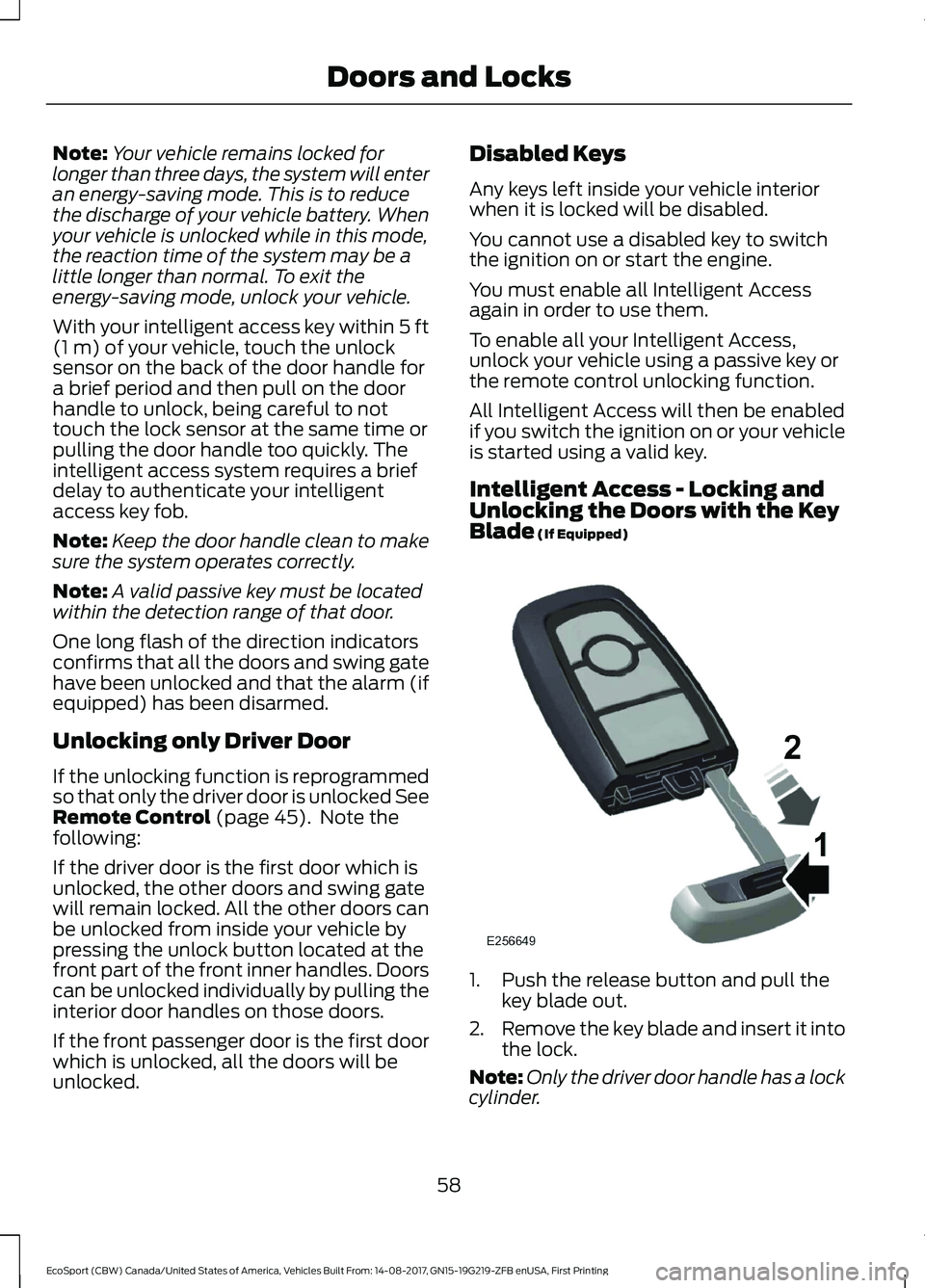
Intelligent Access - Locking andUnlocking the Doors with the KeyBlade (If Equipped)
1.Push the release button and pull thekey blade out.
2.Remove the key blade and insert it intothe lock.
Note:Only the driver door handle has a lockcylinder.
58EcoSport (CBW) Canada/United States of America, Vehicles Built From: 14-08-2017, GN15-19G219-ZFB enUSA, First PrintingDoors and Locks
Page 74 of 452

GENERAL INFORMATION
Condensation in the Exterior FrontLamps and Rear Lamps
Exterior front lamps and rear lamps havevents to accommodate normal changesin air pressure.
Condensation can be a natural by-productof this design. When moist air enters thelamp assembly through the vents, there isa possibility that condensation can occurwhen the temperature is cold. Whennormal condensation occurs, a fine mistcan form on the interior of the lens. Thefine mist eventually clears and exitsthrough the vents during normal operation.
Clearing time may take as long as 48 hoursunder dry weather conditions.
Examples of acceptable condensation are:
•The presence of a fine mist (no streaks,drip marks or large droplets).
•A fine mist covers less than 50% of thelens.
Examples of unacceptable condensationare:
•A water puddle inside the lamp.
•Streaks, drip marks or large dropletspresent on the interior of the lens.
If you see any unacceptable condensation,have your vehicle checked by an authorizeddealer.
LIGHTING CONTROL
Off.A
Parking lamps, instrument panellamps, license plate lamps andtail lamps.
B
Headlamps.C
Note:Prolonged use of the parking lampscauses the battery to run out of charge.
Note: Parking lamps may turn offautomatically. This prevents the vehiclebattery from running out of charge.
Parking Lamps
Switch the ignition off.
Both Sides
Select position B on the lighting control toswitch the parking lamps on.
70EcoSport (CBW) Canada/United States of America, Vehicles Built From: 14-08-2017, GN15-19G219-ZFB enUSA, First PrintingLighting
Page 76 of 452

Windshield Wiper ActivatedHeadlamps (If Equipped)
When the headlamp switch is in theAutolamps position, the windshield wiperactivated exterior lamps will turn on within10 seconds when you switch thewindshield wipers on. They turn offapproximately 60 seconds after you switchthe windshield wipers off.
This feature does not turn on the exteriorlamps:
•During a single wipe.
•While the wipers are on to clear washerfluid during a wash condition.
•If the wipers are in automatic orintermittent modes.
Note:If you have autolamps andautowipers switched on the low beamheadlamps will turn on automatically whenthe windshield wipers operate continuously.
Autolamps Delay (If Equipped)
When the Autolamps have the headlampsand position/parklamps turned on, and theignition is turned OFF, the headlamps andposition/parklamps will remain on for anadditional 20 seconds (the autolamp exitdelay) or until the Autolamps are disabled.
You can change the delay period in theinformation display. See InformationDisplays (page 85).
INSTRUMENT LIGHTING
DIMMER
Press it repeatedly or press it and hold ituntil the desired level is reached.
Note:If you disconnect the battery or itloses charge the instrument lighting willreturn to its brightest setting.
HEADLAMP EXIT DELAY
After you switch the ignition off, you canswitch the headlamps on by pulling thedirection indicator lever toward you. Youwill hear a short tone. The headlamps willswitch off automatically after threeminutes with any door open or 30 secondsafter the last door has been closed. Youcan cancel this feature by pulling thedirection indicator toward you again orswitching the ignition on.
72EcoSport (CBW) Canada/United States of America, Vehicles Built From: 14-08-2017, GN15-19G219-ZFB enUSA, First PrintingLighting
Page 78 of 452

DIRECTION INDICATORS
Push the lever up or down to use thedirection indicators.
Note:Tap the lever up or down to make thedirection indicators flash three times toindicate a lane change.
INTERIOR LAMPS
Courtesy lamp
OffA
Door contactB
OnC
If you set the switch to position B, thecourtesy lamp will come on when youunlock or open a door or the luggagecompartment lid. If you leave a door openwith the ignition switch off, the courtesylamp will go off automatically after sometime to prevent the vehicle battery fromdischarging. To switch it back on, switchon the ignition for a short time.
The courtesy lamp will also come on whenyou switch off the ignition. It will go offautomatically after a short time or whenyou start or restart the engine.
If you set the switch to position C with theignition switch off, the courtesy lamp willcome on. It will go off automatically aftera short time to prevent the vehicle batteryfrom discharging. To switch it back on,switch on the ignition for a short time.
Reading lamps
Press the buttons to switch the readinglamps on and off.
74EcoSport (CBW) Canada/United States of America, Vehicles Built From: 14-08-2017, GN15-19G219-ZFB enUSA, First PrintingLighting
Page 80 of 452

POWER WINDOWS
WARNINGS
Do not leave children unattended inyour vehicle and do not let them playwith the power windows. Failure tofollow this instruction could result inpersonal injury.
When closing the power windows,verify they are free of obstruction andmake sure that children and pets arenot in the proximity of the windowopenings.
Note:If the power window is operatedmany times on a short period the switchmay be inactivated for some moment toavoid overheat on power window system.
Note:You may hear a pulsing noise whenjust one of the windows is open. Lower theopposite window slightly to reduce thisnoise.
Press the switch to open the window. Liftthe switch to close the window.
One-Touch Down (If Equipped)
Press the switch fully and release it. Pressagain or lift it to stop the window.
One-Touch Up (If Equipped)
Lift the switch fully and release it. Press orlift it again to stop the window.
Bounce-Back (If Equipped)
The window will stop automatically whileclosing. It reverses some distance if thereis an obstacle in the way
Overriding the Bounce-Back Feature
WARNING
If you override bounce-back, thewindow does not reverse if it detectsan obstacle. Take care when closingthe windows to avoid personal injury ordamage to your vehicle.
1.Close the window twice until it reachesthe point of resistance and let itreverse.
2.Close the window a third time to thepoint of resistance. You disabled thebounce-back feature and you can nowclose the window manually. Thewindow travels past the point ofresistance and you can close it fully.
Note:: Contact an Authorized Dealer assoon as possible if the window does notclose after the third attempt.
The window reaches the desired position.The window travels up with nobounce-back protection. The windowsstops if you release the switch before thewindow closes fully.
Resetting the One-Touch andBounce-Back Feature (if equipped)
Note:The bounce-back feature remainsturned off until you reset the memory.
If you have disconnected the battery, youmust reset the bounce-back memory fordriver window.
76EcoSport (CBW) Canada/United States of America, Vehicles Built From: 14-08-2017, GN15-19G219-ZFB enUSA, First PrintingWindows and Mirrors
Page 94 of 452

Brake System
ActionMessage
The system has detected a fault that requires service.Have your vehicle checked as soon as possible.Check Brake System
Battery and Charging System
ActionMessage
Stop your vehicle as soon as it is safe to do so andswitch off the ignition. Contact an authorized dealer.Electrical system overvoltageStop safely
Displays to warn of a low battery condition. Turn offall unneeded electrical accessories. Contact anauthorized dealer.
Battery low See manual
Tire Pressure Monitoring System
ActionMessage
Displays if the tire pressure in one or more tires is belowthe correct pressure. See Tire Pressure MonitoringSystem (page 261).
Tire Pressure Low
Tire Pressure Low Specified:
The system has detected a fault that requires service.Have your vehicle checked as soon as possible. SeeTire Pressure Monitoring System (page 261).
Tire Pressure Monitor Fault
Displays if the system detects a fault with a tire pres-sure sensor or the spare tire is in use. See Tire Pres-sure Monitoring System (page 261).If the warning message remains on after you havechecked the tire pressures, the system has detecteda fault that requires service. Have your vehicle checkedas soon as possible.
Tire Pressure Sensor Fault
90EcoSport (CBW) Canada/United States of America, Vehicles Built From: 14-08-2017, GN15-19G219-ZFB enUSA, First PrintingInformation Displays
Page 96 of 452
Keyless Vehicle
ActionMessage
Displayed if the key is not detected by the system. SeePush Button Ignition Switch (page 120).No Key Detected
Displayed as a reminder to turn off the vehicle. SeePush Button Ignition Switch (page 120).Switch ignition off.
Displayed as a reminder to press the brake whilestarting the vehicle.To START Press Brake
Displayed when a valid key is not detected within thevehicle. See Push Button Ignition Switch (page 120).Key Not Inside vehicle
Displays when the key battery is low. Change thebattery as soon as possible. See Remote Control(page 45).
Key Battery low Replace soon
Lighting
ActionMessage
Displays if an electrical malfunction occurs with theheadlamp system. Have your vehicle checked as soonas possible.
Check Headlamp System Seemanual
Maintenance
ActionMessage
Indicates the brake fluid level is low and the brakesystem should be inspected immediately. See BrakeFluid Check (page 212).
Brake fluid level low Servicenow
Indicates that the vehicle sold date has beensuccessful updated. If this date has not been set,contact your authorized dealer.
Maintenance Set initial date
Displays when the date and time are not set.Maintenance Set date
92EcoSport (CBW) Canada/United States of America, Vehicles Built From: 14-08-2017, GN15-19G219-ZFB enUSA, First PrintingInformation Displays