2018 FORD E SERIES lock
[x] Cancel search: lockPage 46 of 323

PASSIVE ANTI-THEFT
SYSTEM (If Equipped)
Note:The system is not compatible withnon-Ford aftermarket remote start systems.Use of these systems may result in vehiclestarting problems and a loss of securityprotection.
Note:Metallic objects, electronic devicesor a second coded key on the same keychain may cause vehicle starting problemsif they are too close to the key when startingthe engine. Prevent these objects fromtouching the coded key while starting theengine. Switch the ignition off, move allobjects on the key chain away from thecoded key and restart the engine if aproblem occurs.
Note:Do not leave a duplicate coded keyin the vehicle. Always take your keys andlock all doors when leaving the vehicle.
SecuriLock®
The system is an engine immobilizationsystem. It is designed to help prevent theengine from being started unless acorrectly coded key for your vehicle is used.Using an incorrectly coded key mayprevent the engine from starting. Amessage may appear in the informationdisplay.
If you are unable to start the engine with acorrectly coded key, a malfunction hashappened and a message may appear inthe information display.
Automatic Arming
The engine immobilization system armsimmediately after you switch the ignitionoff.
Automatic Disarming
Switching the ignition on with a correctlycoded key disarms the engineimmobilization system.
Replacement Keys
The integrated keyhead transmitterfunctions as a programmed ignition keythat operates all the locks and starts yourvehicle, as well as a remote control.
If your keys are lost or stolen and you donot have a spare correctly coded key, youwill need to have your vehicle towed to anauthorized dealer. You need to erase thecoded keys from your vehicle and programnew coded keys.
Store an extra correctly coded key awayfrom the vehicle in a safe place to helpprevent any inconveniences. See anauthorized dealer to purchase additionalspare or replacement keys.
Note:Your vehicle comes with twointegrated keyhead transmitters.
Programming a Spare IntegratedKeyhead Transmitter
You can program your own integratedkeyhead transmitter or standardSecuriLock coded keys to your vehicle. Thisprocedure will program both the engineimmobilizer keycode and the remote entryportion of the remote control to yourvehicle
Only use integrated keyhead transmittersor standard SecuriLock keys.
You must have two previouslyprogrammed correctly coded keys and thenew unprogrammed key readily accessible.See an authorized dealer to have the sparekey programmed if two previouslyprogrammed correctly coded keys are notavailable.
Read and understand the entire procedurebefore you begin.
43
E-Series (TE4) Canada/United States of America, enUSA, Edition date: 201712, Second Printing
Security
Page 52 of 323
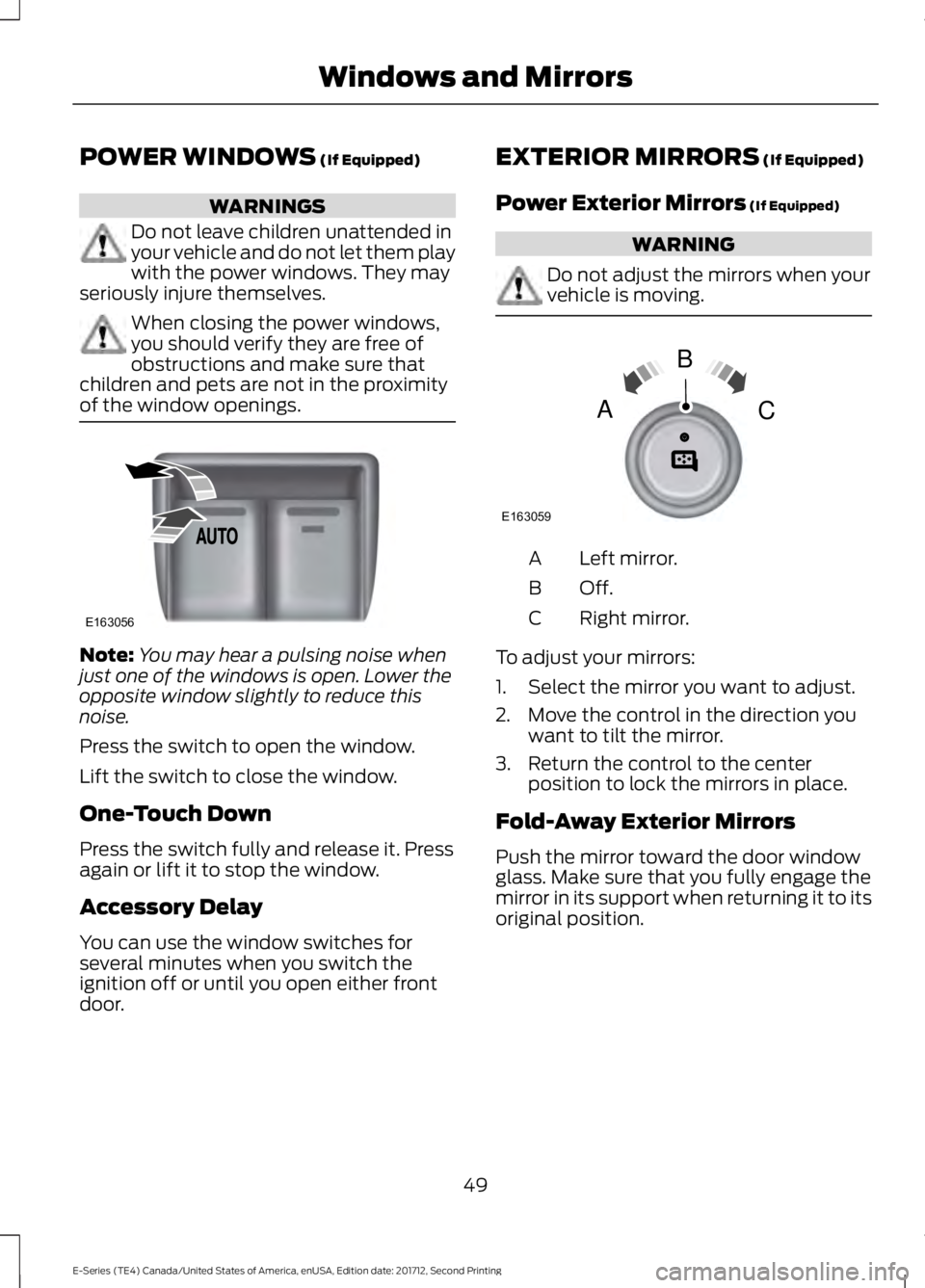
POWER WINDOWS (If Equipped)
WARNINGS
Do not leave children unattended inyour vehicle and do not let them playwith the power windows. They mayseriously injure themselves.
When closing the power windows,you should verify they are free ofobstructions and make sure thatchildren and pets are not in the proximityof the window openings.
Note:You may hear a pulsing noise whenjust one of the windows is open. Lower theopposite window slightly to reduce thisnoise.
Press the switch to open the window.
Lift the switch to close the window.
One-Touch Down
Press the switch fully and release it. Pressagain or lift it to stop the window.
Accessory Delay
You can use the window switches forseveral minutes when you switch theignition off or until you open either frontdoor.
EXTERIOR MIRRORS (If Equipped)
Power Exterior Mirrors (If Equipped)
WARNING
Do not adjust the mirrors when yourvehicle is moving.
Left mirror.A
Off.B
Right mirror.C
To adjust your mirrors:
1. Select the mirror you want to adjust.
2. Move the control in the direction youwant to tilt the mirror.
3. Return the control to the centerposition to lock the mirrors in place.
Fold-Away Exterior Mirrors
Push the mirror toward the door windowglass. Make sure that you fully engage themirror in its support when returning it to itsoriginal position.
49
E-Series (TE4) Canada/United States of America, enUSA, Edition date: 201712, Second Printing
Windows and MirrorsE163056 E163059
B
AC
Page 53 of 323

Telescoping Mirrors (If Equipped)
This feature lets you extend the mirrorabout 3 in (75 mm). It is useful whentowing a trailer. You can manually pull outor push in the mirrors to the desiredposition.
INTERIOR MIRROR (If Equipped)
Manual Dimming Mirror
WARNING
Do not adjust the mirrors when yourvehicle is moving. This could resultin the loss of control of your vehicle,serious personal injury or death.
Pull the tab below the mirror toward youto reduce the effect of bright light frombehind.
Automatic Dimming Mirror (If Equipped)
WARNING
Do not adjust the mirrors when yourvehicle is moving. This could resultin the loss of control of your vehicle,serious personal injury or death.
The mirror dims to reduce the effect ofbright light from behind. It returns tonormal when the bright light from behindis no longer present or if you shift intoreverse (R).
Do not block the sensors on the front andback of the mirror.
Note:A rear center passenger or raised rearcenter head restraint could prevent lightfrom reaching the sensor.
SUN VISORS (If Equipped)
Illuminated Vanity Mirror (If Equipped)
Lift the cover to switch the lamp on.
50
E-Series (TE4) Canada/United States of America, enUSA, Edition date: 201712, Second Printing
Windows and MirrorsE163061 E162197
Page 56 of 323

Airbag Warning Lamp
If it does not illuminate when youswitch the ignition on, continuesto flash or remains on when theengine is running, this indicates amalfunction. Have your vehicle checkedas soon as possible.
Anti-Lock Brake System WarningLamp
If it illuminates when you aredriving, this indicates amalfunction. Your vehiclecontinues to have normal braking withoutthe anti-lock brake system function. Haveyour vehicle checked as soon as possible.
Anti-Theft System
Flashes when the SecuriLockPassive Anti-theft Systemactivates.
Battery
If it illuminates while driving, itindicates a malfunction. Switchoff all unnecessary electricalequipment and have an authorized dealercheck the system immediately.
Brake System Warning Lamp
WARNING
Driving your vehicle with the warninglamp on is dangerous. A significantdecrease in braking performancemay occur. It may take you longer to stopyour vehicle. Have your vehicle checked assoon as possible. Driving extendeddistances with the parking brake engagedcan cause brake failure and the risk ofpersonal injury.
It illuminates when you engagethe parking brake and theignition is on.
If it illuminates when your vehicle ismoving, make sure the parking brake isdisengaged. If the parking brake isdisengaged, this indicates low brake fluidlevel or a brake system fault. Have yourvehicle checked as soon as possible.
Check Fuel Cap
Displays when you do notproperly install the fuel cap.Continued driving with this lighton may cause the service engine soonwarning light to come on.
Cruise Control Indicator (If Equipped)
It illuminates when you switchthe system on.
See Using Cruise Control(page 95).
Direction Indicator
Illuminates when you switch onthe left or right directionindicator or the hazard warningflasher. If the indicators stay on or flashfaster, check for a burned out bulb.
Engine Coolant TemperatureWarning Lamp
If it illuminates when your vehicleis moving, this indicates that theengine is overheating. Stop yourvehicle as soon as it is safe to do so andswitch the engine off. Have your vehiclechecked as soon as possible.
53
E-Series (TE4) Canada/United States of America, enUSA, Edition date: 201712, Second Printing
Instrument ClusterE67017 E144845 E144522 E71340
Page 61 of 323

Press and hold the SELECT/RESET stemto get into the setup menu sequence forthe following displays:
Setup
OIL LIFE
English or MetricPress and hold theSELECT/RESET stemUNITS ENG /METRIC
ON or OFFAUTOLOCK (ifequipped)
ON or OFFAUTOUNLOCK (ifequipped)
COMPASS ZONE (if equipped)
Electric or EOHPress and hold theSELECT/RESET stemTBC MODE (ifequipped)
English / Spanish / FrenchLANGUAGE =ENGLISH /SPANISH /FRENCH
SYSTEM CHECK
XXX% OIL LIFEPress and hold the SELECT/RESET stemRESET FOR SYSTEMCHECKENGINE HOURS (if enabled)
ENGINE IDLE HOURS (ifenabled)
CHARGING SYSTEM
BRAKE SYSTEM
58
E-Series (TE4) Canada/United States of America, enUSA, Edition date: 201712, Second Printing
Information DisplaysE194389
Page 62 of 323

SYSTEM CHECK
TBC GAIN = XX.X or NOTRAILER (if equipped)
TBC GAIN = XX.X orOUTPUT = ////// (ifequipped)
XXX MILES TO E
OIL LIFE XXX% HOLD RESET = NEW
This displays the remaining oil life. An oilchange is required whenever indicated bythe message center and according to therecommended maintenance schedule.USE ONLY RECOMMENDED ENGINE OILS.
To reset the oil monitoring system to 100%after each oil change, perform thefollowing:
1. Press and release the SELECT/RESETstem to display OIL LIFE XXX% HOLDRESET = NEW.
2. Press and hold the SELECT/RESETstem for two seconds and release toreset the oil life to 100%.
Note:To change oil life 100% value (ifequipped):
3. Once OIL LIFE SET TO XXX%displays, release and press theSELECT/RESET stem to change the oillife start value. Each release and pressreduces the value by 10%.
UNITS ENG / METRIC
Displays the current units in English orMetric.
AUTOLOCK
This feature automatically locks all vehicledoors when you shift into any gear, puttingthe vehicle in motion.
AUTOUNLOCK
This feature automatically unlocks allvehicle doors when you open the driver'sdoor within 10 minutes of switching theignition off.
COMPASS (if equipped)
Displays the vehicle's heading direction.
Note:Driving near large buildings, bridges,power lines and powerful broadcastantennas may affect the compass reading.Magnetic or metallic objects placed in, onor near the vehicle may also affect compassaccuracy. If the compass appears to beinaccurate, a manual calibration may benecessary. Refer to Compass zoneadjustment.
Compass zone adjustment
59
E-Series (TE4) Canada/United States of America, enUSA, Edition date: 201712, Second Printing
Information Displays123
4
5
6 7 8 9 1011 12 13 14 15
E142800
Page 72 of 323

The front row outboard non-adjustablehead restraints consist of a trimmed foamcovering over the upper structure of theseatback. Properly adjust the seatback toan upright driving or riding position, so thatthe head restraint is positioned as close aspossible to the back of your head.
MANUAL SEATS (If Equipped)
WARNING
Make sure the seat fully locks intoplace by rocking it backward andforward. Not securing the seat intothe locked position can be dangerous in acrash and could cause serious personalinjury or death.
Moving the Seat Backward andForward
Recline Adjustment (If Equipped)
WARNING
Do not place cargo or any objectsbehind the seat backrest beforereturning it to the original position.Pull on the seat backrest to make sure thatit has fully latched after returning the seatbackrest to its original position. Anunlatched seat may become dangerous ifyou stop suddenly or have a crash.
Manual Lumbar (If Equipped)
The lumbar control is on the inboard sideof the driver seat. Turn the control to adjustyour support.
POWER SEATS (If Equipped)
WARNING
Do not adjust the driver seat orseatback while your vehicle ismoving. Adjusting your seatbackwhile the vehicle is in motion may causeloss of control of the vehicle.
The control is located on the outboard sideof the seat cushion.
69
E-Series (TE4) Canada/United States of America, enUSA, Edition date: 201712, Second Printing
SeatsE190816 E190817 E166702
Page 74 of 323

12 Volt DC Power Point
WARNING
Do not plug optional electricalaccessories into the cigar lightersocket. Incorrect use of the cigarlighter can cause damage not covered bythe vehicle warranty, and can result in fireor serious injury.
Note:When you switch the ignition on, youcan use the socket to power 12 voltappliances with a maximum current ratingof 15 amps.
If the power supply does not work after youswitch the ignition off, switch the ignitionon.Note:Do not hang any accessory from theaccessory plug.
Note:Do not use the power point over thevehicle capacity of 12 volt DC 180 watts ora fuse may blow.
Note:Always keep the power point capsclosed when not in use.
Do not insert objects other than anaccessory plug into the power point. Thisdamages the power point and may blowthe fuse.
Run the vehicle for full capacity use of thepower point.
To prevent the battery from running out ofcharge:
•Do not use the power point longer thannecessary when the vehicle is notrunning.
•Do not leave devices plugged inovernight or when you park your vehiclefor extended periods.
Locations
Power points may be in the followinglocations:
•On the instrument panel.
•Inside the glove box.
•Behind the driver's seat, upper trimpanel.
110 Volt AC Power Point (If Equipped)
WARNING
Do not keep electrical devicesplugged in the power point wheneverthe device is not in use. Do not useany extension cord with the 110 volt ACpower point, since it will defeat the safetyprotection design. Doing so may cause thepower point to overload due to poweringmultiple devices that can reach beyondthe 150 watt load limit and could result infire or serious injury.
Note:The power point turns off when youswitch the ignition off, or when the batteryvoltage drops below 11 volts.
You can use the power point for electricdevices that require up to 150 watts. It ison the rear of the center console.
To gain access to the outlet contacts,press the plug against the outlet and rotateclockwise.
71
E-Series (TE4) Canada/United States of America, enUSA, Edition date: 201712, Second Printing
Auxiliary Power PointsE194174