2018 FORD E SERIES ignition
[x] Cancel search: ignitionPage 42 of 323

3. Insert the new battery. Refer to thesymbols inside the transmitter for thecorrect orientation of the battery.Press the battery down to make sureit is fully in the housing.
4. Reinstall the battery housing coveronto the transmitter.
Note: Replacing the battery does not erasethe programmed key from your vehicle. Thetransmitter should operate normally.
Car Finder
Press the button twice withinthree seconds. The horn soundsand the direction indicatorsflash. We recommend you use this methodto locate your vehicle, rather than usingthe panic alarm.
Sounding the Panic Alarm
Press the button to sound thepanic alarm. Press the buttonagain or switch the ignition on toturn it off.
Note:The panic alarm operates regardlessof the ignition position.
REPLACING A LOST KEY OR
REMOTE CONTROL
Replacement keys or remote controls canbe purchased from an authorized dealer.Authorized dealers can program remotecontrols for your vehicle. See PassiveAnti-Theft System (page 43).
39
E-Series (TE4) Canada/United States of America, enUSA, Edition date: 201712, Second Printing
Keys and Remote ControlsE195661 E138623 E138624
Page 43 of 323

LOCKING AND UNLOCKING
You can use the power door lock controlor the remote control to lock and unlockyour vehicle.
Power Door Locks (If Equipped)
The power door lock control is on the driverand front passenger door panels.
Lock.A
Unlock.B
Remote Control (If Equipped)
You can use the remote control at any timewhen the ignition is off.
Unlocking the Doors (Two-StageUnlock)
Press the button to unlock thedriver door.
Press the button again within threeseconds to unlock all doors. The directionindicators flash.
Note:The driver door can be unlocked withthe key if the remote control is notfunctioning.
Note:When you leave your vehicleunattended for several weeks, the remotecontrol turns off. Your vehicle must beunlocked and started. Unlocking andstarting your vehicle once enables theremote control.
Reprogramming the Unlocking Function
Note: When you press the unlock button,either all the doors are unlocked or only thedriver door is unlocked. Pressing the unlockbutton again unlocks all the doors.
You can reprogram the unlocking functionso that only the driver door is unlocked.
Press and hold the unlock and lock buttonson the remote control simultaneously forat least four seconds with the ignition off.The direction indicators flash twice toconfirm the change.
To return to the original unlocking function,repeat the process.
Locking the Doors
Press the button to lock alldoors. The direction indicatorsflash.
Press the button again within threeseconds to confirm that all the doors areclosed. The doors lock again, the hornsounds and the direction indicators flashif all the doors are closed.
Note:If any door is open, the horn soundstwice and the direction indicators do notflash.
40
E-Series (TE4) Canada/United States of America, enUSA, Edition date: 201712, Second Printing
Doors and LocksE195623
A
B E138629 E138623
Page 44 of 323

Autolock Feature
The autolock feature locks all the doorswhen:
•All doors are closed.
•The ignition is on.
•You shift into any gear putting yourvehicle in motion.
•The ignition is on, all the doors areclosed and your vehicle has been inmotion at a speed greater than 12 mph(20 km/h).
Autounlock Feature
The autounlock feature unlocks all thedoors when:
•Your vehicle comes to a stop and youswitch the ignition off or to accessory.
•You open the driver door within 10minutes of switching the ignition off orto accessory.
Note:If you electronically lock your vehicleafter you switch the ignition off with thedriver door closed, the doors do notautounlock.
Enabling or Disabling Autolock andAutounlock
You can enable or disable the autolock andautounlock features independently of eachother.
To enable or disable autolock, do thefollowing:
1. Switch the ignition on.
2. Press the power door unlock controlthree times.
3. Switch the ignition off.
4. Press the power door unlock controlthree times.
5.Switch the ignition on. The horn soundsindicating your vehicle is inprogramming mode.
6. Press the power door unlock controland within five seconds, press thepower door lock control. The hornsounds once if disabled or twice ifenabled.
7.Switch the ignition off. The horn soundsindicating programming is complete.
Note:You can also switch this feature onor off using the information display. SeeInformation Displays (page 56).
To enable or disable autounlock, do thefollowing:
1. Switch the ignition on.
2. Press the power door unlock controlthree times.
3. Switch the ignition off.
4. Press the power door unlock controlthree times.
5.Switch the ignition on. The horn soundsindicating your vehicle is inprogramming mode.
6. Press the power door lock control andwithin five seconds, press the powerdoor unlock control. The horn soundsonce if disabled or twice if enabled.
7.Switch the ignition off. The horn soundsindicating programming is complete.
Note:You can also switch this feature onor off using the information display. SeeInformation Displays (page 56).
Illuminated Entry
The interior lamps and some exteriorlamps illuminate when you unlock thedoors with the remote control.
The lamps turn off if:
•The ignition is on.
•You press the remote control lockbutton.
•25 seconds have elapsed.
41
E-Series (TE4) Canada/United States of America, enUSA, Edition date: 201712, Second Printing
Doors and Locks
Page 46 of 323

PASSIVE ANTI-THEFT
SYSTEM (If Equipped)
Note:The system is not compatible withnon-Ford aftermarket remote start systems.Use of these systems may result in vehiclestarting problems and a loss of securityprotection.
Note:Metallic objects, electronic devicesor a second coded key on the same keychain may cause vehicle starting problemsif they are too close to the key when startingthe engine. Prevent these objects fromtouching the coded key while starting theengine. Switch the ignition off, move allobjects on the key chain away from thecoded key and restart the engine if aproblem occurs.
Note:Do not leave a duplicate coded keyin the vehicle. Always take your keys andlock all doors when leaving the vehicle.
SecuriLock®
The system is an engine immobilizationsystem. It is designed to help prevent theengine from being started unless acorrectly coded key for your vehicle is used.Using an incorrectly coded key mayprevent the engine from starting. Amessage may appear in the informationdisplay.
If you are unable to start the engine with acorrectly coded key, a malfunction hashappened and a message may appear inthe information display.
Automatic Arming
The engine immobilization system armsimmediately after you switch the ignitionoff.
Automatic Disarming
Switching the ignition on with a correctlycoded key disarms the engineimmobilization system.
Replacement Keys
The integrated keyhead transmitterfunctions as a programmed ignition keythat operates all the locks and starts yourvehicle, as well as a remote control.
If your keys are lost or stolen and you donot have a spare correctly coded key, youwill need to have your vehicle towed to anauthorized dealer. You need to erase thecoded keys from your vehicle and programnew coded keys.
Store an extra correctly coded key awayfrom the vehicle in a safe place to helpprevent any inconveniences. See anauthorized dealer to purchase additionalspare or replacement keys.
Note:Your vehicle comes with twointegrated keyhead transmitters.
Programming a Spare IntegratedKeyhead Transmitter
You can program your own integratedkeyhead transmitter or standardSecuriLock coded keys to your vehicle. Thisprocedure will program both the engineimmobilizer keycode and the remote entryportion of the remote control to yourvehicle
Only use integrated keyhead transmittersor standard SecuriLock keys.
You must have two previouslyprogrammed correctly coded keys and thenew unprogrammed key readily accessible.See an authorized dealer to have the sparekey programmed if two previouslyprogrammed correctly coded keys are notavailable.
Read and understand the entire procedurebefore you begin.
43
E-Series (TE4) Canada/United States of America, enUSA, Edition date: 201712, Second Printing
Security
Page 47 of 323

1.Insert the first previously programmedcorrectly coded key into the ignition.
2.Switch the ignition from off to on. Keepthe ignition on for at least threeseconds, but no more than 10 seconds.
3.Switch the ignition off and remove thefirst correctly coded key from theignition.
4. After three seconds but within 10seconds of switching the ignition off,insert the second previously correctlycoded key into the ignition.
5.Switch the ignition from off to on. Keepthe ignition on for at least threeseconds, but no more than 10 seconds.
6.Switch the ignition off and remove thesecond previously programmedcorrectly coded key from the ignition.
7. After three seconds but within 10seconds of switching the ignition offand removing the previouslyprogrammed correctly coded key,insert the new unprogrammed key intothe ignition.
8.Switch the ignition from off to on. Keepthe ignition on for at least six seconds.
9. Remove the newly programmedcorrectly coded key from the ignition.
If the key has been successfullyprogrammed it will start the engine andoperate the remote entry system (if thenew key is an integrated keyheadtransmitter).
If the key was not successfullyprogrammed, wait 10 seconds and repeatSteps 1 through 8. If you are stillunsuccessful, take your vehicle to anauthorized dealer.
Note:You can program a maximum of eightcoded keys to your vehicle. All eight can beintegrated keyhead transmitters.
44
E-Series (TE4) Canada/United States of America, enUSA, Edition date: 201712, Second Printing
Security
Page 52 of 323
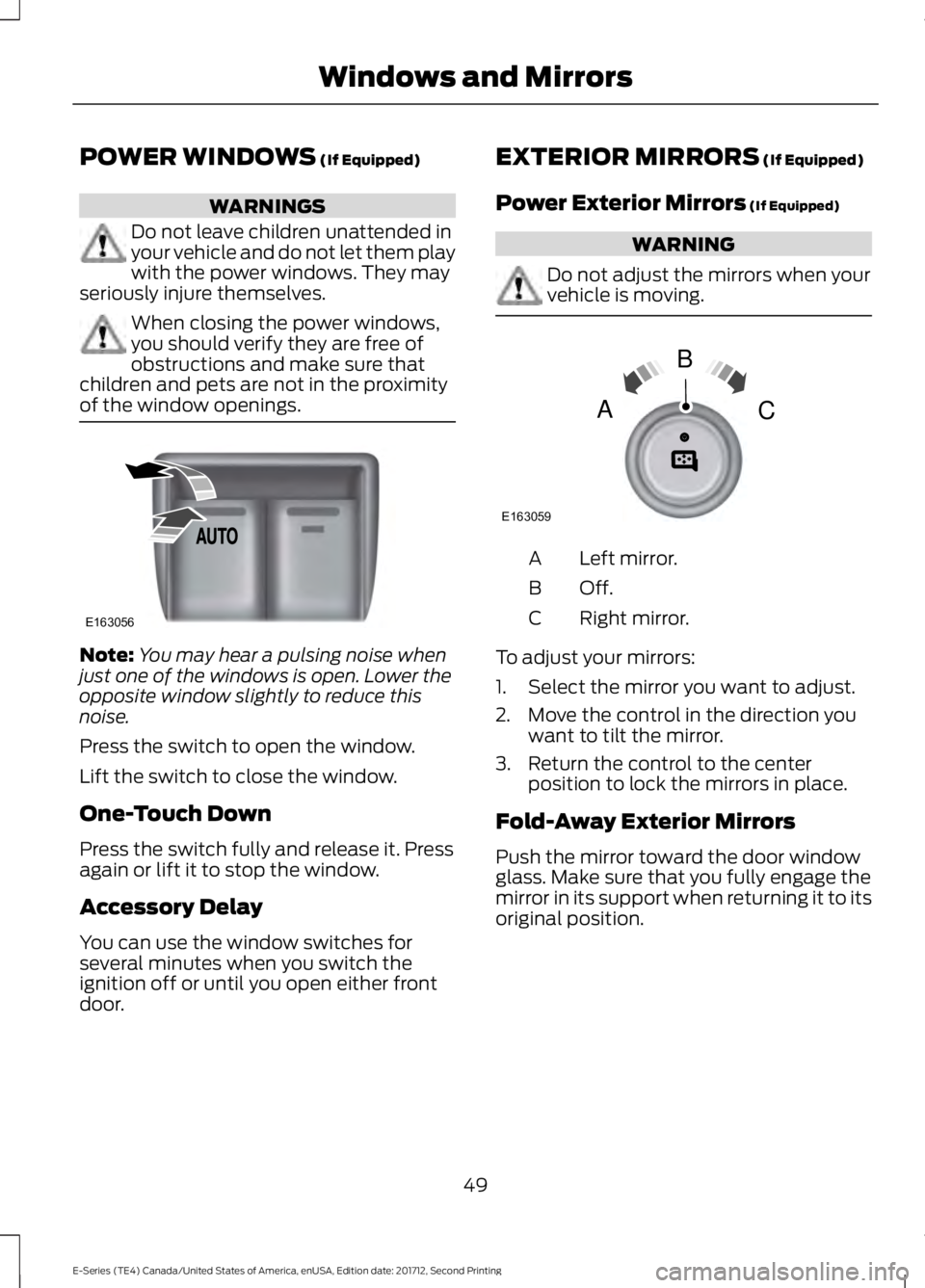
POWER WINDOWS (If Equipped)
WARNINGS
Do not leave children unattended inyour vehicle and do not let them playwith the power windows. They mayseriously injure themselves.
When closing the power windows,you should verify they are free ofobstructions and make sure thatchildren and pets are not in the proximityof the window openings.
Note:You may hear a pulsing noise whenjust one of the windows is open. Lower theopposite window slightly to reduce thisnoise.
Press the switch to open the window.
Lift the switch to close the window.
One-Touch Down
Press the switch fully and release it. Pressagain or lift it to stop the window.
Accessory Delay
You can use the window switches forseveral minutes when you switch theignition off or until you open either frontdoor.
EXTERIOR MIRRORS (If Equipped)
Power Exterior Mirrors (If Equipped)
WARNING
Do not adjust the mirrors when yourvehicle is moving.
Left mirror.A
Off.B
Right mirror.C
To adjust your mirrors:
1. Select the mirror you want to adjust.
2. Move the control in the direction youwant to tilt the mirror.
3. Return the control to the centerposition to lock the mirrors in place.
Fold-Away Exterior Mirrors
Push the mirror toward the door windowglass. Make sure that you fully engage themirror in its support when returning it to itsoriginal position.
49
E-Series (TE4) Canada/United States of America, enUSA, Edition date: 201712, Second Printing
Windows and MirrorsE163056 E163059
B
AC
Page 54 of 323

GAUGES
Tachometer.A
Fuel gauge.B
Engine coolant temperaturegauge.C
Speedometer.D
Battery voltage gauge.E
Information display. SeeGeneral Information (page56).
F
Engine oil pressure gauge.G
Fuel Gauge
Note:The fuel gauge may vary slightlywhen your vehicle is moving or on a slope.
Switch the ignition on. The fuel gaugeindicates approximately how much fuelyou have left in the fuel tank. The arrowadjacent to the fuel pump symbolindicates on which side of your vehicle thefuel filler door is located.
The needle should move toward F whenyou refuel your vehicle. If the needle pointsto E after adding fuel, have an authorizeddealer check the system soon.
After refueling, some variability in theposition of the needle is normal:
51
E-Series (TE4) Canada/United States of America, enUSA, Edition date: 201712, Second Printing
Instrument ClusterE194283
Page 55 of 323
•It may take a short time for the needleto reach F after leaving the gas station.This is normal and depends upon theslope of the pavement at the gasstation.
•The fuel amount dispensed into thetank is a little less or more than thegauge indicated. This is normal anddepends upon the slope of thepavement at the gas station.
•If the gas station nozzle shuts offbefore the tank is full, try a differentgas pump nozzle.
•There is a small reserve left in the tankwhen the fuel gauge reaches empty.
Low Fuel Reminder
A low fuel level reminder displays andsounds when the distance to emptyreaches 50 mi (80 km), 25 mi (40 km),10 mi (20 km) and 0 mi (0 km).
Engine Coolant TemperatureGauge
Indicates engine coolant temperature. Atnormal operating temperature, the levelindicator will be in the normal range. If theengine coolant temperature exceeds thenormal range, stop the vehicle as soon assafely possible, switch off the engine andlet the engine cool.
WARNING
Never remove the coolant reservoircap when the engine is running orhot.
Battery Voltage Gauge
Indicates the battery voltage when theignition is in the on position. If the pointermoves and stays outside the normaloperating range, have an authorized dealercheck the vehicle’s electrical system assoon as possible.
Information Display
Odometer
Located in the bottom of the informationdisplay, the gauge registers the distanceyour vehicle travels.
Trip Computer
See Information Displays (page 56).
Vehicle Settings and Personalization
See Information Displays (page 56).
Engine Oil Pressure Gauge
Indicates the engine oil pressure. Theneedle should stay in the normal operatingrange. If the needle falls below the normalrange, stop the vehicle and switch off theengine. Check the engine oil level and addoil if needed. If the oil level is correct, havean authorized dealer check the system.
WARNING LAMPS AND
INDICATORS
The following warning lamps andindicators alert you to a vehicle conditionthat may become serious. Some lampsilluminate when you start your vehicle tomake sure they work. If any lamps remainon after starting your vehicle, refer to therespective system warning lamp for furtherinformation.
Note:Some warning indicators appear inthe information display and operate thesame as a warning lamp but do notilluminate when you start your vehicle.
52
E-Series (TE4) Canada/United States of America, enUSA, Edition date: 201712, Second Printing
Instrument Cluster