2018 DODGE CHARGER SRT oil
[x] Cancel search: oilPage 346 of 490
Overfilling of fluid is not recommended because it may
cause leaking in the system.
Add enough fluid to bring the level up to the requirements
described on the brake fluid reservoir. With disc brakes,
fluid level can be expected to fall as the brake pads wear.
However, low fluid level may be caused by a leak and a
checkup may be needed.
Use only brake fluid that has been recommended by the
manufacturer, and has been kept in a tightly closed container
to avoid contamination from foreign matter or moisture.
Refer to “Fluids And Lubricants” in “Technical Specifica-
tions” for further information.
WARNING!
•Use only manufacturer’s recommended brake fluid.
Refer to “Fluids And Lubricants” in “Technical
Specifications” for further information. Using the
wrong type of brake fluid can severely damage your
brake system and/or impair its performance. The
proper type of brake fluid for your vehicle is also
identified on the original factory installed hydraulic
master cylinder reservoir.
(Continued)
WARNING! (Continued)
•To avoid contamination from foreign matter or mois-
ture, use only new brake fluid or fluid that has been
in a tightly closed container. Keep the master cylin-
der reservoir cap secured at all times. Brake fluid in
a open container absorbs moisture from the air
resulting in a lower boiling point. This may cause it
to boil unexpectedly during hard or prolonged brak-
ing, resulting in sudden brake failure. This could
result in a collision.
• Overfilling the brake fluid reservoir can result in
spilling brake fluid on hot engine parts, causing the
brake fluid to catch fire. Brake fluid can also damage
painted and vinyl surfaces, care should be taken to
avoid its contact with these surfaces.
• Do not allow petroleum based fluid to contaminate
the brake fluid. Brake seal components could be
damaged, causing partial or complete brake failure.
This could result in a collision.
344 SERVICING AND MAINTENANCE
Page 348 of 490

fluid level checked. Operating the vehicle with an im-
proper fluid level can cause severe transmission damage.
CAUTION!
If a transmission fluid leak occurs, visit an authorized
dealer immediately. Severe transmission damage may
occur. An authorized dealer has the proper tools to
adjust the fluid level accurately.
Fluid And Filter Changes
Under normal operating conditions, the fluid installed at
the factory will provide satisfactory lubrication for the life
of the vehicle.
Routine fluid and filter changes are not required. However,
change the fluid and filter if the fluid becomes contami-
nated (with water, etc.), or if the transmission is disas-
sembled for any reason.
Rear Axle
For normal service, periodic fluid level checks are not
required. When the vehicle is serviced for other reasons the
exterior surfaces of the axle assembly should be inspected.
If gear oil leakage is suspected inspect the fluid level. Refer
to “Fluids And Lubricants” in “Technical Specifications”
for further information.
RAISING THE VEHICLE
In the case where it is necessary to raise the vehicle, go to
an authorized dealer or service station.
TIRES
Tire Safety Information
Tire safety information will cover aspects of the following
information: Tire Markings, Tire Identification Numbers,
Tire Terminology and Definitions, Tire Pressures, and Tire
Loading.
346 SERVICING AND MAINTENANCE
Page 363 of 490

WARNING!(Continued)
You could lose control and have a collision resulting in
serious injury or death.
Keep dismounted tires in a cool, dry place with as little
exposure to light as possible. Protect tires from contact with
oil, grease, and gasoline.
Replacement Tires
The tires on your new vehicle provide a balance of many
characteristics. They should be inspected regularly for
wear and correct cold tire inflation pressures. The manu-
facturer strongly recommends that you use tires equivalent
to the originals in size, quality and performance when
replacement is needed. Refer to the paragraph on “Tread
Wear Indicators” in this section. Refer to the Tire and
Loading Information placard or the Vehicle Certification
Label for the size designation of your tire. The Load Index
and Speed Symbol for your tire will be found on the
original equipment tire sidewall.
See the Tire Sizing Chart example found in the “Tire Safety
Information” section of this manual for more information
relating to the Load Index and Speed Symbol of a tire. It is recommended to replace the two front tires or two rear
tires as a pair. Replacing just one tire can seriously affect
your vehicle’s handling. If you ever replace a wheel, make
sure that the wheel’s specifications match those of the
original wheels.
It is recommended you contact an authorized tire dealer or
original equipment dealer with any questions you may
have on tire specifications or capability. Failure to use
equivalent replacement tires may adversely affect the
safety, handling, and ride of your vehicle.
WARNING!
•
Do not use a tire, wheel size, load rating, or speed
rating other than that specified for your vehicle.
Some combinations of unapproved tires and wheels
may change suspension dimensions and perfor-
mance characteristics, resulting in changes to steer-
ing, handling, and braking of your vehicle. This can
cause unpredictable handling and stress to steering
and suspension components. You could lose control
and have a collision resulting in serious injury or
death. Use only the tire and wheel sizes with load
ratings approved for your vehicle.
(Continued)
8
SERVICING AND MAINTENANCE 361
Page 375 of 490

Cleaning Plastic Instrument Cluster Lenses
The lenses in front of the instruments in this vehicle are
molded in clear plastic. When cleaning the lenses, care
must be taken to avoid scratching the plastic.
1. Clean with a wet soft cloth. A mild soap solution may beused, but do not use high alcohol content or abrasive
cleaners. If soap is used, wipe clean with a clean damp
cloth.
2. Dry with a soft cloth.
Leather Parts
Mopar Total Clean is specifically recommended for leather
upholstery.
Your leather upholstery can be best preserved by regular
cleaning with a damp soft cloth. Small particles of dirt can
act as an abrasive and damage the leather upholstery and
should be removed promptly with a damp cloth. Stubborn
soils can be removed easily with a soft cloth and Mopar
Total Clean. Care should be taken to avoid soaking your
leather upholstery with any liquid. Please do not use
polishes, oils, cleaning fluids, solvents, detergents, or
ammonia-based cleaners to clean your leather upholstery.
Application of a leather conditioner is not required to
maintain the original condition. NOTE:
If equipped with light colored leather, it tends to
show any foreign material, dirt, and fabric dye transfer
more so than darker colors. The leather is designed for easy
cleaning, and FCA recommends Mopar total care leather
cleaner applied on a cloth to clean the leather seats as
needed.
CAUTION!
Do not use Alcohol and Alcohol-based and/or Ketone
based cleaning products to clean leather seats, as
damage to the seat may result.
Glass Surfaces
All glass surfaces should be cleaned on a regular basis with
Mopar Glass Cleaner, or any commercial household-type
glass cleaner. Never use an abrasive type cleaner. Use
caution when cleaning the inside rear window equipped
with electric defrosters or windows equipped with radio
antennas. Do not use scrapers or other sharp instruments
that may scratch the elements.
When cleaning the rear view mirror, spray cleaner on the
towel or cloth that you are using. Do not spray cleaner
directly on the mirror.
8
SERVICING AND MAINTENANCE 373
Page 379 of 490

BRAKE SYSTEM
Your vehicle is equipped with dual hydraulic brake sys-
tems. If either of the two hydraulic systems loses normal
capability, the remaining system will still function. There
will be some loss of overall braking effectiveness. This may
be evident by increased pedal travel during application,
greater pedal force required to slow or stop, and potential
activation of the Brake Warning Light.
In the event power assist is lost for any reason (for
example, repeated brake applications with the engine
OFF), the brakes will still function. The effort required to
brake the vehicle will be much greater than that required
with the power system operating.
NOTE:Your vehicle is equipped with a high performance
braking system. The brake pads are a semi-metallic com-
pound, which offer superior fade resistance for consistent
operation. A compromise to using this type of brake pad is
that the brakes may produce more brake dust and may
squeal slightly under certain weather and operating con-
ditions (i.e., during light brake applications). These are
considered normal conditions.
WHEEL AND TIRE TORQUE SPECIFICATIONS
Proper lug nut/bolt torque is very important to ensure that
the wheel is properly mounted to the vehicle. Any time a
wheel has been removed and reinstalled on the vehicle, the
lug nuts/bolts should be torqued using a properly cali-
brated torque wrench using a high quality six sided (hex)
deep wall socket.
Torque Specifications
Lug Nut/Bolt Torque **Lug Nut/Bolt
Size Lug Nut/Bolt
Socket Size
111 Ft-Lbs (150 N·m) M14 x 1.50 22 mm
**Use only your authorized dealer recommended lug nuts/
bolts and clean or remove any dirt or oil before tightening.
9
TECHNICAL SPECIFICATIONS 377
Page 386 of 490

FLUID CAPACITIES
U.S.Metric
Fuel (Approximate)
6.2L Supercharged Engine (91 Octane or higher, 0-15% Ethanol) 18.5 Gallons70 Liters
6.4L Engine (91 Octane or higher, 0-15% Ethanol) 18.5 Gallons70 Liters
Engine Oil With Filter
6.2L Supercharged Engine (SAE 0W-40, Synthetic API Certified) 7 Quarts6.6 Liters
6.4L Engine (SAE 0W-40, Synthetic API Certified) 7 Quarts6.6 Liters
Cooling System *
6.2L Supercharged Engine (Mopar Antifreeze/Engine Coolant (OAT
coolant conforming to MS.90032) 10 Year/150,000 Mile (240,000 km)
Formula or equivalent) 15.2 Quarts
14.4 Liters
6.2L Supercharged Engine Intercooler (Mopar Antifreeze/Engine Cool-
ant (OAT coolant conforming to MS.90032) 10 Year/150,000 Mile
(240,000 km) Formula or equivalent) 5 Quarts
4.7 Liters
6.4L Engine (Mopar Antifreeze/Engine Coolant (OAT coolant con-
forming to MS.90032) 10 Year/150,000 Mile (240,000 km) Formula or
equivalent) 15.2 Quarts
14.4 Liters
* Includes heater and coolant recovery bottle filled to MAX level.
384 TECHNICAL SPECIFICATIONS
Page 387 of 490

FLUIDS AND LUBRICANTS
Engine
ComponentFluid, Lubricant, or Genuine Part
Engine/Intercooler Coolant We recommend you use Mopar Antifreeze/Coolant 10 Year/150,000 Mile For-
mula OAT coolant conforming to MS.90032.
Engine Oil For best performance and maximum protection under all types of operating
conditions, the manufacturer only recommends full synthetic engine oils.
The manufacturer recommends the use of Pennzoil Ultra Platinum 0W-40 or
equivalent Mopar engine oil meeting the requirements of FCA Material Stan-
dard MS-12633 for use in all operating temperatures.
Engine Oil Filter Mopar Engine Oil Filter or equivalent.
Spark Plugs We recommend you use Mopar Spark Plugs.
Fuel Selection 91 Octane or higher, 0-15% Ethanol.
9
TECHNICAL SPECIFICATIONS 385
Page 420 of 490
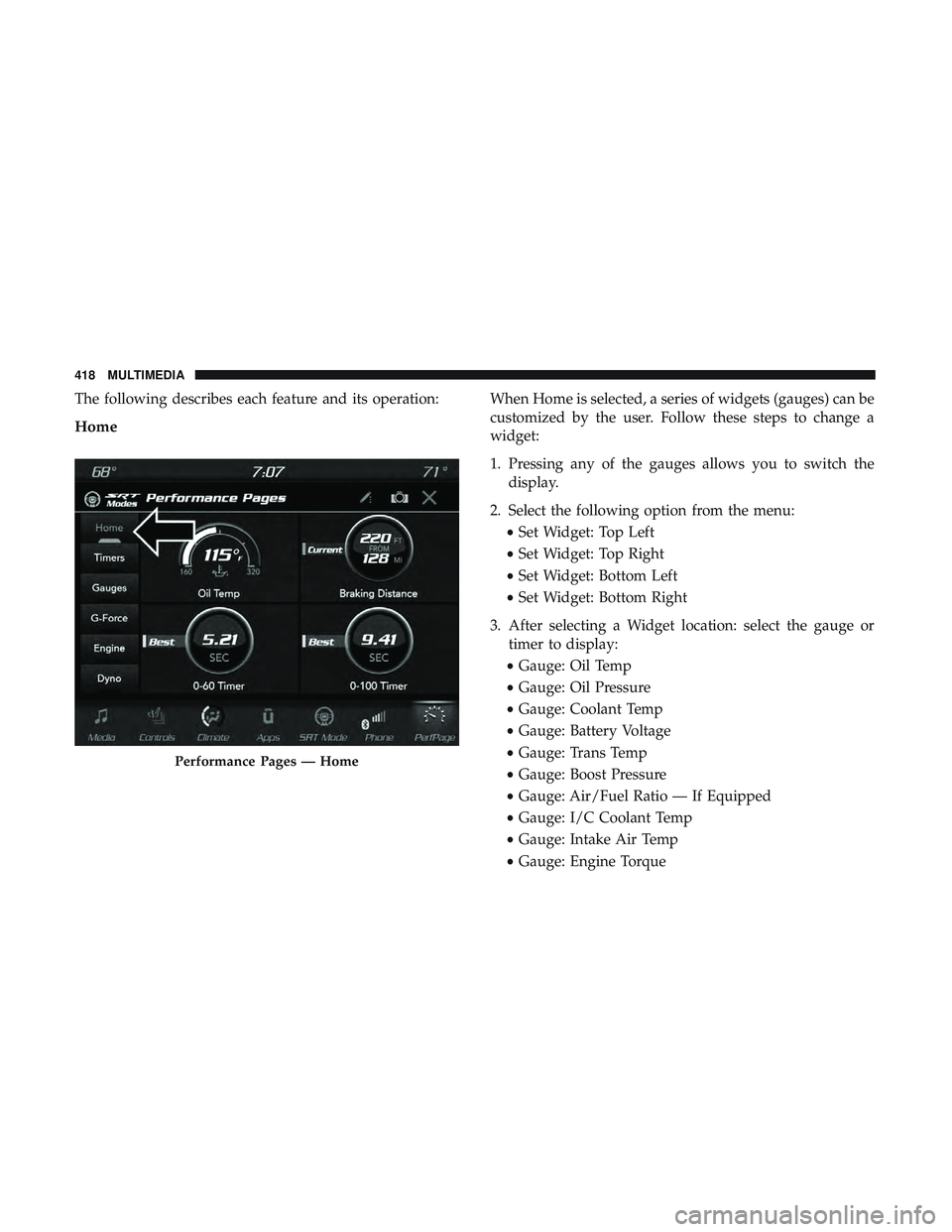
The following describes each feature and its operation:
Home
When Home is selected, a series of widgets (gauges) can be
customized by the user. Follow these steps to change a
widget:
1. Pressing any of the gauges allows you to switch thedisplay.
2. Select the following option from the menu: •Set Widget: Top Left
• Set Widget: Top Right
• Set Widget: Bottom Left
• Set Widget: Bottom Right
3. After selecting a Widget location: select the gauge or timer to display:
• Gauge: Oil Temp
• Gauge: Oil Pressure
• Gauge: Coolant Temp
• Gauge: Battery Voltage
• Gauge: Trans Temp
• Gauge: Boost Pressure
• Gauge: Air/Fuel Ratio — If Equipped
• Gauge: I/C Coolant Temp
• Gauge: Intake Air Temp
• Gauge: Engine Torque
Performance Pages — Home
418 MULTIMEDIA