Page 262 of 553
display “ACC/FCW Limited Functionality Clean Front
Windshield” and the system will have degraded perfor-
mance.
The “ACC/FCW Limited Functionality Clean Front Wind-
shield” message can sometimes be displayed while driving
in adverse weather conditions. The ACC/FCW system will
recover after the vehicle has left these areas. Under rare
conditions, when the camera is not tracking any vehicles or
objects in its path this warning may temporarily occur.
If weather conditions are not a factor, the driver should
examine the windshield and the camera located on the
back side of the inside rear view mirror. They may require
cleaning or removal of an obstruction.
When the condition that created limited functionality is no
longer present, the system will return to full functionality.
NOTE:If the “ACC/FCW Limited Functionality Clean
Front Windshield” message occurs frequently (e.g. more
than once on every trip) without any snow, rain, mud, or
other obstruction, have the windshield and forward facing
camera inspected at your authorized dealer.Service ACC/FCW Warning
If the system turns off, and the instrument cluster displays
“ACC/FCW Unavailable Service Required” or “Cruise/
FCW Unavailable Service Required”, there may be an
internal system fault or a temporary malfunction that
limits ACC functionality. Although the vehicle is still
drivable under normal conditions, ACC will be temporar-
ily unavailable. If this occurs, try activating ACC again
later, following an ignition cycle. If the problem persists,
see your authorized dealer.
Precautions While Driving With ACC
In certain driving situations, ACC may have detection
issues. In these cases, ACC may brake late or unexpectedly.
The driver needs to stay alert and may need to intervene.
Towing A Trailer
Towing a trailer is not advised when using ACC.
Offset Driving
ACC may not detect a vehicle in the same lane that is offset
from your direct line of travel, or a vehicle merging in from
a side lane. There may not be sufficient distance to the
260 STARTING AND OPERATING
Page 266 of 553
General Information
The following regulatory statement applies to all Radio
Frequency (RF) devices equipped in this vehicle:
This device complies with Part 15 of the FCC Rules and
with Industry Canada license-exempt RSS standard(s).
Operation is subject to the following two conditions:
1. This device may not cause harmful interference.
2. This device must accept any interference received, in-cluding interference that may cause undesired opera-
tion.
NOTE: Changes or modifications not expressly approved
by the party responsible for compliance could void the
user ’s authority to operate the equipment.
Normal (Fixed Speed) Cruise Control Mode
In addition to Adaptive Cruise Control mode, a Normal
(Fixed Speed) Cruise Control mode is available for cruising
at fixed speeds. The Normal (Fixed Speed) Cruise Control
mode is designed to maintain a set cruising speed without
requiring the driver to operate the accelerator. Cruise
Control can only be operated if the vehicle speed is above
20 mph (32 km/h). To change between the different control modes, push the
Adaptive Cruise Control (ACC) on/off button which turns
the ACC and the Normal (Fixed Speed) Cruise Control off.
Pushing the Normal (Fixed Speed) Cruise Control on/off
button will result in turning on (changing to) the Normal
(Fixed Speed) Cruise Control mode.
WARNING!
In the Normal (Fixed Speed) Cruise Control mode, the
system will not react to vehicles ahead. In addition, the
proximity warning does not activate and no alarm will
sound even if you are too close to the vehicle ahead
since neither the presence of the vehicle ahead nor the
vehicle-to vehicle distance is detected. Be sure to
maintain a safe distance between your vehicle and the
vehicle ahead. Always be aware which mode is se-
lected.
264 STARTING AND OPERATING
Page 269 of 553

To Turn Off
The system will turn off and erase the set speed in memory
if:
•The Normal (Fixed Speed) Cruise Control on/off button
is pushed.
• The ignition is turned OFF.
• The Adaptive Cruise Control (ACC) on/off button is
pushed.
PARKSENSE REAR PARK ASSIST — IF EQUIPPED
The ParkSense Rear Park Assist system provides visual and
audible indications of the distance between the rear fascia
and a detected obstacle when backing up, e.g. during a
parking maneuver. Refer to “ParkSense System Usage
Precautions” in this section for limitations of this system
and recommendations.
ParkSense will retain the last system state (enabled or
disabled) from the last ignition cycle when the ignition is
changed to the ON/RUN position.
ParkSense can be active only when the gear selector is in
REVERSE. If ParkSense is enabled at this gear selector
position, the system will remain active until the vehicle
speed is increased to approximately 7 mph (11 km/h) or above. The system will become active again if the vehicle
speed is decreased to speeds less than approximately
6 mph (9 km/h).
ParkSense Sensors
The four ParkSense sensors, located in the rear fascia/bumper,
monitor the area behind the vehicle that is within the sensors’
field of view. The sensors can detect obstacles from approxi-
mately 12 inches (30 cm) up to 79 inches (200 cm) from the rear
fascia/bumper in the horizontal direction, depending on the
location, type and orientation of the obstacle.
ParkSense Warning Display
The ParkSense Warning screen will only be displayed if
“Sound and Display” is selected from the Customer -
Programmable Features section of the Uconnect System.
Refer to
�Uconnect Settings” in “Multimedia” for further
information.
The ParkSense Warning screen is located within the instru-
ment cluster display. It provides visual warnings to indi-
cate the distance between the rear fascia/bumper and the
detected obstacle. Refer to “Instrument Cluster Display” in
“Getting To Know Your Instrument Panel” for further
information.
6
STARTING AND OPERATING 267
Page 270 of 553
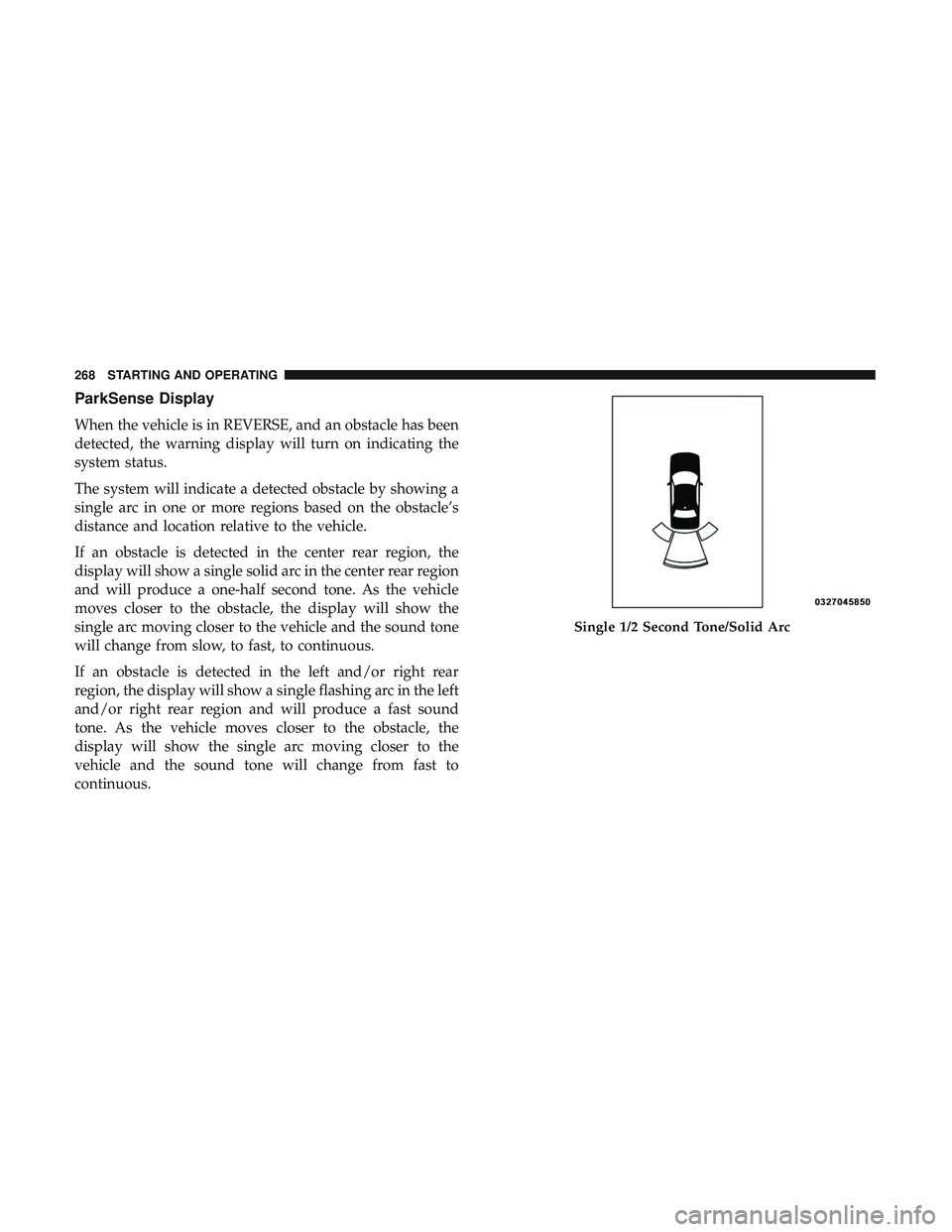
ParkSense Display
When the vehicle is in REVERSE, and an obstacle has been
detected, the warning display will turn on indicating the
system status.
The system will indicate a detected obstacle by showing a
single arc in one or more regions based on the obstacle’s
distance and location relative to the vehicle.
If an obstacle is detected in the center rear region, the
display will show a single solid arc in the center rear region
and will produce a one-half second tone. As the vehicle
moves closer to the obstacle, the display will show the
single arc moving closer to the vehicle and the sound tone
will change from slow, to fast, to continuous.
If an obstacle is detected in the left and/or right rear
region, the display will show a single flashing arc in the left
and/or right rear region and will produce a fast sound
tone. As the vehicle moves closer to the obstacle, the
display will show the single arc moving closer to the
vehicle and the sound tone will change from fast to
continuous.
Single 1/2 Second Tone/Solid Arc
268 STARTING AND OPERATING
Page 272 of 553
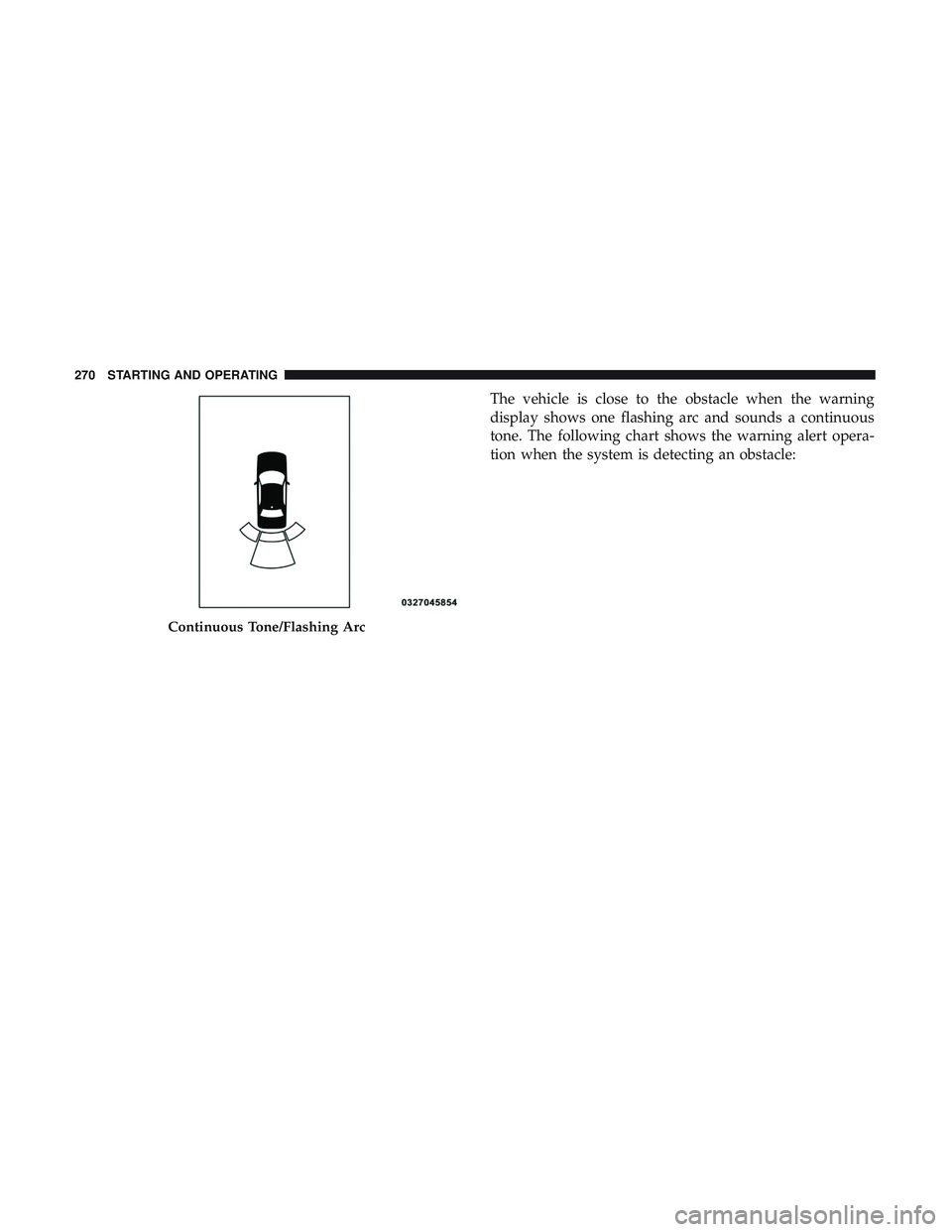
The vehicle is close to the obstacle when the warning
display shows one flashing arc and sounds a continuous
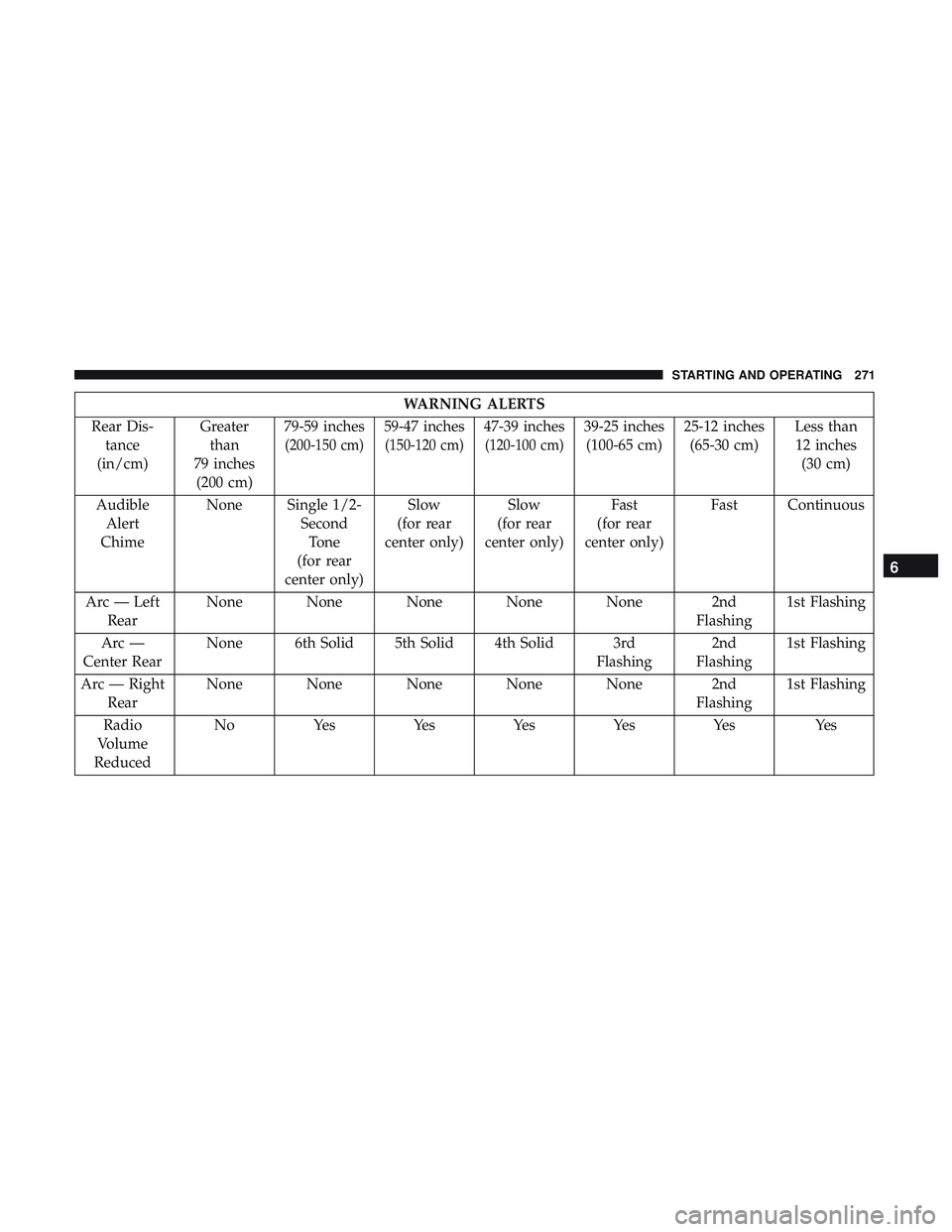
tone. The following chart shows the warning alert opera-
tion when the system is detecting an obstacle:
Continuous Tone/Flashing Arc
270 STARTING AND OPERATING
Page 273 of 553
WARNING ALERTS
Rear Dis- tance
(in/cm) Greater
than
79 inches (200 cm) 79-59 inches
(200-150 cm)
59-47 inches
(150-120 cm)
47-39 inches
(120-100 cm)
39-25 inches
(100-65 cm) 25-12 inches
(65-30 cm) Less than
12 inches (30 cm)
Audible Alert
Chime None Single 1/2-
SecondTone
(for rear
center only) Slow
(for rear
center only) Slow
(for rear
center only) Fast
(for rear
center only) Fast Continuous
Arc — Left Rear None None None None None 2nd
Flashing1st Flashing
Arc —
Center Rear None 6th Solid 5th Solid 4th Solid 3rd
Flashing2nd
Flashing 1st Flashing
Arc — Right Rear None None None None None 2nd
Flashing1st Flashing
Radio
Volume
Reduced No
Yes YesYesYesYes Yes
6
STARTING AND OPERATING 271
Page 276 of 553

WARNING!
Drivers must be careful when backing up even when
using the Rear Park Assist system. Always check
carefully behind your vehicle, and be sure to check for
pedestrians, animals, other vehicles, obstructions, or
blind spots before backing up. You are responsible for
the safety of your surroundings and must continue to
pay attention while backing up. Failure to do so can
result in serious injury or death.
CAUTION!
•ParkSense is only a parking aid and it is unable to
recognize every obstacle, including small obstacles.
Parking curbs might be temporarily detected or not
detected at all. Obstacles located above or below the
sensors will not be detected when they are in close
proximity.
• The vehicle must be driven slowly when using
ParkSense in order to be able to stop in time when an
obstacle is detected. It is recommended that the
driver looks over his/her shoulder when using
ParkSense.
LANESENSE — IF EQUIPPED
LaneSense Operation
The LaneSense system is operational at speeds above
37 mph (60 km/h) and below 112 mph (180 km/h). The
LaneSense system uses a forward looking camera to detect
lane markings and measure vehicle position within the
lane boundaries.
When both lane markings are detected and the driver
unintentionally drifts out of the lane (no turn signal
applied), the LaneSense system provides a haptic warning
in the form of torque applied to the steering wheel to
prompt the driver to remain within the lane boundaries. If
the driver continues to unintentionally drift out of the lane,
the LaneSense system provides a visual warning through
the instrument cluster display to prompt the driver to
remain within the lane boundaries.
The driver may manually override the haptic warning by
applying torque into the steering wheel at any time.
When only a single lane marking is detected and the driver
unintentionally drifts across the lane marking (no turn
signal applied), the LaneSense system provides visual
warnings through the instrument cluster display to prompt
274 STARTING AND OPERATING
Page 277 of 553
the driver to remain within the lane. When only a single
lane marking is detected, a haptic (torque) warning will not
be provided.
NOTE:When operating conditions have been met, the
LaneSense system will monitor if the driver ’s hands are on
the steering wheel and provides an audible warning to the
driver when the driver ’s hands are not detected on the
steering wheel. The system will cancel if the driver does
not return their hands to the wheel.
Turning LaneSense On Or Off
The default status of LaneSense is off.
The LaneSense button is located on the center stack below
the Uconnect display.
To turn the LaneSense system on, push the Lane-
Sense button (LED turns off). A “LaneSense On”
message is shown in the instrument cluster display.
To turn the LaneSense system off, push the LaneSense
button once (LED turns on).
NOTE: The LaneSense system will retain the last system
state, on or off, from the last ignition cycle when the
ignition is changed to the ON/RUN position.
LaneSense Warning Message
The LaneSense system will indicate the current lane drift
condition through the instrument cluster display.
Premium Instrument Cluster Display Screen — If
Equipped
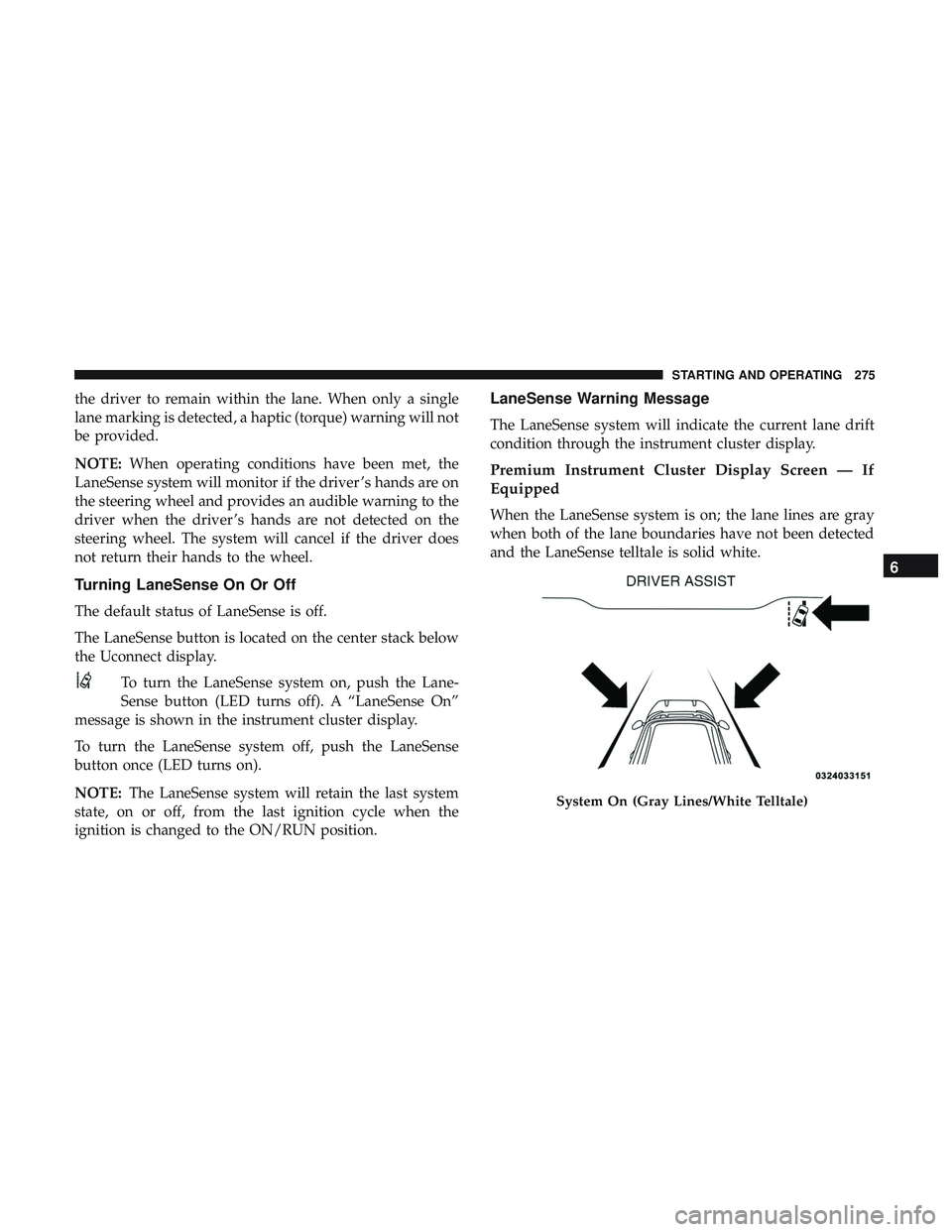
When the LaneSense system is on; the lane lines are gray
when both of the lane boundaries have not been detected
and the LaneSense telltale is solid white.
System On (Gray Lines/White Telltale)
6
STARTING AND OPERATING 275