Page 11 of 516
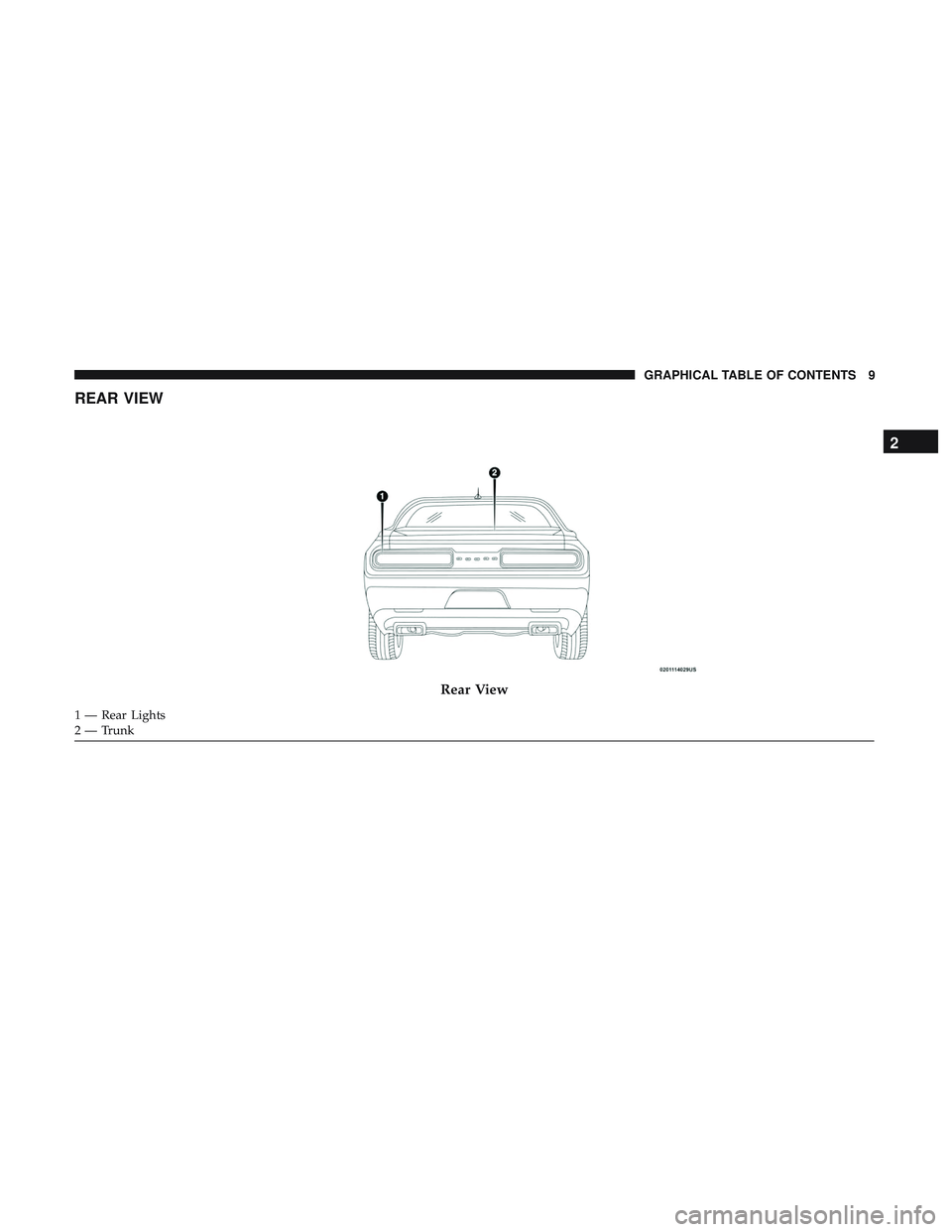
REAR VIEW
Rear View
1 — Rear Lights
2 — Trunk
2
GRAPHICAL TABLE OF CONTENTS 9
Page 17 of 516
▫Headlight Time Delay ....................56
▫ Lights-On Reminder .....................57
▫ Fog Lights — If Equipped .................57
▫ Turn Signals ...........................58
▫ Lane Change Assist — If Equipped ..........58
� INTERIOR LIGHTS .......................58
▫ Map/Reading Lights .....................58
▫ Dimmer Controls .......................59
� WINDSHIELD WIPERS AND WASHERS ........60
▫ Wiper Operation ........................61
▫ Rain Sensing Wipers — If Equipped ..........63
� CLIMATE CONTROLS .....................64
▫ Automatic Climate Control Overview .........64
▫ Climate Control Functions .................69
▫ Automatic Temperature Control (ATC) — If
Equipped .............................70
▫ Operating Tips .........................71 �
WINDOWS .............................73
▫ Power Window Controls ..................73
▫ Wind Buffeting .........................74
� POWER SUNROOF — IF EQUIPPED ..........75
▫ Opening Sunroof ........................76
▫ Closing Sunroof .........................76
▫ Wind Buffeting .........................76
▫ Venting Sunroof — Express .................77
▫ Sunshade Operation ......................77
▫ Pinch Protect Feature .....................77
▫ Sunroof Maintenance .....................77
▫ Ignition Off Operation ....................77
� HOOD ................................78
▫ To Open The Hood ......................78
▫ To Close The Hood ......................79
� TRUNK ...............................79
▫ Opening .............................79
3
GETTING TO KNOW YOUR VEHICLE 15
Page 18 of 516
▫Closing ..............................81
▫ Trunk Safety ...........................81
� GARAGE DOOR OPENER — IF EQUIPPED .....82
▫ Before You Begin Programming HomeLink .....82
▫ Canadian/Gate Operator Programming ........85
▫ Using HomeLink ........................86
▫ Security ..............................87 ▫
Troubleshooting Tips .....................87
▫ General Information ......................88
� INTERNAL EQUIPMENT ...................88
▫ Storage ...............................88
▫ Cupholders ............................90
▫ Electrical Power Outlets ..................91
16 GETTING TO KNOW YOUR VEHICLE
Page 19 of 516
KEYS
Key Fob
The key fob allows you to lock or unlock the doors and
trunk from distances up to approximately 66ft (20m) using
a handheld key fob. The key fob does not need to be
pointed at the vehicle to activate the system.
The key fob also contains an emergency key, which stores
in the rear of the key fob.The emergency key allows for entry into the vehicle should
the battery in the vehicle or the key fob go dead. The
emergency key is also for locking/unlocking the glove
compartment. You can keep the emergency key with you
when valet parking.
To remove the emergency key, slide the mechanical release
button on the back of the key fob sideways with your
thumb and then pull the key out with your other hand.
Key Fob
Emergency Key
3
GETTING TO KNOW YOUR VEHICLE 17
Page 20 of 516

To Unlock The Doors
Push and release the unlock button on the key fob once to
unlock the driver’s door or twice within five seconds to
unlock all doors.
The turn signal lights will flash to acknowledge the unlock
signal. The illuminated entry system will also be activated.NOTE:
All door unlock settings can be programmed to your
convenience through Uconnect Settings. Refer to “Uconnect
Settings” in “Multimedia” for further information.
• Unlock the driver door on the first push of the key fob
unlock button.
• Unlock all doors on the first push of the key fob unlock
button.
NOTE: To unlock doors and trunk with passive entry,
Refer to “Keyless Enter-N-Go — Passive Entry” located in
“Doors” in “Getting To Know Your Vehicle” for further
information.
NOTE: When you use the key fob to open any door, the
courtesy lights, overhead lights, and approach lighting in
the outside mirrors (if equipped) will turn on. Refer to
“Interior Lights” in “Getting To Know Your Vehicle” for
further information
1st Press Of Key Fob Unlocks
This feature lets you program the system to unlock either
the driver’s door or all doors on the first push of the unlock
button on the key fob.
To change the current setting, refer to “Uconnect Settings”
in “Multimedia” for further information.
Emergency Key Removal Process
1 — Mechanical Release Button
2 — Emergency Key 18 GETTING TO KNOW YOUR VEHICLE
Page 21 of 516

Flash Lights With Lock
This feature will cause the turn signal lights to flash when
the doors are locked with the key fob. This feature can be
turned on or turned off. To change the current setting, refer
to “Uconnect Settings” in “Multimedia” for further infor-
mation.
Headlight Illumination On Approach
This feature activates the headlights for up to 90 seconds
when the doors are unlocked with the key fob. The time for
this feature is programmable on vehicles equipped through
Uconnect. To change the current setting, refer to “Uconnect
Settings” in “Multimedia” for further information.
To Unlatch The Trunk
Push the trunk button on the key fob two times within five
seconds to unlatch the trunk.
If the vehicle is equipped with Passive Entry, refer to
“Keyless Enter-N-Go — Passive Entry” under “Getting To
Know Your Vehicle” for further information.
To Lock The Doors And Trunk
Push and release the lock button on the key fob to lock all
doors.The turn signal lights will flash and the horn will chirp to
acknowledge the signal if programmed. Refer to “Uconnect
Settings” in “Multimedia” for further programmable infor-
mation.
NOTE:
To lock the doors with passive entry, Refer to
“Keyless Enter-N-Go — Passive Entry” located in “Doors”
in “Getting To Know Your Vehicle” for further information.
If one or more doors are open, or the trunk is open, the
doors will lock. The doors will unlock automatically if the
key is left inside the passenger compartment, otherwise the
doors will stay locked.
Sound Horn With Lock
This feature will cause the horn to chirp when the doors are
locked with the key fob. This feature can be turned on or
turned off. To change the current setting, refer to
“Uconnect Settings” in “Multimedia” for further informa-
tion.
Using The Panic Alarm
To turn the Panic Alarm feature on or off, push the Panic
button on the key fob. When the Panic Alarm is activated,
the turn signals will flash, the horn will pulse on and off,
and the interior lights will turn on.
3
GETTING TO KNOW YOUR VEHICLE 19
Page 28 of 516

WARNING!(Continued)
•Do not leave the key fob in or near the vehicle, or in
a location accessible to children, and do not leave the
ignition of a vehicle equipped with Keyless Enter-
N-Go in the ON/RUN mode. A child could operate
power windows, other controls, or move the vehicle.
• Do not leave children or animals inside parked
vehicles in hot weather. Interior heat build-up may
cause serious injury or death.
CAUTION!
An unlocked vehicle is an invitation for thieves. Al-
ways remove key fob from the vehicle and lock all
doors when leaving the vehicle unattended.
REMOTE START — IF EQUIPPED
How To Use Remote Start — If Equipped
Push remote start button on the key fob twice
within five seconds. Pushing the remote start
button a third time shuts the engine off. To drive the vehicle, push the unlock button, and push the
ignition to the ON/RUN position.
NOTE:
•
With remote start, the engine will only run for 15
minutes (timeout) unless the ignition is placed in the
ON/RUN position.
• The vehicle must be started with the key after two
consecutive timeouts.
All of the following conditions must be met before the
engine will remote start:
• Gear selector in PARK
• Doors closed
• Hood closed
• Trunk closed
• Hazard switch off
• Brake switch inactive (brake pedal not pushed)
• Battery at an acceptable charge level
• Check engine light shall not be present
• PANIC button not pushed
• System not disabled from previous remote start event
26 GETTING TO KNOW YOUR VEHICLE
Page 29 of 516

•Vehicle alarm system indicator flashing
• Ignition in STOP/OFF position
• Fuel level meets minimum requirement
• Vehicle Security Alarm is not signaling an intrusion
WARNING!
•Do not start or run an engine in a closed garage or
confined area. Exhaust gas contains Carbon Monox-
ide (CO) which is odorless and colorless. Carbon
Monoxide is poisonous and can cause serious injury
or death when inhaled.
• Keep key fobs away from children. Operation of the
Remote Start System, windows, door locks or other
controls could cause serious injury or death.
Remote Start Abort Message On The Instrument
Cluster Display — If Equipped
The following messages will display in the instrument
cluster display if the vehicle fails to remote start or exits
remote start prematurely:
• Remote Start Aborted — Door Open
• Remote Start Aborted — Hood Open •
Remote Start Aborted — Fuel Low
• Remote Start Aborted — Trunk Open
• Remote Start Disabled — Start Vehicle To Reset
The message will stay active until the ignition is turned to
the ON/RUN position.
To Enter Remote Start Mode
Push and release the remote start button on the key fob
twice within five seconds. The vehicle doors will lock, the
parking lights will flash, and the horn will chirp twice (if
programmed). Then, the engine will start, and the vehicle
will remain in the Remote Start mode for a 15-minute cycle.
NOTE:
• If an engine fault is present or fuel level is low, the
vehicle will start and then shut down in 10 seconds.
• The park lamps will turn on and remain on during
Remote Start mode.
• For security, power window and power sunroof opera-
tion (if equipped) are disabled when the vehicle is in the
Remote Start mode.
• The engine can be started two consecutive times with
the key fob. However, the ignition must be cycled by
3
GETTING TO KNOW YOUR VEHICLE 27