Page 10 of 516
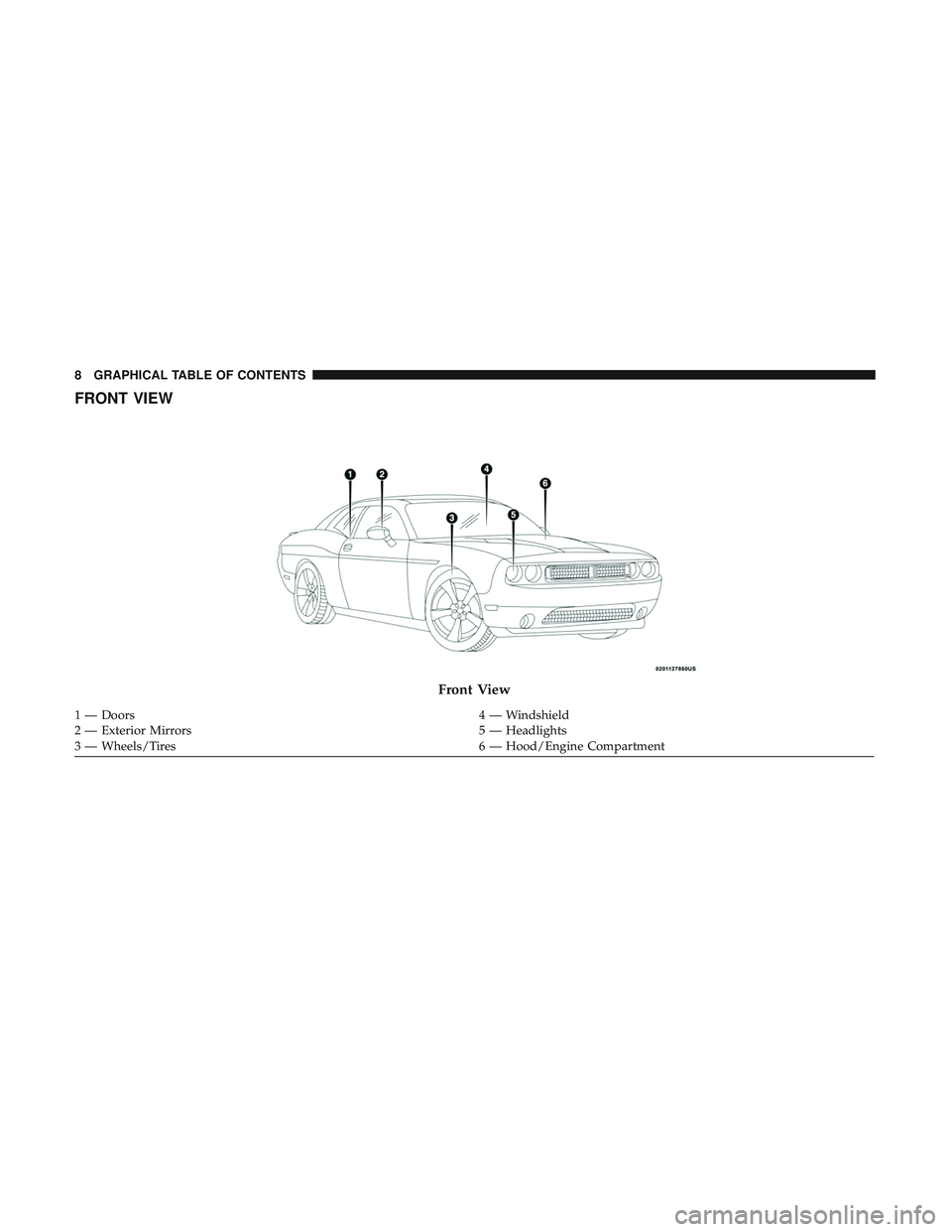
FRONT VIEW
Front View
1 — Doors4 — Windshield
2 — Exterior Mirrors 5 — Headlights
3 — Wheels/Tires 6 — Hood/Engine Compartment
8 GRAPHICAL TABLE OF CONTENTS
Page 13 of 516
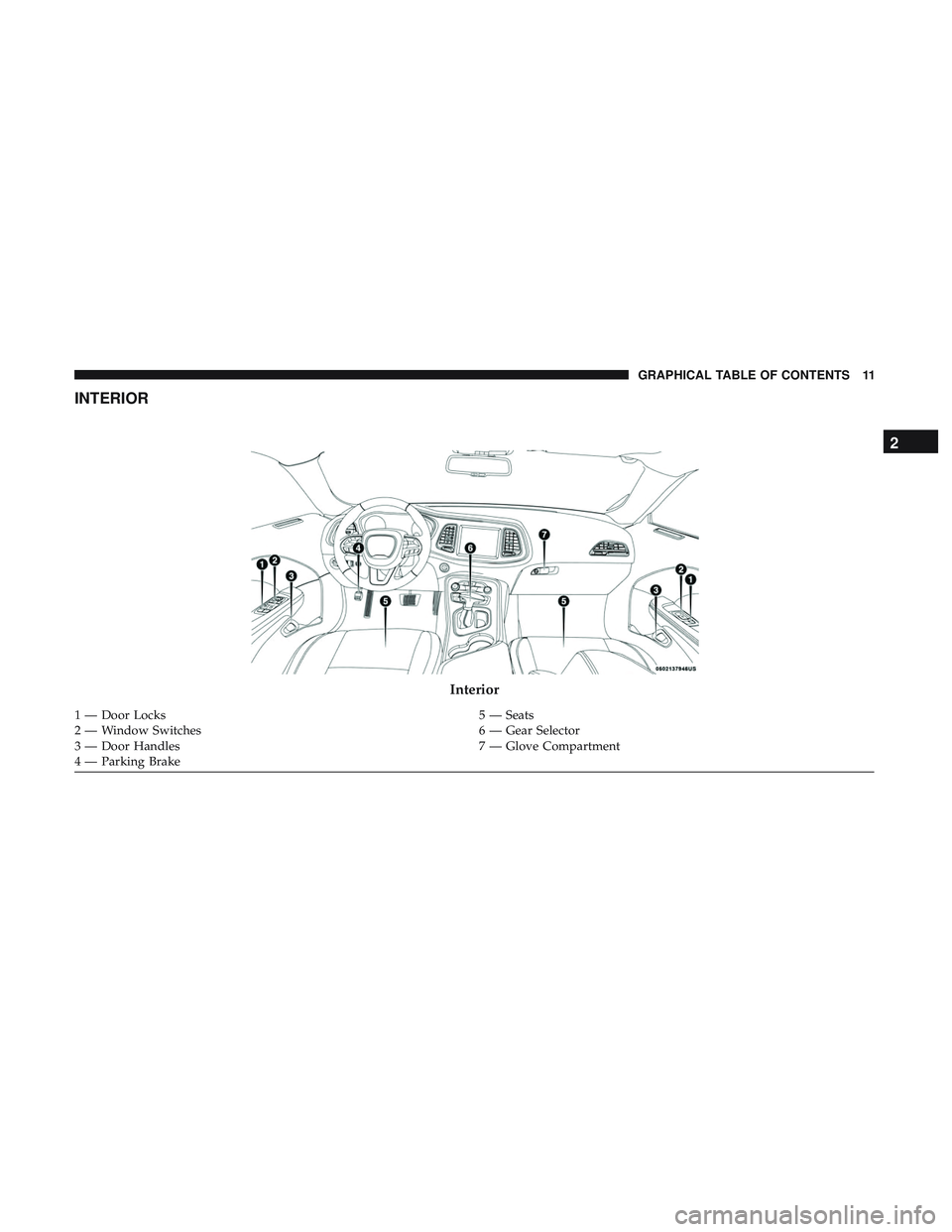
INTERIOR
Interior
1 — Door Locks5 — Seats
2 — Window Switches 6 — Gear Selector
3 — Door Handles 7 — Glove Compartment
4 — Parking Brake
2
GRAPHICAL TABLE OF CONTENTS 11
Page 15 of 516

GETTING TO KNOW YOUR VEHICLE
CONTENTS
�KEYS .................................17
▫ KeyFob..............................17
� IGNITION SWITCH .......................23
▫ Keyless Push Button Ignition ...............23
▫ Vehicle On Message .....................25
� REMOTE START — IF EQUIPPED .............26
▫ How To Use Remote Start — If Equipped ......26
▫ Remote Start Abort Message On The Instrument
Cluster Display — If Equipped ..............27
▫ To Enter Remote Start Mode ................27
▫ To Exit Remote Start Mode Without Driving The
Vehicle ...............................28
▫ To Exit Remote Start Mode And Drive The
Vehicle ...............................28
▫ Remote Start Comfort Systems — If Equipped . . .29 ▫
General Information .....................29
� SENTRY KEY ...........................29
▫ Customer Key Programming ...............30
▫ Replacement Keys .......................30
▫ General Information .....................30
� VEHICLE SECURITY ALARM — IF EQUIPPED . . .31
▫ To Arm The System .....................31
▫ To Disarm The System ....................31
▫ Rearming Of The System ..................32
▫ Tamper Alert ...........................32
� DOORS ...............................32
▫ Manual Door Locks ......................32
▫ Power Door Locks ......................34
▫ Keyless Enter-N-Go — Passive Entry .........343
Page 16 of 516

▫Automatic Unlock Doors On Exit ............38
▫ Automatic Door Locks — If Equipped ........39
� SEATS ................................39
▫
Manual Adjustment (Front Seats) — If Equipped . .39
▫ Power Seats — If Equipped ................41
▫ Heated Seats — If Equipped ...............42
▫ Front Ventilated Seats — If Equipped .........43
▫ Passenger Seat Easy Entry .................44
▫ Folding Rear Seat .......................45
� HEAD RESTRAINTS ......................46
▫ Reactive Head Restraints — Front Seats .......47
▫ Rear Head Restraints .....................48
� STEERING WHEEL .......................48
▫ Manual Tilt/Telescoping Steering Column ......48
▫ Power Tilt/Telescoping Steering Column — If
Equipped .............................49
▫ Heated Steering Wheel — If Equipped .........50�
MIRRORS ..............................50
▫ Automatic Dimming Mirror ................50
▫ Outside Mirrors ........................51
▫ Power Mirrors .........................52
▫ Heated Mirrors — If Equipped .............52
▫ Illuminated Vanity Mirrors ................53
� EXTERIOR LIGHTS .......................54
▫ Headlight Switch .......................54
▫ Multifunction Lever .....................54
▫ Daytime Running Lights (DRL) — If Equipped . .55
▫ High/Low Beam Switch ..................55
▫ Automatic High Beam Headlamp Control — If
Equipped .............................55
▫ Flash-To-Pass ..........................55
▫ Automatic Headlights ....................56
▫ Parking Lights .........................56
▫ Headlights On With Wipers ................56
14 GETTING TO KNOW YOUR VEHICLE
Page 18 of 516
▫Closing ..............................81
▫ Trunk Safety ...........................81
� GARAGE DOOR OPENER — IF EQUIPPED .....82
▫ Before You Begin Programming HomeLink .....82
▫ Canadian/Gate Operator Programming ........85
▫ Using HomeLink ........................86
▫ Security ..............................87 ▫
Troubleshooting Tips .....................87
▫ General Information ......................88
� INTERNAL EQUIPMENT ...................88
▫ Storage ...............................88
▫ Cupholders ............................90
▫ Electrical Power Outlets ..................91
16 GETTING TO KNOW YOUR VEHICLE
Page 19 of 516
KEYS
Key Fob
The key fob allows you to lock or unlock the doors and
trunk from distances up to approximately 66ft (20m) using
a handheld key fob. The key fob does not need to be
pointed at the vehicle to activate the system.
The key fob also contains an emergency key, which stores
in the rear of the key fob.The emergency key allows for entry into the vehicle should
the battery in the vehicle or the key fob go dead. The
emergency key is also for locking/unlocking the glove
compartment. You can keep the emergency key with you
when valet parking.
To remove the emergency key, slide the mechanical release
button on the back of the key fob sideways with your
thumb and then pull the key out with your other hand.
Key Fob
Emergency Key
3
GETTING TO KNOW YOUR VEHICLE 17
Page 20 of 516

To Unlock The Doors
Push and release the unlock button on the key fob once to
unlock the driver’s door or twice within five seconds to
unlock all doors.
The turn signal lights will flash to acknowledge the unlock
signal. The illuminated entry system will also be activated.NOTE:
All door unlock settings can be programmed to your
convenience through Uconnect Settings. Refer to “Uconnect
Settings” in “Multimedia” for further information.
• Unlock the driver door on the first push of the key fob
unlock button.
• Unlock all doors on the first push of the key fob unlock
button.
NOTE: To unlock doors and trunk with passive entry,
Refer to “Keyless Enter-N-Go — Passive Entry” located in
“Doors” in “Getting To Know Your Vehicle” for further
information.
NOTE: When you use the key fob to open any door, the
courtesy lights, overhead lights, and approach lighting in
the outside mirrors (if equipped) will turn on. Refer to
“Interior Lights” in “Getting To Know Your Vehicle” for
further information
1st Press Of Key Fob Unlocks
This feature lets you program the system to unlock either
the driver’s door or all doors on the first push of the unlock
button on the key fob.
To change the current setting, refer to “Uconnect Settings”
in “Multimedia” for further information.
Emergency Key Removal Process
1 — Mechanical Release Button
2 — Emergency Key 18 GETTING TO KNOW YOUR VEHICLE
Page 21 of 516

Flash Lights With Lock
This feature will cause the turn signal lights to flash when
the doors are locked with the key fob. This feature can be
turned on or turned off. To change the current setting, refer
to “Uconnect Settings” in “Multimedia” for further infor-
mation.
Headlight Illumination On Approach
This feature activates the headlights for up to 90 seconds
when the doors are unlocked with the key fob. The time for
this feature is programmable on vehicles equipped through
Uconnect. To change the current setting, refer to “Uconnect
Settings” in “Multimedia” for further information.
To Unlatch The Trunk
Push the trunk button on the key fob two times within five
seconds to unlatch the trunk.
If the vehicle is equipped with Passive Entry, refer to
“Keyless Enter-N-Go — Passive Entry” under “Getting To
Know Your Vehicle” for further information.
To Lock The Doors And Trunk
Push and release the lock button on the key fob to lock all
doors.The turn signal lights will flash and the horn will chirp to
acknowledge the signal if programmed. Refer to “Uconnect
Settings” in “Multimedia” for further programmable infor-
mation.
NOTE:
To lock the doors with passive entry, Refer to
“Keyless Enter-N-Go — Passive Entry” located in “Doors”
in “Getting To Know Your Vehicle” for further information.
If one or more doors are open, or the trunk is open, the
doors will lock. The doors will unlock automatically if the
key is left inside the passenger compartment, otherwise the
doors will stay locked.
Sound Horn With Lock
This feature will cause the horn to chirp when the doors are
locked with the key fob. This feature can be turned on or
turned off. To change the current setting, refer to
“Uconnect Settings” in “Multimedia” for further informa-
tion.
Using The Panic Alarm
To turn the Panic Alarm feature on or off, push the Panic
button on the key fob. When the Panic Alarm is activated,
the turn signals will flash, the horn will pulse on and off,
and the interior lights will turn on.
3
GETTING TO KNOW YOUR VEHICLE 19