Page 313 of 516
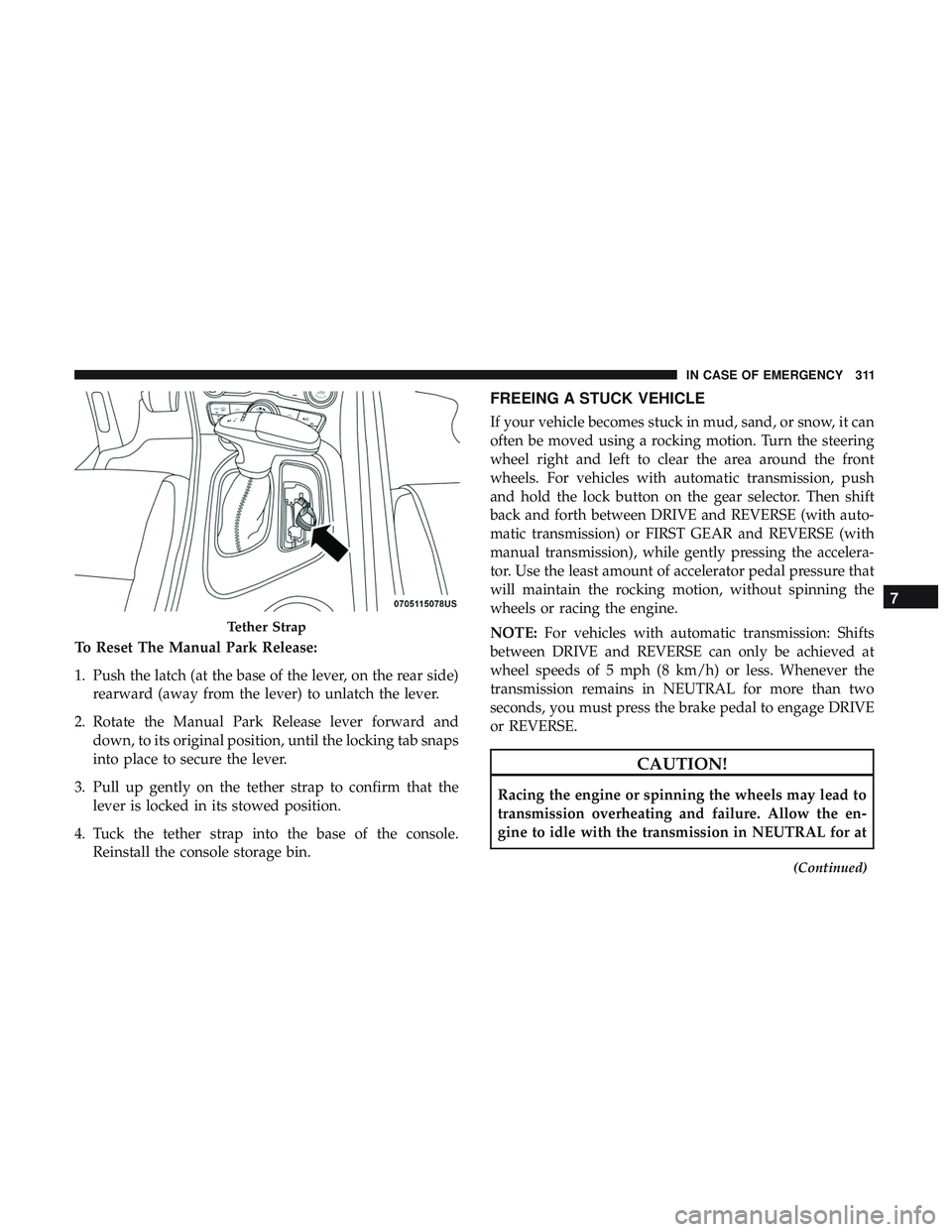
To Reset The Manual Park Release:
1. Push the latch (at the base of the lever, on the rear side)rearward (away from the lever) to unlatch the lever.
2. Rotate the Manual Park Release lever forward and down, to its original position, until the locking tab snaps
into place to secure the lever.
3. Pull up gently on the tether strap to confirm that the lever is locked in its stowed position.
4. Tuck the tether strap into the base of the console. Reinstall the console storage bin.
FREEING A STUCK VEHICLE
If your vehicle becomes stuck in mud, sand, or snow, it can
often be moved using a rocking motion. Turn the steering
wheel right and left to clear the area around the front
wheels. For vehicles with automatic transmission, push
and hold the lock button on the gear selector. Then shift
back and forth between DRIVE and REVERSE (with auto-
matic transmission) or FIRST GEAR and REVERSE (with
manual transmission), while gently pressing the accelera-
tor. Use the least amount of accelerator pedal pressure that
will maintain the rocking motion, without spinning the
wheels or racing the engine.
NOTE: For vehicles with automatic transmission: Shifts
between DRIVE and REVERSE can only be achieved at
wheel speeds of 5 mph (8 km/h) or less. Whenever the
transmission remains in NEUTRAL for more than two
seconds, you must press the brake pedal to engage DRIVE
or REVERSE.
CAUTION!
Racing the engine or spinning the wheels may lead to
transmission overheating and failure. Allow the en-
gine to idle with the transmission in NEUTRAL for at
(Continued)
Tether Strap
7
IN CASE OF EMERGENCY 311
Page 346 of 516
•Noise (objectionable squeal, squeak, or rumble is heard
or felt while drive belt is in operation)
Some conditions can be caused by a faulty component such
as a belt pulley. Belt pulleys should be carefully inspected
for damage and proper alignment.
Belt replacement on some models requires the use of
special tools, we recommend having your vehicle serviced
at an authorized dealer.
Body Lubrication
Locks and all body pivot points, including such items as
seat tracks, door hinge pivot points and rollers, liftgate,
tailgate, decklid, sliding doors and hood hinges, should be
lubricated periodically with a lithium based grease, such as
Mopar Spray White Lube to assure quiet, easy operation
and to protect against rust and wear. Prior to the applica-
tion of any lubricant, the parts concerned should be wiped
clean to remove dust and grit; after lubricating excess oil
and grease should be removed. Particular attention should
also be given to hood latching components to ensure
proper function. When performing other underhood ser-
vices, the hood latch, release mechanism and safety catch
should be cleaned and lubricated. The external lock cylinders should be lubricated twice a
year, preferably in the Fall and Spring. Apply a small
amount of a high quality lubricant, such as Mopar Lock
Cylinder Lubricant directly into the lock cylinder.
Windshield Wiper Blades
Clean the rubber edges of the wiper blades and the
windshield periodically with a sponge or soft cloth and a
mild nonabrasive cleaner. This will remove accumulations
of salt or road film.
Operation of the wipers on dry glass for long periods may
cause deterioration of the wiper blades. Always use washer
fluid when using the wipers to remove salt or dirt from a
dry windshield.
Avoid using the wiper blades to remove frost or ice from
the windshield. Keep the blade rubber out of contact with
petroleum products such as engine oil, gasoline, etc.
NOTE:
Life expectancy of wiper blades varies depending
on geographical area and frequency of use. Poor perfor-
mance of blades may be present with chattering, marks,
water lines or wet spots. If any of these conditions are
present, clean the wiper blades or replace as necessary.
344 SERVICING AND MAINTENANCE
Page 347 of 516
Wiper Blade Removal/Installation
CAUTION!
Do not allow the wiper arm to spring back against the
glass without the wiper blade in place or the glass may
be damaged.
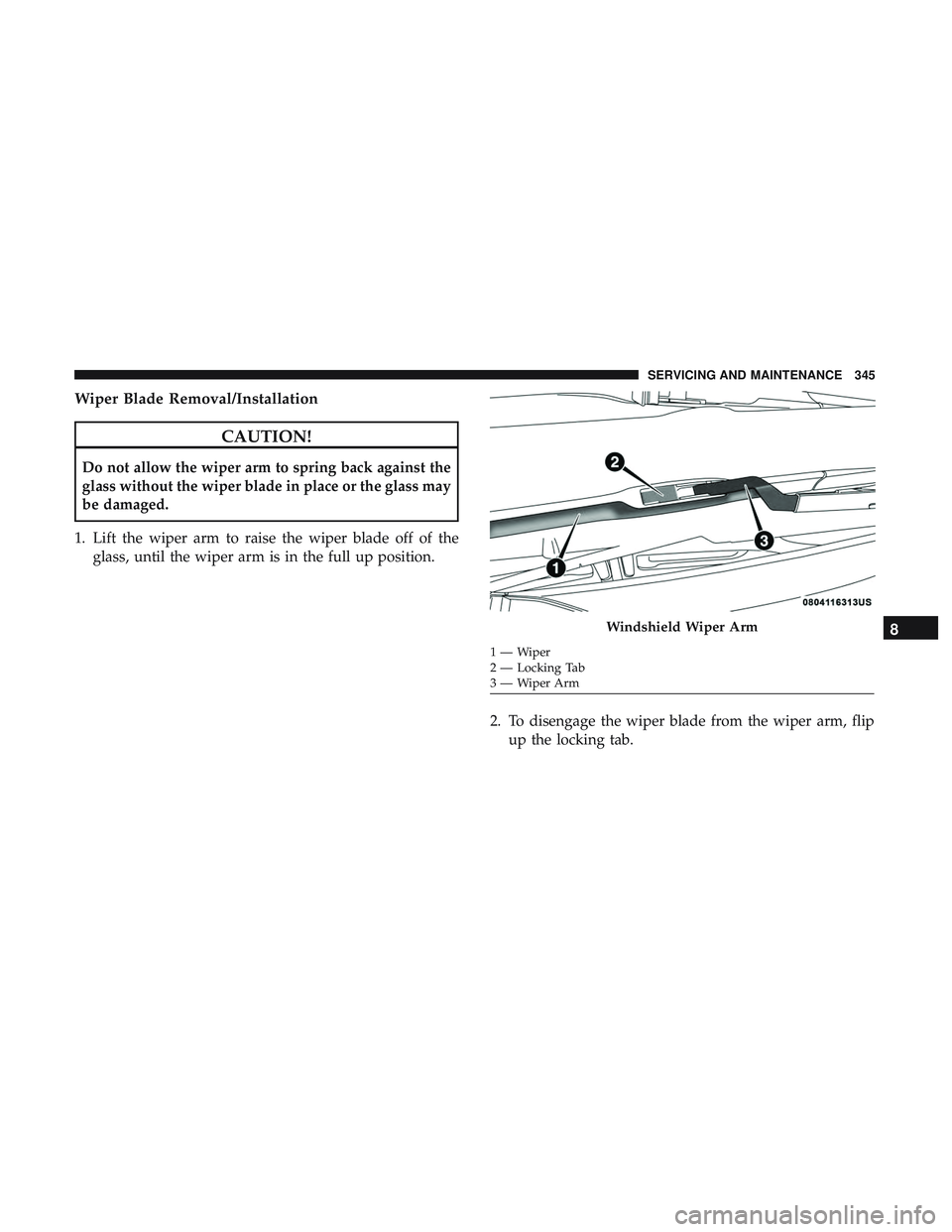
1. Lift the wiper arm to raise the wiper blade off of the glass, until the wiper arm is in the full up position.
2. To disengage the wiper blade from the wiper arm, flipup the locking tab.
Windshield Wiper Arm
1—Wiper
2 — Locking Tab
3—WiperArm
8
SERVICING AND MAINTENANCE 345
Page 348 of 516
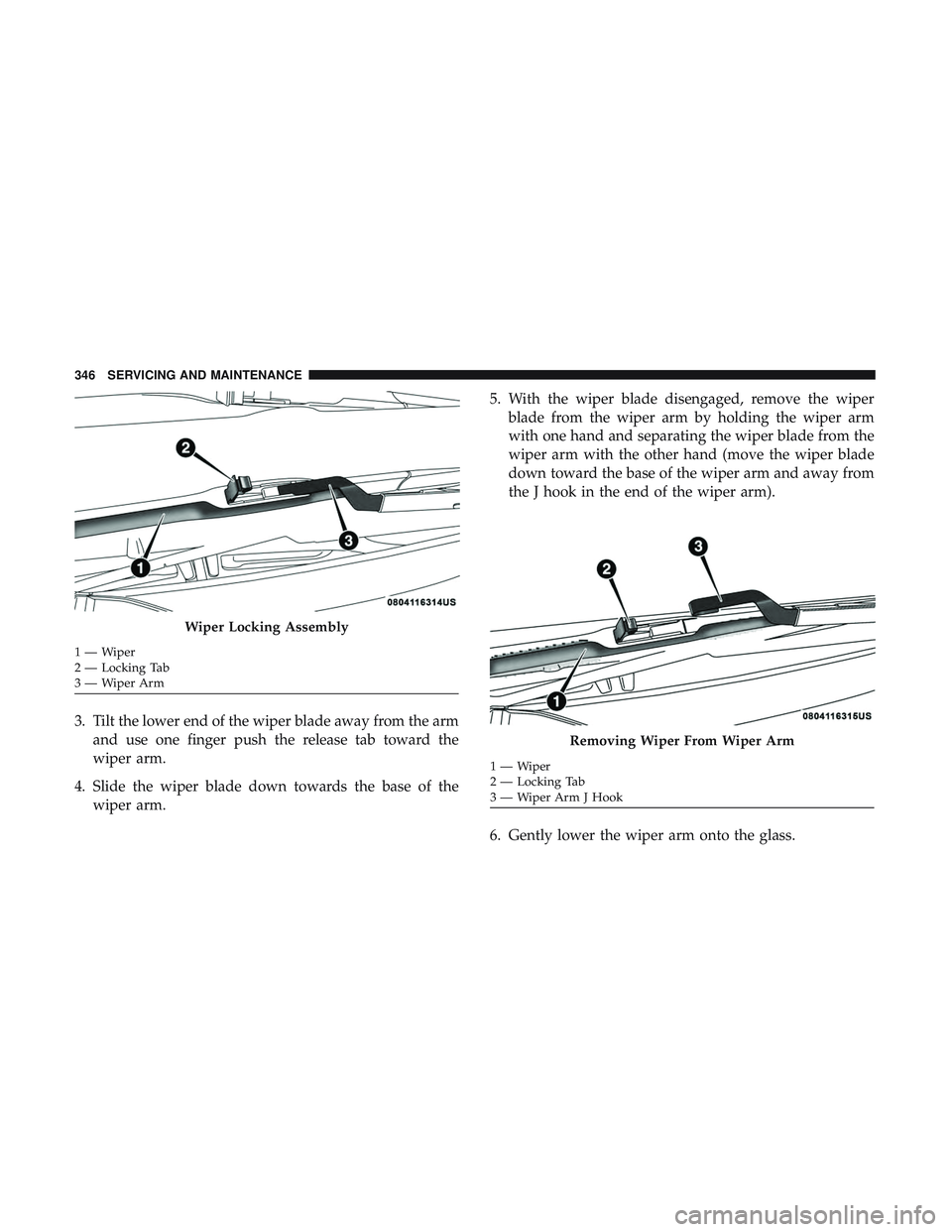
3. Tilt the lower end of the wiper blade away from the armand use one finger push the release tab toward the
wiper arm.
4. Slide the wiper blade down towards the base of the wiper arm. 5. With the wiper blade disengaged, remove the wiper
blade from the wiper arm by holding the wiper arm
with one hand and separating the wiper blade from the
wiper arm with the other hand (move the wiper blade
down toward the base of the wiper arm and away from
the J hook in the end of the wiper arm).
6. Gently lower the wiper arm onto the glass.
Wiper Locking Assembly
1—Wiper
2 — Locking Tab
3—WiperArm
Removing Wiper From Wiper Arm
1—Wiper
2 — Locking Tab
3 — Wiper Arm J Hook
346 SERVICING AND MAINTENANCE
Page 349 of 516
Installing The Front Wipers
1. Lift the wiper arm off of the glass, until the wiper arm isin the full up position.
2. Position the wiper blade under the hook on the tip of the wiper arm with the wiper locking tab open.
3. Insert the receiver bracket on the wiper assembly into the hook on the tip of the arm through the opening in
the wiper blade under the locking tab.
4. Slide the wiper blade up into the hook on the wiper arm until it is latched (engagement will be accompanied by
an audible click). Fold down the latch release tab and
snap it into its locked position.
5. Gently lower the wiper blade onto the glass.
Exhaust System
The best protection against carbon monoxide entry into the
vehicle body is a properly maintained engine exhaust
system.
If you notice a change in the sound of the exhaust system;
or if the exhaust fumes can be detected inside the vehicle;
or when the underside or rear of the vehicle is damaged; have an authorized technician inspect the complete ex-
haust system and adjacent body areas for broken, dam-
aged, deteriorated, or mispositioned parts. Open seams or
loose connections could permit exhaust fumes to seep into
the passenger compartment. In addition, have the exhaust
system inspected each time the vehicle is raised for lubri-
cation or oil change. Replace as required.
WARNING!
•
Exhaust gases can injure or kill. They contain carbon
monoxide (CO), which is colorless and odorless.
Breathing it can make you unconscious and can
eventually poison you. To avoid breathing CO, refer
to “Safety Tips” in “Safety” for further information.
• A hot exhaust system can start a fire if you park over
materials that can burn. Such materials might be
grass or leaves coming into contact with your exhaust
system. Do not park or operate your vehicle in areas
where your exhaust system can contact anything that
can burn.
8
SERVICING AND MAINTENANCE 347
Page 412 of 516
Voice
After pressing the “Voice” button on the touchscreen, the
following settings will be available:
Setting NameSelectable Options
Voice Response Length BriefLong
Show Command List AlwaysWith Help Never
Clock
After pressing the “Clock” button on the touchscreen, the
following settings will be available:
Setting Name Selectable Options
Sync Time With GPS — If Equipped On
Off
NOTE:
The “Sync Time With GPS” feature will allow you to automatically have the radio set the time. Set Time Hours +–
Set Time Minutes +–
Time Format 12 hrs24 hrs
410 MULTIMEDIA
Page 413 of 516

Setting NameSelectable Options
Show Time In Status Bar — If Equipped On
Off
NOTE:
The “Show Time In Status Bar” feature will allow you to turn on or shut off the digital clock in the status bar.
Safety & Driving Assistance
After pressing the “Safety & Driving Assistance” button on
the touchscreen, the following settings will be available:
Setting Name Selectable Options
Forward Collision Warn- ing — If Equipped Near
Far
NOTE:
The Front Collision Warning (FCW) feature provides an audible and/or visual warning to potential forward colli-
sions. The feature can be set to Far, or set to Near. The default status of FCW is the Far setting. This means the sys-
tem will warn you of a possible collision with the vehicle in front of you when you are farther away. This gives you
the most reaction time. To change the setting for more dynamic driving, select the Near setting. This warns you of a
possible collision when you are much closer to the vehicle in front of you.
10
MULTIMEDIA 411
Page 418 of 516
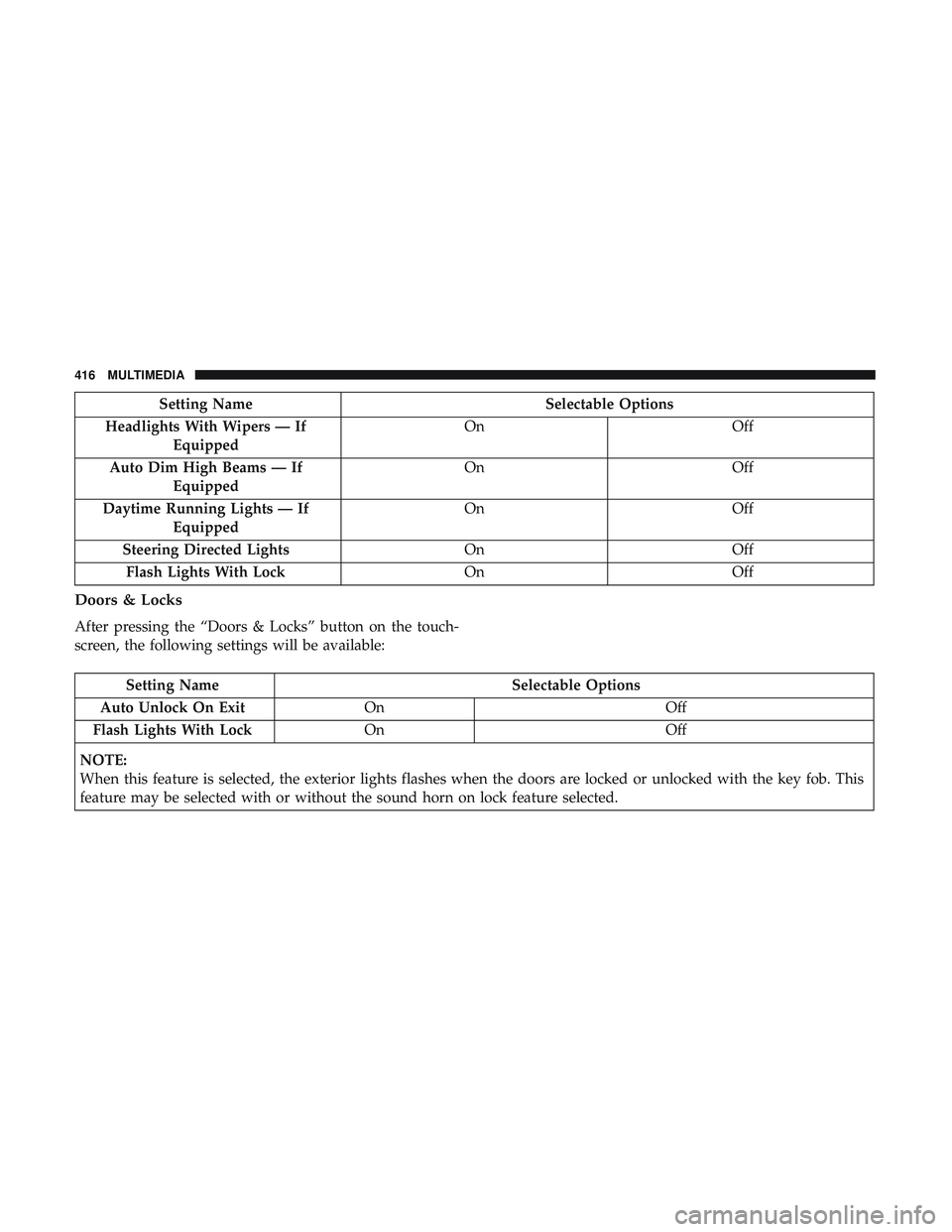
Setting NameSelectable Options
Headlights With Wipers — If Equipped On
Off
Auto Dim High Beams — If Equipped On
Off
Daytime Running Lights — If Equipped On
Off
Steering Directed Lights OnOff
Flash Lights With Lock OnOff
Doors & Locks
After pressing the “Doors & Locks” button on the touch-
screen, the following settings will be available:
Setting Name Selectable Options
Auto Unlock On Exit On Off
Flash Lights With Lock On Off
NOTE:
When this feature is selected, the exterior lights flashes when the doors are locked or unlocked with the key fob. This
feature may be selected with or without the sound horn on lock feature selected.
416 MULTIMEDIA