Page 270 of 696
WARNING!
•Do not drill, cut, or tamper with the knee impact
bolsters in any way.
• Do not mount any accessories to the knee impact
bolsters such as alarm lights, stereos, citizen band
radios, etc.
Supplemental Driver And Front Passenger Knee Air
Bags
This vehicle is equipped with a Supplemental Driver Knee
Air Bag mounted in the instrument panel below the
steering column and a Supplemental Passenger Knee Air
Bag mounted in the instrument panel below the glove
compartment. The Supplemental Knee Air Bags provide
enhanced protection during a frontal impact by working
together with the seat belts, pretensioners, and front air
bags.
Supplemental Side Air Bags
Supplemental Seat-Mounted Side Air Bags (SABs)
This vehicle is equipped with Supplemental Seat-Mounted
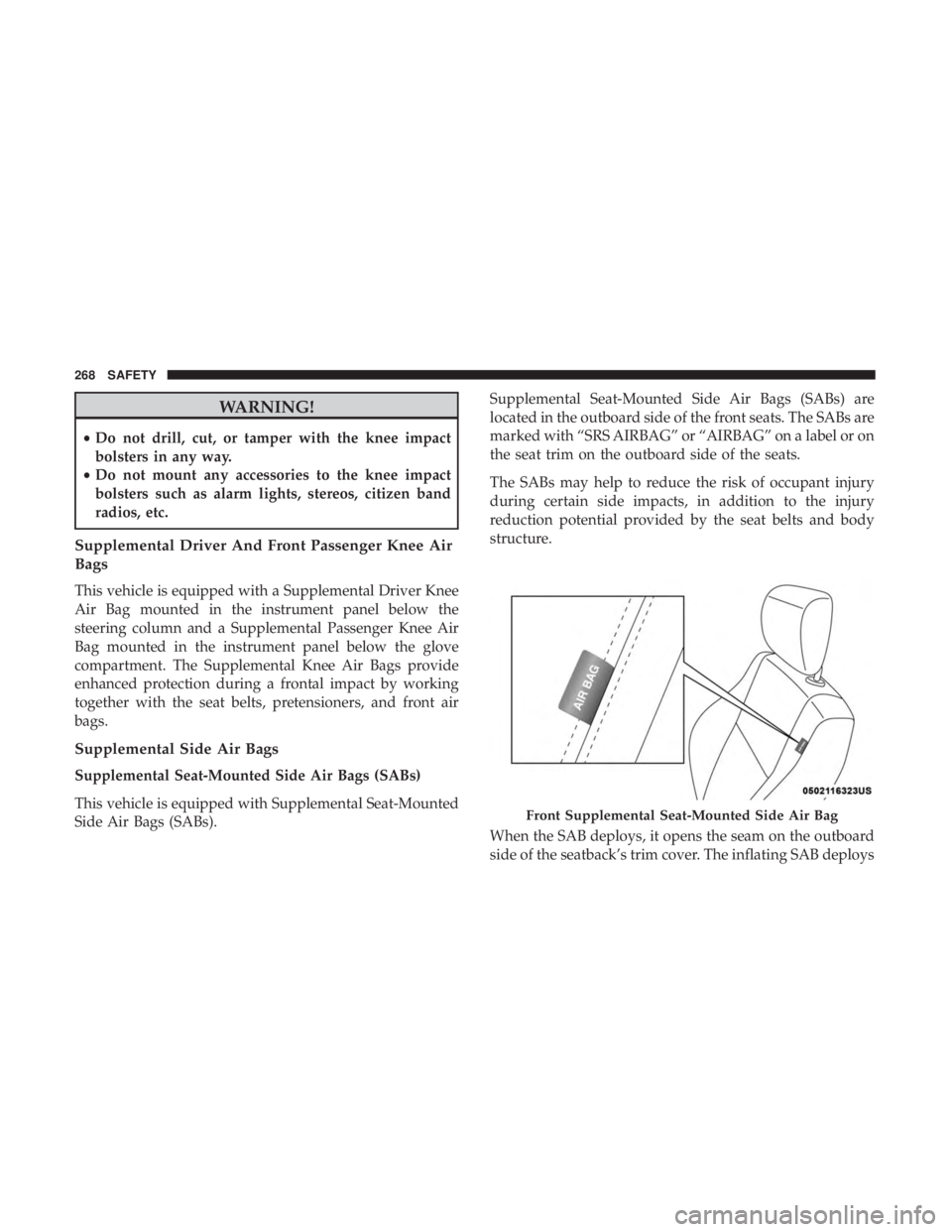
Side Air Bags (SABs). Supplemental Seat-Mounted Side Air Bags (SABs) are
located in the outboard side of the front seats. The SABs are
marked with “SRS AIRBAG” or “AIRBAG” on a label or on
the seat trim on the outboard side of the seats.
The SABs may help to reduce the risk of occupant injury
during certain side impacts, in addition to the injury
reduction potential provided by the seat belts and body
structure.
When the SAB deploys, it opens the seam on the outboard
side of the seatback’s trim cover. The inflating SAB deploys
Front Supplemental Seat-Mounted Side Air Bag
268 SAFETY
Page 331 of 696

4. The STOP/START system will reset itself back to an ONcondition every time the ignition is turned off and back
on.
Automatic Shutdown
This vehicle is equipped with an automatic shutdown
feature. If the vehicle is left in READY mode (vehicle
running) with the gear selector in PARK for one hour after
the driver exits, this feature will automatically turn the
vehicle off. Notifications have been added into this feature
to raise awareness of the timed event:
• In the interior of the vehicle, the instrument cluster will
display “Ready To Drive”, and will be accompanied by
three audible chimes while exiting. These interior warn-
ings will occur regardless of whether the key fob re-
mains in the vehicle or is removed.
• For the exterior of the vehicle, the horn will sound three
times if the fob is removed from the vehicle and the
vehicle is in the “READY” mode.
Please consider this feature when intentionally running the
vehicle for extended periods of time over one hour. To
restart the vehicle, follow the normal vehicle starting
process. NOTE:
If the vehicle is left in the ACC or RUN (engine not
running) position and the transmission is in PARK, the
system will automatically time out (shut down) after an
initial 30 minutes of inactivity, followed by the additional
amount of time for power accessory delay selected in the
radio settings menu. Once the vehicle times out, it will
switch to the OFF position.
To Manually Turn On The Stop/Start System
After turning off the STOP/START system, push the
STOP/START OFF switch again (located on the instrument
panel). The light on the switch will turn off.
System Malfunction
If there is a malfunction in the STOP/START system, the
system will not shut down the engine. A “SERVICE STOP/
START SYSTEM” message will appear in the instrument
cluster display and the Stop/Start telltale will remain
yellow. Refer to “Instrument Cluster Display” in “Getting
To Know Your Instrument Panel” for further information.
If the “SERVICE STOP/START SYSTEM” message appears
in the instrument cluster display, have the system checked
by your authorized dealer.
6
STARTING AND OPERATING 329
Page 350 of 696
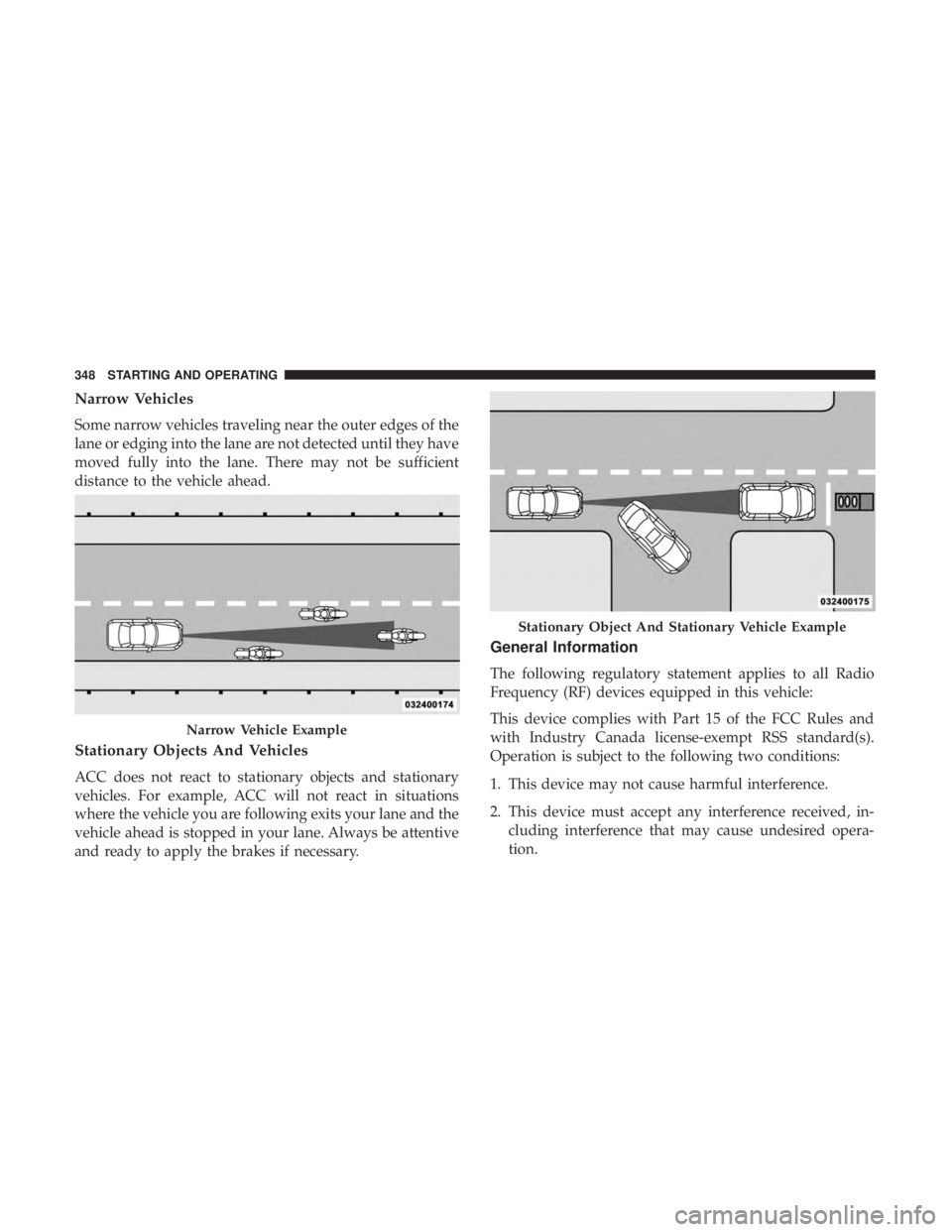
Narrow Vehicles
Some narrow vehicles traveling near the outer edges of the
lane or edging into the lane are not detected until they have
moved fully into the lane. There may not be sufficient
distance to the vehicle ahead.
Stationary Objects And Vehicles
ACC does not react to stationary objects and stationary
vehicles. For example, ACC will not react in situations
where the vehicle you are following exits your lane and the
vehicle ahead is stopped in your lane. Always be attentive
and ready to apply the brakes if necessary.
General Information
The following regulatory statement applies to all Radio
Frequency (RF) devices equipped in this vehicle:
This device complies with Part 15 of the FCC Rules and
with Industry Canada license-exempt RSS standard(s).
Operation is subject to the following two conditions:
1. This device may not cause harmful interference.
2. This device must accept any interference received, in-cluding interference that may cause undesired opera-
tion.
Narrow Vehicle Example
Stationary Object And Stationary Vehicle Example
348 STARTING AND OPERATING
Page 359 of 696
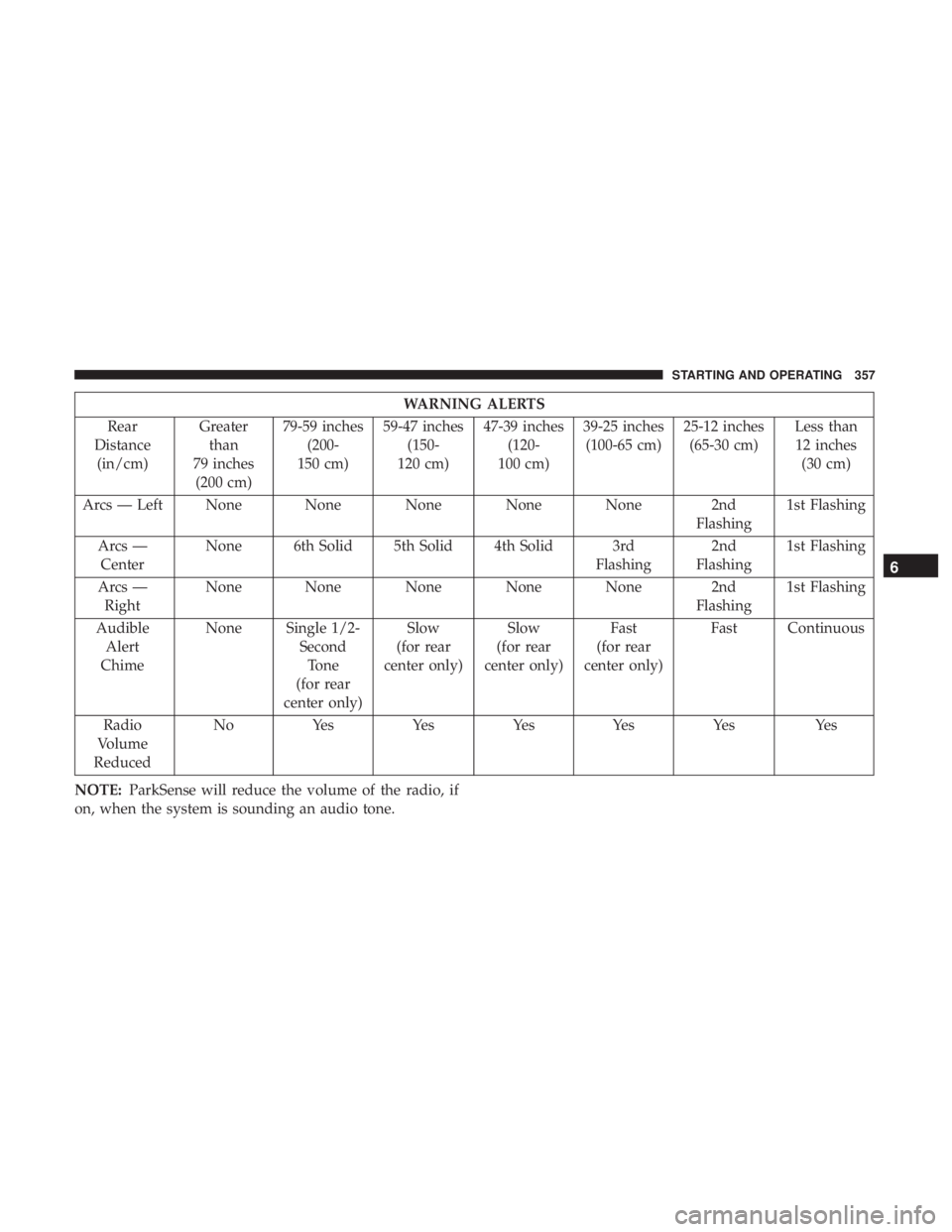
WARNING ALERTS
Rear
Distance (in/cm) Greater
than
79 inches (200 cm) 79-59 inches
(200-
150 cm) 59-47 inches
(150-
120 cm) 47-39 inches
(120-
100 cm) 39-25 inches
(100-65 cm) 25-12 inches
(65-30 cm) Less than
12 inches (30 cm)
Arcs — Left None None None None None 2nd Flashing1st Flashing
Arcs — Center None 6th Solid 5th Solid 4th Solid 3rd
Flashing2nd
Flashing 1st Flashing
Arcs — Right None None None None None 2nd
Flashing1st Flashing
Audible Alert
Chime None Single 1/2-
SecondTone
(for rear
center only) Slow
(for rear
center only) Slow
(for rear
center only) Fast
(for rear
center only) Fast Continuous
Radio
Volume
Reduced No
Yes YesYesYes Yes Yes
NOTE: ParkSense will reduce the volume of the radio, if
on, when the system is sounding an audio tone.
6
STARTING AND OPERATING 357
Page 361 of 696

If “PARKSENSE UNAVAILABLE SERVICE REQUIRED”
appears in the instrument cluster display, see an autho-
rized dealer.
Cleaning The ParkSense System
Clean the ParkSense sensors with water, car wash soap and
a soft cloth. Do not use rough or hard cloths. Do not scratch
or poke the sensors. Otherwise, you could damage the
sensors.
ParkSense System Usage Precautions
NOTE:
•Ensure that the rear bumper is free of snow, ice, mud,
dirt and debris to keep the ParkSense system operating
properly.
• Jackhammers, large trucks, and other vibrations could
affect the performance of ParkSense.
• When you turn ParkSense off, the instrument cluster
will display “PARKSENSE OFF”. Furthermore, once you
turn ParkSense off, it remains off until you turn it on
again, even if you cycle the ignition.
• When you move the gear selector to the REVERSE
position and ParkSense is turned off, the instrument cluster display will show “PARKSENSE OFF” message
for as long as the vehicle is in REVERSE.
• ParkSense, when on, will reduce the volume of the radio
when it is sounding a tone.
• Clean the ParkSense sensors regularly, taking care not to
scratch or damage them. The sensors must not be
covered with ice, snow, slush, mud, dirt or debris.
Failure to do so can result in the system not working
properly. The ParkSense system might not detect an
obstacle behind the fascia/bumper, or it could provide a
false indication that an obstacle is behind the fascia/
bumper.
• ParkSense should be disabled when the liftgate is in the
open position.
• Use the ParkSense switch to turn the ParkSense system
OFF if objects such as bicycle carriers, trailer hitches, etc.
are placed within 12 inches (30 cm) from the rear
fascia/bumper. Failure to do so can result in the system
misinterpreting a close object as a sensor problem,
causing the “PARKSENSE UNAVAILABLE SERVICE
REQUIRED” message to be displayed in the instrument
cluster display.
6
STARTING AND OPERATING 359
Page 369 of 696
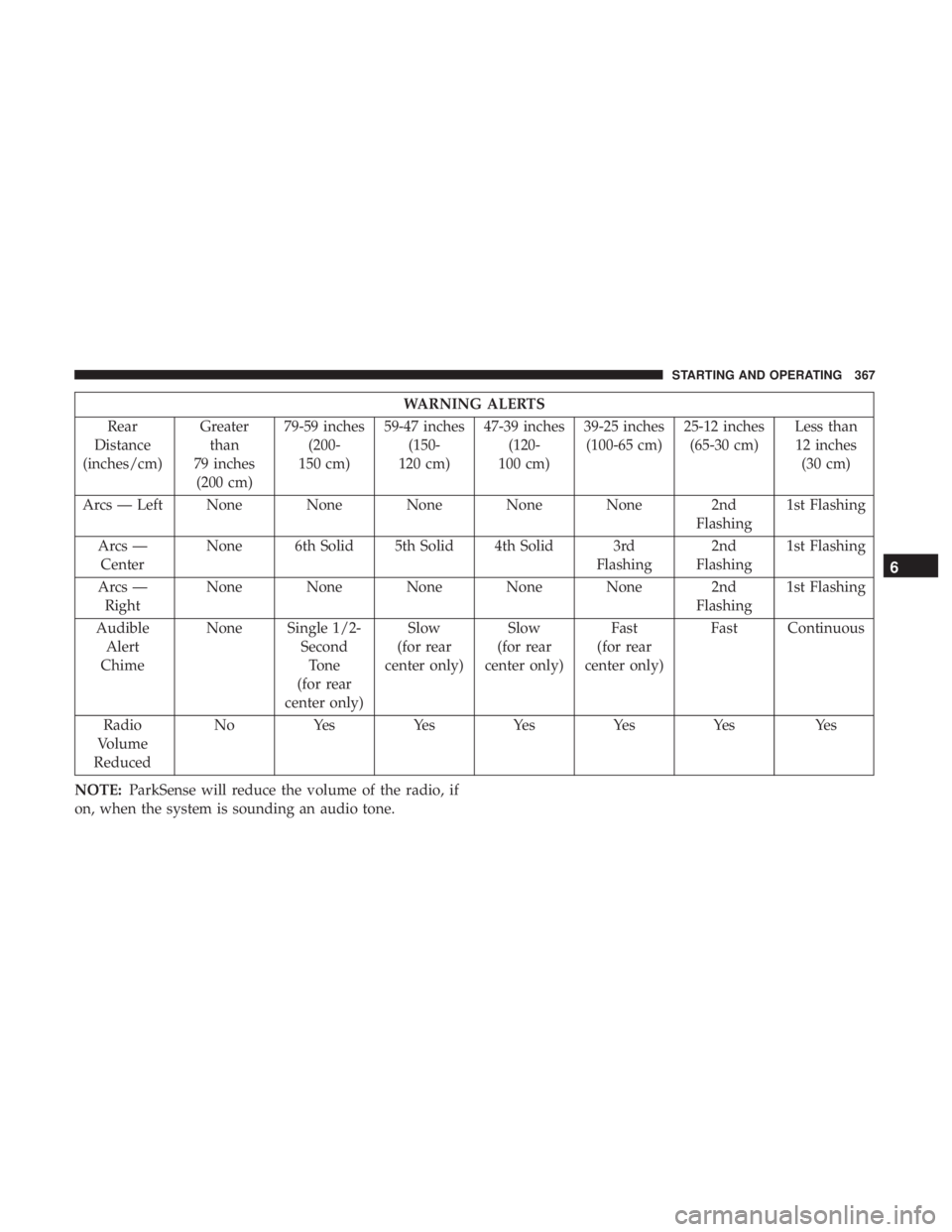
WARNING ALERTS
Rear
Distance
(inches/cm) Greater
than
79 inches (200 cm) 79-59 inches
(200-
150 cm) 59-47 inches
(150-
120 cm) 47-39 inches
(120-
100 cm) 39-25 inches
(100-65 cm) 25-12 inches
(65-30 cm) Less than
12 inches (30 cm)
Arcs — Left None None None None None 2nd Flashing1st Flashing
Arcs — Center None 6th Solid 5th Solid 4th Solid 3rd
Flashing2nd
Flashing 1st Flashing
Arcs — Right None None None None None 2nd
Flashing1st Flashing
Audible Alert
Chime None Single 1/2-
SecondTone
(for rear
center only) Slow
(for rear
center only) Slow
(for rear
center only) Fast
(for rear
center only) Fast Continuous
Radio
Volume
Reduced No
Yes YesYesYesYes Yes
NOTE: ParkSense will reduce the volume of the radio, if
on, when the system is sounding an audio tone.
6
STARTING AND OPERATING 367
Page 372 of 696
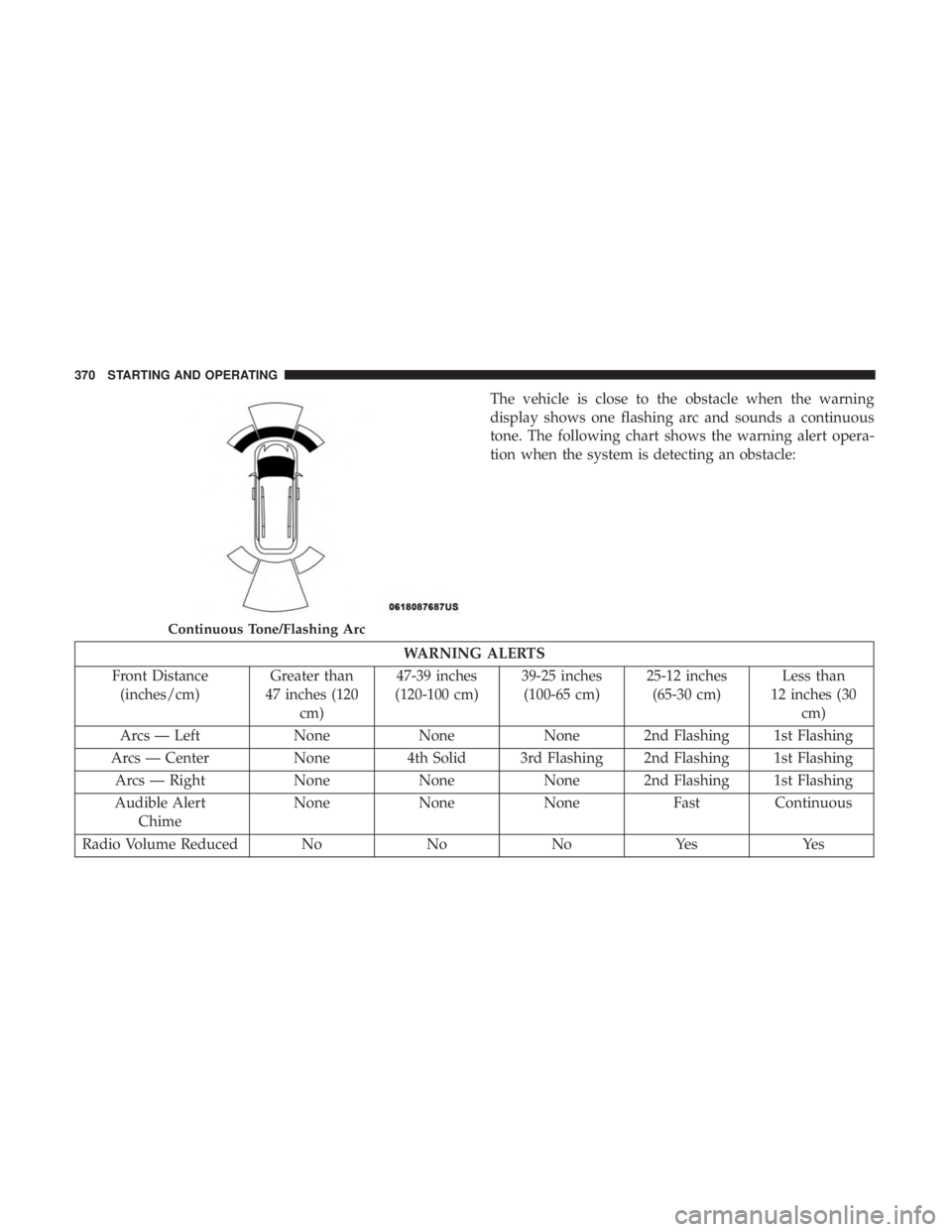
The vehicle is close to the obstacle when the warning
display shows one flashing arc and sounds a continuous
tone. The following chart shows the warning alert opera-
tion when the system is detecting an obstacle:
WARNING ALERTS
Front Distance (inches/cm) Greater than
47 inches (120 cm) 47-39 inches
(120-100 cm) 39-25 inches
(100-65 cm) 25-12 inches
(65-30 cm) Less than
12 inches (30 cm)
Arcs — Left NoneNoneNone 2nd Flashing 1st Flashing
Arcs — Center None4th Solid 3rd Flashing 2nd Flashing 1st Flashing
Arcs — Right NoneNoneNone 2nd Flashing 1st Flashing
Audible Alert Chime None
NoneNone FastContinuous
Radio Volume Reduced No NoNoYes Yes
Continuous Tone/Flashing Arc
370 STARTING AND OPERATING
Page 373 of 696
NOTE:ParkSense will reduce the volume of the radio, if
on, when the system is sounding an audio tone.
Front Park Assist Audible Alerts
ParkSense will turn off the Front Park Assist audible alert
(chime) after approximately three seconds when an ob-
stacle has been detected, the vehicle is stationary, and brake
pedal is applied.
Adjustable Chime Volume Settings
Front and Rear chime volume settings can be selected from
the Customer-Programmable Features section of the
Uconnect System, refer to “Uconnect Settings” in “Multi-
media” for further information.
If the Uconnect System is equipped, chime volume settings
will not be accessible from the instrument cluster display.
The chime volume settings include LOW, MEDIUM, and
HIGH. The factory default volume setting is MEDIUM.
ParkSense will retain its last known configuration state
through ignition cycles.Enabling And Disabling ParkSense
ParkSense can be enabled and disabled with the
ParkSense switch, located on the switch panel
below the Uconnect display.
When the ParkSense switch is pushed to disable the
system, the instrument cluster will display the
“PARKSENSE OFF” message for approximately five sec-
onds. Refer to “Instrument Cluster Display” in “Getting To
Know Your Instrument Panel” for further information.
When the gear selector is moved to REVERSE and the
system is disabled, the instrument cluster display will
show the “PARKSENSE OFF” message for as long as the
vehicle is in REVERSE.
The ParkSense switch LED will be on when ParkSense is
disabled or requires service. The ParkSense switch LED
will be off when the system is enabled. If the ParkSense
switch is pushed, and requires service, the ParkSense
switch LED will blink momentarily, and then the LED will
be on.
6
STARTING AND OPERATING 371