Page 582 of 696
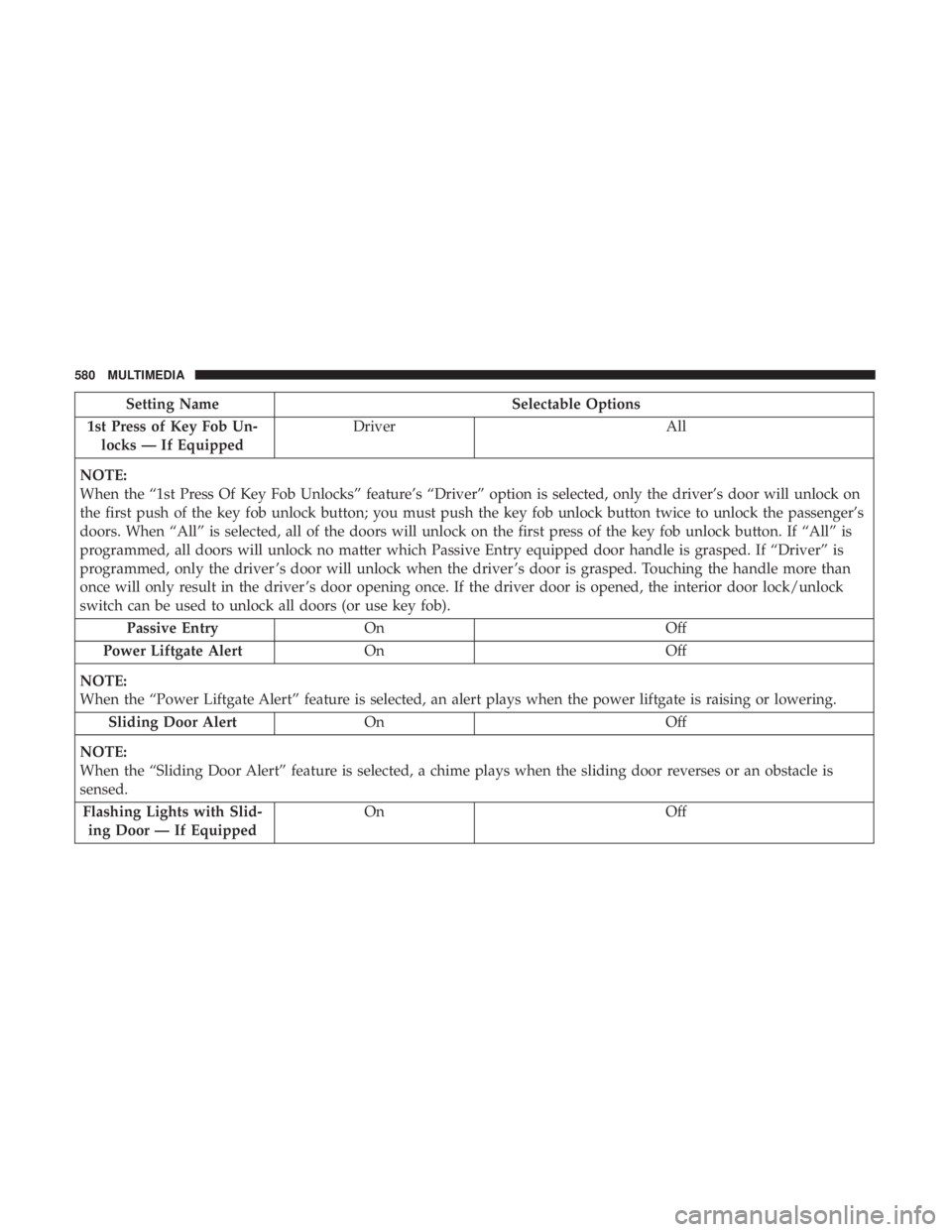
Setting NameSelectable Options
1st Press of Key Fob Un- locks — If Equipped Driver
All
NOTE:
When the “1st Press Of Key Fob Unlocks” feature’s “Driver” option is selected, only the driver’s door will unlock on
the first push of the key fob unlock button; you must push the key fob unlock button twice to unlock the passenger’s
doors. When “All” is selected, all of the doors will unlock on the first press of the key fob unlock button. If “All” is
programmed, all doors will unlock no matter which Passive Entry equipped door handle is grasped. If “Driver” is
programmed, only the driver ’s door will unlock when the driver ’s door is grasped. Touching the handle more than
once will only result in the driver ’s door opening once. If the driver door is opened, the interior door lock/unlock
switch can be used to unlock all doors (or use key fob). Passive Entry On Off
Power Liftgate Alert On Off
NOTE:
When the “Power Liftgate Alert” feature is selected, an alert plays when the power liftgate is raising or lowering. Sliding Door Alert On Off
NOTE:
When the “Sliding Door Alert” feature is selected, a chime plays when the sliding door reverses or an obstacle is
sensed. Flashing Lights with Slid- ing Door — If Equipped On
Off
580 MULTIMEDIA
Page 583 of 696
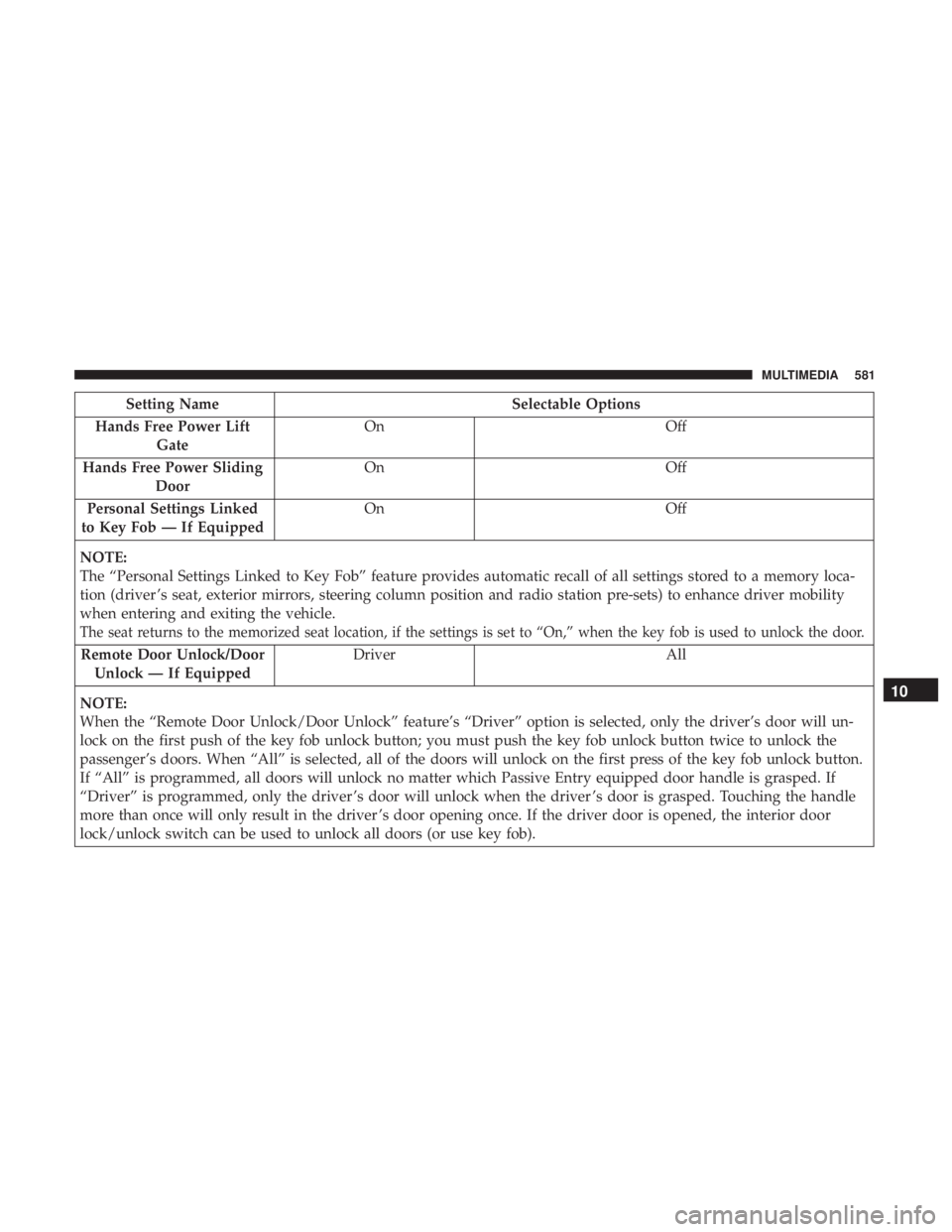
Setting NameSelectable Options
Hands Free Power Lift Gate On
Off
Hands Free Power Sliding Door On
Off
Personal Settings Linked
to Key Fob — If Equipped On
Off
NOTE:
The “Personal Settings Linked to Key Fob” feature provides automatic recall of all settings stored to a memory loca-
tion (driver ’s seat, exterior mirrors, steering column position and radio station pre-sets) to enhance driver mobility
when entering and exiting the vehicle.
The seat returns to the memorized seat location, if the settings is set to “On,” when the key fob is used to unlock the door.
Remote Door Unlock/Door Unlock — If Equipped Driver All
NOTE:
When the “Remote Door Unlock/Door Unlock” feature’s “Driver” option is selected, only the driver’s door will un-
lock on the first push of the key fob unlock button; you must push the key fob unlock button twice to unlock the
passenger’s doors. When “All” is selected, all of the doors will unlock on the first press of the key fob unlock button.
If “All” is programmed, all doors will unlock no matter which Passive Entry equipped door handle is grasped. If
“Driver” is programmed, only the driver ’s door will unlock when the driver ’s door is grasped. Touching the handle
more than once will only result in the driver ’s door opening once. If the driver door is opened, the interior door
lock/unlock switch can be used to unlock all doors (or use key fob).
10
MULTIMEDIA 581
Page 607 of 696
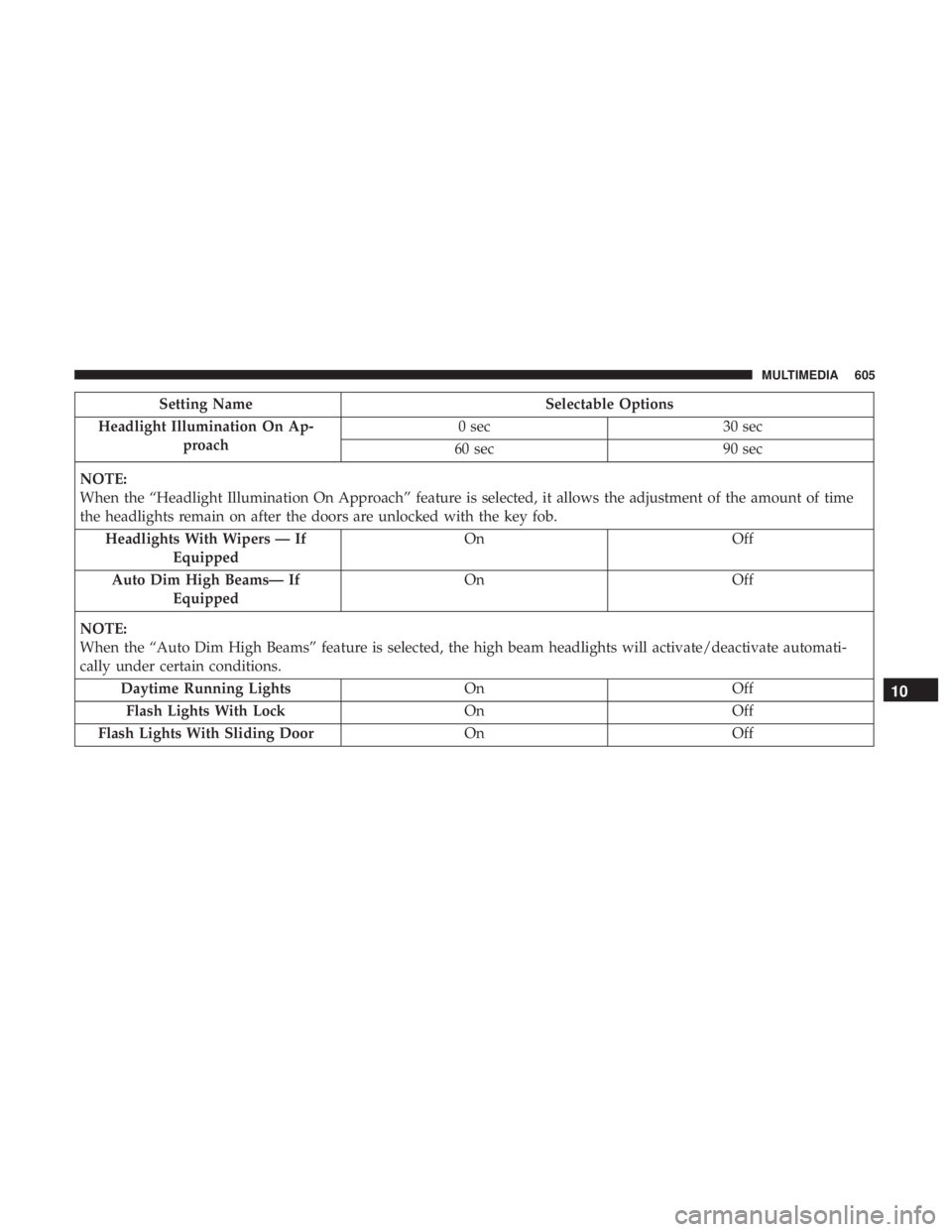
Setting NameSelectable Options
Headlight Illumination On Ap- proach 0 sec
30 sec
60 sec 90 sec
NOTE:
When the “Headlight Illumination On Approach” feature is selected, it allows the adjustment of the amount of time
the headlights remain on after the doors are unlocked with the key fob. Headlights With Wipers — If Equipped On
Off
Auto Dim High Beams— If Equipped On
Off
NOTE:
When the “Auto Dim High Beams” feature is selected, the high beam headlights will activate/deactivate automati-
cally under certain conditions. Daytime Running Lights OnOff
Flash Lights With Lock OnOff
Flash Lights With Sliding Door OnOff
10
MULTIMEDIA 605
Page 609 of 696
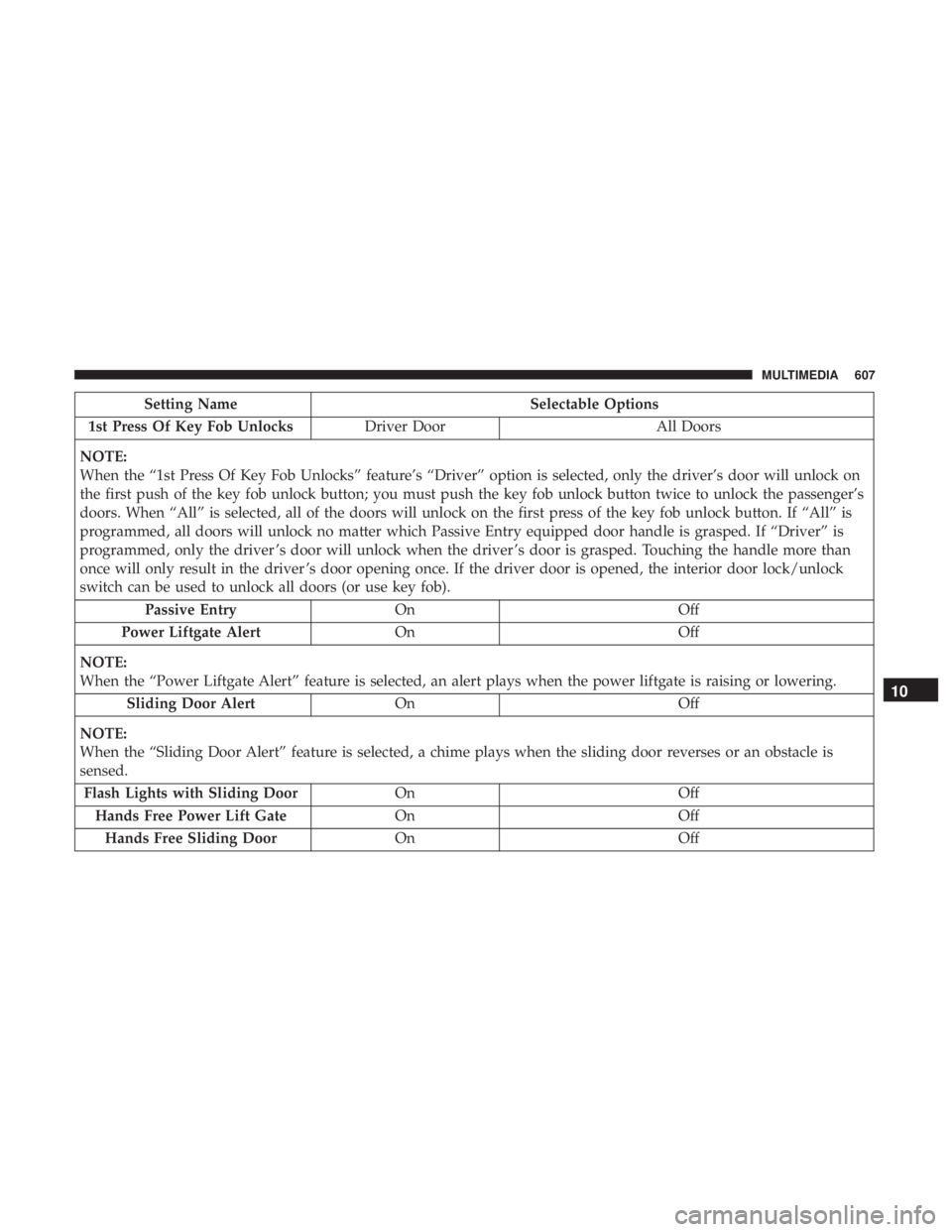
Setting NameSelectable Options
1st Press Of Key Fob Unlocks Driver Door All Doors
NOTE:
When the “1st Press Of Key Fob Unlocks” feature’s “Driver” option is selected, only the driver’s door will unlock on
the first push of the key fob unlock button; you must push the key fob unlock button twice to unlock the passenger’s
doors. When “All” is selected, all of the doors will unlock on the first press of the key fob unlock button. If “All” is
programmed, all doors will unlock no matter which Passive Entry equipped door handle is grasped. If “Driver” is
programmed, only the driver ’s door will unlock when the driver ’s door is grasped. Touching the handle more than
once will only result in the driver ’s door opening once. If the driver door is opened, the interior door lock/unlock
switch can be used to unlock all doors (or use key fob). Passive Entry On Off
Power Liftgate Alert On Off
NOTE:
When the “Power Liftgate Alert” feature is selected, an alert plays when the power liftgate is raising or lowering. Sliding Door Alert On Off
NOTE:
When the “Sliding Door Alert” feature is selected, a chime plays when the sliding door reverses or an obstacle is
sensed. Flash Lights with Sliding Door OnOff
Hands Free Power Lift Gate OnOff
Hands Free Sliding Door OnOff
10
MULTIMEDIA 607
Page:
< prev 1-8 9-16 17-24