Page 580 of 696
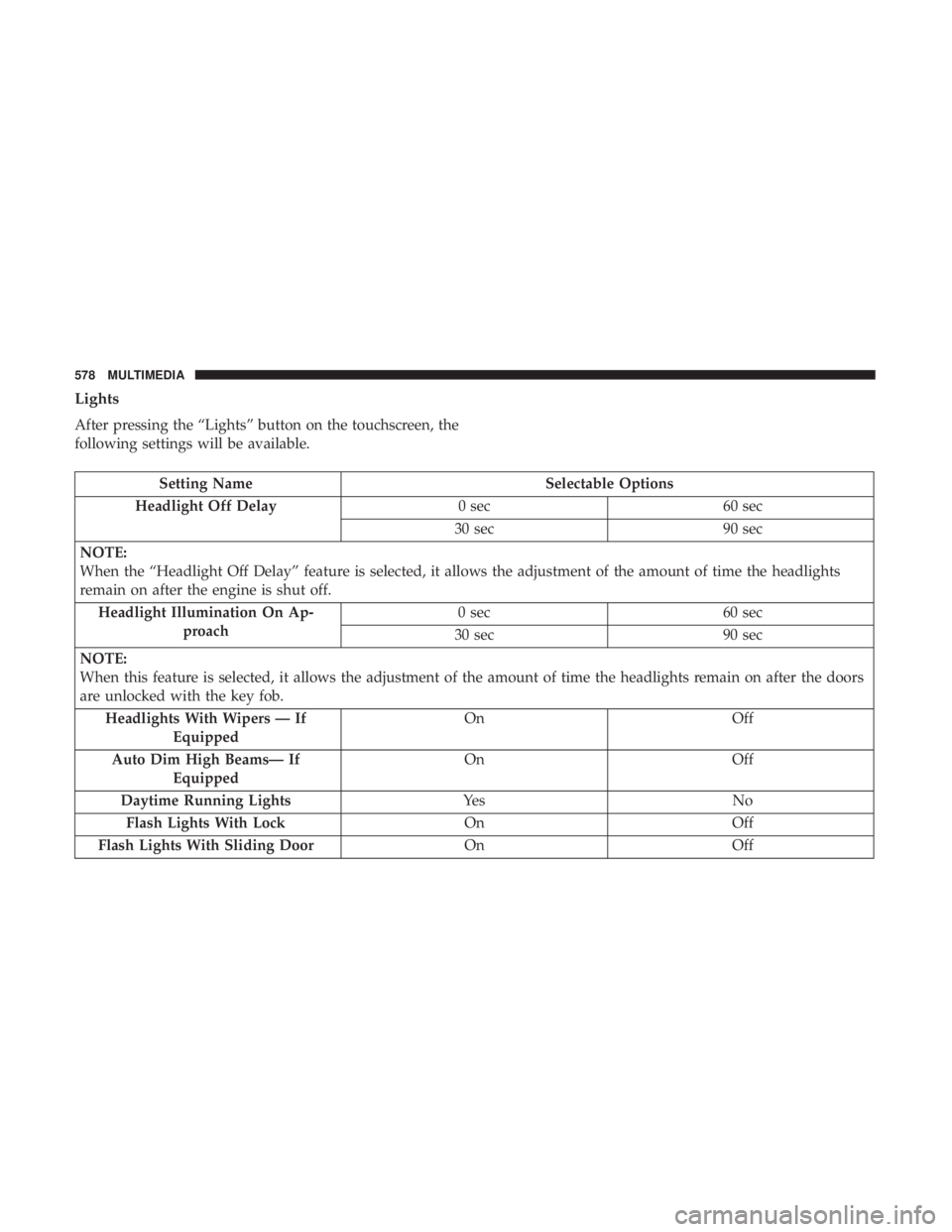
Lights
After pressing the “Lights” button on the touchscreen, the
following settings will be available.
Setting NameSelectable Options
Headlight Off Delay 0 sec60 sec
30 sec 90 sec
NOTE:
When the “Headlight Off Delay” feature is selected, it allows the adjustment of the amount of time the headlights
remain on after the engine is shut off. Headlight Illumination On Ap- proach 0 sec
60 sec
30 sec 90 sec
NOTE:
When this feature is selected, it allows the adjustment of the amount of time the headlights remain on after the doors
are unlocked with the key fob. Headlights With Wipers — If Equipped On
Off
Auto Dim High Beams— If Equipped On
Off
Daytime Running Lights Ye sN o
Flash Lights With Lock OnOff
Flash Lights With Sliding Door OnOff
578 MULTIMEDIA
Page 585 of 696
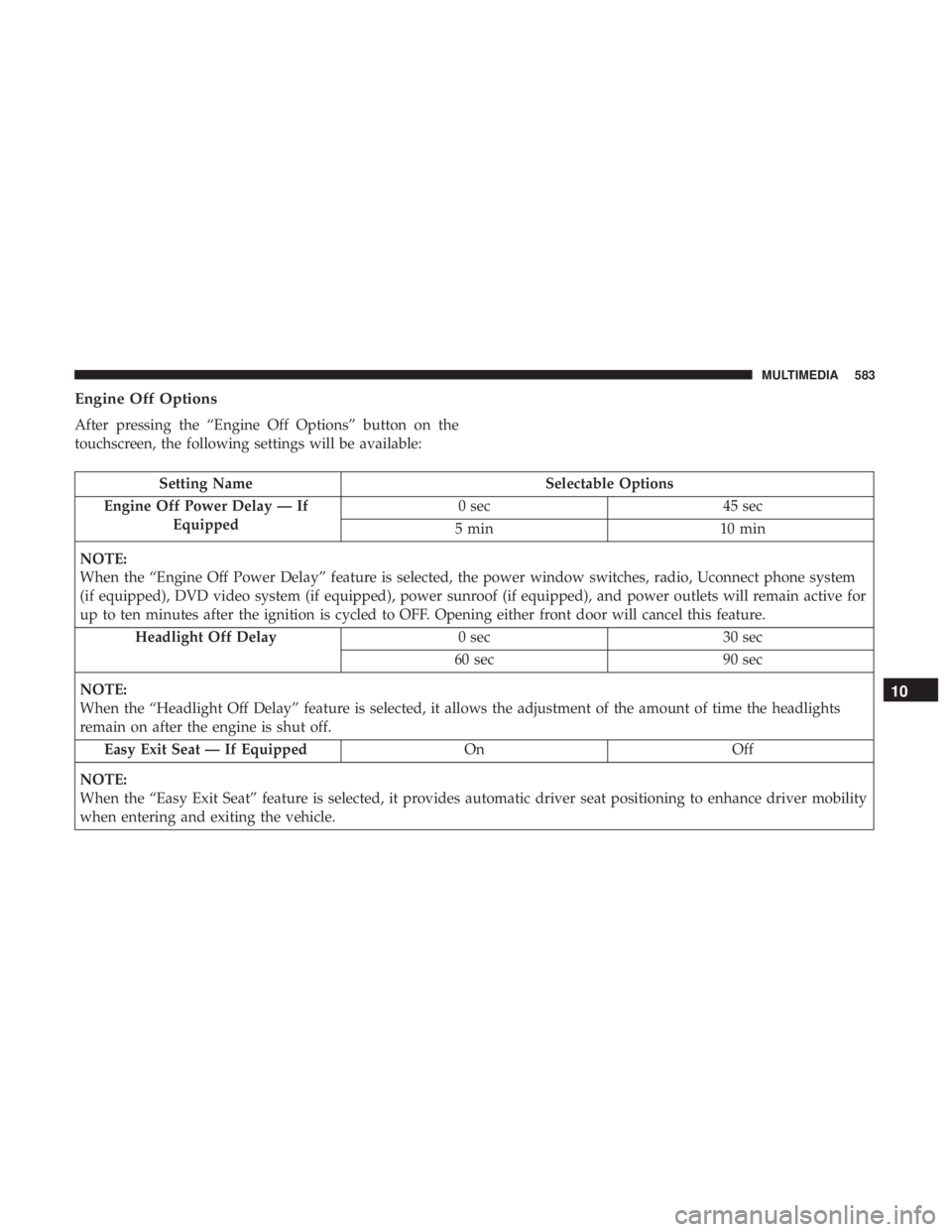
Engine Off Options
After pressing the “Engine Off Options” button on the
touchscreen, the following settings will be available:
Setting NameSelectable Options
Engine Off Power Delay — If Equipped 0 sec
45 sec
5 min 10 min
NOTE:
When the “Engine Off Power Delay” feature is selected, the power window switches, radio, Uconnect phone system
(if equipped), DVD video system (if equipped), power sunroof (if equipped), and power outlets will remain active for
up to ten minutes after the ignition is cycled to OFF. Opening either front door will cancel this feature. Headlight Off Delay 0 sec30 sec
60 sec 90 sec
NOTE:
When the “Headlight Off Delay” feature is selected, it allows the adjustment of the amount of time the headlights
remain on after the engine is shut off. Easy Exit Seat — If Equipped OnOff
NOTE:
When the “Easy Exit Seat” feature is selected, it provides automatic driver seat positioning to enhance driver mobility
when entering and exiting the vehicle.
10
MULTIMEDIA 583
Page 597 of 696
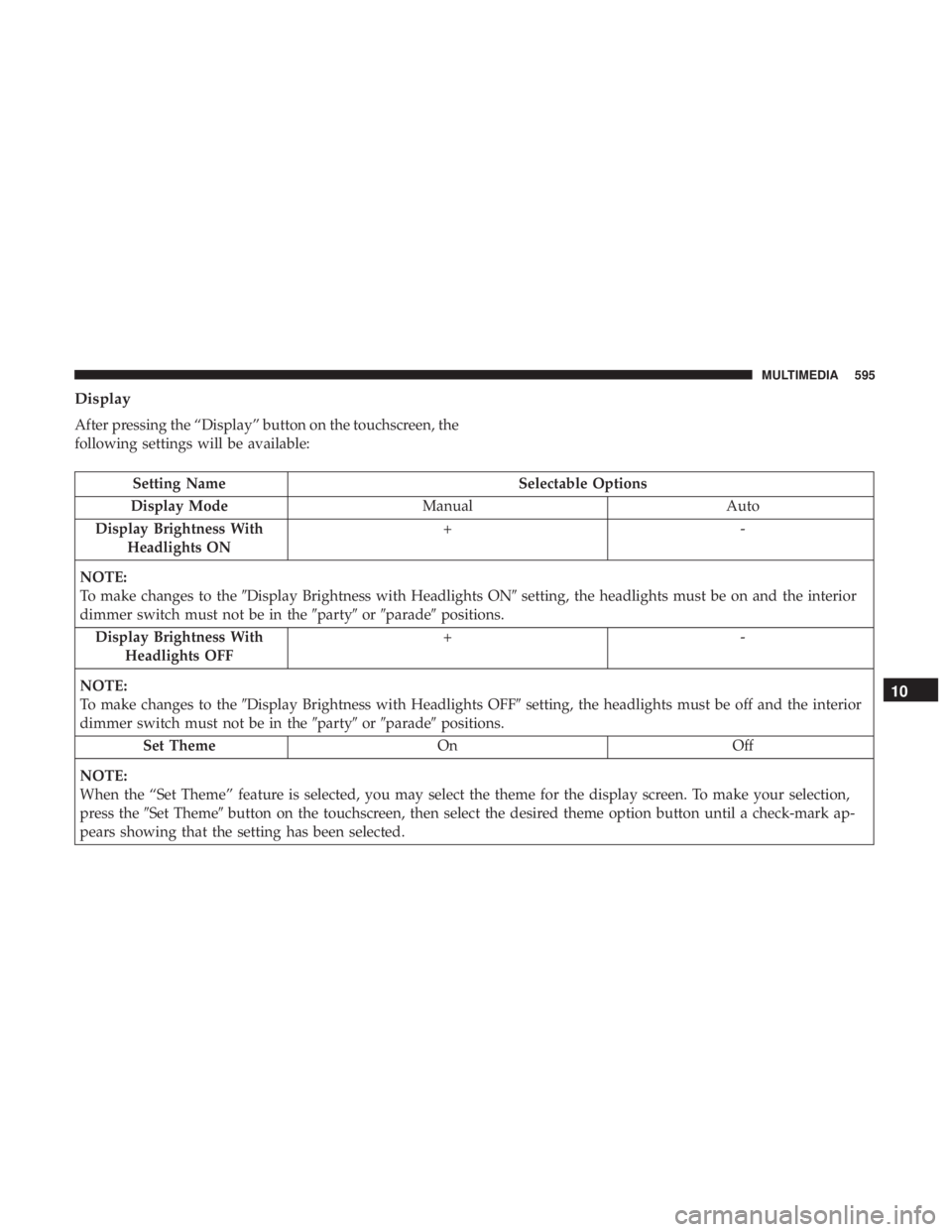
Display
After pressing the “Display” button on the touchscreen, the
following settings will be available:
Setting NameSelectable Options
Display Mode Manual Auto
Display Brightness With Headlights ON +-
NOTE:
To make changes to the �Display Brightness with Headlights ON� setting, the headlights must be on and the interior
dimmer switch must not be in the �party�or�parade� positions.
Display Brightness With Headlights OFF +-
NOTE:
To make changes to the �Display Brightness with Headlights OFF� setting, the headlights must be off and the interior
dimmer switch must not be in the �party�or�parade� positions.
Set Theme OnOff
NOTE:
When the “Set Theme” feature is selected, you may select the theme for the display screen. To make your selection,
press the �Set Theme� button on the touchscreen, then select the desired theme option button until a check-mark ap-
pears showing that the setting has been selected.
10
MULTIMEDIA 595
Page 605 of 696

Setting NameSelectable Options
Blind Spot Alert — If Equipped Off
LightsLights and Chime
NOTE:
When the “Blind Spot Alert” feature is selected, the Blind Spot Monitor (BSM) system is activated and will show a
visual alert in the outside mirrors, or it will show a visual alert in the outside mirrors as well as play an audible alert
when the turn signal is on. When “Off” is selected, the Blind Spot Monitor (BSM) system is deactivated.
If your vehicle has experienced any damage in the area where the sensor is located, even if the fascia is not damaged,
the sensor may have become misaligned. Take your vehicle to an authorized dealer to verify sensor alignment. A sen-
sor that is misaligned will result in the BSM not operating to specification. Hill Start Assist — If Equipped On
Off
Mirrors & Wipers
After pressing the “Mirror and Wipers” button on the
touchscreen, the following settings will be available:
Setting Name Selectable Options
Rain Sensing Auto Wipers OnOff
Tilt Side Mirrors in Reverse OnOff
Headlights with Wipers OnOff
10
MULTIMEDIA 603
Page 606 of 696
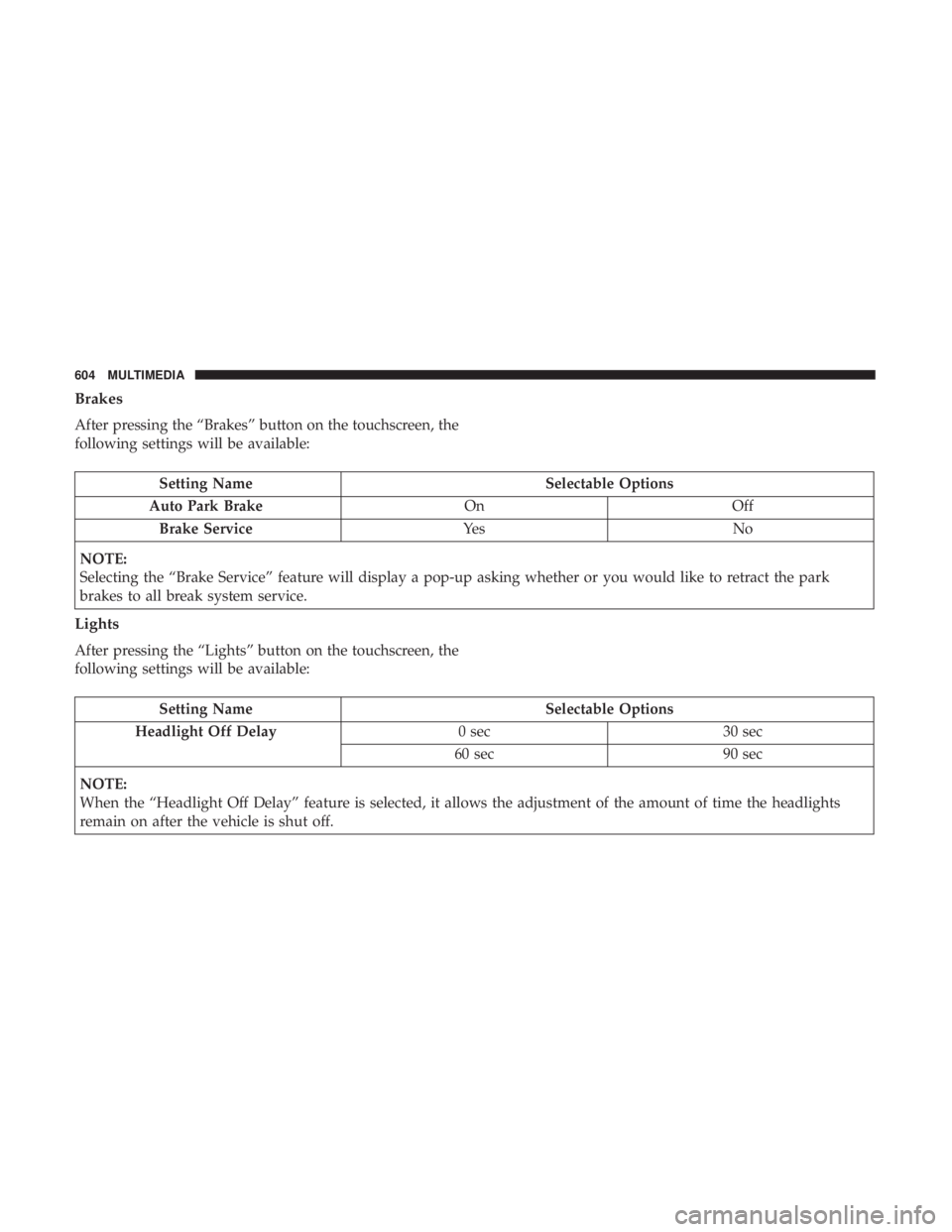
Brakes
After pressing the “Brakes” button on the touchscreen, the
following settings will be available:
Setting NameSelectable Options
Auto Park Brake OnOff
Brake Service Ye sN o
NOTE:
Selecting the “Brake Service” feature will display a pop-up asking whether or you would like to retract the park
brakes to all break system service.
Lights
After pressing the “Lights” button on the touchscreen, the
following settings will be available:
Setting Name Selectable Options
Headlight Off Delay 0 sec30 sec
60 sec 90 sec
NOTE:
When the “Headlight Off Delay” feature is selected, it allows the adjustment of the amount of time the headlights
remain on after the vehicle is shut off.
604 MULTIMEDIA
Page 607 of 696
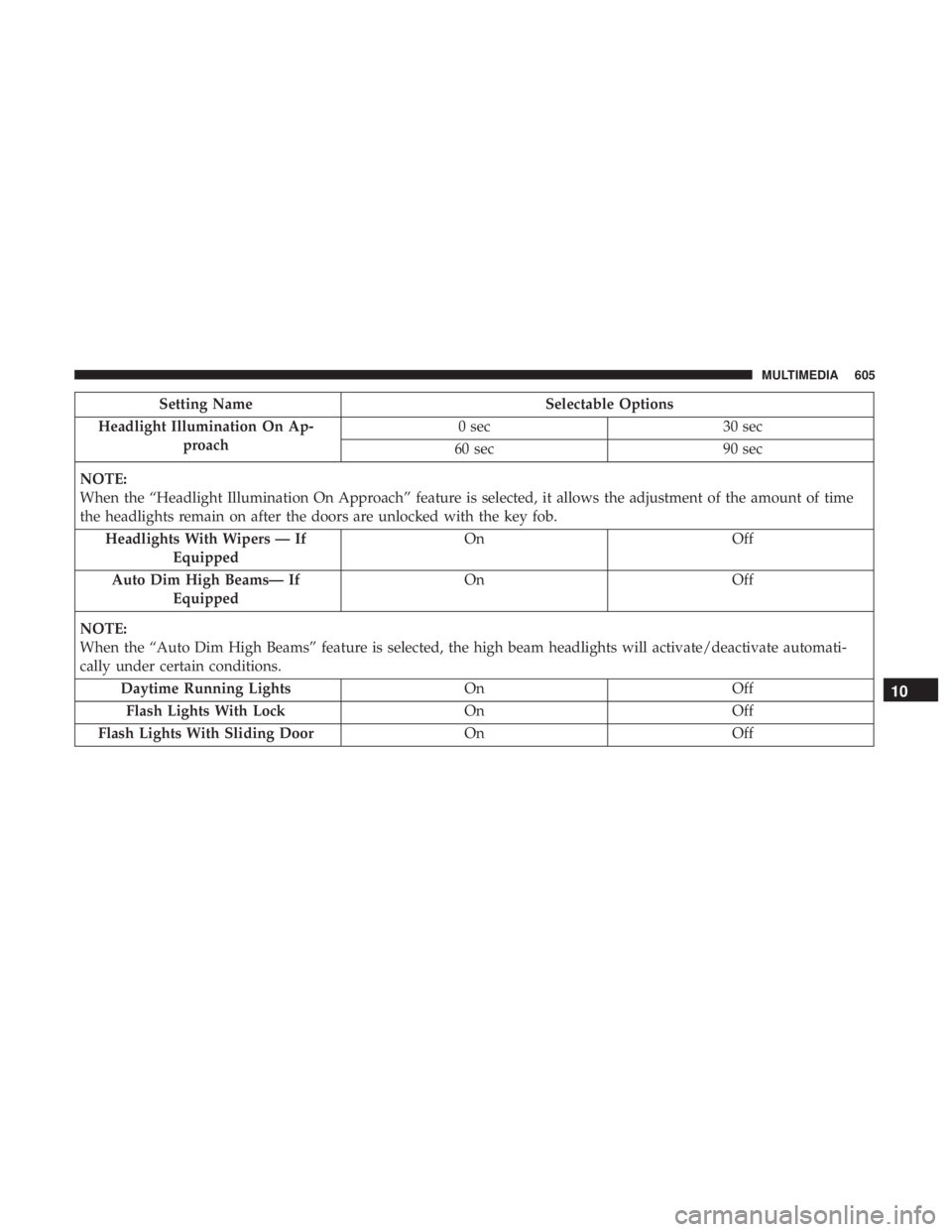
Setting NameSelectable Options
Headlight Illumination On Ap- proach 0 sec
30 sec
60 sec 90 sec
NOTE:
When the “Headlight Illumination On Approach” feature is selected, it allows the adjustment of the amount of time
the headlights remain on after the doors are unlocked with the key fob. Headlights With Wipers — If Equipped On
Off
Auto Dim High Beams— If Equipped On
Off
NOTE:
When the “Auto Dim High Beams” feature is selected, the high beam headlights will activate/deactivate automati-
cally under certain conditions. Daytime Running Lights OnOff
Flash Lights With Lock OnOff
Flash Lights With Sliding Door OnOff
10
MULTIMEDIA 605
Page 611 of 696
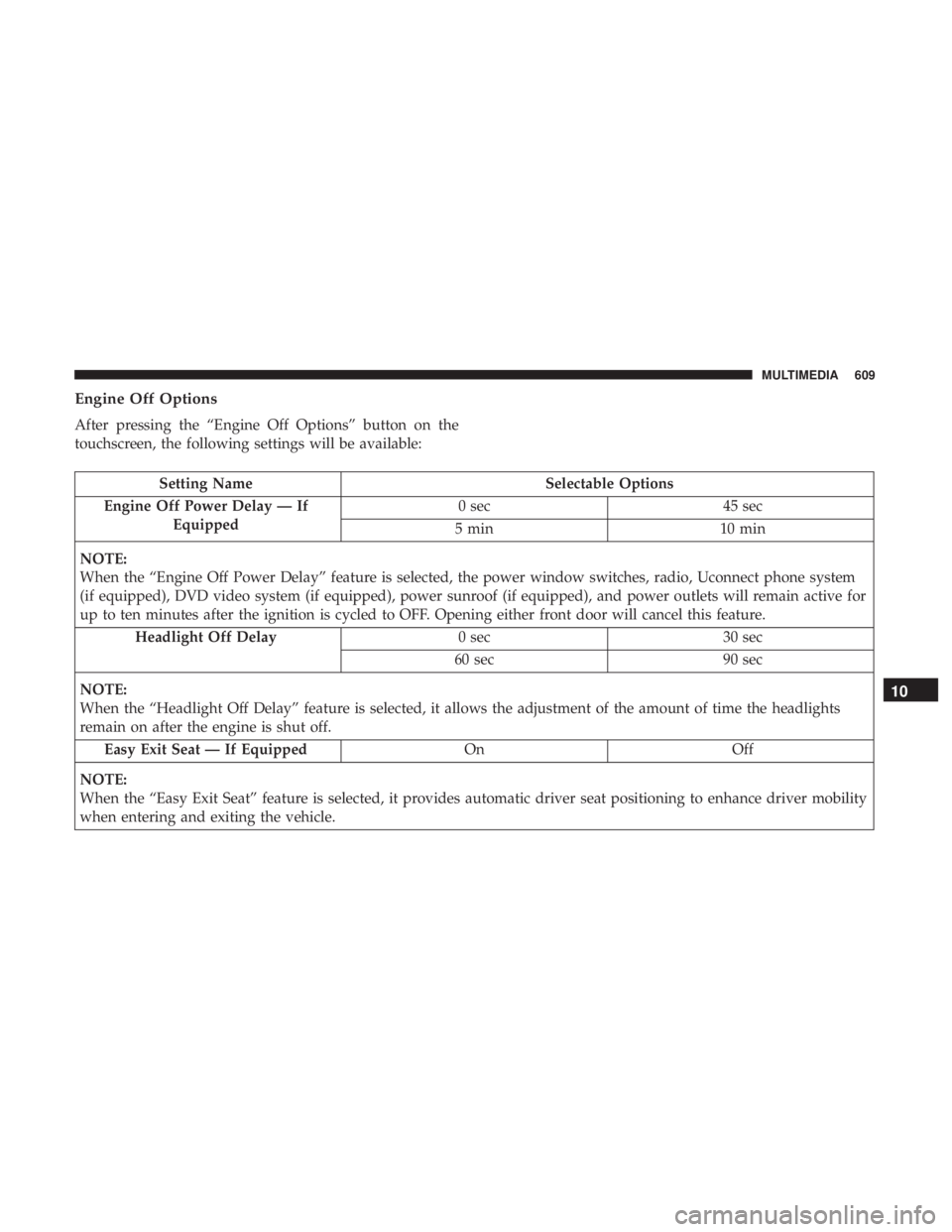
Engine Off Options
After pressing the “Engine Off Options” button on the
touchscreen, the following settings will be available:
Setting NameSelectable Options
Engine Off Power Delay — If Equipped 0 sec
45 sec
5 min 10 min
NOTE:
When the “Engine Off Power Delay” feature is selected, the power window switches, radio, Uconnect phone system
(if equipped), DVD video system (if equipped), power sunroof (if equipped), and power outlets will remain active for
up to ten minutes after the ignition is cycled to OFF. Opening either front door will cancel this feature. Headlight Off Delay 0 sec30 sec
60 sec 90 sec
NOTE:
When the “Headlight Off Delay” feature is selected, it allows the adjustment of the amount of time the headlights
remain on after the engine is shut off. Easy Exit Seat — If Equipped OnOff
NOTE:
When the “Easy Exit Seat” feature is selected, it provides automatic driver seat positioning to enhance driver mobility
when entering and exiting the vehicle.
10
MULTIMEDIA 609
Page 680 of 696
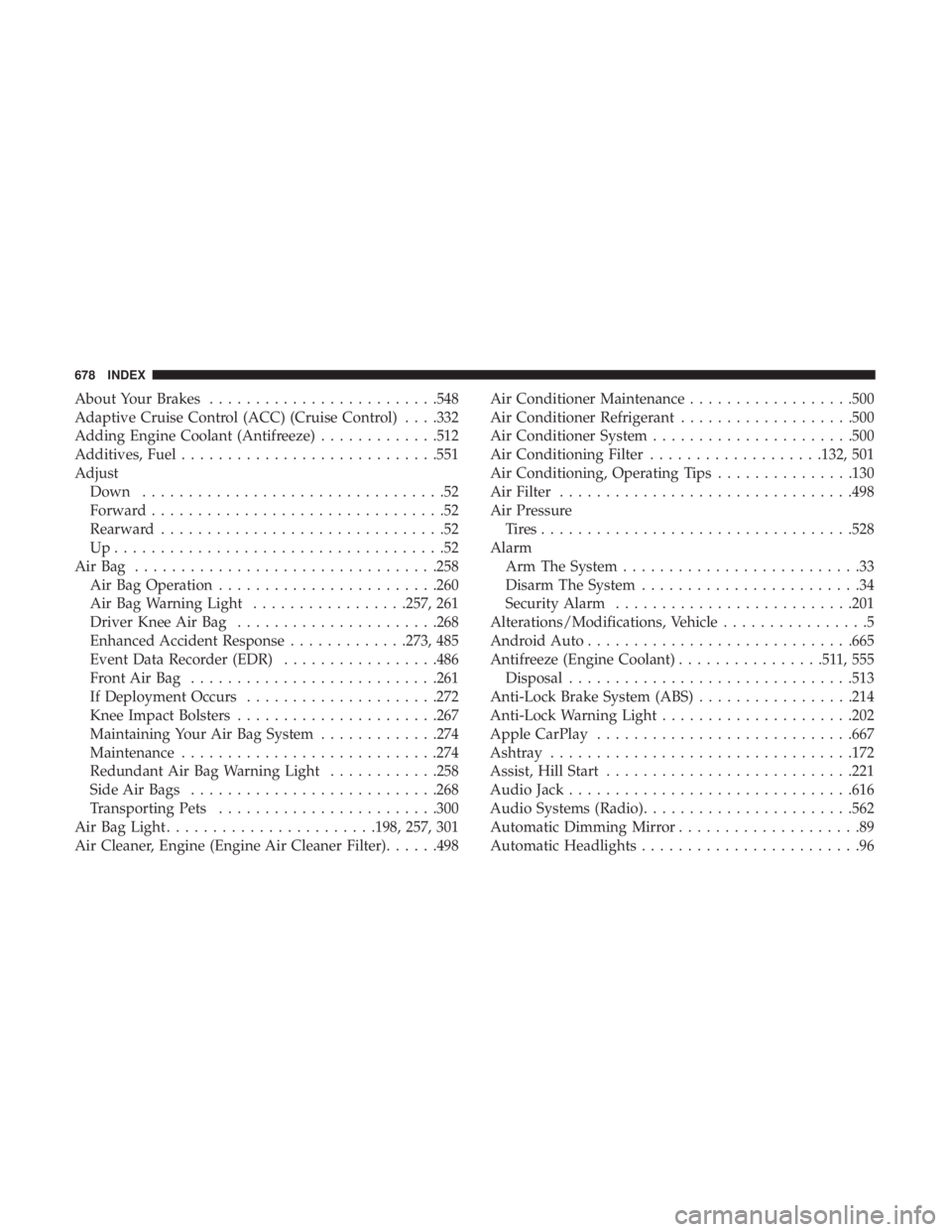
About Your Brakes........................ .548
Adaptive Cruise Control (ACC) (Cruise Control) . . . .332
Adding Engine Coolant (Antifreeze) .............512
Additives, Fuel ............................551
Adjust Down .................................52
Forward ................................52
Rearward ...............................52
Up....................................52
AirBag ................................ .258
Air Bag Operation ........................260
Air Bag Warning Light .................257, 261
Driver Knee Air Bag ..................... .268
Enhanced Accident Response .............273, 485
Event Data Recorder (EDR) .................486
FrontAirBag .......................... .261
If Deployment Occurs .....................272
Knee Impact Bolsters ..................... .267
Maintaining Your Air Bag System .............274
Maintenance ............................274
Redundant Air Bag Warning Light ............258
Side Air Bags .......................... .268
Transporting Pets ........................300
Air Bag Light .......................198, 257, 301
Air Cleaner, Engine (Engine Air Cleaner Filter) ......498Air Conditioner Maintenance
..................500
Air Conditioner Refrigerant ...................500
Air Conditioner System ..................... .500
Air Conditioning Filter ...................132, 501
Air Conditioning, Operating Tips ...............130
Air Filter ............................... .498
Air Pressure Tires................................. .528
Alarm Arm The System ..........................33
Disarm The System ........................34
Security Alarm ..........................201
Alterations/Modifications, Vehicle ................5
Android Auto ............................ .665
Antifreeze (Engine Coolant) ................511,555
Disposal ...............................513
Anti-Lock Brake
System (ABS).................214
Anti-Lock Warning Light .....................202
Apple CarPlay ............................667
Ashtray .................................172
Assist, Hill Start .......................... .221
Audio Jack ...............................616
Audio Systems (Radio) .......................562
Automatic Dimming Mirror ....................89
Automatic Headlights ........................96
678 INDEX