Page 151 of 696
WARNING!
This equipment incorporates parts such as switches,
motors, or the like that tend to produce arcs or sparks
that can cause an explosion. When using your vacuum
near gasoline-dispensing equipment or service sta-
tions, park vehicle at least 20 ft (6 m) away from the
exterior enclosure of any dispensing pump. The
vacuum is mounted more than 18 inches (45 cm) above
ground level in your vehicle.
1. Before Using Vacuum:
Accessory (ACC) Mode Operation - For up to 10 minutes
of operation
Always apply the parking brake, shift the transmission into
PARK, and push ignition button to place ignition in
Accessory (ACC) mode. The engine will not be running in
this mode. Do not leave the key fob in or near the vehicle,
or in a location accessible to children.
NOTE: The vacuum system will run for 10 minutes off
battery power and then the vacuum will shut down. A low
battery indication light (LOW PWR) located below the
vacuum nozzle storage location will come on one minute
before the vacuum shuts down. Engine Running (ON) Operation - For more than 10
minutes of operation
•Position vehicle outdoors and fully open all side
windows.
• Always apply the parking brake, shift the transmission
into PARK, and leave engine running.
WARNING!
Carbon monoxide (CO) in exhaust gases can cause
serious injury or death. Follow the precautions below
to prevent carbon monoxide poisoning:
•Do not inhale exhaust gases.
• Do not start or run an engine in a closed garage or
confined area. Always position vehicle outdoors and
fully open all side windows before using vacuum
system with the engine running.
• Guard against carbon monoxide with proper main-
tenance. Have the exhaust system inspected every
time the vehicle is raised. Have any abnormal condi-
tions repaired promptly.
3
GETTING TO KNOW YOUR VEHICLE 149
Page 153 of 696
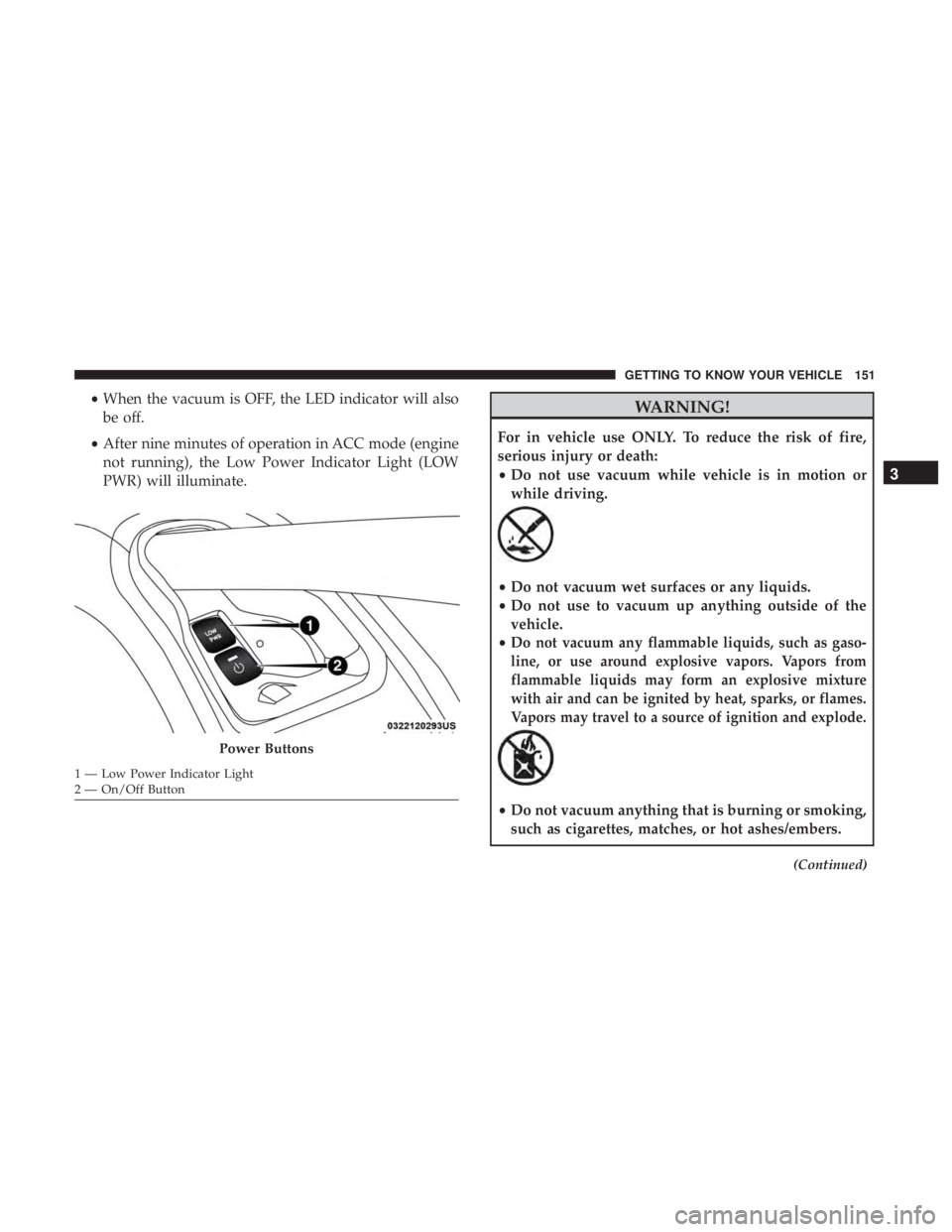
•When the vacuum is OFF, the LED indicator will also
be off.
• After nine minutes of operation in ACC mode (engine
not running), the Low Power Indicator Light (LOW
PWR) will illuminate.WARNING!
For in vehicle use ONLY. To reduce the risk of fire,
serious injury or death:
•Do not use vacuum while vehicle is in motion or
while driving.
•Do not vacuum wet surfaces or any liquids.
• Do not use to vacuum up anything outside of the
vehicle.
•
Do not vacuum any flammable liquids, such as gaso-
line, or use around explosive vapors. Vapors from
flammable liquids may form an explosive mixture
with air and can be ignited by heat, sparks, or flames.
Vapors may travel to a source of ignition and explode.
• Do not vacuum anything that is burning or smoking,
such as cigarettes, matches, or hot ashes/embers.
(Continued)
Power Buttons
1 — Low Power Indicator Light
2 — On/Off Button
3
GETTING TO KNOW YOUR VEHICLE 151
Page 172 of 696
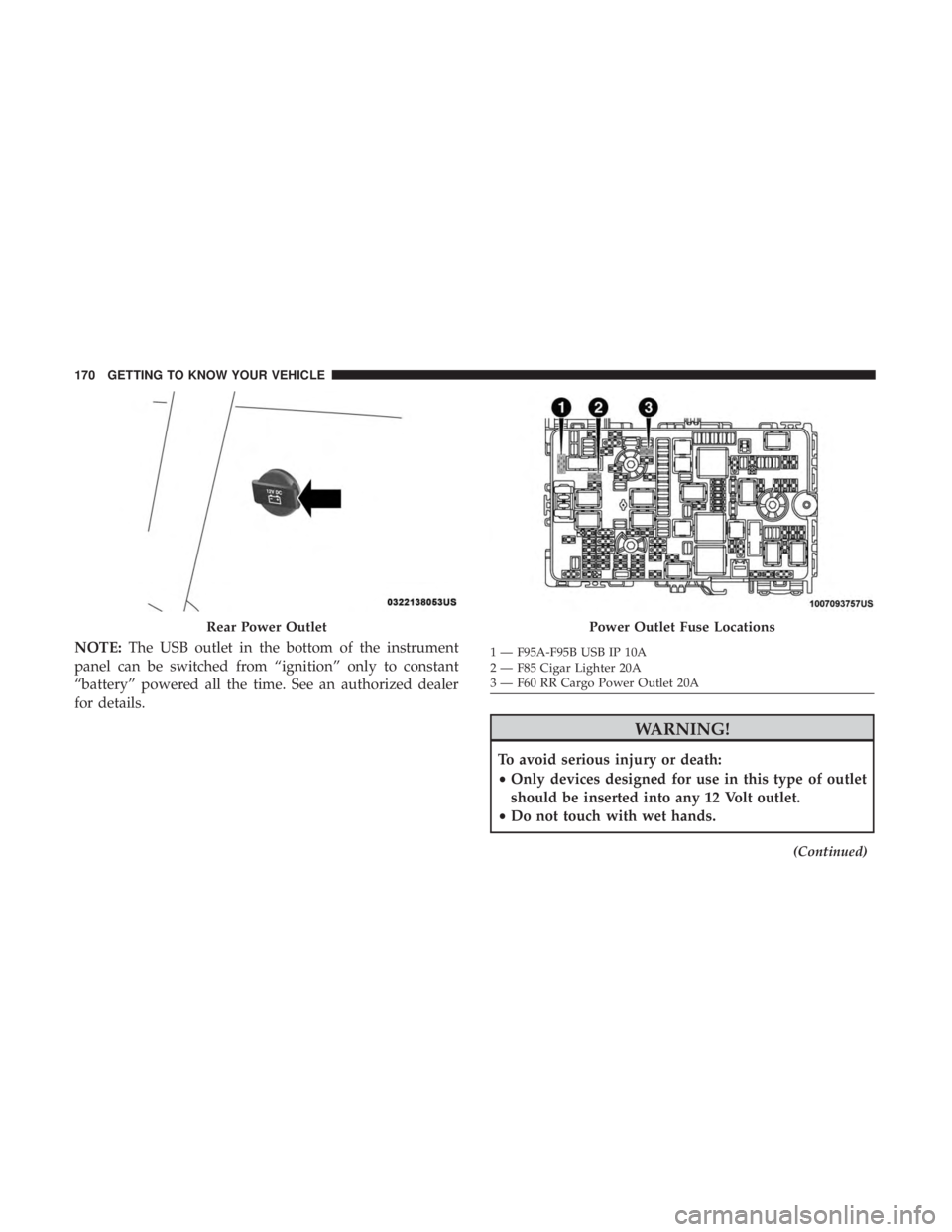
NOTE:The USB outlet in the bottom of the instrument
panel can be switched from “ignition” only to constant
“battery” powered all the time. See an authorized dealer
for details.
WARNING!
To avoid serious injury or death:
• Only devices designed for use in this type of outlet
should be inserted into any 12 Volt outlet.
• Do not touch with wet hands.
(Continued)
Rear Power OutletPower Outlet Fuse Locations
1 — F95A-F95B USB IP 10A
2 — F85 Cigar Lighter 20A
3 — F60 RR Cargo Power Outlet 20A
170 GETTING TO KNOW YOUR VEHICLE
Page 173 of 696
WARNING!(Continued)
•Close the lid when not in use and while driving the
vehicle.
• If this outlet is mishandled, it may cause an electric
shock and failure.
CAUTION!
•Many accessories that can be plugged in draw power
from the vehicle’s battery, even when not in use (i.e.,
cellular phones, etc.). Eventually, if plugged in long
enough, the vehicle’s battery will discharge suffi-
ciently to degrade battery life and/or prevent the
engine from starting.
• Accessories that draw higher power (i.e., coolers,
vacuum cleaners, lights, etc.) will degrade the battery
even more quickly. Only use these intermittently and
with greater caution.
• After the use of high power draw accessories, or long
periods of the vehicle not being started (with acces-
sories still plugged in), the vehicle must be driven a
sufficient length of time to allow the generator to
recharge the vehicle’s battery.
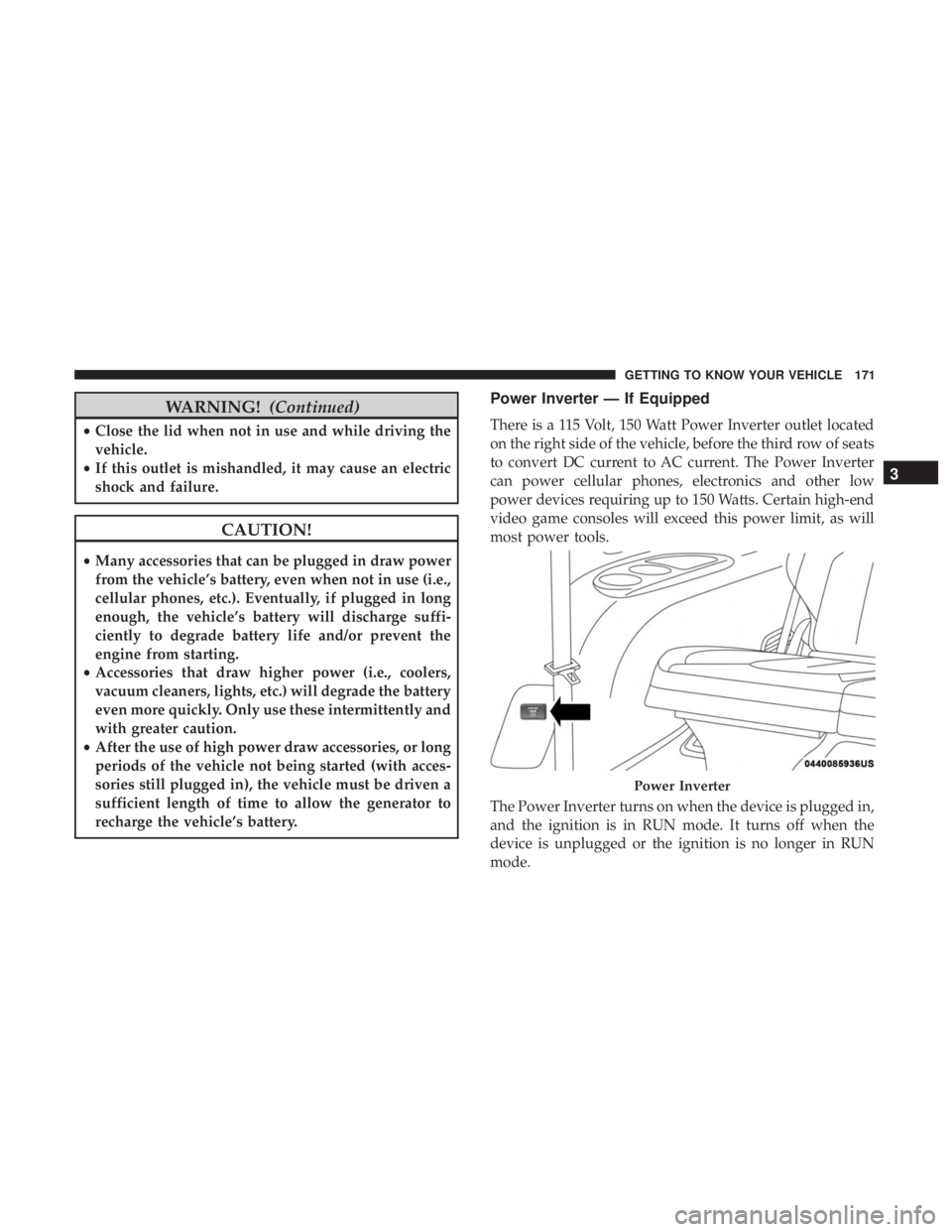
Power Inverter — If Equipped
There is a 115 Volt, 150 Watt Power Inverter outlet located
on the right side of the vehicle, before the third row of seats
to convert DC current to AC current. The Power Inverter
can power cellular phones, electronics and other low
power devices requiring up to 150 Watts. Certain high-end
video game consoles will exceed this power limit, as will
most power tools.
The Power Inverter turns on when the device is plugged in,
and the ignition is in RUN mode. It turns off when the
device is unplugged or the ignition is no longer in RUN
mode.
Power Inverter
3
GETTING TO KNOW YOUR VEHICLE 171
Page 174 of 696
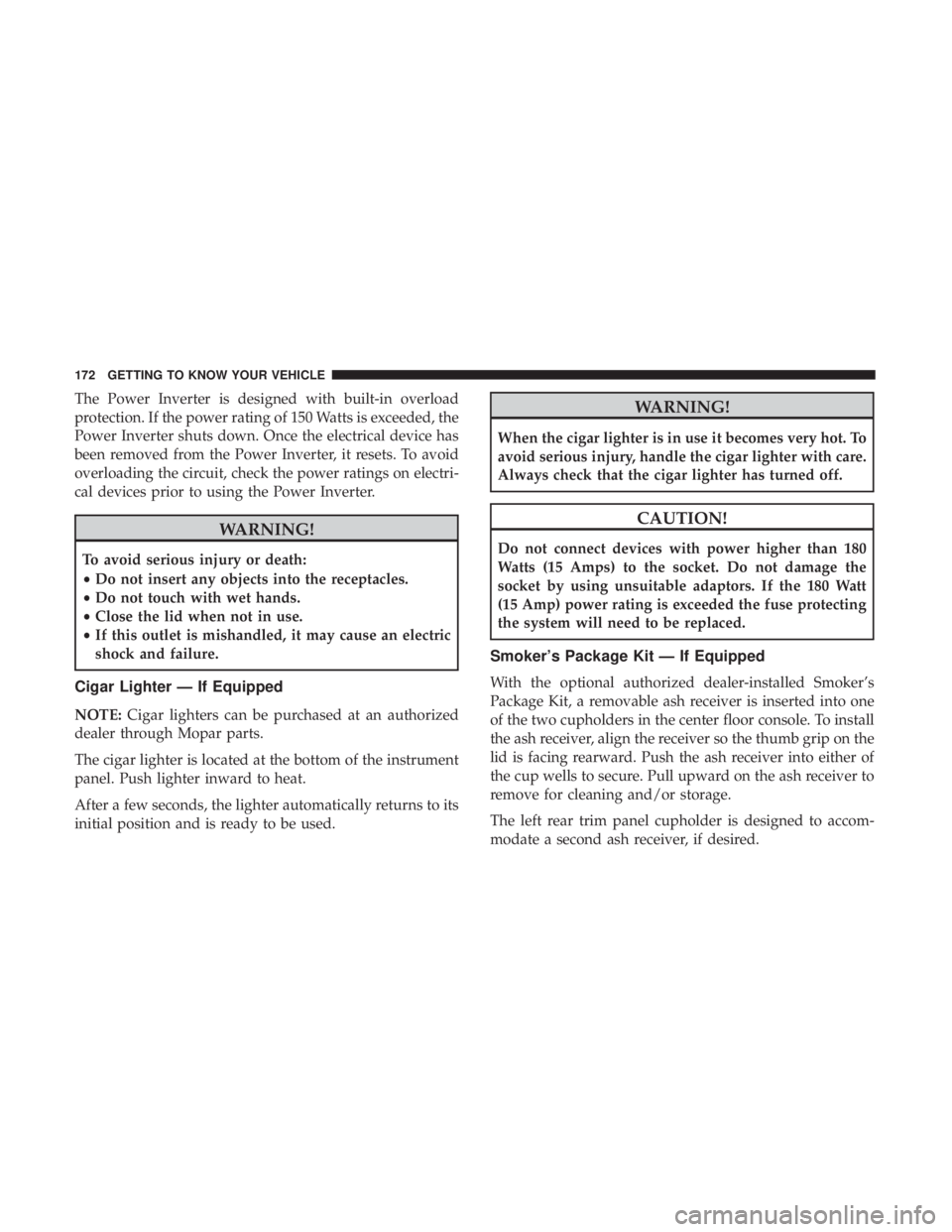
The Power Inverter is designed with built-in overload
protection. If the power rating of 150 Watts is exceeded, the
Power Inverter shuts down. Once the electrical device has
been removed from the Power Inverter, it resets. To avoid
overloading the circuit, check the power ratings on electri-
cal devices prior to using the Power Inverter.
WARNING!
To avoid serious injury or death:
•Do not insert any objects into the receptacles.
• Do not touch with wet hands.
• Close the lid when not in use.
• If this outlet is mishandled, it may cause an electric
shock and failure.
Cigar Lighter — If Equipped
NOTE: Cigar lighters can be purchased at an authorized
dealer through Mopar parts.
The cigar lighter is located at the bottom of the instrument
panel. Push lighter inward to heat.
After a few seconds, the lighter automatically returns to its
initial position and is ready to be used.
WARNING!
When the cigar lighter is in use it becomes very hot. To
avoid serious injury, handle the cigar lighter with care.
Always check that the cigar lighter has turned off.
CAUTION!
Do not connect devices with power higher than 180
Watts (15 Amps) to the socket. Do not damage the
socket by using unsuitable adaptors. If the 180 Watt
(15 Amp) power rating is exceeded the fuse protecting
the system will need to be replaced.
Smoker’s Package Kit — If Equipped
With the optional authorized dealer-installed Smoker’s
Package Kit, a removable ash receiver is inserted into one
of the two cupholders in the center floor console. To install
the ash receiver, align the receiver so the thumb grip on the
lid is facing rearward. Push the ash receiver into either of
the cup wells to secure. Pull upward on the ash receiver to
remove for cleaning and/or storage.
The left rear trim panel cupholder is designed to accom-
modate a second ash receiver, if desired.
172 GETTING TO KNOW YOUR VEHICLE
Page 183 of 696

GETTING TO KNOW YOUR INSTRUMENT PANEL
CONTENTS
�INSTRUMENT CLUSTER ..................182
▫ Instrument Cluster Descriptions ............183
� INSTRUMENT CLUSTER DISPLAY ...........185
▫ Instrument Cluster Display Location And
Controls ............................ .185
▫ Oil Life Reset ........................ .187
▫ KeySense Cluster Messages — If Equipped .....188
▫ Instrument Cluster Display Menu Items ......189
▫ Battery Saver On/Battery Saver Mode
Message — Electrical Load Reduction
Actions — If Equipped ..................195
� TRIP COMPUTER .......................197 �
WARNING LIGHTS AND MESSAGES .........197
▫ Red Warning Lights .....................198
▫ Yellow Warning Lights ...................202
▫ Yellow Indicator Lights ...................206
▫ Green Indicator Lights ...................206
▫ Blue Indicator Lights ....................208
▫ White Indicator Lights ...................208
� ONBOARD DIAGNOSTIC SYSTEM — OBD II . . .209
▫ Onboard Diagnostic System (OBD II)
Cybersecurity ........................ .209
� EMISSIONS INSPECTION AND MAINTENANCE
PROGRAMS .......................... .2104
Page 193 of 696
Trip Info
Push and release theupordown arrow button until the
Trip Menu item is highlighted in the instrument cluster
display. Push the leftorright arrow button to scroll
through the Trip A and Trip B submenus. The Trip infor-
mation will display the following:
• Distance
• Average Fuel Economy
• Elapsed Time
Hold the OKbutton to reset feature information.
Audio
Push and release the upordown arrow button until the
Audio Menu displays in the instrument cluster display.
Messages
Push and release the upordown arrow button until
Messages is highlighted in the instrument cluster display.
This feature shows the number of stored warning mes-
sages. Pushing the rightarrow button will allow you to see
what the stored messages are.
NOTE: The popup messages indicate the status of the
system and/or the conditions that need to be met. Mes-
sages remain in the stored stack until condition is cleared.
Screen Setup
Push and release the upordown arrow button until the
Screen Setup Menu displays in the instrument cluster
display. Push and release the OKbutton to enter the
submenus. The Screen Setup feature allows you to change
what information is displayed in the instrument cluster as
well as the location that information is displayed.
4
GETTING TO KNOW YOUR INSTRUMENT PANEL 191
Page 197 of 696

Battery Saver On/Battery Saver Mode Message —
Electrical Load Reduction Actions — If Equipped
This vehicle is equipped with an Intelligent Battery Sensor
(IBS) to perform additional monitoring of the electrical
system and status of the vehicle battery.
In cases when the IBS detects charging system failure, or
the vehicle battery conditions are deteriorating, electrical
load reduction actions will take place to extend the driving
time and distance of the vehicle. This is done by reducing
power to or turning off non-essential electrical loads.
Load reduction is only active when the engine is running.
It will display a message if there is a risk of battery
depletion to the point where the vehicle may stall due to
lack of electrical supply, or will not restart after the current
drive cycle.
When load reduction is activated, the message “Battery
Saver On” or “Battery Saver Mode” will appear in the
instrument cluster display.
These messages indicate the vehicle battery has a low state
of charge and continues to lose electrical charge at a rate
that the charging system cannot sustain.NOTE:
•
The charging system is independent from load reduc-
tion. The charging system performs a diagnostic on the
charging system continuously.
• If the Battery Charge Warning Light is on it may indicate
a problem with the charging system. Refer to “Battery
Charge Warning Light” in “Warning Lights And Mes-
sages” located in ”Getting To Know Your Instrument
Panel” for further information.
The electrical loads that may be switched off (if equipped),
and vehicle functions which can be effected by load
reduction:
• Heated Seat/Vented Seats/Heated Wheel
• Heated/Cooled Cup Holders — If Equipped
• Rear Defroster And Heated Mirrors
• HVAC System
• 150W Power Inverter System
• Audio and Telematics System
4
GETTING TO KNOW YOUR INSTRUMENT PANEL 195