Page 38 of 696
If the door lock button is locked (no ribbing is visible)
when you shut the door, the door will lock. Therefore,
make sure the key fob is not inside the vehicle before
closing the door.
NOTE:The manual door locks will not lock or unlock the
liftgate.
WARNING!
• For personal security and safety in the event of a
collision, lock the vehicle doors before you drive as
well as when you park and leave the vehicle.
• Never use the PARK position as a substitute for the
parking brake. Always apply the parking brake fully
when parked to guard against vehicle movement and
possible injury or damage.
• When exiting the vehicle, always make sure the
keyless ignition node is in the “OFF” mode, remove
the key fob from the vehicle and lock the vehicle.
• Never leave children alone in a vehicle, or with
access to an unlocked vehicle. Allowing children to
be in a vehicle unattended is dangerous for a number
of reasons. A child or others could be seriously or
fatally injured. Children should be warned not to
touch the parking brake, brake pedal or the gear
selector.
• Do not leave the key fob in or near the vehicle, or in
a location accessible to children, and do not leave the
ignition of a vehicle equipped with Keyless Enter-
N-Go in the ACC or ON/RUN mode. A child could
operate power windows, other controls, or move the
vehicle.
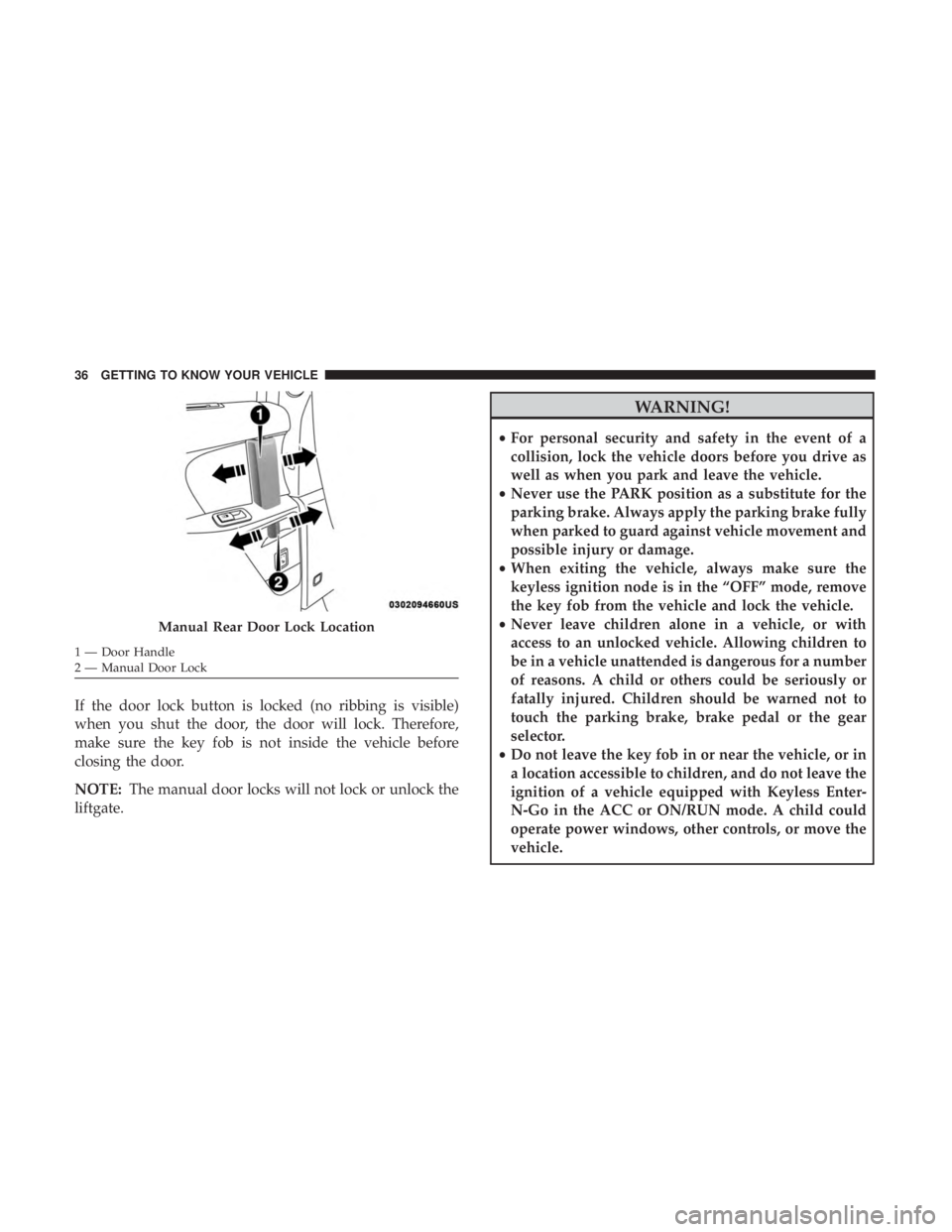
Manual Rear Door Lock Location
1 — Door Handle
2 — Manual Door Lock 36 GETTING TO KNOW YOUR VEHICLE
Page 41 of 696
NOTE:If “Unlock All Doors 1st Press” is programmed, all
doors and liftgate will unlock when you grab hold of the
driver ’s front door handle. To select between “Unlock
Driver Door 1st Press” and “Unlock All Doors 1st Press,”
refer to “Uconnect Settings” in “Multimedia” for further
information.
To Unlock From The Passenger Side:
With a valid key fob within 5 ft (1.5 m) of the passenger
door handle, grab the front passenger door handle to
unlock all four doors and the liftgate automatically. The
interior door panel lock knob will rotate when the door is
unlocked.
NOTE: All doors will unlock when the front passenger
door handle is grabbed regardless of the driver ’s door
unlock preference setting (“Unlock Driver Door 1st Press”
or “Unlock All Doors 1st Press”).
Preventing Inadvertent Locking Of Key Fob In Vehicle
(FOBIK-Safe)
To minimize the possibility of unintentionally locking a
key fob inside your vehicle, the Passive Entry system is
equipped with an automatic door unlock feature. FOBIK-Safe only executes in vehicles with Passive Entry.
There are three situations that trigger a FOBIK-Safe search
in any Passive Entry vehicle:
•
A lock request is made by a valid key fob while a door
is open.
• A lock request is made by the Passive Entry door handle
while a door is open.
• A lock request is made by the door panel switch while
the door is open.
When any of these situations occur, after all open doors are
shut, the FOBIK-Safe search will be executed. If it finds a
key fob inside the car, and it does not find any key fob
outside the car, then the car will unlock and alert the
customer.
NOTE: The vehicle will only unlock the doors when a valid
key fob is detected inside the vehicle, and no valid key fob
is detected outside the vehicle. The vehicle will not unlock
the doors when any of the following conditions are met:
• The doors are manually locked using the door lock
knobs.
• There is a valid key fob outside the vehicle and within
5 ft (1.5 m) of either Passive Entry door handle.
3
GETTING TO KNOW YOUR VEHICLE 39
Page 42 of 696
•Three attempts are made to lock the doors using the
door panel switch and then close the doors.
NOTE: On the third attempt ALL doors will lock and the
key fob can be locked in the vehicle.
To Enter The Liftgate
With a valid key fob within 5 ft (1.5 m) of the liftgate, cycle
the handle to open the liftgate and pull the liftgate open
with one fluid motion.
NOTE: If “Unlock Driver Door 1st Press” is programmed,
only the liftgate will unlock when the liftgate release
handle is pulled. If “Unlock All Doors 1st Press” is pro-
grammed, all doors and the liftgate will unlock when the
liftgate release handle is pulled. To select between “Unlock
Driver Door 1st Press” and “Unlock All Doors 1st Press,”
refer to “Uconnect Settings” in “Multimedia” for further
information.
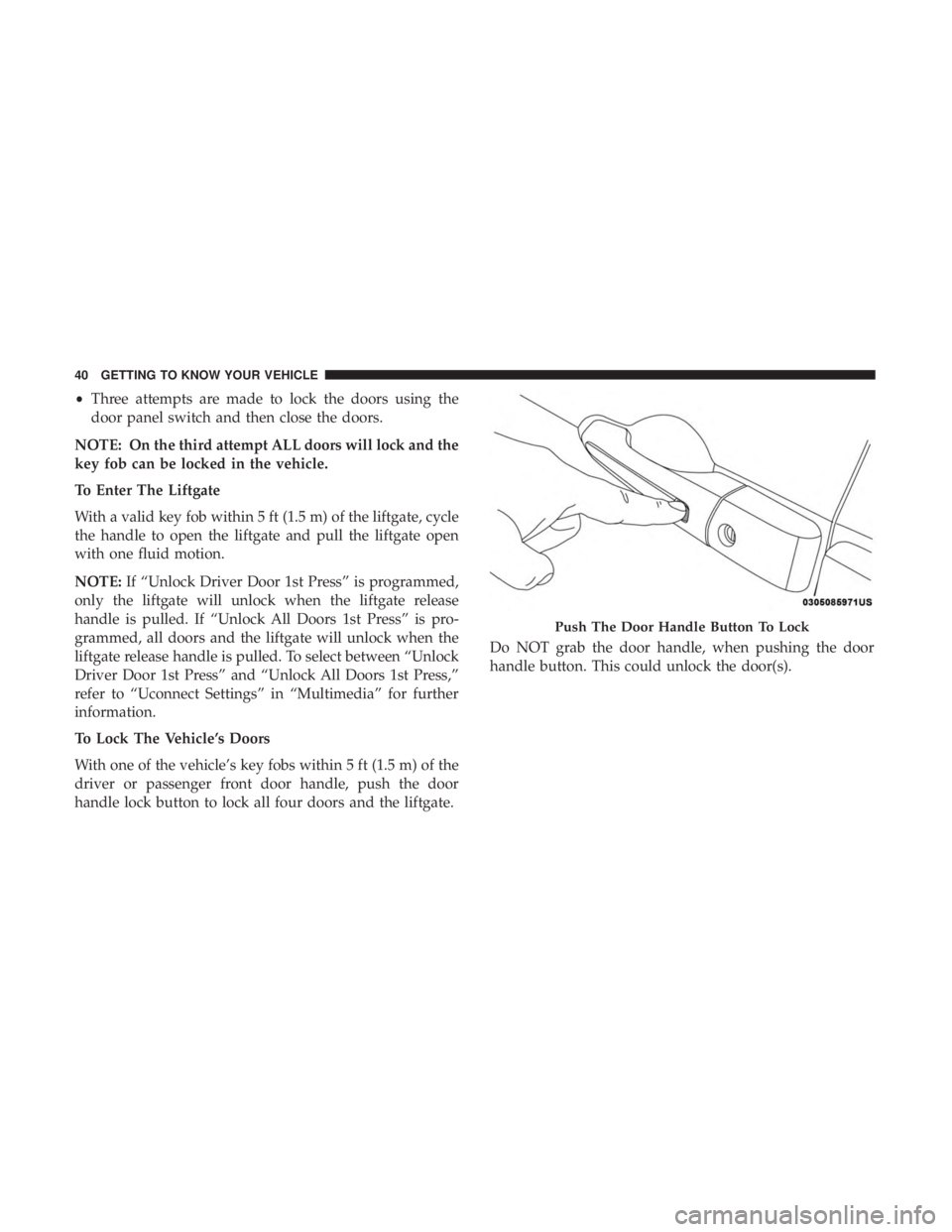
To Lock The Vehicle’s Doors
With one of the vehicle’s key fobs within 5 ft (1.5 m) of the
driver or passenger front door handle, push the door
handle lock button to lock all four doors and the liftgate. Do NOT grab the door handle, when pushing the door
handle button. This could unlock the door(s).
Push The Door Handle Button To Lock
40 GETTING TO KNOW YOUR VEHICLE
Page 45 of 696
•Buttons located:
– In the overhead console
– Just inside the sliding door
– On the outside handle
Push the button on the key fob twice within five
seconds to open, close, or reverse a power sliding
door.
The key fob and the overhead console button will operate
the door when the door is locked. All other ways require
the sliding door to be unlocked. If the vehicle is equipped
with Passive Entry, pressing the button on the outside
handle or Hands-Free feature (if equipped) will unlock and
open the sliding door, with a valid Passive Entry key fob
within 5 ft (1.5 m) of the door handle.
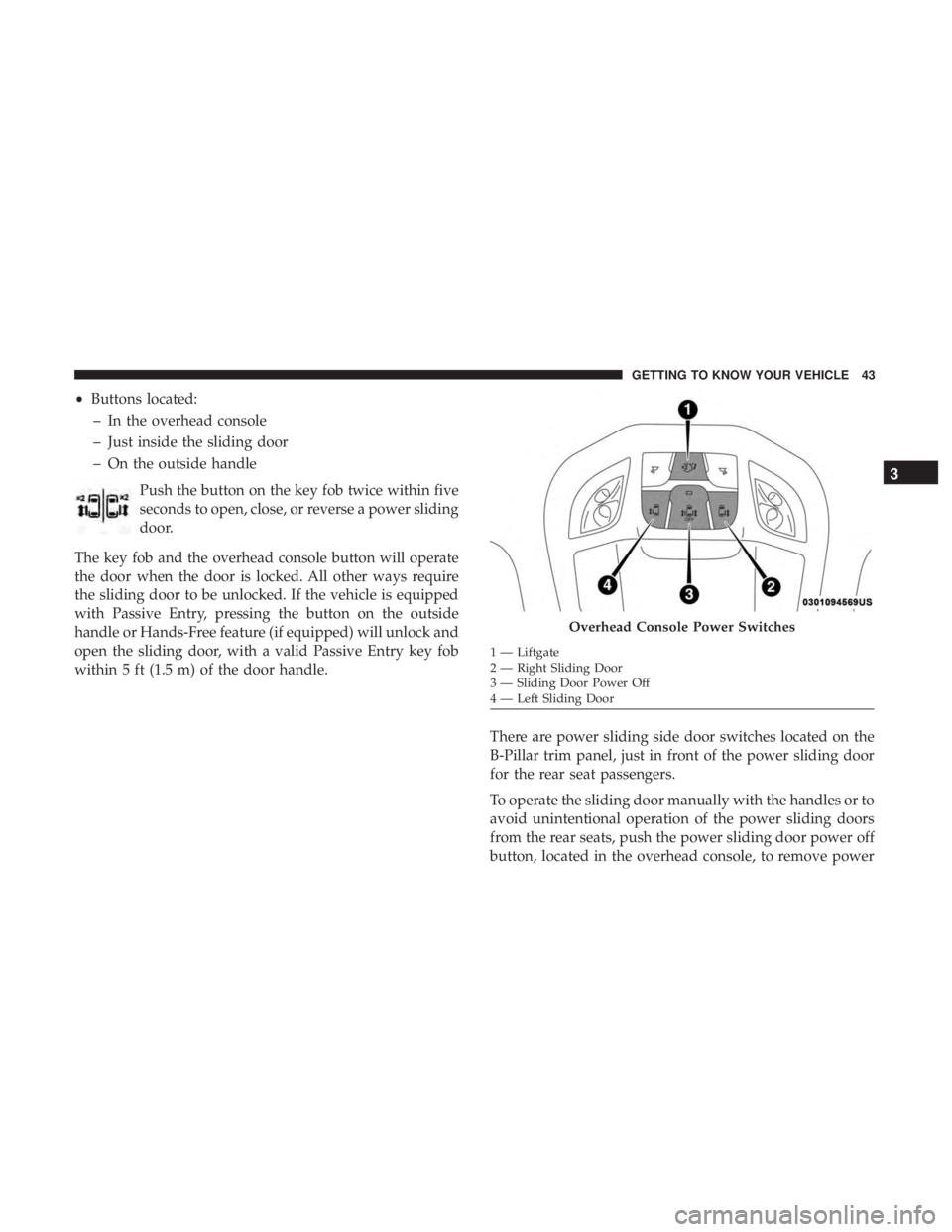
There are power sliding side door switches located on the
B-Pillar trim panel, just in front of the power sliding door
for the rear seat passengers.
To operate the sliding door manually with the handles or to
avoid unintentional operation of the power sliding doors
from the rear seats, push the power sliding door power off
button, located in the overhead console, to remove power
Overhead Console Power Switches
1 — Liftgate
2 — Right Sliding Door
3 — Sliding Door Power Off
4 — Left Sliding Door
3
GETTING TO KNOW YOUR VEHICLE 43
Page 57 of 696
NOTE:
•The outer head restraints will lower automatically as
necessary when the power seat begins to move.
• The center head restraint raises and lowers manually but
will not lower automatically.
• The head restraint can also be lowered manually using
the pull strap located at the back of the seat. Refer to
�Head Restraints - Third Row� in�Head Restraints� for
further information.
The switch is only functional when the liftgate is open and
the vehicle is in PARK.
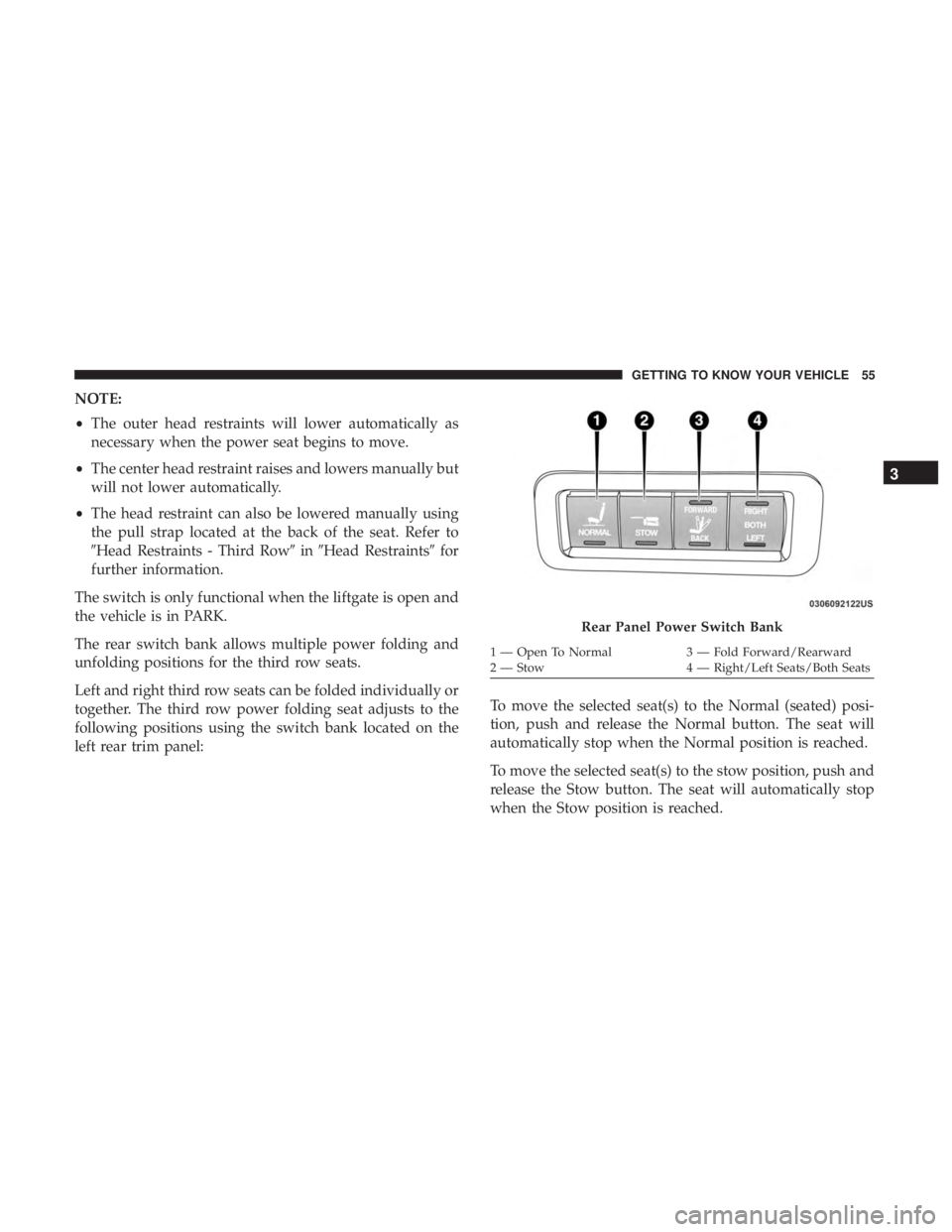
The rear switch bank allows multiple power folding and
unfolding positions for the third row seats.
Left and right third row seats can be folded individually or
together. The third row power folding seat adjusts to the
following positions using the switch bank located on the
left rear trim panel: To move the selected seat(s) to the Normal (seated) posi-
tion, push and release the Normal button. The seat will
automatically stop when the Normal position is reached.
To move the selected seat(s) to the stow position, push and
release the Stow button. The seat will automatically stop
when the Stow position is reached.
Rear Panel Power Switch Bank
1 — Open To Normal
3 — Fold Forward/Rearward
2 — Stow 4 — Right/Left Seats/Both Seats
3
GETTING TO KNOW YOUR VEHICLE 55
Page 101 of 696
NOTE:
•Before exiting the vehicle, make sure that the interior
lights are turned off. This will prevent the battery from
discharging once the doors are closed.
• If a light is left on, it will automatically be turned off
approximately 10 minutes after the ignition is in the
STOP/OFF position.
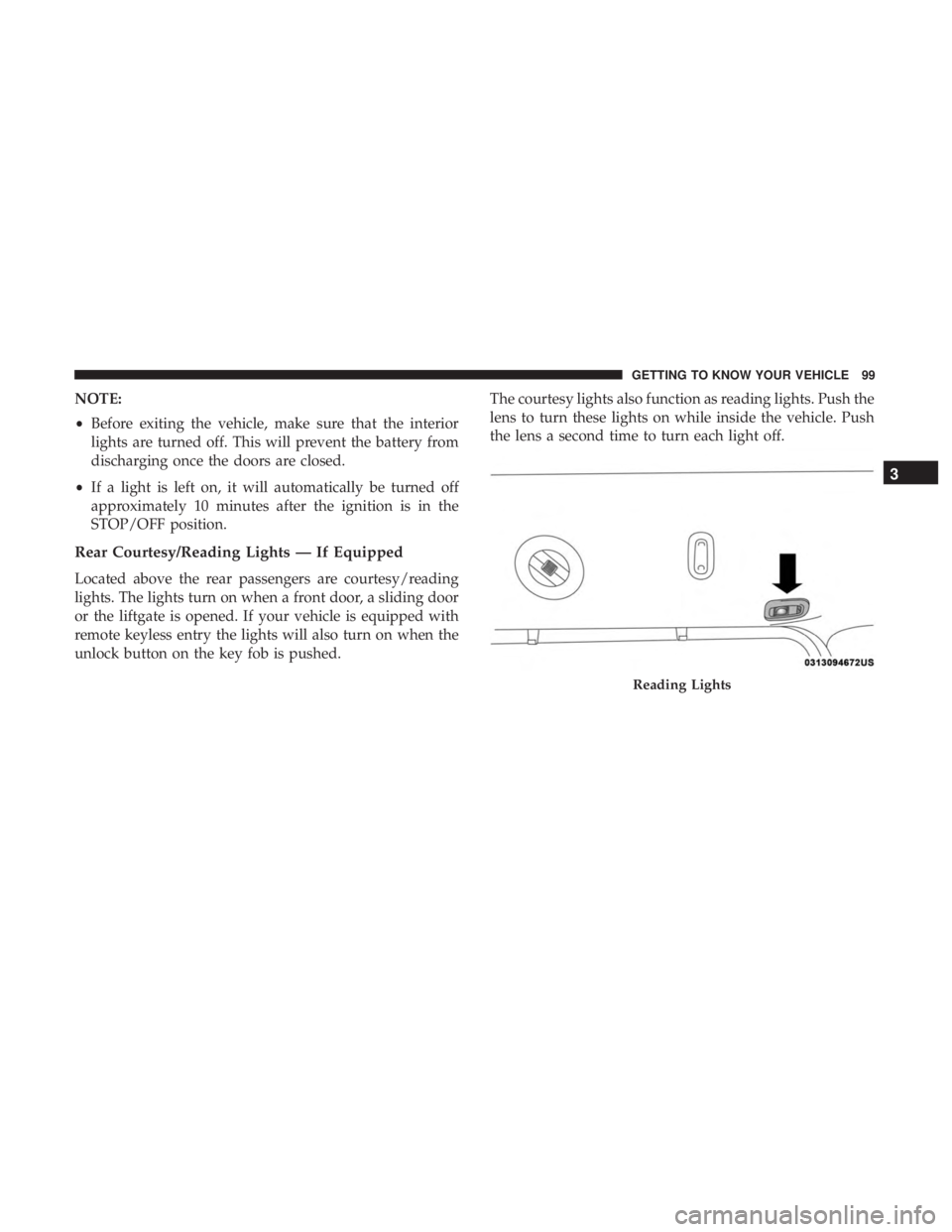
Rear Courtesy/Reading Lights — If Equipped
Located above the rear passengers are courtesy/reading
lights. The lights turn on when a front door, a sliding door
or the liftgate is opened. If your vehicle is equipped with
remote keyless entry the lights will also turn on when the
unlock button on the key fob is pushed. The courtesy lights also function as reading lights. Push the
lens to turn these lights on while inside the vehicle. Push
the lens a second time to turn each light off.
Reading Lights
3
GETTING TO KNOW YOUR VEHICLE 99
Page 102 of 696
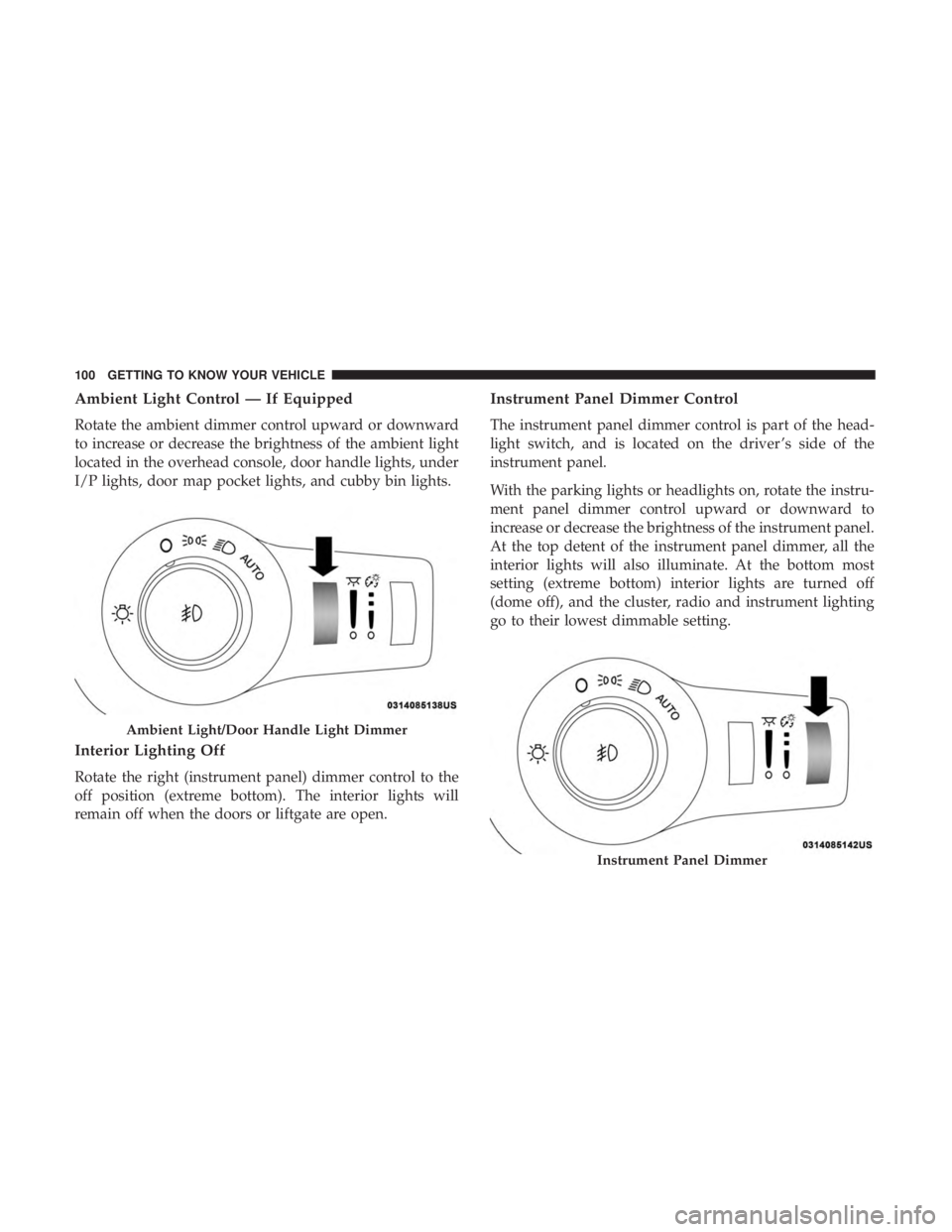
Ambient Light Control — If Equipped
Rotate the ambient dimmer control upward or downward
to increase or decrease the brightness of the ambient light
located in the overhead console, door handle lights, under
I/P lights, door map pocket lights, and cubby bin lights.
Interior Lighting Off
Rotate the right (instrument panel) dimmer control to the
off position (extreme bottom). The interior lights will
remain off when the doors or liftgate are open.
Instrument Panel Dimmer Control
The instrument panel dimmer control is part of the head-
light switch, and is located on the driver ’s side of the
instrument panel.
With the parking lights or headlights on, rotate the instru-
ment panel dimmer control upward or downward to
increase or decrease the brightness of the instrument panel.
At the top detent of the instrument panel dimmer, all the
interior lights will also illuminate. At the bottom most
setting (extreme bottom) interior lights are turned off
(dome off), and the cluster, radio and instrument lighting
go to their lowest dimmable setting.
Ambient Light/Door Handle Light Dimmer
Instrument Panel Dimmer
100 GETTING TO KNOW YOUR VEHICLE
Page 143 of 696
LIFTGATE
Opening
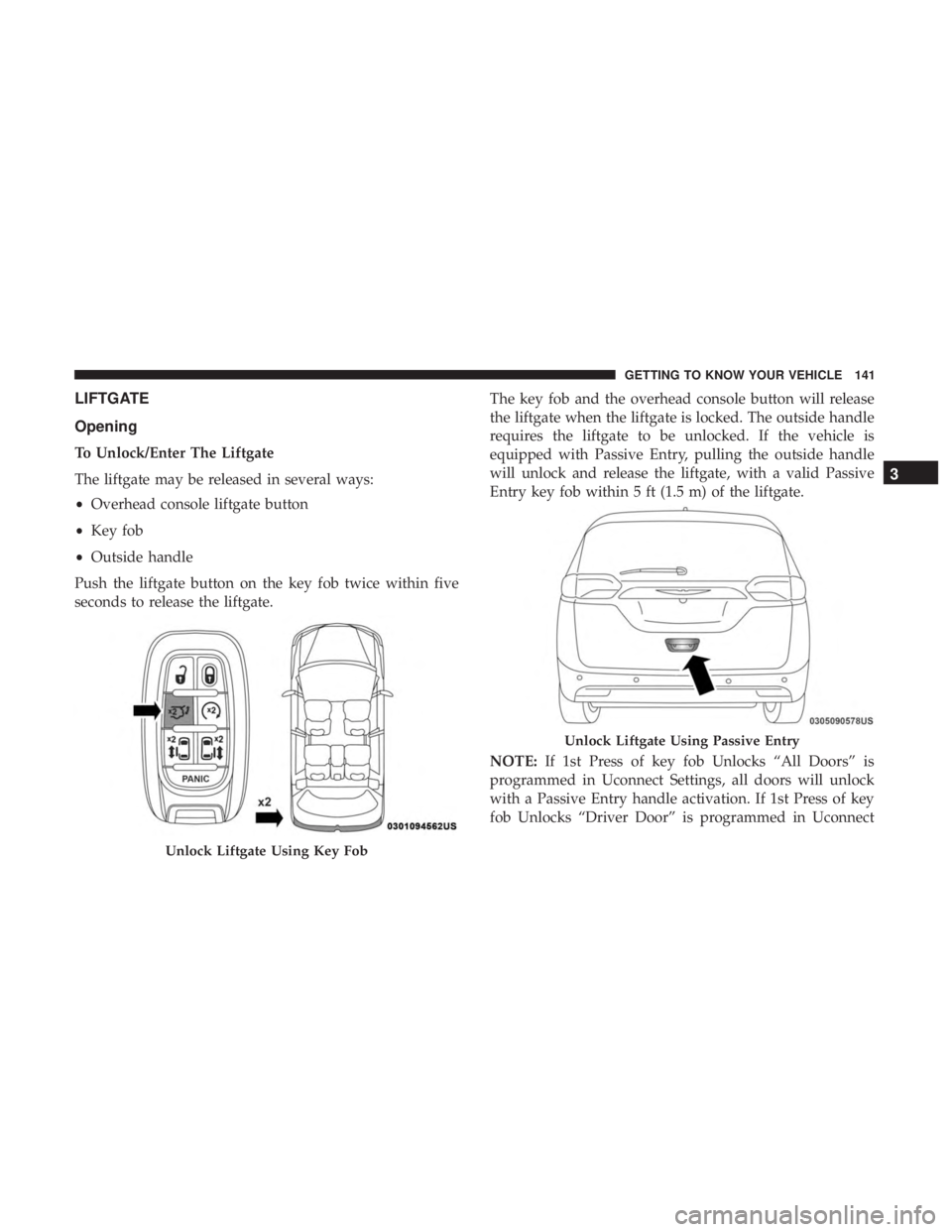
To Unlock/Enter The Liftgate
The liftgate may be released in several ways:
•Overhead console liftgate button
• Key fob
• Outside handle
Push the liftgate button on the key fob twice within five
seconds to release the liftgate. The key fob and the overhead console button will release
the liftgate when the liftgate is locked. The outside handle
requires the liftgate to be unlocked. If the vehicle is
equipped with Passive Entry, pulling the outside handle
will unlock and release the liftgate, with a valid Passive
Entry key fob within 5 ft (1.5 m) of the liftgate.
NOTE:
If 1st Press of key fob Unlocks “All Doors” is
programmed in Uconnect Settings, all doors will unlock
with a Passive Entry handle activation. If 1st Press of key
fob Unlocks “Driver Door” is programmed in Uconnect
Unlock Liftgate Using Key Fob
Unlock Liftgate Using Passive Entry
3
GETTING TO KNOW YOUR VEHICLE 141