2018 CHRYSLER PACIFICA Back light
[x] Cancel search: Back lightPage 161 of 696
If you unplugged the garage door opener/device for
programming, plug it back in at this time.
Reprogramming A Single HomeLink Button (Canadian/
Gate Operator)
To reprogram a channel that has been previously trained,
follow these steps:
1. Cycle the ignition to the ON/RUN position.
2. Press and hold the desired HomeLink button until theindicator light begins to flash after 20 seconds. Do not
release the button.
3. Without releasing the button, proceed with “Canadian/ Gate Operator Programming” step 2 and follow all
remaining steps.
Using HomeLink
To operate, push and release the programmed HomeLink
button. Activation will now occur for the programmed
device (i.e. garage door opener, gate operator, security
system, entry door lock, home/office lighting, etc.). The
hand-held transmitter of the device may also be used at
any time.
Security
It is advised to erase all channels before you sell or turn in
your vehicle.
To do this, push and hold the two outside buttons for 20
seconds until the orange indicator flashes. Note that all
channels will be erased. Individual channels cannot be
erased.
The HomeLink Universal Transceiver is disabled when the
Vehicle Security Alarm is active.
Troubleshooting Tips
If you are having trouble programming HomeLink, here
are some of the most common solutions:
•Replace the battery in the Garage Door Opener hand-
held transmitter.
• Push the LEARN button on the Garage Door Opener to
complete the training for a Rolling Code.
• Did you unplug the device for programming and re-
member to plug it back in?
If you have any problems, or require assistance, please call
toll-free 1-800-355-3515 or, on the Internet at
HomeLink.com for information or assistance.
3
GETTING TO KNOW YOUR VEHICLE 159
Page 221 of 696

WARNING!(Continued)
steering system, suspension, braking system, tire
type and size or wheel size may adversely affect ESC
performance. Improperly inflated and unevenly
worn tires may also degrade ESC performance. Any
vehicle modification or poor vehicle maintenance
that reduces the effectiveness of the ESC system can
increase the risk of loss of vehicle control, vehicle
rollover, personal injury and death.
ESC Operating Modes
NOTE:Depending upon model and mode of operation, the
ESC system may have multiple operating modes.
ESC On
This is the normal operating mode for the ESC. Whenever
the vehicle is started, the ESC system will be in this mode.
This mode should be used for most driving conditions.
Alternate ESC modes should only be used for specific
reasons as noted in the following paragraphs. Partial Off
The “Partial Off” mode is intended for times when a more
spirited driving experience is desired. This mode may
modify TCS and ESC thresholds for activation, which
allows for more wheel spin than normally allowed. This
mode may be useful if the vehicle becomes stuck.
To enter the “Partial Off” mode, momentarily push the
“ESC Off” button and the “ESC Off Indicator Light” will
illuminate. To turn the ESC on again, momentarily push
the “ESC Off” button and the “ESC Off Indicator Light”
will turn off.
NOTE:
When driving with snow chains, or when starting
off in deep snow, sand, or gravel, it may be desirable to
allow more wheel spin. This can be accomplished by
momentarily pushing the “ESC Off” button to enter partial
mode “Partial Off” mode. Once the situation requiring
“Partial Off” mode is overcome, turn ESC back on by
momentarily pushing the “ESC Off” button. This may be
done while the vehicle is in motion.
5
SAFETY 219
Page 223 of 696
The “ESC OFF Indicator Light” indicates the
customer has elected to have the Electronic Sta-
bility Control (ESC) in a reduced mode.
Hill Start Assist (HSA)
The HSA system is designed to mitigate roll back from a
complete stop while on an incline. If the driver releases the
brake while stopped on an incline, HSA will continue to
hold the brake pressure for a short period. If the driver
does not apply the throttle before this time expires, the
system will release brake pressure and the vehicle will roll
down the hill as normal.
The following conditions must be met in order for HSA to
activate:
•The feature must be enabled.
• The vehicle must be stopped.
• Park brake must be off.
• Driver door must be closed.
• The vehicle must be on a sufficient grade.
• The gear selection must match vehicle uphill direction
(i.e., vehicle facing uphill is in forward gear; vehicle
backing uphill is in REVERSE gear). •
HSA will work in REVERSE gear and all forward gears.
The system will not activate if the transmission is in
PARK or NEUTRAL. For vehicles equipped with a
manual transmission, if the clutch is pressed, HSA will
remain active.WARNING!
There may be situations where the Hill Start Assist
(HSA) will not activate and slight rolling may occur,
such as on minor hills or with a loaded vehicle, or
while pulling a trailer. HSA is not a substitute for
active driving involvement. It is always the driver ’s
responsibility to be attentive to distance to other ve-
hicles, people, and objects, and most importantly brake
operation to ensure safe operation of the vehicle under
all road conditions. Your complete attention is always
required while driving to maintain safe control of your
vehicle. Failure to follow these warnings can result in
a collision or serious personal injury.
Towing With HSA
HSA will also provide assistance to mitigate roll back while
towing a trailer.
5
SAFETY 221
Page 226 of 696

both sides of the vehicle when the vehicle speed reaches
approximately 6 mph (10 km/h) or higher and will alert
the driver of vehicles in these areas.
NOTE:
•The BSM system DOES NOT alert the driver about
rapidly approaching vehicles that are outside the detec-
tion zones.
• The BSM system detection zone DOES NOT change if
your vehicle is towing a trailer. Therefore, visually verify
the adjacent lane is clear for both your vehicle and trailer
before making a lane change. If the trailer or other object
(i.e., bicycle, sports equipment) extends beyond the side
of your vehicle, this may result in false detections. The
BSM warning light may even remain illuminated the
entire time the vehicle is in a forward gear.
•
The Blind Spot Monitoring (BSM) system may experience
drop outs (blinking on and off) of the side mirror Warning
Indicator lamps when a motorcycle or any small object
remains at the side of the vehicle for extended periods of
time (more than a couple of seconds).
The area on the rear fascia where the radar sensors are
located must remain free of snow, ice, and dirt/road
contamination so that the BSM system can function prop-
erly. Do not block the area of the rear fascia where the radar sensors are located with foreign objects (bumper stickers,
bicycle racks, etc.).
If the system detects degraded performance due to con-
tamination or foreign objects, a message will warn you of a
blocked sensor and the warning indicators in side view
mirrors will be on. The warning indicators will remain
illuminated until blockage clearing conditions are met.
First clear the fascia area around the sensors of the block-
age. After removing the blockage, the following procedure
can be used to reset the system:
•
Cycle the ignition from on to off and then back on.
Sensor Location
224 SAFETY
Page 231 of 696

(5 km/h), to objects moving a maximum of approximately
20 mph (32 km/h), such as in parking lot situations.
NOTE:In a parking lot situation, oncoming vehicles can be
obscured by vehicles parked on either side. If the sensors
are blocked by other structures or vehicles, the system will
not be able to alert the driver. Additionally, if the host
vehicle is obscured by a flat object on one side the system
can false alert on vehicles approaching from the opposite
direction.
When RCP is on and the vehicle is in REVERSE, the driver
is alerted using both the visual and audible alarms, includ-
ing reducing the radio volume.
WARNING!
Rear Cross Path Detection (RCP) is not a back up aid
system. It is intended to be used to help a driver detect
an oncoming vehicle in a parking lot situation. Drivers
must be careful when backing up, even when using
RCP. Always check carefully behind your vehicle, look
behind you, and be sure to check for pedestrians,
animals, other vehicles, obstructions, and blind spots
before backing up. Failure to do so can result in serious
injury or death.
Modes Of Operation
Three selectable modes of operation are available in the
Uconnect System. Refer to “Uconnect Settings” in “Multi-
media” for further information.
Blind Spot Alert Lights Only — Default Setting
When operating in Blind Spot Alert mode, the BSM system
will provide a visual alert in the appropriate side view
mirror based on a detected object. However, when the
system is operating in Rear Cross Path (RCP) mode, the
system will respond with both visual and audible alerts
when a detected object is present. Whenever an audible
alert is requested, the radio is muted.
Blind Spot Alert Lights/Chime
When operating in Blind Spot Alert Lights/Chime mode,
the BSM system will provide a visual alert in the appro-
priate side view mirror based on a detected object. If the
turn signal is then activated, and it corresponds to an alert
present on that side of the vehicle, an audible chime will
also be sounded. Whenever a turn signal and detected
object are present on the same side at the same time, both
the visual and audible alerts will be issued. In addition to
the audible alert the radio (if on) will also be muted.
5
SAFETY 229
Page 259 of 696

•Instrument Panel
• Knee Impact Bolsters
• Driver and Front Passenger Air Bags
• Seat Belt Buckle Switch
• Supplemental Side Air Bags
• Supplemental Knee Air Bags
• Front and Side Impact Sensors
• Seat Belt Pretensioners
• Seat Track Position Sensors
• Occupant Classification System
Air Bag Warning Light
The ORC monitors the readiness of the electronic
parts of the air bag system whenever the ignition
switch is in the START or ON/RUN position. If
the ignition switch is in the OFF position or in the
ACC position, the air bag system is not on and the air bags
will not inflate.
The ORC contains a backup power supply system that may
deploy the air bag system even if the battery loses power or
it becomes disconnected prior to deployment. The ORC turns on the Air Bag Warning Light in the
instrument panel for approximately four to eight seconds
for a self-check when the ignition switch is first in the
ON/RUN position. After the self-check, the Air Bag Warn-
ing Light will turn off. If the ORC detects a malfunction in
any part of the system, it turns on the Air Bag Warning
Light, either momentarily or continuously. A single chime
will sound to alert you if the light comes on again after
initial startup.
The ORC also includes diagnostics that will illuminate the
instrument panel Air Bag Warning Light if a malfunction is
detected that could affect the air bag system. The diagnos-
tics also record the nature of the malfunction. While the air
bag system is designed to be maintenance free, if any of the
following occurs, have an authorized dealer service the air
bag system immediately.
•
The Air Bag Warning Light does not come on during the
four to eight seconds when the ignition switch is first in
the ON/RUN position.
• The Air Bag Warning Light remains on after the four to
eight-second interval.
• The Air Bag Warning Light comes on intermittently or
remains on while driving.
5
SAFETY 257
Page 265 of 696
The OCS determines the front passenger ’s most probable
classification. The OCS estimates the seated weight on the
front passenger seat and where that weight is located. The
OCS communicates the classification status to the ORC.
The ORC uses the classification to determine whether the
Passenger Advanced Front Air Bag inflation rate should be
adjusted.
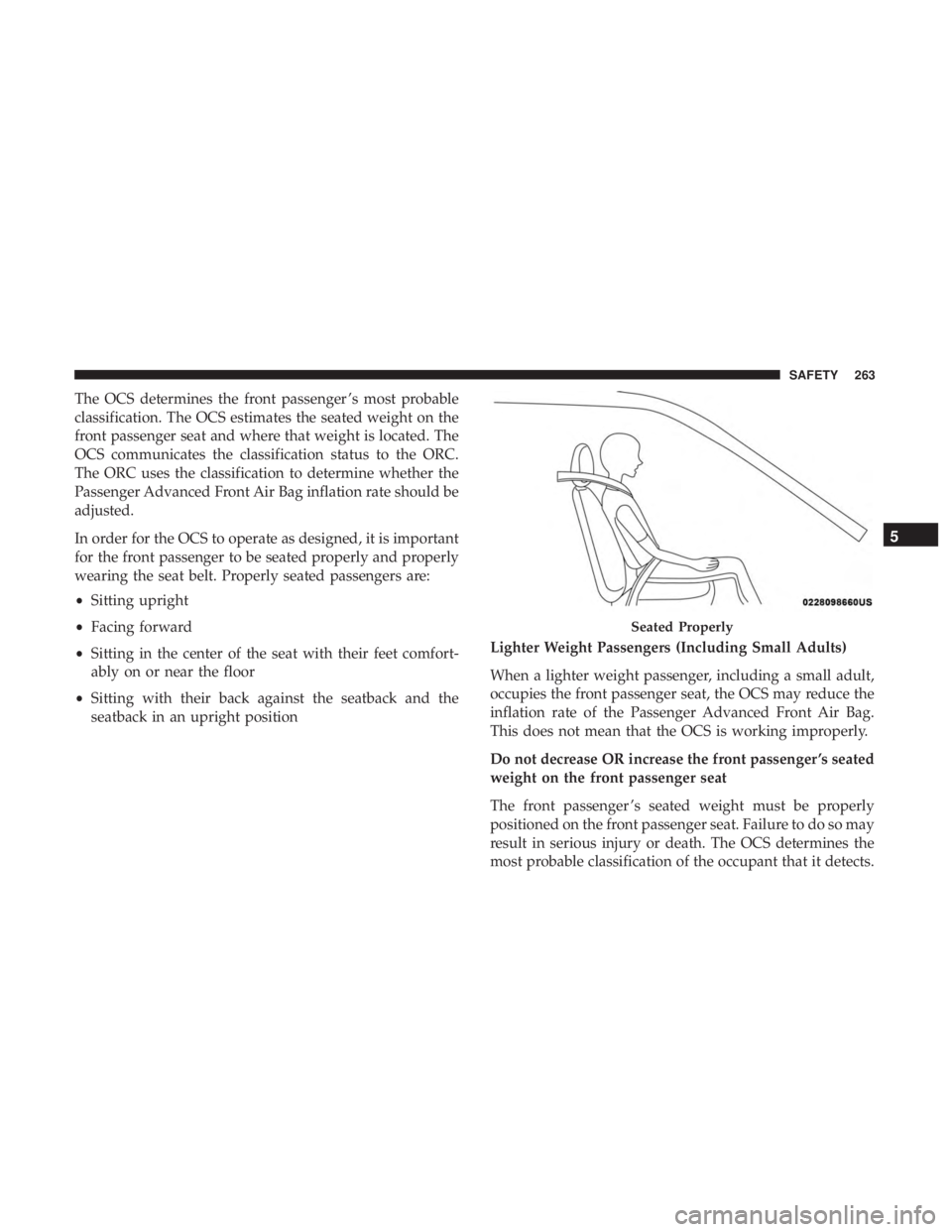
In order for the OCS to operate as designed, it is important
for the front passenger to be seated properly and properly
wearing the seat belt. Properly seated passengers are:
•Sitting upright
• Facing forward
• Sitting in the center of the seat with their feet comfort-
ably on or near the floor
• Sitting with their back against the seatback and the
seatback in an upright position Lighter Weight Passengers (Including Small Adults)
When a lighter weight passenger, including a small adult,
occupies the front passenger seat, the OCS may reduce the
inflation rate of the Passenger Advanced Front Air Bag.
This does not mean that the OCS is working improperly.
Do not decrease OR increase the front passenger ’s seated
weight on the front passenger seat
The front passenger ’s seated weight must be properly
positioned on the front passenger seat. Failure to do so may
result in serious injury or death. The OCS determines the
most probable classification of the occupant that it detects.
Seated Properly
5
SAFETY 263
Page 268 of 696
WARNING!
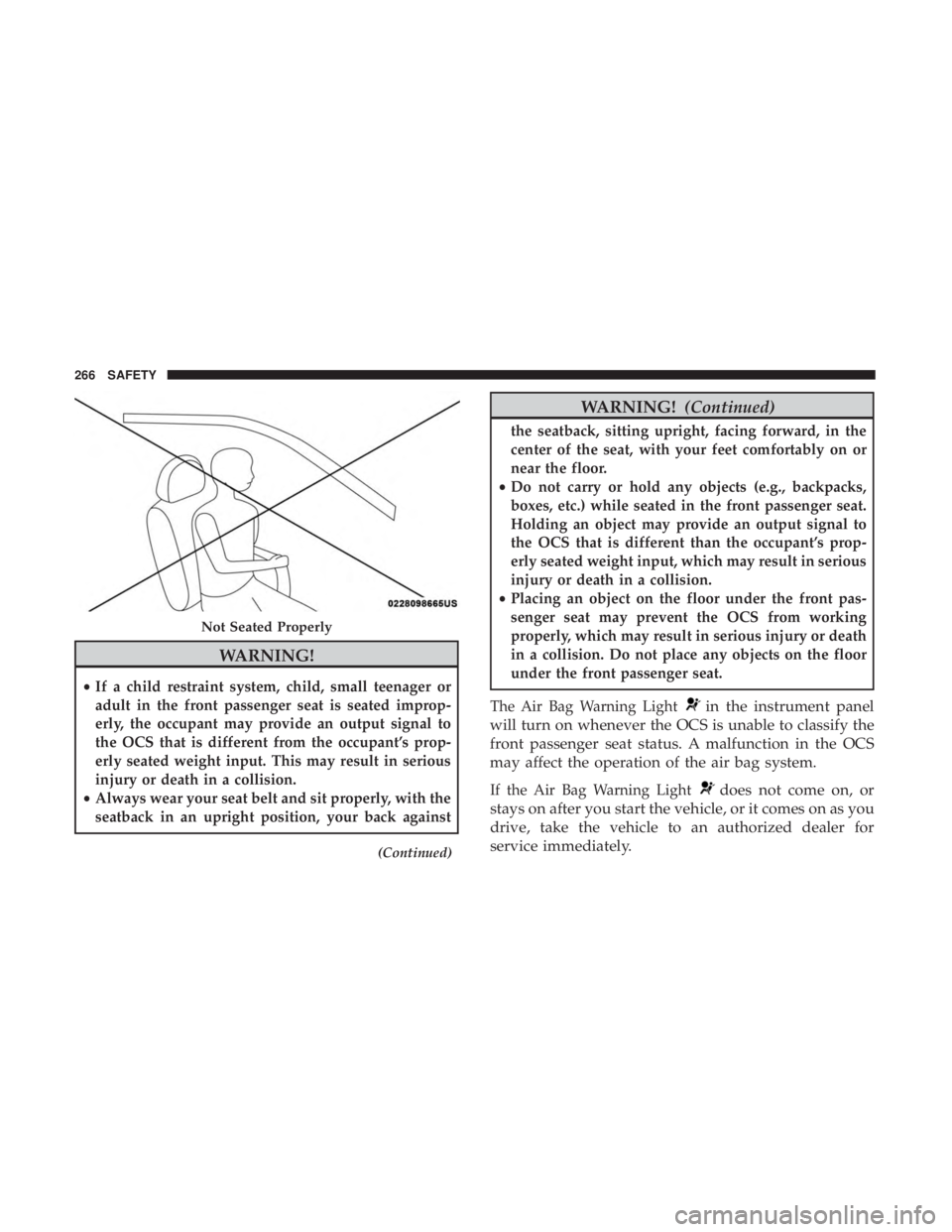
•If a child restraint system, child, small teenager or
adult in the front passenger seat is seated improp-
erly, the occupant may provide an output signal to
the OCS that is different from the occupant’s prop-
erly seated weight input. This may result in serious
injury or death in a collision.
• Always wear your seat belt and sit properly, with the
seatback in an upright position, your back against
(Continued)
WARNING! (Continued)
the seatback, sitting upright, facing forward, in the
center of the seat, with your feet comfortably on or
near the floor.
• Do not carry or hold any objects (e.g., backpacks,
boxes, etc.) while seated in the front passenger seat.
Holding an object may provide an output signal to
the OCS that is different than the occupant’s prop-
erly seated weight input, which may result in serious
injury or death in a collision.
• Placing an object on the floor under the front pas-
senger seat may prevent the OCS from working
properly, which may result in serious injury or death
in a collision. Do not place any objects on the floor
under the front passenger seat.
The Air Bag Warning Light
in the instrument panel
will turn on whenever the OCS is unable to classify the
front passenger seat status. A malfunction in the OCS
may affect the operation of the air bag system.
If the Air Bag Warning Lightdoes not come on, or
stays on after you start the vehicle, or it comes on as you
drive, take the vehicle to an authorized dealer for
service immediately.
Not Seated Properly
266 SAFETY