Page 549 of 696
TECHNICAL SPECIFICATIONS
CONTENTS
�IDENTIFICATION DATA ...................548
▫ Vehicle Identification Number .............548
� BRAKE SYSTEM ........................548
� WHEEL AND TIRE TORQUE SPECIFICATIONS . .549
▫ Torque Specifications ....................549
� FUEL REQUIREMENTS ...................550
▫ 3.6L Engine ..........................550
▫ Reformulated Gasoline ..................551
▫ Materials Added To Fuel .................551
▫ Gasoline/Oxygenate Blends ...............551 ▫
Do Not Use E-85 In Non-Flex Fuel Vehicles . . . .552
▫ CNG And LP Fuel System Modifications ......552
▫ MMT In Gasoline .......................553
▫ Fuel System Cautions ....................553
▫ Carbon Monoxide Warnings ...............554
� FLUID CAPACITIES ..................... .555
� FLUIDS AND LUBRICANTS ................555
▫ Engine ............................. .555
▫ Chassis ............................ .557
9
Page 550 of 696
IDENTIFICATION DATA
Vehicle Identification Number
The Vehicle Identification Number (VIN) is on the left front
corner of the instrument panel and is visible from outside
of the vehicle through the windshield. This number also
appears stamped under the right rear sliding door trim
panel and printed on the Automobile Information Disclo-
sure Label affixed to a window on your vehicle, the vehicle
registration and title.NOTE:It is illegal to remove or alter the VIN.
BRAKE SYSTEM
Your vehicle is equipped with dual hydraulic brake sys-
tems. If either of the two hydraulic systems loses normal
capability, the remaining system will still function. How-
ever, there will be some loss of overall braking effective-
ness. You may notice increased pedal travel during appli-
cation, greater pedal force required to slow or stop, and
potential activation of the Brake Warning Light.
Vehicle Identification Number
Vehicle Identification Number
548 TECHNICAL SPECIFICATIONS
Page 551 of 696

In the event power assist is lost for any reason (i.e.,
repeated brake applications with the engine off) the brakes
will still function. However, the effort required to brake the
vehicle will be much greater than that required with the
power system operating.
WHEEL AND TIRE TORQUE SPECIFICATIONS
Proper lug nut/bolt torque is very important to ensure that
the wheel is properly mounted to the vehicle. Any time a
wheel has been removed and reinstalled on the vehicle, the
lug nuts/bolts should be torqued using a properly cali-
brated torque wrench using a high quality six sided (hex)
deep wall socket.
Torque Specifications
Lug Nut/BoltTorque **Lug Nut/Bolt
Size Lug Nut/Bolt
Socket Size
100 Ft-Lbs (135 N·m) M12 x 1.5
19 mm
**Use only your authorized dealer recommended lug nuts/
bolts and clean or remove any dirt or oil before tightening.
Inspect the wheel mounting surface prior to mounting the
tire and remove any corrosion or loose particles. Tighten the lug nuts/bolts in a star pattern until each
nut/bolt has been tightened twice. Ensure that the socket is
fully engaged on the lug nut/bolt (do not insert it half-
way).
Wheel Mounting Surface
9
TECHNICAL SPECIFICATIONS 549
Page 559 of 696
Chassis
ComponentFluid, Lubricant, or Genuine Part
Automatic Transmission Use only Mopar ZF 8&9 Speed ATF Automatic Transmis-
sion Fluid, or equivalent.
Failure to use the correct fluid may affect the function or
performance of your transmission.
Brake Master Cylinder We recommend you use Mopar DOT 3 Brake Fluid, SAE
J1703 should be used. If DOT 3, SAE J1703 brake fluid is not
available, then DOT 4 is acceptable. Use only recom-
mended brake fluids.
Refrigerant Use only refrigerant R-1234yf
Charge Amounts:
Single A/C System — 1.94 lb (880g)
Dual A/C System — 2.31 lb (1050g)
Compressor Oil Use only PAG oil PSD-1:
Single A/C System — 140 ml
Dual A/C System — 190 ml
9
TECHNICAL SPECIFICATIONS 557
Page 577 of 696
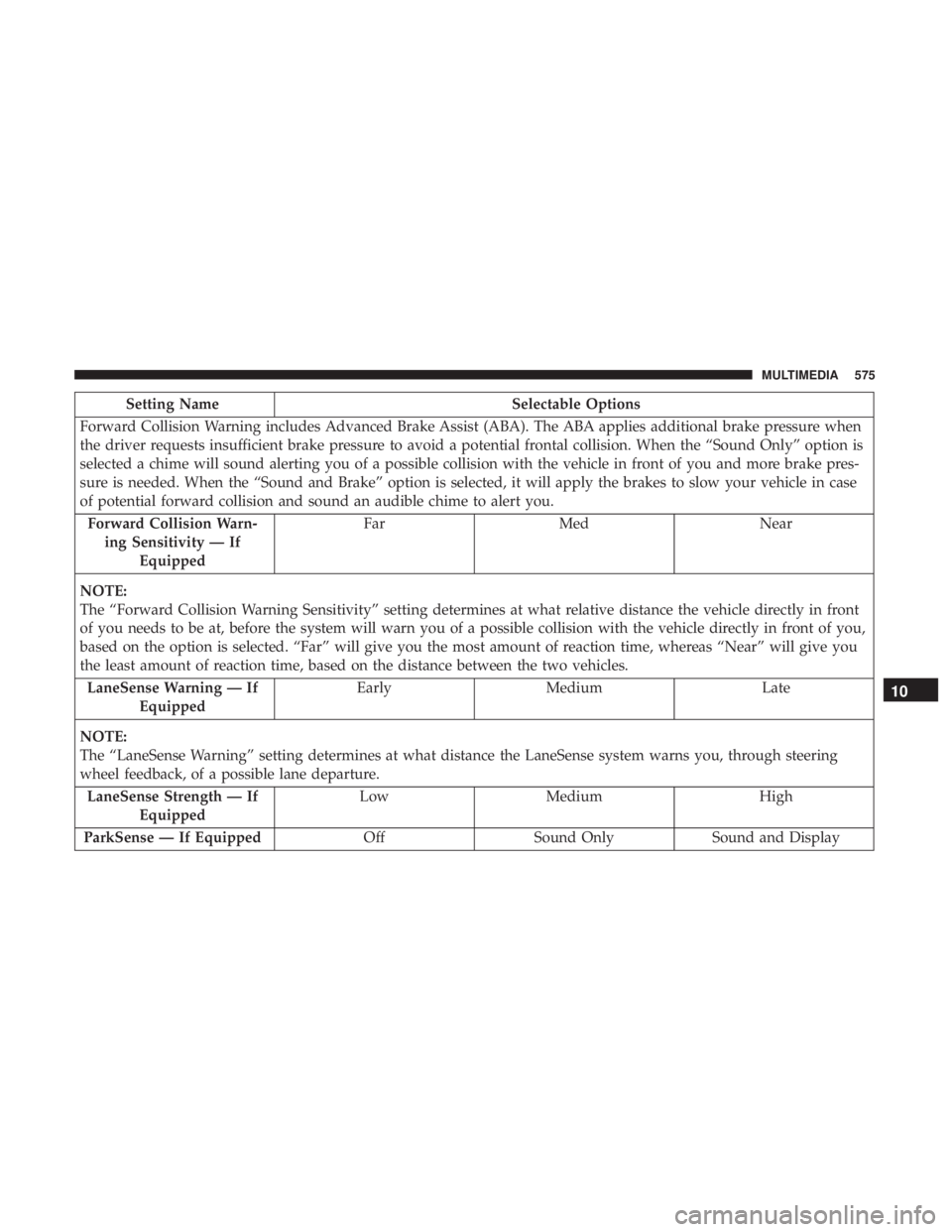
Setting NameSelectable Options
Forward Collision Warning includes Advanced Brake Assist (ABA). The ABA applies additional brake pressure when
the driver requests insufficient brake pressure to avoid a potential frontal collision. When the “Sound Only” option is
selected a chime will sound alerting you of a possible collision with the vehicle in front of you and more brake pres-
sure is needed. When the “Sound and Brake” option is selected, it will apply the brakes to slow your vehicle in case
of potential forward collision and sound an audible chime to alert you. Forward Collision Warn- ing Sensitivity — If Equipped Far
Med Near
NOTE:
The “Forward Collision Warning Sensitivity” setting determines at what relative distance the vehicle directly in front
of you needs to be at, before the system will warn you of a possible collision with the vehicle directly in front of you,
based on the option is selected. “Far” will give you the most amount of reaction time, whereas “Near” will give you
the least amount of reaction time, based on the distance between the two vehicles. LaneSense Warning — If Equipped Early
Medium Late
NOTE:
The “LaneSense Warning” setting determines at what distance the LaneSense system warns you, through steering
wheel feedback, of a possible lane departure. LaneSense Strength — If Equipped Low
Medium High
ParkSense — If Equipped OffSound Only Sound and Display
10
MULTIMEDIA 575
Page 579 of 696
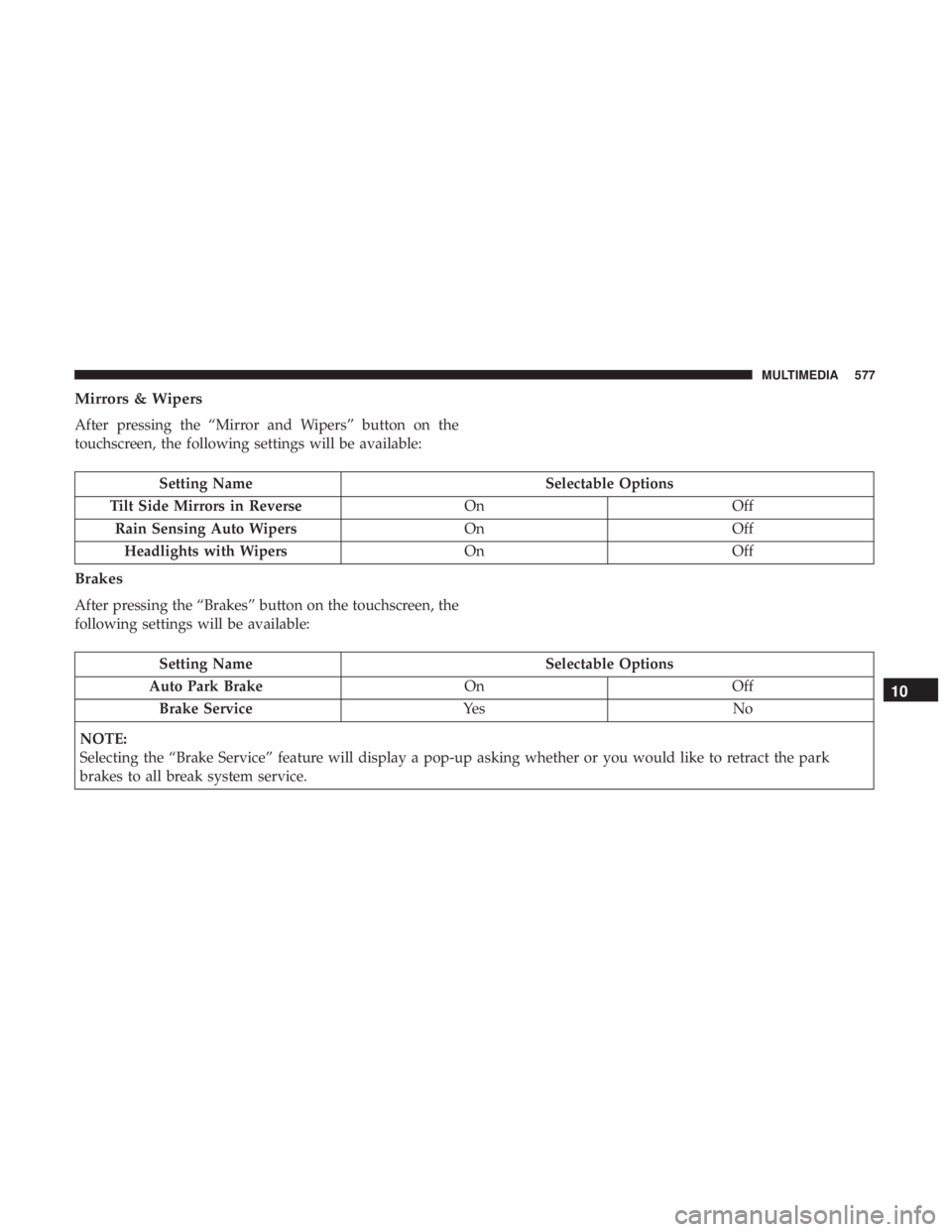
Mirrors & Wipers
After pressing the “Mirror and Wipers” button on the
touchscreen, the following settings will be available:
Setting NameSelectable Options
Tilt Side Mirrors in Reverse OnOff
Rain Sensing Auto Wipers OnOff
Headlights with Wipers OnOff
Brakes
After pressing the “Brakes” button on the touchscreen, the
following settings will be available:
Setting Name Selectable Options
Auto Park Brake OnOff
Brake Service Ye sN o
NOTE:
Selecting the “Brake Service” feature will display a pop-up asking whether or you would like to retract the park
brakes to all break system service.
10
MULTIMEDIA 577
Page 606 of 696
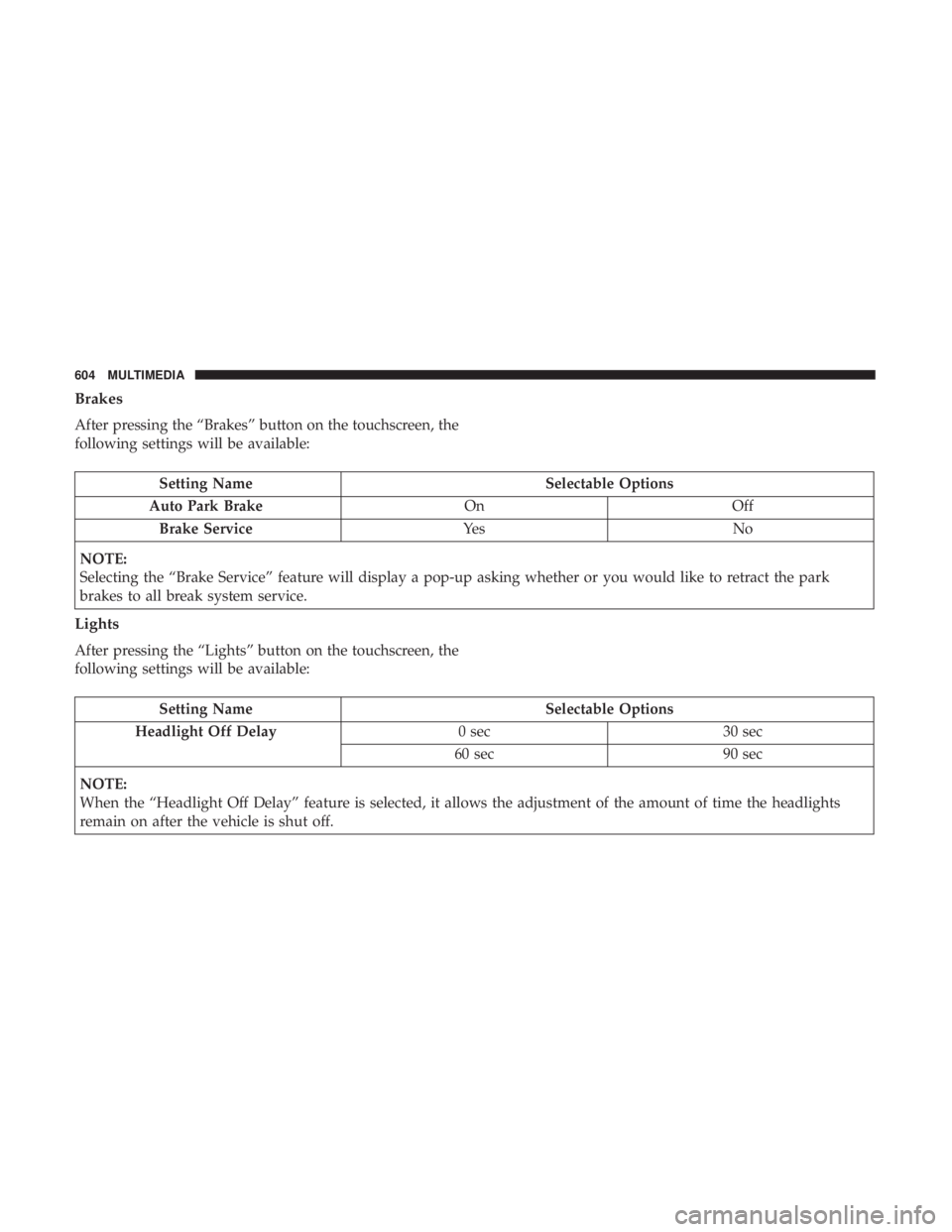
Brakes
After pressing the “Brakes” button on the touchscreen, the
following settings will be available:
Setting NameSelectable Options
Auto Park Brake OnOff
Brake Service Ye sN o
NOTE:
Selecting the “Brake Service” feature will display a pop-up asking whether or you would like to retract the park
brakes to all break system service.
Lights
After pressing the “Lights” button on the touchscreen, the
following settings will be available:
Setting Name Selectable Options
Headlight Off Delay 0 sec30 sec
60 sec 90 sec
NOTE:
When the “Headlight Off Delay” feature is selected, it allows the adjustment of the amount of time the headlights
remain on after the vehicle is shut off.
604 MULTIMEDIA
Page 680 of 696
About Your Brakes........................ .548
Adaptive Cruise Control (ACC) (Cruise Control) . . . .332
Adding Engine Coolant (Antifreeze) .............512
Additives, Fuel ............................551
Adjust Down .................................52
Forward ................................52
Rearward ...............................52
Up....................................52
AirBag ................................ .258
Air Bag Operation ........................260
Air Bag Warning Light .................257, 261
Driver Knee Air Bag ..................... .268
Enhanced Accident Response .............273, 485
Event Data Recorder (EDR) .................486
FrontAirBag .......................... .261
If Deployment Occurs .....................272
Knee Impact Bolsters ..................... .267
Maintaining Your Air Bag System .............274
Maintenance ............................274
Redundant Air Bag Warning Light ............258
Side Air Bags .......................... .268
Transporting Pets ........................300
Air Bag Light .......................198, 257, 301
Air Cleaner, Engine (Engine Air Cleaner Filter) ......498Air Conditioner Maintenance
..................500
Air Conditioner Refrigerant ...................500
Air Conditioner System ..................... .500
Air Conditioning Filter ...................132, 501
Air Conditioning, Operating Tips ...............130
Air Filter ............................... .498
Air Pressure Tires................................. .528
Alarm Arm The System ..........................33
Disarm The System ........................34
Security Alarm ..........................201
Alterations/Modifications, Vehicle ................5
Android Auto ............................ .665
Antifreeze (Engine Coolant) ................511,555
Disposal ...............................513
Anti-Lock Brake
System (ABS).................214
Anti-Lock Warning Light .....................202
Apple CarPlay ............................667
Ashtray .................................172
Assist, Hill Start .......................... .221
Audio Jack ...............................616
Audio Systems (Radio) .......................562
Automatic Dimming Mirror ....................89
Automatic Headlights ........................96
678 INDEX