2018 CHRYSLER PACIFICA instrument panel
[x] Cancel search: instrument panelPage 445 of 696

Cavity Cartridge FuseBlade FuseDescription
F62 – – Not Used
F63 –20 Amp Yellow Trailer Tow Left Stop/Turn — If Equipped
F64 –15 Amp Blue RT HID Headlamp
F65 – – Not Used
F66 –15 Amp Blue Instrument Panel Cluster (IPC)
F67 –10 Amp Red Haptic Lane Feedback Module (HALF) / Parktron-
ics System (PTS)/Drivers Assist System Module(DASM)
F68 – – Not Used
F69 – – Not Used
F70 – – Not Used
F71 –20 Amp Yellow Horn
F72 –10 Amp Red Heated Mirrors – If Equipped
F73 30 Amp Pink –Rear Defroster (EBL)
F74 20 Amp Blue –Trailer Tow Backup
F75 – 5 Amp Tan Overhead Console / RR ISC
F76 –20 Amp Yellow Uconnect/DCSD/Telematics
7
IN CASE OF EMERGENCY 443
Page 491 of 696

SCHEDULED SERVICING
Your vehicle is equipped with an automatic oil change
indicator system. The oil change indicator system will
remind you that it is time to take your vehicle in for
scheduled maintenance.
Based on engine operation conditions, the oil change
indicator message will illuminate. This means that service
is required for your vehicle. Operating conditions such as
frequent short-trips, trailer tow, extremely hot or cold
ambient temperatures will influence when the “Oil Change
Required” message is displayed. Severe Operating Condi-
tions can cause the change oil message to illuminate as
early as 3,500 miles (5,600 km) since last reset. Have your
vehicle serviced as soon as possible, within the next 500
miles (805 km).
Your authorized dealer will reset the oil change indicator
message after completing the scheduled oil change. If a
scheduled oil change is performed by someone other than
your authorized dealer, the message can be reset by
referring to “Instrument Cluster Display” in “Getting To
Know Your Instrument Panel”.NOTE:
Under no circumstances should oil change inter-
vals exceed 10,000 miles (16,000 km), twelve months or 350
hours of engine run time, whichever comes first. The 350
hours of engine run or idle time is generally only a concern
for fleet customers.
Severe Duty All Models
Change Engine Oil at 4,000 miles (6,500 km) or 350 hours of
engine run time if the vehicle is operated in a dusty and off
road environment or is operated predominately at idle or
only very low engine RPM’s. This type of vehicle use is
considered Severe Duty.
Once A Month Or Before A Long Trip:
• Check engine oil level.
• Check windshield washer fluid level.
• Check tire pressure and look for unusual wear or
damage. Rotate tires at the first sign of irregular wear,
even if it occurs before the oil indicator system turns on.
• Check the fluid levels of the coolant reservoir and brake
master cylinder, fill as needed.
• Check function of all interior and exterior lights.
8
SERVICING AND MAINTENANCE 489
Page 550 of 696

IDENTIFICATION DATA
Vehicle Identification Number
The Vehicle Identification Number (VIN) is on the left front
corner of the instrument panel and is visible from outside
of the vehicle through the windshield. This number also
appears stamped under the right rear sliding door trim
panel and printed on the Automobile Information Disclo-
sure Label affixed to a window on your vehicle, the vehicle
registration and title.NOTE:It is illegal to remove or alter the VIN.
BRAKE SYSTEM
Your vehicle is equipped with dual hydraulic brake sys-
tems. If either of the two hydraulic systems loses normal
capability, the remaining system will still function. How-
ever, there will be some loss of overall braking effective-
ness. You may notice increased pedal travel during appli-
cation, greater pedal force required to slow or stop, and
potential activation of the Brake Warning Light.
Vehicle Identification Number
Vehicle Identification Number
548 TECHNICAL SPECIFICATIONS
Page 566 of 696
NOTE:
•FCA US LLC or your dealer may contact you directly
regarding software updates.
• To help further improve vehicle security and minimize
the potential risk of a security breach, vehicle owners
should:
• Routinely check www.driveuconnect.com/support/
software-update.html (U.S. Residents) or www.driveu-
connect.ca (Canadian Residents) to learn about avail-
able Uconnect software updates.
• Only connect and use trusted media devices (e.g.
personal mobile phones, USBs, CDs).
Privacy of any wireless and wired communications cannot
be assured. Third parties may unlawfully intercept infor-
mation and private communications without your consent.
For further information, refer to “Data Collection & Pri-
vacy” in your Uconnect Owner ’s Manual Supplement or
“Onboard Diagnostic System (OBD II) Cybersecurity” in
“Getting To Know Your Instrument Panel”.UCONNECT SETTINGS
The Uconnect system uses a combination of buttons on the
touchscreen and/or buttons on the faceplate located on the
center of the instrument panel that allow you to access and
change the customer programmable features. Many fea-
tures can vary by vehicle.
Buttons on the touchscreen are accessible on the Uconnect
touchscreen.
Buttons on the faceplate are located below, and in the
center of the instrument panel. In addition, there is a
Scroll/Enter control knob located on the right side. Turn
the control knob to scroll through menus and change
settings (i.e., 30, 60, 90), push the center of the control knob
one or more times to select or change a setting (i.e., ON,
OFF).
Your Uconnect system may also have Screen Off and back
arrow buttons on the faceplate.
Push the Screen Off button on the faceplate to turn off the
Uconnect screen. Push the Screen Off button on the face-
plate a second time to turn the screen on.
Push the Back Arrow button on the faceplate to exit out of
a Menu or certain option on the Uconnect system.
564 MULTIMEDIA
Page 618 of 696
AUX/USB/MP3 CONTROL
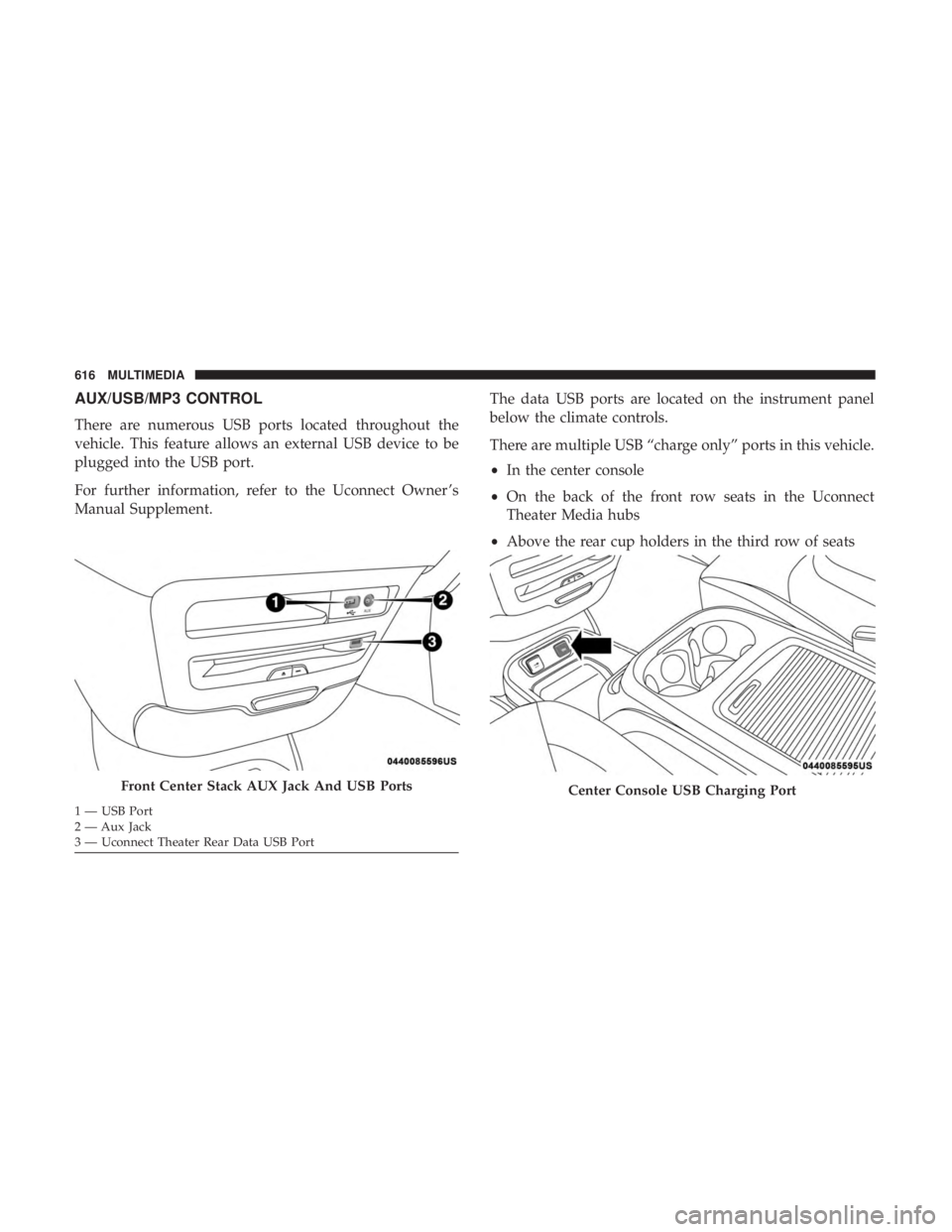
There are numerous USB ports located throughout the
vehicle. This feature allows an external USB device to be
plugged into the USB port.
For further information, refer to the Uconnect Owner ’s
Manual Supplement.The data USB ports are located on the instrument panel
below the climate controls.
There are multiple USB “charge only” ports in this vehicle.
•
In the center console
• On the back of the front row seats in the Uconnect
Theater Media hubs
• Above the rear cup holders in the third row of seats
Front Center Stack AUX Jack And USB Ports
1 — USB Port
2 — Aux Jack
3 — Uconnect Theater Rear Data USB Port
Center Console USB Charging Port
616 MULTIMEDIA
Page 629 of 696
General Information
The following regulatory statement applies to all Radio
Frequency (RF) devices equipped in this vehicle:
This device complies with Part 15 of the FCC Rules and
with Industry Canada license-exempt RSS standard(s).
Operation is subject to the following two conditions:
1. This device may not cause harmful interference, and
2. This device must accept any interference received, in-cluding interference that may cause undesired opera-
tion.
NOTE: Changes or modifications not expressly approved
by the party responsible for compliance could void the
user ’s authority to operate the equipment.
Play A DVD/Blu-ray Or USB Media File From
Uconnect System
1. Insert a Blu-ray disc or DVD disc into the disc player with the label facing up. Or insert a USB drive into rear
Video USB port.
NOTE: The DVD/Blu-ray Disc player and Video USB port
are both located under the radio controls in the instrument
panel. 2. Press the “Uconnect Theater” button on the radio touch-
screen.
Refer to “Accessing The System From The Uconnect sys-
tem” in this section for further information.
3. Select Disc or USB from the source controls (i.e. select the desired source from the “Select Input 1” or “Select
Input 2” menu for the respective screen).
4. For DVD/Blu-ray disc – press the “Press to Enter” feature in the Movie Snapshot on radio touchscreen,
then press “OK” on following screen. The steps to start
a DVD are dependent on the steps required by that
specific DVD. For USB Media Files - Press Music, Movie,
or Folders, then select media title from list(s).
5. To play a DVD/Blu-ray disc on both screens simultane- ously, select disc from both screen drop downs, or
choose disc source on one screen and push “View
Screen” button on the other.
10
MULTIMEDIA 627
Page 635 of 696
Using The Rear Video USB Port
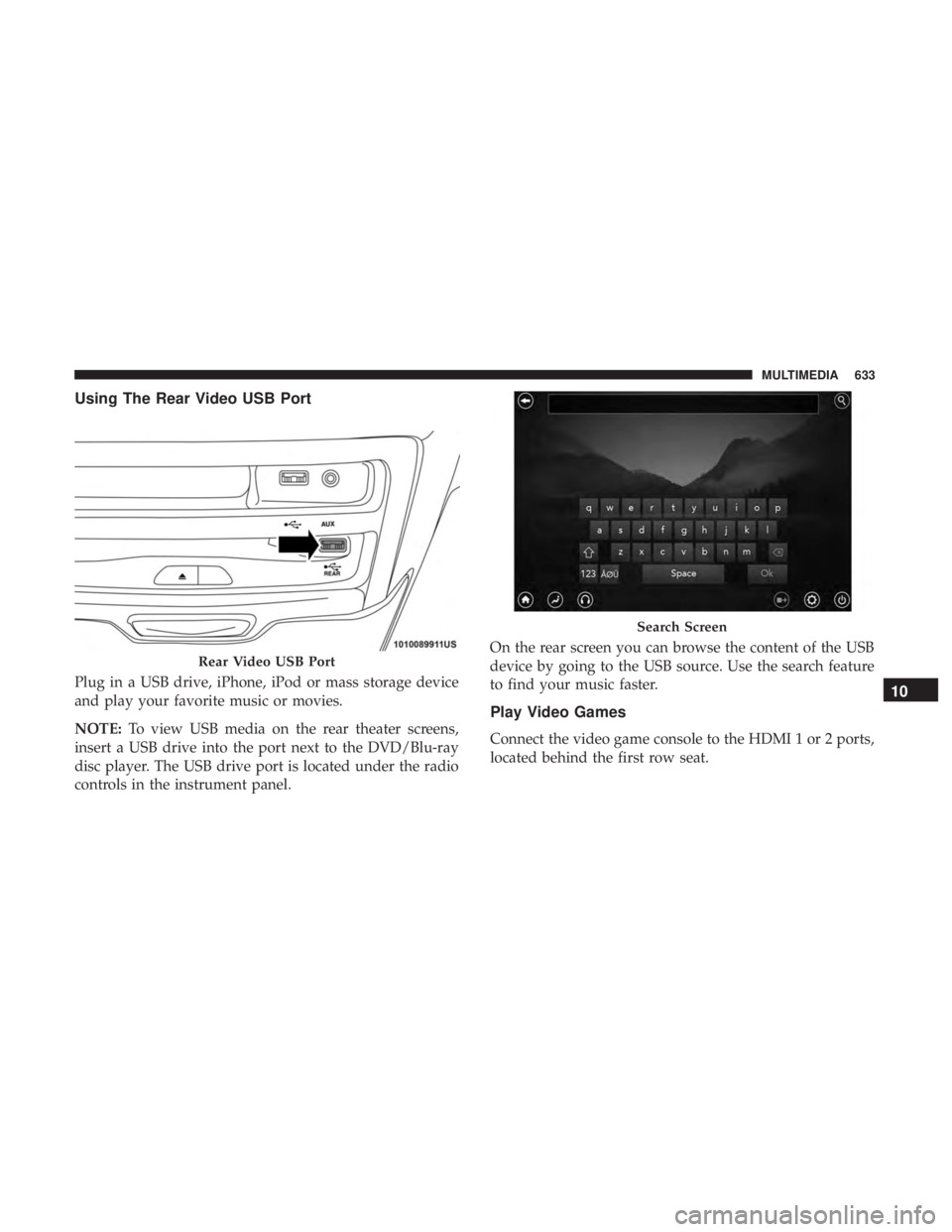
Plug in a USB drive, iPhone, iPod or mass storage device
and play your favorite music or movies.
NOTE:To view USB media on the rear theater screens,
insert a USB drive into the port next to the DVD/Blu-ray
disc player. The USB drive port is located under the radio
controls in the instrument panel. On the rear screen you can browse the content of the USB
device by going to the USB source. Use the search feature
to find your music faster.
Play Video Games
Connect the video game console to the HDMI 1 or 2 ports,
located behind the first row seat.
Rear Video USB Port
Search Screen
10
MULTIMEDIA 633
Page 686 of 696

Ignition..................................26
Switch .................................26
Inside Rearview Mirror ....................89, 425
Instrument Cluster ..........................183
Descriptions ............................207
Display ...............................185
Menu Items ............................189
Instrument Panel Lens Cleaning ................545
Interior And Instrument Lights ..................98
Interior Appearance Care .....................544
Interior Lights ..............................98
Intermittent Wipers (Delay Wipers) ..............102
Introduction ................................4
Inverter Power ............................... .171
Jack Location ............................ .446
Jack Operation ........................ .446, 517
Jump Starting ............................ .475
KeyFob..................................18 Arm The System ..........................33
Disarm The Alarm ........................34
Programming Additional Key Fobs ..........24, 32
Key Fob Battery Service (Remote Keyless Entry) .....22Key Fob Programming (Remote Keyless Entry)
......24
Keys ....................................18
Replacement .............................32
Lane Change And Turn Signals .................94
Lane Change Assist .......................94, 98
LaneSense ............................... .394
Lap/Shoulder Belts ........................ .242
Latches ................................. .304
Hood .................................139
Lead Free Gasoline ........................ .550
Leaks, Fluid ............................. .304
Life Of Tires ............................. .531
Liftgate ................................. .141
Power ............................... .142
Light Bulbs .......................... .303, 435
Lighter Cigar ................................ .172
Lights .................................. .303
A i
rBag .........................198, 257, 301
Battery Saver ............................98
Brake Assist Warning ..................... .220
Brake Warning ..........................198
Bulb Replacement .....................431, 435
Center Mounted Stop ..................... .437
684 INDEX