Page 397 of 696
Turning LaneSense On Or Off
The LaneSense button is located on the switch
panel below the Uconnect display.
To turn the LaneSense system on, push the LaneSense
button (LED turns off). A “LaneSense On” message is
shown in the instrument cluster display.
To turn the LaneSense system off, push the LaneSense
button again (LED turns on). NOTE:
The LaneSense system will retain the last system
state on or off from the last ignition cycle when the ignition
is changed to the ON/RUN position.
LaneSense Warning Message
The LaneSense system will indicate the current lane drift
condition through the instrument cluster display.
Instrument Cluster Display
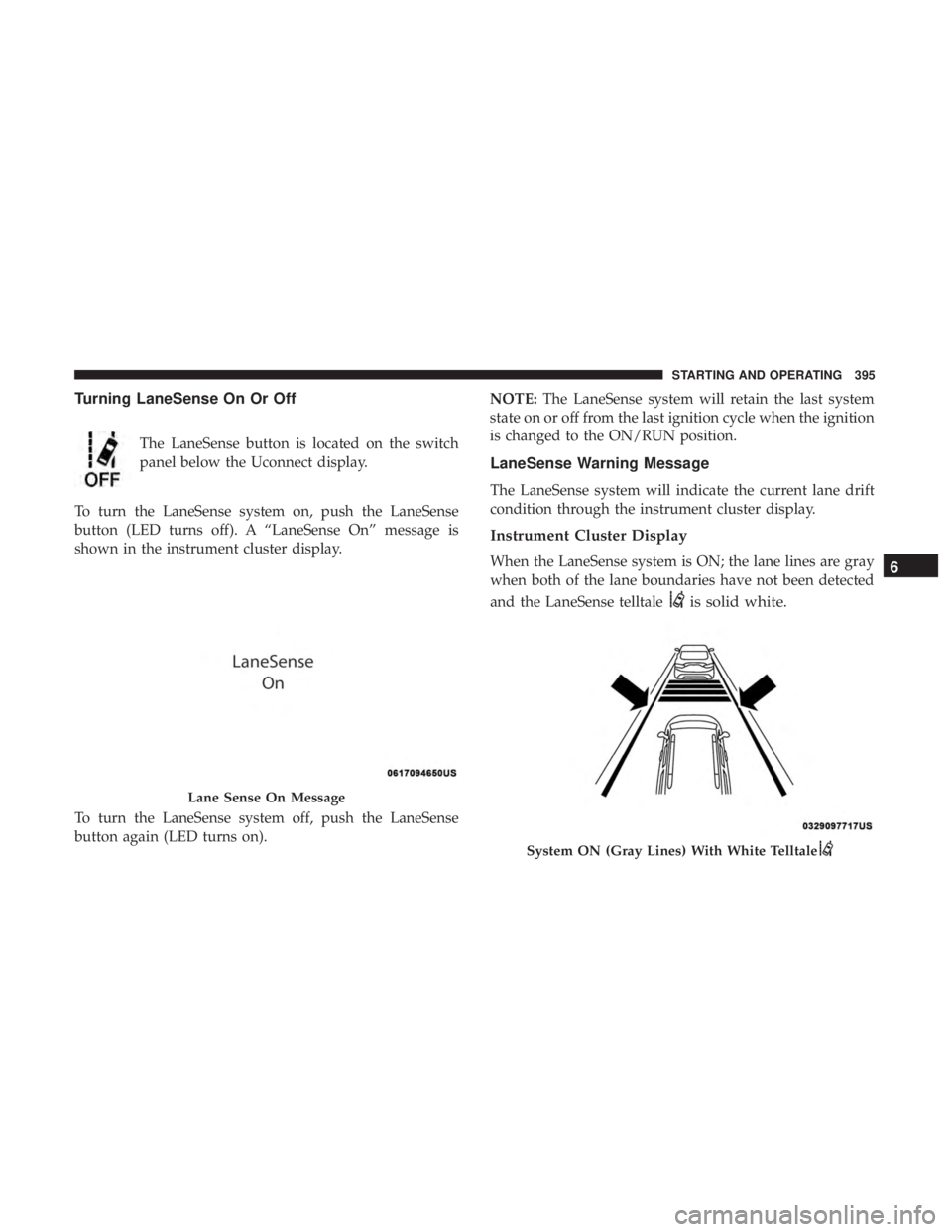
When the LaneSense system is ON; the lane lines are gray
when both of the lane boundaries have not been detected
and the LaneSense telltale
is solid white.
Lane Sense On Message
System ON (Gray Lines) With White Telltale
6
STARTING AND OPERATING 395
Page 398 of 696
Left Lane Departure — Only Left Lane Detected
•When the LaneSense system is ON, the LaneSense
Telltale
is solid white when only the left lane
marking has been detected and the system is ready to
provide visual warnings in the instrument cluster
display if an unintentional lane departure occurs on
the left side.
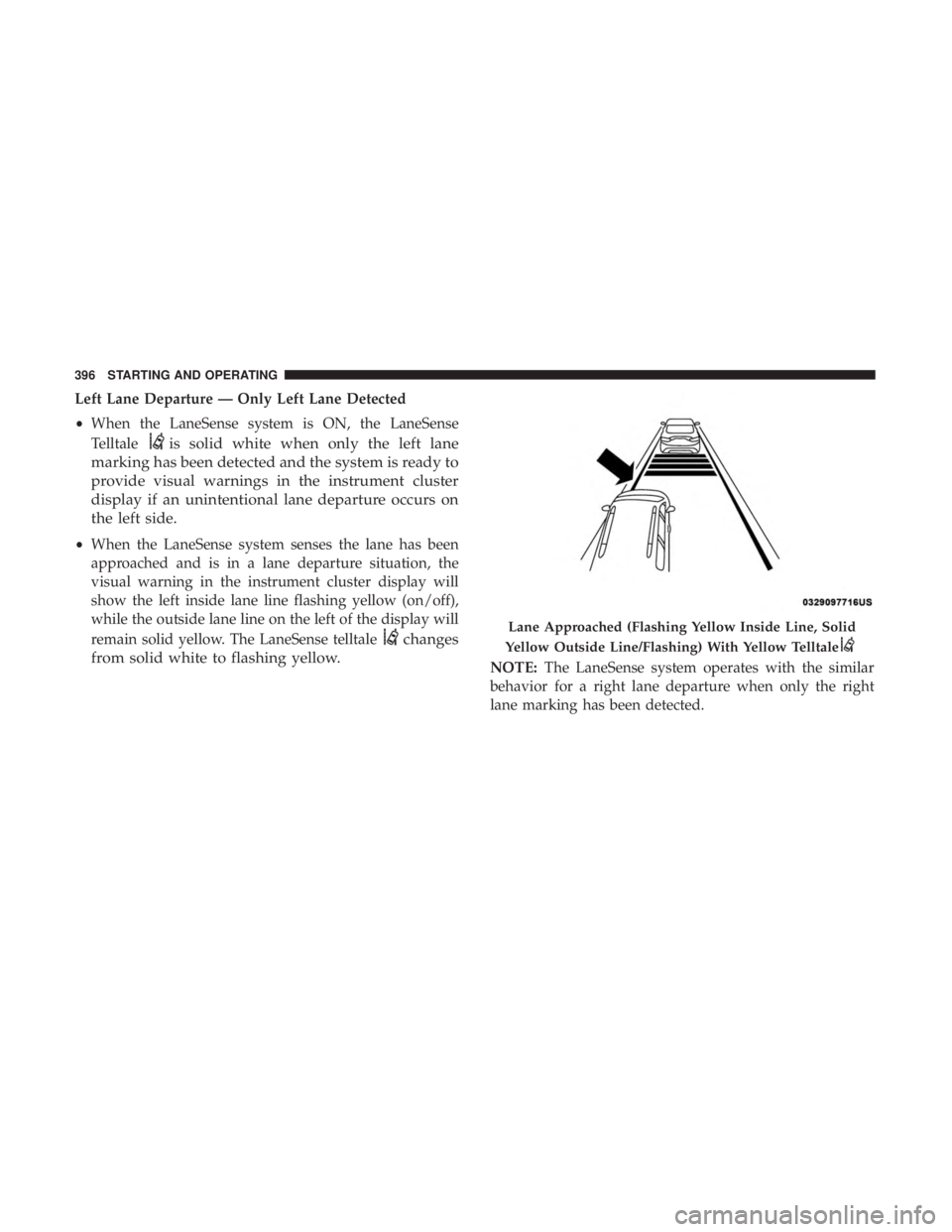
• When the LaneSense system senses the lane has been
approached and is in a lane departure situation, the
visual warning in the instrument cluster display will
show the left inside lane line flashing yellow (on/off),
while the outside lane line on the left of the display will
remain solid yellow. The LaneSense telltale
changes
from solid white to flashing yellow.
NOTE: The LaneSense system operates with the similar
behavior for a right lane departure when only the right
lane marking has been detected.
Lane Approached (Flashing Yellow Inside Line, Solid
Yellow Outside Line/Flashing) With Yellow Telltale
396 STARTING AND OPERATING
Page 399 of 696
Left Lane Departure — Both Lane Lines Detected
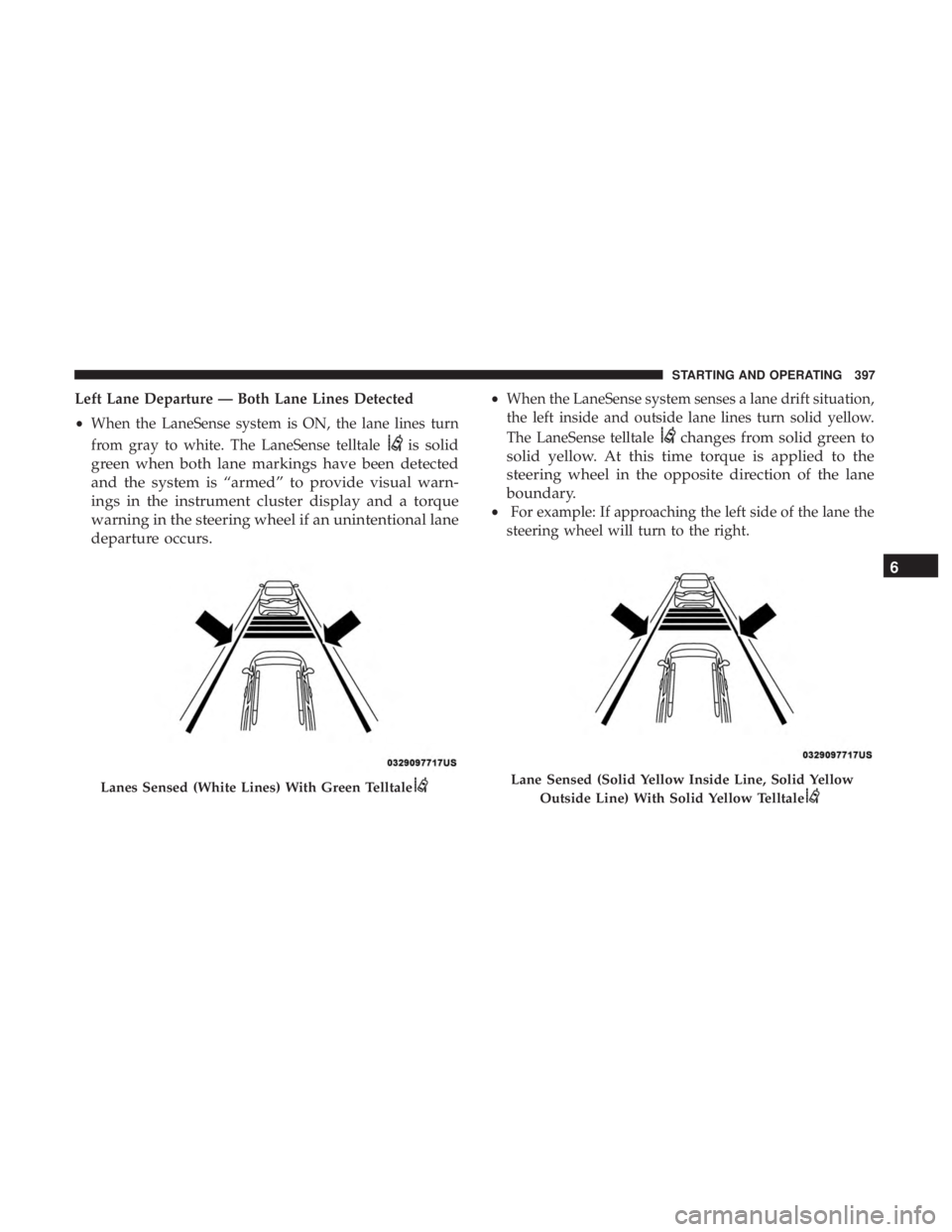
•When the LaneSense system is ON, the lane lines turn
from gray to white. The LaneSense telltale
is solid
green when both lane markings have been detected
and the system is “armed” to provide visual warn-
ings in the instrument cluster display and a torque
warning in the steering wheel if an unintentional lane
departure occurs.
• When the LaneSense system senses a lane drift situation,
the left inside and outside lane lines turn solid yellow.
The LaneSense telltale
changes from solid green to
solid yellow. At this time torque is applied to the
steering wheel in the opposite direction of the lane
boundary.
• For example: If approaching the left side of the lane the
steering wheel will turn to the right.
Lanes Sensed (White Lines) With Green TelltaleLane Sensed (Solid Yellow Inside Line, Solid Yellow
Outside Line) With Solid Yellow Telltale
6
STARTING AND OPERATING 397
Page 433 of 696
BULB REPLACEMENT
Replacement Bulbs
Interior Bulbs
LampsBulb Number
Center & Rear Dome Lamp LED (Serviced At Authorized Dealer)
Center & Rear Reading Lamps LED (Serviced At Authorized Dealer)
Front Door Courtesy Lamp LED (Serviced At Authorized Dealer)
Front Header Reading Lamps – If Equipped LED (Serviced At Authorized Dealer)
Instrument Cluster Lamps LED (Serviced At Authorized Dealer)
Liftgate Lamp(s) LED (Serviced At Authorized Dealer)
Overhead Console Reading Lamps LED (Serviced At Authorized Dealer)
Removable Console Lamp – If Equipped LED (Serviced At Authorized Dealer)
Visor Vanity Lamps 6501966
Exterior Bulbs
LampsBulb Number
High Intensity Discharge Headlamp Low Beam - D3S
High Beam - 9005LL
Halogen Headlamp Reflector Low Beam - H11LL
Projector Halogen Low Beam - 9005HL+ All High Beams - 9005LL
7
IN CASE OF EMERGENCY 431
Page 445 of 696
Cavity Cartridge FuseBlade FuseDescription
F62 – – Not Used
F63 –20 Amp Yellow Trailer Tow Left Stop/Turn — If Equipped
F64 –15 Amp Blue RT HID Headlamp
F65 – – Not Used
F66 –15 Amp Blue Instrument Panel Cluster (IPC)
F67 –10 Amp Red Haptic Lane Feedback Module (HALF) / Parktron-
ics System (PTS)/Drivers Assist System Module(DASM)
F68 – – Not Used
F69 – – Not Used
F70 – – Not Used
F71 –20 Amp Yellow Horn
F72 –10 Amp Red Heated Mirrors – If Equipped
F73 30 Amp Pink –Rear Defroster (EBL)
F74 20 Amp Blue –Trailer Tow Backup
F75 – 5 Amp Tan Overhead Console / RR ISC
F76 –20 Amp Yellow Uconnect/DCSD/Telematics
7
IN CASE OF EMERGENCY 443
Page 446 of 696
Cavity Cartridge FuseBlade FuseDescription
F77A –10 Amp Red RR Entertainment Screen 1 & 2/Media HUB 1 &
2/3rd Row USB Charge Only/2nd Row USB
Charge Only/Vaccum Cleaner SW/3rd Row Re- cline ST SW/LT & RT Stow N Go SW/LT & RT Sliding Door SW Backlight
F77B –10 Amp Red Rain Sensor/Sunroof /CRVMM
F78A –15 Amp Blue Transmission Control Module (TCM)/ E-Shifter
F78B –15 Amp Blue Instrument Cluster
F79 –10 Amp Red ICS/Front And Rear HVAC/ SCCM/ EPB
F80 – – Not Used
F81 – – Not Used
F82 – – Not Used
F83 20 Amp Blue –TT Park Lights — If Equipped
30 Amp Pink –Headlamp Washer Pump — If Equipped
F84 – – Not Used
F85 –20 Amp Yellow Cigar Lighter
F86 – – Not Used
F87 – – Not Used
F88 –20 Amp Yellow Front Heated Seats
F89 –20 Amp Yellow Rear Heated Seats
444 IN CASE OF EMERGENCY
Page 491 of 696

SCHEDULED SERVICING
Your vehicle is equipped with an automatic oil change
indicator system. The oil change indicator system will
remind you that it is time to take your vehicle in for
scheduled maintenance.
Based on engine operation conditions, the oil change
indicator message will illuminate. This means that service
is required for your vehicle. Operating conditions such as
frequent short-trips, trailer tow, extremely hot or cold
ambient temperatures will influence when the “Oil Change
Required” message is displayed. Severe Operating Condi-
tions can cause the change oil message to illuminate as
early as 3,500 miles (5,600 km) since last reset. Have your
vehicle serviced as soon as possible, within the next 500
miles (805 km).
Your authorized dealer will reset the oil change indicator
message after completing the scheduled oil change. If a
scheduled oil change is performed by someone other than
your authorized dealer, the message can be reset by
referring to “Instrument Cluster Display” in “Getting To
Know Your Instrument Panel”.NOTE:
Under no circumstances should oil change inter-
vals exceed 10,000 miles (16,000 km), twelve months or 350
hours of engine run time, whichever comes first. The 350
hours of engine run or idle time is generally only a concern
for fleet customers.
Severe Duty All Models
Change Engine Oil at 4,000 miles (6,500 km) or 350 hours of
engine run time if the vehicle is operated in a dusty and off
road environment or is operated predominately at idle or
only very low engine RPM’s. This type of vehicle use is
considered Severe Duty.
Once A Month Or Before A Long Trip:
• Check engine oil level.
• Check windshield washer fluid level.
• Check tire pressure and look for unusual wear or
damage. Rotate tires at the first sign of irregular wear,
even if it occurs before the oil indicator system turns on.
• Check the fluid levels of the coolant reservoir and brake
master cylinder, fill as needed.
• Check function of all interior and exterior lights.
8
SERVICING AND MAINTENANCE 489
Page 547 of 696
Seat Belt Maintenance
Do not bleach, dye or clean the belts with chemical solvents
or abrasive cleaners. This will weaken the fabric. Sun
damage can also weaken the fabric.
If the belts need cleaning, use a mild soap solution or
lukewarm water. Do not remove the belts from the vehicle
to wash them. Dry with a soft cloth.
Replace the belts if they appear frayed or worn or if the
buckles do not work properly.
WARNING!
A frayed or torn belt could rip apart in a collision and
leave you with no protection. Inspect the belt system
periodically, checking for cuts, frays, or loose parts.
Damaged parts must be replaced immediately. Do not
disassemble or modify the system. Seat belt assemblies
must be replaced after a collision if they have been
damaged (i.e., bent retractor, torn webbing, etc.).
Plastic And Coated Parts
Use Mopar Total Clean to clean vinyl upholstery.
CAUTION!
•Direct contact of air fresheners, insect repellents,
suntan lotions, or hand sanitizers to the plastic,
painted, or decorated surfaces of the interior may
cause permanent damage. Wipe away immediately.
• Damage caused by these type of products may not be
covered by your New Vehicle Limited Warranty.
Cleaning Plastic Instrument Cluster Lenses
The lenses in front of the instruments in this vehicle are
molded in clear plastic. When cleaning the lenses, care
must be taken to avoid scratching the plastic.
1. Clean with a wet soft cloth. A mild soap solution may be
used, but do not use high alcohol content or abrasive
cleaners. If soap is used, wipe clean with a clean damp
cloth.
2. Dry with a soft cloth.
8
SERVICING AND MAINTENANCE 545