Page 583 of 614
Siri Eyes Free — If Equipped
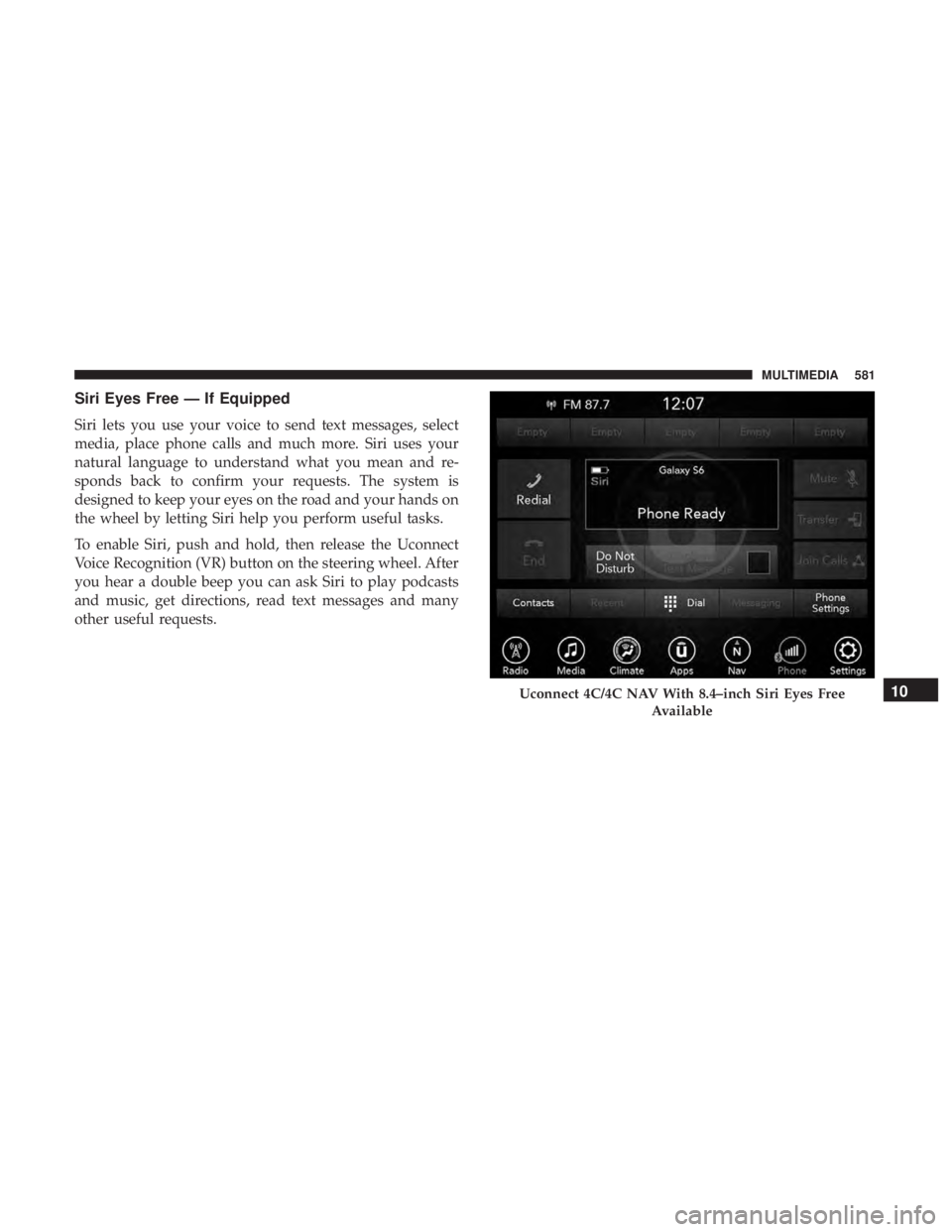
Siri lets you use your voice to send text messages, select
media, place phone calls and much more. Siri uses your
natural language to understand what you mean and re-
sponds back to confirm your requests. The system is
designed to keep your eyes on the road and your hands on
the wheel by letting Siri help you perform useful tasks.
To enable Siri, push and hold, then release the Uconnect
Voice Recognition (VR) button on the steering wheel. After
you hear a double beep you can ask Siri to play podcasts
and music, get directions, read text messages and many
other useful requests.
Uconnect 4C/4C NAV With 8.4–inch Siri Eyes FreeAvailable10
MULTIMEDIA 581
Page 584 of 614

Do Not Disturb
With Do Not Disturb, you can disable notifications from
incoming calls and texts, allowing you to keep your eyes
on the road and hands on the wheel. For your convenience,
there is a counter display to keep track of your missed calls
and text messages while you were using Do Not Disturb.
Do Not Disturb can automatically reply with a text mes-
sage, a call or both, when declining an incoming call and
send it to voicemail.
Automatic reply messages can be:
•“I am driving right now, I will get back to you shortly.”
• Create a custom auto reply message up to 160 characters.
NOTE: Only the first 25 characters can be seen on the
touchscreen while typing a custom message.
While in Do Not Disturb, Conference Call can be selected
so you can still place a second call without being inter-
rupted by incoming calls. NOTE:
•
Reply with text message is not compatible with iPhones.
• Auto reply with text message is only available on
phones that support Bluetooth MAP.
Android Auto — If Equipped
Android Auto allows you to use your voice to interact with
Android’s best-in-class speech technology through your
vehicle’s voice recognition system, and use your smart-
phone’s data plan to project your Android powered smart-
phone and a number of its apps onto your Uconnect
touchscreen. Connect your Android 5.0 (Lollipop), or
higher, to one of the media USB ports, using the factory-
provided USB cable, and press the new Android Auto icon
that replaces your “Phone” icon on the main menu bar to
begin Android Auto. Push and hold the VR button on the
steering wheel, or press and hold the “Microphone” icon
within Android Auto, to activate Android’s VR, which
recognizes natural voice commands, to use a list of your
smartphone’s features:
• Maps
• Music
• Phone
582 MULTIMEDIA
Page 585 of 614
•Text Messages
• Additional Apps
Refer to your Uconnect Owner ’s Manual Supplement for
further information.Apple CarPlay — If Equipped
Apple CarPlay allows you to use your voice to interact
with Siri through your vehicle’s voice recognition system,
and use your smartphone’s data plan to project your
iPhone and a number of its apps onto your Uconnect
touchscreen. Connect your iPhone 5, or higher, to one of
the media USB ports, using the factory-provided Lightning
cable, and press the new CarPlay icon that replaces your
“Phone” icon on the main menu bar to begin Apple
CarPlay. Press and hold the VR button on the steering
wheel, or press and hold the “Home” button within Apple
CarPlay, to activate Siri, which recognizes natural voice
commands to use a list of your iPhone’s features:
• Phone
• Music
• Messages
• Maps
• Additional Apps
Android Auto On 8.4-inch Display
10
MULTIMEDIA 583
Page 604 of 614
Checking............................. .436
Disposal .............................. .439
Filter ............................. .440, 499
Filter Disposal .......................... .439
Identification Logo ...................... .439
Materials Added To ...................... .439
Pressure Warning Light ....................175
Recommendation .....................439, 498
Viscosity .......................... .439, 498
Oil Filter, Change ......................... .440
Oil Filter, Selection ......................... .440
Oil Pressure Light ......................... .175
Onboard Diagnostic System ...................184
Opener, Garage Door (HomeLink) ...............134
Operating Precautions ...................... .184
Operator Manual (Owner’s Manual) ...............4
Outside Rearview Mirrors ...................89, 90
Overheating, Engine ....................... .423
Owner’s Manual (Operator Manual) ...........4,592
Paint Care ............................... .486
Parking Brake ............................ .281
ParkSense System, Rear ...................316, 324
Pets ................................... .271
Placard, Tire And Loading Information ...........467Power
Brakes ............................... .492
Inverter .............................. .147
Mirrors ................................91
Outlet (Auxiliary Electrical Outlet) ............144
Seats ..................................72
Steering .............................. .293
Power Seats Down .................................73
Forward ................................73
Rearward ...............................73
Up....................................73
Power Sliding Door On / Off Switch ..........................63
Pregnant Women And Seat Belts ................225
Preparation For Jacking ..................... .401
Pr
etensionersSeat Belts ............................. .226
Radial Ply Tires ........................... .473
Radiator Cap (Coolant Pressure Cap) .............456
Radio Frequency General Information ..................46, 52, 53
Radio Operation .......................... .569
Radio Remote Controls ..................... .534
602 INDEX
Page 607 of 614
Spark Plugs............................. .499
Specifications Fuel (Gasoline) ......................... .499
Oil.................................. .499
Speed Control Accel/Decel ........................... .296
Accel/Decel (ACC Only) ...................302
Cancel ............................... .297
Resume .............................. .296
Speed Control (Cruise Control) ..............294, 297
Starting .............................. .49, 278
Remote ................................49
Starting And Operating ..................... .278
Starting Procedures ........................ .278
Steering ................................ .293
Column Controls .........................93
Tilt Column .............................87
Wheel, Heated ........................ .87, 88
Wheel, Tilt ..............................87
Steering Wheel Audio Controls .................534
Steering Wheel Mounted Sound System Controls . . . .534
Storage, Vehicle ............................118
Stuck, Freeing ............................ .424
Sunglasses Storage ......................... .149
Sun Roof ............................... .123Supplemental Restraint System - Air Bag
..........231
System, Remote Starting ......................49
Telescoping Steering Column ...................87
Temperature Control, Automatic (ATC) ...........110
Tie Down Hooks, Cargo ..................... .134
Tilt Steering Column .........................87
Time Delay, Headlight ........................93
Tire And Loading Information Placard ............467
Tire Markings ............................ .462
Tires......................... .274, 471, 478, 483
Aging (Life Of Tires) ..................... .475
Air Pressure ........................... .471
Chains ............................... .482
Changing .......................... .400, 461
Compact Spare ......................... .478
General
Information ...................471, 478
High Speed ............................ .473
Inflation Pressures ....................... .472
Jacking ........................ .400, 401, 461
Life Of Tires ........................... .475
Load Capacity ...................... .467, 468
Pressure Monitor System (TPMS) ..........164, 207
Pressure Warning Light ....................180
Quality Grading ........................ .483
12
INDEX 605