Media
Uconnect offers connections via USB, Bluetooth and auxil-
iary ports (If Equipped). Voice operation is only available
for connected USB and AUX devices.
Push the VR button
. After the beep, say one of the
following commands and follow the prompts to switch
your media source or choose an artist.
• “Change source to Bluetooth”
• “Change source to AUX”
• “Change source to USB”
• “Play artist Beethoven”; “ Play albumGreatest Hits”; “
Play song Moonlight Sonata”; “ Play genreClassical”
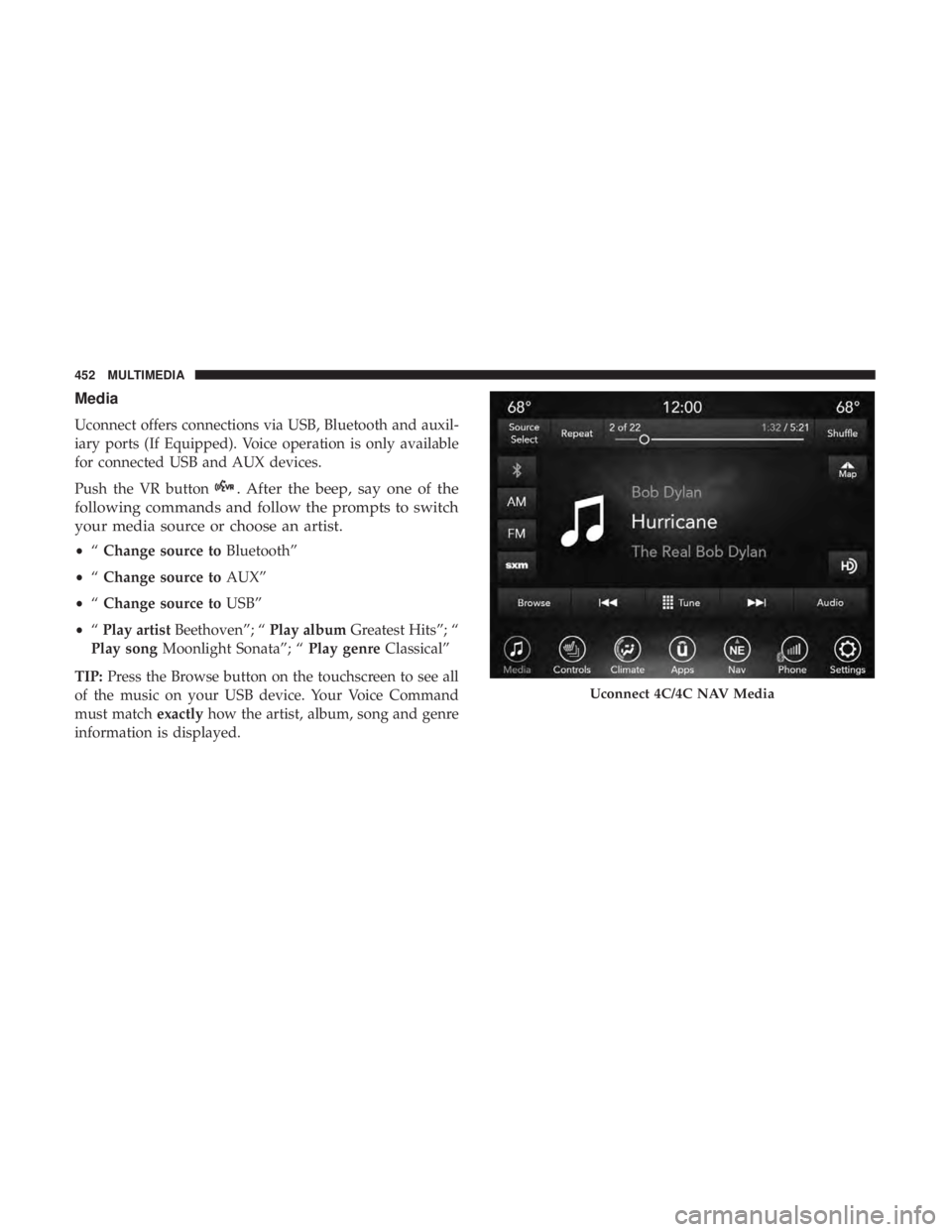
TIP: Press the Browse button on the touchscreen to see all
of the music on your USB device. Your Voice Command
must match exactlyhow the artist, album, song and genre
information is displayed.
Uconnect 4C/4C NAV Media
452 MULTIMEDIA
NOTE:Requires compatible iPhone. See dealer for phone
compatibility. Data plan rates apply. Vehicle user interface
is a product of Apple®. Apple CarPlay is a trademark of
Apple Inc. iPhone is a trademark of Apple Inc., registered
in the US and other countries. Apple terms of use and
privacy statements apply.
General Information
The following regulatory statement applies to all Radio
Frequency (RF) devices equipped in this vehicle:
This device complies with Part 15 of the FCC Rules and
with Industry Canada license-exempt RSS standard(s).
Operation is subject to the following two conditions:
1. This device may not cause harmful interference, and
2. This device must accept any interference received, in- cluding interference that may cause undesired opera-
tion.
NOTE: Changes or modifications not expressly approved
by the party responsible for compliance could void the
user ’s authority to operate the equipment.
Additional Information
© 2018 FCA US LLC. All rights reserved. Mopar and
Uconnect are registered trademarks and Mopar Owner
Connect is a trademark of FCA US LLC. Android is a
trademark of Google Inc. SiriusXM and all related marks
and logos are trademarks of SiriusXM Radio Inc.
Uconnect System Support:
• U.S. residents visit DriveUconnect.com or call: 1-877-
855-8400(24 hours a day 7 days a week)
• Canadian residents visit DriveUconnect.ca or call: 1-800-
465-2001(English) or 1-800-387-9983(French)
SiriusXM Guardian services support:
• U.S. residents visit siriusxm.com/guardian or call:
1-844-796-4827
• Canadian residents visit www.siriusxm.ca/guardian or
call: 1-877-324-9091
10
MULTIMEDIA 463
Key FobArm The System ..........................32
Panic Alarm .............................20
Programming Additional Key Fobs ..........23, 31
Unlatch The Trunk ........................20
Key Fob Battery Service (Remote Keyless Entry) .....21
Key Fob Programming (Remote Keyless Entry) ......23
Key-In Reminder ............................26
Keyless Enter-N-Go ..................... .35, 217
Enter The Trunk ..........................20
Passive Entry ............................35
Passive Entry Programming ..................35
Keys ....................................17
Replacement ......................... .23, 31
Key, Sentry (Immobilizer) ......................30
Lane Change And Turn Signals .................67
Lane Change Assist ..........................67
LaneSense ............................... .272
Lap/Shoulder Belts ........................ .169
Latches ................................. .212
Hood ..................................90
Lead Free Gasoline ........................ .405
Leaks, Fluid ............................. .212
Life Of Tires ............................. .385Light Bulbs
.......................... .212, 304
Lights .................................. .212
AirBag .........................125, 178, 210
Automatic Headlights ......................64
Brake Assist Warning ..................... .146
Brake Warning ...................... .126, 403
Bulb Replacement ....................... .304
Cruise ............................ .134, 135
Daytime Running .........................63
Dimmer Switch, Headlight ...................63
Engine Temperature Warning ................128
Exterior .............................. .212
Fog ...................................66
Hazard Warning Flasher ...................298
Headlights ....................... .62, 66, 306
Headlights On With Wipers ..................65
Headlight Switch .........................62
High Beam ..............................63
High Beam/Low Beam Select .................63
Instr
ument Cluster ........................62
Intensity Control ..........................70
Interior ................................67
License ............................... .309
Lights On Reminder .......................66
Malfunction Indicator (Check Engine) ..........129
12
INDEX 479