2018 CHRYSLER 300 Turn on
[x] Cancel search: Turn onPage 434 of 492
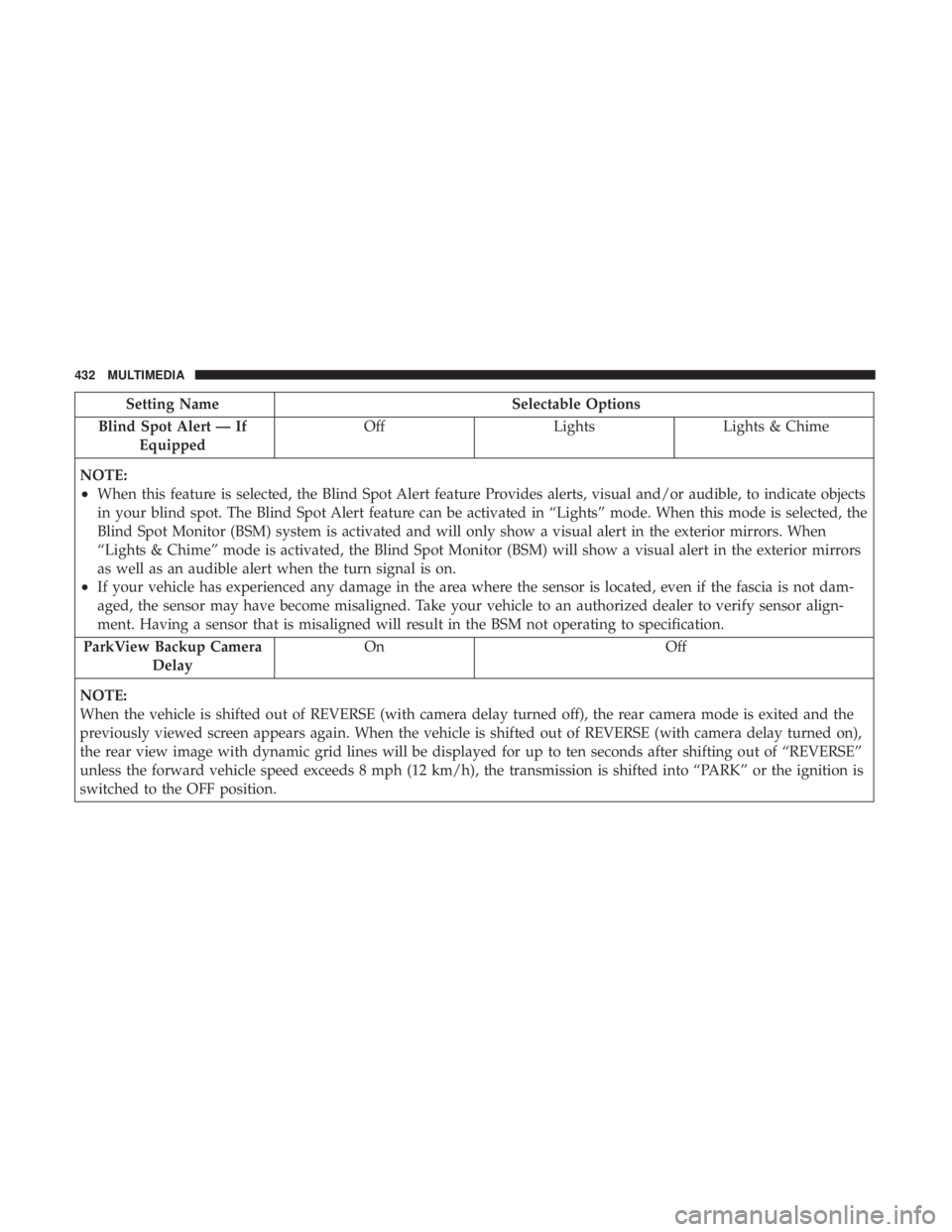
Setting NameSelectable Options
Blind Spot Alert — If Equipped Off
LightsLights & Chime
NOTE:
•When this feature is selected, the Blind Spot Alert feature Provides alerts, visual and/or audible, to indicate objects
in your blind spot. The Blind Spot Alert feature can be activated in “Lights” mode. When this mode is selected, the
Blind Spot Monitor (BSM) system is activated and will only show a visual alert in the exterior mirrors. When
“Lights & Chime” mode is activated, the Blind Spot Monitor (BSM) will show a visual alert in the exterior mirrors
as well as an audible alert when the turn signal is on.
•If your vehicle has experienced any damage in the area where the sensor is located, even if the fascia is not dam-
aged, the sensor may have become misaligned. Take your vehicle to an authorized dealer to verify sensor align-
ment. Having a sensor that is misaligned will result in the BSM not operating to specification.
ParkView Backup Camera Delay On Off
NOTE:
When the vehicle is shifted out of REVERSE (with camera delay turned off), the rear camera mode is exited and the
previously viewed screen appears again. When the vehicle is shifted out of REVERSE (with camera delay turned on),
the rear view image with dynamic grid lines will be displayed for up to ten seconds after shifting out of “REVERSE”
unless the forward vehicle speed exceeds 8 mph (12 km/h), the transmission is shifted into “PARK” or the ignition is
switched to the OFF position.
432 MULTIMEDIA
Page 439 of 492
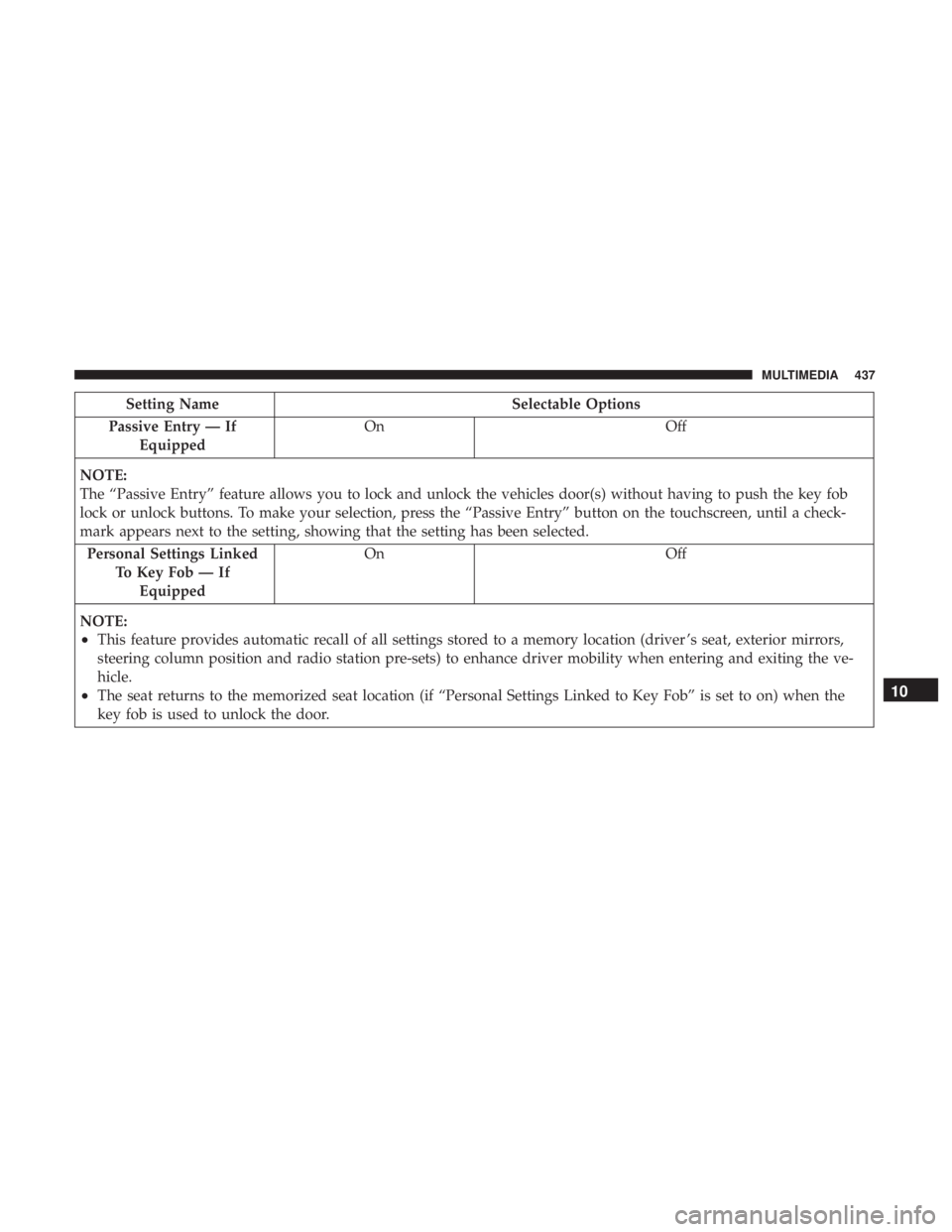
Setting NameSelectable Options
Passive Entry — If Equipped On
Off
NOTE:
The “Passive Entry” feature allows you to lock and unlock the vehicles door(s) without having to push the key fob
lock or unlock buttons. To make your selection, press the “Passive Entry” button on the touchscreen, until a check-
mark appears next to the setting, showing that the setting has been selected. Personal Settings Linked To Key Fob — IfEquipped On
Off
NOTE:
•This feature provides automatic recall of all settings stored to a memory location (driver ’s seat, exterior mirrors,
steering column position and radio station pre-sets) to enhance driver mobility when entering and exiting the ve-
hicle.
•The seat returns to the memorized seat location (if “Personal Settings Linked to Key Fob” is set to on) when the
key fob is used to unlock the door.10
MULTIMEDIA 437
Page 440 of 492
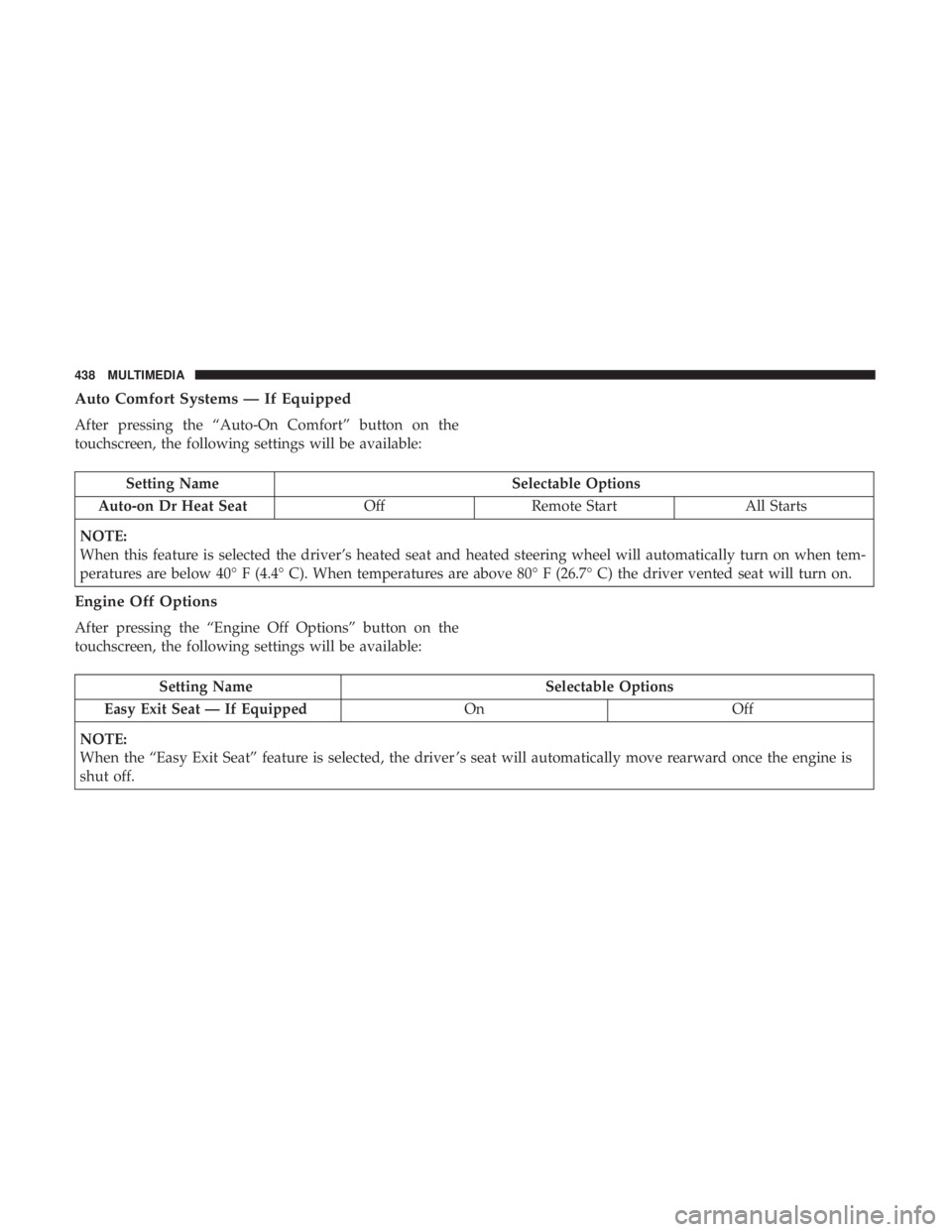
Auto Comfort Systems — If Equipped
After pressing the “Auto-On Comfort” button on the
touchscreen, the following settings will be available:
Setting NameSelectable Options
Auto-on Dr Heat Seat OffRemote Start All Starts
NOTE:
When this feature is selected the driver’s heated seat and heated steering wheel will automatically turn on when tem-
peratures are below 40° F (4.4° C). When temperatures are above 80° F (26.7° C) the driver vented seat will turn on.
Engine Off Options
After pressing the “Engine Off Options” button on the
touchscreen, the following settings will be available:
Setting Name Selectable Options
Easy Exit Seat — If Equipped OnOff
NOTE:
When the “Easy Exit Seat” feature is selected, the driver ’s seat will automatically move rearward once the engine is
shut off.
438 MULTIMEDIA
Page 450 of 492
not satisfactorily “clear” by the repositioning of the an-
tenna, it is recommended that the radio volume be turned
down or off during mobile phone operation when not
using Uconnect (if equipped).
Regulatory And Safety Information
USA/CANADA
Exposure to Radio Frequency Radiation
The radiated output power of the internal wireless radio is
far below the FCC and IC radio frequency exposure limits.
Nevertheless, the wireless radio will be used in such a
manner that the radio is 20 cm or further from the human
body.
The internal wireless radio operates within guidelines
found in radio frequency safety standards and recommen-
dations, which reflect the consensus of the scientific com-
munity.
The radio manufacturer believes the internal wireless radio
is safe for use by consumers. The level of energy emitted is
far less than the electromagnetic energy emitted by wire-
less devices such as mobile phones. However, the use of
wireless radios may be restricted in some situations orenvironments, such as aboard airplanes. If you are unsure
of restrictions, you are encouraged to ask for authorization
before turning on the wireless radio.
The following regulatory statement applies to all Radio
Frequency (RF) devices equipped in this vehicle:
This device complies with Part 15 of the FCC Rules and
with Industry Canada license-exempt RSS standard(s).
Operation is subject to the following two conditions:
1. This device may not cause harmful interference, and
2. This device must accept any interference received, in-
cluding interference that may cause undesired opera-
tion.
NOTE: Changes or modifications not expressly approved
by the party responsible for compliance could void the
user ’s authority to operate the equipment.
448 MULTIMEDIA
Page 451 of 492
NOTE:
•This equipment has been tested and found to comply
with the limits for a Class B digital device, pursuant to
Part 15 of the FCC Rules. These limits are designed to
provide reasonable protection against harmful interfer-
ence in a residential installation. This equipment gener-
ates, uses and can radiate radio frequency energy and, if
not installed and used in accordance with the instruc-
tions, may cause harmful interference to radio commu-
nications. However, there is no guarantee that interfer-
ence will not occur in a particular installation.
• If this equipment does cause harmful interference to
radio or television reception, which can be determined
by turning the equipment off and on, the user is encour-
aged to try to correct the interference by one or more of
the following measures:
1. Increase the separation between the equipment and receiver.
2. Consult an authorized dealer or an experienced radio technician for help.UCONNECT VOICE RECOGNITION QUICK TIPS
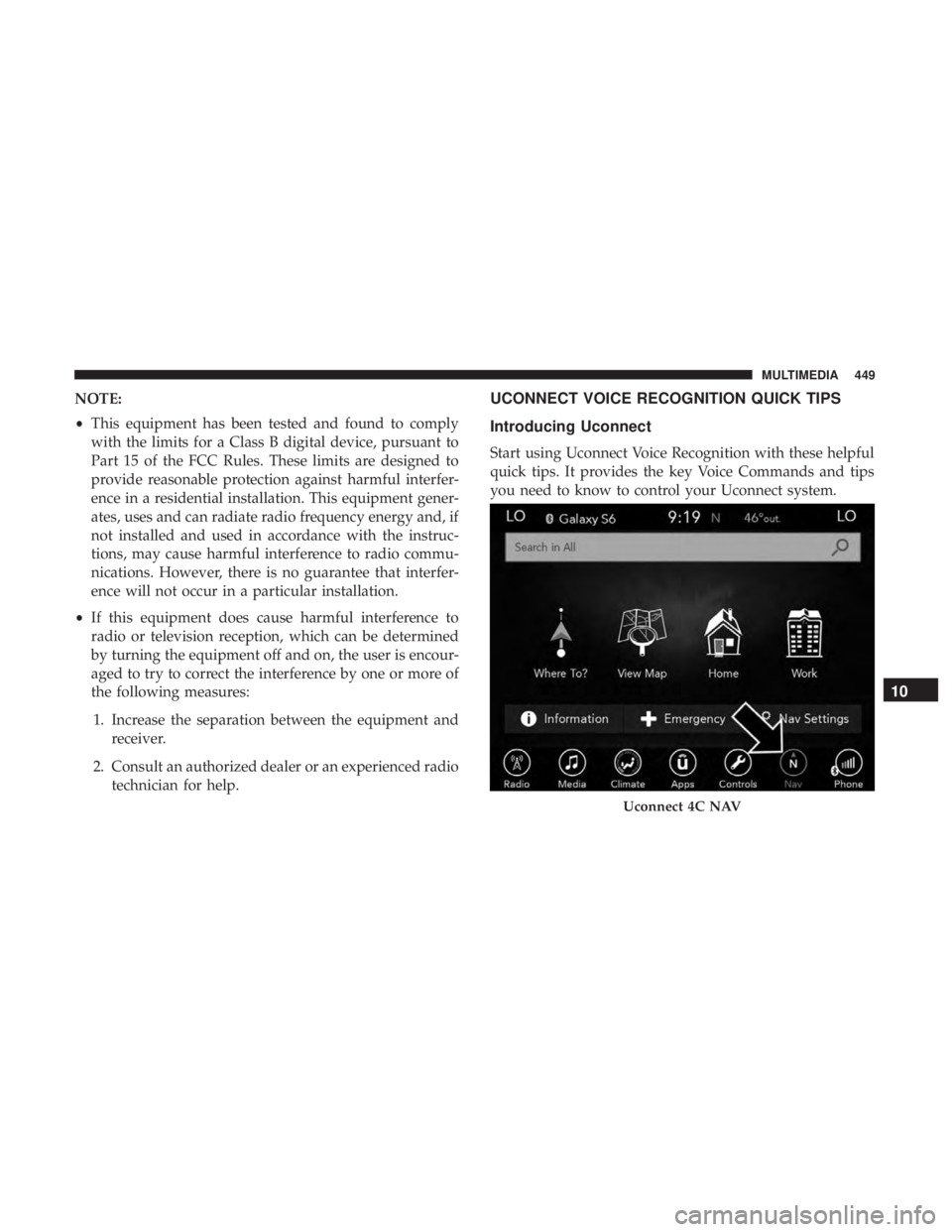
Introducing Uconnect
Start using Uconnect Voice Recognition with these helpful
quick tips. It provides the key Voice Commands and tips
you need to know to control your Uconnect system.
Uconnect 4C NAV
10
MULTIMEDIA 449
Page 456 of 492
2. Listen to the Uconnect prompts. After the beep, repeatone of the pre-defined messages and follow the system
prompts.
PRE-DEFINED VOICE TEXT REPLY RESPONSES
Yes. Stuck in traffic. See you later.
No. Start without
me. I’ll be late.
Okay. Where are you? I will be
minutes late.
Call me. Are you there
yet?
I’ll call you later. I need
directions. See you in
I’m on my way. Can’t talk right
now.
I’m lost. Thanks.
TIP: Your mobile phone must have the full implementation
of the Message Access Profile (MAP) to take advantage of
this feature. For details about MAP, visit
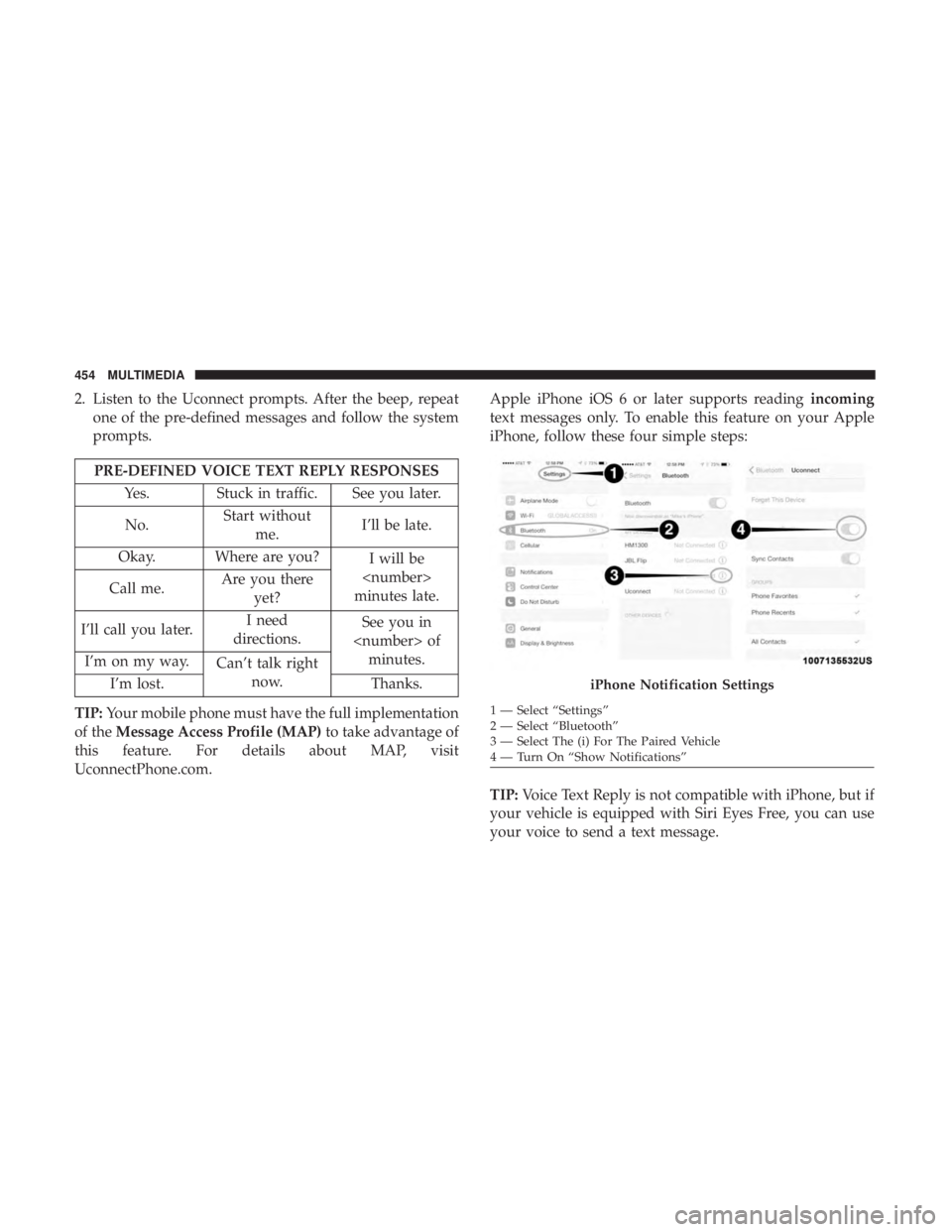
UconnectPhone.com. Apple iPhone iOS 6 or later supports reading
incoming
text messages only. To enable this feature on your Apple
iPhone, follow these four simple steps:
TIP: Voice Text Reply is not compatible with iPhone, but if
your vehicle is equipped with Siri Eyes Free, you can use
your voice to send a text message.
iPhone Notification Settings
1 — Select “Settings”
2 — Select “Bluetooth”
3 — Select The (i) For The Paired Vehicle
4 — Turn On “Show Notifications”
454 MULTIMEDIA
Page 478 of 492
Emergency, In Case OfFreeing Vehicle When Stuck .................334
Hazard Warning Flasher ...................298
Jacking ........................... .321, 371
Jump Starting ....................... .328, 329
Towing ............................... .336
Emission Control System Maintenance ............137
Engine .............................. .346, 347
Air Cleaner ............................ .353
Block Heater ........................... .221
Break-In Recommendations .................221
Checking Oil Level ...................... .348
Compartment ....................... .346, 347
Compartment Identification .................346
Coolant (Antifreeze) ...................363, 413
Cooling .............................. .362
Exhaust Gas Caution ...................209, 409
Fails To Start ........................... .220
Flooded, Starting ........................ .220
Fuel Requirements ....................... .405
Jump Starting ....................... .328, 329
Oil ........................... .351, 412, 413
Oil Filler Cap ....................... .346, 352
Oil Filter .............................. .353
Oil Selection ........................ .351, 412Oil Synthetic
........................... .352
Overheating ........................... .331
Starting ........................... .216, 217
Engine Oil Viscosity ........................ .352
Engine Oil Viscosity Chart ....................352
Enhanced Accident Response Feature .........188, 338
Ethanol ............................. .407, 410
Exhaust Gas Cautions ....................209, 409
Exhaust System ....................... .209, 360
Exterior Lighting ............................62
Exterior Lights ......................... .62,
212
Filters Air Cleaner ............................ .353
Air Conditioning ..................... .82, 355
Engine Oil ......................... .353, 413
Engine Oil Disposal ...................... .353
Flashers ................................ .298
Hazard Warning ........................ .298
Turn Signals ..................... .67, 135, 212
Flash-To-Pass ..............................64
Flexible Fuel Vehicles Cruising Range ..........................411
Engine Oil .............................411
Fuel Requirements ....................... .410
476 INDEX
Page 481 of 492
Key FobArm The System ..........................32
Panic Alarm .............................20
Programming Additional Key Fobs ..........23, 31
Unlatch The Trunk ........................20
Key Fob Battery Service (Remote Keyless Entry) .....21
Key Fob Programming (Remote Keyless Entry) ......23
Key-In Reminder ............................26
Keyless Enter-N-Go ..................... .35, 217
Enter The Trunk ..........................20
Passive Entry ............................35
Passive Entry Programming ..................35
Keys ....................................17
Replacement ......................... .23, 31
Key, Sentry (Immobilizer) ......................30
Lane Change And Turn Signals .................67
Lane Change Assist ..........................67
LaneSense ............................... .272
Lap/Shoulder Belts ........................ .169
Latches ................................. .212
Hood ..................................90
Lead Free Gasoline ........................ .405
Leaks, Fluid ............................. .212
Life Of Tires ............................. .385Light Bulbs
.......................... .212, 304
Lights .................................. .212
AirBag .........................125, 178, 210
Automatic Headlights ......................64
Brake Assist Warning ..................... .146
Brake Warning ...................... .126, 403
Bulb Replacement ....................... .304
Cruise ............................ .134, 135
Daytime Running .........................63
Dimmer Switch, Headlight ...................63
Engine Temperature Warning ................128
Exterior .............................. .212
Fog ...................................66
Hazard Warning Flasher ...................298
Headlights ....................... .62, 66, 306
Headlights On With Wipers ..................65
Headlight Switch .........................62
High Beam ..............................63
High Beam/Low Beam Select .................63
Instr
ument Cluster ........................62
Intensity Control ..........................70
Interior ................................67
License ............................... .309
Lights On Reminder .......................66
Malfunction Indicator (Check Engine) ..........129
12
INDEX 479