2018 CHEVROLET VOLT interior lights
[x] Cancel search: interior lightsPage 13 of 379

Chevrolet VOLT Owner Manual (GMNA-Localizing-U.S./Canada/Mexico-
11349113) - 2018 - crc - 10/12/17
12 In Brief
Reclining Seatbacks
To recline the seatback:1. Lift the lever.
2. Move the seatback to the desired position, and then
release the lever to lock the
seatback in place.
3. Push and pull on the seatback to make sure it is locked. To return the seatback to the upright
position:
1. Lift the lever fully without applying pressure to the
seatback, and the seatback will
return to the upright position.
2. Push and pull on the seatback to make sure it is locked.
See Reclining Seatbacks 054.
Heated Seats
If equipped, the controls are on the
center stack. To operate, the vehicle
must be on. Press
LorMto heat the driver or
passenger seat.
Press the button once for the
highest setting. With each press of
the button, the heated seat will
change to the next lower setting,
and then the off setting. Three lights
indicate the highest setting and one
light the lowest.
See Heated Front Seats 056.
Auto Heated Seats
If equipped, the controls can be
accessed while the vehicle is on by
pressing
LorM.
When the vehicle is on, this feature
will automatically activate the
heated seats at the level required by
the vehicle's interior temperature.
The active high, medium, low, or off
heated seat level will be indicated
by the heated seat button lights on
the center stack. Use
LorMon the
center stack to turn auto heated
seats off.
See Heated Front Seats 056.
Page 47 of 379

Chevrolet VOLT Owner Manual (GMNA-Localizing-U.S./Canada/Mexico-
11349113) - 2018 - crc - 10/12/17
46 Keys, Doors, and Windows
Vehicle Security
This vehicle has theft-deterrent
features; however, they do not make
the vehicle impossible to steal.
Vehicle Alarm System
This vehicle has an anti-theft alarm
system.
Arming the Alarm System
1. Turn off the vehicle.
2. Lock the vehicle in one ofthree ways:
.Use the RKE transmitter.
. Use the Keyless Access
system.
. With a door open, press
Q
on the interior door switch.
3. After 30 seconds the alarm system will arm. Pressing
Qon
the RKE transmitter a second
time will bypass the 30-second
delay and immediately arm the
alarm system. The vehicle alarm system will not
arm if the doors are locked with
the key.
If the driver door is opened without
first unlocking with the RKE
transmitter, the horn will chirp and
the lights will flash to indicate
pre-alarm. If the vehicle is not
started, or the door is not unlocked
by pressing
Kon the RKE
transmitter during the 10-second
pre-alarm, the alarm will be
activated.
The alarm will also be activated if
there is an attempt to remove the
charge cord, or if a passenger door,
the hatch, or the hood is opened,
without first disarming the system.
When the alarm is activated, the
turn signals flash and the horn
sounds for about 30 seconds. The
alarm system will then re-arm to
monitor for the next unauthorized
event. The charge cord theft alert feature
may be disabled through the vehicle
personalization. See
“Charge Cord
Theft Alert” underVehicle
Personalization 0137.
Disarming the Alarm System
To disarm the alarm system, or turn
off the alarm if it has been activated,
do one of the following:
.
Press
Kon the RKE transmitter.
. Unlock the vehicle using the
Keyless Access system.
. Start the vehicle.
To avoid setting off the alarm by
accident:
. Lock the vehicle after all
occupants have exited.
. Always unlock a door with the
RKE transmitter or use the
Keyless Access system.
Unlocking the driver door with the
key will not disarm the system or
turn off the alarm.
Page 57 of 379

Chevrolet VOLT Owner Manual (GMNA-Localizing-U.S./Canada/Mexico-
11349113) - 2018 - crc - 10/12/17
56 Seats and Restraints
Heated Front Seats
{Warning
If temperature change or pain to
the skin cannot be felt, the seat
heater may cause burns. To
reduce the risk of burns, use care
when using the seat heater,
especially for long periods of
time. Do not place anything on
the seat that insulates against
heat, such as a blanket, cushion,
cover, or similar item. This may
cause the seat heater to
overheat. An overheated seat
heater may cause a burn or may
damage the seat.
If equipped, the controls are on the
center stack. To operate, the vehicle
must be on.
Press
LorMto heat the driver or
passenger seat.
Press the button once for the
highest setting. With each press of
the button, the heated seat will
change to the next lower setting,
and then the off setting. Three lights
indicate the highest setting and one
light the lowest.
Auto Heated Seats
If equipped, the controls can be
accessed while the vehicle is on by
pressing
LorMon the center
stack.
When the vehicle is on, this feature
will automatically activate the
heated seats at the level required by
the vehicle's interior temperature.
The active high, medium, low, or off
heated seat level will be indicated
by the heated seat button lights on
the center stack. Use
LorMon the
center stack to turn auto heated
seats off.
If the passenger seat is unoccupied,
the auto heated seats feature will
not activate that seat.
The auto heated seats feature can
be programmed to always be
enabled when the vehicle is on. See
Vehicle Personalization 0137.
Remote Start Auto Heated Seats
During a remote start, the heated
seats can be turned on
automatically. When it is cold
outside, the heated seats will turn
Page 58 of 379

Chevrolet VOLT Owner Manual (GMNA-Localizing-U.S./Canada/Mexico-
11349113) - 2018 - crc - 10/12/17
Seats and Restraints 57
on followed by the heated steering
wheel, if equipped. If the vehicle has
auto heated seats, the seat heating
level will automatically change to
the level required by the vehicle's
interior temperature when the
vehicle is turned on.
The indicator lights on the heated
seat buttons do not turn on during a
remote start.
The temperature performance of an
unoccupied seat may be reduced.
This is normal.
The heated seats will not turn on
during a remote start unless the
heated seats feature is enabled in
vehicle personalization. SeeVehicle
Personalization 0137.Rear Seats
Folding the Seatback
{Warning
If either seatback is not locked, it
could move forward in a sudden
stop or crash. That could cause
injury to the person sitting there.
Always push and pull on the
seatbacks to be sure they are
locked.
{Warning
A seat belt that is improperly
routed, not properly attached,
or twisted will not provide the
protection needed in a crash. The
person wearing the belt could be
seriously injured. After raising the
rear seatback, always check to be
sure that the seat belts are
properly routed and attached, and
are not twisted. To fold the seatback down:
Caution
Folding a rear seat with the seat
belts still fastened may cause
damage to the seat or the seat
belts. Always unbuckle the seat
belts and return them to their
normal stowed position before
folding a rear seat.
1. Pull the seatback release lever
to unlock the seatback.
A tab near the lever raises
when the seatback is unlocked.
Page 142 of 379

Chevrolet VOLT Owner Manual (GMNA-Localizing-U.S./Canada/Mexico-
11349113) - 2018 - crc - 10/12/17
Instruments and Controls 141
Lighting
Select and the following may
display:
.Vehicle Locator Lights
. Exit Lighting
Vehicle Locator Lights
This feature will flash the exterior
lamps and allows some of the
exterior lamps and most of the
interior lamps to turn on briefly when
Kon the Remote Keyless Entry
(RKE) transmitter is pressed to
locate the vehicle.
Select Off or On.
Exit Lighting
This allows the selection of how
long the exterior lamps stay on
when leaving the vehicle when it is
dark outside.
Select Off, 30 Seconds, 60 Seconds,
or 120 Seconds.
Power Door Locks
Select and the following may
display:
. Unlocked Door Anti-Lockout
. Auto Door Unlock
. Delayed Door Lock
Unlocked Door Anti-Lockout
When on, this feature will keep the
driver door from locking when the
door is open. If Off is selected, the
Delayed Door Lock menu will be
available.
Select Off or On.
Auto Door Unlock
This allows selection of which of the
doors will automatically unlock when
the vehicle is shifted into P (Park).
Select Off, All Doors, or Driver Door.
Delayed Door Lock
When on, this feature will delay the
locking of the doors. To override the
delay, press the power door lock
switch on the door.
Select Off or On.
Remote Lock, Unlock, Start
Select and the following may
display:
. Remote Unlock Light Feedback
. Remote Lock Feedback
. Remote Door Unlock
. Remote Start Auto Heat Seats
. Remote Window Operation
. Passive Door Unlock
. Passive Door Lock
. Remote Left in Vehicle Alert
Remote Unlock Light Feedback
When on, the exterior lamps will
flash when unlocking the vehicle
with the RKE transmitter.
Select Off or Flash Lights.
Remote Lock Feedback
This allows selection of what type of
feedback is given when locking the
vehicle with the RKE transmitter.
Select Off, Lights and Horn, Lights
Only, or Horn Only.
Page 146 of 379

Chevrolet VOLT Owner Manual (GMNA-Localizing-U.S./Canada/Mexico-
11349113) - 2018 - crc - 10/12/17
Lighting 145
Lighting
Exterior Lighting
Exterior Lamp Controls . . . . . . . 145
Headlamp High/Low-BeamChanger . . . . . . . . . . . . . . . . . . . . 147
Flash-to-Pass . . . . . . . . . . . . . . . . 147
Daytime Running Lamps (DRL) . . . . . . . . . . . . . . . 147
Automatic Headlamp System . . . . . . . . . . . . . . . . . . . . . . 147
Hazard Warning Flashers . . . . . 148
Turn and Lane-Change Signals . . . . . . . . . . . . . . . . . . . . . . 149
Interior Lighting
Instrument Panel IlluminationControl . . . . . . . . . . . . . . . . . . . . . . 149
Dome Lamps . . . . . . . . . . . . . . . . . 150
Reading Lamps . . . . . . . . . . . . . . 150
Lighting Features
Entry Lighting . . . . . . . . . . . . . . . . 151
Exit Lighting . . . . . . . . . . . . . . . . . . 151
Battery Power Protection . . . . . 151
Exterior Lighting
Exterior Lamp Controls
The exterior lamp control is on the
instrument panel to the left of the
steering column.
There are four positions.
O: Turns the exterior lamps off and
deactivates the AUTO mode. Turn
to
Oagain to reactivate the
AUTO mode.
In Canada, the headlamps will
automatically reactivate when the
vehicle is shifted out of P (Park).
AUTO : Turns the exterior lamps on
and off automatically depending on
outside lighting.
;: Turns on the parking lamps
including all lamps, except the
headlamps.
5: Turns on the headlamps
together with the parking lamps and
instrument panel lights.
IntelliBeam®System
If equipped, this system turns the
vehicle's high-beam headlamps on
and off according to surrounding
traffic conditions.
The system turns the high-beam
headlamps on when it is dark
enough and there is no other traffic
present.
This light comes on in the
instrument cluster when the
IntelliBeam system is enabled.
Page 150 of 379
Chevrolet VOLT Owner Manual (GMNA-Localizing-U.S./Canada/Mexico-
11349113) - 2018 - crc - 10/12/17
Lighting 149
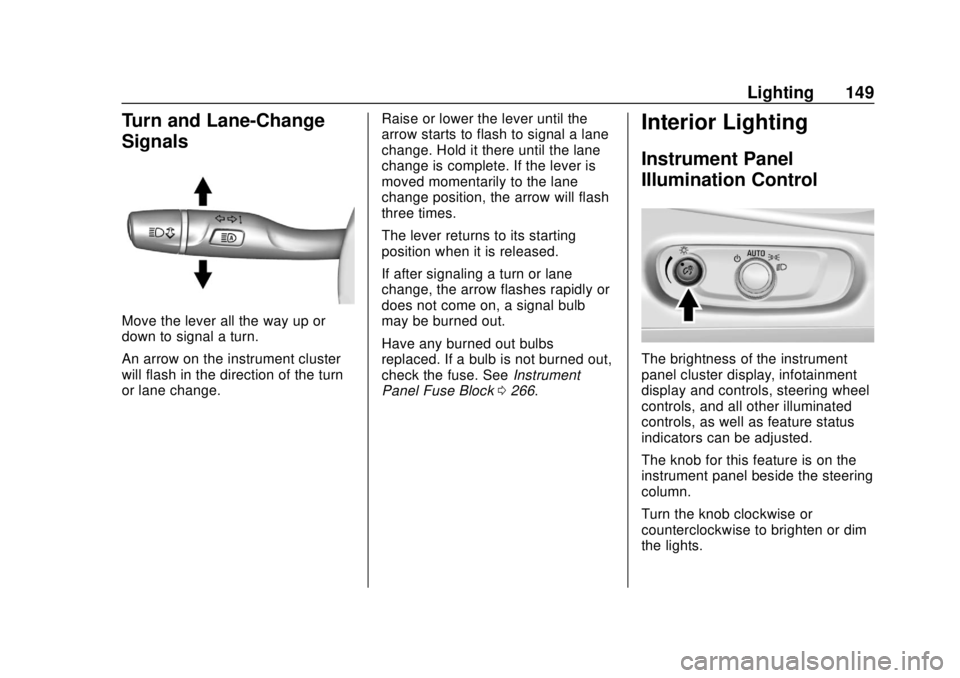
Turn and Lane-Change
Signals
Move the lever all the way up or
down to signal a turn.
An arrow on the instrument cluster
will flash in the direction of the turn
or lane change.Raise or lower the lever until the
arrow starts to flash to signal a lane
change. Hold it there until the lane
change is complete. If the lever is
moved momentarily to the lane
change position, the arrow will flash
three times.
The lever returns to its starting
position when it is released.
If after signaling a turn or lane
change, the arrow flashes rapidly or
does not come on, a signal bulb
may be burned out.
Have any burned out bulbs
replaced. If a bulb is not burned out,
check the fuse. See
Instrument
Panel Fuse Block 0266.
Interior Lighting
Instrument Panel
Illumination Control
The brightness of the instrument
panel cluster display, infotainment
display and controls, steering wheel
controls, and all other illuminated
controls, as well as feature status
indicators can be adjusted.
The knob for this feature is on the
instrument panel beside the steering
column.
Turn the knob clockwise or
counterclockwise to brighten or dim
the lights.
Page 152 of 379

Chevrolet VOLT Owner Manual (GMNA-Localizing-U.S./Canada/Mexico-
11349113) - 2018 - crc - 10/12/17
Lighting 151
Lighting Features
Entry Lighting
Some exterior lamps and the interior
lights turn on briefly at night when
the Remote Keyless Entry (RKE)
transmitter
Kis pressed. The lights
turn off immediately when POWER
Ois pressed or automatically after a
brief period.
Exit Lighting
Some exterior lamps come on at
night when the vehicle is turned off
and the driver door is opened.
Some interior lights also come on
when the vehicle is turned off. The
exterior lamps and interior lights
remain on after the door is closed
for a brief period and then turn off.
The exit lighting feature can be
changed. See Vehicle
Personalization 0137.
Battery Power Protection
The battery saver feature is
designed to protect the vehicle's
12-volt battery.
If the exterior lamps or any interior
lamp is left on and the vehicle is
turned off, the battery rundown
protection system automatically
turns the lamps off after about
10 minutes.