2018 CHEVROLET VOLT light
[x] Cancel search: lightPage 147 of 379

Chevrolet VOLT Owner Manual (GMNA-Localizing-U.S./Canada/Mexico-
11349113) - 2018 - crc - 10/12/17
146 Lighting
Turning On and Enabling
IntelliBeam
To enable the IntelliBeam system,
press
bon the turn signal lever
when it is dark outside and the
exterior lamp control is in AUTO
or
5. The blue high-beam on light
appears on the instrument cluster
when the high beams are on.
Driving with IntelliBeam
The system only activates the high
beams when driving over 40 km/h
(25 mph).
There is a sensor near the top
center of the windshield that
automatically controls the system. Keep this area of the windshield
clear of debris to allow for best
system performance.
The high-beam headlamps remain
on, under the automatic control,
until one of the following situations
occurs:
.
The system detects an
approaching vehicle's
headlamps.
. The system detects a preceding
vehicle's taillamps.
. The outside light is bright
enough that high-beam
headlamps are not required.
. The vehicle's speed drops below
20 km/h (12 mph).
. The IntelliBeam system is
disabled by the button on the
turn signal lever. If this happens,
press
bon the turn signal
lever when the exterior lamp
control is in the AUTO or
5
position to reactivate the
IntelliBeam system. The instrument cluster light will come
on to indicate the IntelliBeam
system is reactivated.
The high beams may not turn off
automatically if the system cannot
detect another vehicle's lamps
because of any of the following:
. The other vehicle's lamps are
missing, damaged, obstructed
from view, or otherwise
undetected.
. The other vehicle's lamps are
covered with dirt, snow, and/or
road spray.
. The other vehicle's lamps cannot
be detected due to dense
exhaust, smoke, fog, snow, road
spray, mist, or other airborne
obstructions.
. The vehicle's windshield is dirty,
cracked, or obstructed by
something that blocks the view
of the light sensor.
Page 148 of 379

Chevrolet VOLT Owner Manual (GMNA-Localizing-U.S./Canada/Mexico-
11349113) - 2018 - crc - 10/12/17
Lighting 147
.The vehicle is loaded such that
the front end points upward,
causing the light sensor to aim
high and not detect headlamps
and taillamps.
. The vehicle is being driven on
winding or hilly roads.
The IntelliBeam system may need to
be disabled if any of the above
conditions exist.
Headlamp High/
Low-Beam Changer
Push the turn signal lever away
from you and release, to turn the
high beams on. To return to low
beams, push the lever again or pull
it toward you and release.
This indicator light turns on in the
instrument cluster when the
high-beam headlamps are on.
Flash-to-Pass
The flash-to-pass feature works with
the low beams or Daytime Running
Lamps (DRL) on or off.
To flash the high beams, pull the
turn signal lever toward you
momentarily and then release it.
Daytime Running
Lamps (DRL)
The DRL system comes on in
daylight when the following
conditions are met:
. The vehicle is on.
. The exterior lamp control is
in AUTO.
. The electric drive unit is not in
P (Park).
. The light sensor determines it is
daytime.
Fully functional DRL are required on
all vehicles first sold in Canada. When the DRL are on, the taillamps,
sidemarker lamps, instrument panel
lights, and other lamps will not be
on. The instrument cluster will be lit.
When the exterior lamp control is
turned to the headlamp position, the
low-beam headlamps come on. The
other lamps that come on with the
headlamps will also come on.
The DRL turn off when the
headlamps are turned to
Oor the
vehicle is off.
For vehicles first sold in Canada,
the DRL can only be turned off
when the vehicle is parked.
The regular headlamp system
should be turned on when needed.
Automatic Headlamp
System
When the exterior lamp control is
set to AUTO and it is dark enough
outside, the headlamps come on
automatically.
Page 149 of 379

Chevrolet VOLT Owner Manual (GMNA-Localizing-U.S./Canada/Mexico-
11349113) - 2018 - crc - 10/12/17
148 Lighting
There is a light sensor on top of the
instrument panel. Do not cover the
sensor, otherwise the headlamps
will come on when they are not
needed.
The system may also turn on the
headlamps when driving through a
parking garage or tunnel.
If the vehicle is started in a dark
garage, the automatic headlamp
system comes on immediately. If it
is light outside when the vehicle
leaves the garage, there is a slight
delay before the automatic
headlamp system changes to the
DRL. During that delay, the
instrument cluster may not be asbright as usual. Make sure the
instrument panel brightness control
is in the full bright position. See
Instrument Panel Illumination
Control
0149.
When it is bright enough outside,
the headlamps will turn off or may
change to Daytime Running
Lamps (DRL).
The automatic headlamp system
turns off when the exterior lamp
control is turned toOor the vehicle
is turned off.
Lights On with Wipers
If the windshield wipers are
activated in daylight with the vehicle
on, and the exterior lamp control is
in AUTO, the headlamps, parking
lamps, and other exterior lamps
come on. The transition time for the
lamps coming on varies based on
wiper speed. When the wipers are
not operating, these lamps turn off.
Move the exterior lamp control to
O
or;to disable this feature.
Hazard Warning Flashers
|: Press to make the front and
rear turn signal lamps flash on and
off. This warns others that you are
having trouble.
Press
|again to turn the
flashers off.
Page 150 of 379
Chevrolet VOLT Owner Manual (GMNA-Localizing-U.S./Canada/Mexico-
11349113) - 2018 - crc - 10/12/17
Lighting 149
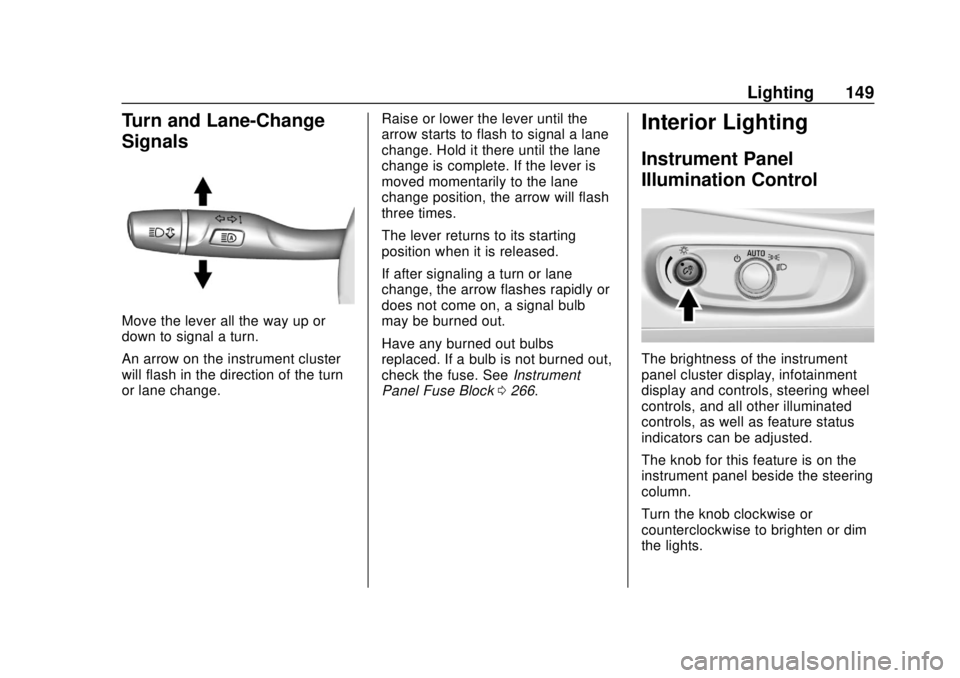
Turn and Lane-Change
Signals
Move the lever all the way up or
down to signal a turn.
An arrow on the instrument cluster
will flash in the direction of the turn
or lane change.Raise or lower the lever until the
arrow starts to flash to signal a lane
change. Hold it there until the lane
change is complete. If the lever is
moved momentarily to the lane
change position, the arrow will flash
three times.
The lever returns to its starting
position when it is released.
If after signaling a turn or lane
change, the arrow flashes rapidly or
does not come on, a signal bulb
may be burned out.
Have any burned out bulbs
replaced. If a bulb is not burned out,
check the fuse. See
Instrument
Panel Fuse Block 0266.
Interior Lighting
Instrument Panel
Illumination Control
The brightness of the instrument
panel cluster display, infotainment
display and controls, steering wheel
controls, and all other illuminated
controls, as well as feature status
indicators can be adjusted.
The knob for this feature is on the
instrument panel beside the steering
column.
Turn the knob clockwise or
counterclockwise to brighten or dim
the lights.
Page 151 of 379

Chevrolet VOLT Owner Manual (GMNA-Localizing-U.S./Canada/Mexico-
11349113) - 2018 - crc - 10/12/17
150 Lighting
Dome Lamps
The dome lamp controls are in the
overhead console.
To operate, press the following
buttons:
jOFF :Press to turn off the
dome lamps when a door is open.
An indicator light on the button will
turn on when the dome lamp
override is activated. Press
j
OFF again to deactivate this feature
and the indicator light will turn off.
The dome lamps will come on when
doors are opened. +
ON/OFF : Press to turn the dome
lamps on manually.
Reading Lamps
There are front and rear reading
lamps.
The front reading lamps are in the
overhead console.
Press the lamp lenses to turn the
front reading lamps on or off.
The rear reading lamps are in the
headliner.
Press the button near each lamp to
turn the rear reading lamps on
or off.
Page 152 of 379

Chevrolet VOLT Owner Manual (GMNA-Localizing-U.S./Canada/Mexico-
11349113) - 2018 - crc - 10/12/17
Lighting 151
Lighting Features
Entry Lighting
Some exterior lamps and the interior
lights turn on briefly at night when
the Remote Keyless Entry (RKE)
transmitter
Kis pressed. The lights
turn off immediately when POWER
Ois pressed or automatically after a
brief period.
Exit Lighting
Some exterior lamps come on at
night when the vehicle is turned off
and the driver door is opened.
Some interior lights also come on
when the vehicle is turned off. The
exterior lamps and interior lights
remain on after the door is closed
for a brief period and then turn off.
The exit lighting feature can be
changed. See Vehicle
Personalization 0137.
Battery Power Protection
The battery saver feature is
designed to protect the vehicle's
12-volt battery.
If the exterior lamps or any interior
lamp is left on and the vehicle is
turned off, the battery rundown
protection system automatically
turns the lamps off after about
10 minutes.
Page 155 of 379

Chevrolet VOLT Owner Manual (GMNA-Localizing-U.S./Canada/Mexico-
11349113) - 2018 - crc - 10/12/17
154 Climate Controls
1. Manual Fan Control Knob
2. MAX Defrost
3. Defrost/Defog
4. AUTO (Automatic Operation)
5. Recirculation
6. eco Climate Mode Button
7. Temperature Control Knob
8. Driver and Passenger HeatedSeats (If Equipped)
9. MAX Climate Mode Button
10. Power Button
11. Air Delivery Mode Controls 12. Rear Window Defogger
Climate Mode Operation
There are three climate mode
settings: Fan Only, eco, and MAX.
These settings adjust the impact the
climate control system has on the
vehicle's electric range or fuel
economy.
To select a climate mode,
press eco.
Fan Only Mode :
To select this
mode, turn off both eco and MAX
mode. The air conditioning and
electric heat are turned off. As long as
0MAX is not selected, the
climate control settings may not
have a noticeable effect on the
vehicle electric range and fuel
economy.
When in Fan Only mode, the AUTO
indicator light will be on. When
AUTO is selected in Fan Only
mode, the mode will change to
either eco or MAX.
When in Fan Only mode, the air
conditioning system may turn on
automatically if the high voltage
battery is being cooled. The climate
control system could blow cold air.
This is normal. To prevent cold air
from blowing into the interior, turn off
the fan control and select the vent
mode and manual recirculation
mode, and close the air vents.
When in Fan Only mode, if Auto
Defog is enabled, the air
conditioning and electric heat may
turn on when high humidity
conditions exist. See “Climate and
Air Quality” underVehicle
Personalization 0137 for more
Page 156 of 379

Chevrolet VOLT Owner Manual (GMNA-Localizing-U.S./Canada/Mexico-
11349113) - 2018 - crc - 10/12/17
Climate Controls 155
information on the Auto Defog
selection. The air conditioning may
also run if
0MAX is selected.
eco Mode : Press eco to select this
mode and the indicator will be lit.
The air conditioning and electric
heat are controlled to balance
comfort with fuel economy. As long
as
0MAX is not selected, the
vehicle electric range or fuel
economy will decrease less than in
MAX mode, but will result in
moderate comfort.
MAX Mode : Press MAX to select
this mode and the indicator will be
lit. The air conditioning and electric
heat are controlled to reach the best
comfort level based on the
temperature setting selected. In this
mode, vehicle electric range or fuel
economy will decrease depending
on the amount of energy required to
reach the best comfort levels.
The air conditioning and electric
heat could be on at the same time
when dehumidification is required in
eco or MAX modes. The air conditioning may also run if
0MAX is selected, regardless of
the climate mode.
Automatic Operation
The system automatically controls
the fan speed, air delivery mode, air
conditioning, and recirculation to
heat or cool the vehicle to the
selected temperature.
When AUTO is lit, all four functions
operate automatically. Each function
can also be manually set and the
setting is displayed. Functions not
manually set will continue to be
automatically controlled, even if the
AUTO indicator is not lit.
For automatic operation:
1. Press AUTO.
2. Set the temperature. An initial setting of 23 °C (74 °F) is
recommended. Allow the
system time to stabilize. Adjust
the temperature as needed.
Manual Operation
O: Press to turn the climate control
system on and off.
A: Turn the knob clockwise or
counterclockwise to increase or
decrease the fan speed. The fan
speed setting appears on the
display screen. Manually adjusting
the fan speed cancels automatic fan
control. Press AUTO to return to
automatic operation. Press
Oto turn
off the fan and the climate control
system.
If the power is turned off while in
eco or MAX mode, the display will
automatically change to Fan Only
mode. If the fan speed is increased
or AUTO is pressed, the climate
mode will revert back to eco or
MAX mode.
Temperature Control : Turn the
knob clockwise or counterclockwise
to increase or decrease the
temperature setting.
Air Delivery Mode Control : Press
0,dorcor a combination of
the buttons to change the direction
of the airflow. The indicator light in
the button will turn on. The current
mode appears in the display screen.