2018 CHEVROLET SILVERADO 1500 automatic
[x] Cancel search: automaticPage 23 of 501
Chevrolet Silverado Owner Manual (GMNA-Localizing-U.S./Canada/Mexico-
11349200) - 2018 - CRC - 2/27/18
22 In Brief
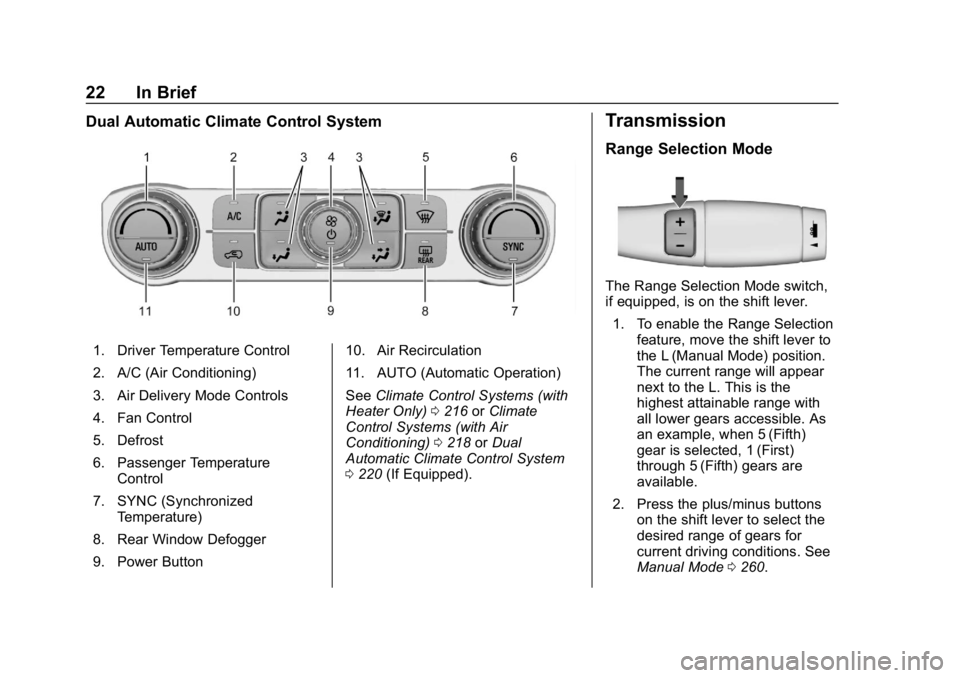
Dual Automatic Climate Control System
1. Driver Temperature Control
2. A/C (Air Conditioning)
3. Air Delivery Mode Controls
4. Fan Control
5. Defrost
6. Passenger TemperatureControl
7. SYNC (Synchronized Temperature)
8. Rear Window Defogger
9. Power Button 10. Air Recirculation
11. AUTO (Automatic Operation)
See
Climate Control Systems (with
Heater Only) 0216 orClimate
Control Systems (with Air
Conditioning) 0218 orDual
Automatic Climate Control System
0 220 (If Equipped).
Transmission
Range Selection Mode
The Range Selection Mode switch,
if equipped, is on the shift lever.
1. To enable the Range Selection feature, move the shift lever to
the L (Manual Mode) position.
The current range will appear
next to the L. This is the
highest attainable range with
all lower gears accessible. As
an example, when 5 (Fifth)
gear is selected, 1 (First)
through 5 (Fifth) gears are
available.
2. Press the plus/minus buttons on the shift lever to select the
desired range of gears for
current driving conditions. See
Manual Mode 0260.
Page 25 of 501
Chevrolet Silverado Owner Manual (GMNA-Localizing-U.S./Canada/Mexico-
11349200) - 2018 - CRC - 2/27/18
24 In Brief
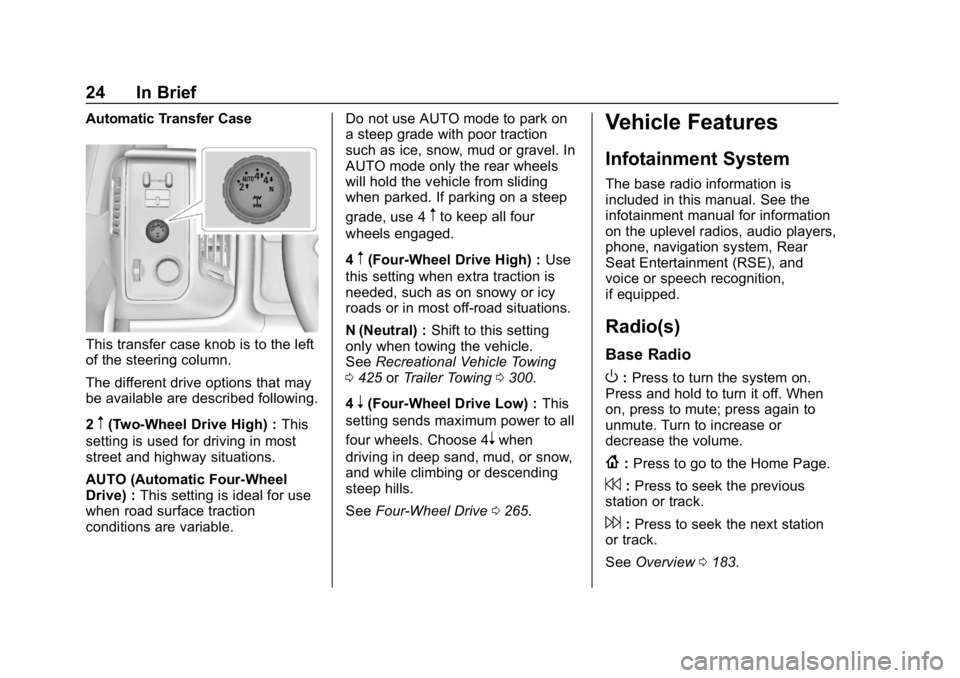
Automatic Transfer Case
This transfer case knob is to the left
of the steering column.
The different drive options that may
be available are described following.
2
m(Two-Wheel Drive High) :This
setting is used for driving in most
street and highway situations.
AUTO (Automatic Four-Wheel
Drive) : This setting is ideal for use
when road surface traction
conditions are variable. Do not use AUTO mode to park on
a steep grade with poor traction
such as ice, snow, mud or gravel. In
AUTO mode only the rear wheels
will hold the vehicle from sliding
when parked. If parking on a steep
grade, use 4
mto keep all four
wheels engaged.
4
m(Four-Wheel Drive High) : Use
this setting when extra traction is
needed, such as on snowy or icy
roads or in most off-road situations.
N (Neutral) : Shift to this setting
only when towing the vehicle.
See Recreational Vehicle Towing
0 425 orTrailer Towing 0300.
4
n(Four-Wheel Drive Low) : This
setting sends maximum power to all
four wheels. Choose 4
nwhen
driving in deep sand, mud, or snow,
and while climbing or descending
steep hills.
See Four-Wheel Drive 0265.
Vehicle Features
Infotainment System
The base radio information is
included in this manual. See the
infotainment manual for information
on the uplevel radios, audio players,
phone, navigation system, Rear
Seat Entertainment (RSE), and
voice or speech recognition,
if equipped.
Radio(s)
Base Radio
O:Press to turn the system on.
Press and hold to turn it off. When
on, press to mute; press again to
unmute. Turn to increase or
decrease the volume.
{: Press to go to the Home Page.
7:Press to seek the previous
station or track.
6: Press to seek the next station
or track.
See Overview 0183.
Page 28 of 501

Chevrolet Silverado Owner Manual (GMNA-Localizing-U.S./Canada/Mexico-
11349200) - 2018 - CRC - 2/27/18
In Brief 27
If the vehicle has the uplevel
instrument cluster, the right steering
wheel controls are used to operate
the DIC.
worx:Press to move up or
down in a list.
oorp: Press to move between
the interactive display zones in the
cluster.
V: Press to open a menu or select
a menu item. Press and hold to
reset values on certain screens. See
Driver Information Center (DIC)
(Base Level) 0155 orDriver
Information Center (DIC) (Uplevel)
0 156.
Forward Collision Alert
(FCA) System
If equipped, FCA may help avoid or
reduce the harm caused by
front-end crashes. FCA provides a
green indicator,
V, when a vehicle
is detected ahead. This indicator
displays amber if you follow a
vehicle too closely. When
approaching a vehicle ahead too
quickly, FCA provides a flashing red
alert on the windshield and rapidly
beeps or pulses the driver seat.
See Forward Collision Alert (FCA)
System 0285.
Forward Automatic
Braking (FAB)
If the vehicle has Forward Collision
Alert (FCA), it also has FAB, which
includes Intelligent Brake
Assist (IBA). When the system detects a vehicle ahead in your path
that is traveling in the same
direction that you may be about to
crash into, it can provide a boost to
braking or automatically brake the
vehicle. This can help avoid or
lessen the severity of crashes when
driving in a forward gear.
See
Forward Automatic Braking
(FAB) 0287.
Lane Departure
Warning (LDW)
If equipped, LDW may help avoid
unintentional lane departures at
speeds of 56 km/h (35 mph) or
greater. LDW uses a camera sensor
to detect the lane markings. The
LDW light,
@, is green if a lane
marking is detected. If the vehicle
departs the lane, the light will
change to amber and flash. In
addition, beeps will sound or the
driver seat will pulse.
See Lane Departure Warning (LDW)
(2500/3500 Series) 0288.
Page 31 of 501
Chevrolet Silverado Owner Manual (GMNA-Localizing-U.S./Canada/Mexico-
11349200) - 2018 - CRC - 2/27/18
30 In Brief
Tilt Switch
Vent :From the closed position,
press
Jto vent the sunroof. Press
Kto close the vent.
When the sunroof is opened, an air
deflector will automatically raise.
The air deflector will retract when
the sunroof is closed.
The sunroof also has a sunshade,
which can be pulled forward to block
sun rays. The sunshade must be
opened and closed manually.
If an object is in the path of the
sunroof while it is closing, the
automatic reversal system will
detect the object and stop the
sunroof.
See Sunroof 055.
Performance and
Maintenance
Traction Control/
Electronic Stability
Control
The vehicle has a Traction Control
System (TCS) that limits wheel spin
and the StabiliTrak system that
assists with directional control of the
vehicle in difficult driving conditions.
Both systems come on
automatically when the vehicle is
started and begins to move.
.
To turn off TCS, press and
release
gon the center stack.
The traction off light
idisplays
in the instrument cluster. The
appropriate Driver Information
Center (DIC) message displays.
. To turn off both TCS and
StabiliTrak, press and hold
g
untiliandgilluminate in the
instrument cluster and the
appropriate DIC message
displays. .
Press and release
gagain to
turn on both systems.
StabiliTrak will automatically turn on
if the vehicle exceeds 56 km/h
(35 mph). Traction control will
remain off.
See Traction Control/Electronic
Stability Control 0276.
Tire Pressure Monitor
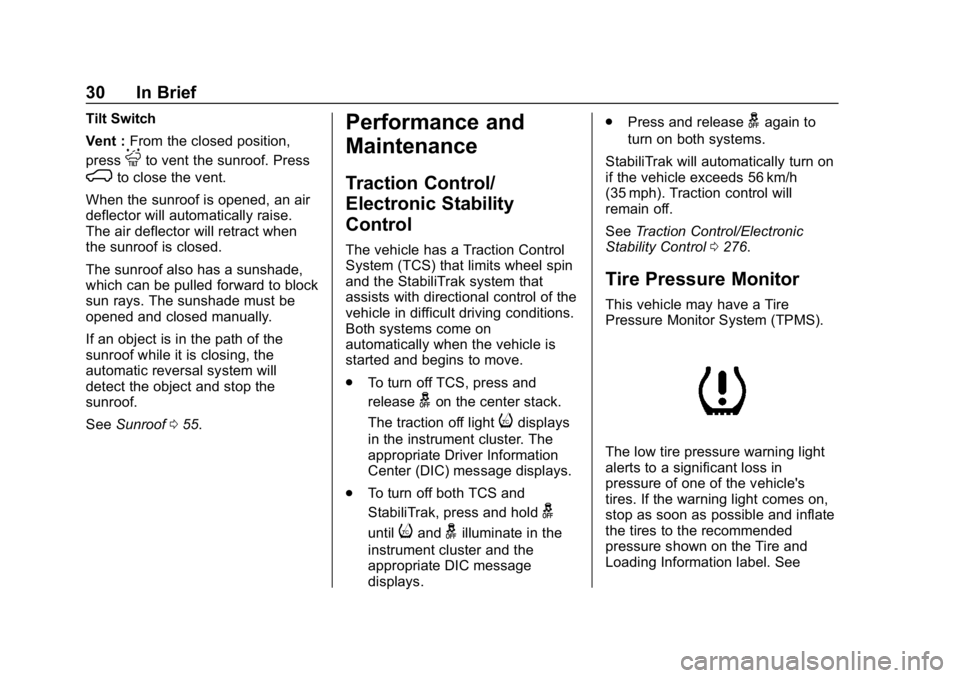
This vehicle may have a Tire
Pressure Monitor System (TPMS).
The low tire pressure warning light
alerts to a significant loss in
pressure of one of the vehicle's
tires. If the warning light comes on,
stop as soon as possible and inflate
the tires to the recommended
pressure shown on the Tire and
Loading Information label. See
Page 34 of 501
Chevrolet Silverado Owner Manual (GMNA-Localizing-U.S./Canada/Mexico-
11349200) - 2018 - CRC - 2/27/18
In Brief 33
Roadside Assistance
Program
U.S.: 1-800-243-8872
TTY Users (U.S. Only):
1-888-889-2438
Canada: 1-800-268-6800
New Chevrolet owners are
automatically enrolled in the
Roadside Assistance Program.
SeeRoadside Assistance Program
0 465.
Page 35 of 501
Chevrolet Silverado Owner Manual (GMNA-Localizing-U.S./Canada/Mexico-
11349200) - 2018 - CRC - 2/27/18
34 Keys, Doors, and Windows
Keys, Doors, and
Windows
Keys and Locks
Keys . . . . . . . . . . . . . . . . . . . . . . . . . . . 34
Remote Keyless Entry (RKE)System . . . . . . . . . . . . . . . . . . . . . . . 37
Remote Keyless Entry (RKE) System Operation . . . . . . . . . . . . 37
Remote Vehicle Start . . . . . . . . . . 39
Door Locks . . . . . . . . . . . . . . . . . . . . 40
Power Door Locks . . . . . . . . . . . . . 41
Automatic Door Locks . . . . . . . . . 41
Lockout Protection . . . . . . . . . . . . . 42
Safety Locks . . . . . . . . . . . . . . . . . . . 42
Doors
Tailgate . . . . . . . . . . . . . . . . . . . . . . . . 43
Power Assist Steps . . . . . . . . . . . . 43
Vehicle Security
Vehicle Security . . . . . . . . . . . . . . . . 44
Vehicle Alarm System . . . . . . . . . 44
Immobilizer . . . . . . . . . . . . . . . . . . . . 46
Immobilizer Operation . . . . . . . . . 46
Exterior Mirrors
Convex Mirrors . . . . . . . . . . . . . . . . 47
Manual Mirrors . . . . . . . . . . . . . . . . . 47
Trailer-Tow Mirrors . . . . . . . . . . . . . 48
Power Mirrors . . . . . . . . . . . . . . . . . . 48
Folding Mirrors . . . . . . . . . . . . . . . . . 49
Heated Mirrors . . . . . . . . . . . . . . . . . 50
Automatic Dimming Mirror . . . . . 50
Blind Spot Mirrors . . . . . . . . . . . . . . 50
Reverse Tilt Mirrors . . . . . . . . . . . . 51
Interior Mirrors
Interior Rearview Mirrors . . . . . . . 51
Manual Rearview Mirror . . . . . . . . 52
Automatic Dimming Rearview Mirror . . . . . . . . . . . . . . . . . . . . . . . . . 52
Windows
Windows . . . . . . . . . . . . . . . . . . . . . . . 52
Manual Windows . . . . . . . . . . . . . . 52
Power Windows . . . . . . . . . . . . . . . 52
Rear Windows . . . . . . . . . . . . . . . . . 55
Sun Visors . . . . . . . . . . . . . . . . . . . . . 55
Roof
Sunroof . . . . . . . . . . . . . . . . . . . . . . . . 55
Keys and Locks
Keys
{Warning
Leaving children in a vehicle with
the ignition key is dangerous and
children or others could be
seriously injured or killed. They
could operate the power windows
or other controls or make the
vehicle move. The windows will
function with the keys in the
ignition, and children or others
could be caught in the path of a
closing window. Do not leave
children in a vehicle with the
ignition key.
Page 42 of 501
Chevrolet Silverado Owner Manual (GMNA-Localizing-U.S./Canada/Mexico-
11349200) - 2018 - CRC - 2/27/18
Keys, Doors, and Windows 41
Warning (Continued)
.Young children who get into
unlocked vehicles may be
unable to get out. A child
can be overcome by
extreme heat and can suffer
permanent injuries or even
death from heat stroke.
Always lock the vehicle
whenever leaving it.
. Outsiders can easily enter
through an unlocked door
when you slow down or stop
the vehicle. Locking the
doors can help prevent this
from happening.
There are several ways to lock and
unlock the vehicle.
From outside, use the Remote
Keyless Entry (RKE) transmitter or
the key in the driver door.
From inside, use the power door
locks or manual door locks. To lock
or unlock the door with the manual
locks, push down or pull up on the
manual lock knob. From inside, pull the door handle
once to unlock the door. Pull the
handle again to open the door.
See
Vehicle Alarm System 044.
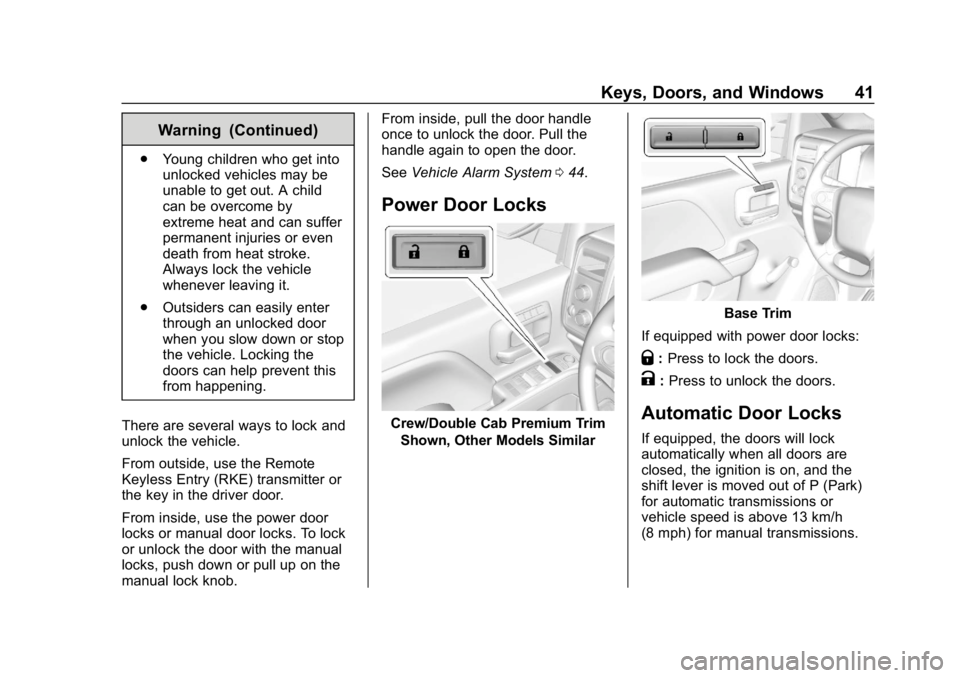
Power Door Locks
Crew/Double Cab Premium Trim
Shown, Other Models Similar
Base Trim
If equipped with power door locks:
Q: Press to lock the doors.
K:Press to unlock the doors.
Automatic Door Locks
If equipped, the doors will lock
automatically when all doors are
closed, the ignition is on, and the
shift lever is moved out of P (Park)
for automatic transmissions or
vehicle speed is above 13 km/h
(8 mph) for manual transmissions.
Page 43 of 501
Chevrolet Silverado Owner Manual (GMNA-Localizing-U.S./Canada/Mexico-
11349200) - 2018 - CRC - 2/27/18
42 Keys, Doors, and Windows
To unlock the doors:
.Press
Kon a power door lock
switch.
. If equipped with an automatic
transmission, shift the
transmission into P (Park)
. If equipped with manual
transmission, remove the key
from the ignition when parked.
Automatic door locking cannot be
disabled. Automatic door unlocking
can be programmed. See Vehicle
Personalization 0160.
Lockout Protection
If the ignition is on or in ACC/
ACCESSORY and the power door
lock switch is pressed with the
driver door open, all the doors will
lock and only the driver door will
unlock.
If the vehicle is off and locking is
selected while a door is open, when
all doors are closed the vehicle will
check for RKE transmitters inside.
If an RKE transmitter is detected,
and the number of RKE transmitters has not reduced, the driver door will
unlock and the horn will chirp three
times.
This can be manually overridden by
pressing and holding
Qon the
power door lock switch.
Unlocked Door Anti-Lockout
If Unlocked Door Anti-Lockout is
turned on and the vehicle is off, the
driver door is open, and locking is
requested, all the doors will lock and
the driver door will remain open.
Press the button again to lock the
driver door. The Unlocked Door
Anti-Lockout feature can be turned
on or off. See Vehicle
Personalization 0160.
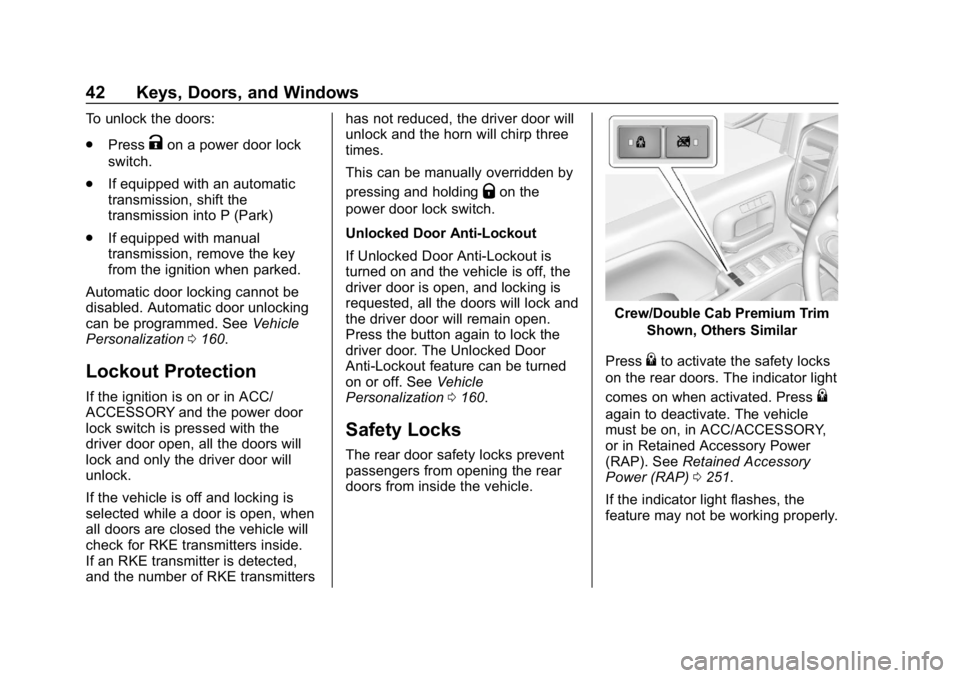
Safety Locks
The rear door safety locks prevent
passengers from opening the rear
doors from inside the vehicle.
Crew/Double Cab Premium Trim
Shown, Others Similar
Press
{to activate the safety locks
on the rear doors. The indicator light
comes on when activated. Press
{
again to deactivate. The vehicle
must be on, in ACC/ACCESSORY,
or in Retained Accessory Power
(RAP). See Retained Accessory
Power (RAP) 0251.
If the indicator light flashes, the
feature may not be working properly.