2018 CHEVROLET EQUINOX traction control
[x] Cancel search: traction controlPage 5 of 428

Chevrolet Equinox Owner Manual (GMNA-Localizing-U.S./Canada/Mexico-
10446639) - 2018 - CRC - 8/18/17
4 Introduction
Vehicle Symbol Chart
Here are some additional symbols
that may be found on the vehicle
and what they mean. See the
features in this manual for
information.
9:Airbag Readiness Light
#:Air Conditioning
!:Antilock Brake System (ABS)
$:Brake System Warning Light
":Charging System
I: Cruise Control
`:Do Not Puncture
^:Do Not Service
B:Engine Coolant Temperature
O:Exterior Lamps
_: Flame/Fire Prohibited
.:Fuel Gauge
+: Fuses
3:Headlamp High/Low-Beam
Changer
j: ISOFIX/LATCH System Child
Restraints
*: Malfunction Indicator Lamp
::Oil Pressure
O:Power
/:Remote Vehicle Start
>:Seat Belt Reminders
7: Tire Pressure Monitor
d:Traction Control/StabiliTrak
a:Under Pressure
M: Windshield Washer Fluid
Page 6 of 428

Chevrolet Equinox Owner Manual (GMNA-Localizing-U.S./Canada/Mexico-
10446639) - 2018 - CRC - 8/18/17
In Brief 5
In Brief
Instrument Panel
Instrument Panel . . . . . . . . . . . . . . . . 6
Initial Drive Information
Initial Drive Information . . . . . . . . . . 8
Stop/Start System . . . . . . . . . . . . . . . 8
Remote Keyless Entry (RKE)System . . . . . . . . . . . . . . . . . . . . . . . . 8
Remote Vehicle Start . . . . . . . . . . . 8
Door Locks . . . . . . . . . . . . . . . . . . . . . 9
Liftgate . . . . . . . . . . . . . . . . . . . . . . . . 10
Windows . . . . . . . . . . . . . . . . . . . . . . . 10
Seat Adjustment . . . . . . . . . . . . . . . 11
Memory Features . . . . . . . . . . . . . . 13
Heated and Ventilated Seats . . . 13
Head Restraint Adjustment . . . . 14
Seat Belts . . . . . . . . . . . . . . . . . . . . . 14
Passenger Sensing System . . . 14
Mirror Adjustment . . . . . . . . . . . . . . 15
Steering Wheel Adjustment . . . . 15
Interior Lighting . . . . . . . . . . . . . . . . 16
Exterior Lighting . . . . . . . . . . . . . . . 17
Windshield Wiper/Washer . . . . . . 17
Climate Controls . . . . . . . . . . . . . . . 18
Transmission . . . . . . . . . . . . . . . . . . 19
Vehicle Features
Infotainment System . . . . . . . . . . . 20
Radio(s) . . . . . . . . . . . . . . . . . . . . . . . 20
Satellite Radio . . . . . . . . . . . . . . . . . 21
Portable Audio Devices . . . . . . . . 21
Bluetooth
®. . . . . . . . . . . . . . . . . . . . . 21
Steering Wheel Controls . . . . . . . 21
Cruise Control . . . . . . . . . . . . . . . . . 22
Driver Information Center (DIC) . . . . . . . . . . . . . . . . . 23
Forward Collision Alert (FCA) System . . . . . . . . . . . . . . . . . . . . . . . 23
Forward Automatic Braking (FAB) . . . . . . . . . . . . . . . . 23
Lane Keep Assist (LKA) . . . . . . . 23
Lane Change Alert (LCA) . . . . . . 24
Surround Vision . . . . . . . . . . . . . . . 24
Rear Vision Camera (RVC) . . . . 24
Rear Cross Traffic Alert (RCTA) System . . . . . . . . . . . . . . . . . . . . . . . 24
Parking Assist . . . . . . . . . . . . . . . . . 24
Power Outlets . . . . . . . . . . . . . . . . . 25
Universal Remote System . . . . . 25
Sunroof . . . . . . . . . . . . . . . . . . . . . . . . 25
Performance and Maintenance
Traction Control/Electronic Stability Control . . . . . . . . . . . . . . 26
Tire Pressure Monitor . . . . . . . . . . 27 Fuel (LYX - 1.5L L4 Turbo
Engine) . . . . . . . . . . . . . . . . . . . . . . . 27
Fuel (LTG - 2.0L L4 Turbo Engine) . . . . . . . . . . . . . . . . . . . . . . . 28
Fuel (Diesel) . . . . . . . . . . . . . . . . . . . 28
E85 or FlexFuel . . . . . . . . . . . . . . . . 28
Engine Oil Life System . . . . . . . . 28
Driving for Better Fuel
Economy . . . . . . . . . . . . . . . . . . . . . 29
Diesel Particulate Filter . . . . . . . . 29
Diesel Exhaust Fluid . . . . . . . . . . . 30
Roadside Assistance Program . . . . . . . . . . . . . . . . . . . . . . 30
Page 8 of 428

Chevrolet Equinox Owner Manual (GMNA-Localizing-U.S./Canada/Mexico-
10446639) - 2018 - CRC - 8/18/17
In Brief 7
1.Air Vents 0195.
2. Turn Signal Lever. See Turn
and Lane-Change Signals
0 161.
IntelliBeam
®System Button (If
Equipped). See Exterior Lamp
Controls 0157.
3. Instrument Cluster 0122.
Driver Information Center (DIC)
Display. See Driver Information
Center (DIC) 0139.
4. Windshield Wiper/Washer
0114.
5. Infotainment 0165.
6. Light Sensor. See Automatic
Headlamp System 0160.
7. Hazard Warning Flashers
0160.
8. Climate Control Systems 0190
(If Equipped).
Dual Automatic Climate Control
System 0192 (If Equipped).
9. Heated and Ventilated Front
Seats 066 (If Equipped). 10.
Power Outlets 0118.
11. Wireless Charging 0120 (If
Equipped).
12. USB Port 0173.
Auxiliary Input Jack. See
Auxiliary Devices 0179.
13. All-Wheel Drive 0234 (If
Equipped).
Tow/Haul Mode 0234.
14. Electric Parking Brake 0236.
15. Shift Lever. See Automatic
Transmission 0231.
Manual Mode 0233.
16. ENGINE START/STOP Button. SeeIgnition Positions 0215.
17. Steering Wheel Controls 0113.
Traction Control/Electronic
Stability Control 0238.
18. Horn 0114.
19. Steering Wheel Adjustment
0113 (Out of View). 20.
Cruise Control 0241.
Heated Steering Wheel 0114
(If Equipped).
Forward Collision Alert (FCA)
System 0248 (If Equipped).
Lane Keep Assist (LKA) 0254
(If Equipped).
21. Hood Release. See Hood
0 281.
22. Fog Lamps 0161 (If
Equipped).
23. Exterior Lamp Controls 0157.
24. Data Link Connector (DLC) (Out of View). See Malfunction
Indicator Lamp (Check Engine
Light) 0130.
25. Instrument Panel Illumination
Control 0162.
Page 21 of 428

Chevrolet Equinox Owner Manual (GMNA-Localizing-U.S./Canada/Mexico-
10446639) - 2018 - CRC - 8/18/17
20 In Brief
Vehicle Features
Infotainment System
Base radio information is included in
this manual. See the infotainment
manual for information on other
available infotainment systems.
Read the following pages to
become familiar with the features.
{Warning
Taking your eyes off the road for
too long or too often while using
any infotainment feature can
cause a crash. You or others
could be injured or killed. Do not
give extended attention to
infotainment tasks while driving.
Limit your glances at the vehicle
displays and focus your attention
on driving. Use voice commands
whenever possible.
The infotainment system has built-in
features intended to help avoid
distraction by disabling some functions when driving. These
functions may gray out when they
are unavailable. Many infotainment
features are also available through
the instrument cluster and steering
wheel controls.
Before driving:
.
Become familiar with the
operation, center stack controls,
and infotainment display
controls.
. Set up the audio by presetting
favorite stations, setting the
tone, and adjusting the
speakers.
. Set up phone numbers in
advance so they can be called
easily by pressing a single
control or by using a single voice
command if equipped with
Bluetooth phone capability.
See Defensive Driving 0200.
To play the infotainment system with
the ignition off, see Retained
Accessory Power (RAP) 0221.
Radio(s)
O
:
. Press to turn the power on.
. Press and hold to turn the
power off.
. Press to mute/unmute the
system when on.
. Turn to decrease or increase the
volume.
g:
. Radio: Press and release to fast
seek the strongest previous
station or channel.
. USB/Music/Pictures: Press to go
to the previous content. Press
and hold to fast rewind.
d:
. Radio: Press and release to fast
seek the next strongest station
or channel.
. USB/Music/Pictures: Press to go
to the next content. Press and
hold to fast forward.
Page 27 of 428

Chevrolet Equinox Owner Manual (GMNA-Localizing-U.S./Canada/Mexico-
10446639) - 2018 - CRC - 8/18/17
26 In Brief
Sunroof Switch
Express-Open/Express-Close :To
express-open the sunroof, fully
press and release
e(1). Press
the switch again to stop it. To
express-close the sunroof, fully
press and release
g(1). Press
the switch again to stop it.
Open/Close (Manual Mode) : To
open the sunroof, press and hold
e(1) until the sunroof reaches
the desired position. Press and hold
g(1) to close it.
Comfort Stop : The sunroof has a
comfort stop feature that stops the
sunroof from opening fully. Press
and release the rear of
gto open
the sunroof to the comfort open
position. Pressing the rear of
g
again will open the sunroof fully.
If the sunshade is not fully open
when the comfort stop feature is
pressed the second time, the
sunshade will open fully. Vent :
From the closed position,
press
e(1) to vent the sunroof.
Sunshade Switch
Express-open/Express-close : To
express-open the sunshade, fully
press and release
r(2). To
express-close the sunshade, fully
press and release
s(2) . Press
the switch again to stop it.
Open/Close : To open the
sunshade, press and hold
r(2)
until the sunshade reaches the
desired position.
When the sunroof is opened, an air
deflector will automatically raise.
The air deflector will retract when
the sunroof is closed.
Performance and
Maintenance
Traction Control/
Electronic Stability
Control
The Traction Control System (TCS)
limits wheel slip. The system is on
when the vehicle is started.
The StabiliTrak system assists with
directional control of the vehicle in
difficult driving conditions. The
system is on when the vehicle is
started.
TCS and StabiliTrak can be turned
off or on using the Driver
Information Center (DIC) controls.
See Traction Control/Electronic
Stability Control 0238.
Page 113 of 428

Chevrolet Equinox Owner Manual (GMNA-Localizing-U.S./Canada/Mexico-
10446639) - 2018 - CRC - 8/18/17
112 Instruments and Controls
Instruments and
Controls
Controls
Steering Wheel Adjustment . . . 113
Steering Wheel Controls . . . . . . 113
Heated Steering Wheel . . . . . . . 114
Horn . . . . . . . . . . . . . . . . . . . . . . . . . . 114
Windshield Wiper/Washer . . . . 114
Rear Window Wiper/Washer . . . . . . . . . . . . . . . . . . . . . . 115
Compass . . . . . . . . . . . . . . . . . . . . . 116
Clock . . . . . . . . . . . . . . . . . . . . . . . . . 116
Power Outlets . . . . . . . . . . . . . . . . 118
Wireless Charging . . . . . . . . . . . . 120
Warning Lights, Gauges, and
Indicators
Warning Lights, Gauges, and Indicators . . . . . . . . . . . . . . . . . . . 121
Instrument Cluster . . . . . . . . . . . . 122
Speedometer . . . . . . . . . . . . . . . . . 126
Odometer . . . . . . . . . . . . . . . . . . . . . 126
Trip Odometer . . . . . . . . . . . . . . . . 126
Tachometer . . . . . . . . . . . . . . . . . . . 126
Fuel Gauge . . . . . . . . . . . . . . . . . . . 127
Engine Coolant Temperature
Gauge . . . . . . . . . . . . . . . . . . . . . . 127 Seat Belt Reminders . . . . . . . . . 128
Airbag Readiness Light . . . . . . . 129
Passenger Airbag Status
Indicator . . . . . . . . . . . . . . . . . . . . 129
Charging System Light . . . . . . . 130
Malfunction Indicator Lamp
(Check Engine Light) . . . . . . . . 130
Brake System Warning Light . . . . . . . . . . . . . . . . . . . . . . . . 132
Electric Parking Brake Light . . . . . . . . . . . . . . . . . . . . . . . . 133
Service Electric Parking Brake Light (Uplevel Only) . . . . . . . . . 133
Antilock Brake System (ABS) Warning Light . . . . . . . . . . . . . . . 134
Tow/Haul Mode Light . . . . . . . . . 134
Lane Keep Assist (LKA) Light . . . . . . . . . . . . . . . . . . . . . . . . 134
Vehicle Ahead Indicator . . . . . . 135
Traction Off Light . . . . . . . . . . . . . 135
StabiliTrak OFF Light . . . . . . . . . 135
Traction Control System (TCS)/ StabiliTrak Light . . . . . . . . . . . . . 135
Wait-to-Start Light . . . . . . . . . . . . 136
Tire Pressure Light . . . . . . . . . . . 136
Engine Oil Pressure Light . . . . 136
Low Fuel Warning Light . . . . . . 137
Diesel Exhaust Fluid (DEF) Warning Light . . . . . . . . . . . . . . . 137
Security Light . . . . . . . . . . . . . . . . . 138 High-Beam On Light . . . . . . . . . . 138
Front Fog Lamp Light . . . . . . . . . 138
Lamps On Reminder . . . . . . . . . 138
Cruise Control Light . . . . . . . . . . 139
Information Displays
Driver Information
Center (DIC) . . . . . . . . . . . . . . . . 139
Vehicle Messages
Vehicle Messages . . . . . . . . . . . . 144
Engine Power Messages . . . . . 145
Vehicle Speed Messages . . . . . 145
Vehicle Personalization
Vehicle Personalization . . . . . . . 145
Universal Remote System
Universal Remote System . . . . 154
Universal Remote SystemProgramming . . . . . . . . . . . . . . . 154
Universal Remote System Operation . . . . . . . . . . . . . . . . . . . 156
Page 127 of 428

Chevrolet Equinox Owner Manual (GMNA-Localizing-U.S./Canada/Mexico-
10446639) - 2018 - CRC - 8/18/17
126 Instruments and Controls
Info Pages :Presspwhile Info
Pages is displayed to enter the Info
Pages menu and select the items to
be displayed in the Info app. See
Driver Information Center (DIC)
0 139.
Traction and Stability : Press
pto
enter the Traction and Stability
menu. To turn the Traction Control
System (TCS) on or off, choose
Traction. To turn StabiliTrak on or
off, choose Stability. See Traction
Control/Electronic Stability Control
0 238.
Speed Warning : The Speed
Warning display allows the driver to
set a speed that they do not want to
exceed. To set the Speed Warning
press
pwhen Speed Warning is
displayed. Press
worxto adjust
the value. Press
Vto set the speed.
Once the speed is set, this feature
can be turned off by pressing
V
while viewing this page. If the
selected speed limit is exceeded, a
pop-up warning is displayed with a
chime.
Speedometer
The speedometer shows the
vehicle's speed in either kilometers
per hour (km/h) or miles per
hour (mph).
Odometer
The odometer shows how far the
vehicle has been driven, in either
kilometers or miles.
Trip Odometer
The trip odometer shows how far
the vehicle has been driven since
the trip odometer was last reset.
The trip odometer is accessed and
reset through the Driver Information
Center (DIC). See Driver
Information Center (DIC) 0139.
Tachometer
The tachometer displays the engine
speed in revolutions per
minute (rpm). For vehicles with the Stop/Start
system, when the ignition is on, the
tachometer indicates the vehicle
status. When pointing to AUTO
STOP, the engine is off but the
vehicle is on and can move. The
engine could auto start at any time.
When the indicator points to OFF,
the vehicle is off.
When the engine is on, the
tachometer will indicate the engine’s
revolutions per minute (rpm). The
tachometer may vary by several
hundred rpm’s, during Auto Stop
mode, when the engine is shutting
off and restarting.
A slight bump may be felt when the
transmission is determining the
most fuel efficient operating range.
Page 136 of 428
Chevrolet Equinox Owner Manual (GMNA-Localizing-U.S./Canada/Mexico-
10446639) - 2018 - CRC - 8/18/17
Instruments and Controls 135
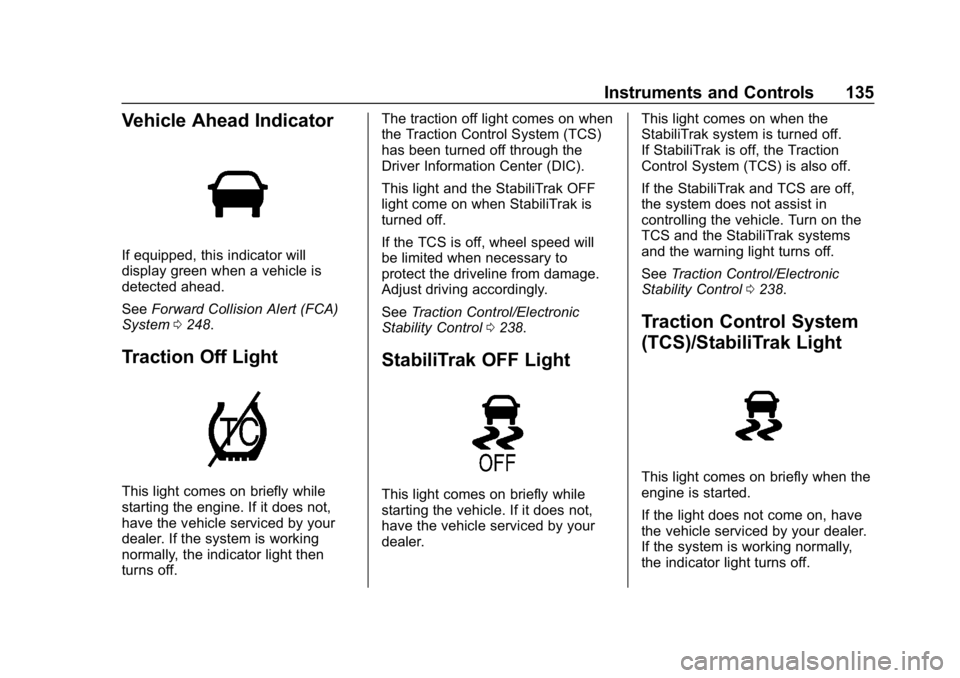
Vehicle Ahead Indicator
If equipped, this indicator will
display green when a vehicle is
detected ahead.
SeeForward Collision Alert (FCA)
System 0248.
Traction Off Light
This light comes on briefly while
starting the engine. If it does not,
have the vehicle serviced by your
dealer. If the system is working
normally, the indicator light then
turns off. The traction off light comes on when
the Traction Control System (TCS)
has been turned off through the
Driver Information Center (DIC).
This light and the StabiliTrak OFF
light come on when StabiliTrak is
turned off.
If the TCS is off, wheel speed will
be limited when necessary to
protect the driveline from damage.
Adjust driving accordingly.
See
Traction Control/Electronic
Stability Control 0238.
StabiliTrak OFF Light
This light comes on briefly while
starting the vehicle. If it does not,
have the vehicle serviced by your
dealer. This light comes on when the
StabiliTrak system is turned off.
If StabiliTrak is off, the Traction
Control System (TCS) is also off.
If the StabiliTrak and TCS are off,
the system does not assist in
controlling the vehicle. Turn on the
TCS and the StabiliTrak systems
and the warning light turns off.
See
Traction Control/Electronic
Stability Control 0238.
Traction Control System
(TCS)/StabiliTrak Light
This light comes on briefly when the
engine is started.
If the light does not come on, have
the vehicle serviced by your dealer.
If the system is working normally,
the indicator light turns off.