2018 CHEVROLET BOLT EV reset
[x] Cancel search: resetPage 21 of 370
Chevrolet BOLT EV Owner Manual (GMNA-Localizing-U.S./Canada/Mexico-
11434431) - 2018 - crc - 2/14/18
20 In Brief
−SET :Press briefly to set the
speed and activate cruise control.
If cruise control is already active,
use to decrease vehicle speed.
See Cruise Control 0219.
Driver Information
Center (DIC)
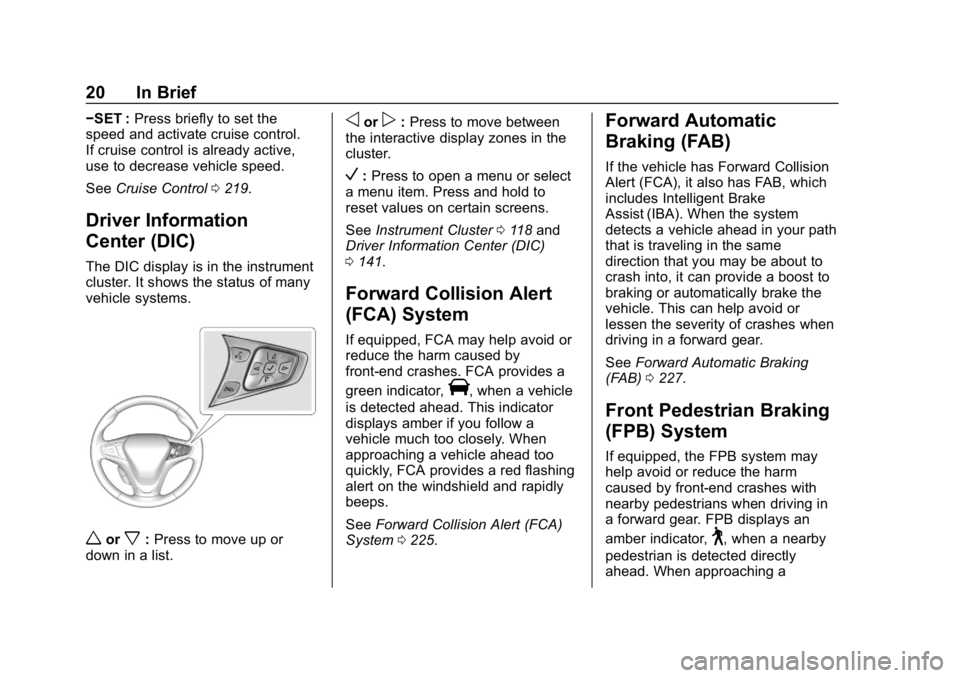
The DIC display is in the instrument
cluster. It shows the status of many
vehicle systems.
worx:Press to move up or
down in a list.
oorp: Press to move between
the interactive display zones in the
cluster.
V: Press to open a menu or select
a menu item. Press and hold to
reset values on certain screens.
See Instrument Cluster 0118 and
Driver Information Center (DIC)
0 141.
Forward Collision Alert
(FCA) System
If equipped, FCA may help avoid or
reduce the harm caused by
front-end crashes. FCA provides a
green indicator,
V, when a vehicle
is detected ahead. This indicator
displays amber if you follow a
vehicle much too closely. When
approaching a vehicle ahead too
quickly, FCA provides a red flashing
alert on the windshield and rapidly
beeps.
See Forward Collision Alert (FCA)
System 0225.
Forward Automatic
Braking (FAB)
If the vehicle has Forward Collision
Alert (FCA), it also has FAB, which
includes Intelligent Brake
Assist (IBA). When the system
detects a vehicle ahead in your path
that is traveling in the same
direction that you may be about to
crash into, it can provide a boost to
braking or automatically brake the
vehicle. This can help avoid or
lessen the severity of crashes when
driving in a forward gear.
See Forward Automatic Braking
(FAB) 0227.
Front Pedestrian Braking
(FPB) System
If equipped, the FPB system may
help avoid or reduce the harm
caused by front-end crashes with
nearby pedestrians when driving in
a forward gear. FPB displays an
amber indicator,
~, when a nearby
pedestrian is detected directly
ahead. When approaching a
Page 44 of 370
Chevrolet BOLT EV Owner Manual (GMNA-Localizing-U.S./Canada/Mexico-
11434431) - 2018 - crc - 2/14/18
Keys, Doors, and Windows 43
2. Rotate the cap upward andinstall into place.
3. Check that the cap is secure.
Free-Turning Locks
The door key lock cylinder turns
freely when either the wrong key is
used, or the correct key is not fully
inserted. The free-turning door lock
feature prevents the lock from being
forced open. To reset the lock, turn
it to the vertical position with the
correct key fully inserted. Remove
the key and insert it again. If this
does not reset the lock, turn the key
halfway around in the cylinder and
repeat the reset procedure.
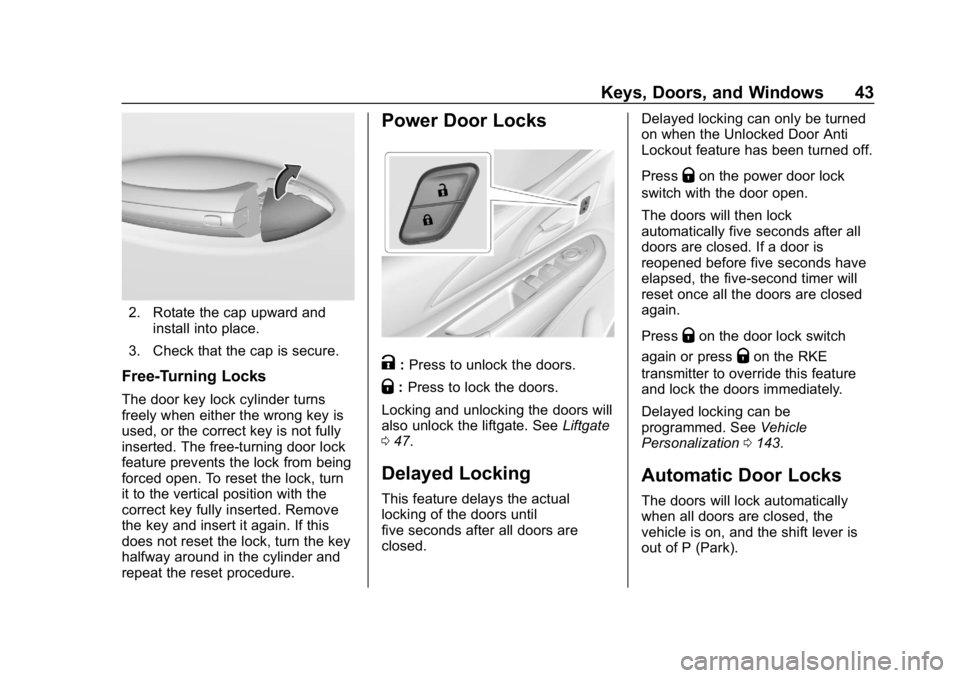
Power Door Locks
K: Press to unlock the doors.
Q: Press to lock the doors.
Locking and unlocking the doors will
also unlock the liftgate. See Liftgate
0 47.
Delayed Locking
This feature delays the actual
locking of the doors until
five seconds after all doors are
closed. Delayed locking can only be turned
on when the Unlocked Door Anti
Lockout feature has been turned off.
Press
Qon the power door lock
switch with the door open.
The doors will then lock
automatically five seconds after all
doors are closed. If a door is
reopened before five seconds have
elapsed, the five-second timer will
reset once all the doors are closed
again.
Press
Qon the door lock switch
again or press
Qon the RKE
transmitter to override this feature
and lock the doors immediately.
Delayed locking can be
programmed. See Vehicle
Personalization 0143.
Automatic Door Locks
The doors will lock automatically
when all doors are closed, the
vehicle is on, and the shift lever is
out of P (Park).
Page 55 of 370
Chevrolet BOLT EV Owner Manual (GMNA-Localizing-U.S./Canada/Mexico-
11434431) - 2018 - crc - 2/14/18
54 Keys, Doors, and Windows
The power windows only operate
with the vehicle on or in Service
Mode, or when Retained Accessory
Power (RAP) is active.
Express Window Operation
The driver window has an express
feature which allows the window to
be lowered or raised without holding
the switch. To automatically raise or
lower the window, pull the driver
window switch up or press it down
all the way and release. Stop the
window by pressing or pulling the
switch in the same direction a
second time, or by briefly operating
the switch to the first position in
either direction. The front and rear
passenger windows have express
open only.
Safety Function
This is for vehicles with the
express-up feature. If any object is
in the path of the window when the
express-up feature is active, the
window will stop and auto-reverse to
a preset position. Weather
conditions may cause the window to
auto-reverse. The window switchmay be held up to the second
position to close the window. The
window will return to normal
operation once the obstruction or
condition is removed.
Safety Function Override
This is for vehicles with the
express-up feature. If the battery on
the vehicle has been recharged or
disconnected, or is not working, the
windows will need to be
reprogrammed for the express-up
feature to work. Before
reprogramming, replace or recharge
the vehicle's battery.
To program the driver window:
1. Close all doors with the vehicle on or in Service Mode.
2. Press and hold the power window switch until the window
is fully open.
3. Pull the power window switch up until the window is fully
closed. 4. Continue holding the switch up
for approximately two seconds
after the window is completely
closed.
Window Lockout
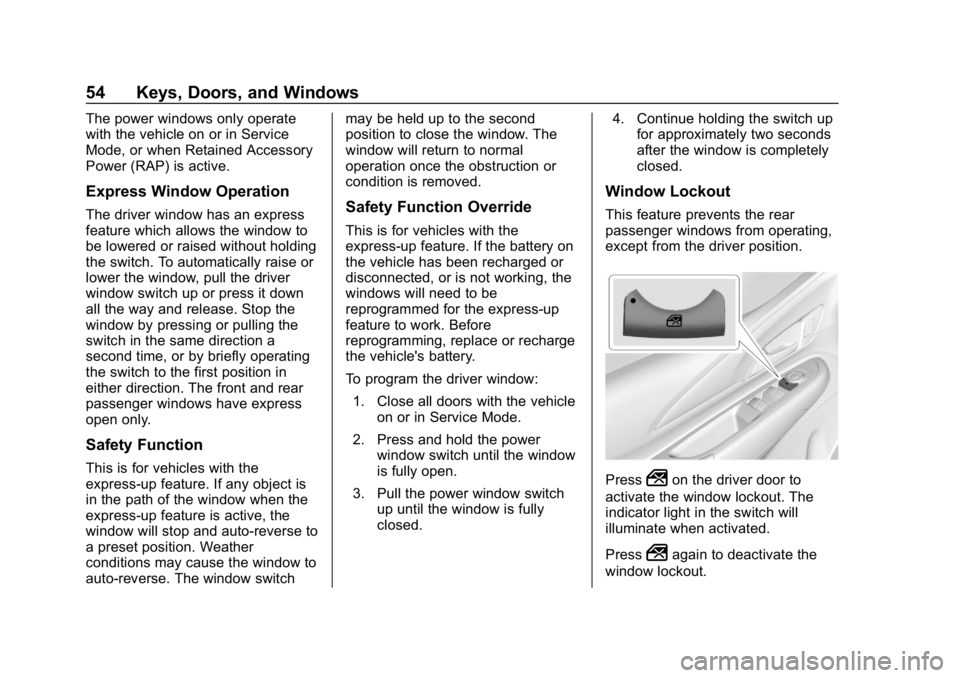
This feature prevents the rear
passenger windows from operating,
except from the driver position.
Press2on the driver door to
activate the window lockout. The
indicator light in the switch will
illuminate when activated.
Press
2again to deactivate the
window lockout.
Page 122 of 370
Chevrolet BOLT EV Owner Manual (GMNA-Localizing-U.S./Canada/Mexico-
11434431) - 2018 - crc - 2/14/18
Instruments and Controls 121
Phone
In the Phone menu, if there is no
active phone call, view recent calls,
scroll through contacts, or select
from the favorites. If there is an
active call, mute or unmute the
phone or switch to handset or
handsfree operation.
Onstar Navigation
This display is used for OnStar
Turn-by-Turn guidance, if equipped.
Layout
Choose Classic, Modern,
or Enhanced layout by pressing
V
while the desired item is highlighted.
Exit the Layout menu by
pressing
o.
Options
PressVto select the Options app.
Use
worxto scroll through the
items in the Options menu. Exit the
Options menu by pressing
o. Units :
Press
pwhile Units is
displayed to enter the Units menu.
Use
worxto scroll through the
items. Choose U.S., Metric,
or Imperial by pressing
Vwhile the
desired item is highlighted.
Speed Warning : The speed
warning display allows the driver to
set a speed that they do not want to
exceed. To set the speed warning,
press
Vwhen Speed Warning is
displayed. Press
worxto adjust
the value. Press
Vto set the speed.
Once set, this feature can be turned
off by pressing
Vwhile viewing this
page. If the selected speed limit is
exceeded, a pop-up warning is
displayed and a chime may sound.
Help : Press
pwhile Help is
displayed to enter the Help menu.
Use
worxto scroll through the
items in the Help menu.
Open Source Software : Press
V
while Open Source Software is
highlighted to display open source
software information.
Speedometer
The speedometer shows the
vehicle's speed in either kilometers
per hour (km/h) or miles per
hour (mph).
Odometer
The odometer shows how far the
vehicle has been driven, in either
kilometers or miles.
Trip Odometer
The trip odometer shows how far
the vehicle has been driven since
the trip odometer was last reset.
The trip odometer is accessed and
reset through the Driver Information
Center (DIC). SeeDriver
Information Center (DIC) 0141.
Page 128 of 370
Chevrolet BOLT EV Owner Manual (GMNA-Localizing-U.S./Canada/Mexico-
11434431) - 2018 - crc - 2/14/18
Instruments and Controls 127
parking brake is released, or while
driving, there is a problem with the
Electric Parking Brake system.
If the light does not come on,
or remains flashing, see your dealer.
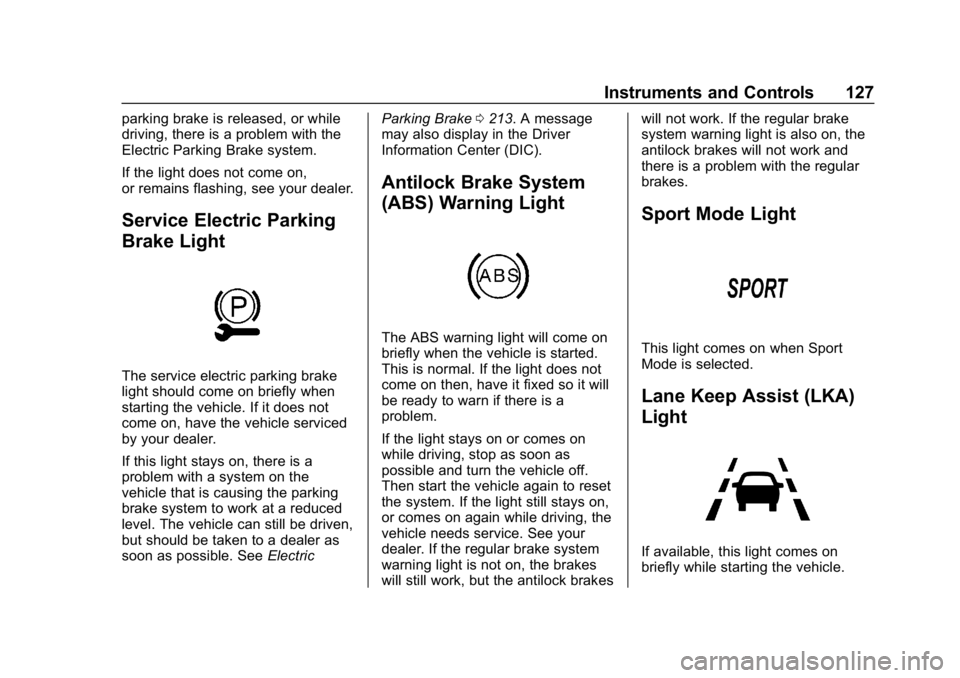
Service Electric Parking
Brake Light
The service electric parking brake
light should come on briefly when
starting the vehicle. If it does not
come on, have the vehicle serviced
by your dealer.
If this light stays on, there is a
problem with a system on the
vehicle that is causing the parking
brake system to work at a reduced
level. The vehicle can still be driven,
but should be taken to a dealer as
soon as possible. SeeElectricParking Brake
0213. A message
may also display in the Driver
Information Center (DIC).
Antilock Brake System
(ABS) Warning Light
The ABS warning light will come on
briefly when the vehicle is started.
This is normal. If the light does not
come on then, have it fixed so it will
be ready to warn if there is a
problem.
If the light stays on or comes on
while driving, stop as soon as
possible and turn the vehicle off.
Then start the vehicle again to reset
the system. If the light still stays on,
or comes on again while driving, the
vehicle needs service. See your
dealer. If the regular brake system
warning light is not on, the brakes
will still work, but the antilock brakes will not work. If the regular brake
system warning light is also on, the
antilock brakes will not work and
there is a problem with the regular
brakes.
Sport Mode Light
This light comes on when Sport
Mode is selected.
Lane Keep Assist (LKA)
Light
If available, this light comes on
briefly while starting the vehicle.
Page 134 of 370
Chevrolet BOLT EV Owner Manual (GMNA-Localizing-U.S./Canada/Mexico-
11434431) - 2018 - crc - 2/14/18
Instruments and Controls 133
Departure :The vehicle will
schedule charging to complete by
the programmed departure time.
The vehicle estimates the charging
schedule based on programmed
departure times, charge rate limits,
electric rate preference and
schedule, and priority charging
settings. If there is not sufficient
time after the charge cord is
plugged in, the vehicle will not be
fully charged by the departure time.
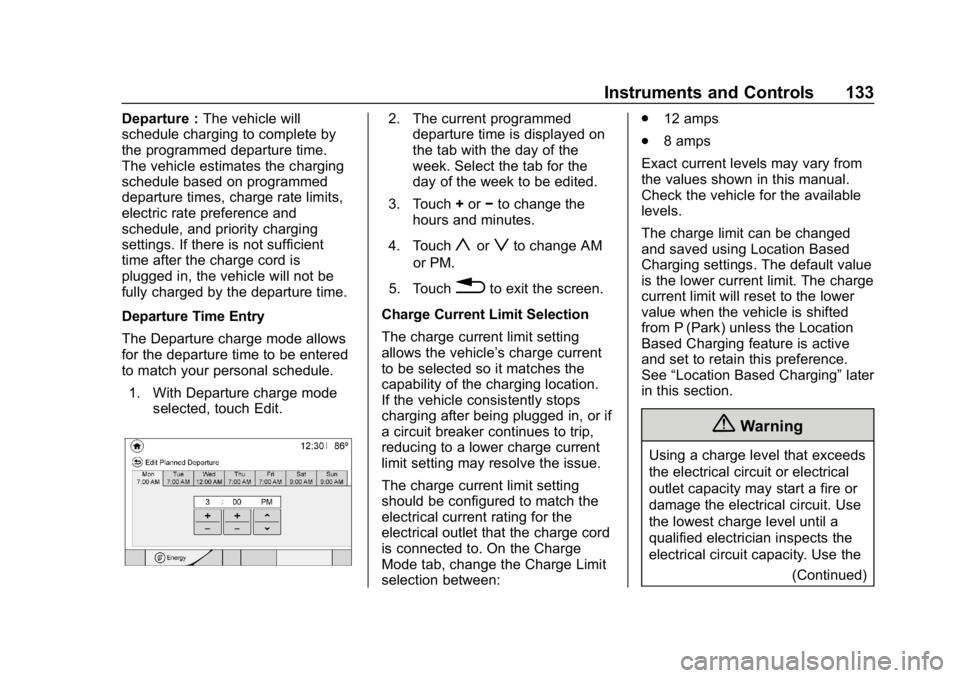
Departure Time Entry
The Departure charge mode allows
for the departure time to be entered
to match your personal schedule.
1. With Departure charge mode selected, touch Edit.2. The current programmeddeparture time is displayed on
the tab with the day of the
week. Select the tab for the
day of the week to be edited.
3. Touch +or −to change the
hours and minutes.
4. Touch
yorzto change AM
or PM.
5. Touch
0to exit the screen.
Charge Current Limit Selection
The charge current limit setting
allows the vehicle’s charge current
to be selected so it matches the
capability of the charging location.
If the vehicle consistently stops
charging after being plugged in, or if
a circuit breaker continues to trip,
reducing to a lower charge current
limit setting may resolve the issue.
The charge current limit setting
should be configured to match the
electrical current rating for the
electrical outlet that the charge cord
is connected to. On the Charge
Mode tab, change the Charge Limit
selection between: .
12 amps
. 8 amps
Exact current levels may vary from
the values shown in this manual.
Check the vehicle for the available
levels.
The charge limit can be changed
and saved using Location Based
Charging settings. The default value
is the lower current limit. The charge
current limit will reset to the lower
value when the vehicle is shifted
from P (Park) unless the Location
Based Charging feature is active
and set to retain this preference.
See “Location Based Charging” later
in this section.
{Warning
Using a charge level that exceeds
the electrical circuit or electrical
outlet capacity may start a fire or
damage the electrical circuit. Use
the lowest charge level until a
qualified electrician inspects the
electrical circuit capacity. Use the
(Continued)
Page 138 of 370
Chevrolet BOLT EV Owner Manual (GMNA-Localizing-U.S./Canada/Mexico-
11434431) - 2018 - crc - 2/14/18
Instruments and Controls 137
overridden for one charge cycle. In
addition to the in-vehicle overrides
through the programmable charging
screens, there are other ways to
temporarily override a delayed
charge mode. SeePlug-In Charging
0 235.
Temporary Override of a Delayed
Charge Mode
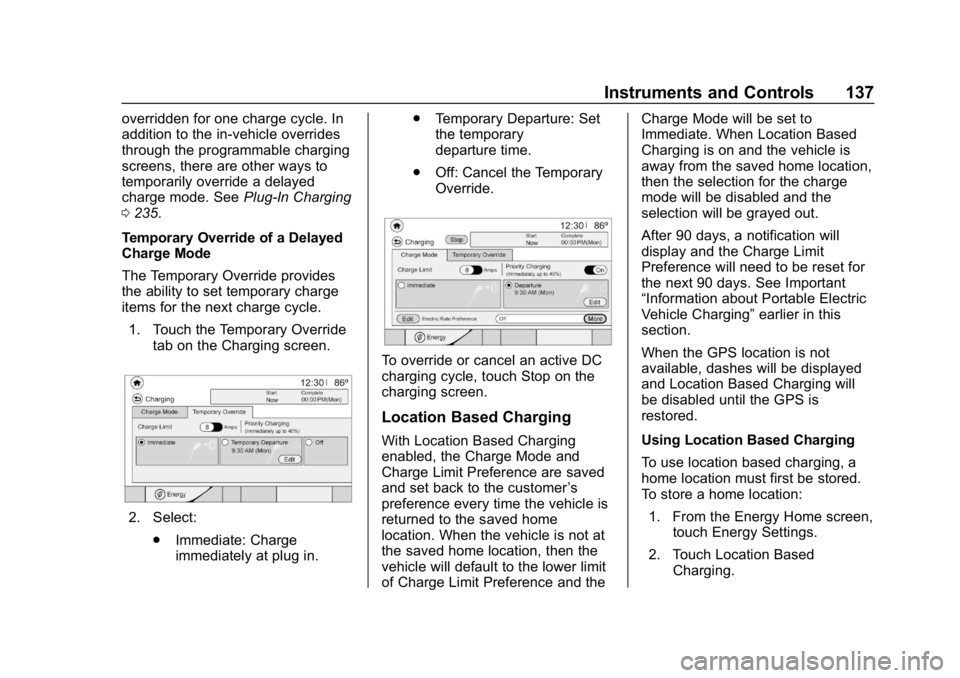
The Temporary Override provides
the ability to set temporary charge
items for the next charge cycle. 1. Touch the Temporary Override tab on the Charging screen.
2. Select:
.Immediate: Charge
immediately at plug in. .
Temporary Departure: Set
the temporary
departure time.
. Off: Cancel the Temporary
Override.
To override or cancel an active DC
charging cycle, touch Stop on the
charging screen.
Location Based Charging
With Location Based Charging
enabled, the Charge Mode and
Charge Limit Preference are saved
and set back to the customer ’s
preference every time the vehicle is
returned to the saved home
location. When the vehicle is not at
the saved home location, then the
vehicle will default to the lower limit
of Charge Limit Preference and the Charge Mode will be set to
Immediate. When Location Based
Charging is on and the vehicle is
away from the saved home location,
then the selection for the charge
mode will be disabled and the
selection will be grayed out.
After 90 days, a notification will
display and the Charge Limit
Preference will need to be reset for
the next 90 days. See Important
“Information about Portable Electric
Vehicle Charging”
earlier in this
section.
When the GPS location is not
available, dashes will be displayed
and Location Based Charging will
be disabled until the GPS is
restored.
Using Location Based Charging
To use location based charging, a
home location must first be stored.
To store a home location:
1. From the Energy Home screen, touch Energy Settings.
2. Touch Location Based Charging.
Page 140 of 370
Chevrolet BOLT EV Owner Manual (GMNA-Localizing-U.S./Canada/Mexico-
11434431) - 2018 - crc - 2/14/18
Instruments and Controls 139
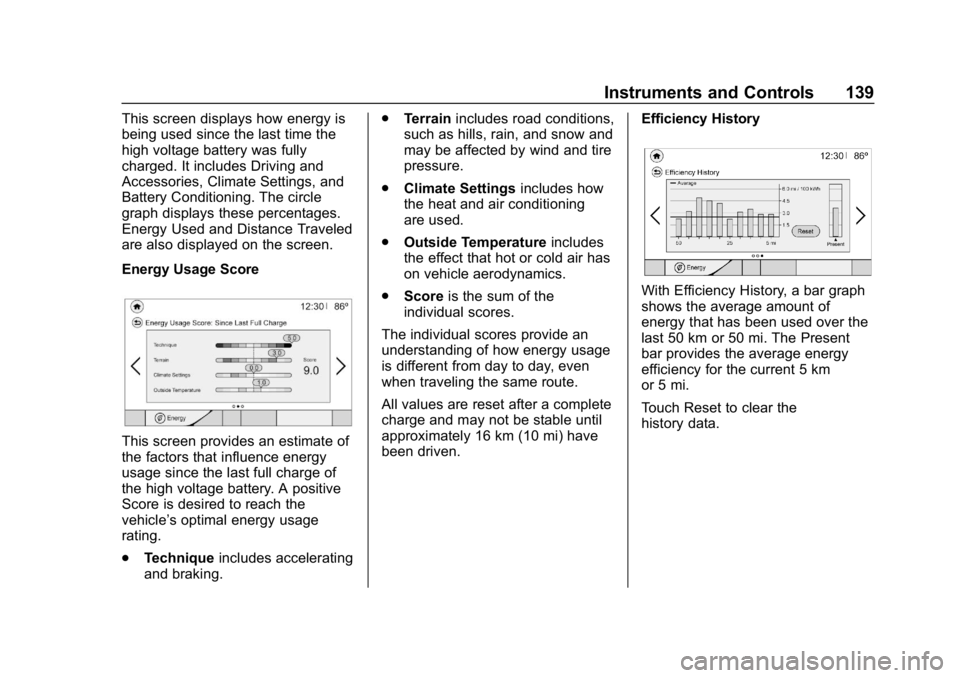
This screen displays how energy is
being used since the last time the
high voltage battery was fully
charged. It includes Driving and
Accessories, Climate Settings, and
Battery Conditioning. The circle
graph displays these percentages.
Energy Used and Distance Traveled
are also displayed on the screen.
Energy Usage Score
This screen provides an estimate of
the factors that influence energy
usage since the last full charge of
the high voltage battery. A positive
Score is desired to reach the
vehicle’s optimal energy usage
rating.
.Technique includes accelerating
and braking. .
Terrain includes road conditions,
such as hills, rain, and snow and
may be affected by wind and tire
pressure.
. Climate Settings includes how
the heat and air conditioning
are used.
. Outside Temperature includes
the effect that hot or cold air has
on vehicle aerodynamics.
. Score is the sum of the
individual scores.
The individual scores provide an
understanding of how energy usage
is different from day to day, even
when traveling the same route.
All values are reset after a complete
charge and may not be stable until
approximately 16 km (10 mi) have
been driven. Efficiency History
With Efficiency History, a bar graph
shows the average amount of
energy that has been used over the
last 50 km or 50 mi. The Present
bar provides the average energy
efficiency for the current 5 km
or 5 mi.
Touch Reset to clear the
history data.