2018 CHEVROLET BOLT EV turn signal
[x] Cancel search: turn signalPage 234 of 370

Chevrolet BOLT EV Owner Manual (GMNA-Localizing-U.S./Canada/Mexico-
11434431) - 2018 - crc - 2/14/18
Driving and Operating 233
approaching this zone and the
system is clean, the system may
need service. Take the vehicle to
your dealer.
Lane Departure
Warning (LDW)
If equipped, LDW may help avoid
crashes due to unintentional lane
departures. It may provide a
warning if the vehicle is crossing a
detected lane marking without using
a turn signal in the lane departure
direction. Since this system is part
of the Lane Keep Assist (LKA)
system, read the entire LKA section
before using this feature.
Lane Keep Assist (LKA)
If equipped, LKA may help avoid
crashes due to unintentional lane
departures. It may assist by gently
turning the steering wheel if the
vehicle approaches a detected lane
marking without using a turn signal
in that direction. It may also provide
a Lane Departure Warning (LDW)
system alert as the lane marking iscrossed. The LKA system will not
assist or provide an LDW alert if it
detects that you are actively
steering. Override LKA by turning
the steering wheel. LKA uses a
camera to detect lane markings
between 60 km/h (37 mph) and
155 km/h (96 mph).
{Warning
The LKA system does not
continuously steer the vehicle.
It may not keep the vehicle in the
lane or give a Lane Departure
Warning (LDW) alert, even if a
lane marking is detected. The
LKA and LDW systems may not:
. Provide an alert or enough
steering assist to avoid a
lane departure or crash.
. Detect lane markings under
poor weather or visibility
conditions. This can occur if
the windshield or
headlamps are blocked by
dirt, snow, or ice, if they are
(Continued)
Warning (Continued)
not in proper condition, or if
the sun shines directly into
the camera.
. Detect road edges.
. Detect lanes on winding or
hilly roads.
If LKA only detects lane markings
on one side of the road, it will
only assist or provide an LDW
alert when approaching the lane
on the side where it has detected
a lane marking. Even with LKA
and LDW, you must steer the
vehicle. Always keep your
attention on the road and
maintain proper vehicle position
within the lane, or vehicle
damage, injury, or death could
occur. Always keep the
windshield, headlamps, and
camera sensors clean and in
good repair. Do not use LKA in
bad weather conditions.
Page 235 of 370

Chevrolet BOLT EV Owner Manual (GMNA-Localizing-U.S./Canada/Mexico-
11434431) - 2018 - crc - 2/14/18
234 Driving and Operating
{Warning
Using LKA on slippery roads
could cause loss of control of the
vehicle and a crash. Turn the
system off.
How the System Works
The LKA camera sensor is on the
windshield ahead of the rearview
mirror.
To turn LKA on and off, press
A
on the steering wheel.
When on,
Ais green if LKA is
available to assist and provide LDW
alerts. It may assist by gently
turning the steering wheel and
display
Aas amber if the vehicle
approaches a detected lane marking
without using a turn signal in that
direction. It may also provide an
LDW alert by flashing
Aamber
as the lane marking is crossed. Additionally, there may be three
beeps on the right or left, depending
on the lane departure direction.
The LKA system does not
continuously steer the vehicle.
If LKA does not detect active driver
steering, an alert and chime may be
provided. Move the steering wheel
to dismiss.
When the System Does Not
Seem to Work Properly
The system performance may be
affected by:
.
Close vehicles ahead.
. Sudden lighting changes, such
as when driving through tunnels.
. Banked roads.
. Roads with poor lane markings,
such as two-lane roads.
If the LKA system is not functioning
properly when lane markings are
clearly visible, cleaning the
windshield may help. LKA assistance and/or LDW alerts
may occur due to tar marks,
shadows, cracks in the road,
temporary or construction lane
markings, or other road
imperfections. This is normal system
operation; the vehicle does not need
service. Turn LKA off if these
conditions continue.
Page 255 of 370

Chevrolet BOLT EV Owner Manual (GMNA-Localizing-U.S./Canada/Mexico-
11434431) - 2018 - crc - 2/14/18
254 Vehicle Care
Vehicle Care
General Information
General Information . . . . . . . . . . 255
California Proposition65 Warning . . . . . . . . . . . . . . . . . 255
California Perchlorate Materials Requirements . . . . . 256
Accessories and Modifications . . . . . . . . . . . . . . . . 256
Vehicle Checks
Doing Your OwnService Work . . . . . . . . . . . . . . . 256
Hood . . . . . . . . . . . . . . . . . . . . . . . . . 257
Underhood Compartment Overview . . . . . . . . . . . . . . . . . . . . 259
Cooling System . . . . . . . . . . . . . . 260
Washer Fluid . . . . . . . . . . . . . . . . . 261
Brakes . . . . . . . . . . . . . . . . . . . . . . . 262
Brake Fluid . . . . . . . . . . . . . . . . . . . 263
Battery - North America . . . . . . 264
Wiper Blade Replacement . . . . 266
Windshield Replacement . . . . . 267
Gas Strut(s) . . . . . . . . . . . . . . . . . . 267
Headlamp Aiming
Headlamp Aiming . . . . . . . . . . . . 269
Bulb Replacement
Bulb Replacement . . . . . . . . . . . . 269
Halogen Bulbs . . . . . . . . . . . . . . . . 269
High Intensity Discharge (HID) Lighting . . . . . . . . . . . . . . . . . . . . . 269
LED Lighting . . . . . . . . . . . . . . . . . 269
Taillamps, Turn Signal,
Stoplamps, and Back-Up
Lamps . . . . . . . . . . . . . . . . . . . . . . 270
License Plate Lamp . . . . . . . . . . 270
Electrical System
High Voltage Devices and Wiring . . . . . . . . . . . . . . . . . . . . . . . 271
Electrical System Overload . . . 271
Fuses and Circuit Breakers . . . 272
Underhood Compartment Fuse Block . . . . . . . . . . . . . . . . . . . . . . . . 272
Instrument Panel Fuse Block . . . . . . . . . . . . . . . . . . . . . . . . 276
Wheels and Tires
Tires . . . . . . . . . . . . . . . . . . . . . . . . . . 278
All-Season Tires . . . . . . . . . . . . . . 279
Winter Tires . . . . . . . . . . . . . . . . . . 279
Self-Sealing Tires . . . . . . . . . . . . 279
Tire Sidewall Labeling . . . . . . . . 280
Tire Designations . . . . . . . . . . . . . 281
Tire Terminology andDefinitions . . . . . . . . . . . . . . . . . . 282
Tire Pressure . . . . . . . . . . . . . . . . . 284 Tire Pressure Monitor
System . . . . . . . . . . . . . . . . . . . . . . 285
Tire Pressure Monitor Operation . . . . . . . . . . . . . . . . . . . 286
Tire Inspection . . . . . . . . . . . . . . . . 289
Tire Rotation . . . . . . . . . . . . . . . . . 290
When It Is Time for New
Tires . . . . . . . . . . . . . . . . . . . . . . . . 291
Buying New Tires . . . . . . . . . . . . . 291
Different Size Tires and Wheels . . . . . . . . . . . . . . . . . . . . . . 293
Uniform Tire Quality Grading . . . . . . . . . . . . . . . . . . . . . 293
Wheel Alignment and Tire Balance . . . . . . . . . . . . . . . . . . . . . 295
Wheel Replacement . . . . . . . . . . 295
Tire Chains . . . . . . . . . . . . . . . . . . . 296
If a Tire Goes Flat . . . . . . . . . . . . 296
Tire Sealant and Compressor Kit . . . . . . . . . . . . . 297
Storing the Tire Sealant and Compressor Kit . . . . . . . . . . . . . 303
Jump Starting
Jump Starting - NorthAmerica . . . . . . . . . . . . . . . . . . . . . 304
Towing the Vehicle
Towing the Vehicle . . . . . . . . . . . 307
Recreational VehicleTowing . . . . . . . . . . . . . . . . . . . . . . 309
Page 271 of 370
Chevrolet BOLT EV Owner Manual (GMNA-Localizing-U.S./Canada/Mexico-
11434431) - 2018 - crc - 2/14/18
270 Vehicle Care
Taillamps, Turn Signal,
Stoplamps, and Back-Up
Lamps
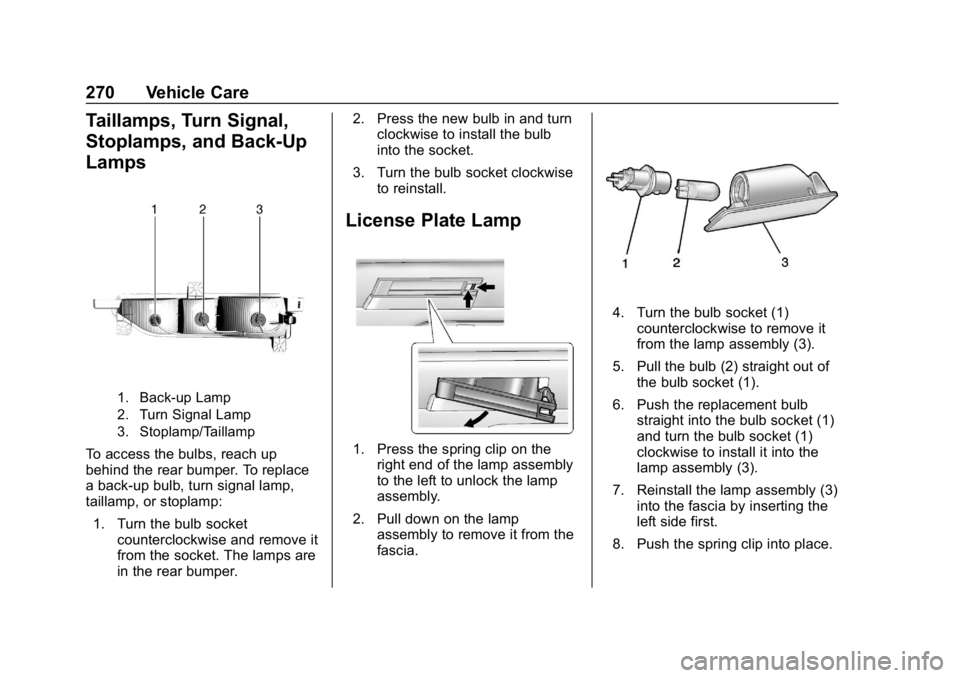
1. Back-up Lamp
2. Turn Signal Lamp
3. Stoplamp/Taillamp
To access the bulbs, reach up
behind the rear bumper. To replace
a back-up bulb, turn signal lamp,
taillamp, or stoplamp:1. Turn the bulb socket counterclockwise and remove it
from the socket. The lamps are
in the rear bumper. 2. Press the new bulb in and turn
clockwise to install the bulb
into the socket.
3. Turn the bulb socket clockwise to reinstall.
License Plate Lamp
1. Press the spring clip on theright end of the lamp assembly
to the left to unlock the lamp
assembly.
2. Pull down on the lamp assembly to remove it from the
fascia.
4. Turn the bulb socket (1)counterclockwise to remove it
from the lamp assembly (3).
5. Pull the bulb (2) straight out of the bulb socket (1).
6. Push the replacement bulb straight into the bulb socket (1)
and turn the bulb socket (1)
clockwise to install it into the
lamp assembly (3).
7. Reinstall the lamp assembly (3) into the fascia by inserting the
left side first.
8. Push the spring clip into place.
Page 290 of 370

Chevrolet BOLT EV Owner Manual (GMNA-Localizing-U.S./Canada/Mexico-
11434431) - 2018 - crc - 2/14/18
Vehicle Care 289
Tool at
www.gmtoolsandequipment.com or
call 1-800-GM TOOLS
(1-800-468-6657).
There are two minutes to match the
first tire/wheel position, and
five minutes overall to match all four
tire/wheel positions. If it takes
longer, the matching process stops
and must be restarted.
The TPMS sensor matching
process is:1. Set the parking brake.
2. Press POWER
Oto start the
vehicle. See Power Button
0 204.
3. Make sure the Tire Pressure info page option is turned on.
The info pages on the DIC can
be turned on and off through
the Settings menu. See Driver
Information Center (DIC) 0141.
4. Use the DIC controls on the right side of the steering wheel
to scroll to the Tire Pressure
screen under the DIC
info page. 5. Press and hold
Vin the center
of the DIC controls.
The horn sounds twice to
signal the receiver is in relearn
mode and the TIRE
LEARNING ACTIVE message
displays on the DIC screen.
6. Start with the driver side front tire.
7. Place the relearn tool against the tire sidewall, near the valve
stem. Then press the button to
activate the TPMS sensor.
A horn chirp confirms that the
sensor identification code has
been matched to this tire and
wheel position.
8. Proceed to the passenger side front tire, and repeat the
procedure in Step 7.
9. Proceed to the passenger side rear tire, and repeat the
procedure in Step 7.
10. Proceed to the driver side rear tire, and repeat the procedure
in Step 7. The horn sounds two
times to indicate the sensor identification code has been
matched to the driver side rear
tire, and the TPMS sensor
matching process is no longer
active. The TIRE LEARNING
ACTIVE message on the DIC
display screen goes off.
11. Turn the vehicle off.
12. Set all four tires to the recommended air pressure
level as indicated on the Tire
and Loading Information label.
Tire Inspection
We recommend that the tires,
including the spare tire, if the
vehicle has one, be inspected
for signs of wear or damage at
least once a month.
Replace the tire if:
.The indicators at three or
more places around the tire
can be seen.
.There is cord or fabric
showing through the tire's
rubber.
Page 354 of 370
Chevrolet BOLT EV Owner Manual (GMNA-Localizing-U.S./Canada/Mexico-
11434431) - 2018 - crc - 2/14/18
OnStar 353
Advanced Vehicle Diagnostics,
Remote Services, Roadside
Assistance, Turn-by-Turn
Navigation, and Hands-Free Calling
are available on most vehicles. Not
all OnStar services are available
everywhere or on all vehicles. For
more information, a full description
of OnStar services, system
limitations, and OnStar User Terms,
Privacy Statement, and Software
Terms:
.Call 1-888-4ONSTAR
(1-888-466-7827).
. See www.onstar.com (U.S.).
. See www.onstar.ca (Canada).
. Call TTY 1-877-248-2080.
. Press
Qto speak with an
Advisor.
OnStar services cannot work unless
the vehicle is in a place where
OnStar has an agreement with a
wireless service provider for service
in that area. The wireless service
provider must also have coverage,
network capacity, reception, and
technology compatible with OnStar services. Service involving location
information about the vehicle cannot
work unless GPS signals are
available, unobstructed, and
compatible with the OnStar
hardware. OnStar services may not
work if the OnStar equipment is not
properly installed or it has not been
properly maintained. If equipment or
software is added, connected,
or modified, OnStar services may
not work. Other problems beyond
the control of OnStar
—such as
hills, tall buildings, tunnels, weather,
electrical system design and
architecture of the vehicle, damage
to the vehicle in a crash, or wireless
phone network congestion or
jamming —may prevent service.
See Radio Frequency Statement
0 342.
Services for People with
Disabilities
Advisors provide services to help
with physical disabilities and
medical conditions. Press
Qto help:
. Locate a gas station with an
attendant to pump gas.
. Find a hotel, restaurant, etc.,
that meets accessibility needs.
. Provide directions to the closest
hospital or pharmacy in urgent
situations.
TTY Users
OnStar has the ability to
communicate to deaf,
hard-of-hearing, or speech-impaired
customers while in the vehicle. The
available dealer-installed TTY
system can provide in-vehicle
access to all OnStar services,
except Virtual Advisor and OnStar
Turn-by-Turn Navigation.
OnStar Personal Identification
Number (PIN)
A PIN is needed to access some
OnStar services. The PIN will need
to be changed the first time when
speaking with an Advisor. To
Page 355 of 370
Chevrolet BOLT EV Owner Manual (GMNA-Localizing-U.S./Canada/Mexico-
11434431) - 2018 - crc - 2/14/18
354 OnStar
change the OnStar PIN, contact an
OnStar Advisor by pressing
Qor
calling 1-888-4ONSTAR.
Warranty
OnStar equipment may be
warranted as part of the vehicle
warranty.
Languages
The vehicle can be programmed to
respond in multiple languages.
Press
Qand ask for an Advisor.
Advisors are available in English,
Spanish, and French. Available
languages may vary by country.
Potential Issues
OnStar cannot perform Remote
Door Unlock or Stolen Vehicle
Assistance after the vehicle has
been off continuously for 10 days
without an ignition cycle. If the
vehicle has not been started for
10 days, OnStar can contact
Roadside Assistance or a locksmith
to help gain access to the vehicle.
Global Positioning
System (GPS)
. Obstruction of the GPS can
occur in a large city with tall
buildings; in parking garages;
around airports; in tunnels and
underpasses; or in an area with
very dense trees. If GPS signals
are not available, the OnStar
system should still operate to
call OnStar. However, OnStar
could have difficulty identifying
the exact location.
. In emergency situations, OnStar
can use the last stored GPS
location to send to emergency
responders.
A temporary loss of GPS can cause
loss of the ability to send a
Turn-by-Turn Navigation route. The
Advisor may give a verbal route or
may ask for a call back after the
vehicle is driven into an open area.
Cellular and GPS Antennas
Cellular reception is required for
OnStar to send remote signals to
the vehicle. Do not place items over or near the antenna to prevent
blocking cellular and GPS signal
reception.
Unable to Connect to OnStar
Message
If there is limited cellular coverage
or the cellular network has reached
maximum capacity, this message
may come on. Press
Qto try the
call again or try again after driving a
few miles into another cellular area.
Vehicle and Power Issues
OnStar services require a vehicle
electrical system, wireless service,
and GPS satellite technologies to be
available and operating for features
to function properly. These systems
may not operate if the battery is
discharged or disconnected.
Add-on Electrical Equipment
The OnStar system is integrated
into the electrical architecture of the
vehicle. Do not add any electrical
equipment. See Add-On Electrical
Equipment 0252. Added electrical
Page 360 of 370

Chevrolet BOLT EV Owner Manual (GMNA-Localizing-U.S./Canada/Mexico-
11434431) - 2018 - crc - 2/14/18
Index 359
ArmrestRear Seat . . . . . . . . . . . . . . . . . . . . . . 64
Assistance Program, Roadside . . . . . . . . . . . . . . . . . . . . . . 336
Assistance Systems for Driving . . . . . . . . . . . . . . . . . . . . . . . . 225
Assistance Systems for
Parking and Backing . . . . . . . . . . 222
Audio Bluetooth . . . . . . . . . . . . . . . . . . . . . 172
Theft-Deterrent Feature . . . . . . . 158
Automatic Climate Control System . . . . . . . 186
Door Locks . . . . . . . . . . . . . . . . . . . . . 43
Forward Braking . . . . . . . . . . . . . . 227
Headlamp System . . . . . . . . . . . . 153
Auxiliary Devices . . . . . . . . . . . . . . . . . . . . . . . 172
B
Battery . . . . . . . . . . . . . . . . . . . . . . . . . 122Exterior Lighting BatterySaver . . . . . . . . . . . . . . . . . . . . . . . 156
Power Protection . . . . . . . . . . . . . 156
Battery - North America . . . . 264, 304
Battery Gauge High Voltage . . . . . . . . . . . . . . . . . . 122
Blade Replacement, Wiper . . . . . 266 Bluetooth
Overview . . . . . . . . . . . . . . . . . . . . . 175
Bluetooth Audio . . . . . . . . . . . . . . . . 172
Brake Parking, Electric . . . . . . . . . . . . . . 213
System Warning Light . . . . . . . . 126
Brakes . . . . . . . . . . . . . . . . . . . . . . . . . . 262
Antilock . . . . . . . . . . . . . . . . . . . . . . . 213
Assist . . . . . . . . . . . . . . . . . . . . . . . . . 215
Fluid . . . . . . . . . . . . . . . . . . . . . . . . . . 263
Regenerative Braking . . . . . . . . . 215
Braking . . . . . . . . . . . . . . . . . . . . . . . . . 195 Automatic Forward . . . . . . . . . . . 227
Braking System Front Pedestrian (FPB) . . . . . . . 229
Break-In, New Vehicle . . . . . . . . . . 203
Bulb Replacement
Halogen Bulbs . . . . . . . . . . . . . . . . 269
Headlamp Aiming . . . . . . . . . . . . . 269
Headlamps . . . . . . . . . . . . . . . . . . . 269
High Intensity Discharge(HID) Lighting . . . . . . . . . . . . . . . 269
License Plate Lamps . . . . . . . . . 270
Taillamps, Turn Signal, Stoplamps, and Back-up
Lamps . . . . . . . . . . . . . . . . . . . . . . 270
Buying New Tires . . . . . . . . . . . . . . . 291
C
Calibration . . . . . . . . . . . . . . . . . . . . . . 113
California Perchlorate MaterialsRequirements . . . . . . . . . . . . . . . 256
California Proposition
65 Warning . . . . . . . . . .255, 264, 304, Back Cover
Canadian Vehicle Owners . . . . . . . . 2
Capacities and
Specifications . . . . . . . . . . . . . . . . . 331
Carbon Monoxide Liftgate . . . . . . . . . . . . . . . . . . . . . . . . . 47
Winter Driving . . . . . . . . . . . . . . . . 198
Cargo Cover . . . . . . . . . . . . . . . . . . . . . . . . . 106
Management System . . . . . . . . . 107
Caution, Danger, and Warning . . . . 2
Center Console Storage . . . . . . . . 106
Chains, Tire . . . . . . . . . . . . . . . . . . . . 296
Charge Cord . . . . . . . . . . . . . . . . . . . . 243
Charging Delay Override . . . . . . . . . . . . . . . 239
Electrical Requirements . . . . . . 251
Plug-In . . . . . . . . . . . . . . . . . . . . . . . 235
Programmable . . . . . . . . . . . . . . . . 131
Utility Interruption . . . . . . . . . . . . . 250