2018 CHEVROLET BOLT EV instrument panel
[x] Cancel search: instrument panelPage 6 of 370
Chevrolet BOLT EV Owner Manual (GMNA-Localizing-U.S./Canada/Mexico-
11434431) - 2018 - crc - 2/14/18
In Brief 5
In Brief
Instrument Panel
Instrument Panel . . . . . . . . . . . . . . . . 6
Initial Drive Information
Initial Drive Information . . . . . . . . . . 8
Remote Keyless Entry (RKE)System . . . . . . . . . . . . . . . . . . . . . . . . 8
Remote Start . . . . . . . . . . . . . . . . . . . . 8
Door Locks . . . . . . . . . . . . . . . . . . . . . 9
Liftgate . . . . . . . . . . . . . . . . . . . . . . . . 10
Windows . . . . . . . . . . . . . . . . . . . . . . . 11
Seat Adjustment . . . . . . . . . . . . . . . 11
Heated Seats . . . . . . . . . . . . . . . . . . 12
Head Restraint Adjustment . . . . 13
Seat Belts . . . . . . . . . . . . . . . . . . . . . 13
Passenger Sensing System . . . 13
Mirror Adjustment . . . . . . . . . . . . . . 14
Steering Wheel Adjustment . . . . 14
Interior Lighting . . . . . . . . . . . . . . . . 14
Exterior Lighting . . . . . . . . . . . . . . . 15
Windshield Wiper/Washer . . . . . . 16
Climate Controls . . . . . . . . . . . . . . . 17
Vehicle Features
Radio(s) . . . . . . . . . . . . . . . . . . . . . . . 17
Satellite Radio . . . . . . . . . . . . . . . . . 18
Portable Audio Devices . . . . . . . . 18 Bluetooth . . . . . . . . . . . . . . . . . . . . . . 18
Steering Wheel Controls . . . . . . . 18
Cruise Control . . . . . . . . . . . . . . . . . 19
Driver Information
Center (DIC) . . . . . . . . . . . . . . . . . 20
Forward Collision Alert (FCA) System . . . . . . . . . . . . . . . . . . . . . . . 20
Forward Automatic Braking (FAB) . . . . . . . . . . . . . . . . 20
Front Pedestrian Braking (FPB) System . . . . . . . . . . . . . . . . . . . . . . . 20
Lane Keep Assist (LKA) . . . . . . . 21
Lane Change Alert (LCA) . . . . . . 21
Rear Vision Camera (RVC) . . . . 21
Rear Cross Traffic Alert (RCTA) System . . . . . . . . . . . . . . . . . . . . . . . 21
Parking Assist . . . . . . . . . . . . . . . . . 21
Power Outlets . . . . . . . . . . . . . . . . . 22
Battery and Efficiency
High Voltage Safety Information . . . . . . . . . . . . . . . . . . . 22
Charging . . . . . . . . . . . . . . . . . . . . . . . 23
Regenerative Braking . . . . . . . . . . 28
Service . . . . . . . . . . . . . . . . . . . . . . . . 28
Performance and Maintenance
Traction Control/Electronic Stability Control . . . . . . . . . . . . . . 29
Tire Pressure Monitor . . . . . . . . . . 29 Driving for Better Energy
Efficiency . . . . . . . . . . . . . . . . . . . . . 30
Roadside Assistance Program . . . . . . . . . . . . . . . . . . . . . . 31
Page 7 of 370
Chevrolet BOLT EV Owner Manual (GMNA-Localizing-U.S./Canada/Mexico-
11434431) - 2018 - crc - 2/14/18
6 In Brief
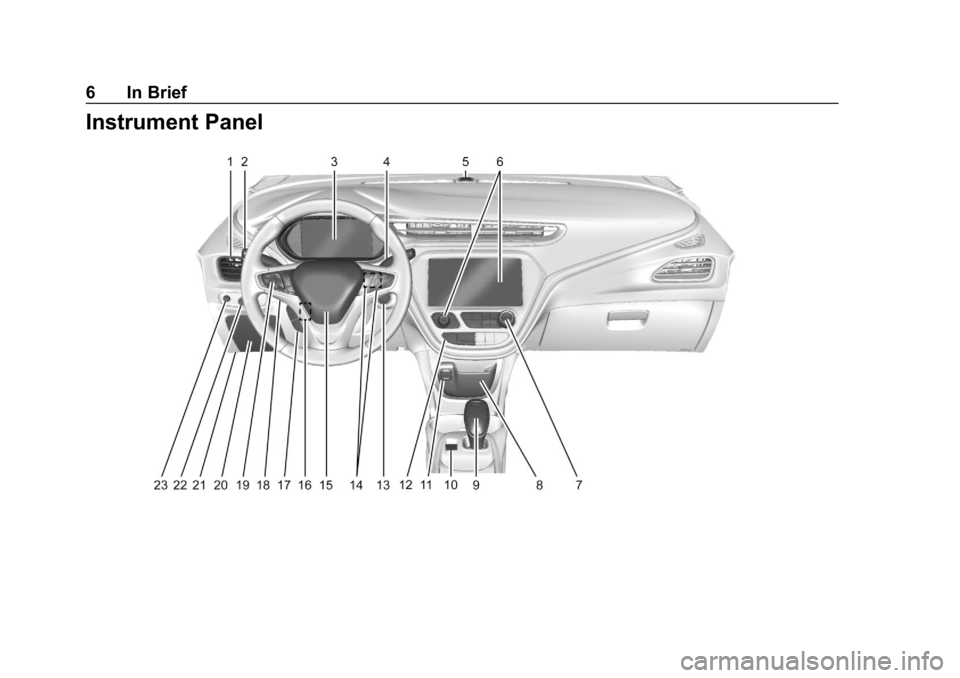
Instrument Panel
Page 8 of 370

Chevrolet BOLT EV Owner Manual (GMNA-Localizing-U.S./Canada/Mexico-
11434431) - 2018 - crc - 2/14/18
In Brief 7
1.Air Vents 0190.
2. Turn and Lane-Change Signals
0154.
IntelliBeam System Button (If
Equipped). See Exterior Lamp
Controls 0150.
3. Instrument Cluster 0118.
Driver Information Center (DIC)
0 141.
4. Windshield Wiper/Washer
0111.
5. Charging Status Feedback
0240.
Automatic Headlamp System
0 153.
Indicator Light and Solar
Sensor (ILSS). See “Sensors”
under Automatic Climate
Control System 0186.
6. Infotainment System. See AM-FM Radio 0162.
Heated Front Seats 060 (If
Equipped).
7. Automatic Climate Control
System 0186. 8.
Storage Compartments 0105.
9. Shift Lever. See Electric Drive
Unit 0208.
10. Electric Parking Brake 0213.
11. Power Outlets 0114.
12. Hazard Warning Flashers
0153.
Traction Control/Electronic
Stability Control 0217.
Driver Selected Operating
Modes 0208.
13. Power Button 0204.
14. Steering Wheel Controls 0109
(If Equipped).
15. Horn 0110.
16. Steering Wheel Adjustment
0109 (Out of View).
17. Steering Wheel Controls 0109
(If Equipped).
18. Regen on Demand (Out of View). See Regenerative
Braking 0215.
19. Cruise Control 0219. Heated Steering Wheel
0110
(If Equipped).
Forward Collision Alert (FCA)
System 0225 (If Equipped).
Lane Keep Assist (LKA) 0233
(If Equipped).
20. Instrument Panel Fuse Block
0276.
21. Data Link Connector (DLC) (Out of View). See Service
Vehicle Soon Light 0126.
22. Exterior Lamp Controls 0150.
23. Instrument Panel Illumination
Control 0154.
Page 16 of 370
Chevrolet BOLT EV Owner Manual (GMNA-Localizing-U.S./Canada/Mexico-
11434431) - 2018 - crc - 2/14/18
In Brief 15
1:When the button is returned to
the middle position, the lamps turn
on automatically when a door is
opened.
+ON : Press to turn on the dome
lamps.
Front and Rear Reading
Lamps
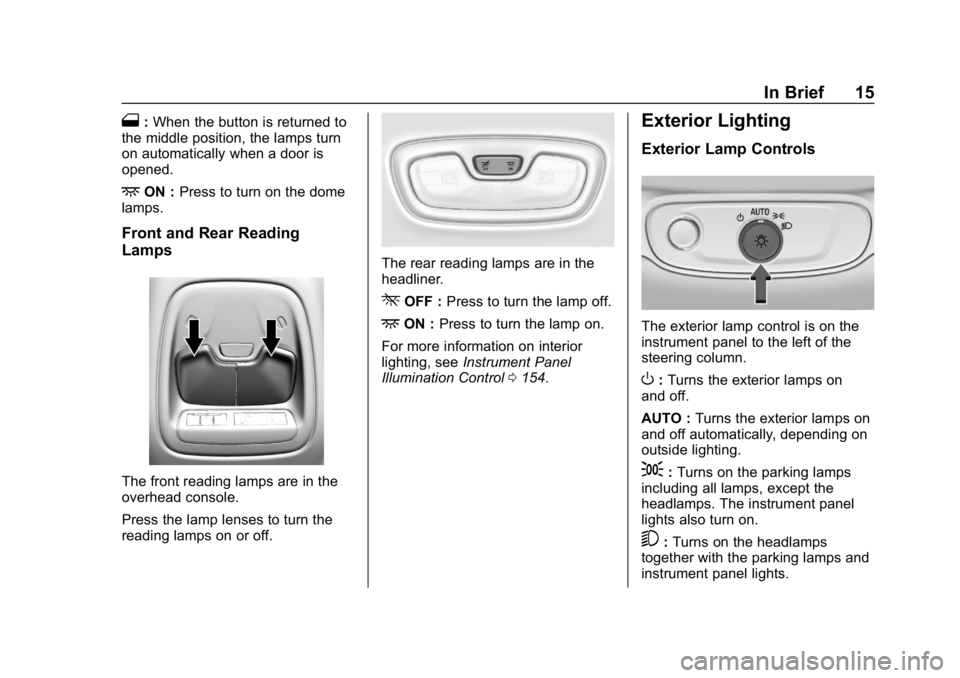
The front reading lamps are in the
overhead console.
Press the lamp lenses to turn the
reading lamps on or off.
The rear reading lamps are in the
headliner.
*OFF : Press to turn the lamp off.
+ON :Press to turn the lamp on.
For more information on interior
lighting, see Instrument Panel
Illumination Control 0154.
Exterior Lighting
Exterior Lamp Controls
The exterior lamp control is on the
instrument panel to the left of the
steering column.
O:Turns the exterior lamps on
and off.
AUTO : Turns the exterior lamps on
and off automatically, depending on
outside lighting.
;: Turns on the parking lamps
including all lamps, except the
headlamps. The instrument panel
lights also turn on.
5: Turns on the headlamps
together with the parking lamps and
instrument panel lights.
Page 26 of 370
Chevrolet BOLT EV Owner Manual (GMNA-Localizing-U.S./Canada/Mexico-
11434431) - 2018 - crc - 2/14/18
In Brief 25
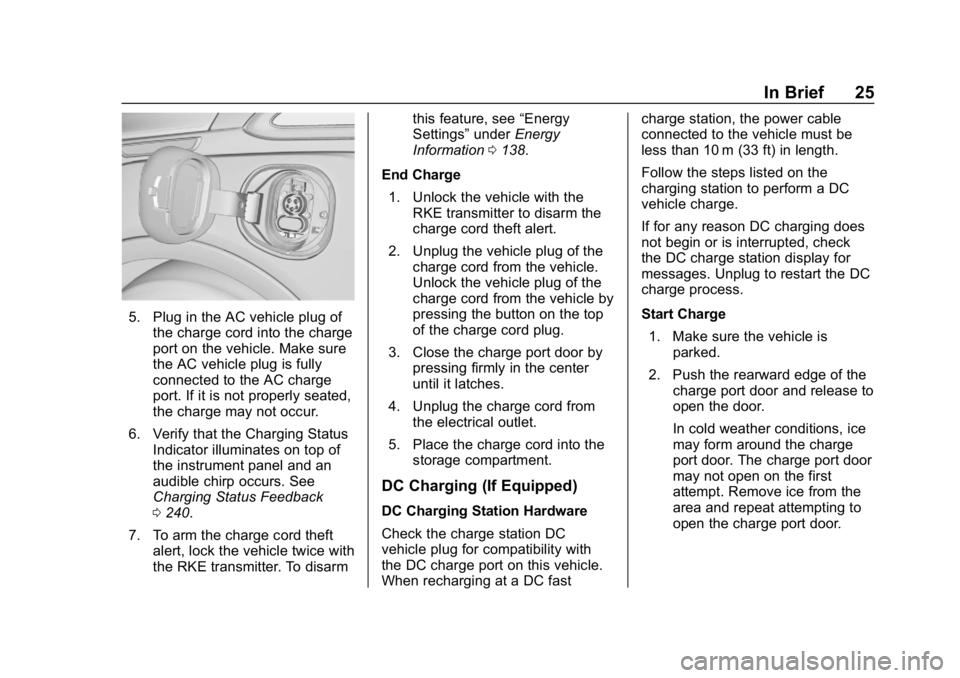
5. Plug in the AC vehicle plug ofthe charge cord into the charge
port on the vehicle. Make sure
the AC vehicle plug is fully
connected to the AC charge
port. If it is not properly seated,
the charge may not occur.
6. Verify that the Charging Status Indicator illuminates on top of
the instrument panel and an
audible chirp occurs. See
Charging Status Feedback
0240.
7. To arm the charge cord theft alert, lock the vehicle twice with
the RKE transmitter. To disarm this feature, see
“Energy
Settings” underEnergy
Information 0138.
End Charge 1. Unlock the vehicle with the RKE transmitter to disarm the
charge cord theft alert.
2. Unplug the vehicle plug of the charge cord from the vehicle.
Unlock the vehicle plug of the
charge cord from the vehicle by
pressing the button on the top
of the charge cord plug.
3. Close the charge port door by pressing firmly in the center
until it latches.
4. Unplug the charge cord from the electrical outlet.
5. Place the charge cord into the storage compartment.
DC Charging (If Equipped)
DC Charging Station Hardware
Check the charge station DC
vehicle plug for compatibility with
the DC charge port on this vehicle.
When recharging at a DC fast charge station, the power cable
connected to the vehicle must be
less than 10 m (33 ft) in length.
Follow the steps listed on the
charging station to perform a DC
vehicle charge.
If for any reason DC charging does
not begin or is interrupted, check
the DC charge station display for
messages. Unplug to restart the DC
charge process.
Start Charge
1. Make sure the vehicle is parked.
2. Push the rearward edge of the charge port door and release to
open the door.
In cold weather conditions, ice
may form around the charge
port door. The charge port door
may not open on the first
attempt. Remove ice from the
area and repeat attempting to
open the charge port door.
Page 27 of 370
Chevrolet BOLT EV Owner Manual (GMNA-Localizing-U.S./Canada/Mexico-
11434431) - 2018 - crc - 2/14/18
26 In Brief
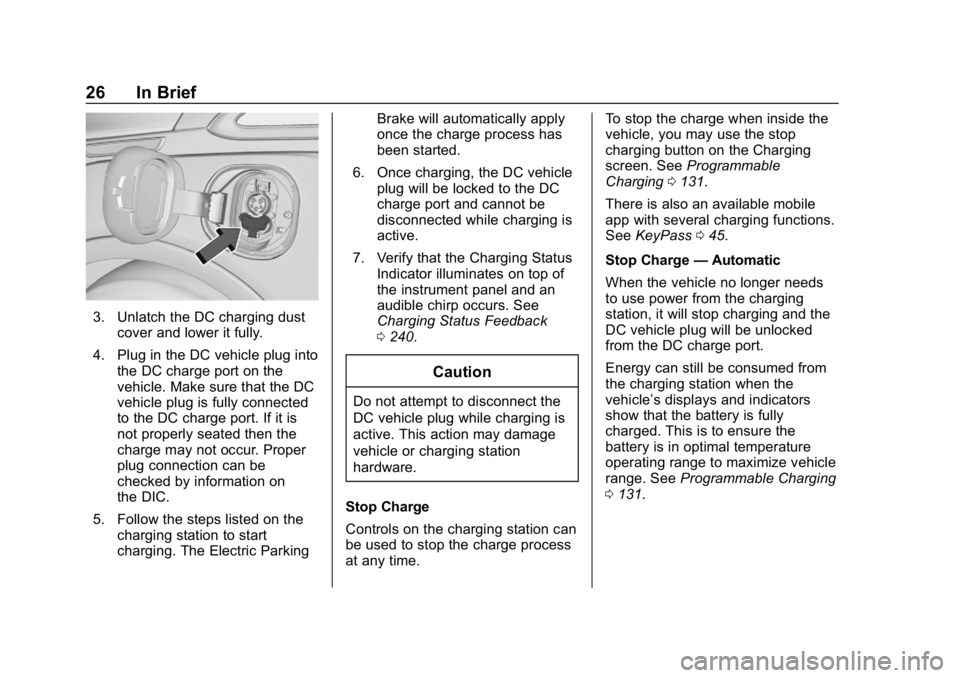
3. Unlatch the DC charging dustcover and lower it fully.
4. Plug in the DC vehicle plug into the DC charge port on the
vehicle. Make sure that the DC
vehicle plug is fully connected
to the DC charge port. If it is
not properly seated then the
charge may not occur. Proper
plug connection can be
checked by information on
the DIC.
5. Follow the steps listed on the charging station to start
charging. The Electric Parking Brake will automatically apply
once the charge process has
been started.
6. Once charging, the DC vehicle plug will be locked to the DC
charge port and cannot be
disconnected while charging is
active.
7. Verify that the Charging Status Indicator illuminates on top of
the instrument panel and an
audible chirp occurs. See
Charging Status Feedback
0240.
Caution
Do not attempt to disconnect the
DC vehicle plug while charging is
active. This action may damage
vehicle or charging station
hardware.
Stop Charge
Controls on the charging station can
be used to stop the charge process
at any time. To stop the charge when inside the
vehicle, you may use the stop
charging button on the Charging
screen. See
Programmable
Charging 0131.
There is also an available mobile
app with several charging functions.
See KeyPass 045.
Stop Charge —Automatic
When the vehicle no longer needs
to use power from the charging
station, it will stop charging and the
DC vehicle plug will be unlocked
from the DC charge port.
Energy can still be consumed from
the charging station when the
vehicle’s displays and indicators
show that the battery is fully
charged. This is to ensure the
battery is in optimal temperature
operating range to maximize vehicle
range. See Programmable Charging
0 131.
Page 66 of 370
Chevrolet BOLT EV Owner Manual (GMNA-Localizing-U.S./Canada/Mexico-
11434431) - 2018 - crc - 2/14/18
Seats and Restraints 65
Seat Belts
This section describes how to use
seat belts properly, and some things
not to do.
{Warning
Do not let anyone ride where a
seat belt cannot be worn properly.
In a crash, if you or your
passenger(s) are not wearing
seat belts, injuries can be much
worse than if you are wearing
seat belts. You can be seriously
injured or killed by hitting things
inside the vehicle harder or by
being ejected from the vehicle. In
addition, anyone who is not
buckled up can strike other
passengers in the vehicle.
It is extremely dangerous to ride
in a cargo area, inside or outside
of a vehicle. In a collision,
passengers riding in these areas
are more likely to be seriously
injured or killed. Do not allow(Continued)
Warning (Continued)
passengers to ride in any area of
the vehicle that is not equipped
with seats and seat belts.
Always wear a seat belt, and
check that all passenger(s) are
restrained properly too.
This vehicle has indicators as a
reminder to buckle the seat belts.
See Seat Belt Reminders 0123.
Why Seat Belts Work
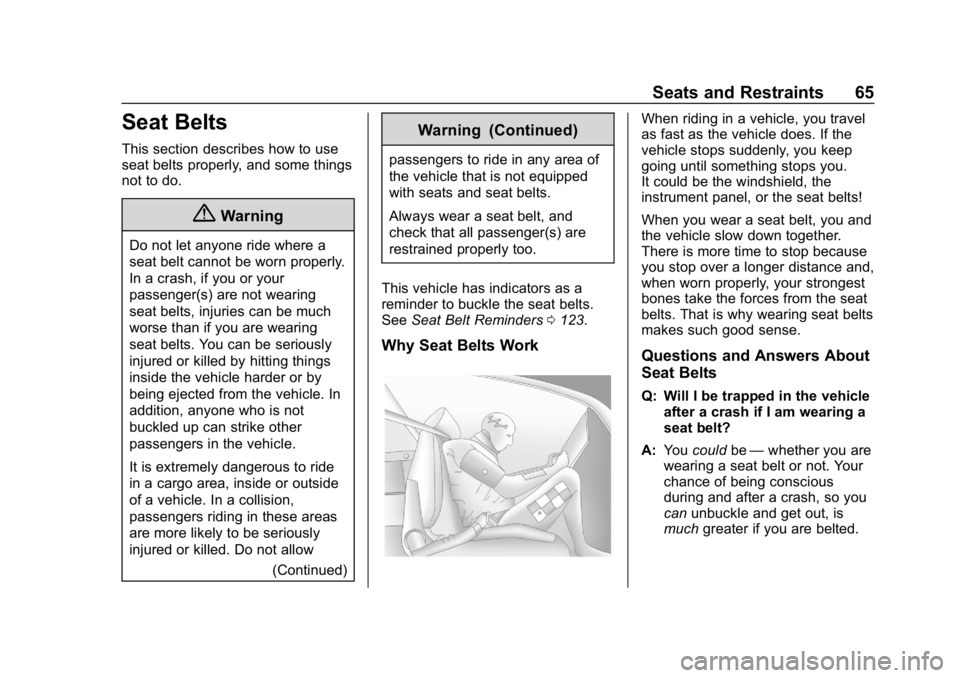
When riding in a vehicle, you travel
as fast as the vehicle does. If the
vehicle stops suddenly, you keep
going until something stops you.
It could be the windshield, the
instrument panel, or the seat belts!
When you wear a seat belt, you and
the vehicle slow down together.
There is more time to stop because
you stop over a longer distance and,
when worn properly, your strongest
bones take the forces from the seat
belts. That is why wearing seat belts
makes such good sense.
Questions and Answers About
Seat Belts
Q: Will I be trapped in the vehicle
after a crash if I am wearing a
seat belt?
A: You could be—whether you are
wearing a seat belt or not. Your
chance of being conscious
during and after a crash, so you
can unbuckle and get out, is
much greater if you are belted.
Page 72 of 370
Chevrolet BOLT EV Owner Manual (GMNA-Localizing-U.S./Canada/Mexico-
11434431) - 2018 - crc - 2/14/18
Seats and Restraints 71
Airbag System
The vehicle has the following
airbags:
.A frontal airbag for the driver
. A frontal airbag for the front
outboard passenger
. A knee airbag for the driver
. A knee airbag for the front
outboard passenger
. A seat-mounted side impact
airbag for the driver
. A seat-mounted side impact
airbag for the front outboard
passenger
. A roof-rail airbag for the driver
and the and the area directly
behind the driver
. A roof-rail airbag for the front
outboard passenger and the
area directly behind the front
outboard passenger Sedan models may have the
following airbags:
.
Seat-mounted side impact
airbags for the second row
outboard passengers
All vehicle airbags have the word
AIRBAG on the trim or on a label
near the deployment opening.
For frontal airbags, the word
AIRBAG is on the center of the
steering wheel for the driver and on
the instrument panel for the front
outboard passenger.
For knee airbags, the word AIRBAG
is on the lower part of the
instrument panel.
For seat-mounted side impact
airbags, the word AIRBAG is on the
side of the seat closest to the door.
For roof-rail airbags, the word
AIRBAG is on the ceiling or trim.
Airbags are designed to supplement
the protection provided by seat
belts. Even though today's airbags
are also designed to help reduce the risk of injury from the force of an
inflating bag, all airbags must inflate
very quickly to do their job.
Here are the most important things
to know about the airbag system:
{Warning
You can be severely injured or
killed in a crash if you are not
wearing your seat belt, even with
airbags. Airbags are designed to
work with seat belts, not replace
them. Also, airbags are not
designed to inflate in every crash.
In some crashes seat belts are
the only restraint. See
When
Should an Airbag Inflate? 074.
Wearing your seat belt during a
crash helps reduce your chance
of hitting things inside the vehicle
or being ejected from it. Airbags
are “supplemental restraints” to
the seat belts. Everyone in the
vehicle should wear a seat belt
properly, whether or not there is
an airbag for that person.